
1. Quick Preview
| Item | Details |
|---|---|
| Supported Methods | On-chain deposits and internal transfers |
| Supported Assets | USDT, BTC, ETH, XRP, and other digital assets |
| Deposit Arrival Time | Funds are credited after blockchain network confirmations. It usually takes around 3–30 minutes, depending on network congestion. |
| Fees | Network fees are charged by the blockchain. Bitunix does not charge any additional deposit fees. |
2. What Are Deposits and Withdrawals?
Deposits refer to transferring digital assets from an external wallet or another exchange into your personal Bitunix account. Similar to an interbank transfer, deposits are the primary method for adding funds to your platform account.
Bitunix supports the following deposit method:
- On-chain Deposit: Transfer digital assets across blockchain networks from an external wallet or another exchange to your Bitunix account.
Withdrawals refer to transferring digital assets from your Bitunix account to an external personal wallet or another exchange account.
Bitunix supports two withdrawal methods:
- On-chain Withdrawal: Transfer digital assets through blockchain networks to an external wallet or another platform.
- Internal Transfer: Instantly transfer assets between Bitunix users with zero on-chain fees and immediate arrival.
3. How to Deposit Crypto
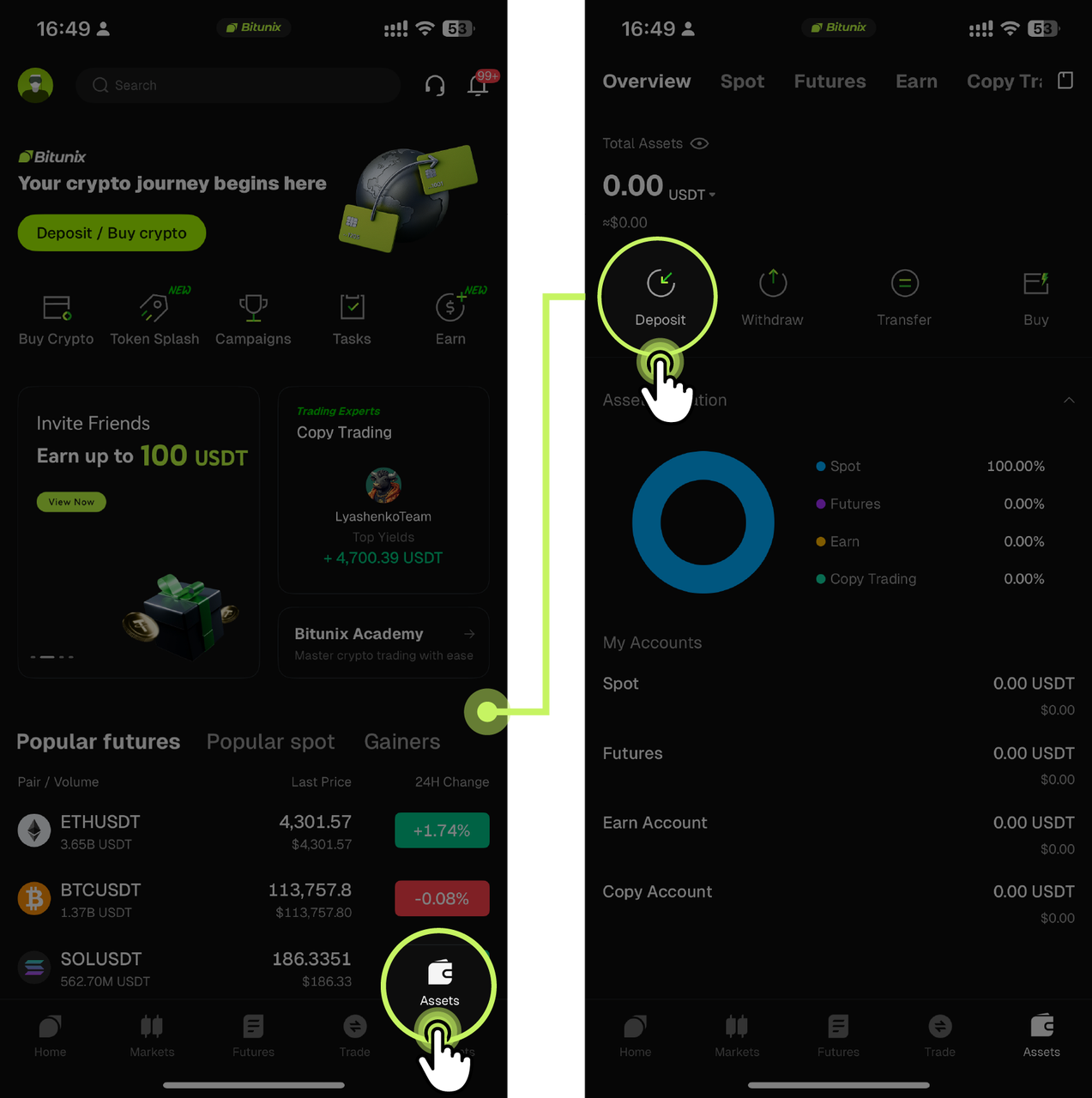
1. Open the Bitunix App homepage and tap [Assets] → [Deposit].
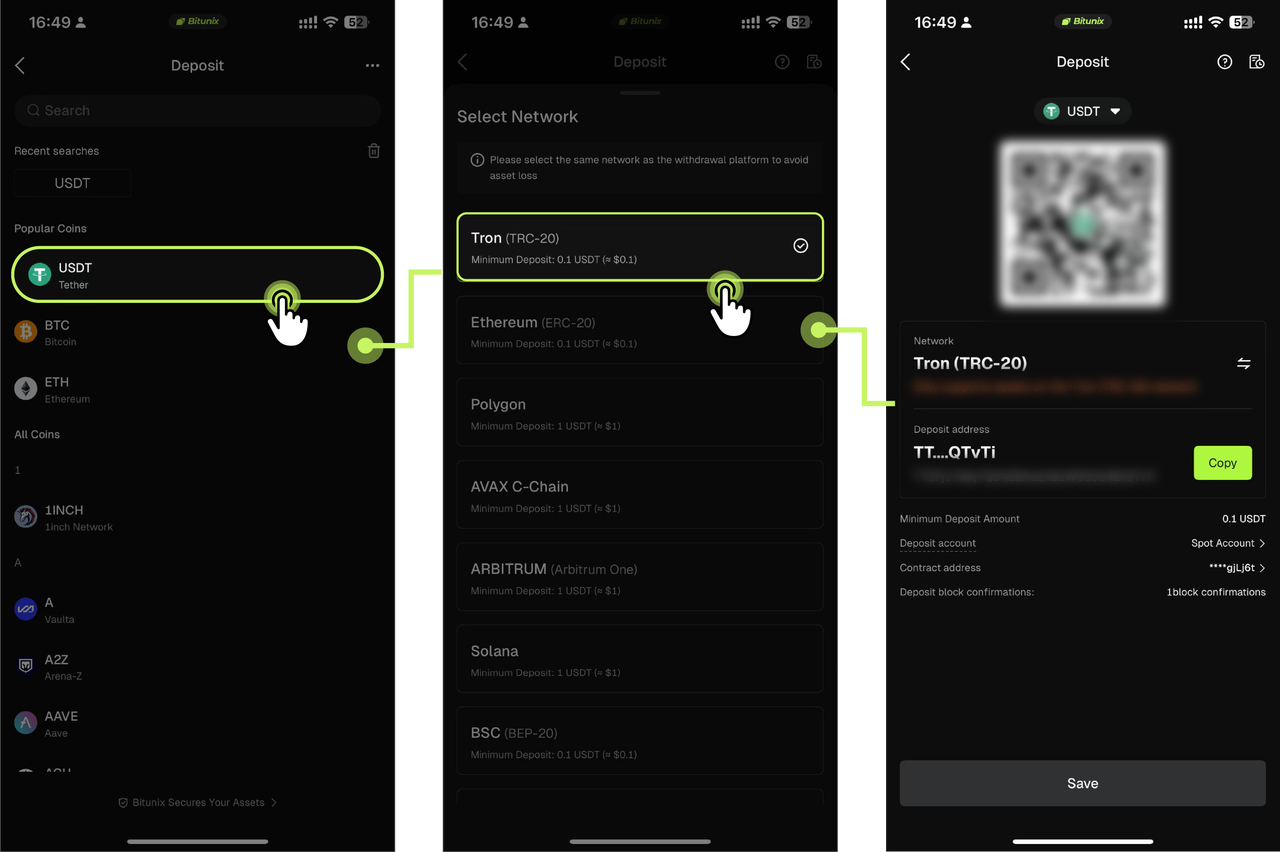
2. Select the cryptocurrency you want to deposit. In this example, we will use USDT. Choose a supported deposit network, such as TRON (TRC-20). Tap [Copy] to copy the generated deposit address, or save the provided QR code.
Note: When selecting a deposit network, make sure the withdrawal network used by the sending exchange or wallet matches the deposit network supported by Bitunix. For example, both networks must be USDT-TRON (TRC-20). Using an incompatible network may result in the loss of your assets.
For certain cryptocurrencies, such as XRP, additional identifiers such as a MEMO or TAG may be required. Make sure all required information is entered correctly when initiating the transfer.
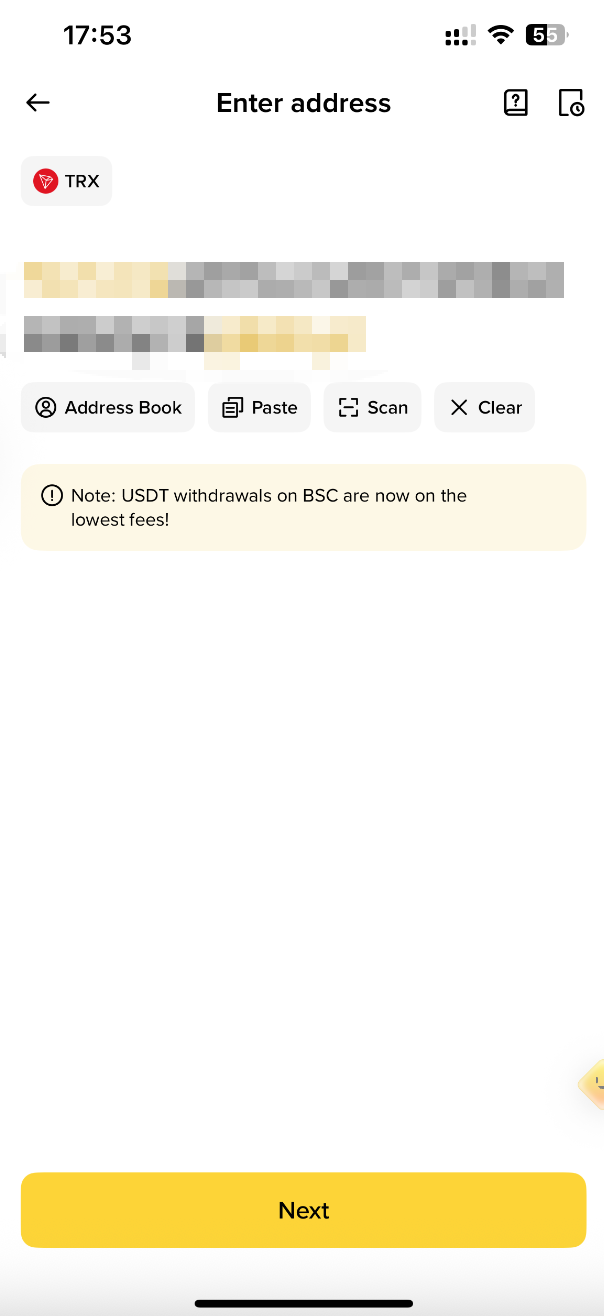
3. Open the external exchange or wallet, select [Withdraw], and choose USDT. Select the same blockchain network as the one supported by Bitunix, then paste the deposit address copied from Bitunix or scan the QR code using the corresponding app. Complete the required information according to the instructions and confirm the transfer.
4. Once the transaction is confirmed by the blockchain network, the deposit will be completed. Your funds will be credited to your Bitunix account and displayed on the Assets Overview page.
How to Deposit Crypto on Bitunix (Web Guide)
4. How to Withdraw Crypto
Method 1: On-chain Withdrawal
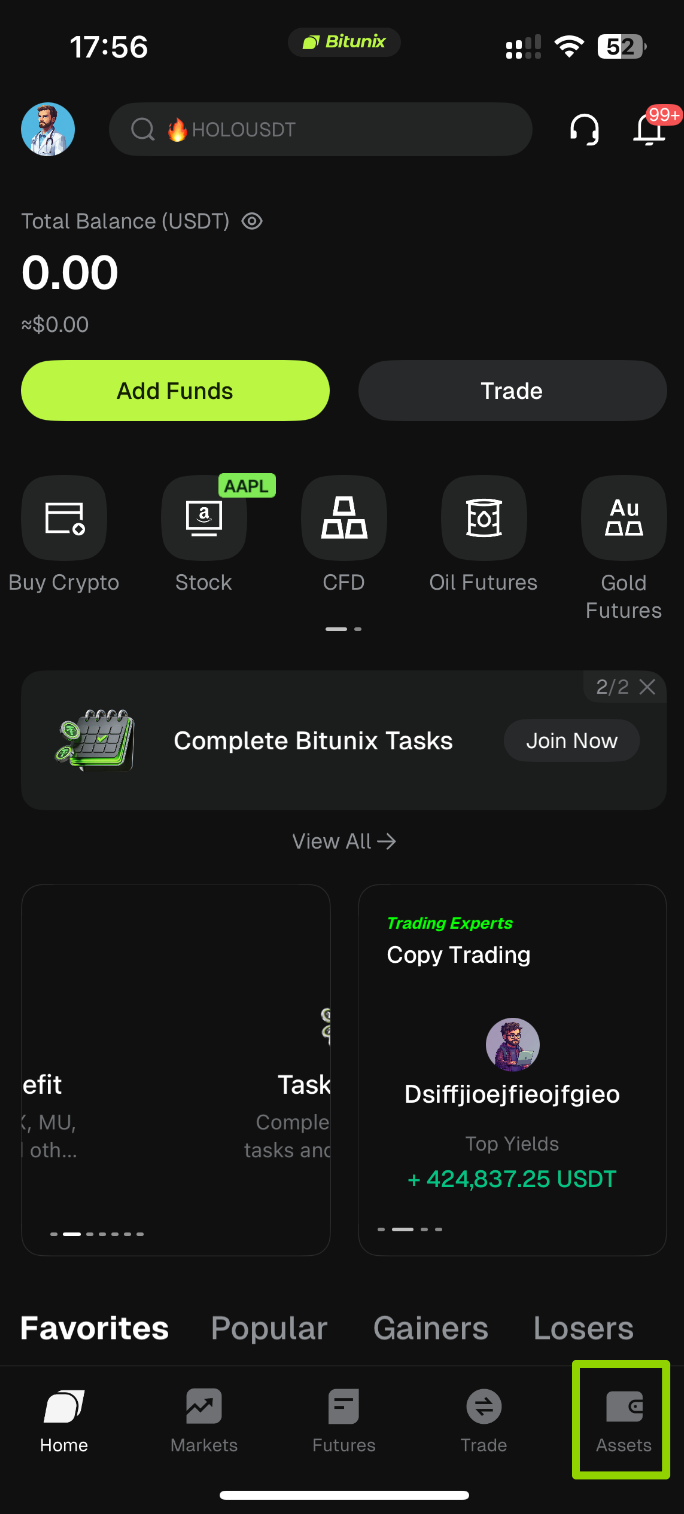
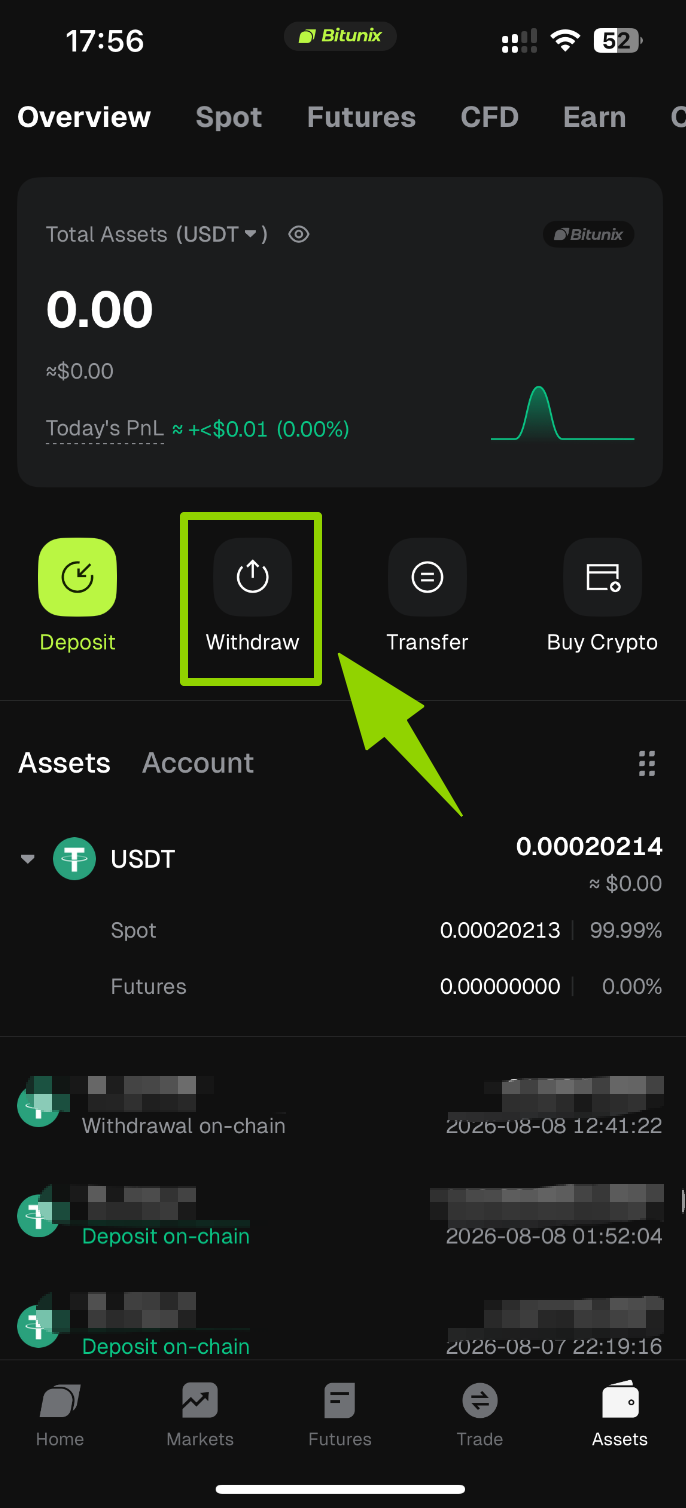
1. Open the Bitunix App homepage and tap [Assets] → [Withdraw].
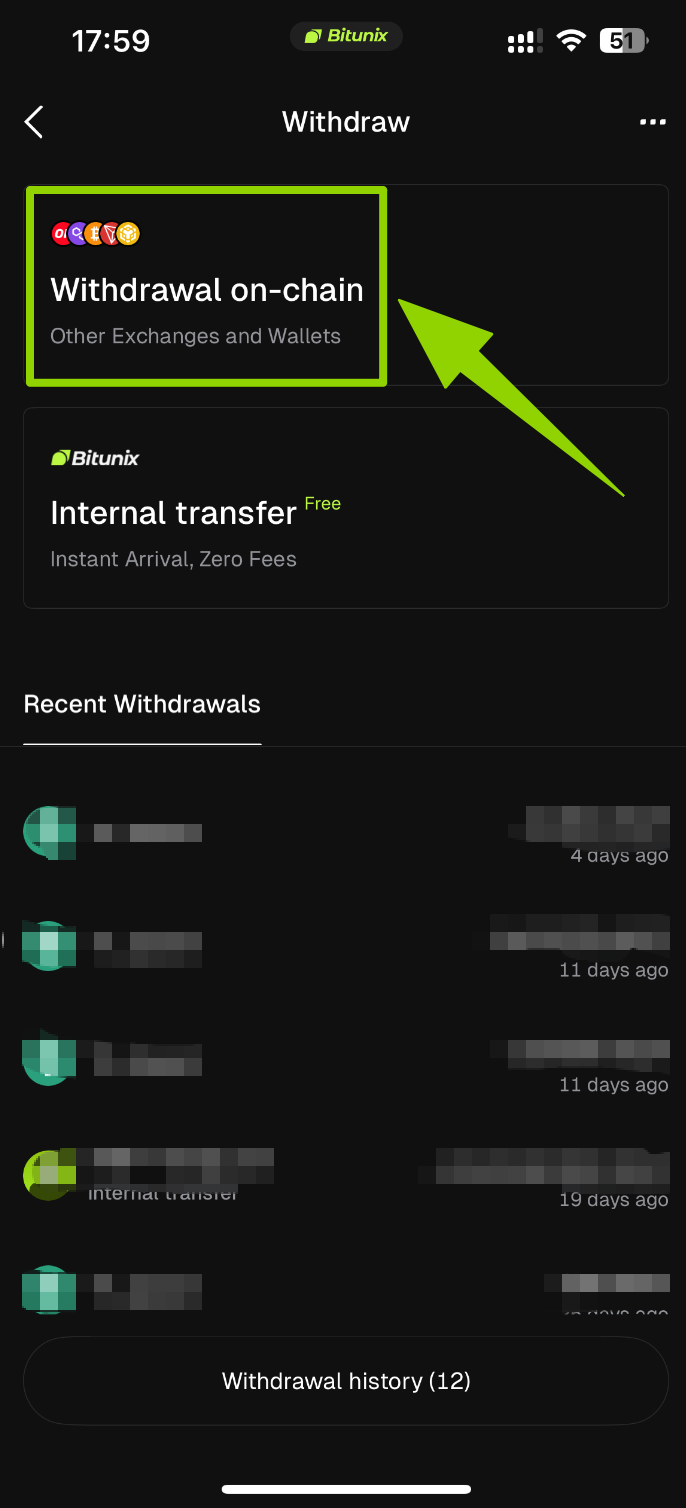
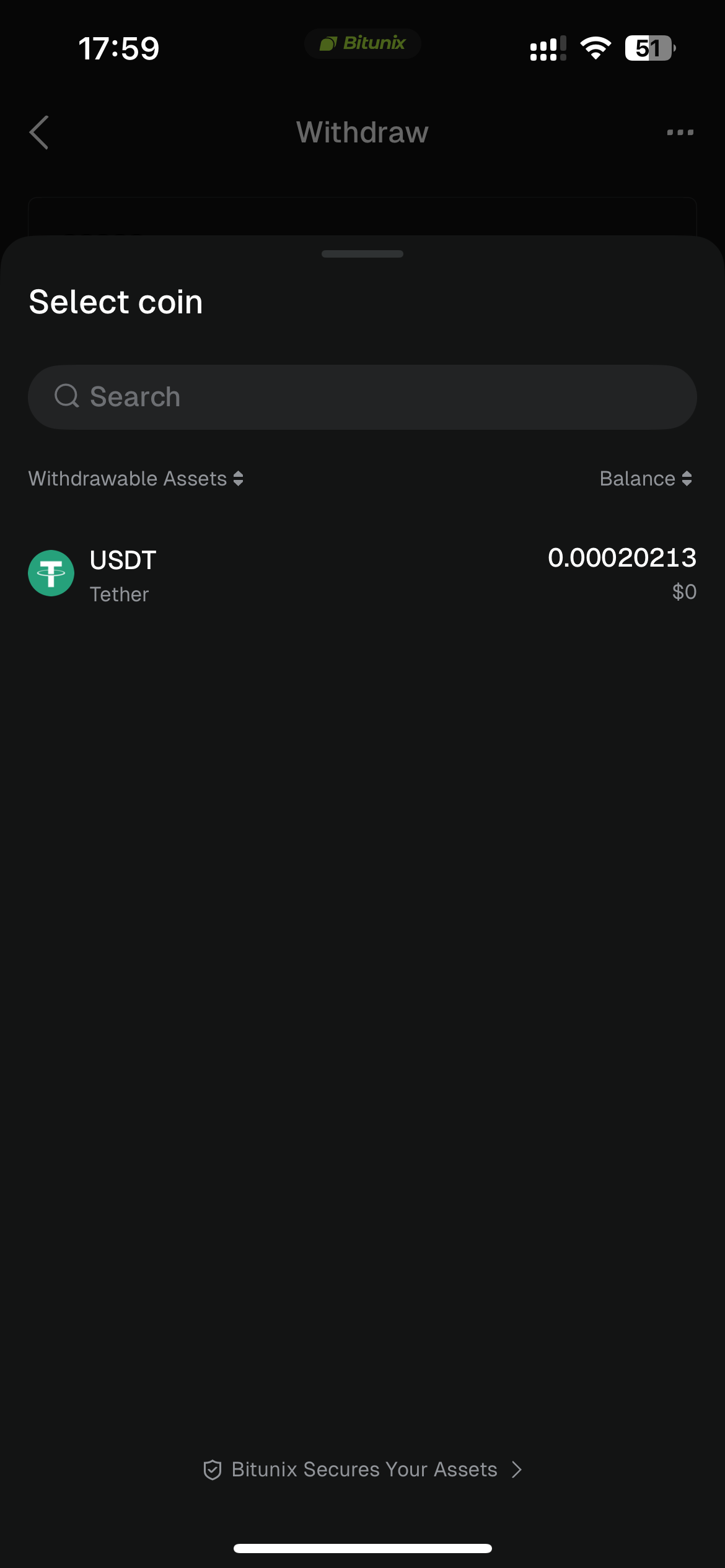
2. On the Withdraw page, choose [Withdrawal on-chain], then use the search bar at the top to search for the cryptocurrency you want to withdraw (such as USDT).
3. Select the network and enter withdrawal details. Using USDT as an example, select TRON (TRC-20) as the withdrawal network, then complete the following information:
- Withdrawal Address: Enter or paste the deposit address of the destination wallet. You can also select an address directly from your [Address Book].
- Withdrawal Amount: Enter the amount you want to transfer.
⚠️ Important: Before confirming the withdrawal, make sure the destination address type is correctly selected as [Address Book], [Exchange], or [Non-custodial Wallet], and carefully verify that the withdrawal address is accurate.
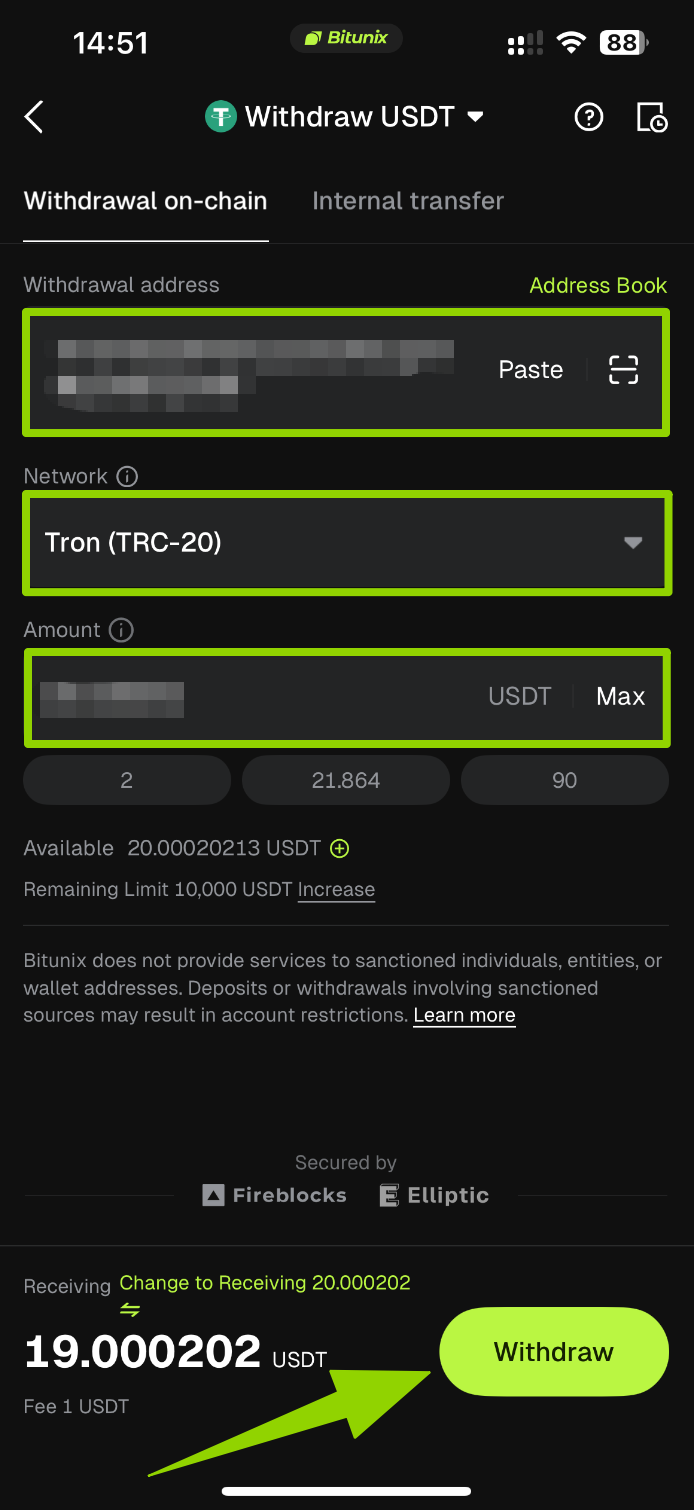
4. Confirm and verify. Carefully review all withdrawal details (asset, network, address, and amount). Tap [Withdraw], then complete SMS verification and Google Authenticator verification as instructed to submit the withdrawal request.
Method 2: Internal Transfer
1. Open the Bitunix App homepage and tap [Assets] → [Withdraw].
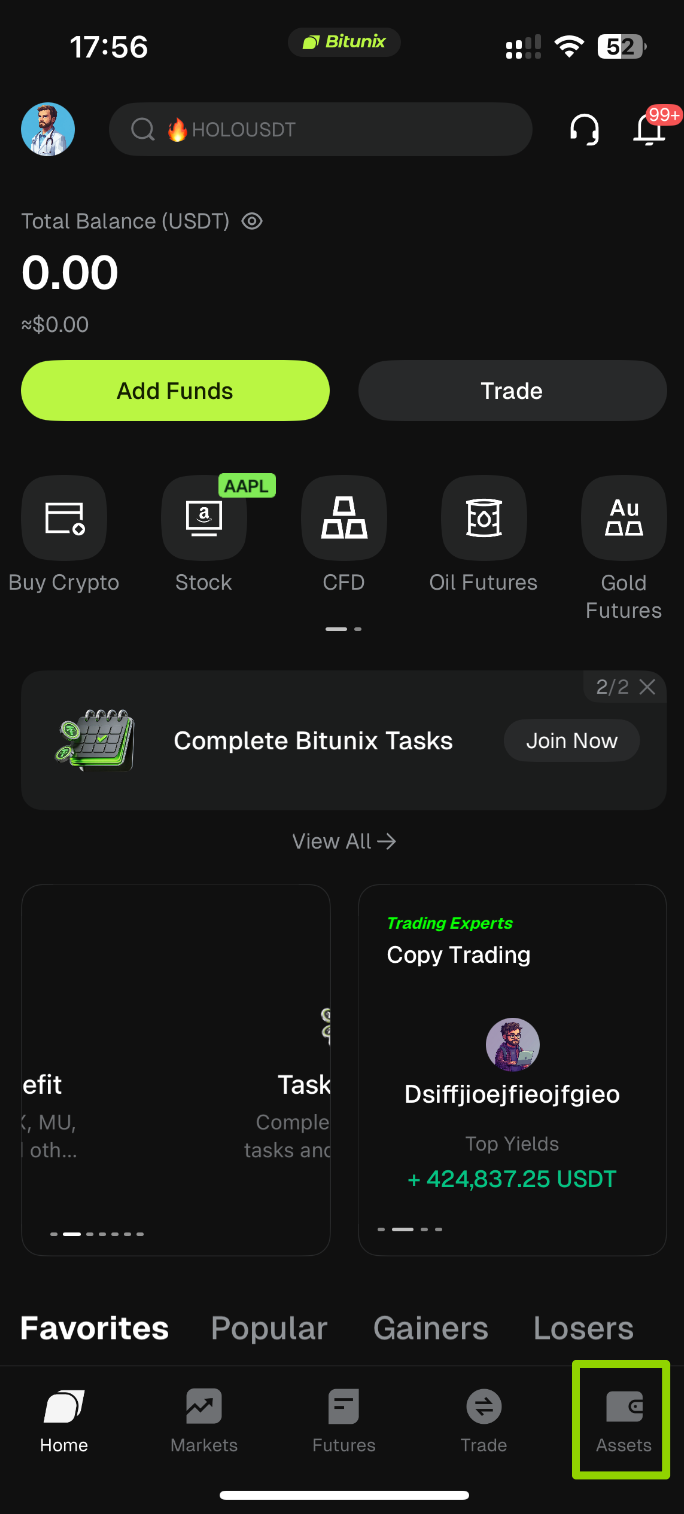
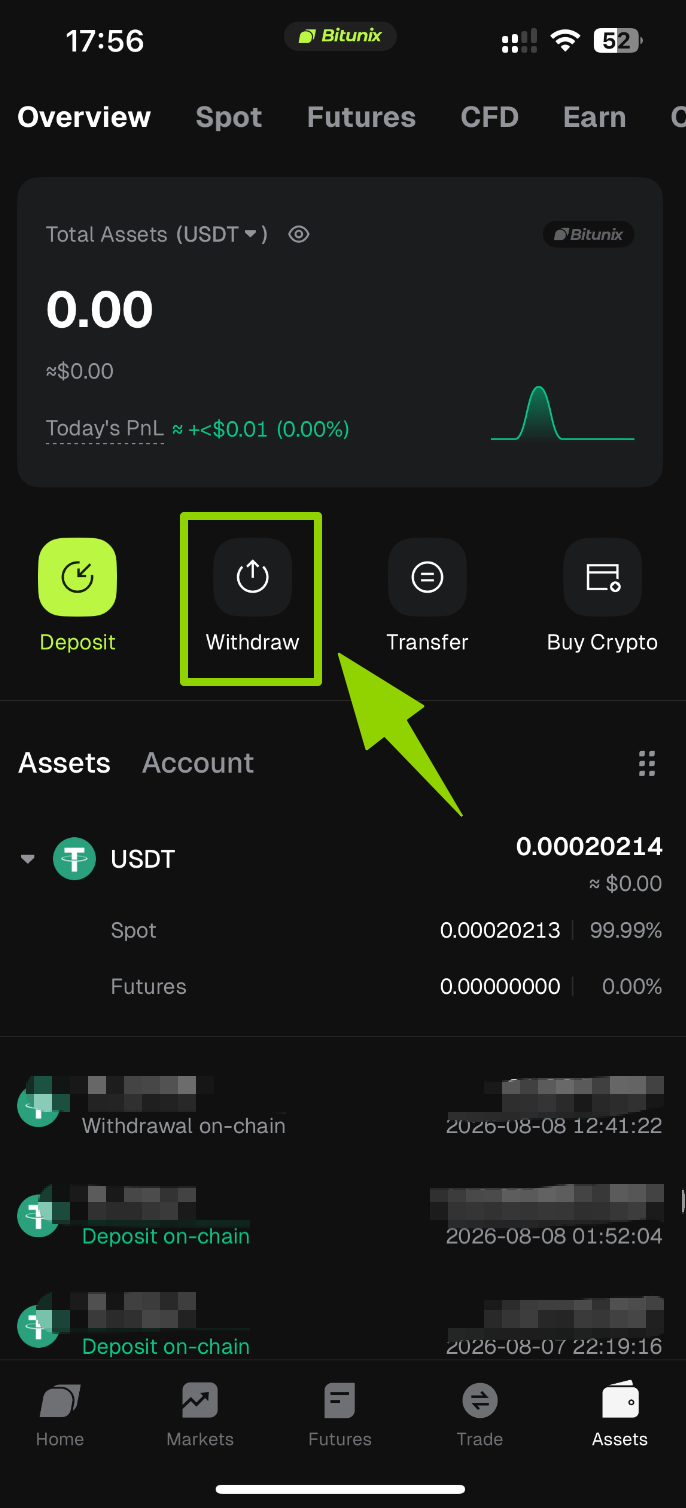
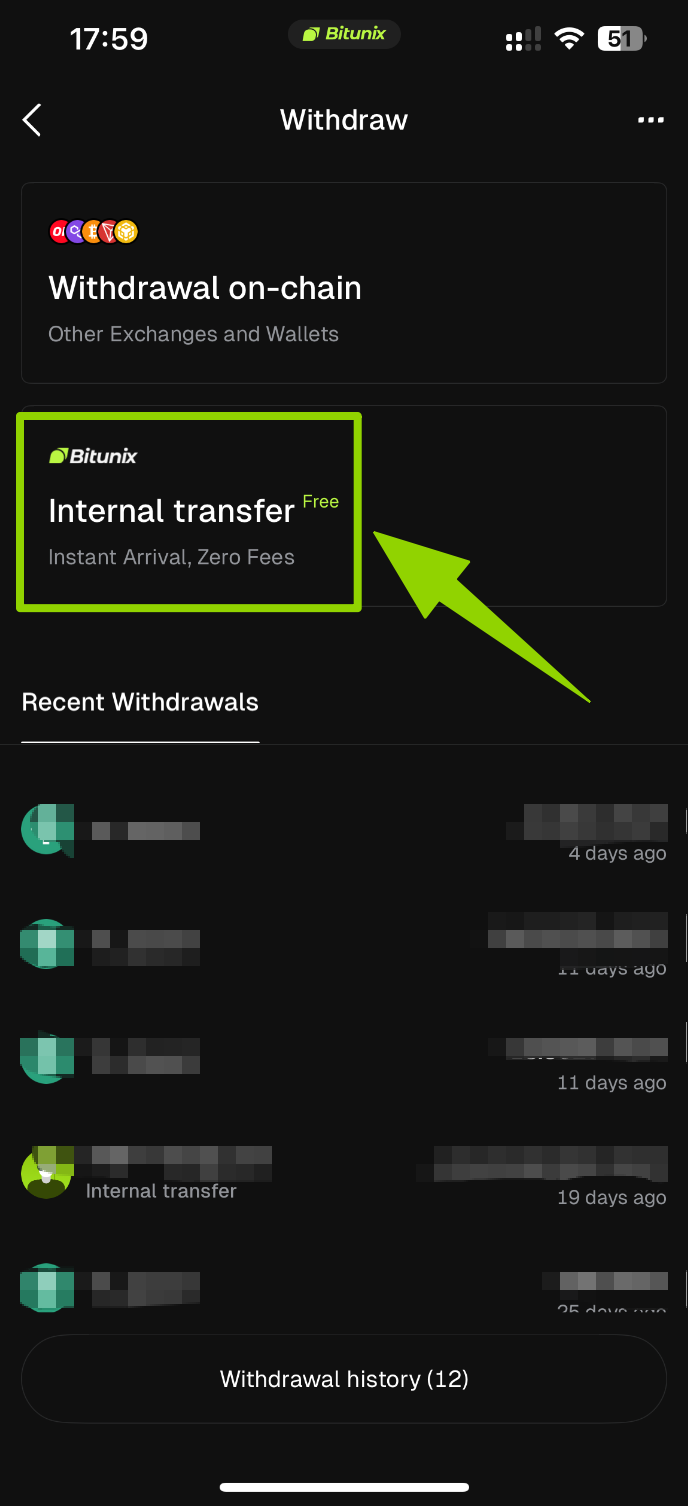
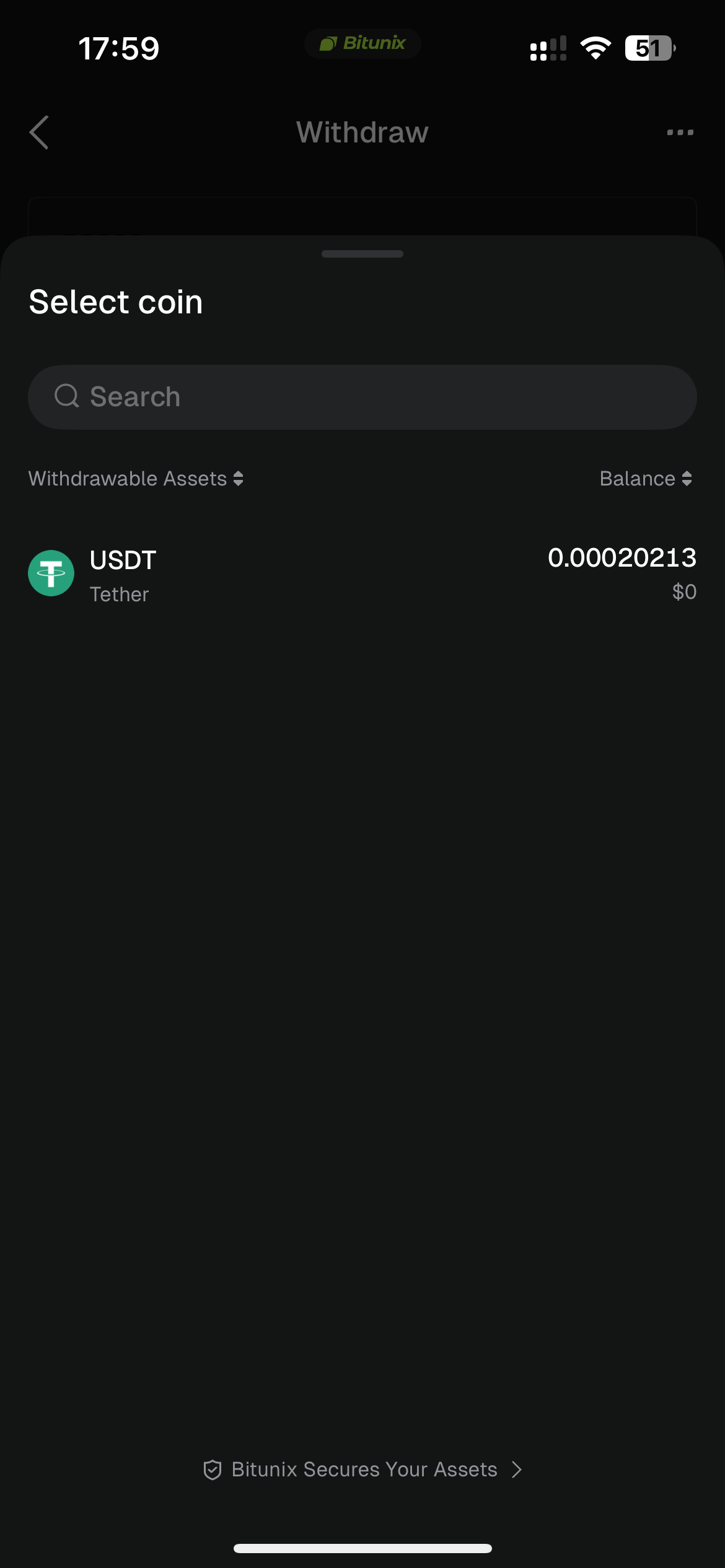
2. On the Withdraw page, choose [Internal Transfer], then use the search bar at the top to search for the cryptocurrency you want to withdraw (such as USDT).
3: Enter recipient details and transfer amount.
Internal Transfer supports the following three identification methods. Enter any one of the following:
- [Email]: The recipient's registered email address
- [Phone Number]: The recipient's registered phone number
- [UID]: The recipient's Bitunix User ID
- After entering the recipient details, input the transfer amount. Confirm that all information is correct, then tap [Withdraw].
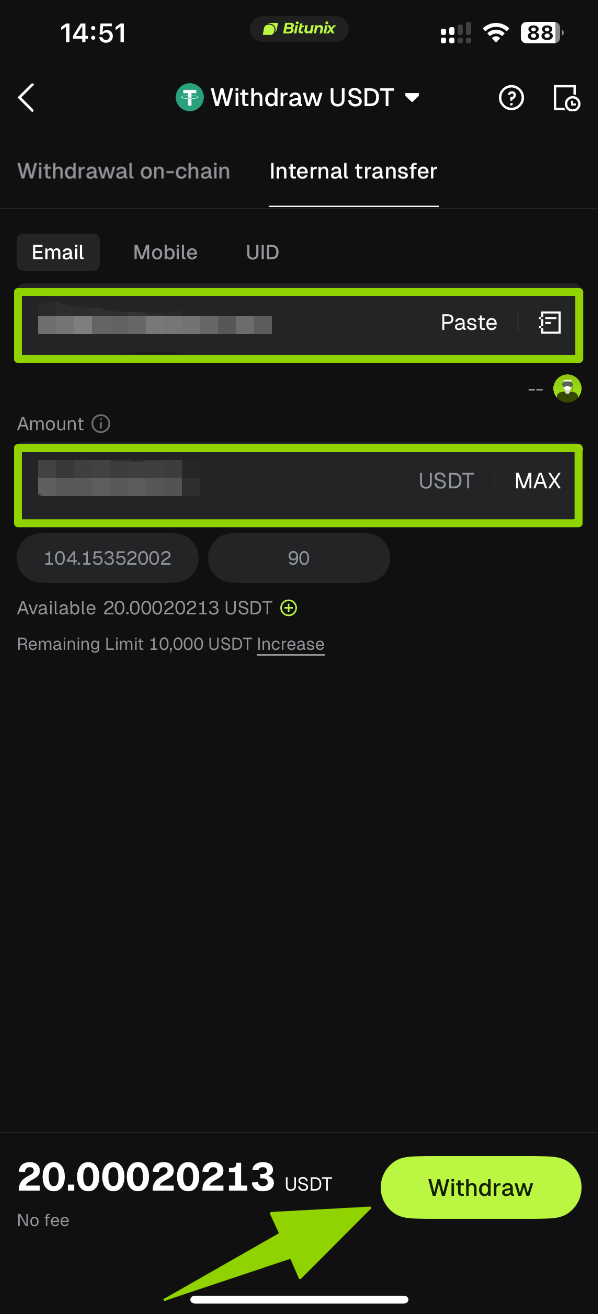
4. Verify and complete the transfer.
Follow the instructions to complete verification. Once verified, the transfer will be completed instantly, and the funds will be credited directly to the recipient's Bitunix account.
How to Withdraw Crypto on Bitunix (Web Guide)
5. Risk Control and Important Notes
- Once the network, cryptocurrency, or MEMO information is entered incorrectly, blockchain transactions cannot be reversed and may result in the permanent loss of assets.
- Before making a deposit, make sure the deposit amount meets the minimum deposit requirement for the selected cryptocurrency and network. Deposits below the minimum limit may not be automatically credited and can be difficult to recover.
- Only use the deposit address generated on the Bitunix platform. Do not transfer funds directly to a cryptocurrency contract address.
- During periods of high blockchain network congestion, transaction confirmations may be delayed. You can use the TXID to check the transaction status on a blockchain explorer.
- Do not trust any third party who contacts you privately claiming to help "recover assets." All support requests should only be handled through Bitunix's official customer support ticket channels.
Crypto Deposit and Withdrawal FAQs
- My on-chain deposit has not arrived. What should I do?
First, verify that the cryptocurrency, network, deposit address, and MEMO information are all correct. Confirm whether the external platform has successfully initiated the transaction. If the transaction has already been recorded on the blockchain but the funds have not arrived after an extended period, copy the transaction hash (TXID) and submit a request through [Customer Support] in the Bitunix App to check the transaction status.
- I entered the wrong MEMO when making a deposit. Can my assets be recovered?
If the transaction has not yet been broadcast to the blockchain, you may cancel the transfer and try again. If the transaction has already been confirmed on-chain, contact Bitunix Customer Support as soon as possible and provide the transaction details for assistance. The recovery process may take a longer time.
- My deposit is correct but delayed due to blockchain confirmation. What should I do?
If your deposit details are correct but the funds have not been credited, you can check the transaction status on the blockchain. This usually means the transaction is still waiting for network confirmations. Once the required confirmations are completed, the blockchain data will be synchronized with the platform wallet, which may take additional time. Please wait patiently or contact the wallet or platform support team where the withdrawal was initiated for further assistance.
- I deposited a different cryptocurrency. Will my funds be credited?
Before making a deposit, make sure the deposited cryptocurrency matches the cryptocurrency supported by your Bitunix account. If the cryptocurrency or contract address does not match, the funds may not be credited. Please submit a request, and the Bitunix team will assist you with the issue. Please note that a service fee may apply for manual processing.
- I deposited to the wrong address or network. Will my funds be recovered?
Before making a deposit, carefully verify the deposit address and network. Do not send ETH to a BTC address, or transfer assets using the ERC-20 network to an address on another network. Otherwise, your funds may not be credited. If this happens, please submit a request as soon as possible, and our support team will assist you. Please note that a service fee may apply for manual processing.
- My smart contract deposit has not been credited. What should I do?
Each cryptocurrency has a dedicated deposit address. Always use the deposit address generated by the platform for the specific cryptocurrency. Do not deposit funds directly to a cryptocurrency contract address, as this may result in the funds not being credited.
- I deposited unsupported cryptocurrency to Bitunix by mistake. What should I do?
If you deposit funds to the wrong network or wallet address, Bitunix may generally be unable to provide asset recovery support. If this happens, please submit a support ticket with detailed information about the issue. The Bitunix support team will review your case and determine whether it meets the recovery requirements.
- Please provide the following information:
- Your Bitunix registered account and User ID;
- The name of the deposited digital asset;
- The deposit amount;
- Transaction ID (TXID);
- The wallet address used for the deposit and the Bitunix deposit address;
- Note: A service fee may apply when processing unsupported asset recovery requests.
- I forgot to enter the MEMO/TAG when making a deposit. What should I do?
Some cryptocurrencies, such as EOS and XRP, require both a deposit address and a MEMO/TAG when making a deposit. Failure to provide the required MEMO/TAG may result in the deposit not being credited.
If you forgot to enter the MEMO/TAG, please submit a support ticket and provide your account ID, the correct MEMO/TAG, transaction ID (TXID) in text format, and a screenshot of the transfer from the sending platform. After verification, Bitunix will process the credit manually.
- What should I do if I withdraw funds to the wrong address?
If the address format is valid but the withdrawal address is incorrect (such as another person's address or an address that does not belong to you), the withdrawal status will show as "Completed" in your withdrawal history.
The withdrawn assets will be credited to the wallet corresponding to the address provided during the withdrawal request. Due to the irreversible nature of blockchain transactions, Bitunix cannot recover the assets after a successful withdrawal. You will need to contact the recipient of the address and resolve the issue directly.
- Why are there withdrawal limits?
To protect your assets, Bitunix sets different withdrawal limits based on your account security level and identity verification status. Accounts with only one security method enabled (such as email, phone number, or Google Authenticator) have a daily withdrawal limit of 10,000 USD equivalent in tokens. You can increase your withdrawal limit by adding more security methods or completing identity verification.
- What should I do if my withdrawal has not arrived?
Asset transfers on the blockchain generally involve three stages: Withdrawal Initiation → Blockchain Confirmation → Deposit Credit.
- ① Withdrawal Initiation: If the withdrawal status on the sending platform or wallet shows "Completed" or "Successful," it means the transaction has been successfully sent to the blockchain. However, this does not necessarily mean the funds have already been credited to the receiving platform or wallet.
- ② Blockchain Confirmation: Each transaction on the blockchain requires a certain number of confirmations before it is processed by the receiving platform. Please wait until the required blockchain confirmations are completed.
- ③ Deposit Credit: Funds are credited only after the blockchain transaction is confirmed and the required number of confirmations is reached. If the blockchain shows "Confirmed" but the funds have not been credited after a prolonged period, please contact the receiving platform for assistance.
- How can I withdraw a delisted cryptocurrency?
For cryptocurrencies that have been removed from Bitunix trading services, Bitunix will usually notify users in advance and provide a designated withdrawal period. During this period, users can still initiate withdrawals as normal.
- I withdrew a cryptocurrency unsupported by the receiving platform. What should I do?
Bitunix only verifies whether the withdrawal address format is valid and cannot guarantee that the receiving address supports the withdrawn cryptocurrency.For further assistance, you will need to contact the receiving platform and discuss possible solutions.
If the receiving platform supports returning the funds to the original sender, provide your Bitunix deposit address and request the receiving platform to return the assets to your account.
If the receiving platform only supports returning funds to the original sender, the returned assets may not be credited directly to your account. Please request the receiving platform to provide the return transaction hash, then submit a support ticket on Bitunix with the following information:
- Return transaction hash;
- Communication records with the receiving platform;
- Your correct Bitunix deposit address;
- A detailed description of the issue.
- The Bitunix support team will review your request and assist with crediting the recovered funds when possible.
If the receiving platform provides another solution that requires Bitunix's assistance, please submit a support ticket or contact online customer support with the details for further assistance.
- Why is my available withdrawal amount lower than my wallet balance?
Your available withdrawal amount may be lower than your actual balance in the following situations:
- Open orders: If you have pending orders, the corresponding assets may be locked. For example, if your wallet balance is 10 ETH and you have an open sell order for 1 ETH in the ETH market, your available withdrawal amount will be 9 ETH.
- Deposits pending blockchain confirmations: The available withdrawal amount will match your wallet balance only after the deposit reaches the required number of blockchain confirmations. Please check whether your deposit has completed the required confirmations.
Disclaimer
This article is not intended to provide:
(i) investment advice or investment recommendations;
(ii) an offer or solicitation to buy, sell, or hold digital assets; or
(iii) financial, accounting, legal, or tax advice.
Digital assets you hold, including stablecoins and NFTs, involve significant risks and may experience substantial price volatility. You should carefully consider whether trading or holding digital assets is suitable for you based on your financial circumstances.
For advice specific to your situation, please consult your legal, tax, or investment professionals. You are solely responsible for understanding and complying with all applicable local laws and regulations.
About Bitunix
Bitunix is a global cryptocurrency derivatives exchange trusted by more than 3 million users from over 100 countries. Bitunix is committed to providing a transparent, compliant and secure trading environment for every user. The platform has a fast registration process and friendly verification system, and ensures security and compliance through mandatory KYC. Through Proof of Reserve (PoR) and global-level protection standards such as Bitunix Care Fund, Bitunix puts user trust and the safety of funds first.The K-Line Ultra Charting System brings a seamless trading experience to both novice and advanced traders, with up to 200 times leverage and deep liquidity, making Bitunix one of the most dynamic platforms in the market.
Bitunix Global Account
X | Telegram Announcements | Telegram Global | CoinMarketCap | Instagram | Facebook | LinkedIn | Reddit | Medium