
What Are Take Profit and Stop Loss?
Take Profit (TP) and Stop Loss (SL) are essential tools in futures trading. They help traders manage risk and automatically lock in profits without constant market monitoring.
When a Take Profit (TP) target is reached, your position automatically closes to secure profits.
When the market price hits your Stop Loss (SL) level, your position automatically closes to limit losses.
Both tools ensure that your trades are executed according to your preset strategy, helping you maintain discipline and manage risk effectively.
Bitunix allows you to set Take Profit and Stop Loss for perpetual contracts in two ways:
- On the Futures Trading Page
- On the Position Details Page
You can choose either method based on your trading preferences.
How to Set Take Profit and Stop Loss on the App
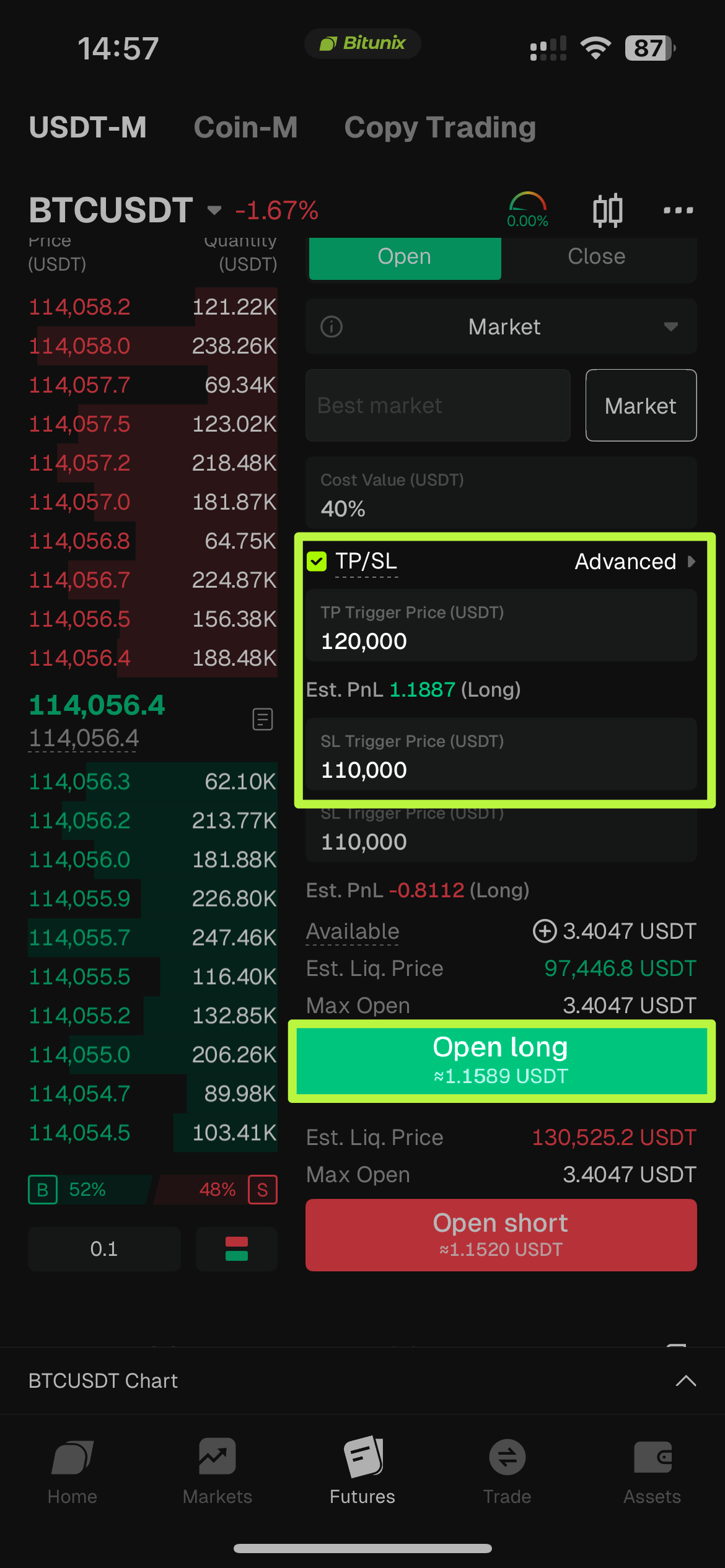
From the Futures Trading Page
- Open the Bitunix App and go to the [Futures] trading page.
- After entering your trade details, tap [Take Profit and Stop Loss] at the bottom of the screen.
- Set your Take Profit trigger price and Stop Loss trigger price, then confirm.
- Once confirmed, the system will automatically execute your TP/SL orders when the trigger prices are reached.
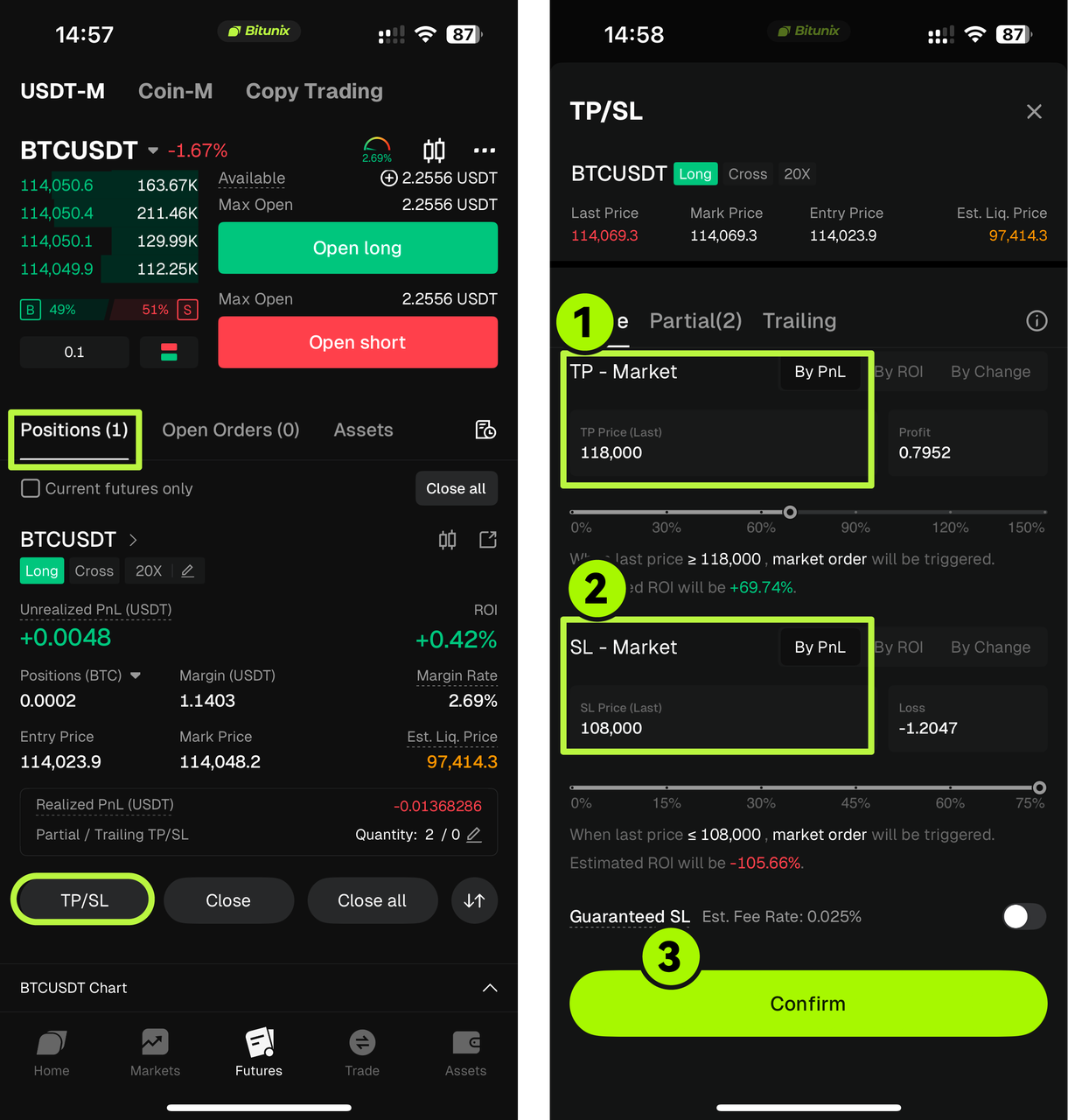
From the Position Details Page
- Tap [Positions] in the bottom menu.
- Select the position you want to manage, then tap [Take Profit / Stop Loss].
- Enter your Take Profit trigger price, Stop Loss trigger price, and quantity, then tap [Confirm].
- The system will automatically monitor your position and execute the order when the market reaches those levels.
How to Set Take Profit and Stop Loss on the Website
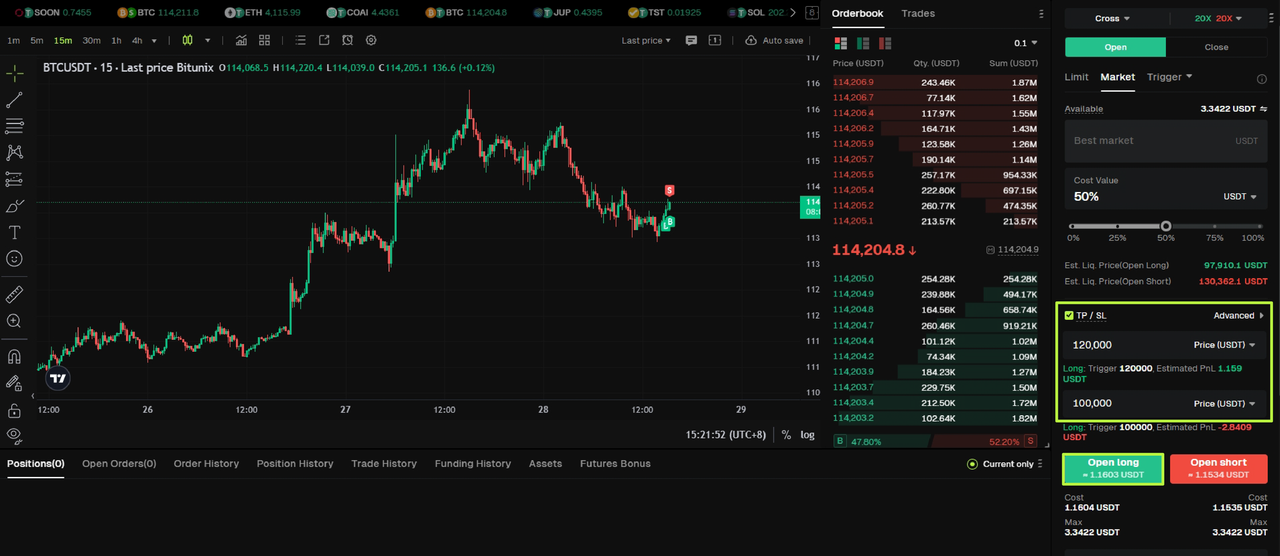
From the Futures Trading Page
- Log in to your account on bitunix.com
- Click [Futures Trading] from the top menu.
- Set your order details and click [Take Profit and Stop Loss].
- Enter your trigger prices and confirm.
Once confirmed, your TP/SL will automatically trigger when the market price hits your set levels.
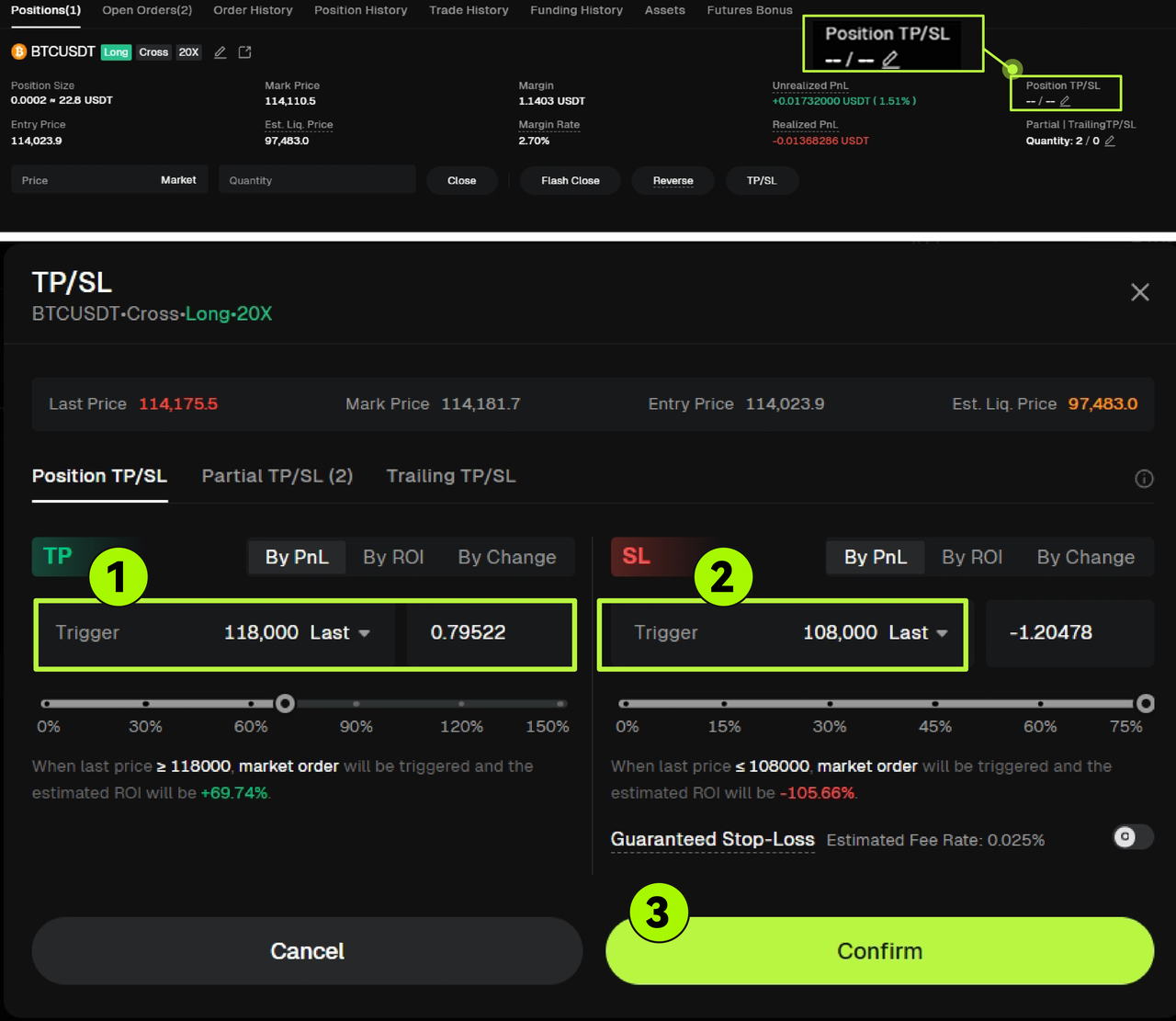
From the Position Details Page
- Click [Positions] in the bottom panel.
- Select the position you want to modify, then click [TP/SL].
- Enter your Take Profit and Stop Loss trigger prices, set the quantity, and click [Confirm].
- The system will automatically apply your settings and manage your position accordingly.
What Does “Close Position” Mean?
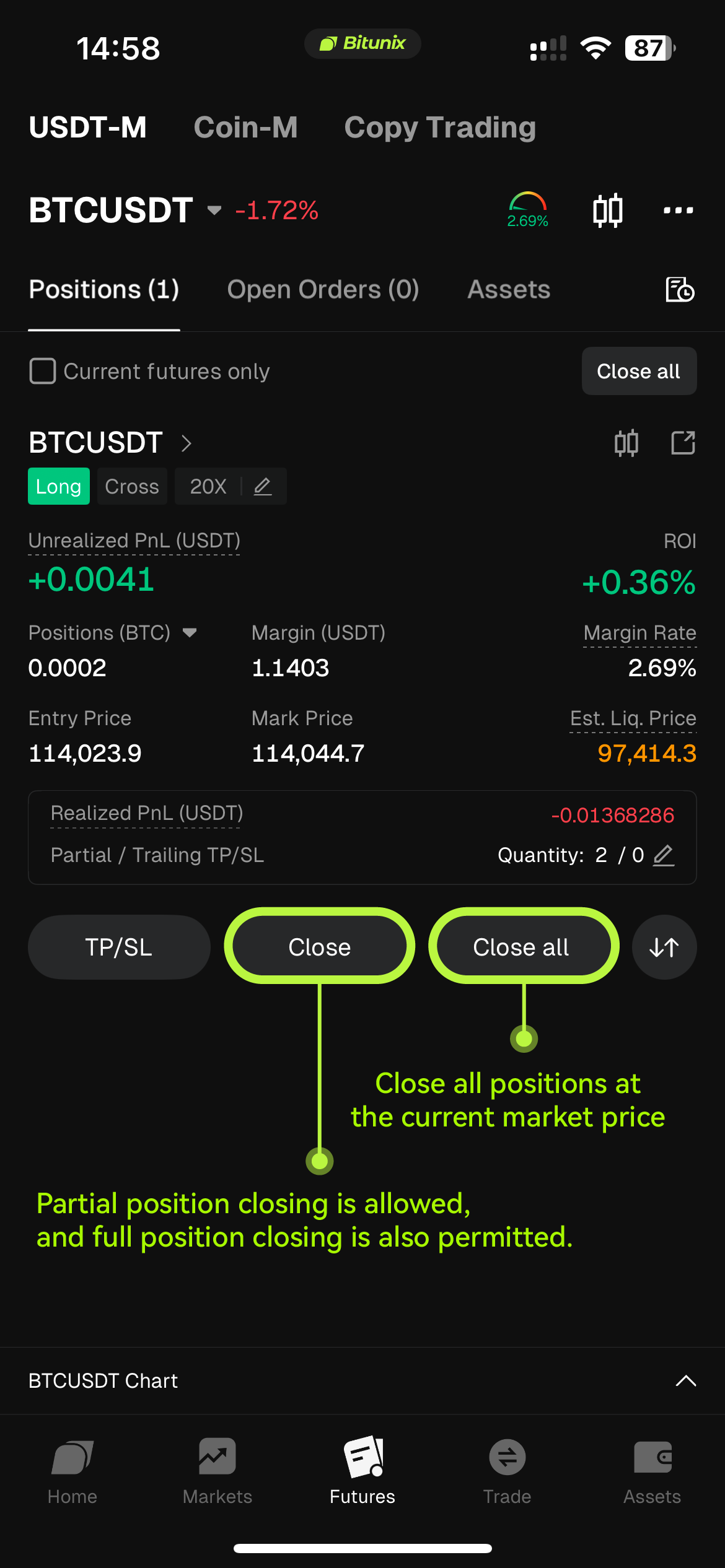
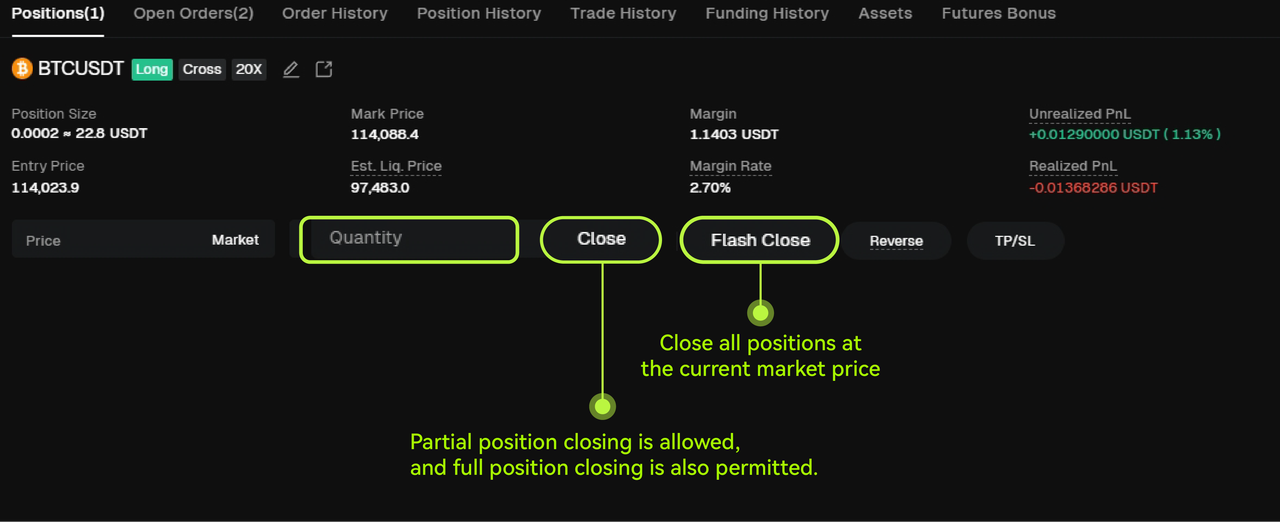
In futures trading, closing a position means exiting all or part of an open trade to realize your profit or loss.
Once you close a position, the system calculates your realized PnL (profit and loss) based on the market price at that time.
You can choose to close a single position, multiple positions, or all open positions simultaneously depending on your strategy.
The “Close” feature helps you manage your trades quickly and precisely when the market moves in your favor or against you.
App:
Website:
Disclaimer
This article does not provide:
(i) investment advice or investment recommendations;
(ii) an offer or solicitation to buy, sell, or hold digital assets;
(iii) financial, accounting, legal, or tax advice.
Digital assets, including stablecoins and NFTs, involve high risk and may fluctuate significantly. Consider whether trading or holding digital assets is appropriate for you given your financial situation. Consult a qualified legal, tax, or investment professional when needed. You are responsible for understanding and complying with applicable local laws and regulations.
About Bitunix
Bitunix is a global cryptocurrency derivatives exchange trusted by over 3 million users across more than 100 countries. At Bitunix, we are committed to providing a transparent, compliant, and secure trading environment for every user. Our platform features a fast registration process and a user-friendly verification system supported by mandatory KYC to ensure safety and compliance. With global standards of protection through Proof of Reserves (POR) and the Bitunix Care Fund, we prioritize user trust and fund security. The K-Line Ultra chart system delivers a seamless trading experience for both beginners and advanced traders, while leverage of up to 200x and deep liquidity make Bitunix one of the most dynamic platforms in the market.
Bitunix Global Accounts
X | Telegram Announcements | Telegram Global | CoinMarketCap | Instagram | Facebook | LinkedIn | Reddit | Medium