
What is Futures Trading
Futures trading lets you speculate on the price of a digital asset by going long or short with leverage. On Bitunix, the most common product is USDT-M Perpetual Futures, which do not have an expiry date. Positions are marked to the Mark Price, and funding payments keep perpetual prices aligned with the spot market. Profits and losses are realized in USDT, and positions can be closed at any time subject to liquidity.
Deposit
You can add funds to your Bitunix account in two main ways:
- On-chain deposit Transfer supported assets from an external wallet or another exchange to your Bitunix deposit address.
- Fiat purchase via P2P Buy USDT or other supported assets with local currency through Bitunix P2P Trading. This is the most common method for first-time users.
- Before you trade, complete Identity Verification (KYC) in the app or on the web.
How to complete Identity Verification (KYC)
- How to Complete Identity Verification (KYC) on Bitunix (App)?
- How to Complete Identity Verification (KYC) on Bitunix (Web)?
How to Buy Digital Assets via P2P Trading
1、Log in to your Bitunix App account, locate the “Buy Crypto” option in the function bar, and tap “P2P Trading.”
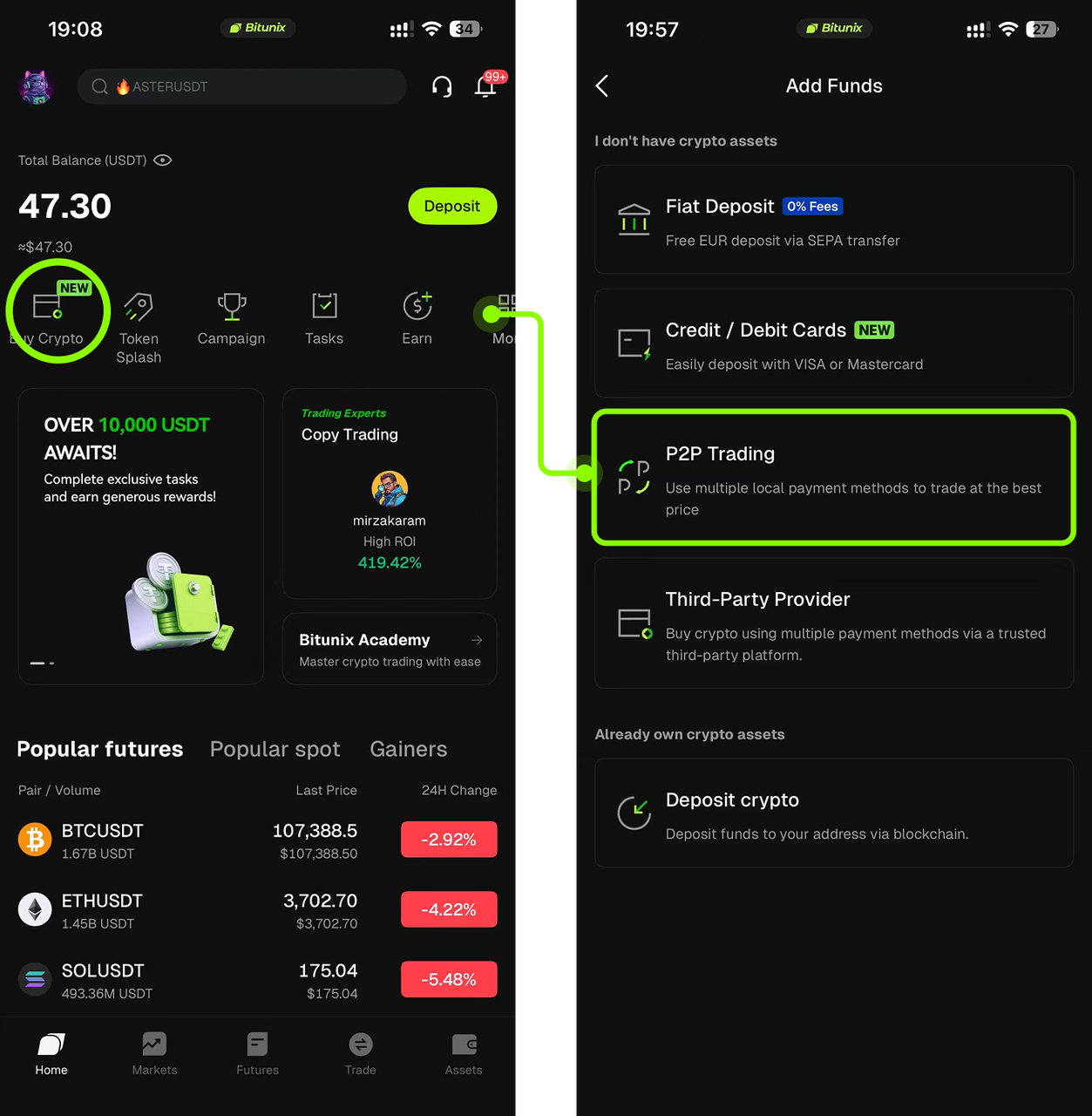
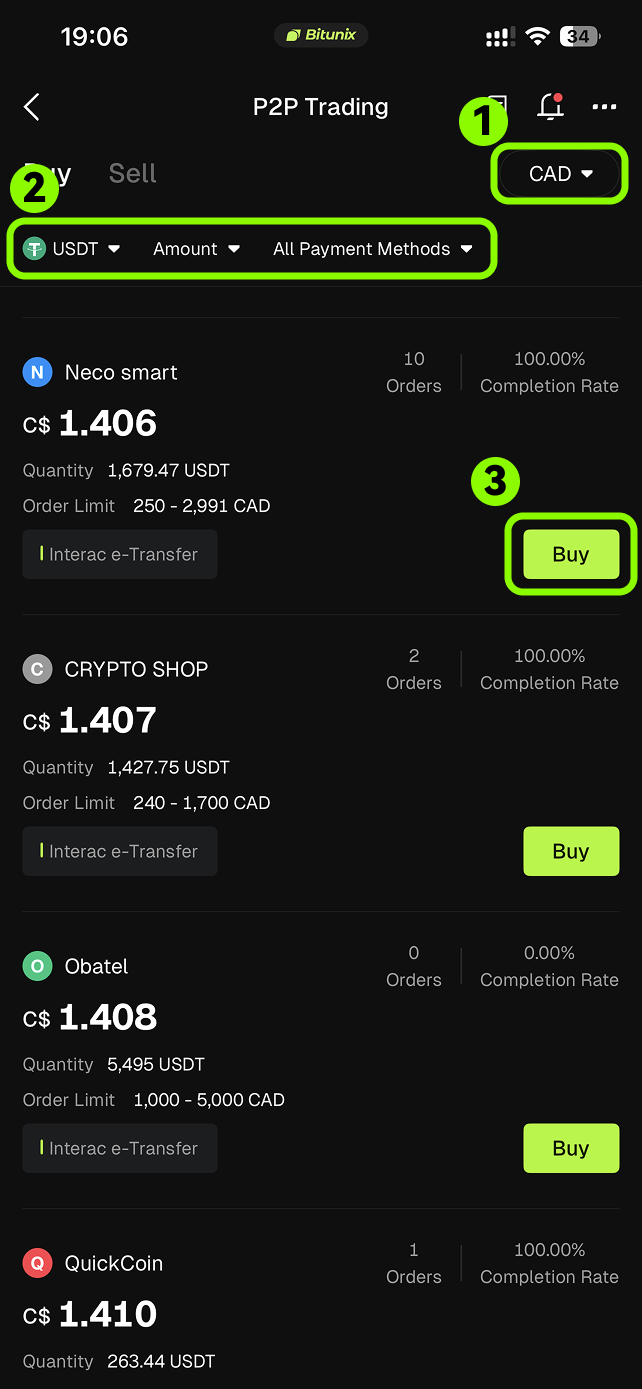
2、After entering the P2P Trading page, you can filter advertisements in the following ways:
- Select your preferred fiat currency (for example, CAD, USD, JPY, or EUR).
- Choose the cryptocurrency you wish to purchase (for example, USDT).
- Select your preferred payment method (multiple payment methods are available).
- Browse the list of advertisements, then tap Buy on your chosen offer.
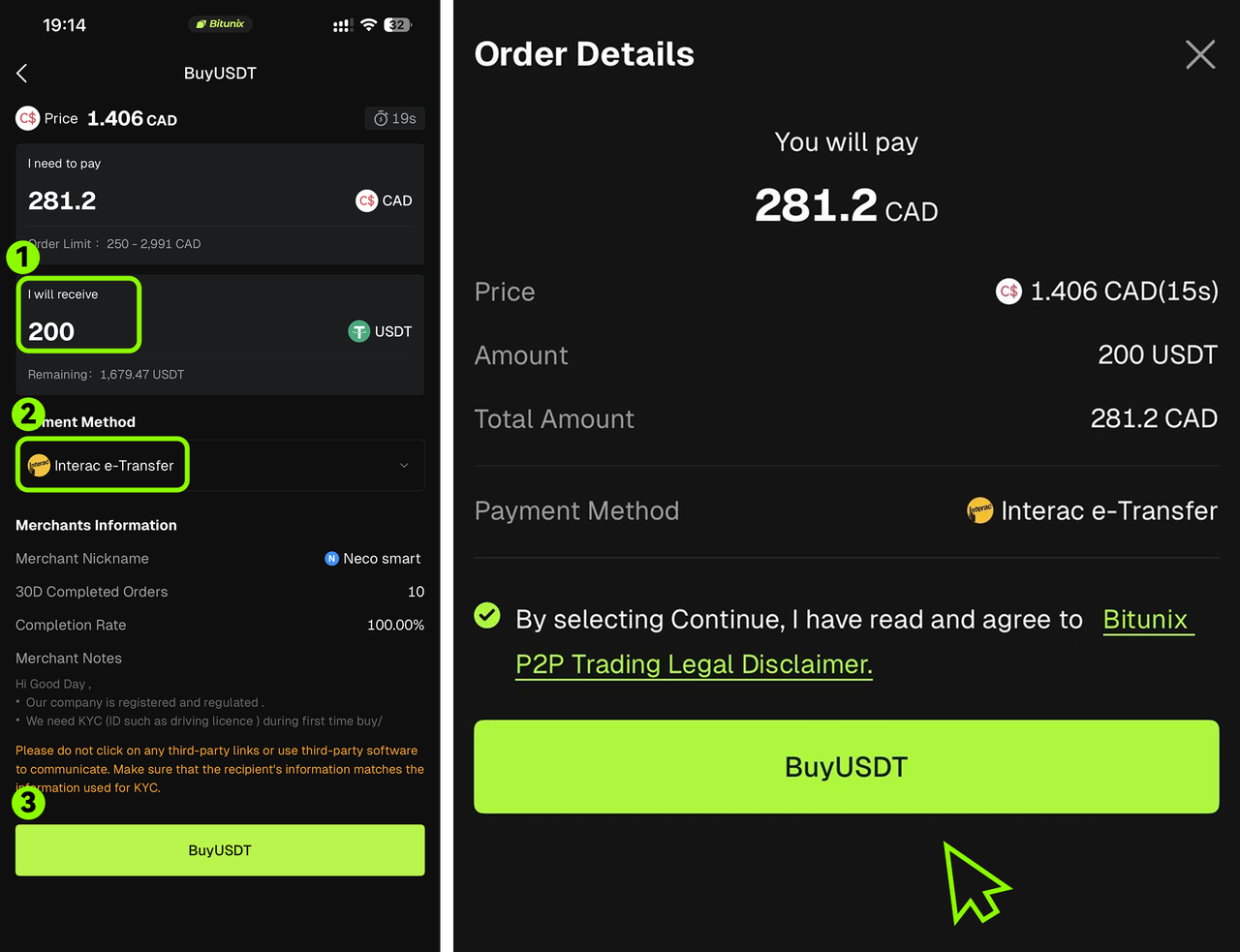
3、Enter the purchase amount or quantity, select your “Payment Method,” and tap “Buy USDT.”
- Enter the amount of USDT you want to buy.
- Choose your preferred payment method (for example, Interac e-Transfer).
- Review all order details carefully. Once confirmed, read and agree to the Bitunix P2P Trading Legal Disclaimer, then tap Buy USDT to proceed.
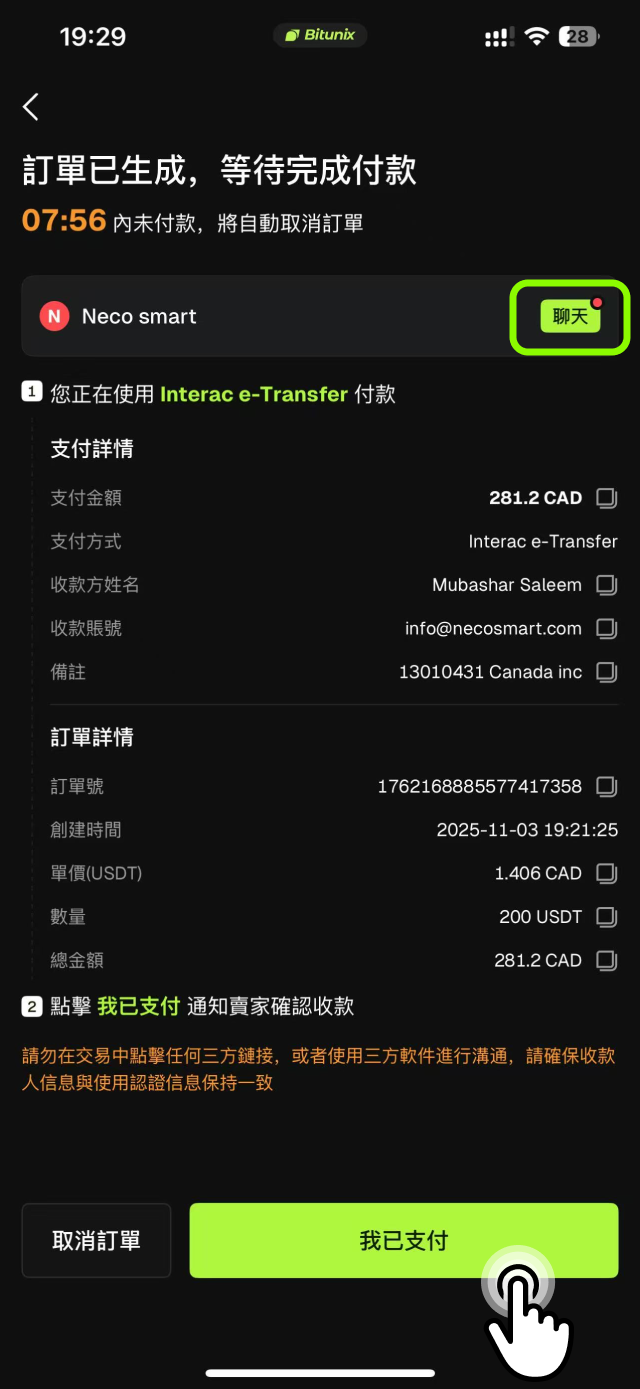
4、Complete the payment according to the order instructions.
- After your order is created, follow the payment instructions shown under Pending Payment.
- Once you have made the payment, tap I Have Paid to notify the seller.
- Wait for the seller to confirm receipt of payment. When the transaction is complete, your purchased crypto will be credited to your Spot Account.
- (Tip: You can also tap the “Chat” icon in the top-right corner to communicate directly with the seller.)
Important Notes
- Name consistency
Make sure the payer name on your payment method matches the real-name information verified on Bitunix. If they do not match, the advertiser may refuse the trade.
- Follow the seller’s payment instructions
Transfer funds strictly according to the seller’s stated payment method and carefully confirm the recipient details before sending.
- Withdrawal timing for P2P purchases
Assets bought via P2P can be withdrawn on T+1 day. This means withdrawals are available on the day after the trade is completed. Please plan your use of funds with this limit in mind.
- Fiat arrival time
After you confirm payment, the seller typically releases crypto within 15 minutes.
- Cancelling a P2P order
You may cancel an order only before making payment. If an order has already been paid and has entered the pending-payment stage, cancelling it may affect your reputation score and limit your P2P privileges. If you cancel 3 or more orders in a single day, your access to P2P services will be restricted within 24 hours. If the daily cancellation limit is triggered for two consecutive days (that is, daily cancellations ≥ 3), your P2P access will be suspended for 7 days.
Other fiat purchase methods
- How to Buy Cryptocurrency Using P2P Trading (Web) ?
- How to Purchase Crypto with Debit or Credit Cards (Web)
- How to Purchase Crypto Via Third-Party (Web)
Live Trading: From Funding Transfer to Closing a Position
Step 1: Transfer funds
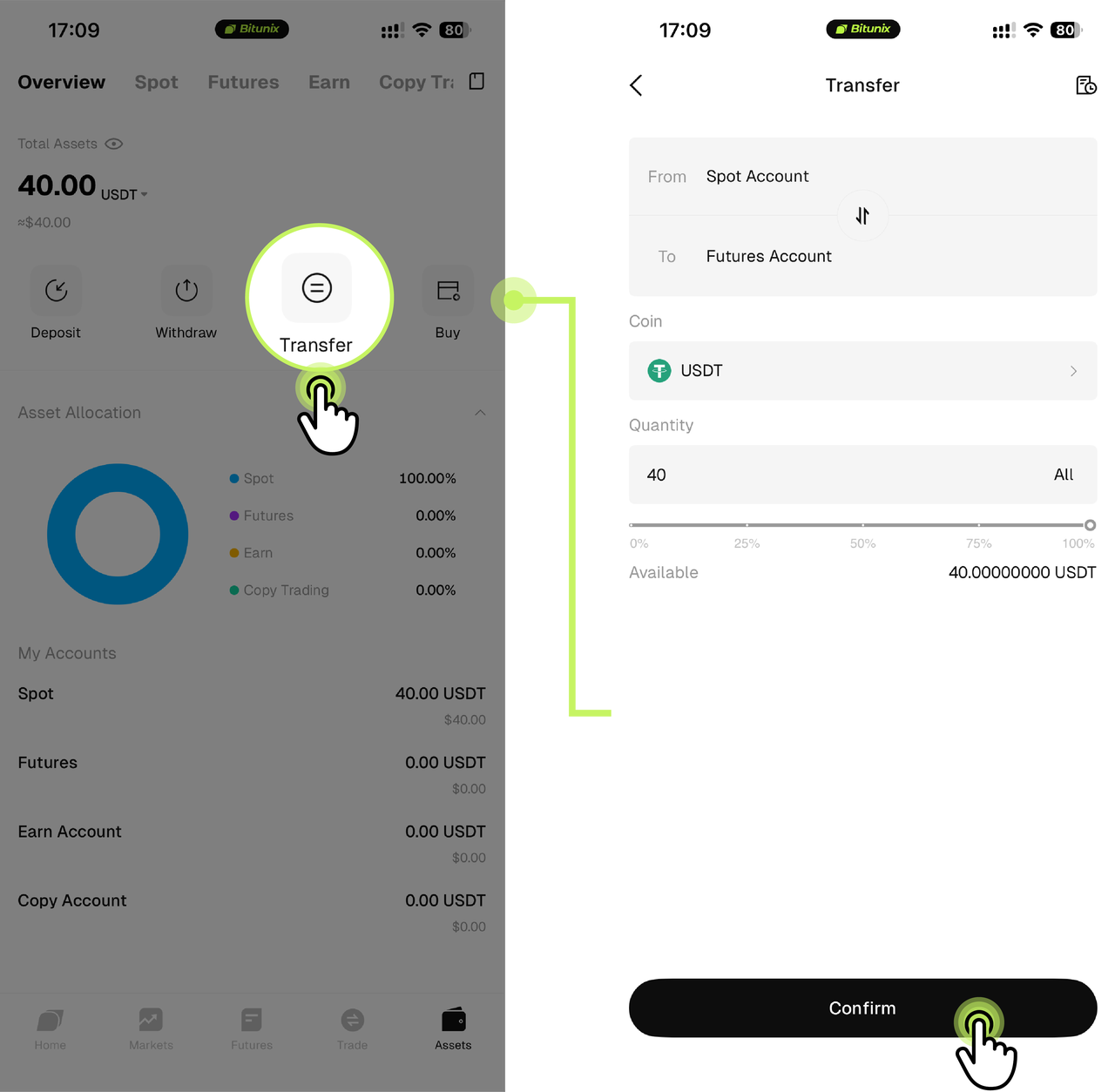
Log in to the Bitunix App and tap Assets to open the asset page.
Tap Transfer, set From: Spot Account and To: Futures Account, enter the Amount, select the currency (USDT), and tap Confirm.
Step 2: Select a trading pair
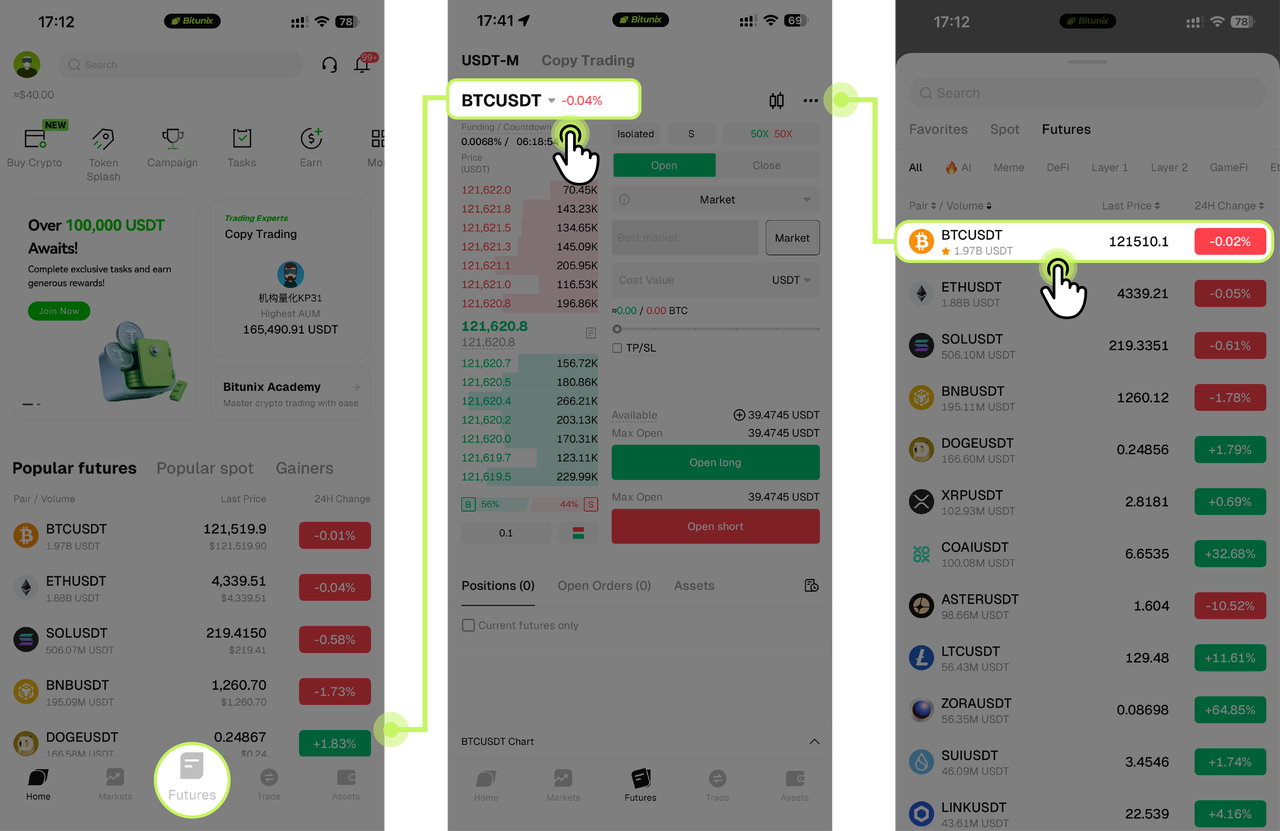
Tap Futures in the bottom navigation. In the pair selector at the top left, choose BTC/USDT. You can search by symbol or pick from the list of USDT-M Perpetual Futures pairs.
Step 3: Set leverage and order type
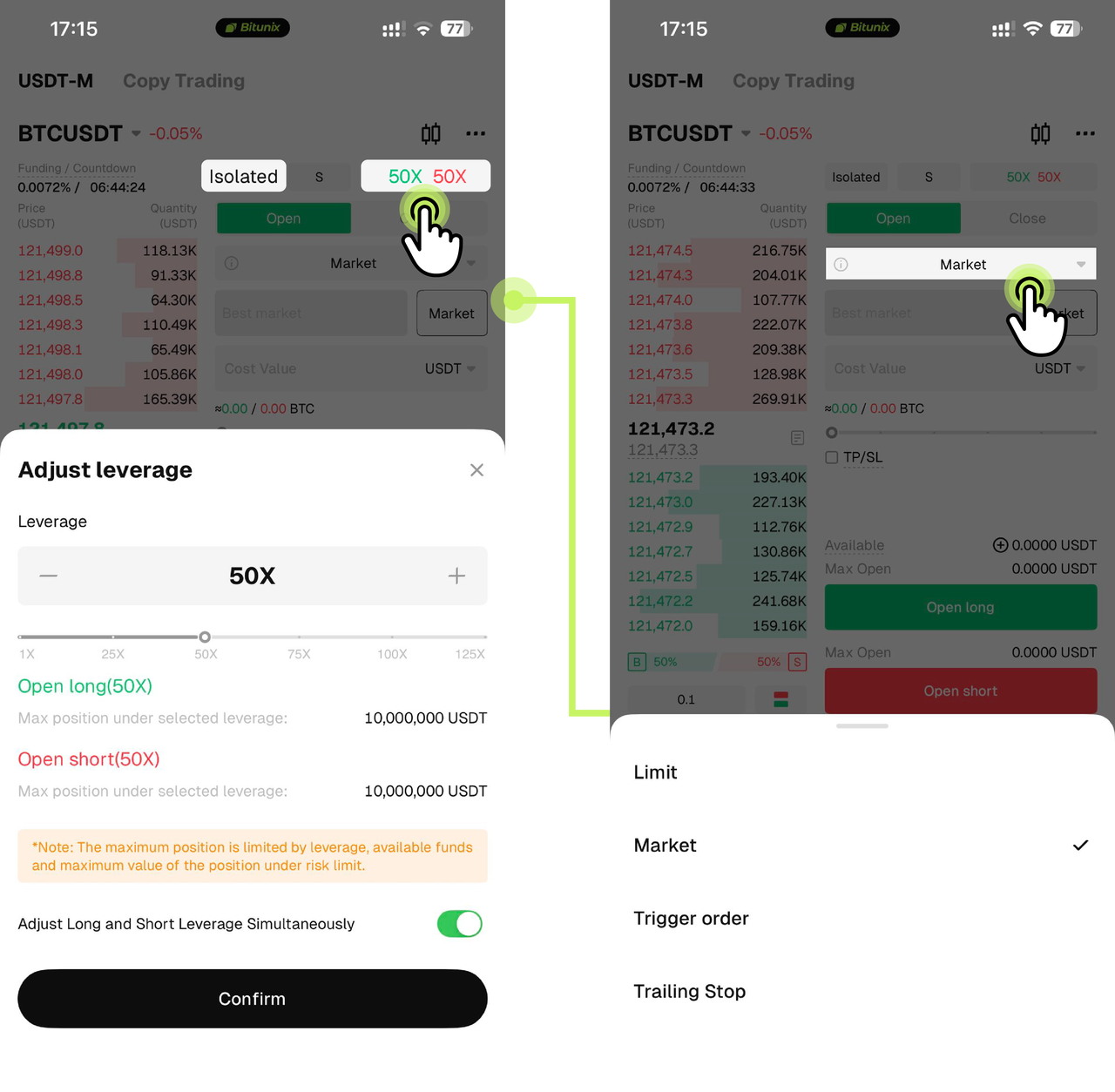
This example uses Isolated Mode with BTCUSDT Perpetual Futures.
Set the leverage to 50x and choose the order type:
- Limit Order: set a specific price.
- Market Order: execute at the current market price.
Step 4: Enter quantity and place the order
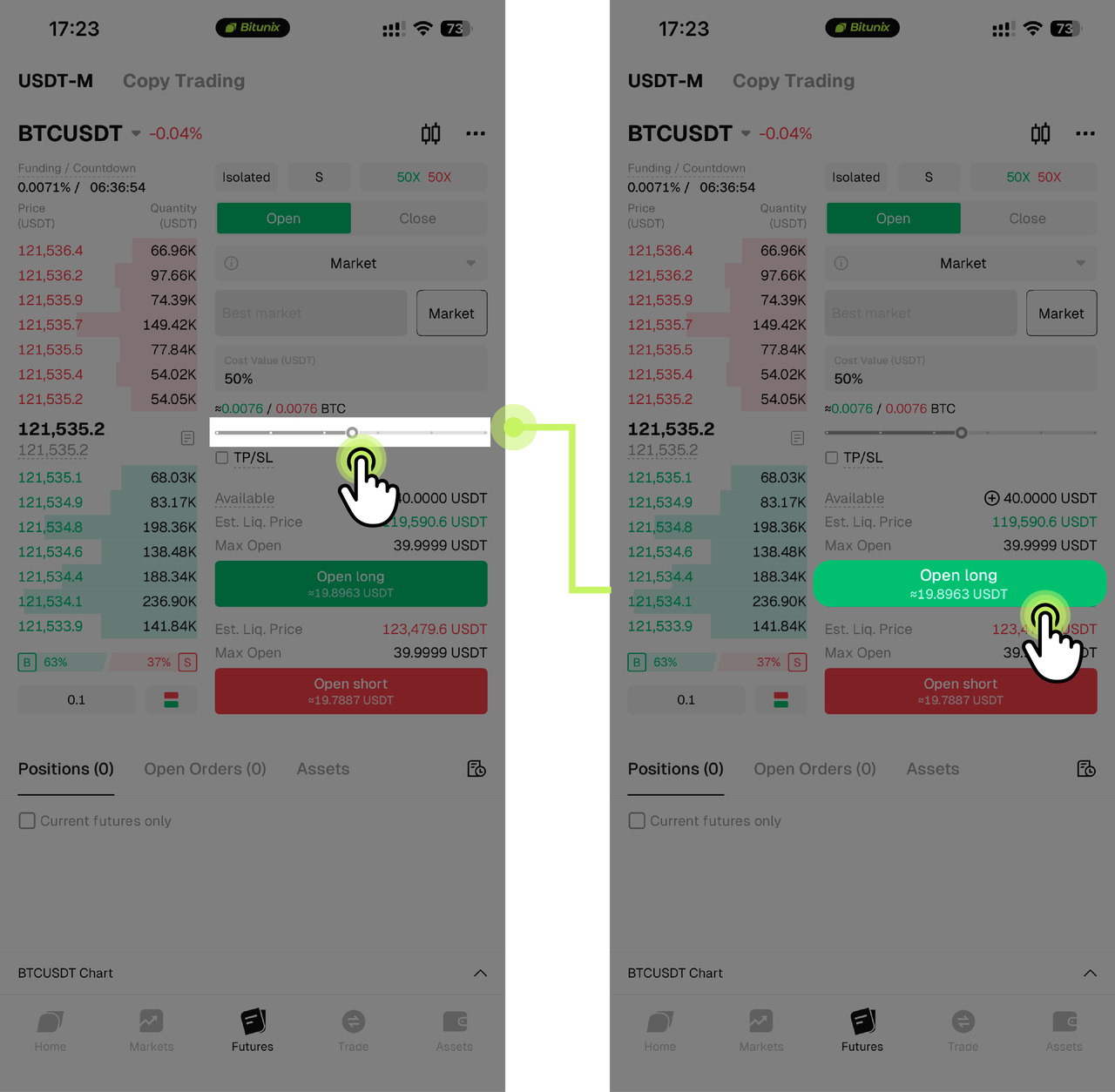
Enter the quantity or amount to open. Choose Buy Open Long if you expect price to rise, or Sell Open Short if you expect price to fall. Tap Confirm to place the order.
Step 5: Manage the position
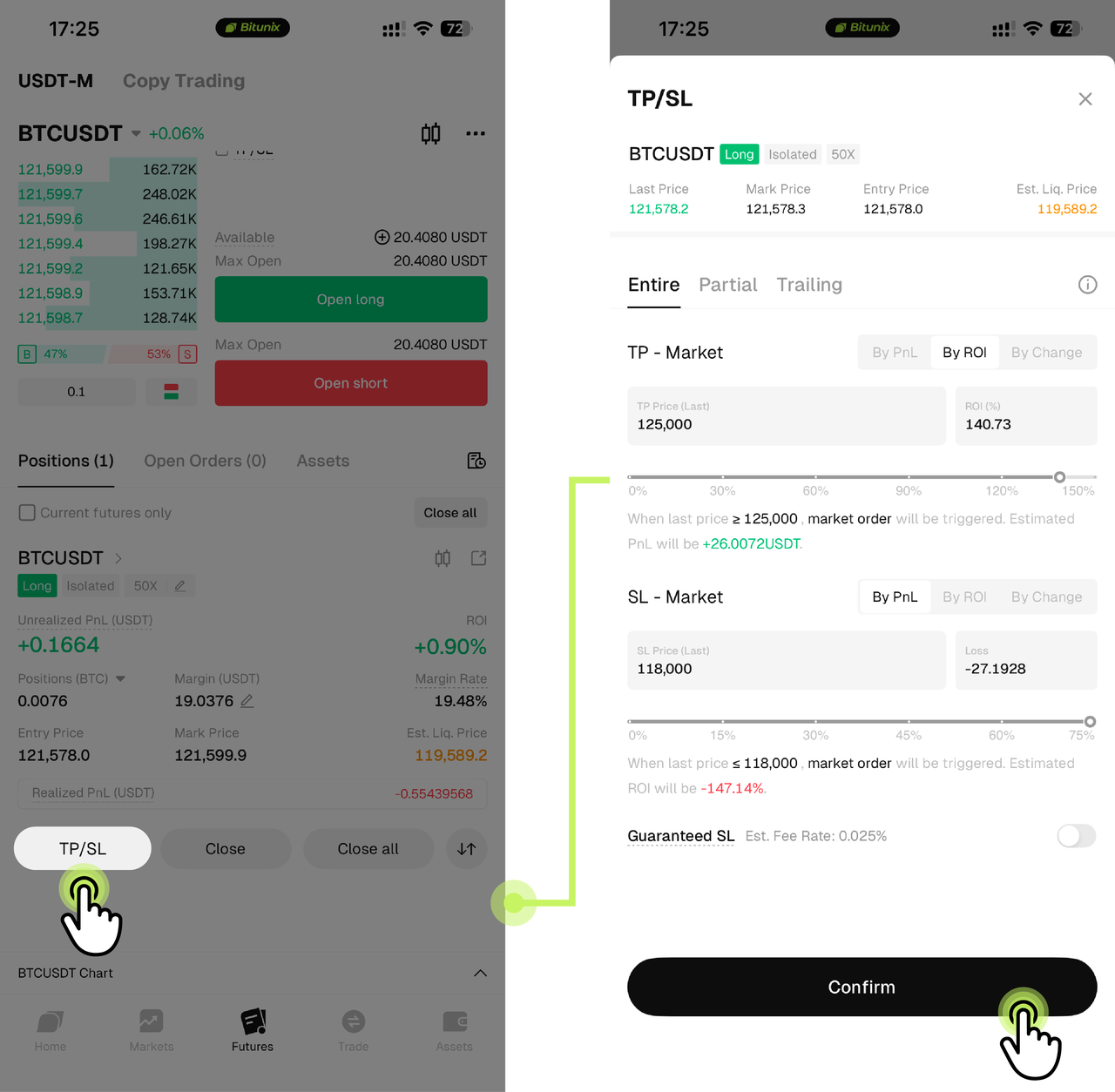
After the order is filled, review the position details. You can set Take Profit and Stop Loss to manage risk, then tap Confirm.
Learn more:
How to complete futures trading on Bitunix (Web)?
A must-see for beginners: two key reminders for Futures trading
- Start small and practice before scaling Leverage increases both potential profit and potential loss. Begin with a small amount, for example $100, to learn the full flow of opening and closing positions, monitoring margin, and managing risk. As you gain familiarity with trading rules and market behavior, adjust position size gradually.
- Use Take Profit and Stop Loss to control risk and lock in returns After opening a position, set TP/SL on the position page. As a reference, beginners can start with rules such as “Take Profit at +10%” and “Stop Loss at −5%”, then adjust based on market conditions. Proper TP/SL helps handle sudden reversals, secure gains, and cap losses.
Conclusion
Futures trading offers flexible speculation and risk management tools in crypto. It also carries elevated risk due to price volatility and the effects of leverage. Choose a platform with professional tooling and strong security, such as Bitunix, understand the differences between Perpetual Futures and spot markets, and size positions prudently according to your risk tolerance. Trade responsibly.
Disclaimer
This article does not provide:
(i) investment advice or investment recommendations;
(ii) an offer or solicitation to buy, sell, or hold digital assets;
(iii) financial, accounting, legal, or tax advice.
Digital assets, including stablecoins and NFTs, involve high risk and may fluctuate significantly. Consider whether trading or holding digital assets is appropriate for you given your financial situation. Consult a qualified legal, tax, or investment professional when needed. You are responsible for understanding and complying with applicable local laws and regulations.
About Bitunix
Bitunix is a global cryptocurrency derivatives exchange trusted by over 3 million users across more than 100 countries. At Bitunix, we are committed to providing a transparent, compliant, and secure trading environment for every user. Our platform features a fast registration process and a user-friendly verification system supported by mandatory KYC to ensure safety and compliance. With global standards of protection through Proof of Reserves (POR) and the Bitunix Care Fund, we prioritize user trust and fund security. The K-Line Ultra chart system delivers a seamless trading experience for both beginners and advanced traders, while leverage of up to 200x and deep liquidity make Bitunix one of the most dynamic platforms in the market.
Bitunix Global Accounts
X | Telegram Announcements | Telegram Global | CoinMarketCap | Instagram | Facebook | LinkedIn | Reddit | Medium