
Article Summary
- This article provides a clear, beginner-friendly explanation of what a DeFi wallet (also known as a non-custodial or self-custody wallet) is.
- It draws a sharp contrast between a DeFi wallet, where the user has full control over their private keys and assets, and a centralized exchange (CEX) wallet, where the exchange holds the keys on the user's behalf.
- The guide explains the critical importance of the seed phrase (or recovery phrase) and provides best practices for securing it.
When you keep crypto on a centralized exchange, you trust that platform to custody your assets. That setup feels familiar if you have used a bank app before, and it helps when you want to trade fast or reset a password. A crypto exchange like Bitunix can be convenient for buying, selling, and moving funds in and out.
A DeFi wallet changes the relationship. You hold the keys, so you control the assets directly. That freedom unlocks DeFi apps and NFTs, but it also hands you the responsibility. If you lose your recovery details, nobody can undo it for you.
This guide explains what a DeFi wallet is, how it differs from an exchange wallet, and what you need to do before you take your first step into self-custody.
What Is a DeFi Wallet?
A DeFi wallet is a non-custodial wallet. Only you have the private keys, which means only you can sign transactions that move your funds. That is the core difference: your wallet does not hold coins like a bank vault. It holds keys that prove you can spend them on the blockchain.
If you are asking what is a DeFi wallet, think of it as an account you control without a customer support desk behind it. The wallet creates addresses, signs transactions, and lets you interact with networks like Ethereum or Solana. You can still use an exchange, but the wallet is what you use when you want direct access to decentralized apps.
A DeFi wallet is also your entry point to Web3. You connect it to a dApp and approve actions such as swapping tokens on a DEX, lending, borrowing, minting NFTs, or signing into a site without an email or password. Those actions work through a smart contract, so the wallet acts like your signature tool for on-chain apps.
DeFi activity changes fast, but wallets stay the tool you use when you want access beyond exchange features, like signing transactions and interacting with dApps directly. CoinDesk reported that in late August 2025, ETH set a new high around $4,946, while Ethereum DeFi TVL sat around $91B, still below the $108B peak from November 2021; in ETH terms, just under 21M ETH were locked versus 29.2M ETH in July 2021 and over 26M ETH earlier in 2025.
Examples of popular DeFi wallets include MetaMask (common for Ethereum and EVM chains), Phantom (common for Solana), and Trust Wallet (multi-chain). Each wallet has its own design, supported networks, and security options, but the custody model stays the same: you control the keys.
DeFi Wallet vs. Centralized Exchange Wallet
Both tools can store crypto balances, so it’s easy to assume they are interchangeable. They are not. The key difference is custody: who controls the keys that authorize transactions. Once you understand that, the other differences (recovery, app access, and risk) make more sense.
Here is the main comparison:
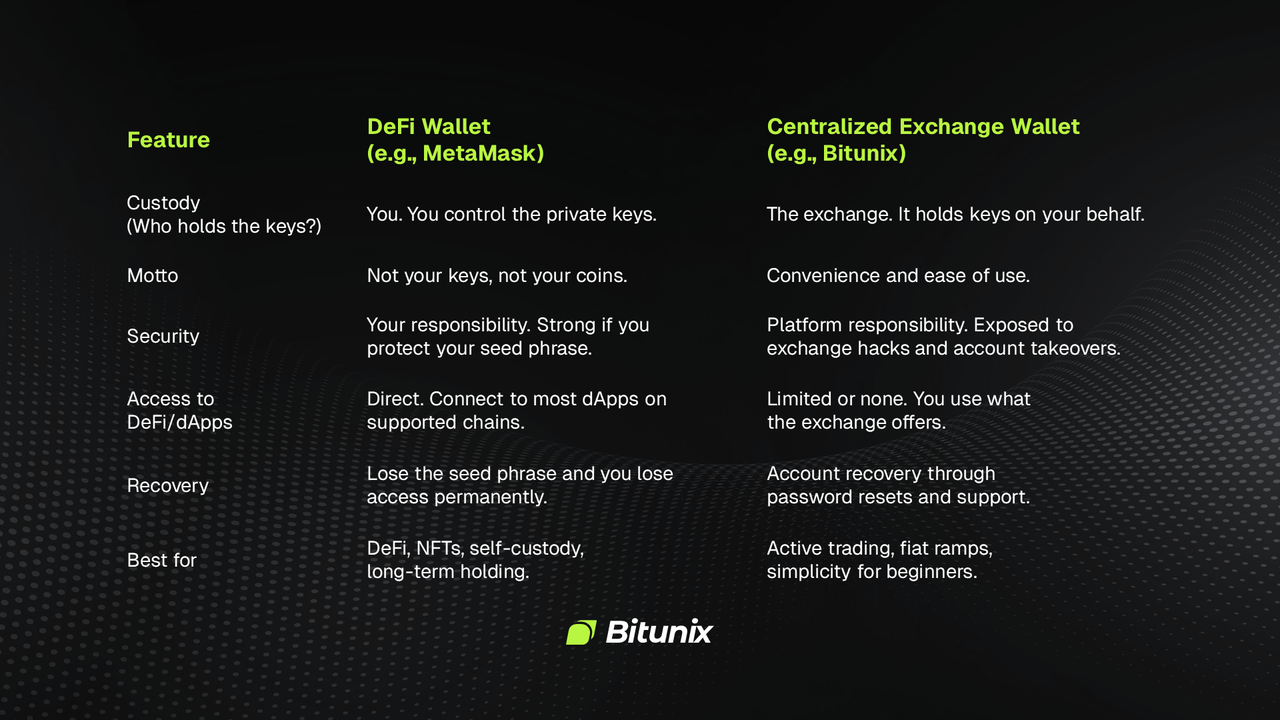
A simple way to decide is to match the tool to the job. If you want to trade quickly and keep things simple, an exchange wallet fits. If you want to use DeFi apps, mint NFTs, or hold assets without third-party custody, you need a DeFi wallet.
The Most Important Thing: Your Seed Phrase
Your seed phrase (also called a recovery phrase) is the single point of failure for most DeFi wallets. It usually has 12 or 24 words, and it can restore your wallet on a new phone, laptop, or browser extension. If someone gets it, they do not need your device. They can rebuild your wallet elsewhere and move funds.
MetaMask describes it on its support site:
"A Secret Recovery Phrase is a 12-word phrase that is the master key to your wallet."
Don't forget that your wallet app is just an interface. The seed phrase is what generates your private keys through a standard called hierarchical deterministic key derivation. That is why one phrase can recreate many addresses across the same wallet. It also explains why switching devices is easy when you do it correctly, and why theft is final when you do it wrong.
Most seed phrase losses come from social engineering. Common setups include fake support accounts, cloned wallet websites, browser pop-ups that claim you have a problem, and dApps that ask you to paste your phrase to verify. No legitimate wallet, exchange, or dApp needs your seed phrase to help you. The only time you use it is to restore your wallet inside your wallet app.
Seed phrases also tie into a second risk: approvals. Even if you never share your seed phrase, you can still lose funds if you sign a malicious transaction or approve a token-draining contract. That is why wallet safety is not only about storing words. It’s also about slowing down when you sign, checking domains, and using separate wallets for risky activity.
Use these habits to reduce your risk:
- Write the seed phrase down offline, ideally on paper or a metal backup, and store it in secure places.
- Never store it as a screenshot, text file, email draft, cloud note, or password manager entry you might copy-paste.
- Use a separate wallet for experiments, a small spending wallet for DeFi, and keep your long-term assets in a safer setup.
If you think you exposed your seed phrase, treat it like a compromised password that can never be changed. Move funds to a new wallet immediately, revoke token approvals where possible, and assume anything left behind can be drained later.
How Do You Use a DeFi Wallet?
Once your wallet is set up and backed up, using it becomes routine. The steps below look simple, but each step has a reason. Follow these steps to make sure everything is done safely:
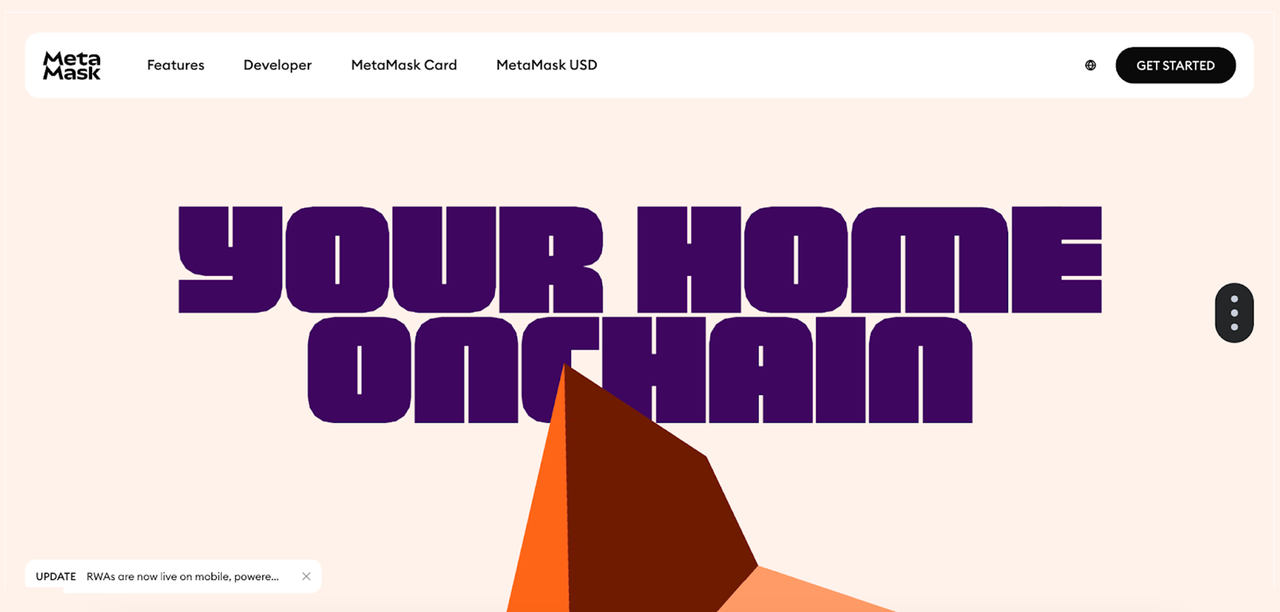
Step 1: Download And Install
Choose a wallet and install it as a browser extension or mobile app. Use the official site or official app store listing. Avoid random download links from social media.
Step 2: Create A New Wallet
Follow the setup prompts until the wallet shows your seed phrase. Write it down offline and confirm it in the app. Don’t rush this step. If you lose your phone or laptop, the seed phrase is the only way to restore your wallet.
Step 3: Fund Your Wallet
Send crypto from an exchange to your wallet address. Most beginners start with a small test transfer first. That helps you confirm you copied the address correctly and selected the right network.
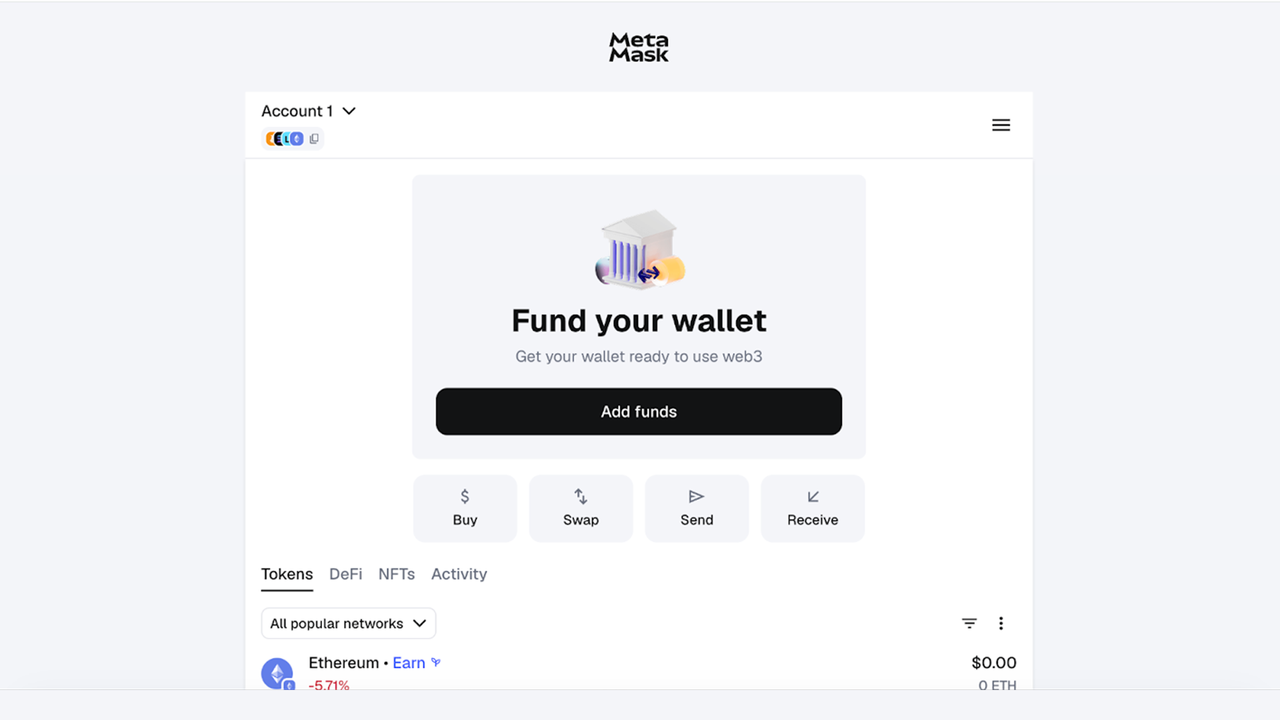
This is where your exchange account stays useful. Many users buy on an exchange, then withdraw to self-custody when they want direct access to DeFi. It’s also where on-ramp and off-ramp decisions show up in real life: you often move between bank money, exchange balances, and self-custody depending on what you’re doing.
Step 4: Connect to a dApp
Go to a DeFi application and click Connect Wallet. Your wallet will pop up and ask you to approve the connection. After that, the dApp can view your address and request signatures for specific actions.
For example, you buy SOL on Bitunix (in the SOL/USDT spot market), then withdraw it to your DeFi wallet address. Bitunix processes the withdrawal and gives you a TxID so you can track the confirmation on a block explorer. After the funds arrive, you connect your wallet to a DEX, pick a pair, and submit the swap. Your wallet shows the exact action you’re approving and the network fee, then broadcasts the transaction.
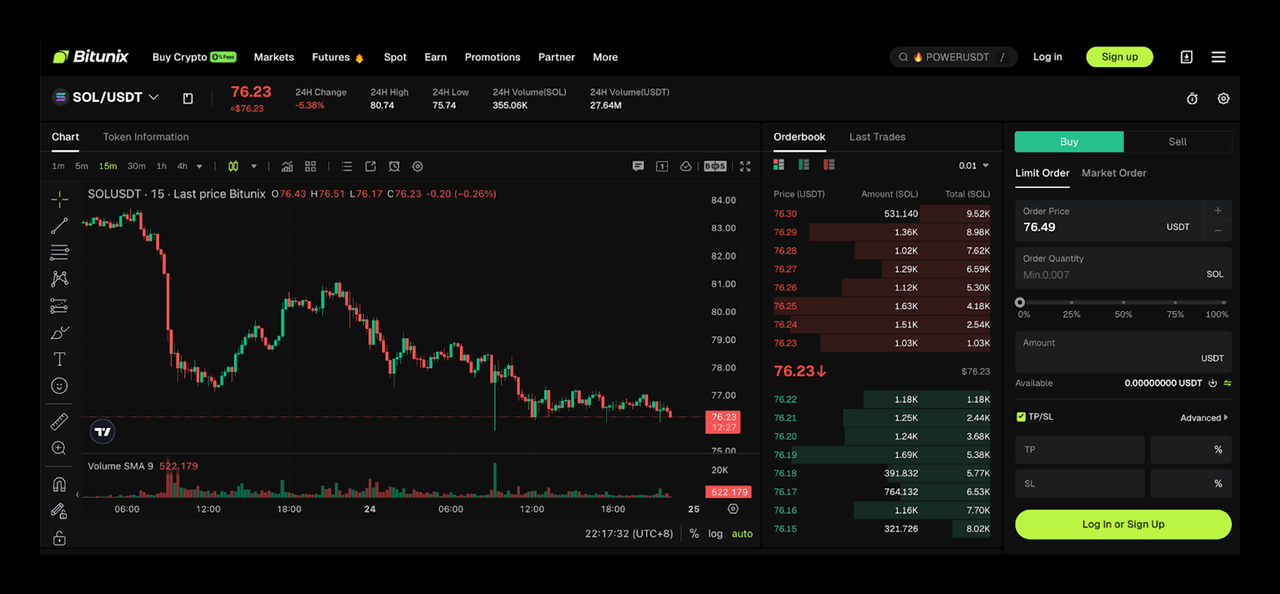
Fees show up in a few places. You pay trading fees on Bitunix when you place orders, and withdrawals can include network-related fees depending on the asset and chain. You also need a small amount of the chain’s native token in your DeFi wallet to pay on-chain transaction fees.
Conclusion: The Trade-Off Between Control and Convenience
DeFi wallets and exchange wallets serve different jobs. Exchange wallets offer convenience and recovery options, which help when you are trading or learning. DeFi wallets offer control and direct access to DeFi and NFTs, but you carry the responsibility for security and recovery.
Many people use both tools. They keep trading funds on an exchange and move a separate amount to a DeFi wallet when they want to explore. That split reduces stress and lowers the chance that one mistake wipes out everything.
If your goal is to invest in DeFi, start small and build habits first. Use the Bitunix app, register, and start to buy and sell crypto, then withdraw to your DeFi wallet when you are ready to interact with dApps directly.
FAQ
Is a DeFi wallet anonymous?
Not fully. Your wallet address is public on the blockchain, and transactions are visible. You can avoid linking your name to the address, but exchanges, analytics tools, and mistakes like reusing addresses can connect identities over time.
Are DeFi wallets free to use?
Most wallets cost nothing to download. You still pay network transaction fees when you send tokens, swap, mint NFTs, or interact with DeFi apps. Some actions also require extra fees, like bridging across chains.
Can my DeFi wallet be hacked?
Attackers usually steal funds by tricking you into sharing the seed phrase or signing malicious transactions. Protect your seed phrase, verify URLs, and use a separate spending wallet for dApps to reduce the impact of mistakes.
What happens if the company that made my wallet shuts down?
If you have your seed phrase, you can restore the wallet in another compatible wallet app. Your assets live on the blockchain, not inside the company’s servers. Without the seed phrase, you cannot reliably recover self-custody funds.
Can I have multiple DeFi wallets?
Yes. Many users keep separate wallets for long-term holding, daily DeFi use, and experiments. This separation limits damage if you connect to a malicious dApp or approve a risky contract with one wallet.
What is a hot wallet vs. a cold wallet?
A hot wallet is connected to the internet, like a browser extension or mobile app. A cold wallet keeps keys offline, usually in a hardware device. Cold wallets reduce online attack surface but still require careful signing and backups.
How do I know which wallet to use for which blockchain?
Choose a wallet that supports the chain you want. MetaMask focuses on Ethereum and EVM chains. Phantom focuses on Solana. Multi-chain wallets exist, but always check supported networks and token standards before sending funds.
Can I send NFTs to my exchange wallet?
Sometimes, but it’s risky. Many exchanges do not support NFT deposits, and unsupported deposits can get stuck. Use a DeFi wallet for NFTs unless the exchange explicitly supports that NFT standard and chain.
What is a smart contract wallet?
It’s a wallet controlled by a smart contract instead of a single private key. It can add features like multi-signature approvals, spending limits, and social recovery. It also adds complexity and depends on the correct contract code.
Why do I need to pay gas fees in a DeFi wallet?
Blockchains charge fees to process and secure transactions. Fees deter spam and pay validators. Without paying the network fee, your transaction cannot be included in a block, so swaps, transfers, and contract interactions will fail.
Glossary
- Custody — Who controls the keys that authorize spending, not who shows your balance.
- Non-custodial wallet — A wallet where you hold the keys and approve every transaction yourself.
- Custodial wallet — A wallet where a platform holds keys on your behalf and manages access.
- Private key — Secret cryptographic key that signs transactions and proves ownership of an address.
- Seed phrase — 12 or 24 words that can regenerate wallet keys and restore access.
- Public address — Shareable identifier used to receive funds; it does not reveal your private key.
- Transaction signature — Cryptographic proof you approved a transaction with your private key.
- dApp — Decentralized app that runs on a blockchain and interacts with wallets directly.
- DEX — Decentralized exchange where trades happen via smart contracts, not order books held by companies.
- Smart contract — On-chain program that enforces rules for swaps, lending, NFTs, and more.
- Token approval — Permission for a contract to spend specific tokens from your wallet.
- Gas fee — Network fee paid to process a transaction and compensate validators.
- Bridge — Tool that moves assets between blockchains, often with extra smart contract risk.
- Hardware wallet — Device that stores keys offline and signs transactions without exposing private keys.
- On-ramp / Off-ramp — Methods to move between fiat and crypto, usually through regulated providers.
About Bitunix
Bitunix is a global cryptocurrency derivatives exchange trusted by over 3 million users across more than 100 countries. The platform is committed to providing a transparent, compliant, and secure trading environment for every user. Bitunix offers a fast registration process and a user-friendly verification system supported by mandatory KYC to ensure safety and compliance. With global standards of protection through Proof of Reserves (POR) and the Bitunix Care Fund, Bitunix prioritizes user trust and fund security. The K-Line Ultra chart system delivers a seamless trading experience for both beginners and advanced traders, while leverage of up to 200x and deep liquidity make Bitunix one of the most dynamic platforms in the market.
Bitunix Global Accounts
X | Telegram Announcements | Telegram Global | CoinMarketCap | Instagram | Facebook | LinkedIn | Reddit | Medium
Disclaimer: Trading digital assets involves risk and may result in the loss of capital. Always do your own research. Terms, conditions, and regional restrictions may apply.