
Article Summary
- This guide provides a comprehensive, beginner-friendly walkthrough of the entire Bitunix onboarding process.
- The article emphasizes the importance of security at every step, including setting up Two-Factor Authentication (2FA).
Getting started on a new exchange can feel like showing up to a party where everyone already knows the dance moves. You want to trade, but first you need to set things up the right way.
This guide walks you through the basics of a crypto exchange: register, secure your account, deposit funds, and place your first spot order. By the end, you will know how to use Bitunix without guessing which button does what.
One quick reality check before we start: eligibility rules apply. Bitunix notes that users under 18 are not allowed to trade or use the platform. If that applies to you, stop here and do not proceed.
Account Registration: Your First Step
Here are the steps for Bitunix registration on the web. The app steps are similar.
Step 1: Visit the official site
Type the address directly in your browser and avoid clicking random ads. You want the real site, not a copycat.
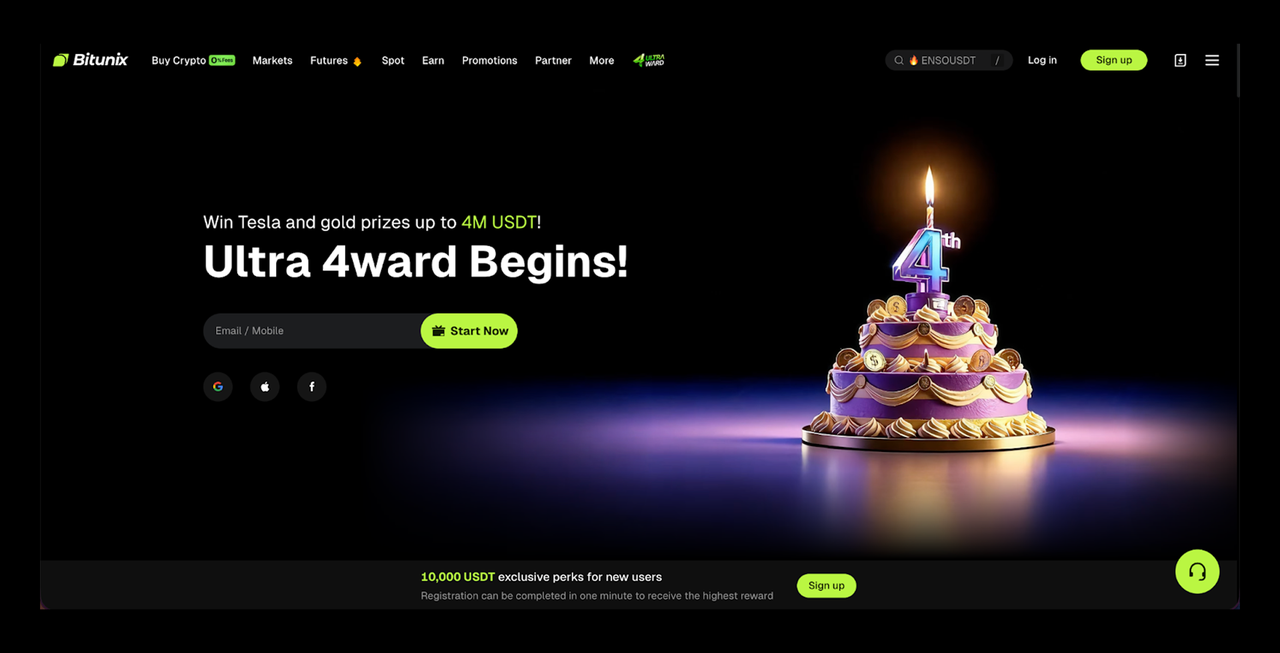
Step 2: Sign up with your email or phone
You choose email or phone, then create a password.
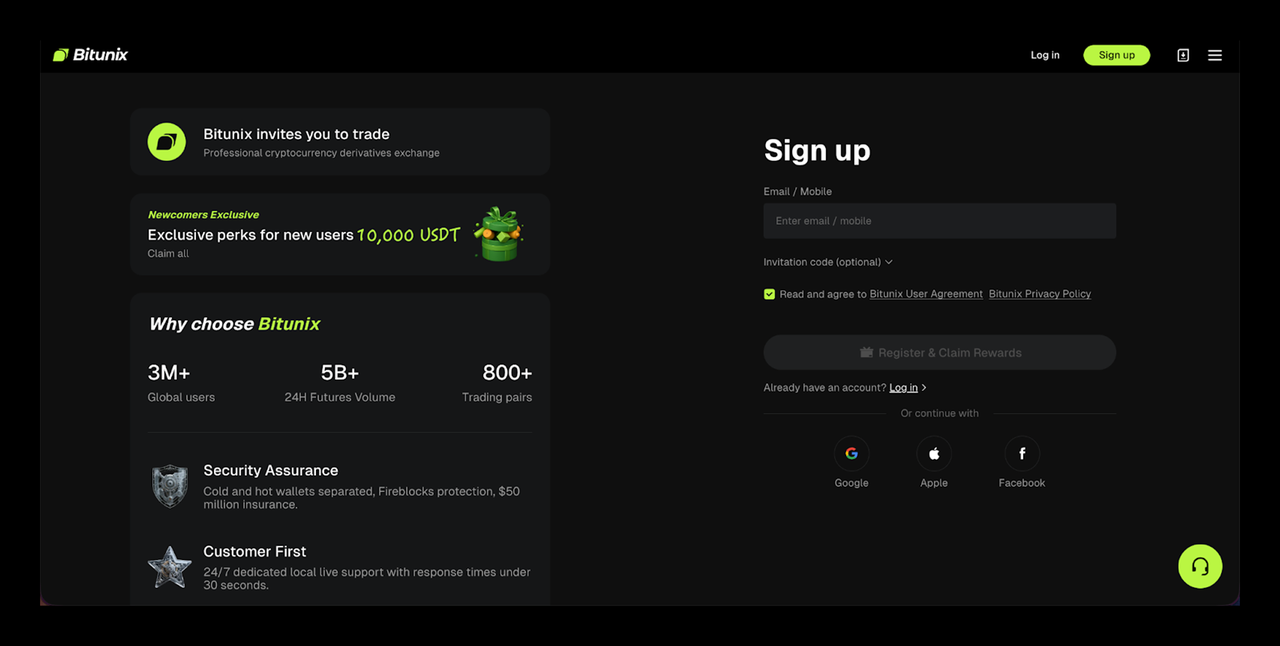
Password tip that actually helps: use a long password you have never used anywhere else. A password manager makes this painless.
Step 3: Verify email or SMS
Bitunix sends a code. Enter it to finish registration. If the code does not arrive, jump to the FAQ section. There are a few fixes.
Step 4: Activate 2FA (Google Authenticator)
Two-factor authentication adds a second check to your login and security actions, so a leaked password alone is not enough to compromise your account. Here is how to set it up:
- Install Google Authenticator from the App Store or Google Play.
- Open the 2FA setup in Bitunix: Mobile: tap your avatar → Security → Bind next to Google Authenticator. Web: click the profile icon → Security → Set up next to Google Authenticator.
- Copy the setup key or save the QR code, then add it inside Google Authenticator (scan the QR or paste the key).
- Back on Bitunix, enter the 6-digit code from Google Authenticator and complete the on-screen security checks to finish setup.
Tip: Save the setup key somewhere safe (offline). It helps if you replace your phone.
Funding Your Account: Your First Deposit
Depositing on Bitunix is simple, but it has one sharp edge: networks must match.
Step 1: Open the deposit page
On the web, log in and click the wallet icon, then choose Deposit.
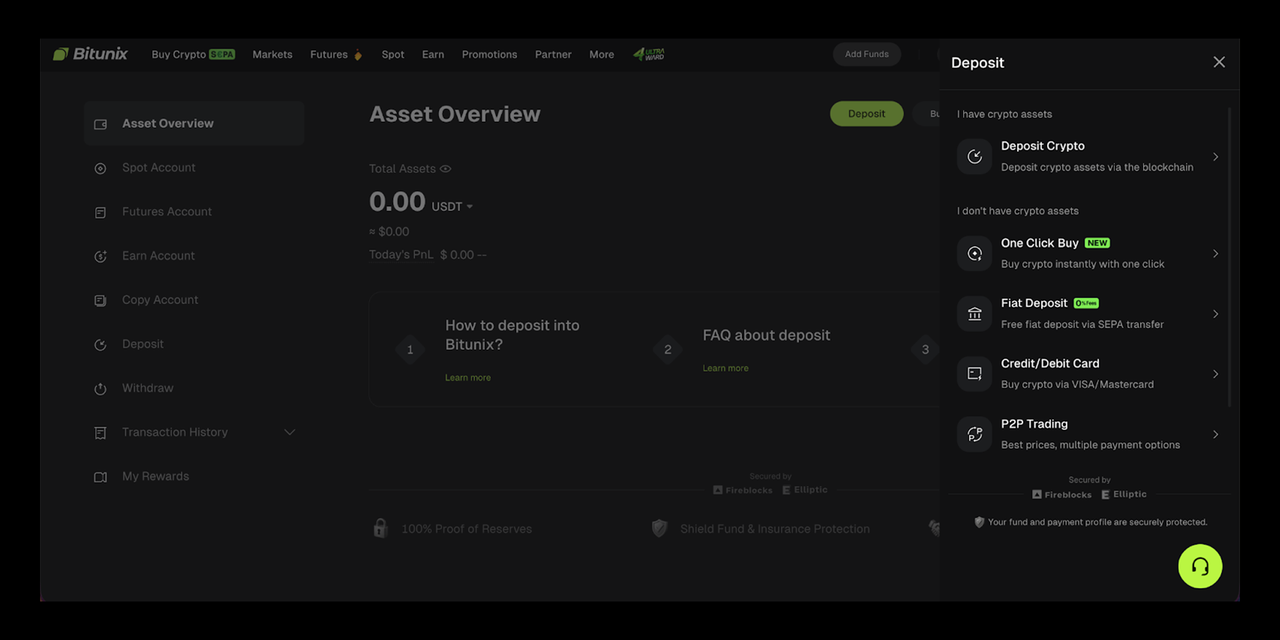
Step 2: Choose the coin and network
Pick what you are depositing, for example, USDT, then select the network you will use. The deposit guide explains that you choose the network and copy the address or QR code from the deposit screen.
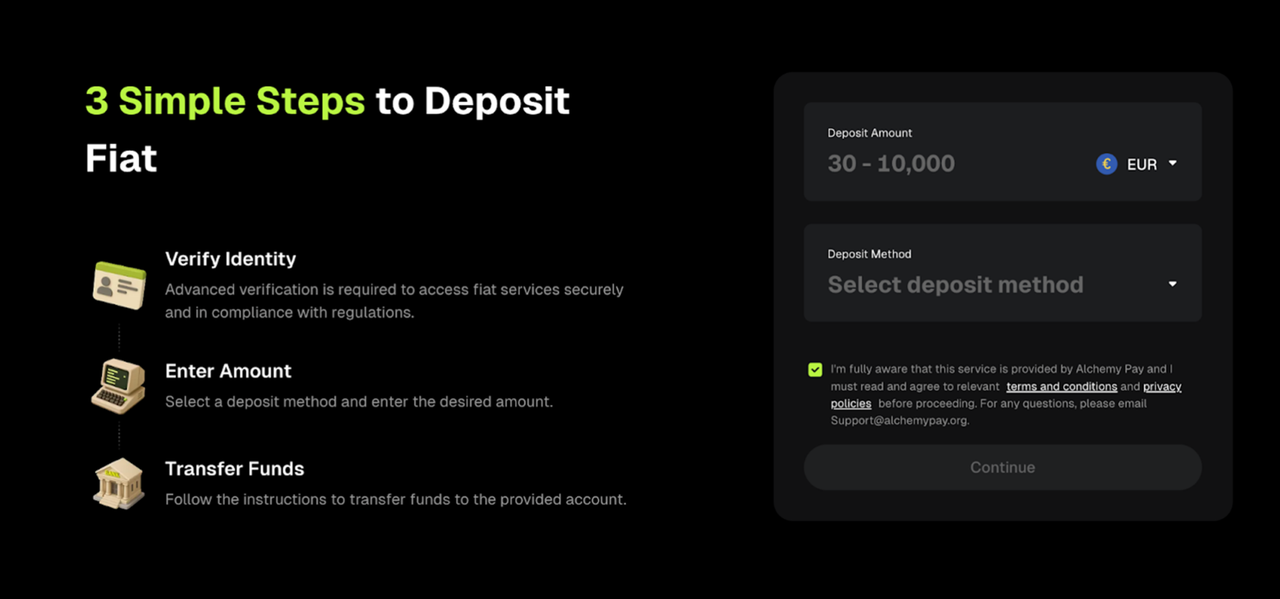
Step 3: Copy the address and send from your other wallet
Paste the deposit address into the withdrawal screen of your external wallet or another exchange.
Crucial warning: Network mismatch is the classic mistake. Bitunix explicitly tells you to double-check the asset, network, and address before depositing. Also note that some tokens need an extra tag, like a memo. The deposit guide mentions this for tokens like XRP.
Fees and timing
Bitunix does not charge deposit fees, but the sending wallet may charge a network fee.
Deposits still need blockchain confirmations, and Bitunix says confirmation can take 3 to 30 minutes, depending on network status.
When you are ready to withdraw later, use the fee schedule to check network fees, minimums, and maximums per coin and network.
Your First Trade: Buying Crypto on the Spot Market
Time for your Bitunix first trade. Spot trading means you buy or sell the actual asset, without leverage.
Step 1: Open the spot trading screen
Go to the Spot market.
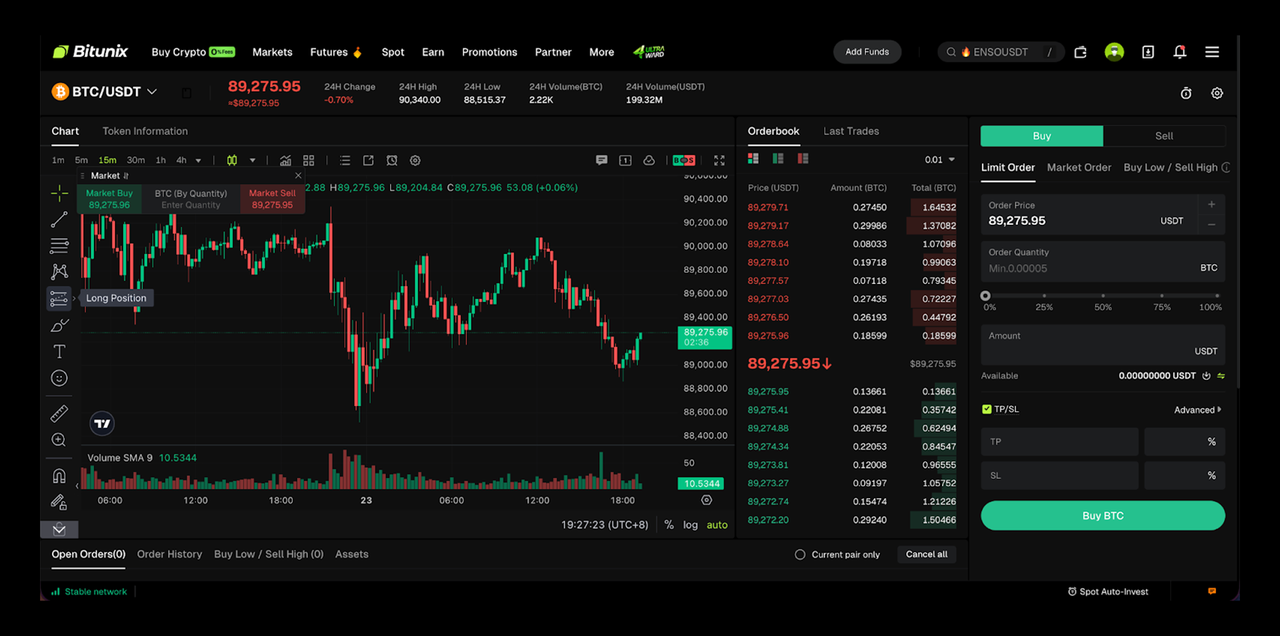
Step 2: Pick a trading pair
A trading pair shows what you buy and what you pay with, like BTC/USDT.
Step 3: Choose a market order
Market orders are the simplest way to start because they execute at the current market price. We explain the difference between market and limit orders in its spot transaction guide.
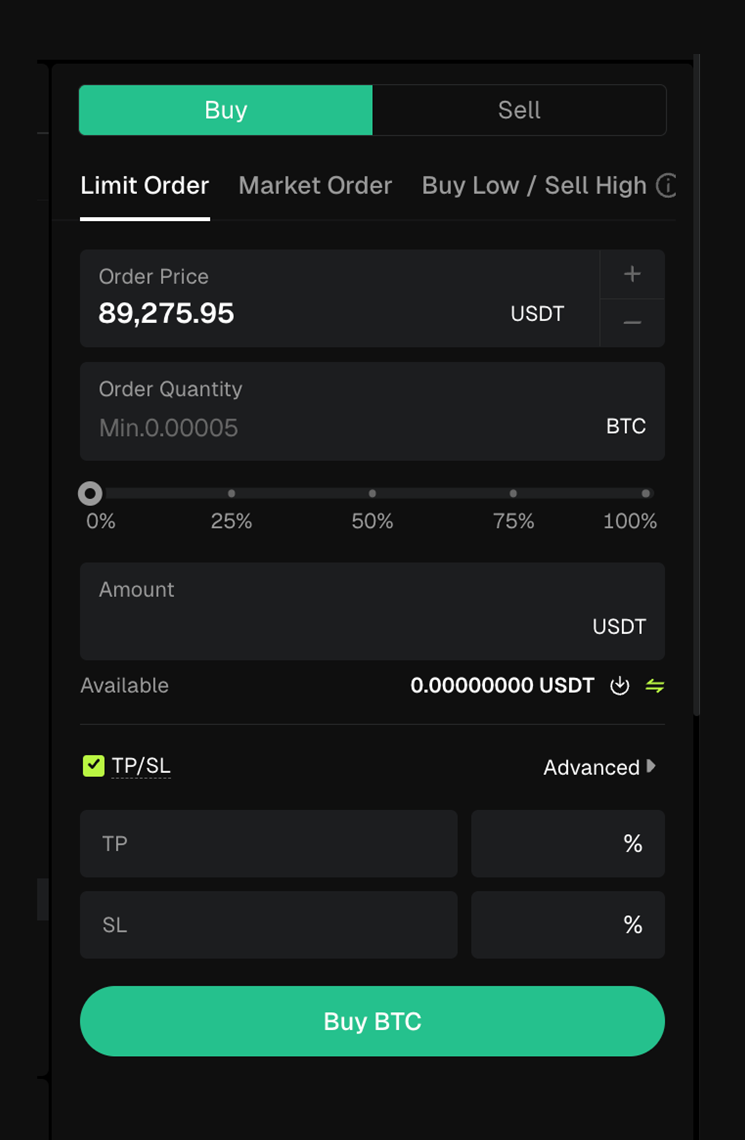
Step 4: Enter the amount
Enter how much you want to spend, for example, how much USDT you want to use.
Step 5: Confirm the trade
Once the order fills, your balance updates. The spot transaction guide notes that you can view the relevant asset information after completing the order.
Conclusion: The Journey Begins
Nice work. You registered, secured, and funded your Bitunix account, then placed a first spot trade. From here, take it one feature at a time. Explore futures, copy trading, or earn products only after you understand the risks and the basics. And remember: the goal is not to press buttons fast. The goal is to press the right buttons.
This is just the beginning. Download the app, log in, and explore our other features like futures trading, copy trading, and our earn products. Welcome to the future of crypto trading.
FAQ
How long does KYC verification usually take on Bitunix?
Bitunix says verification completes after it reviews your documents and information. The exact time varies by queue and document clarity.
What should I do if I don’t receive my email verification code?
Check spam and filters, then try to resend. If you used the wrong email or lost access, Bitunix provides steps to change your email in the Security settings.
Is it safe to complete KYC on Bitunix?
KYC is a standard process for exchanges to reduce fraud and meet compliance needs. Bitunix frames KYC as part of preventing illegal activity and enabling withdrawals.
What is the difference between a market order and a limit order?
A limit order lets you set a specific price. A market order executes at the current market price.
How can I check the status of my deposit?
Deposits require network confirmations first. If it is taking longer than expected, check the transaction hash on a block explorer and compare it to the required confirmations. Bitunix notes deposits can take 3 to 30 minutes, depending on network status.
What are the benefits of completing KYC Level 2?
Bitunix lists higher withdrawal limits for higher KYC tiers, with Level 2 having a higher daily limit than Level 1.
Can I trade on Bitunix without completing KYC?
Bitunix states that KYC is required for withdrawals and publishes different KYC tiers. For what you can do without KYC in your region, check the current account prompts and KYC tier rules inside your profile.
What should I do if I lose my 2FA device?
Bitunix offers a self-service reset option for Google Authenticator. Start with the setup steps and, if needed, use the reset flow in the Help Center.
Are there any fees for depositing crypto into Bitunix?
Bitunix states it does not charge deposit fees. Your sending wallet or exchange may still charge a network fee.
Where can I see my trading history?
On web, Bitunix says you can open Transaction History under Assets, then filter for Spot.
Glossary
- Crypto exchange — A platform where you buy, sell, and trade cryptocurrencies.
- Bitunix account — Your user profile that holds your login, security settings, and balances on the platform.
- Bitunix registration — The sign-up process, where you create an account with your email or phone and verify a code.
- Verification code — A one-time code sent by email or SMS to confirm you control that address or number.
- KYC — Know Your Customer checks that verify identity using personal details and documents.
- Basic verification — The first KYC level that collects identity details and ID documents.
- Advanced verification — A higher KYC level that adds extra information, such as proof of address.
- 2FA — Two-factor authentication that adds a second login step using a time-based code.
- Google Authenticator — An app that generates time-based 2FA codes for logins and sensitive actions.
- Deposit — Moving crypto from an external wallet or another exchange into your exchange wallet.
- Network — The blockchain system used to move tokens, such as TRC-20 or ERC-20.
- Deposit address — The wallet address you copy from the deposit screen to receive crypto.
- Memo or tag — An extra identifier required by some networks or tokens to route deposits correctly.
- Spot market — The market where you trade the actual asset for immediate delivery.
- Market order — An order that executes at the current market price.
About Bitunix
Bitunix is a global cryptocurrency derivatives exchange trusted by over 3 million users across more than 100 countries. The platform is committed to providing a transparent, compliant, and secure trading environment for every user. Bitunix offers a fast registration process and a user-friendly verification system supported by mandatory KYC to ensure safety and compliance. With global standards of protection through Proof of Reserves (POR) and the Bitunix Care Fund, Bitunix prioritizes user trust and fund security. The K-Line Ultra chart system delivers a seamless trading experience for both beginners and advanced traders, while leverage of up to 200x and deep liquidity make Bitunix one of the most dynamic platforms in the market.
Bitunix Global Accounts
X | Telegram Announcements | Telegram Global | CoinMarketCap | Instagram | Facebook | LinkedIn | Reddit | Medium
Disclaimer: Trading digital assets involves risk and may result in the loss of capital. Always do your own research. Terms, conditions, and regional restrictions may apply.