Within just three days, BitMEX and BitMart moved to wind down their exchange operations, marking a defining consolidation milestone for the crypto industry.
According to CoinMarketCap data, both platforms had already fallen out of the top-tier rankings prior to their announcements, as evaporating retail interest and fierce competition severely eroded their trading volumes. Notably, BitMEX's share of the global derivatives market had decayed to a mere 0.08%, underscoring its marginalization long before the final exit.
The contrast between their historical prominence and sudden closures highlights the unforgiving evolution of the market:
BitMEX (Founded 2014): The pioneer that fundamentally reshaped crypto trading by inventing the 100x leveraged perpetual swap—a product that once allowed it to command over 55% of global crypto derivatives volume. On July 23, 2026, BitMEX officially announced it would permanently shutter all trading operations by September 23, 2026.
BitMart (Founded 2018): A global spot exchange that onboarded over 13 million users during the bull market by aggressively listing over 1,700 exotic altcoins. Caught in a matching liquidity squeeze, BitMart followed suit on July 26, 2026, announcing the complete termination of its services by August 26, 2026.
This wave of liquidations arrives as trading platforms face a brutal balancing act between global expansion, rigid compliance mandates, and long-term capital efficiency. For users holding positions on either platform, the immediate priority is understanding the official timelines and securing fund withdrawals.
This guide breaks down the shutdown schedules, details critical asset migration steps, and provides a practical blueprint for transferring funds securely to Bitunix.
Why Are BitMEX and BitMart Ending Their Operations?
While both platforms publicly cited generic shifting "operating conditions and strategic directions" as catalysts, their orderly liquidations point to deeper, structural vulnerabilities unique to each business model.
BitMEX: The Cost of Regulatory Scrutiny and Cannibalized Liquidity
BitMEX's exit marks the end of an era for crypto's earliest derivatives venue. Its decline was accelerated by two irreversible headwinds:
The Compliance Hangover: Years of intense regulatory battles with U.S. authorities resulted in massive financial penalties and rigid compliance mandates, permanently stripping the platform of its historical operational flexibility and offshore advantage.
The Liquidity Squeeze: The derivatives landscape has shifted from a monopoly into an aggressive multi-front war. BitMEX's market share was rapidly cannibalized from above by compliant centralized giants like Binance and OKX, and from below by hyper-efficient, decentralized perpetual protocols like Hyperliquid.
BitMart: Squeezed by Altcoin Fatigue and the MiCA Framework
BitMart's sudden closure exposes the fragility of mid-tier spot exchanges that rely heavily on retail speculative volume.
Prohibitive Compliance Costs: The global regulatory bar has risen exponentially. The sweeping enforcement of rigid frameworks, such as the European Union's Markets in Crypto-Assets (MiCA) regulation, has made maintaining fragmented global operations cost-prohibitive for exchanges lacking massive institutional backing.
Retail Capital Flight: BitMart's monetization model depended on long-tail asset liquidity—specifically exotic memecoins and low-cap altcoins. As retail trading volumes dried up and investors migrated their capital toward secure, top-tier ecosystems, the platform faced a terminal squeeze on transaction fee revenues.
The Macro Takeaway: The Era of Exchange Consolidation
The dual exit of BitMEX and BitMart confirms that operating a global exchange in 2026 is no longer just about leverage or token volume. It requires massive, continuous capital expenditure across institutional-grade security, sovereign compliance, and deep, organic liquidity. For mid-tier venues unable to defend a distinct structural niche, orderly liquidation has become the only viable option, clearing the path for highly liquid and secure alternatives like Bitunix.
BitMEX and BitMart Shutdown Timeline
The two exchanges announced their shutdown plans under different circumstances and timelines. Understanding the official schedule is the first step for users preparing to withdraw funds. All times below are based on UTC.
BitMEX Closure Timeline

BitMEX announced on July 23, 2026, that it would close its exchange operations on September 23, 2026, at 04:00 UTC.
Unlike spot-focused exchanges, BitMEX has historically focused on crypto derivatives trading. Users need to pay particular attention to open positions, margin balances, and the transition from normal trading to the final shutdown period.
Date and Time (UTC) | Service Changes | Recommended User Action |
July 23, 2026 | BitMEX announced the closure of its exchange operations and stopped accepting new account registrations immediately. | Existing users should review account balances, open positions, and withdrawal arrangements. |
July 30, 2026, 12:00 | BitMEX announced the early settlement and delisting of certain illiquid contracts as part of the platform wind-down process. | Users holding affected contracts should review settlement details and manage positions accordingly. |
August 26, 2026, 04:00 | Risk limits will be applied. Users will no longer be able to open new positions and will only be able to reduce existing positions. BitMEX may begin force-closing positions during the wind-down period. | Close or adjust open derivatives positions before this transition to avoid forced position management. |
September 23, 2026, 04:00 | BitMEX officially closes exchange services. Any remaining open positions will be force-closed at the Closure Time. | Complete position management and withdraw available assets before the closure time. |
After September 23, 2026 | Users can continue accessing account information, including wallet balances and historical transaction records, and withdraw remaining assets according to BitMEX's arrangements. | Withdraw remaining assets as soon as possible and monitor official updates. |
BitMart Wind-Down Timeline

According to BitMart's official announcements, the platform will gradually suspend different services before the final shutdown. The timeline below summarizes the key dates users should be aware of.
Date and Time (UTC) | Service Changes | Recommended User Action |
July 26, 2026, 01:30 | New registrations, deposits, and new trading orders suspended. Futures accounts switched to reduce-only mode. Certain services, including copy trading, grid trading, and API services, began phased suspension. | Stop sending additional funds to BitMart and review your withdrawal plan. |
August 8, 2026, 23:59 | Deadline stated in BitMart's separate notice for certain U.S. accounts. | Affected U.S. users should close positions and withdraw assets before this deadline. |
August 26, 2026, 01:00 | Spot, futures, and other trading services end. Existing futures positions may be handled according to applicable settlement rules. | Cancel remaining orders and manage open positions before trading services stop. |
August 26, 2026, 05:00 | Recommended deadline for submitting withdrawal requests. | Submit withdrawal requests before this time to avoid last-minute processing issues. |
January 31, 2027, 15:59 | BitMart officially ceases operations according to its announced timeline, followed by limited account access arrangements. | Complete all withdrawals well before the final shutdown date. |
For BitMart users, the main challenge isn't only timing but also asset compatibility. Because the platform has historically supported a wide range of digital assets, users should confirm whether their holdings can be directly withdrawn to their chosen destination. A token being available on BitMart doesn't necessarily mean it will be supported by another exchange or wallet — checking supported assets and networks before initiating a transfer can help avoid unnecessary complications.
Additional Deadline for Certain BitMart Users
In addition to the general wind-down timeline, BitMart announced a separate deadline for identified U.S. users. According to BitMart's notice, affected U.S. accounts must complete the following actions by 23:59 UTC on August 8, 2026:
BitMart also stated that identified U.S. accounts may face restrictions on certain activities, including new deposits, new positions, and new product subscriptions. Users who fall under this category should follow the earlier deadline rather than the general shutdown schedule.
For users in affected regions, the transfer process remains the same:
Confirm the receiving platform supports the asset.
Select the correct blockchain network.
Include Memo/Tag information when required.
Keep transaction records after withdrawal.
How the Shutdown Affects Different Crypto Asset Holders
Although BitMEX and BitMart are both winding down their exchange operations, users shouldn't approach asset migration the same way — the appropriate steps depend on the type of services users rely on and the assets they hold.
For BitMEX users, the main priority is managing derivatives positions and margin balances before trading restrictions take effect. For BitMart users, the main challenge is reviewing token support, withdrawal availability, and transfer options across a wider range of spot assets.
Before moving any funds, users should first confirm:
Current account balances
Whether assets are available for withdrawal
Whether the destination platform supports the same asset
Whether the selected blockchain network is compatible
Whether additional information such as Memo or Tag is required
Managing Assets on BitMEX: Focus on Positions Before Withdrawals
BitMEX has historically focused on cryptocurrency derivatives trading, which means users should prioritize position management before withdrawing remaining assets. For users with open contracts, the first step isn't simply requesting a withdrawal, but confirming how existing positions and margin balances will be handled during the wind-down process.
Before withdrawing from BitMEX, users should complete the following steps:
Review Open Positions and Margin Balances
Users should check:
Active futures or perpetual contracts
Unrealized profit and loss
Available margin balance
Assets currently available for withdrawal
Funds used as margin for active positions may not be immediately available until positions are closed, settled, or otherwise handled according to BitMEX's closure procedures.
Close or Adjust Positions Before Trading Restrictions
Users with open derivatives positions should manage their exposure before the reduce-only phase begins. Waiting until the final stage of the shutdown process may increase the risk of:
Forced position management
Limited trading flexibility
Insufficient time to adjust positions
Users who no longer wish to maintain exposure should consider closing positions before the relevant deadline announced by BitMEX.
Confirm Remaining Account Balances
After closing positions, users should review their account again to confirm:
This helps ensure that all available funds are accounted for before submitting withdrawal requests.
Download Trading and Account Records
Before the platform fully closes, users may wish to save:
Trading history
Deposit records
Withdrawal records
Account statements
These records can be useful for personal accounting, tax reporting, or future transaction verification.
Withdraw Remaining Assets Before Closure
After completing position management and confirming available balances, users should submit withdrawal requests before the final closure time. Users should avoid waiting until the last moment, as withdrawal processing times may vary depending on network conditions and platform activity.
Managing Assets on BitMart: Check Token Support Before Moving Funds
BitMart users may face different challenges because the platform has historically supported a broader range of spot assets. Unlike a derivatives-focused platform, BitMart users may hold:
Because of this, users should review each asset individually before deciding how to migrate funds.
Review All Assets and Product Balances
Before submitting withdrawals, users should check:
Different products may follow different timelines during a platform wind-down. Users should review relevant announcements instead of assuming all assets become available for withdrawal at the same time.
Cancel Open Orders and Manage Trading Positions
Users should cancel remaining spot orders and manage any open futures positions before trading services are fully suspended. Leaving orders or positions open may create unnecessary confusion when reviewing final balances — a clean account state makes it easier to confirm which assets are ready for withdrawal.
Check Destination Platform Support Before Transferring
Users shouldn't assume every BitMart-listed token can be transferred directly to another exchange. Before withdrawing, confirm:
Whether the receiving platform supports the token
Whether deposits for that token are enabled
Whether the same blockchain network is available
If a token isn't supported by the destination platform, users may need to consider other available options depending on the asset and current market conditions. There's no universal requirement to convert all assets into USDT before withdrawal.
Avoid Relying on Last-Minute Token Conversion
During an exchange wind-down, users shouldn't assume that smaller tokens can always be sold into stablecoins before leaving the platform. Trading availability may change during the shutdown process, and some assets may have limited liquidity.
A more practical approach is:
Review the assets you currently hold.
Check whether direct withdrawal is available.
Confirm whether the destination platform supports the asset.
Decide the most suitable transfer method based on the available options.
Download Account Records and Prepare for Withdrawal
Before the platform reaches its final shutdown stage, users should save:
When submitting withdrawals, users should also prepare:
Correct receiving address
Matching blockchain network
Required Memo/Tag information
Any necessary account verification details
What to Do Before an Exchange Shutdown: A Practical Checklist
When an exchange announces a wind-down, the biggest risk for users is often not the shutdown itself, but waiting too long to take action. As closure dates approach, exchanges may experience higher withdrawal volumes, additional account reviews, or longer processing times. Preparing early gives users more time to resolve potential issues and avoid last-minute problems.
Before transferring assets away from a closing exchange, users should review the following areas.
Confirm Official Announcements and Withdrawal Deadlines
The first step is to verify the latest information through official sources. Exchange shutdown periods often attract phishing attempts and fake support services. Users may encounter:
Fake withdrawal websites
Impersonated customer support accounts
Fraudulent asset recovery services
Phishing emails requesting account information
Users should access announcements through official exchange websites and verified channels rather than relying on links shared through unofficial sources.
Legitimate exchanges will never ask users to provide:
Private keys
Seed phrases
Wallet recovery phrases
Any request for this information should be treated as a potential security risk.
Review Your Assets and Available Transfer Options
Not all crypto assets follow the same migration path during an exchange shutdown. Before withdrawing, users should review:
Current asset balances
Whether withdrawals are available
Whether the destination platform supports the asset
Which blockchain networks are supported
Whether additional information such as Memo or Tag is required
For assets supported by the receiving platform, the transfer process is usually straightforward:
Select the matching asset.
Choose the correct blockchain network.
Copy the receiving address.
Submit the withdrawal request.
For unsupported assets, users may need to consider alternative options depending on the asset, liquidity conditions, and available services. There's no universal requirement to convert every asset into a major cryptocurrency such as USDT before withdrawal — the appropriate approach depends on the specific asset and the available transfer options.
Prepare Account Information Before Moving Funds
Before submitting withdrawal requests, users should make sure their account information and security settings are ready. Depending on the exchange's requirements, users may need to confirm:
Identity verification status
Security verification methods
Withdrawal permissions
Whitelisted addresses (if applicable)
Completing these steps early can help avoid delays caused by additional verification requirements during the final stages of a shutdown.
Keep Records of Your Transactions
Before an exchange fully closes, users should consider downloading and saving relevant account records, including:
Deposit history
Withdrawal history
Trading records
Transaction details
These records can be useful for personal accounting, tax reporting, future transaction verification, or resolving potential support issues. Users shouldn't assume that all account information will remain immediately accessible after the platform reaches its final shutdown stage.
Verify Transfer Details Before Confirmation
Before confirming any withdrawal, users should complete a final review of the transfer details. A successful crypto transfer requires:
For example, sending an asset through an unsupported network may result in delayed processing or require additional recovery procedures. Taking a few minutes to verify transfer details before submission can help prevent irreversible mistakes.
How to Transfer Crypto From a Closing Exchange
After confirming the asset strategy, the actual transfer process follows the standard exchange withdrawal flow. Whether users are transferring funds from BitMEX, BitMart, or another platform, the core steps remain similar:
Confirm the receiving platform supports the asset.
Obtain the correct deposit information.
Submit the withdrawal request from the original exchange.
Track the transaction until confirmation.
Using Bitunix as an example, users transferring supported assets can follow the standard exchange-to-exchange transfer process below.
Step 1: Check Asset and Network Compatibility
Before copying a deposit address, confirm the following information:
Cryptocurrency name
Supported blockchain network
Minimum deposit requirement
Required Memo/Tag information
Many cryptocurrencies operate across multiple networks. USDT, for example, may exist on different blockchain networks, and the selected network on the sending platform must match the receiving platform. A network mismatch is one of the most common causes of failed crypto transfers.
Before confirming a withdrawal:
Open the deposit page on the receiving platform.
Confirm the available network.
Select the identical network on the sending platform.
Review all transfer details before submission.
Step 2: Create a Bitunix Account and Set Up a Deposit Address
Users who already have a Bitunix account can directly proceed to the deposit process. New users will need to create an account before receiving transferred assets.
After logging in to Bitunix Web:
Create a Bitunix account and complete the required account setup process.
Click the Wallet icon in the upper-right corner.
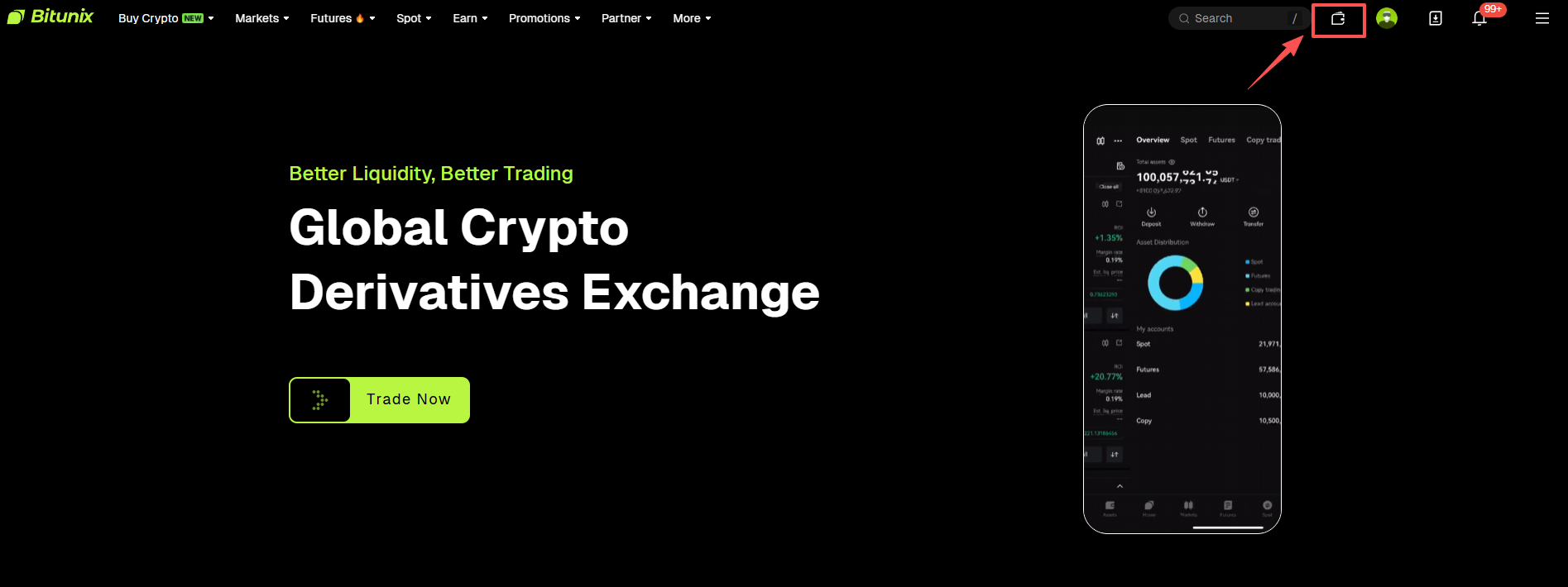
Select Deposit.

Choose the cryptocurrency you want to receive.
Select the supported blockchain network.
Copy the generated deposit address or save the QR code.

Check whether the selected asset requires additional information, such as a Memo or Tag.
Before transferring assets, carefully review the deposit details shown on the page, including:
For example, when depositing USDT, users need to select the correct supported USDT network before copying the deposit address. The withdrawal network selected on the original exchange must match the network selected on Bitunix.
Step 3: Submit the Withdrawal Request From the Original Exchange
After obtaining the Bitunix deposit details, return to the original exchange and submit the withdrawal request. The process generally includes:
Open the withdrawal page on BitMEX, BitMart, or another exchange.
Select the same cryptocurrency chosen on Bitunix.
Select the same blockchain network.
Paste the Bitunix deposit address.
Enter the withdrawal amount.
Add Memo/Tag information if required.
Complete security verification and submit the request.
Before confirming the transaction, verify:
The asset matches on both platforms.
The blockchain network is identical.
The deposit address is correct.
Any required Memo/Tag information has been included.
Step 4: Track the Transaction Status
After a withdrawal is processed, the sending platform usually provides a transaction hash (TxID). The TxID can be used to:
Check blockchain confirmation status
Verify whether the transaction has been broadcast
Provide transfer details when contacting support
Transfer times may vary depending on blockchain congestion, required confirmation numbers, and exchange processing procedures. If a deposit doesn't appear immediately, users should first check the transaction status on-chain before assuming the transfer has failed.
Bitunix Deposit Requirements Before Receiving Crypto
Before transferring assets from a closing exchange, users should review the deposit requirements of the receiving platform. A successful crypto transfer depends on more than just copying a wallet address — the asset type, blockchain network, deposit amount, and any required additional information must all match the receiving platform's requirements.
For users transferring supported assets to Bitunix, the deposit page provides the necessary information before submitting a withdrawal request, including the selected asset, available networks, deposit address, and additional requirements where applicable.
Check Account Availability Before Transferring Assets
Before transferring assets to a receiving platform, users should confirm that they're eligible to create and use an account in their jurisdiction. Exchange services may vary depending on local regulations, supported regions, and account verification requirements.
Before initiating a transfer, users should confirm:
Whether the platform is available in their region
Whether account registration is supported
Whether identity verification requirements apply
Whether the selected asset and services are available for their account
Completing account setup before withdrawing from the original exchange can help avoid delays caused by registration or verification issues.
Minimum Deposit Amount
One detail that users often overlook during exchange-to-exchange transfers is the minimum deposit amount. Different cryptocurrencies and networks may have different minimum deposit requirements, and if the transferred amount is below the required threshold, the deposit may not be credited automatically.
Before withdrawing funds from BitMEX, BitMart, or another exchange, users should confirm:
The minimum deposit amount shown on the receiving platform
The withdrawal fee charged by the sending platform
The actual amount expected to arrive after fees
For small balances, especially during exchange closures, users should consider whether the transfer amount is sufficient to meet the receiving platform's deposit requirements.
Network Compatibility
Network selection is one of the most important steps in any crypto transfer. The same cryptocurrency may exist on multiple blockchain networks — USDT, for example, can be transferred through different networks depending on platform support.
Before confirming a withdrawal, users should ensure:
The asset selected on the sending exchange matches the deposit asset
The withdrawal network matches the deposit network
The receiving platform supports the selected network
A common mistake is selecting the correct token but the wrong network. Withdrawing an asset through one blockchain network while the receiving address only supports another, for instance, may result in delayed processing or require additional recovery procedures. Checking the network information on both platforms before submitting the transfer request is the safest approach.
Memo and Tag Requirements
Some cryptocurrencies require additional identifiers beyond the wallet address. These identifiers may appear as:
Assets such as XRP, EOS, and some other cryptocurrencies may require this additional information for automated account recognition. If a Memo or Tag is required but not included, the transaction may still arrive on-chain but fail to be automatically credited to the correct account.
Before transferring:
Check whether the receiving platform displays a Memo/Tag requirement.
Copy the required information exactly.
Include it when submitting the withdrawal request from the original exchange.
If a Memo or Tag is missing, users should keep the transaction details, including the TxID, and contact the receiving platform's support team for assistance.
Common Crypto Transfer Issues and Solutions
Even when users follow the standard withdrawal process, issues can still occur during asset migration. The most common problems usually involve network selection, deposit requirements, or incomplete transfer information.
Blockchain Transaction Confirmed but Deposit Not Received
A transaction showing as confirmed on-chain doesn't always mean the funds have already been credited to the receiving account. Possible reasons include:
The receiving platform requires additional confirmations
The deposit amount is below the minimum requirement
The wrong network was selected
The asset is not supported
A required Memo/Tag was missing
The first step is to check:
Transaction status through the blockchain explorer.
Whether the receiving platform supports the asset and network.
Whether the deposit requirements were met.
If further assistance is needed, users should prepare:
This information helps support teams investigate the transfer more efficiently.
Deposit Amount Below the Minimum Requirement
Small balances are common when users are leaving an exchange, especially if they hold multiple low-value assets. Before transferring, users should compare:
If the final amount after fees doesn't meet the receiving platform's requirement, users may need to consider alternative solutions depending on the asset and available services.
Wrong Network Selected
A network mismatch is one of the most serious transfer mistakes because crypto transactions are generally irreversible once confirmed on-chain. Before submitting a withdrawal:
Compare the withdrawal network with the deposit network.
Do not rely only on the wallet address format.
Confirm network compatibility on both platforms.
If a wrong-network transfer has already occurred, users should collect transaction details and contact the receiving platform for possible recovery assistance. Recovery availability depends on the asset type, network, and technical circumstances.
Security Risks During Exchange Shutdowns
Exchange shutdown announcements often create urgency, which can also increase scam activity. Users should be particularly careful with messages claiming to offer:
Verify Official Sources
Always confirm shutdown-related information through official channels. Avoid clicking:
Unverified withdrawal links
Unknown customer support messages
Social media accounts impersonating exchange representatives
When accessing an exchange, manually enter the official website address or use previously verified bookmarks.
Never Share Private Keys or Recovery Phrases
Legitimate exchanges and customer support teams will never request:
Private keys
Seed phrases
Wallet recovery phrases
Anyone asking for this information is attempting to gain control of your assets.
Be Careful With Fake Support Accounts
During a platform shutdown, scammers often monitor public discussions and pretend to provide assistance. Common warning signs include:
Asking users to connect wallets
Requesting remote access
Sending unofficial recovery links
Promising guaranteed asset recovery
If assistance is required, use official support channels listed on the platform's website.
Conclusion
The closure of BitMEX and BitMart highlights an important aspect of using centralized exchanges: users should always understand how to manage their assets when platform services change. Although both platforms are winding down operations, the appropriate response depends on the type of assets held and the services involved.
BitMEX users should prioritize managing derivatives positions and remaining balances, while BitMart users should pay closer attention to token support, withdrawal availability, and network compatibility.
For any exchange-to-exchange transfer, the most important steps remain the same:
Confirm the asset and network are supported.
Review minimum deposit requirements.
Include Memo/Tag information when required.
Verify withdrawal details before submitting transactions.
Use only official channels during platform transitions.
Preparing withdrawals early and checking transfer details carefully can help users move assets safely and avoid unnecessary complications during an exchange shutdown.
This article is for informational purposes only and does not constitute financial or investment advice. Cryptocurrency trading and transfers carry risk, including irreversible loss of funds. Always verify official announcements and platform requirements before taking action.
About Bitunix
Bitunix is a global cryptocurrency derivatives exchange trusted by over 5 million users across more than 150 countries/districts. The platform is committed to providing a transparent, compliant, and secure trading environment for every user. Bitunix offers a fast registration process and a user-friendly verification system supported by mandatory KYC to ensure safety and compliance.
With global standards of protection through Proof of Reserves (POR) and the Bitunix Care Fund, Bitunix prioritizes user trust and fund security. The K-Line Ultra chart system delivers a seamless trading experience for both beginners and advanced traders, while leverage of up to 200x and deep liquidity make Bitunix one of the most dynamic platforms in the market.
Bitunix Global Accounts
X | Telegram Announcements | Telegram Global | CoinMarketCap | Instagram | Facebook | LinkedIn | Reddit | Medium