Chat with us, powered by LiveChat
Search results
Bitunix Position Voucher User Guide (App)


What is a Futures Position Voucher?

Simply put, a Futures Position Voucher is a trading experience coupon that allows you to "open a position without collateral." When used on designated perpetual contract trading pairs with specific leverage, you can participate in market movements and earn profits without investing your own margin. The notional value of the voucher itself cannot be withdrawn or transferred; however, the actual trading profits generated from using the voucher are fully withdrawable. Each voucher specifies its applicable trading pairs, available leverage, and expiration date. Actual earnings will fluctuate based on market volatility and your chosen position direction.


Key Benefits of Futures Position Vouchers

  • Zero Margin Required: Experience perpetual contract trading without using your own capital.
  • Market Participation: Use the voucher’s notional value to profit from price movements on specific pairs.
  • Keep Your Profits: While the voucher amount isn't withdrawable, the realized profits are yours to keep.
  • Risk-Free Learning: Perfect for beginners to learn contract mechanics or for experienced traders to test strategies during promotions.


How to Use the Voucher

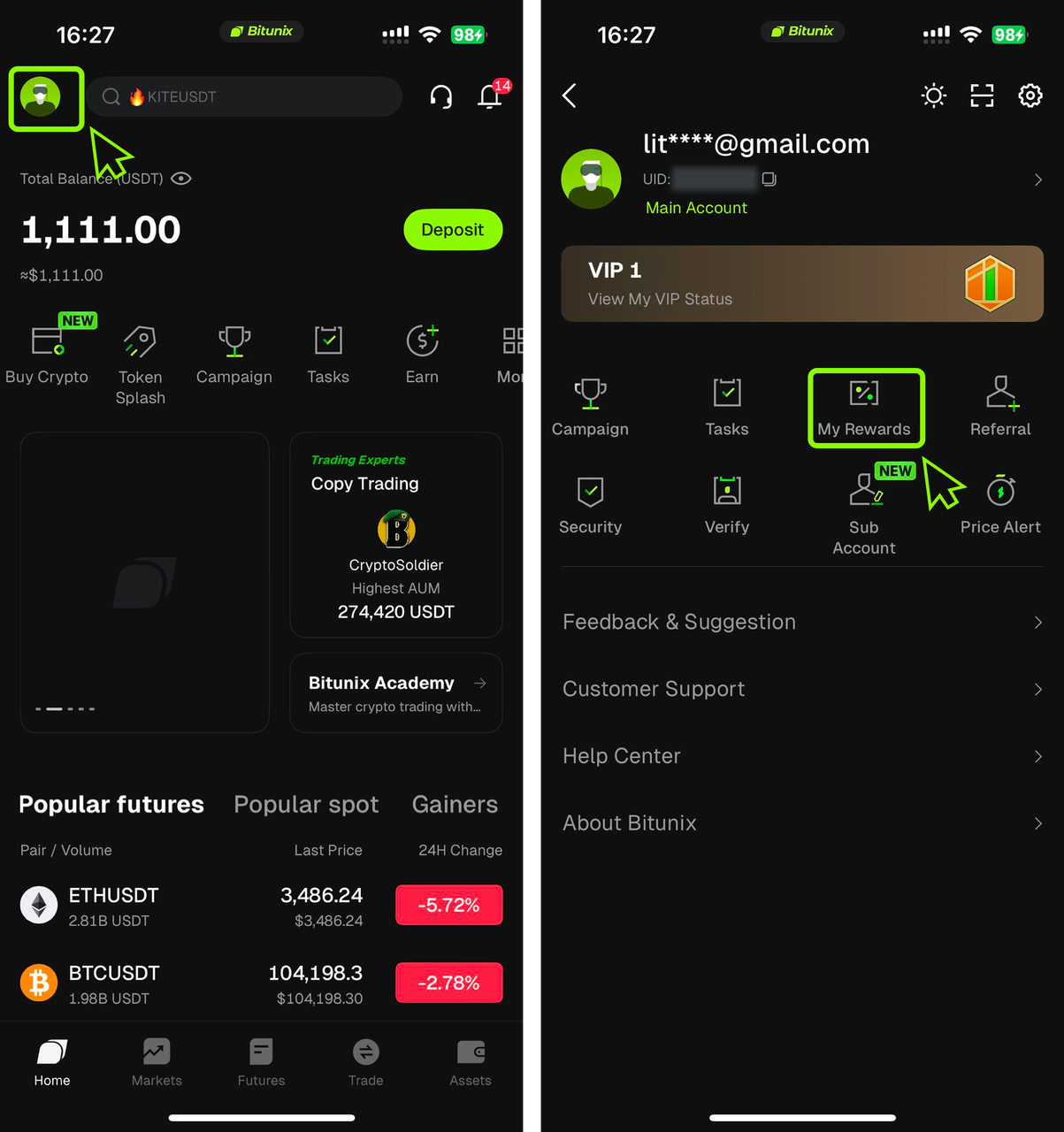
1. Locate Your Reward: Download and log in to the Bitunix App. Tap the "Profile Icon" in the top left corner and select "My Rewards."

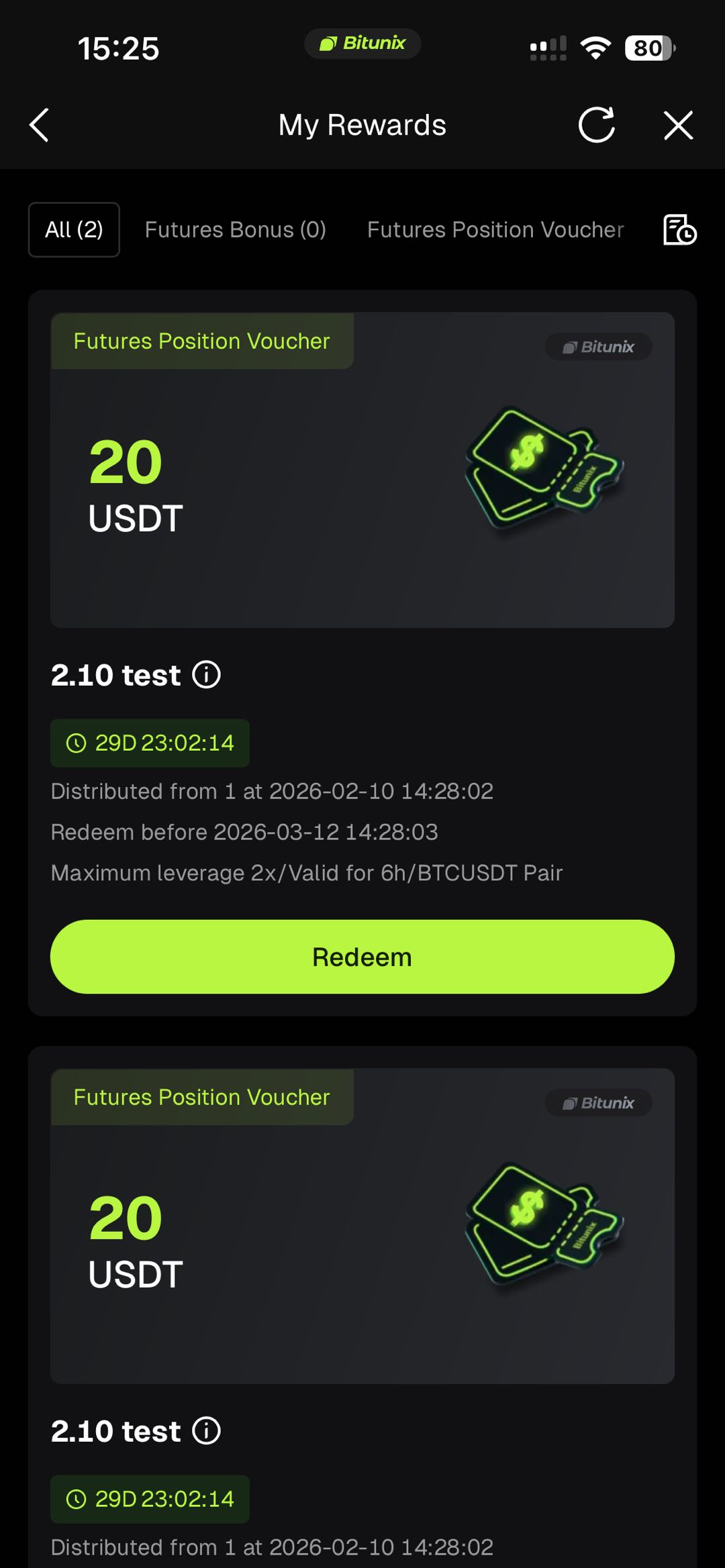
2. Redeem Your Voucher: Within the "My Rewards" page, locate your "Futures Position Voucher" and tap "Redeem." This will automatically redirect you to the Futures trading page. If you already have an active voucher but haven't redeemed it yet, you can also find a "Redeem Now" prompt conveniently located below the positions section on the trading page.
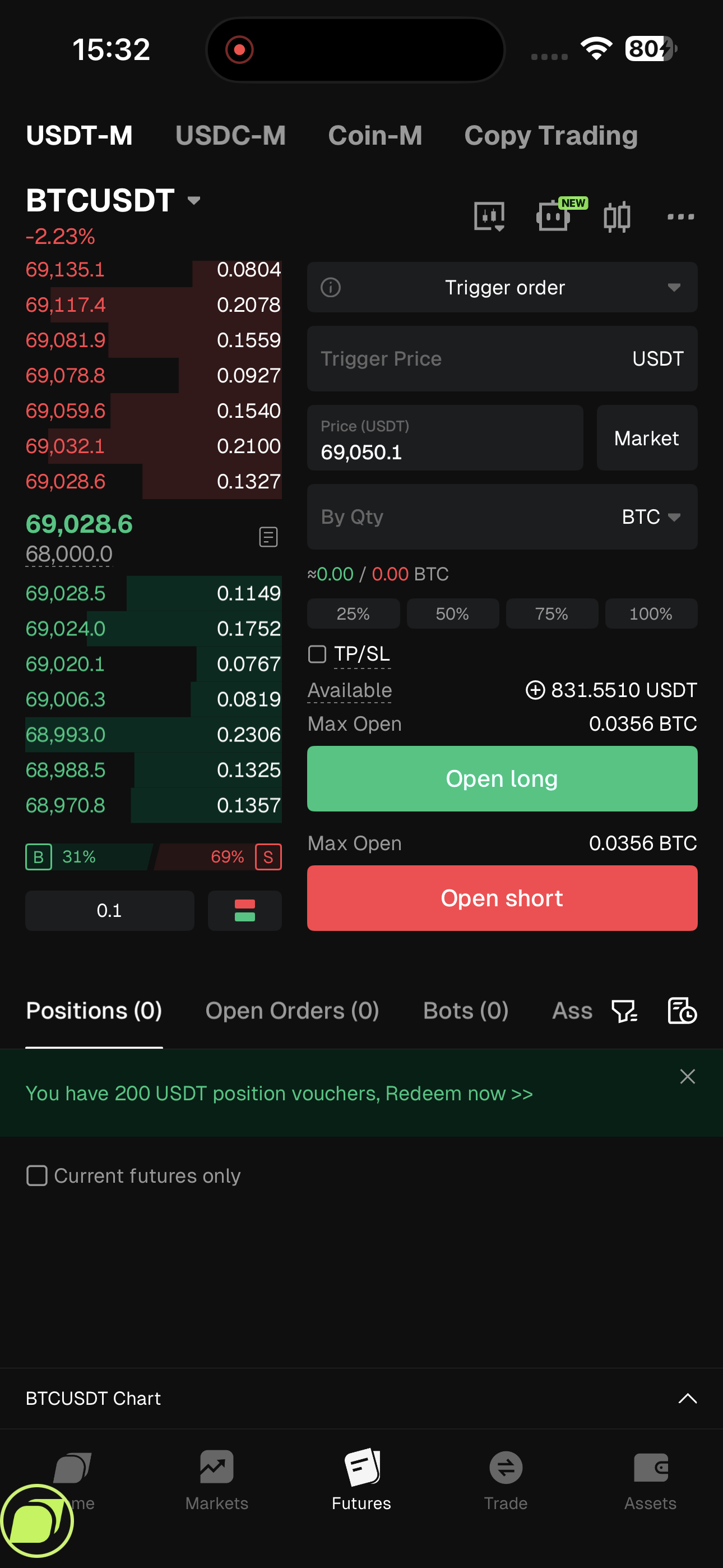
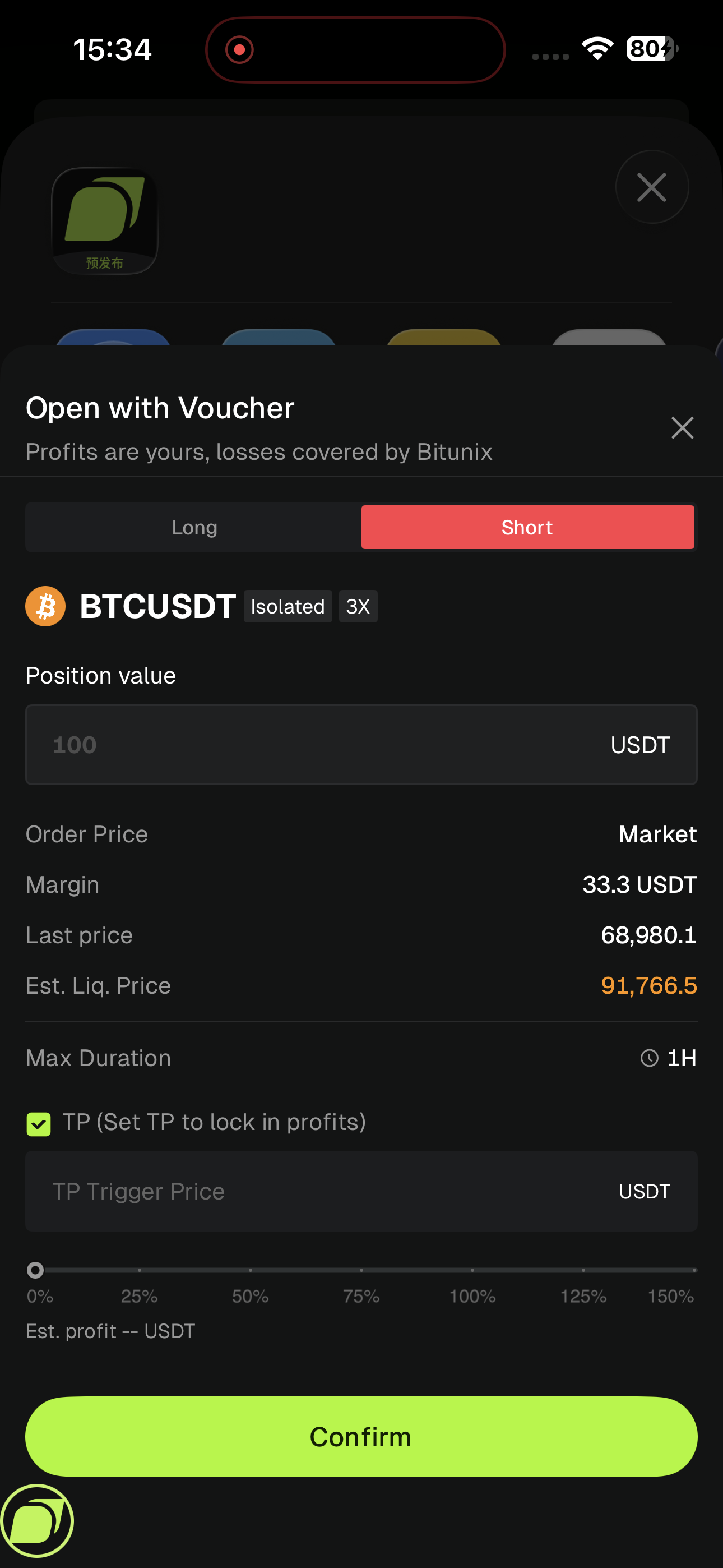
3. Set Your Trade: On the trading page, select your direction by choosing either Long or Short, set your preferred Take Profit (TP) and Stop Loss (SL) levels, and confirm your order. Please keep in mind that the voucher can only be used on specific trading pairs and leverage settings, and if you currently have an open position, the system will prompt you to close it before you can execute the voucher trade.


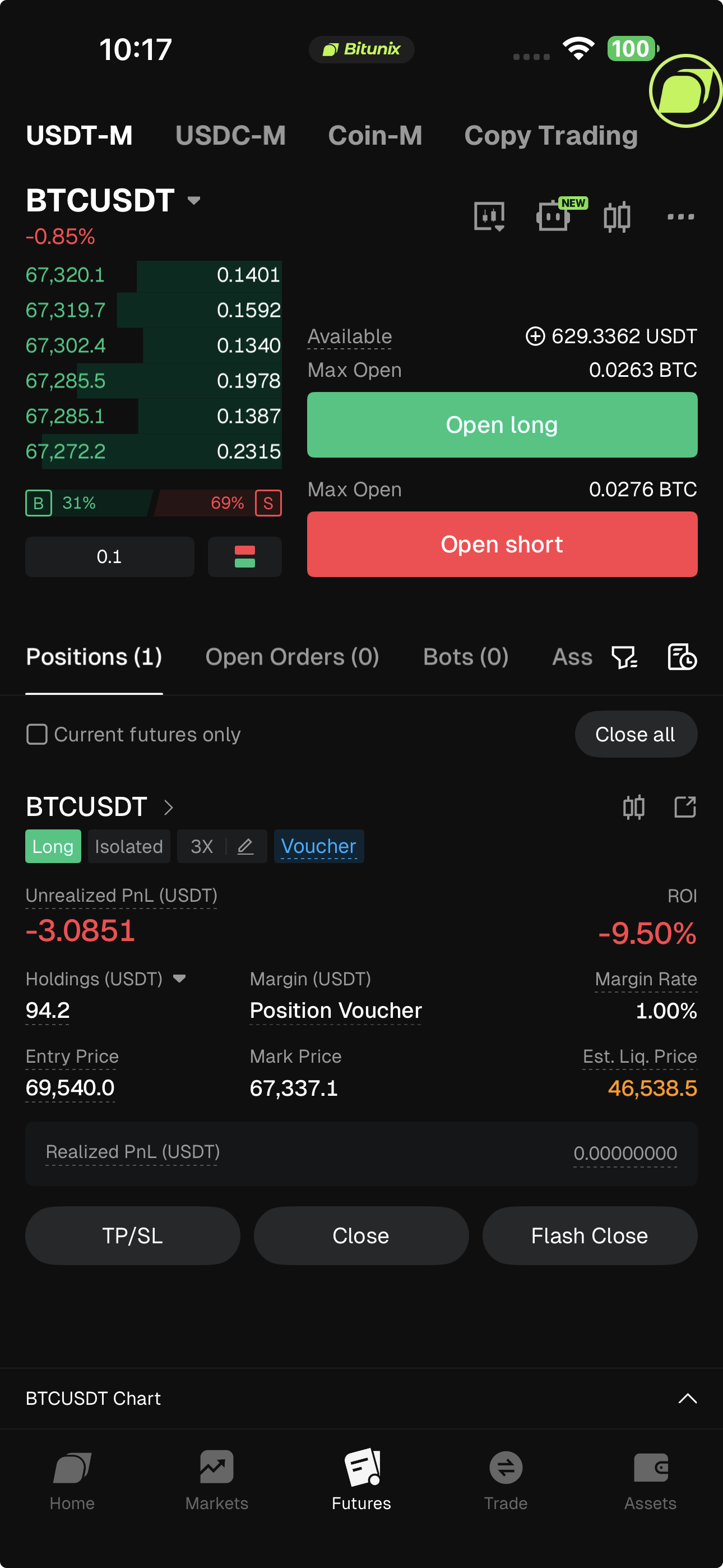
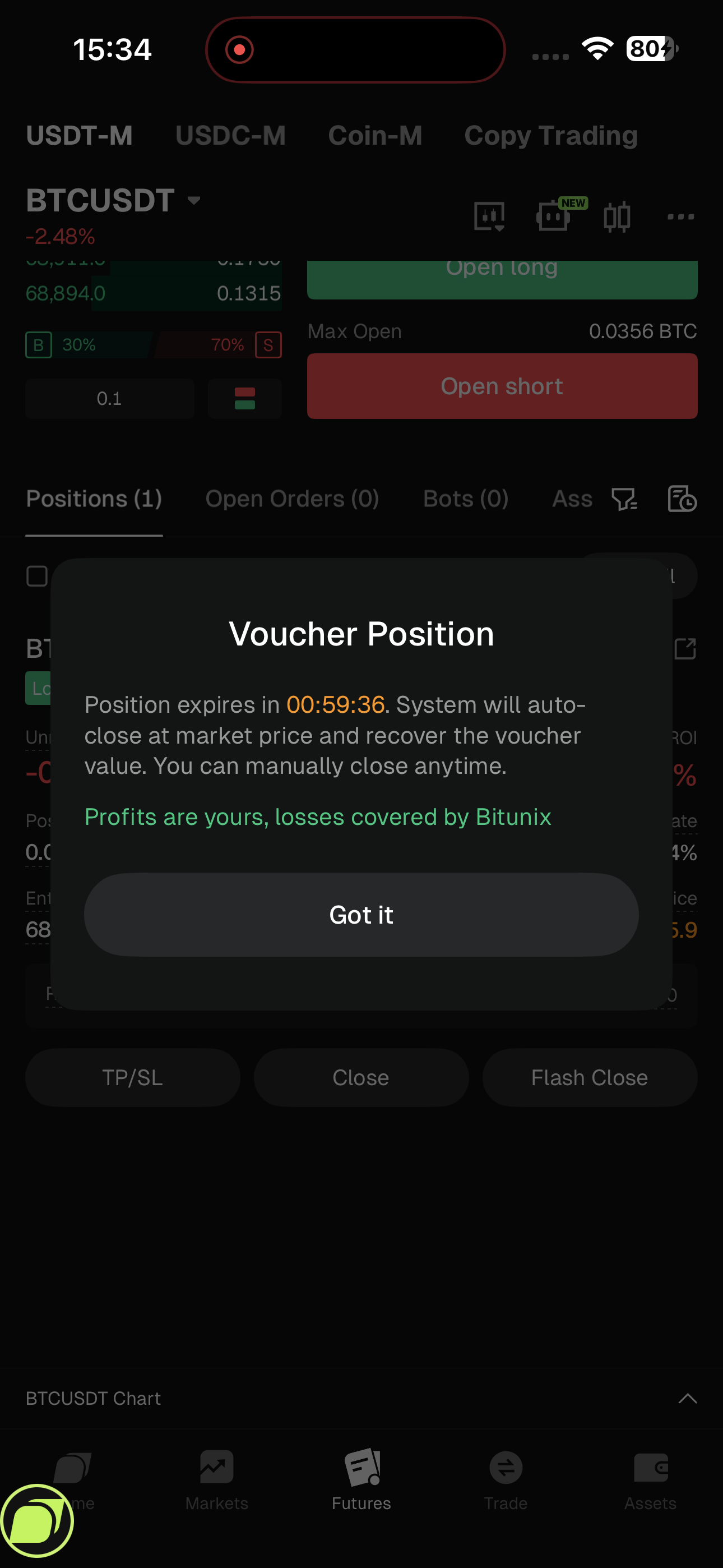
4. Manage Your Position: After placing an order, your position details will be displayed. You can click the "Trial Position" button to view the position’s expiry time. Once the position expires, the platform will automatically close it.
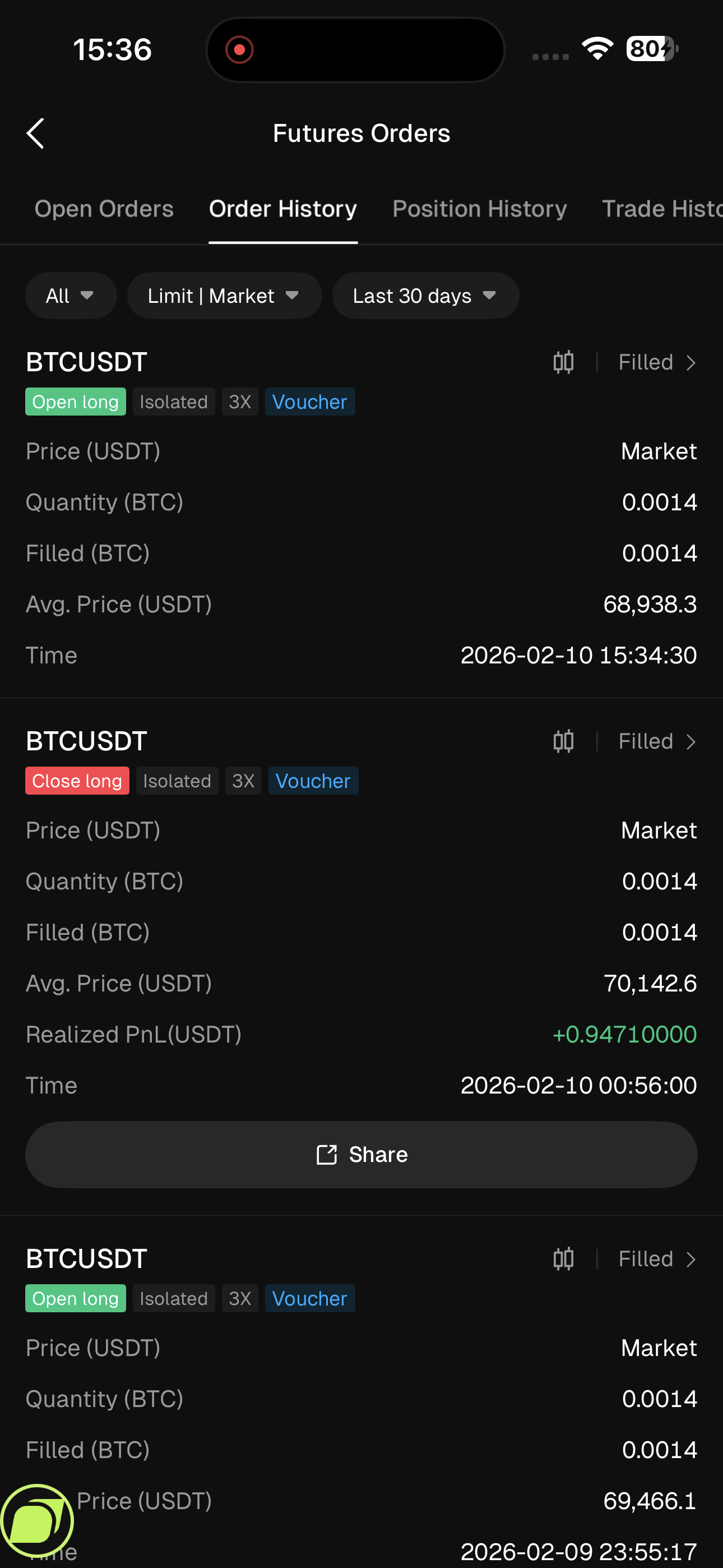
5. View Your History: You can track your activity and review previous trades by navigating to the Futures Order page to view your historical orders. Any trades executed using a Futures Position Voucher will be clearly labeled as a "Trial Position" for easy identification.


Terms and Conditions

  • Time Constraints: Vouchers have an expiration date for activation and a specific holding time limit. Once the holding period ends, the system will automatically close the position and reclaim the voucher.
  • Usage Restrictions: Vouchers are valid only for the designated trading pairs and leverage specified on the coupon. They cannot be transferred to Spot or Funding accounts, nor can they be used for other products.
  • Anti-Fraud Policy: Bitunix strictly prohibits batch registrations or malicious exploitation. Any violations will result in account disqualification and the clawback of issued vouchers.
  • Final Authority: Bitunix reserves the right of final interpretation regarding these vouchers


Disclaimer

This material is provided for general information only. It is not intended to provide:

  1. Investment advice or investment recommendations.
  2. An offer or a solicitation to buy, sell, or hold digital assets.
  3. Financial, accounting, legal, or tax advice.
  4. Digital assets, including stablecoins and NFTs, carry a high level of risk and can fluctuate significantly in value. Consider carefully whether trading or holding digital assets is suitable for your financial situation. Consult your legal, tax, or investment professional for guidance tailored to your circumstances. You are responsible for understanding and complying with all applicable laws and regulations in your location.

Published on 2026-02-18|Updated on 2026-02-27
APP Chart Trading 2.0 Basic Version

What's the basic version?

The Basic version focuses on simplicity, smooth interaction, and a low learning curve, complemented by a clean and intuitive visual design that enables new users to quickly understand the entire trading process.

The half-screen panel clearly separates the trading panel, positions panel, and orders panel, allowing users to switch freely between them with ease.

Panel switching and core operations are designed to be minimal and straightforward, focusing on essential trading functions so users can get started quickly without additional learning.

Step Guide to Use Non-Full-Screen Mode.

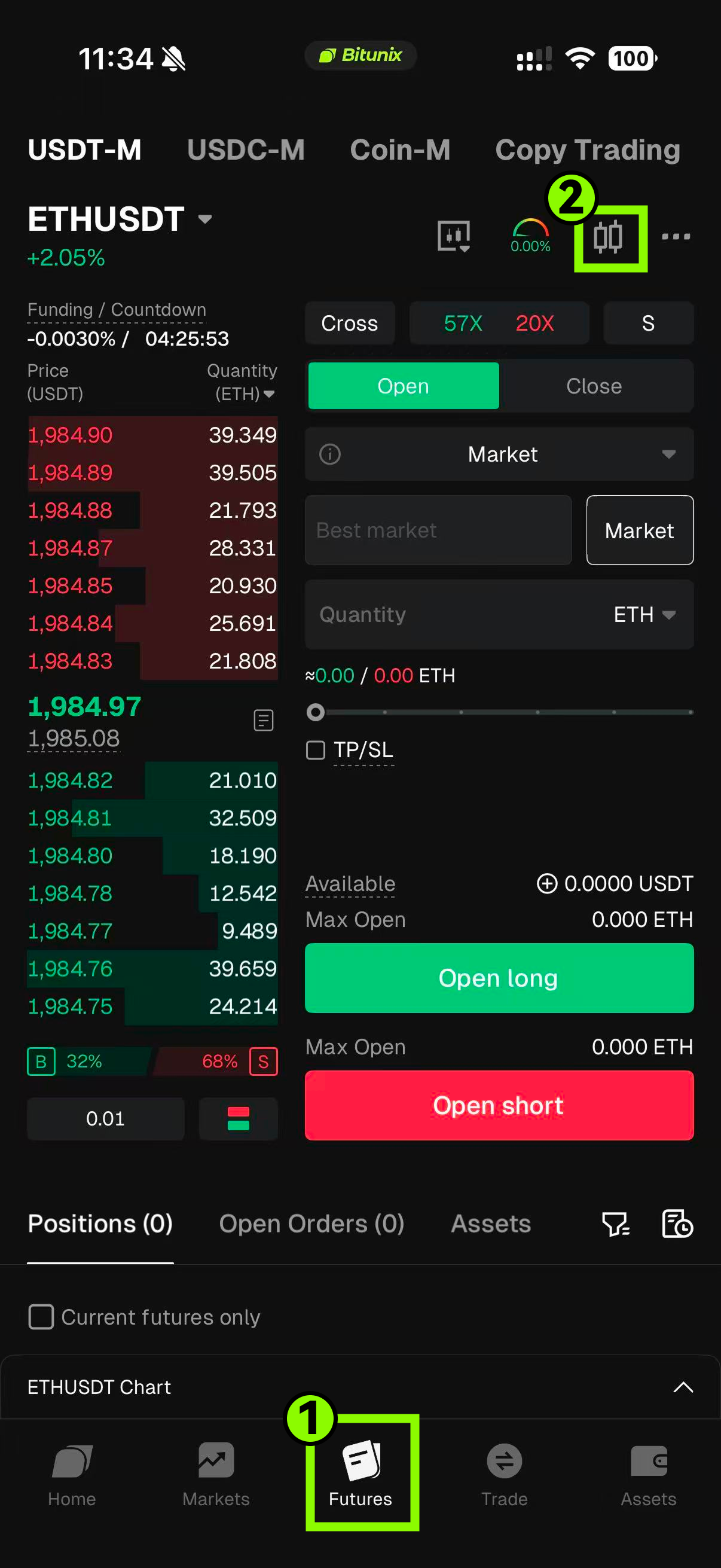
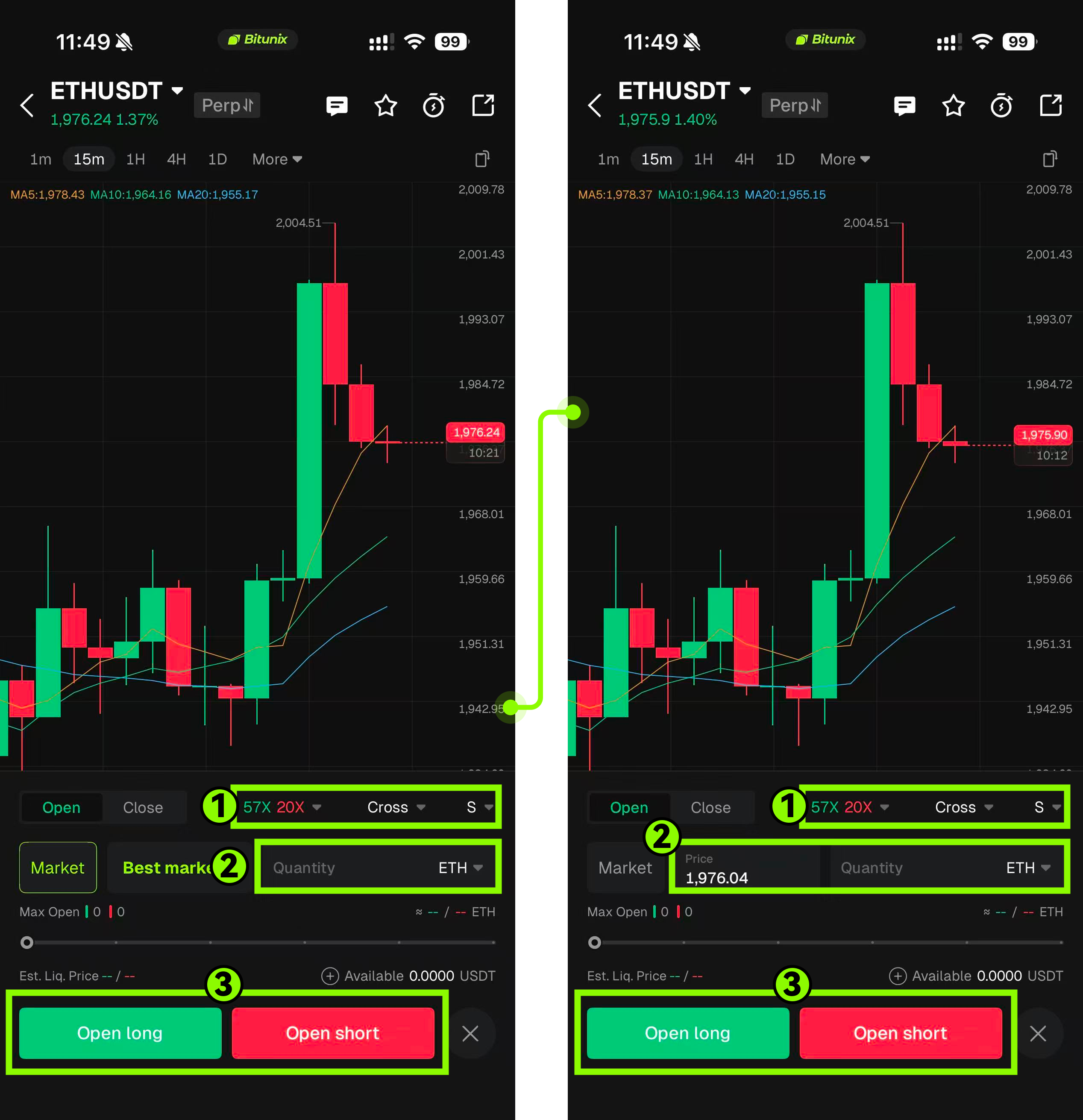
Step 1: Tap future button from the bottom navigation bar, then tap the k-line icon.

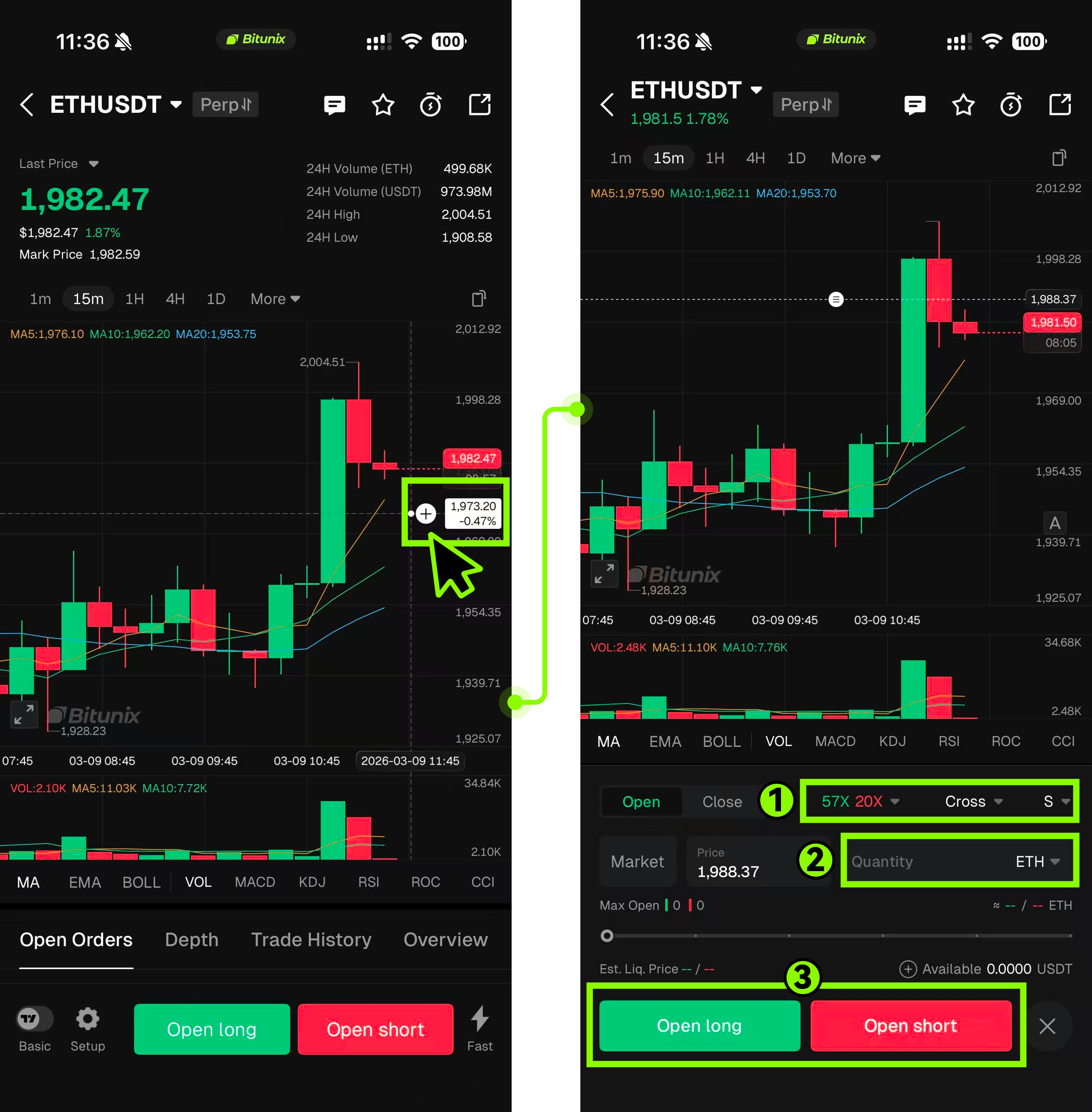
Step 2: Tap the “+” icon to instantly open the half-screen panel in Limit mode. The system will automatically populate the price at the tapped chart position into the input field, reducing manual input errors.

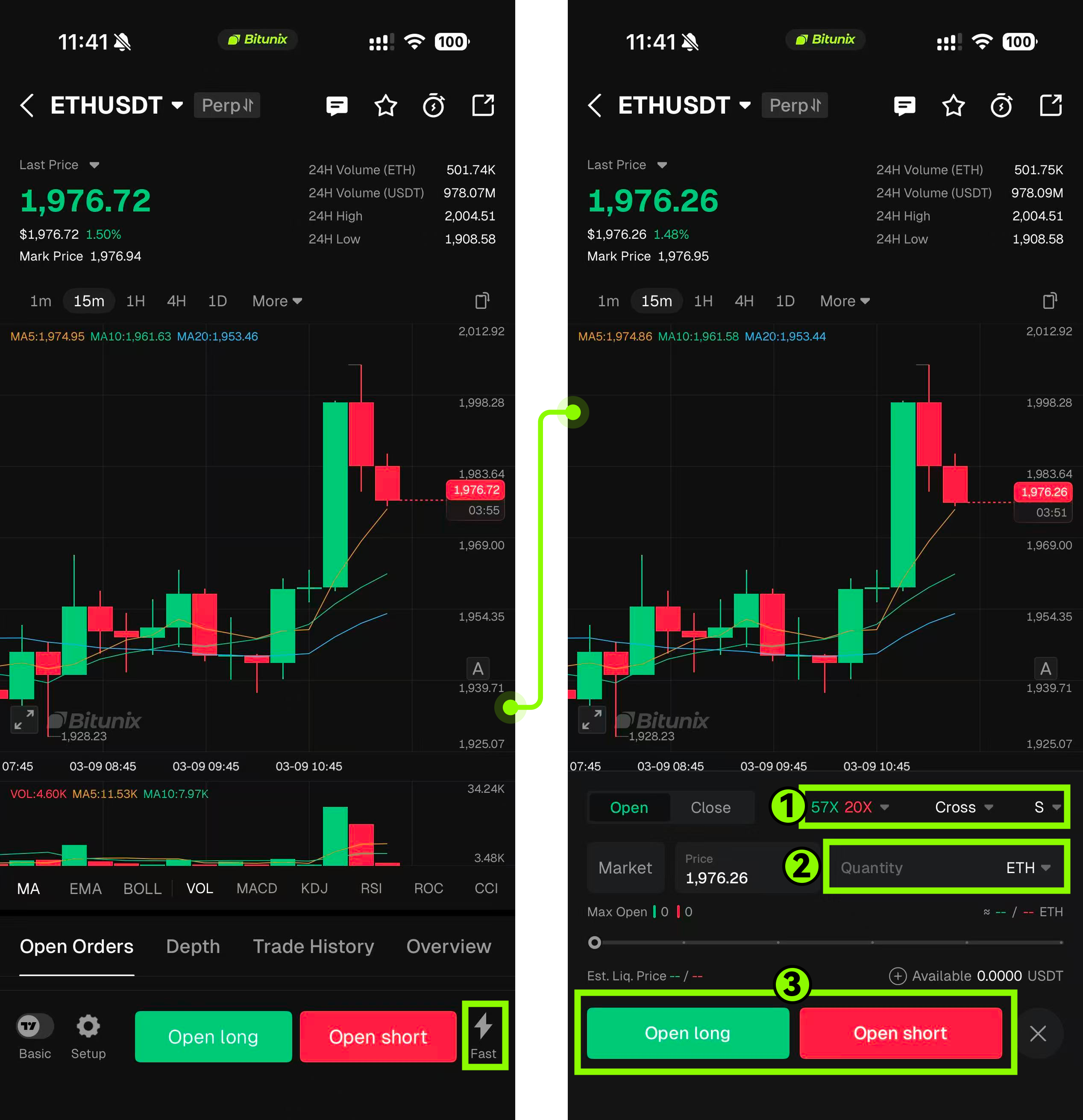
Step 3: Tap the “FAST” quick button → Market to open the half-screen panel in Market mode, providing a clear entry point and intuitive operation.

Step Guide to Use Full-Screen Mode

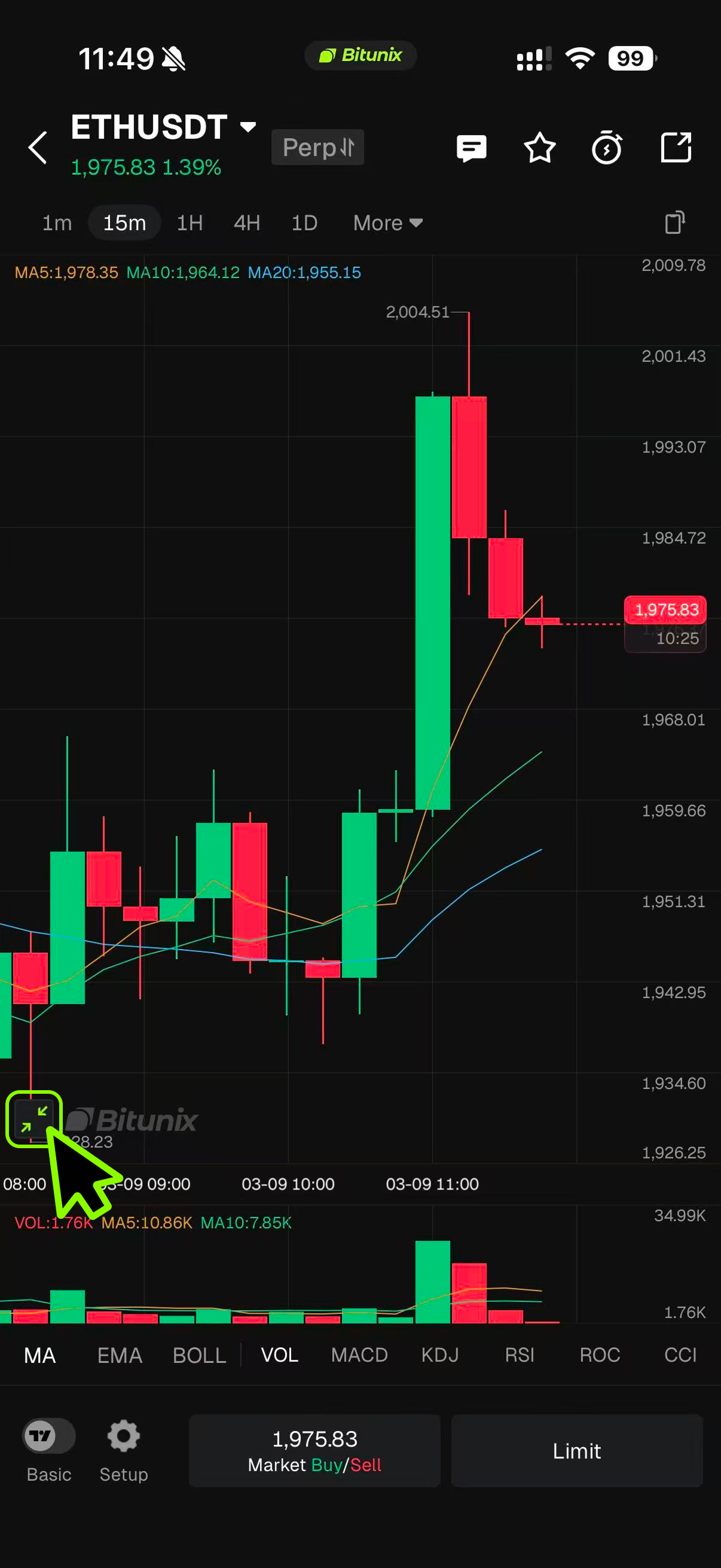
Step 1: After entering full-screen mode, the bottom bar panel is displayed by default. Tapping it will open the half-screen panel.

Step 2: Either Tap on Market Mode Or Limit Mode.

  1. Tap the Market button to instantly open the half-screen panel in Market mode.
  2. Limit Mode:Tap the Limit button to instantly open the half-screen panel in Limit mode, with the current price automatically populated to reduce input errors.Tap the “+” icon to instantly open the half-screen panel in Limit mode, with the price at the tapped chart position automatically filled in, reducing manual input errors.

Conclusion

The Basic version is designed to provide a simple and efficient trading experience for users who prefer a clear interface and minimal complexity. With its clean layout, intuitive controls, and streamlined panel switching, users can quickly understand the trading workflow and execute trades with ease. Whether using the half-screen panel for quick access or switching between Market and Limit modes, the design minimizes unnecessary steps and reduces input errors. Overall, the Basic version lowers the learning barrier while maintaining the essential tools needed for a smooth and efficient trading experience.

Disclaimer

This article is not intended to provide:

(i) investment advice or investment recommendations;

(ii) an offer, invitation, or solicitation to buy, sell, or hold digital assets;

(iii) financial, accounting, legal, or tax advice.

Digital assets, including stablecoins and NFTs, carry significant risk and price volatility. Evaluate whether trading or holding digital assets is appropriate for your financial situation. Seek guidance from your legal, tax, or investment adviser regarding your specific circumstances.

Bitunix assumes no responsibility for any investment outcomes. You are solely responsible for understanding and complying with all applicable local laws and regulations.

Published on 2026-03-17|Updated on 2026-03-17
How to Use the Fixed Risk Order Feature (Web)?

What Is Fixed Risk Order?

Fixed Risk Order is an intelligent order-assist tool designed to help you define the maximum acceptable loss for a single trade before placing an order. Based on this predefined loss amount, the system automatically calculates an appropriate position size. By productizing the “risk-first” approach commonly used by professional traders, this feature allows you to establish clear risk boundaries before opening a position. It helps effectively prevent overexposure caused by emotional decisions or manual calculation errors.

It’s important to note that Fixed Risk Order is not a standalone order type. In execution, it still relies on limited orders or market orders. After selecting this feature, the system will generate a standard limit or market order, while automatically attaching a corresponding stop-loss condition. This mechanism ensures your trading logic integrates seamlessly with existing trading methods, allowing you to benefit from automated position sizing while keeping risk strictly under control.

What Are the Benefits of Fixed Risk Order?

  • Risk-First Approach: Shifts from the traditional “place order first, calculate risk later” workflow to defining risk boundaries before entering a trade.
  • Automatic Calculation: The system calculates position size automatically, reducing errors from manual calculations and minimizing the risk of loss mismanagement.
  • Low Learning Curve: Seamlessly integrates with existing limit/market order logic. No need to learn complex order models—suitable for both beginners and advanced traders.
  • Professional Risk Management: Embeds the “risk-first” philosophy of professional traders into the product, helping users develop disciplined trading habits.

How to Use Fixed Risk Order?

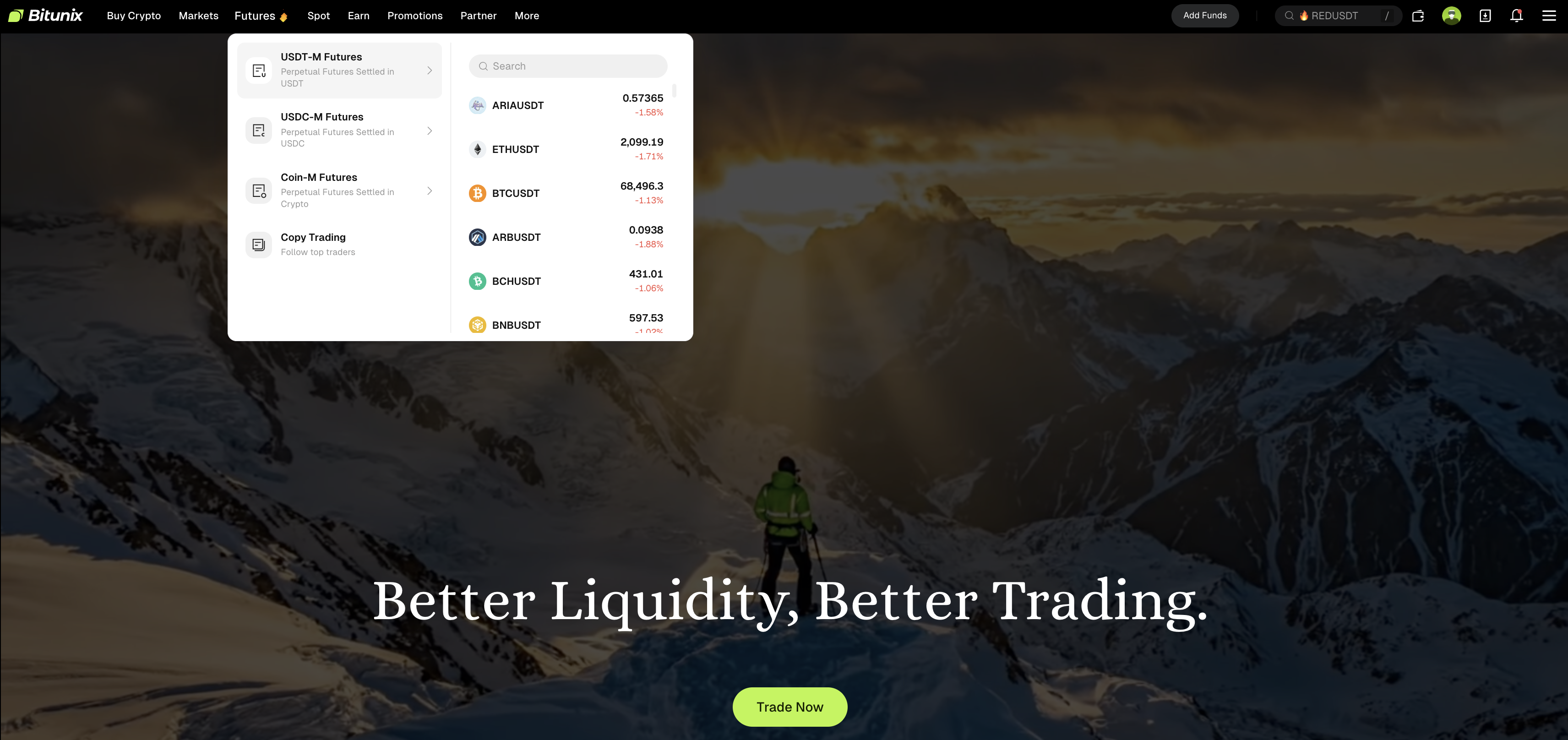
1. Log in to the Bitunix web platform, click “Futures Trading” in the top navigation bar, and select the trading pair you want to trade.

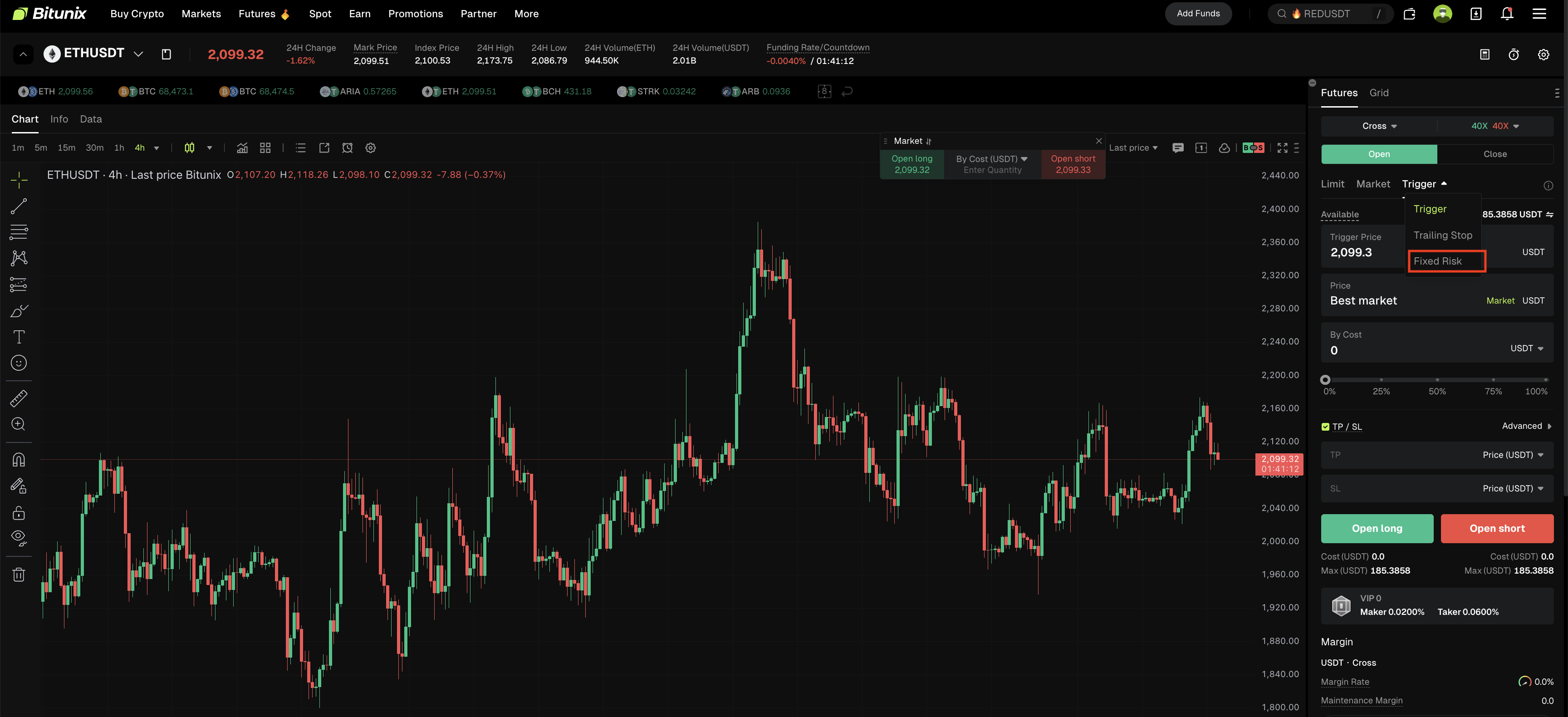
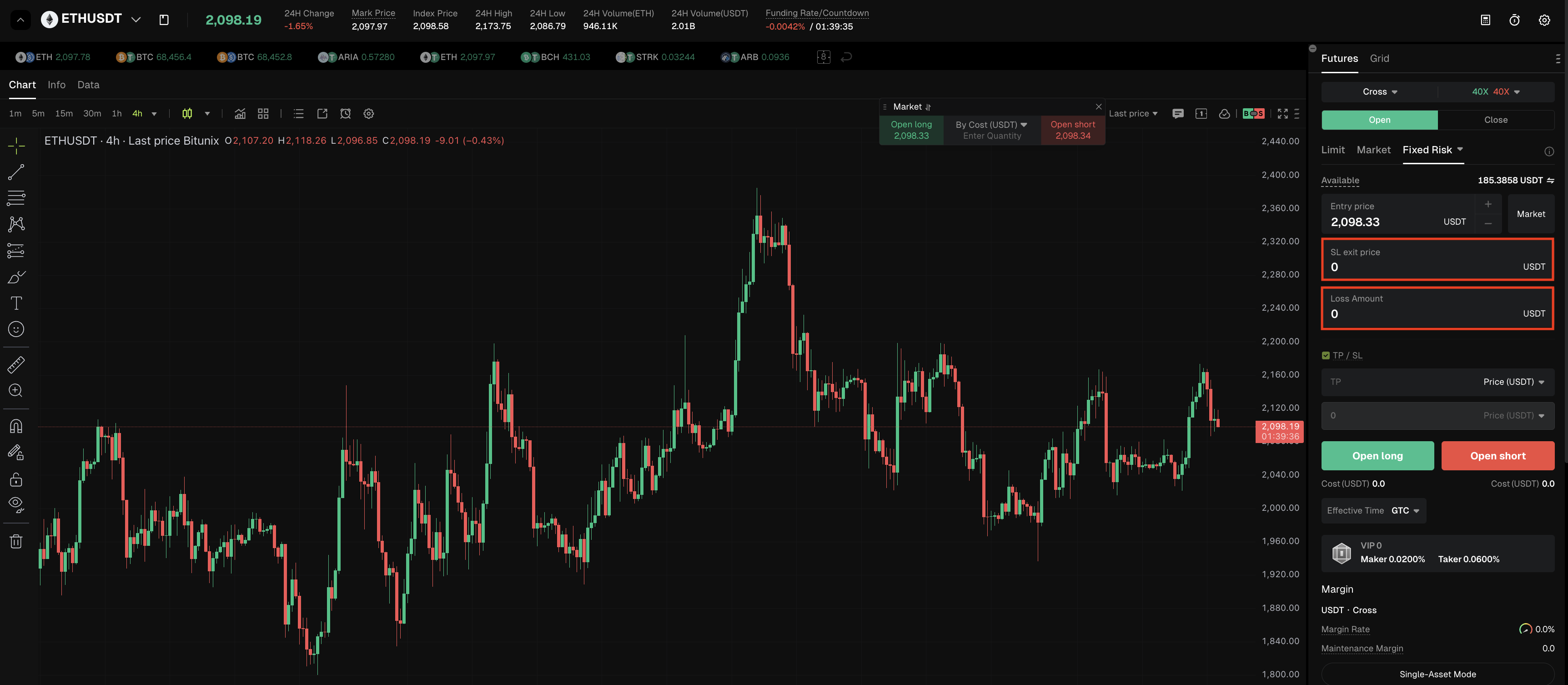
2. In the order panel on the right side of the trading page, click the “Trigger Order” button. From the dropdown options (Trigger Order, Trailing Order, Fixed Risk Order), select “Fixed Risk.”

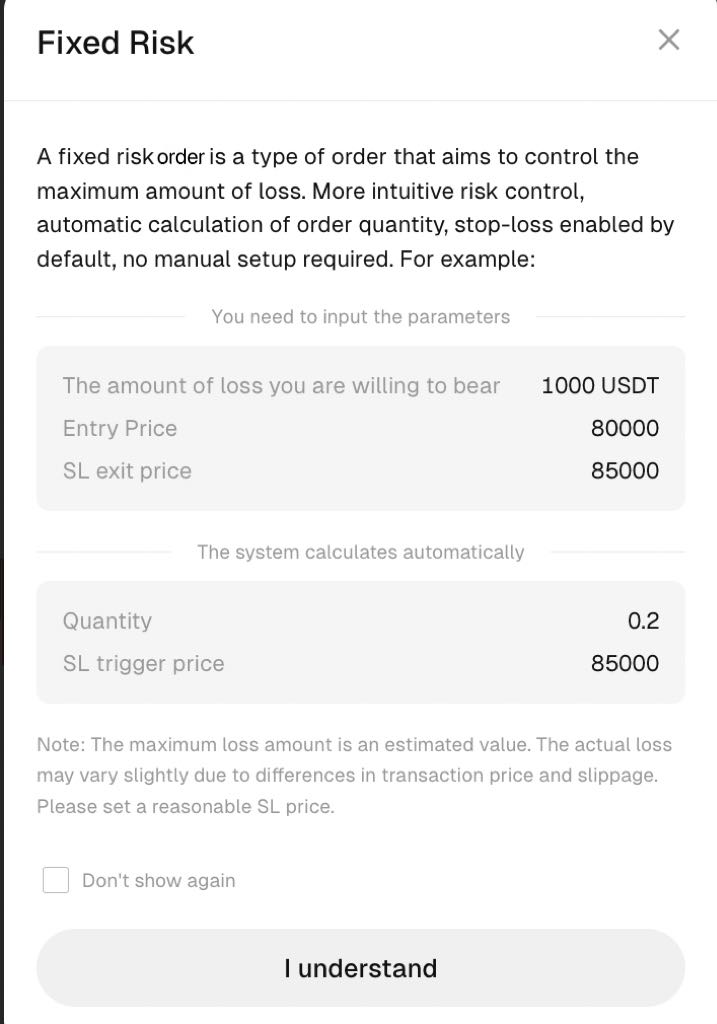
3. After selecting “Fixed Risk” a prompt will appear: A fixed risk order is a type of order that aims to control the maximum amount of loss. More intuitive risk control, automatic calculation of order quantity, stop-loss enabled by default, no manual setup required.

4. In Fixed Risk Order mode, you can manually enter the stop-loss price and loss amount. This ensures each trade is strictly confined within your acceptable risk range, helping you manage risk more clearly and achieve systematic position management.

Summary

Fixed Risk Order is a powerful tool for implementing effective risk management. By integrating the “risk-first” philosophy into the order placement process, it makes every trade more strategic and easier to manage.

Before using this feature, make sure you fully understand its calculation logic and applicable scenarios, and always operate in accordance with actual market conditions. With scientific position management, this feature can help you build a more disciplined and robust trading system, supporting long-term asset growth in volatile markets.

Disclaimer

This article is not intended to provide:

(i) investment advice or investment recommendations;

(ii) an offer, invitation, or solicitation to buy, sell, or hold digital assets;

(iii) financial, accounting, legal, or tax advice.

Digital assets (including stablecoins and NFTs) involve high risk and may be highly volatile. You should carefully consider whether trading or holding digital assets is suitable for you based on your financial situation. For your specific circumstances, consult your legal, tax, or investment professionals. You are responsible for understanding and complying with all applicable local laws and regulations.

Published on 2026-04-07|Updated on 2026-04-07
  • 1
Showing articles 1-3 of 3