
Article Summary
- This guide explains the benefits of mobile crypto trading and introduces the Bitunix App as a powerful tool for trading anywhere, anytime.
- It provides a crucial, security-focused walkthrough on how to safely download the official Bitunix app from the Apple App Store, Google Play Store, and via direct APK download.
- A clear, feature-by-feature tour of the app’s main sections is included, helping users navigate the interface with confidence.
- A simple, step-by-step guide shows users how to place their first trade directly from the mobile app.
- The article concludes by positioning the Bitunix app as an essential tool for modern crypto traders who need to stay connected to the market.
The crypto market moves faster than ever before, shifting rapidly between bearish outlooks and bullish rallies, spurring opportunities that you may miss if you’re tied to your desktop. Fortunately, you can still capitalize on market swings with the powerful Bitunix mobile app that fits the entire market in your pocket.
This Bitunix download guide explains why mobile trading is no longer a compromise for on-the-go traders. Read on to discover how to download and install the official Bitunix app securely, and how to use its powerful features to manage your portfolio and trade safely on our crypto exchange even when you’re away from home.
Why Use a Crypto Trading App?
For most of its 16-year history, the crypto market has been available only on desktops, tying traders to their home or office computers. Most crypto exchanges focused on developing secure and efficient desktop applications, neglecting mobile functionality. It was only recently that technological breakthroughs enabled developers to create mobile apps that deliver the same safe, lucrative trading experience as desktop platforms.
According to Business of Apps, over 500 million people worldwide use crypto mobile apps. This figure is poised to grow substantially in the coming years as mobile crypto trading becomes increasingly popular. More importantly, trading on the go provides significant benefits that justify its elevated use, such as:
Trade Anywhere, Anytime
The most obvious benefit of a crypto trading app is that you can place and execute trades even when you’re not at home. You don’t have to remain glued to your computer to manage your crypto portfolio.
Instead, you can use the fast and powerful Bitunix app to trade when you’re out and about, traveling, flying, or vacationing on a trans-Atlantic cruise. As long as you have a stable internet connection, you can dive into the crypto market whenever you please.
Instant Alerts & Notifications
A proficient trading app keeps you up to date with the latest market movements. The Bitunix mobile app can notify you in real time of significant changes to your trading and portfolio. Moreover, the app lets you set price alerts and receive notifications as soon as a profitable trading opportunity opens.
Quick & Convenient Management
The Bitunix app allows mobile users to easily check their portfolios, view open positions, and make quick, necessary adjustments. This is possible thanks to the app’s powerful engine that lets you move in the market with the same ease and efficiency as if you were using the platform’s desktop version.
Secure Crypto Trading
Using a mobile app to trade crypto is just as safe as trading on a desktop computer. For example, the Bitunix app adheres to high security standards to ensure users’ data and funds are always protected. You can further secure your account by setting up 2FA (Two-Factor Authentication), which drastically reduces the risk of unauthorized access.
How to Download the Official Bitunix Mobile App
Bitunix has over 3 million users worldwide, many of whom switch between the mobile app and the platform’s desktop version to trade crypto online. Generally, such popular financial apps attract hackers, who create fake apps to steal your information. These apps look nearly identical to the Bitunix crypto trading app, and can easily fool you into downloading and installing them.
Your security is our top priority. To protect your account, it is critical that you only download the Bitunix app from official sources.
For example, desktop users can go to the Bitunix Download page, where all the download links are available. If you prefer to install the app directly, you can download the official Bitunix APK by scanning the QR code on our homepage or using this link.
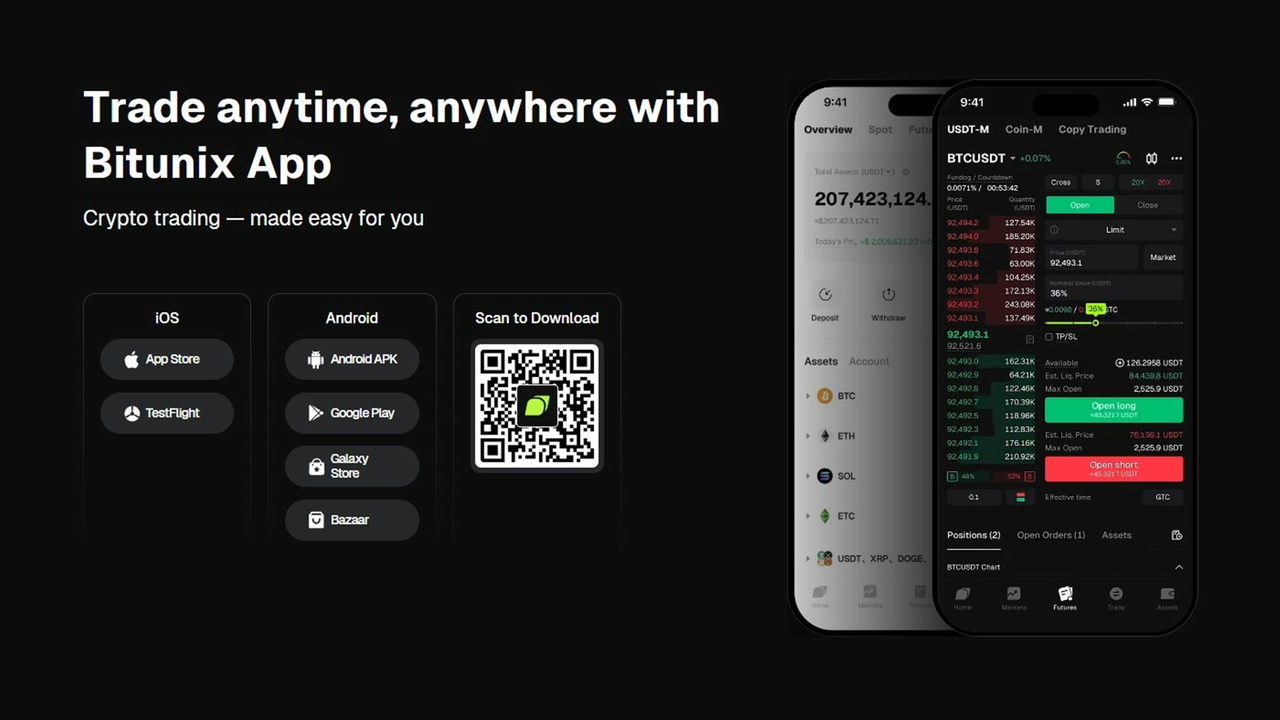
A Quick Tour of the Bitunix Apk Interface
The Bitunix app has a clear, easy-to-use interface that even beginners can master during their first trading period. Here is a short visual guide of the app’s main areas and features:
The Home screen is the first thing you will see after logging in to your Bitunix apk account via your mobile device. Here, you can see the featured markets, including the most popular trading pairs in Spot and Futures trading.
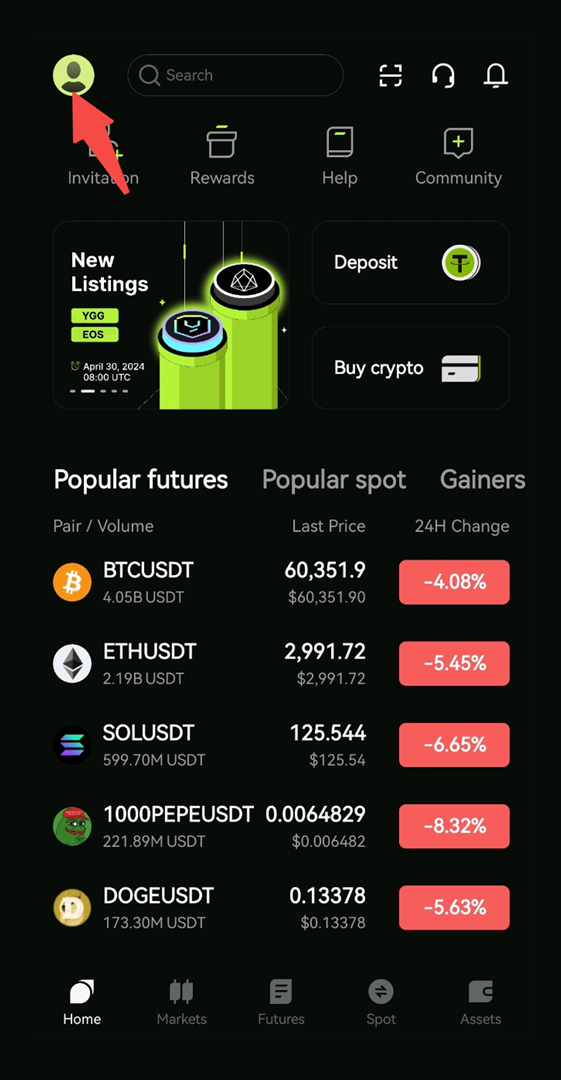
At the top of your screen, you will find your profile, a.k.a. the Personal Center (avatar icon), along with quick links to referrals, rewards, the Help Center, and community threads. At the bottom, you can navigate the main Bitunix-supported markets and your assets in the Wallet section. The Deposit and Buy Crypto options are easily visible at the center of the screen.
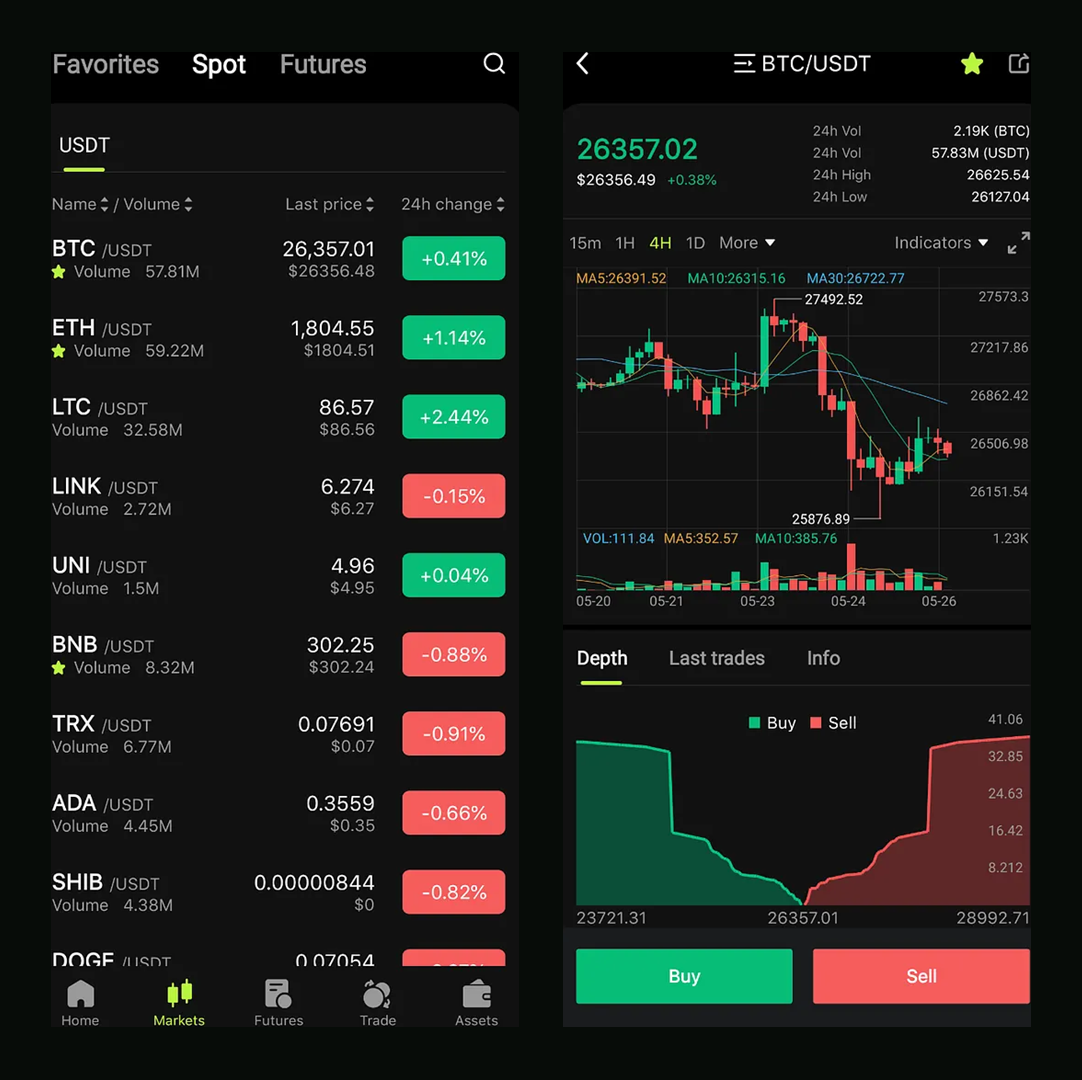
Choosing any of the market available options, e.g. Spot, will present you with different trading pairs and their essential metrics. Browse this section and add as many as you like to your favorites.
The Trade tab is the app’s main trading interface for placing spot and futures orders. The Buy and Sell buttons are conveniently located at the bottom of the screen in striking colors. Here, you can see the selected pair’s depth, latest trades, and essential data to help you make better-informed decisions.
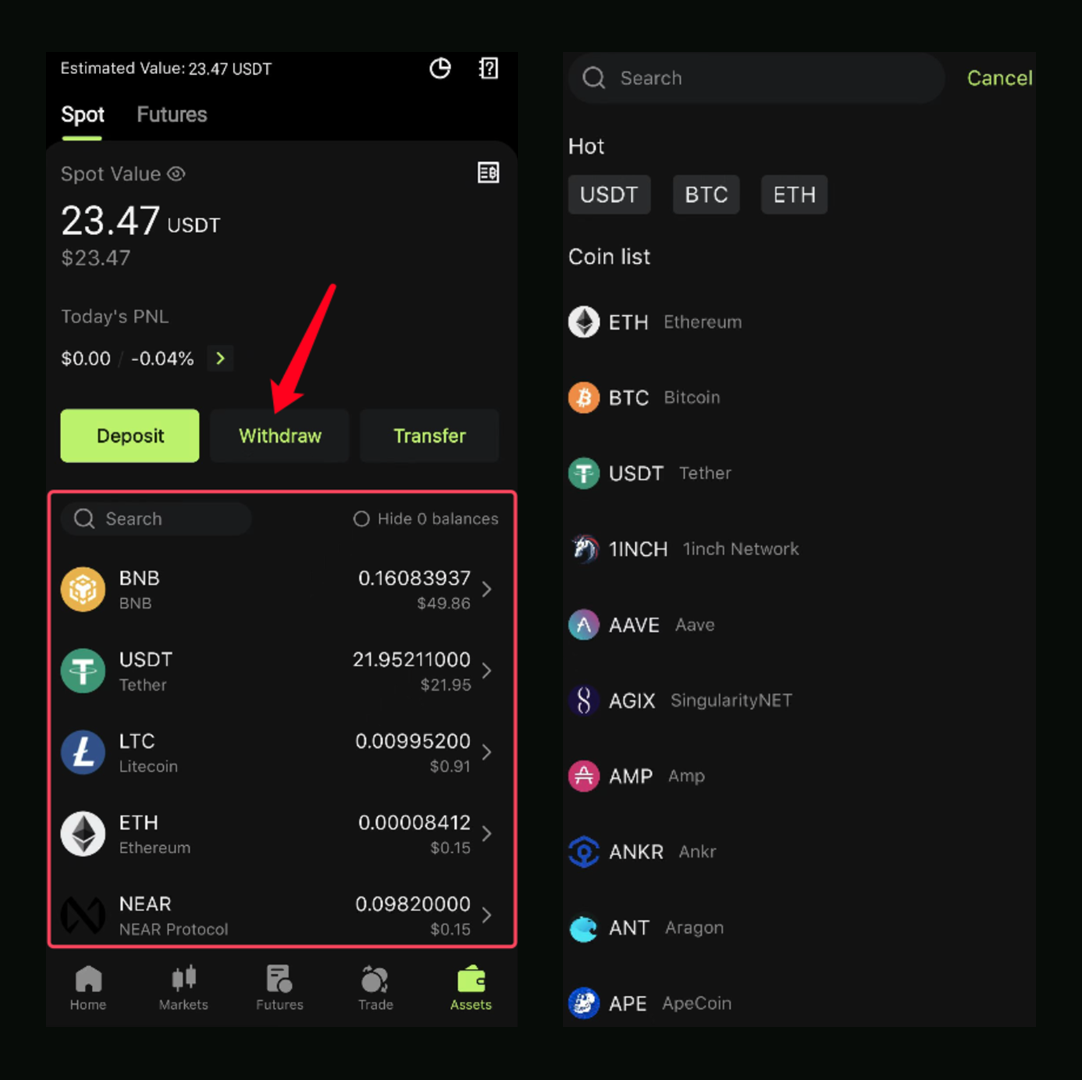
The Wallet tab is where you can check your balances and deposit or withdraw funds. It provides a clear overview of the assets you hold across your Spot and Futures accounts, along with daily PNL (Profit and Loss).
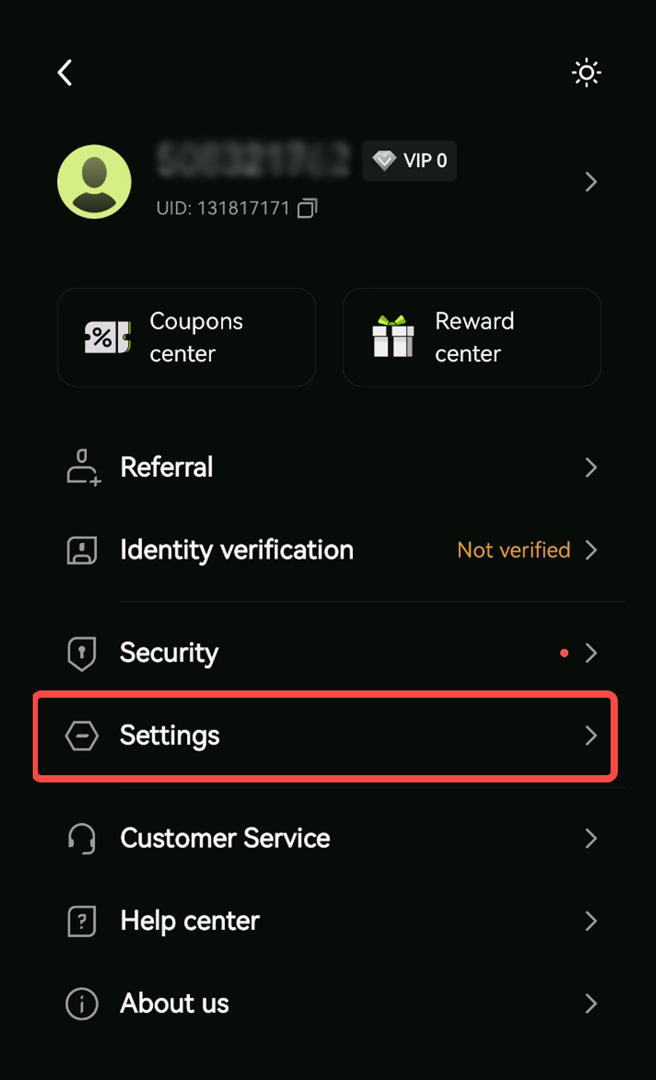
The Settings tab is another crucial section of the Bitunix app. You can find it by navigating to the Profile icon in the top-left corner of your dashboard. Here you can personalize your Bitunix experience by tweaking your settings and security preferences. Additionally, you find quick shortcuts to the Help, Coupon, and Reward Centers as well as instant access to our professional 24/7 customer support.
How to Place Your First Trade on the App
Follow these simple steps to place and execute your first trade on the Bitunix app:
- Log in to the app with your Bitunix credentials.
- Navigate to the “Trade” tab.
- Select your desired trading pair (e.g., BTC/USDT).
- Choose your order type (e.g., “Market”), enter the amount, and click “Buy” or “Sell.”
- Confirm your order and view your open position in the “Positions” tab.
Bitunix facilitates quick crypto trades through its user-friendly mobile app and high-performance technology.
The low Bitunix fees have convinced millions of traders worldwide to join the platform. Moreover, Bitunix reassures users that their assets are safe with a dedicated Protection Fund, high security, and compliance with global regulations.
Final Thoughts on the Bitunix Download Guide
The Bitunix app puts a robust, secure, and user-friendly trading terminal in your pocket, giving you the complete freedom to trade, monitor, and manage your crypto assets anywhere.
Staying connected to the crypto market is key to success. The free Bitunix app ensures you never miss a beat. Its user-friendly interface, quick trade controls, and easy access to advanced trading tools let you enjoy a high-quality Bitunix trading experience on the go.
Sign up for our platform and download the Bitunix app today to experience the freedom of secure and efficient mobile trading.
FAQ Section
Is the Bitunix app free to download and use?
Yes, the Bitunix app is free to download and use for basic features.
Is the Bitunix app as secure as the desktop website?
Most crypto exchanges, including Bitunix, ensure the same security across all their applications, including desktop and mobile apps.
Can I access all the same features on the Bitunix app as on the website?
Yes, the Bitunix app offers access to most of the same features as the website, providing a comparable and fully functional trading experience.
How do I set up price alerts on the Bitunix app?
You can set up price alerts on the Bitunix app from your Personal Center (avatar icon). Select Price Alert, tap Create, and choose the trading pair and price you wish to be updated about at all times.
What should I do if I have trouble installing the Bitunix app?
If you have trouble installing the Bitunix app, you should check your internet connection and storage space, restart your device, and update your system software. If the problem persists, contact the Bitunix customer service.
Can I use the same account for both the Bitunix app and the website?
Yes, you can use the same account to access both the Bitunix app and the website.
Is the APK download from the official Bitunix website safe?
Yes, downloading the APK for the Bitunix app directly from the official website is safe and recommended.
Can I contact customer support through the Bitunix app?
You can contact the Bitunix customer service from the Bitunix app by navigating to the Personal Center (avatar icon).
Glossary
APK: Android Package Kit (or Android Application Package) is the standard file format used by the Android operating system to distribute and install mobile apps.
Trading Pair: A combination of two different digital or fiat currencies that can be exchanged for one another on a cryptocurrency exchange.
IEO: A method for crypto startups to raise funds by selling new tokens directly on a crypto exchange's platform, with the exchange acting as an intermediary.
IDO: The process of launching a cryptocurrency on a decentralized exchange (DEX).
TVL: The entire value locked in a protocol, a rough usage proxy.
DeFi: Decentralized finance applications on public blockchains.
Layer 1: Base blockchain that verifies and records transactions.
Layer 2: A scaling solution that processes transactions off the main chain and posts proofs to L1.
Gas: Network fee for processing a transaction.
Altcoin: Any crypto asset that is not Bitcoin.
Volatility: Degree of price fluctuation for an asset over time.
Proof of Stake (PoS): Consensus where validators lock native tokens to secure the network and earn rewards.
Validator: Operator that proposes or attests blocks in PoS and shares rewards with delegators.
Incentive Program: Extra token rewards used to direct liquidity or votes.
Governance: Process for changing parameters or logic, often token-based with timelocks.
Stable Pair: A pool of assets that track similar values, such as two stablecoins.
About Bitunix
Bitunix is a global cryptocurrency derivatives exchange trusted by over 3 million users across more than 100 countries. The platform is committed to providing a transparent, compliant, and secure trading environment for every user. Bitunix offers a fast registration process and a user-friendly verification system supported by mandatory KYC to ensure safety and compliance. With global standards of protection through Proof of Reserves (POR) and the Bitunix Care Fund, Bitunix prioritizes user trust and fund security. The K-Line Ultra chart system delivers a seamless trading experience for both beginners and advanced traders, while leverage of up to 200x and deep liquidity make Bitunix one of the most dynamic platforms in the market.
Bitunix Global Accounts
X | Telegram Announcements | Telegram Global | CoinMarketCap | Instagram | Facebook | LinkedIn | Reddit | Medium