SEPA (Single Euro Payments Area) allows users to transfer euros between participating bank accounts. On Bitunix, eligible users can use the SEPA Deposit feature to transfer EUR into their accounts and then use their available balance to buy supported cryptocurrencies. Whether SEPA is available to you depends on your eligibility and the options displayed in your account.
Before making a transfer, check the applicable fees, confirm that your bank account details match your verified Bitunix information, and follow the payment instructions shown on the deposit page. If you prefer to buy crypto directly through checkout, check whether SEPA appears among the payment methods available for your selected currency and asset.
What Is SEPA, and How Does It Work for Crypto Purchases?
SEPA stands for the Single Euro Payments Area. It provides a common framework for euro bank transfers between participating countries and territories, making it easier to move euros between eligible bank accounts.
For crypto buyers, SEPA can provide a way to fund an exchange account using a familiar bank transfer rather than a card payment or another checkout method.
SEPA Bank Transfers Explained
A SEPA transfer moves euros from your bank account to a designated recipient account. The transfer is processed through the banking system, so its timing and requirements can differ from card payments or blockchain transactions.
SEPA availability does not automatically mean every bank, country, exchange account, or purchase is supported. Eligibility and payment options depend on the service provider and the specific transaction.
Buying Crypto Directly vs. Depositing EUR First
There are two different purchase routes to understand:
EUR deposit followed by a crypto purchase: Deposit euros into your Bitunix account using the SEPA Deposit feature, then use the available balance to buy supported cryptocurrencies through an available trading or conversion feature.
Direct crypto purchase at checkout: Open Bitunix Buy Crypto, choose your fiat currency and crypto asset, enter the amount, and review the payment methods offered. SEPA is an option only if it appears for your selected transaction.
These routes are not interchangeable. A SEPA bank deposit does not necessarily mean that SEPA is available as a direct payment method in every One-Click Buy checkout.
SEPA Fees on Bitunix: What Will You Pay?
The cost of buying crypto through a bank transfer depends on the payment route and its applicable terms. A low or zero deposit fee does not necessarily mean that the entire purchase has no costs.
Bitunix Deposit and Purchase Fees
Before transferring EUR, check the current terms for the SEPA Deposit feature in your Bitunix account. If you plan to buy crypto directly through One-Click Buy, review the quote and any displayed fees separately.
Do not assume that a fee policy for fiat deposits also applies to direct purchases, spot trades, or third-party payment services. The applicable terms may differ by route.
Bank Fees, Provider Charges, and Exchange Rates
Your total cost may include more than a separately displayed platform fee. Depending on the payment route, relevant costs can include:
Bank transfer charges: Your bank may apply a fee under your account's pricing terms.
Payment-provider fees: If a third-party provider processes the purchase, its charges may apply.
Conversion rates: The quoted rate determines how much crypto you receive for the amount paid. A difference between rates can affect the effective purchase cost even when no separate fee is displayed.
Trading fees: If you deposit EUR first and then execute a spot trade, the applicable trading fee may also affect your total cost.
Not every cost applies to every route. Review the specific transaction details rather than assuming that all of these charges will be incurred.
How to Check the Total Cost Before Confirming
Before you send money or confirm a purchase:
Check whether you are using SEPA Deposit or a direct purchase method.
Review the applicable deposit or purchase fees.
Check any charges disclosed by your bank or payment provider.
Review the quoted exchange rate and estimated crypto amount.
Confirm the final details before proceeding.
For direct purchases, the Bitunix Buy Crypto page instructs users to review rates, fees, and order details before confirming. For SEPA deposits, use the instructions and terms displayed in your account.
How to Buy Crypto with SEPA on Bitunix
The following steps describe the EUR deposit route documented by Bitunix. The exact interface and available options may vary, so follow the instructions currently displayed in your account.
Step 1: Sign In to Your Bitunix Account
Open the official Bitunix website and sign in. If you do not have an account, register and complete the required account setup.
Step 2: Complete the Required Identity Verification
Open the verification section and complete KYC if required for your account and payment route.
Bitunix's SEPA Deposit instructions state that the bank account used for the transfer must match the account-holder information verified through KYC. Make sure your account information is accurate before proceeding.
Step 3: Open the SEPA Deposit Page
Navigate to Buy Crypto and select SEPA Deposit if the option is available to you.
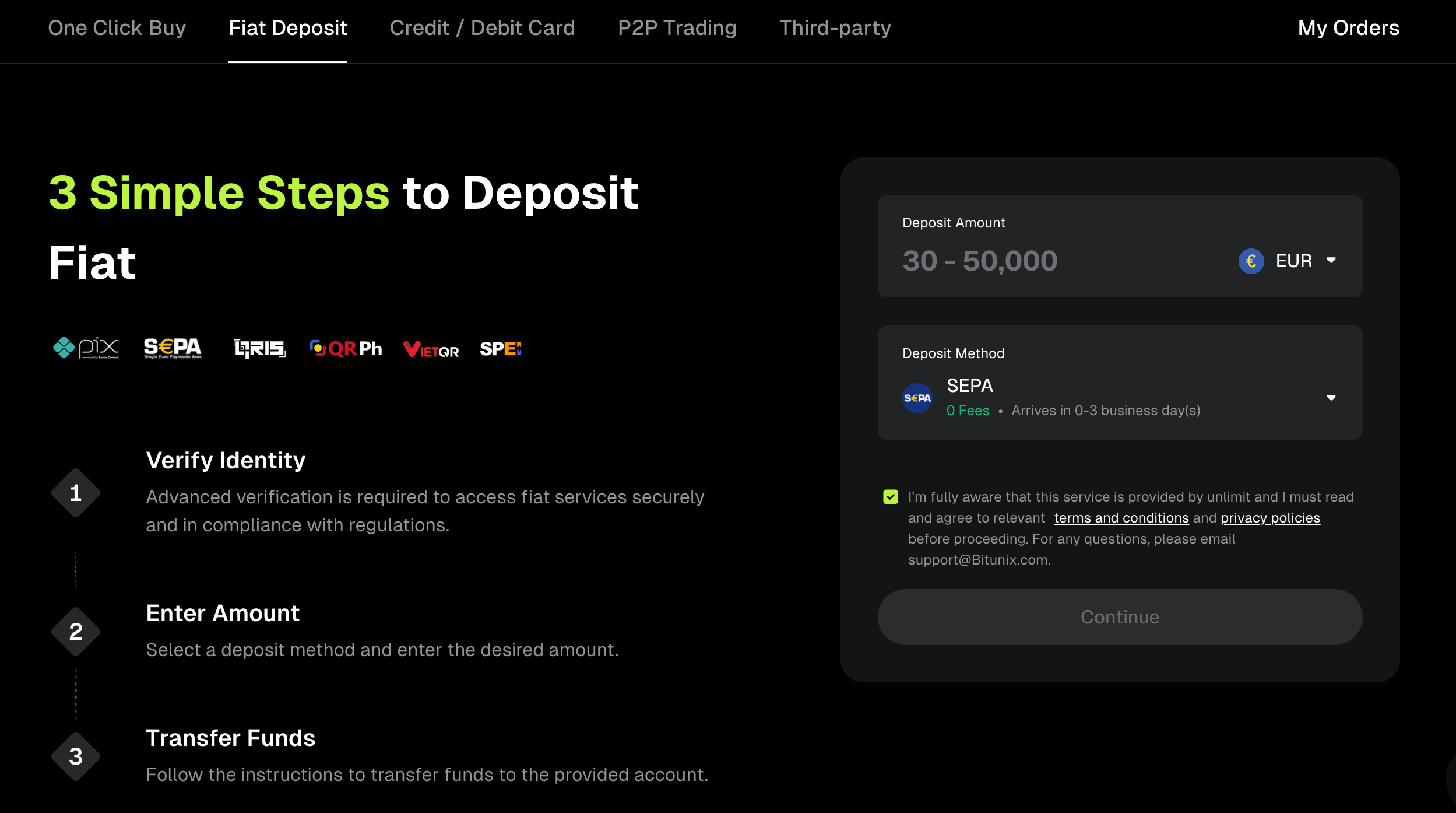
On the deposit page, select EUR as the deposit currency and SEPA as the payment method. Enter the amount you want to transfer.
If SEPA Deposit is not displayed, check your eligibility and the available options in your account rather than using bank details from another source.
Step 4: Review the Transfer Instructions
Check the receiving bank details and any additional payment instructions displayed on the deposit page. Confirm the beneficiary information, transfer amount, and any required reference before opening your banking app or online banking service.
Do not substitute bank details from an old transaction, another user, or an unofficial website. If any information is unclear, contact official Bitunix support before sending funds.
Step 5: Send the EUR Transfer
Initiate the transfer through your bank using the details provided by Bitunix. Follow the displayed instructions exactly, including any required payment reference.
Make sure the transfer comes from the bank account that matches your verified account-holder information. Retain the payment confirmation and any transaction reference issued by your bank.
Step 6: Check Your Bitunix Balance
After sending the transfer, monitor your account and transaction status for confirmation that the funds have been credited.
Once the EUR balance is available, use a supported purchase or trading feature to buy your chosen cryptocurrency. Check the asset, amount, price, and applicable fees before confirming the transaction.
If you intend to buy crypto directly rather than deposit EUR first, return to Bitunix Buy Crypto and check whether your selected currency and asset have a suitable payment option.
SEPA Transfer Requirements and Processing Times
Understanding the requirements before sending money can help prevent avoidable delays.
Eligible Countries, EUR Support, and Account Verification
SEPA participation alone does not guarantee that a particular user can access Bitunix's SEPA Deposit feature. Platform eligibility, regional restrictions, verification status, and payment-service availability may affect access.
Check the latest requirements and the options available in your account before initiating a transfer. If a payment method is unavailable, do not assume that changing your selected asset or currency will make it eligible.
Matching Names and Required Payment References
Bitunix's SEPA Deposit Help Center guide instructs users to transfer funds from a bank account whose account-holder information matches the information verified through KYC.
Before sending money:
Use your own eligible bank account.
Confirm the beneficiary details against the instructions shown in Bitunix.
Include any required payment reference exactly as displayed.
Keep a copy of the bank transfer confirmation.
If the name on your bank account does not match your verified information, contact support before transferring funds.
How Long Can a SEPA Transfer Take?
Processing time depends on the transfer type, the banks involved, and the payment route. A standard SEPA transfer and a SEPA Instant transfer may follow different processing timelines, and availability of the instant service should not be assumed.
A transfer may also take longer to appear in your exchange balance if additional checks or processing are required. Use the current Bitunix instructions for the relevant deposit route rather than relying on a general estimate for all SEPA transfers.
Common SEPA Problems and How to Resolve Them
SEPA Is Not Available at Checkout
If SEPA does not appear as a payment option, availability may depend on your region, selected fiat currency, crypto asset, account verification, or provider availability.
Check the options displayed in your account. If you want to fund your account with EUR, check whether the separate SEPA Deposit feature is available. Do not assume that a missing direct-purchase option means every bank deposit route is unavailable, or vice versa.
The Bank Transfer Is Pending or Delayed
First, check your bank's transfer status and confirm that the payment was sent successfully. Review the receiving details and any required payment reference.
If the transfer has been sent but the funds have not arrived, keep your transaction receipt and reference number. Contact Bitunix support through official channels if the delay exceeds the timeframe stated in the relevant deposit instructions.
Avoid sending another transfer simply because the first one has not appeared yet. Confirm the status of the original payment before taking further action.
The Payment Is Completed but Crypto Has Not Arrived
If you deposited EUR, first check whether the EUR balance has been credited. A completed bank transfer and a completed crypto purchase are separate steps when you use the deposit-first route.
If your EUR balance is available but you have not bought crypto, you may still need to complete the purchase separately. If a direct crypto purchase has already been confirmed, check its order status and transaction history.
If the payment appears completed but the expected funds or crypto are missing, contact official Bitunix support with the relevant order details and payment evidence.
The Transfer Is Rejected or Returned
Check the rejection or return information provided by your bank. Possible causes may include incorrect recipient details, a payment reference error, account restrictions, or checks performed by the bank or payment service.
Do not repeatedly retry a rejected transfer without understanding the reason. Verify the instructions with Bitunix support and your bank before attempting another payment.
How to Make a SEPA Crypto Purchase More Safely
Verify the Beneficiary and Transfer Details
Always compare the receiving bank details in your Bitunix account with the details entered in your banking service. Check the recipient, amount, and required reference before confirming the transfer.
Use the official Bitunix website or app and avoid following payment instructions received from unverified sources.
Keep the Payment Receipt and Order Reference
Retain your bank confirmation, transfer reference, relevant Bitunix transaction details, and any support correspondence. These records can help you investigate a delayed or unmatched payment.
Do not share passwords, authentication codes, or other account-security credentials when seeking help.
Follow the Displayed Instructions
Payment routes can have different requirements. A SEPA deposit, a direct purchase, and a third-party checkout should not be treated as the same process.
Use the instructions for the route you actually selected. If the displayed details conflict with other guidance, pause the transfer and ask official support to clarify the discrepancy.
Buying cryptocurrency also involves market risk. A successful bank transfer does not protect the value of the crypto you purchase from price fluctuations.