Leaving your crypto on a centralized exchange exposes your portfolio to hacks, frozen accounts, and sudden platform bankruptcies. Taking full personal custody of your assets is the single most effective way to secure your digital wealth.
This guide cuts through the technical noise to help you find the best Cold wallet for XRP in 2026. You will understand how offline security works, compare the top hardware options, and learn how to move your XRP to a Cold Wallet to protect your funds immediately.
What is a Cold wallet for XRP?

Cold wallet for XRP is a physical hardware device storing private keys offline
A Cold wallet for XRP is a physical hardware device that stores your private keys completely offline. It functions as a secure digital vault, strictly isolating your sensitive recovery phrase from internet connections, malware, and phishing attacks.
Unlike a software-based web3 wallet that remains constantly connected to the internet, Cold storage never exposes your cryptographic data to your computer screen. To transfer funds, you must physically connect the device and press its buttons to approve the action. The wallet signs the transaction internally before safely broadcasting it to the XRP ledger.
Upgrading to the best Cold storage wallet for XRP guarantees absolute, non-custodial ownership of your tokens. By removing third-party exchanges from the equation, you ensure no company can ever freeze, mismanage, or limit access to your portfolio.
Top Contenders: Finding the Best Cold Wallet for XRP
Choosing the right hardware depends entirely on your daily routine, technical comfort level, and how frequently you interact with the XRP Ledger. Based on security certifications, native features, and ease of use, here are the TOP 5 hardware devices for securing your portfolio in 2026:
1. Tangem Wallet

(Source: Tangem)
The Tangem Wallet completely redefines hardware custody by abandoning bulky devices and screens in favor of a sleek, credit card-sized form factor. It operates via NFC technology - simply tap the card on your smartphone to sign transactions. Tangem eliminates the need for written seed phrases by utilizing a smart multi-card backup system, making it the most accessible and durable web3 wallet for mobile-first users.
2. Ledger Flex

(Source: Ledger)
As the latest evolution in the industry-standard Ledger lineup, the Ledger Flex combines a secure E-ink touchscreen with a CC EAL6+ certified chip. It connects to your mobile device via Bluetooth or to your desktop via USB-C. The companion Ledger Live app provides an excellent, unified dashboard for managing XRP alongside thousands of other assets, making it ideal for investors with diverse, multi-chain portfolios.
3. D'CENT Biometric Wallet

(Source: Gadget Flow)
The D'CENT hardware wallet is widely considered the best Cold storage wallet for XRP power users. It features a built-in fingerprint scanner for fast, biometric transaction authorization. More importantly, D'CENT offers the deepest native integration with the XRP Ledger on the market, allowing you to easily set up Trust Lines, interact with XRPL decentralized finance (DeFi), and manage network airdrops directly from the device.
4. Trezor Safe 5

(Source: Trezor)
For investors who prioritize code transparency, the Trezor Safe 5 is the premier choice. It pairs a fully open-source software architecture with a robust EAL6+ Secure Element to protect against physical extraction. Featuring a modern haptic touchscreen and USB-C connectivity, it delivers premium security without compromising user experience, backed by one of the oldest and most trusted companies in the crypto industry.
5. SafePal S1 Pro

(Source: SafePal)
If your primary goal is maximum isolation, the SafePal S1 Pro delivers a fully air-gapped security model. The device has no Bluetooth, Wi-Fi, NFC, or USB data capabilities. Instead, it uses an integrated camera and a high-resolution color screen to scan QR codes back and forth with your mobile phone. This guarantees your private keys are never exposed to any wireless or wired network attack paths.
How to Move Your XRP to a Cold Wallet
Transferring your XRP from an exchange to offline Cold storage is a straightforward process. Following these step-by-step instructions ensures your funds move safely to the XRP Ledger without risk of loss.
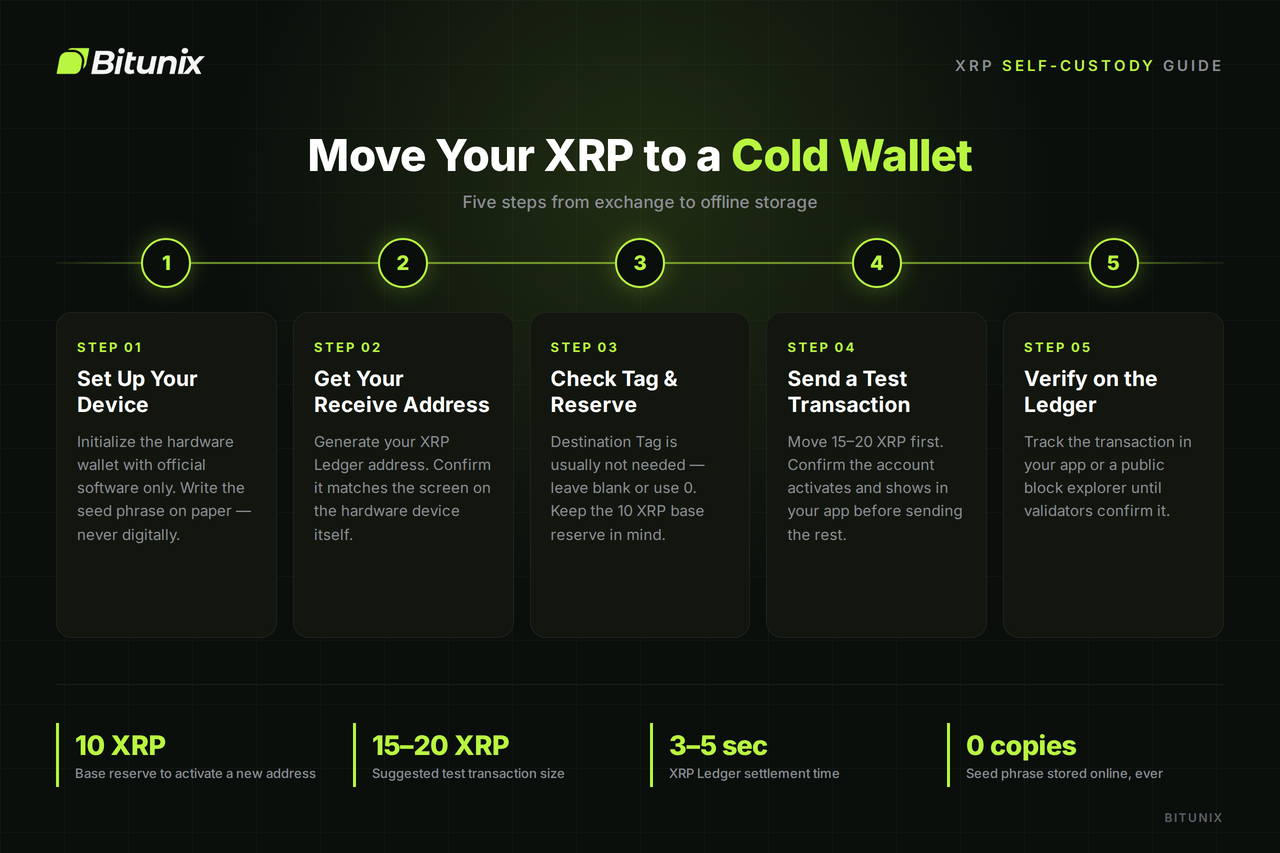
5 steps to move your XRP to a Cold Wallet easily
Step 1: Set Up and Initialize Your Device
Unbox your hardware wallet and initialize it using official companion software downloaded directly from the manufacturer's verified website. Generate a new seed phrase or backup set, write it down on physical paper, and store it in a secure location. Never save your seed phrase digitally, take a screenshot, or enter it into any online app.
Step 2: Locate Your XRP Receive Address
Open your wallet's companion software, navigate to your XRP account, and select the receive option. Your device will generate a unique public address on the XRP Ledger. Always verify that the address displayed on your smartphone or computer screen matches the physical screen of your hardware device before copying it.
Step 3: Understand Destination Tags and Reserve Requirements
Log into your Crypto exchange account, select withdraw, and paste your Cold wallet address. When sending funds to a self-custodial Cold wallet, a Destination Tag is usually not required; you can leave it blank or enter 0 if your exchange mandates a value. Remember that the XRP Ledger requires a mandatory base reserve (currently 10 XRP) to activate any new address on-chain.
>>> See more: How to buy XRP on Bitunix Exchange?
Step 4: Execute a Test Transaction
Before moving your entire balance, send a small test transaction - such as 15 to 20 XRP - to confirm the transfer path. Verify that the test deposit successfully activates your new account and displays inside your companion app before transferring your remaining portfolio.
Step 5: Verify the Transfer on the XRP Ledger
After submitting the main withdrawal request, monitor the transaction status inside your companion app or on a public block explorer. Because the XRP Ledger settles transactions within 3 to 5 seconds, your updated balance will reflect almost instantly once confirmed by network validators.
Key Criteria for choosing the best Cold storage wallet for XRP
Selecting the right hardware device requires looking beyond flashy marketing. Evaluating a device across specific security and functional standards ensures your assets remain safe while remaining easy to manage.
Security Architecture & Chip Certification
The core security of a Cold wallet for XRP relies on its internal hardware components. Look for devices built around Common Criteria certified Secure Element chips rated at EAL5+ or EAL6+. These isolated microcontrollers safeguard your private keys against physical tampering, side-channel attacks, and hardware extraction methods.
Native XRPL Feature Support
The best Cold storage wallet for XRP must support specific native features built into the XRP Ledger. Beyond storing tokens, your hardware and companion app should easily handle the mandatory account activation reserve, process destination or memo tags accurately, and allow you to manage trustlines for custom tokens on the network.
Companion App Usability
Your hardware wallet communicates with blockchain through a desktop or mobile software app. The companion interface should feature a clean layout for monitoring balances, viewing transaction history, and authorizing payments. It should also connect seamlessly with broader web3 wallet ecosystems without ever compromising offline security.
Connection Method & Portability
Consider how you intend to interact with your device. Modern Cold wallets offer various connection options, ranging from air-gapped QR code scanners and USB-C cables to wireless Bluetooth or fast NFC tap technology found in solutions like the Tangem wallet. Choose a physical design and connection style that aligns with your preferred level of mobility and convenience.
Backup & Recovery Protocols
A secure backup protocol ensures you never lose access to your funds if your physical device gets lost, damaged, or stolen. Verify whether the wallet uses a standard 12 or 24-word seed phrase or relies on multi-card seedless backup methods. Clear, reliable recovery procedures are essential for long-term peace of mind.
Conclusion
Storing your assets on centralized exchanges leaves your crypto vulnerable to third-party risks, platform shutdowns, and security breaches. Taking full control of your private keys offline is the single most important step you can take to safeguard your financial future.
Choosing the right Cold wallet for XRP ultimately comes down to your personal preferences, whether you favor the seamless NFC convenience of Tangem, the advanced biometric authentication of D'CENT, or the air-gapped isolation of SafePal. Securing your tokens on the XRP Ledger ensures your digital wealth remains completely safe, private, and under your direct ownership for the long haul.
Frequently Asked Questions
What is a Cold wallet for XRP?
A Cold wallet for XRP is a physical hardware device that stores your private keys completely offline. It keeps your sensitive cryptographic data isolated from internet connections, protecting your tokens from online hacks, malware, and exchange bankruptcies.
What is the Best XRP Cold wallet for beginners?
The Tangem Wallet is widely considered the best option for beginners. Its credit-card design, simple NFC smartphone tap interface, and seedless multi-card backup system eliminate the technical complexity of traditional hardware wallets while maintaining top-tier security.
How to get a Cold wallet for XRP?
To get a Cold wallet for XRP, always order directly from the manufacturer's official website or an authorized dealer to ensure the hardware has not been tampered with. Once delivered, download the official companion app, initialize your device, write down your backup, and send your XRP to your new offline address.
Should I put my XRP in a Cold wallet?
Yes. Storing your XRP in a Cold wallet gives you 100% control over your private keys. It eliminates third-party risk, ensuring no exchange or central authority can freeze your account, restrict your withdrawals, or mismanage your funds.
Can I sell my XRP from a Cold wallet?
Yes. You can sell XRP directly within your hardware wallet's companion app using integrated swap providers and fiat gateways. Alternatively, you can transfer your XRP back to a centralized exchange in just a few seconds whenever you are ready to cash out.