1. Quick Overview
Item | Specifications |
Initial Virtual Funds | 50,000 USDT fixed virtual balance (cannot be customized or adjusted) |
Supported Products | USDT-M Perpetual Futures only |
Margin Mode | Supports both Isolated Margin and Cross Margin, consistent with live trading |
Trading Fees | VIP 0 fee rates: Maker fee 0.02%, Taker fee 0.06% |
Slippage Mechanism | No slippage. Orders are simulated based on real-time market prices without affecting the actual order book |
Funding Rate | Real-time funding rates are synchronized with live trading, with all payments and receipts recorded in the simulated transaction history |
Liquidation Rules | Fully replicates live trading liquidation rules without simplification |
Account Limit | Each master account can be linked to only one demo trading account |
Deposit / Withdrawal / Transfer | Not supported. Virtual funds are for practice purposes only |
VIP Progress Calculation | Demo trading volume does not count toward live account VIP upgrade progress |
Supported Devices | Bitunix mobile App on iOS and Android |
Fund Reset | Users can manually reset the account to clear all positions and open orders and restore the initial 50,000 USDT virtual funds |
Access Bitunix to try the Futures Demo Trading feature. No KYC verification is required — simply log in to your account to start practicing.
2. Basic Definition of Bitunix Demo Trading
Bitunix Demo Trading follows the principle of "Practice First, Trade Later." It is a virtual funds-based Futures practice mode launched by Bitunix, designed to help users gain hands-on experience in contract trading. The order matching logic, liquidation mechanism, and fee calculations are fully aligned with the rules of live USDT-M perpetual futures trading. Users can practice trading with virtual funds without any risk of real asset losses, making it suitable for beginners to learn the complete futures trading process and test trading strategies.
Demo Trading uses real-time market data from Bitunix's live trading system, ensuring that prices, funding rates, and market conditions remain synchronized with the real market. All orders are simulated internally and do not affect the Bitunix live order book. Demo account funds are virtual credits only and cannot be deposited, withdrawn, or transferred to other accounts.
3.📌 Who Should Use Bitunix Futures Demo Trading?

1.Futures Beginners
Users who have never traded USDT-margined perpetual futures and are unfamiliar with concepts such as opening and closing positions, margin, liquidation, and funding rates. They can use demo trading to learn the basics without putting real money at risk.
Example: If you have no idea what 20x leverage means, cannot tell the difference between going long and going short, or are not ready to deposit real funds, you can first use a demo account to go through the entire process of opening, managing, setting a stop loss on, and closing a position.
2.Traders Experiencing Consistent Losses in Live Trading
Traders who are frequently liquidated, struggle to set appropriate take-profit and stop-loss levels, or have poor position management can use demo trading to improve their trading habits before returning to live trading.
Example: If you tend to hold losing positions in the hope that they will recover and have been liquidated multiple times as a result, use demo trading to practice exiting a position when it reaches your stop-loss level and break the habit of holding losing trades.
3.Strategy Testers
Traders who want to test combinations of technical indicators, leverage, and long/short trading ideas without exposing real funds to trading risk.
Example: If you have developed an entry strategy based on MACD and Bollinger Bands (BOLL), but are unsure how well it performs, you can test it in a demo account for 2–4 weeks and track metrics such as win rate and risk-reward ratio.
4.Experienced Traders Switching to Bitunix
Traders who already have experience trading futures but have recently switched to Bitunix and want to familiarize themselves with the platform interface, liquidation rules, and fee calculation.
Example: If you are accustomed to placing limit orders on another exchange, the Bitunix interface and liquidation calculations may work differently. You can use demo trading to repeatedly practice actions such as adding to a position and partially closing a position, reducing the risk of accidental errors when trading live.
5.Users Practicing Trade Review
Users who want to recreate their trading ideas based on historical market conditions and improve their market-reading and decision-making skills.
Example: Review a historical range-bound period in BTC and consider how you would have traded under those conditions. You can then use a demo account to recreate your hypothetical entry point and evaluate whether your original market assessment would have been correct.
6.Users Learning the Differences Between Margin Modes
Users who are unclear about the risk differences between isolated and cross margin and want to see how the liquidation price changes under each mode.
Example: Open positions of the same size using the same leverage under cross and isolated margin. Compare how the margin ratio and estimated liquidation price change as the market moves lower, helping you understand the different risk characteristics of each margin mode.
⚠️ Not Suitable For: Users who expect to earn and withdraw profits from a demo account, or who treat demo trading profits as an indication of potential live-trading returns. Demo trading is a training tool and cannot fully replicate the psychological pressure of trading with real money or the liquidity and execution risks of live markets.
4.📌 What Are You Actually Practicing in Demo Trading?
1.Platform Operations
Become familiar with the complete workflow for trading perpetual futures and reduce the risk of execution errors when trading with real funds.
Example:
① Practice switching to the BTCUSDT contract, adjusting leverage to 25x, switching between isolated and cross margin, and placing both market and limit orders.
② Practice setting take-profit and stop-loss orders from an open position, partially reducing a position, and closing a position with one click.
③ Also familiarize yourself with the demo account reset function to avoid accidentally clicking the wrong button or entering incorrect parameters in live trading.
2.Understanding Trading Rules
Build a solid understanding of the underlying mechanics of futures trading, including trading fees, funding rates, and liquidation rules.
Example: ① Observe what happens when you hold a position overnight and how the account balance is affected by positive or negative funding rates. ② Deliberately move a position closer to its liquidation price and observe how the margin ratio changes to understand the conditions that can trigger liquidation. ③ Compare the impact of Maker and Taker fees on the P&L of individual trades when placing limit orders versus executing against existing orders.
3.Trading Strategies and Technical Skills
Refine your entry and exit logic, improve position management, and test the viability of your strategies.
Example: ① Technical signals: Open a long position when BTC breaks above the upper boundary of a trading range, or open a short position when it breaks below support. Record the P&L of each trade and calculate the success rate of the strategy. ② Position management: Practice allocating 2%–5% of your total capital to each position. Compare the outcomes of using smaller, diversified positions with taking a single oversized position to better understand the risks of heavy positions and high leverage. ③ Profit and loss management: Take profit when an open position reaches your target level and lock in the gains. If the market moves against your position and reaches your stop-loss level, exit decisively. You can also observe how refusing to cut a losing position can gradually increase losses and eventually lead to liquidation.
4.Mindset Training (Important, but With Limitations)
Note: Because demo trading does not involve real financial gains or losses, it can only provide basic psychological training and cannot fully replicate the emotional pressure of live trading.
Example: ① Discipline training: Set a stop-loss in advance, then observe how you respond when the market moves against your position. Test whether you can stick to your plan instead of removing the stop loss or adding to the position based on emotion. ② Self-review: After completing 10 demo trades, review your results and distinguish between profits that came from luck and those generated by a sound trading rationale. Identify which losses were caused by poor entry decisions or unnecessary trades. ③ Risk awareness: Experience firsthand how relatively small market movements can result in substantial unrealized losses or even liquidation when using high leverage, helping build a realistic understanding of the risks involved in futures trading.
5. Bitunix Demo Trading Tutorial (Practice First, Trade Later)
Go to the Bitunix Futures live trading page.

2.Tap the "…" button in the upper-right corner of the Futures trading page to open the【Quick Access】menu. Then tap the【Demo Trading】icon in the lower-left corner of the pop-up window.

3.When opening Demo Trading for the first time, a tutorial pop-up will appear, highlighting three key features: 50,000 USDT virtual funds, 1:1 matching with Live, and Reset anytime. Tap【Start Demo Trading】to enter the Demo Futures trading interface.

4.Take BTCUSDT Perpetual Futures as an example:
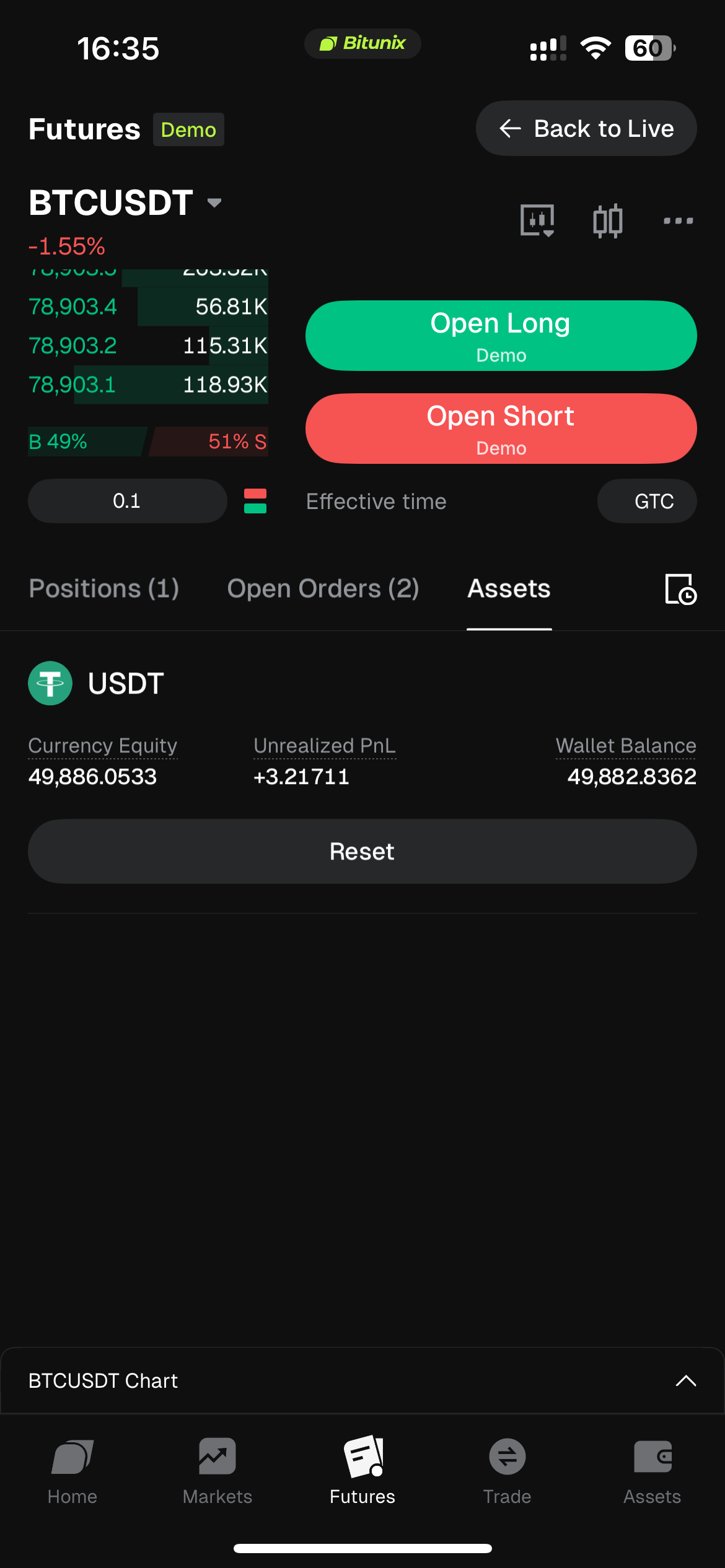
Configure Trading Parameters: Select the BTCUSDT perpetual contract, set 20X Cross Margin and a Market Order, then review the order book and funding rate.

Confirm Position Opening: Tap【Open Long】, review the margin, trading fee, estimated liquidation price, and margin rate, then confirm the order.

Manage Positions: After the order is filled, check PnL, entry price, and estimated liquidation price on the Positions page. Users can set take-profit and stop-loss (TP/SL) orders, add to positions, or close positions with one click.

Reset Account: Go to the Assets page. After losses occur, tap Reset to clear all positions and open orders and restore the 50,000 USDT virtual funds.
5. Return to Live Trading
After completing your practice, follow the principle of "Practice First, Trade Later." Simply tap the【Back to Live】button in the upper-right corner to exit the demo environment and return to real Bitunix Futures trading.

6. Risk Management and Important Notes
Demo Trading market data is synchronized with live trading, but trading results are for strategy practice and reference only. The demo environment does not reflect real market liquidity, and simulated profits should not be considered equivalent to actual trading returns.
Each Bitunix master account can be linked to only one Demo Trading account. Creating multiple demo accounts is not supported.
Demo Trading volume does not count toward live account VIP upgrade statistics. Trading fee rates follow the user's live VIP level and are updated accordingly.
Virtual funds cannot be deposited, withdrawn, or transferred. Regardless of the amount of simulated profits earned, virtual balances cannot be converted into real assets.
The current version of Demo Trading does not support Copy Trading or Grid Trading Bots. Related features will be evaluated for future releases.
When logging into a Bitunix account on different devices, Demo Trading positions, assets, and trading history are synchronized through the cloud, ensuring consistent data across devices.
Always check the "Demo" label displayed on the page to distinguish between the demo and live trading environments and avoid placing unintended real orders.
Account reset actions are irreversible. Resetting will clear all demo positions and open orders. Confirm that you no longer need the current simulated positions before proceeding.