Quick Information Summary
Item | Details |
Platform | Bitunix — Spot & Futures Trading |
Topic | Position size, leverage, and margin mode configuration |
Margin Modes | Isolated — margin per position; Cross — shared account margin |
Where to Configure | Futures Trading page → Position Size slider / leverage input → Margin mode toggle |
Supported Devices | Bitunix mobile app and web platform |
Mode Switch Rule | Cannot switch margin mode while an open position or pending order exists for the same trading pair |
Leverage Control | Slider (e.g., 25%, 50%, 100% of available margin) or manual multiplier entry |
Liquidation Scope | Isolated: limited to position margin · Cross: entire margin balance for that asset |
Trading Fees | Subject to current Bitunix fee schedule; fees apply per trade and may affect margin calculations |
Settlement | Futures positions settle in real time; margin adjustments reflect immediately after order confirmation |
Best For | Beginners learning risk control (Isolated) · Experienced traders optimizing capital efficiency (Cross) |
Related Guides | Bitunix Academy — Futures Trading Guide series |
How to Set Positioning
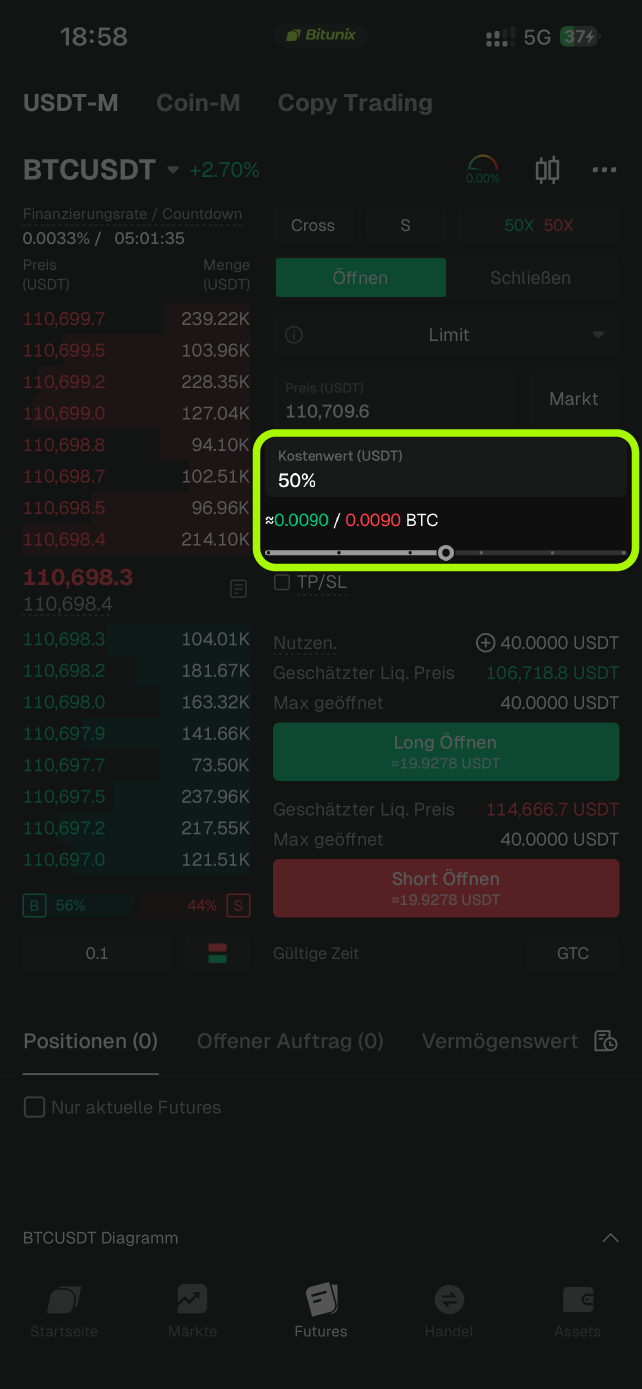
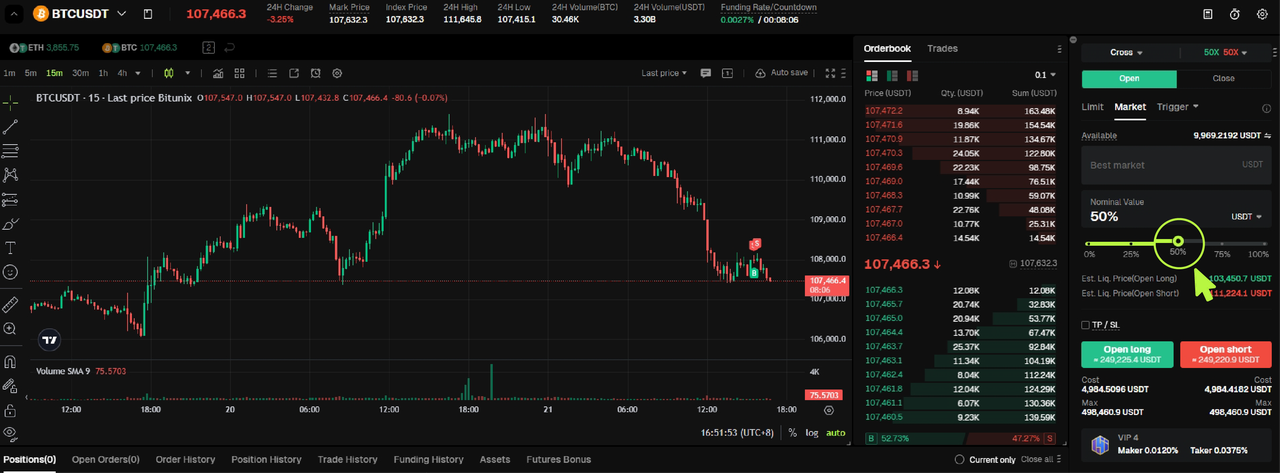
Go to the [Futures Trading] page. Use the slider or manually enter your desired leverage ratio and position size.
App:
On the trading interface, adjust the position size using the slider (for example, 25%, 50%, or 100%) to select the portion of your available margin you want to use for the trade.
You can also manually enter a leverage multiplier to control the exposure level of your futures position.
Website:
Go to the Futures Trading interface on Bitunix.
Under Position Size, use the slider or enter your leverage ratio manually.
Check your estimated position size and margin allocation before confirming the order.
Margin Mode: Isolated Margin Selection
Bitunix traders can choose between Isolated Margin Mode and Cross Margin Mode in Futures Trading. Each mode manages margin allocation differently. Traders can select a mode based on their preferred risk control and position management strategy.
What Is the Isolated Margin Mode?
In Isolated Margin Mode, the margin for each position is calculated independently.
When a position is liquidated, only the margin allocated to that specific position is lost, while the remaining funds in the futures account are unaffected.
Advantages of Isolated Margin Trading
Risk Control: Losses are limited to the margin used for each position. This isolates risk and prevents one trade from affecting others.
Independent Management: Traders can manage each position separately and adjust leverage or margin according to their trading strategy.
Custom Margin Allocation: Specific margin amounts can be assigned to individual positions based on the trader’s risk tolerance.
Example
Trader A has 100 USDT in their futures account and opens a BTC/USDT long position with 10 USDT as margin.
If the BTC/USDT long position is liquidated, only the 10 USDT margin will be lost. The remaining 90 USDT in the account will not be affected (assuming no trading fees are involved).
How to Use Isolated Margin Mode
Open the Bitunix App or Web version.
Go to the [Futures Trading] page.
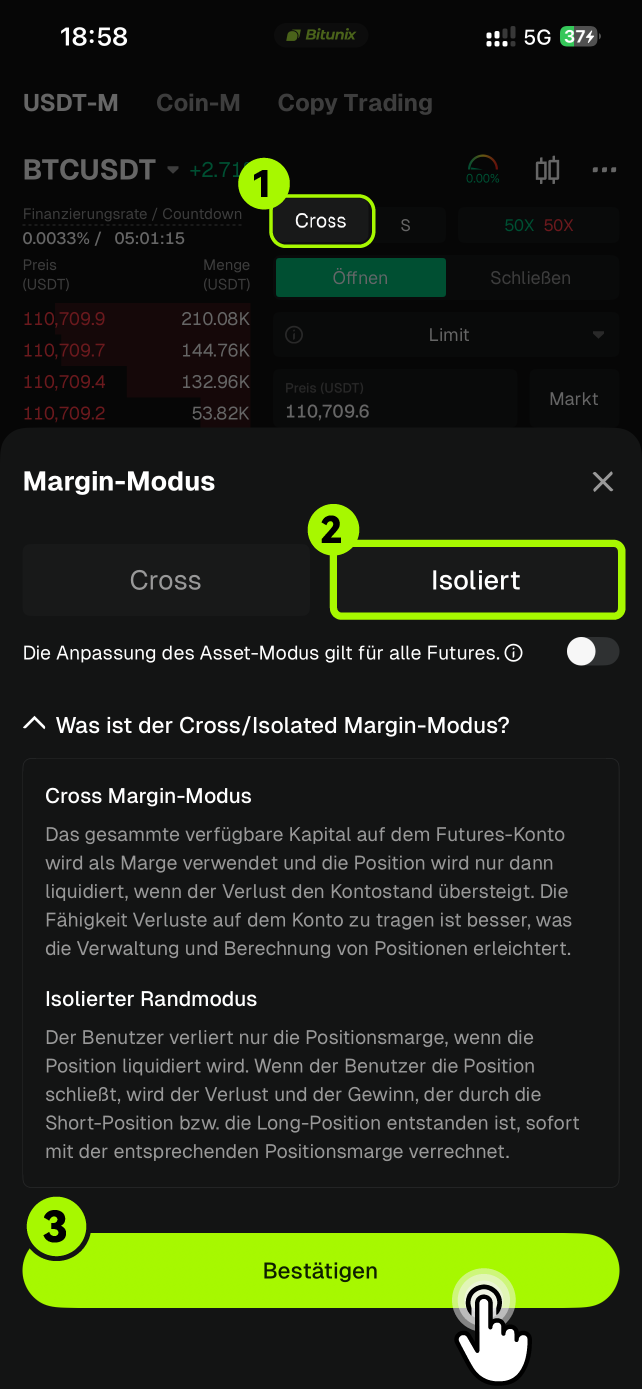
On the trading interface, click on [Cross] and select [Isolated].
Click Confirm to complete the change.
App:
Web:
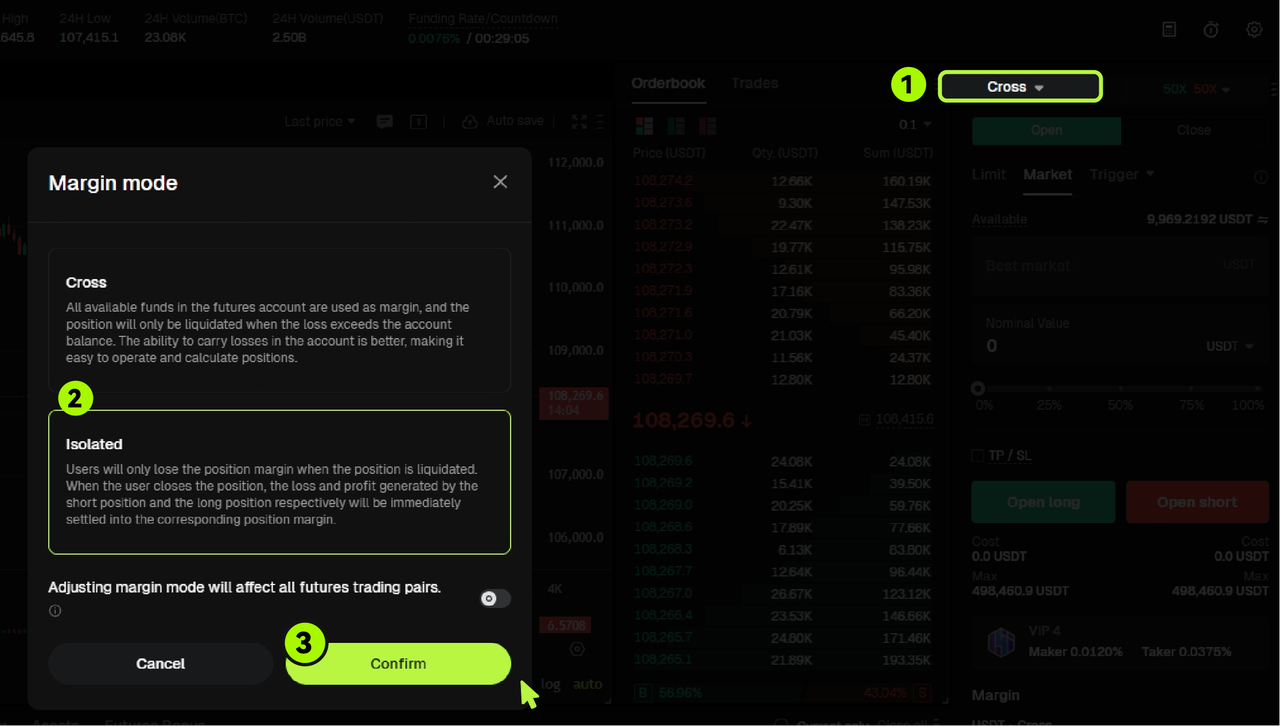
Note: When you hold an open position or have a pending order for a specific trading pair, you cannot switch between Isolated Margin Mode and Cross Margin Mode until all active orders for that pair are closed.
What Is Cross Margin Mode?
In Cross Margin Mode, all positions under the same margin asset share a common margin balance.
If forced liquidation occurs, the total margin balance across all open positions is used to prevent liquidation. The maximum potential loss is therefore limited to the full available margin in the account.
Advantages of Cross Margin Trading
Shared Margin: The available margin is distributed among all open positions, reducing the likelihood of liquidation during market fluctuations.
Capital Efficiency: Merging margin across positions improves overall capital utilization, reducing the need for additional margin deposits.
Risk Diversification: Losses from one position can be offset by profits from other positions, effectively reducing total account risk.
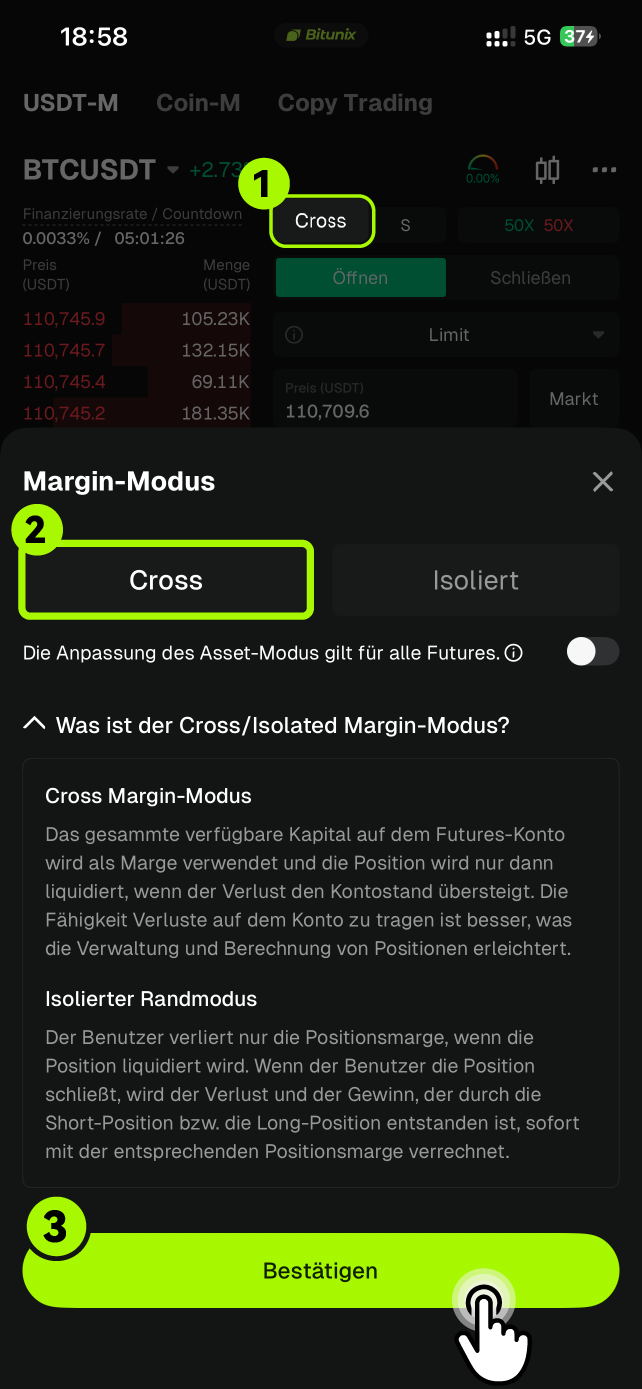
How to Use Cross Margin Mode for Trading
Open the Bitunix App or access the Web version.
Go to the [Futures Trading] page.
In the margin settings section, select [Cross].
Click Confirm to complete the change.
App:
Web:
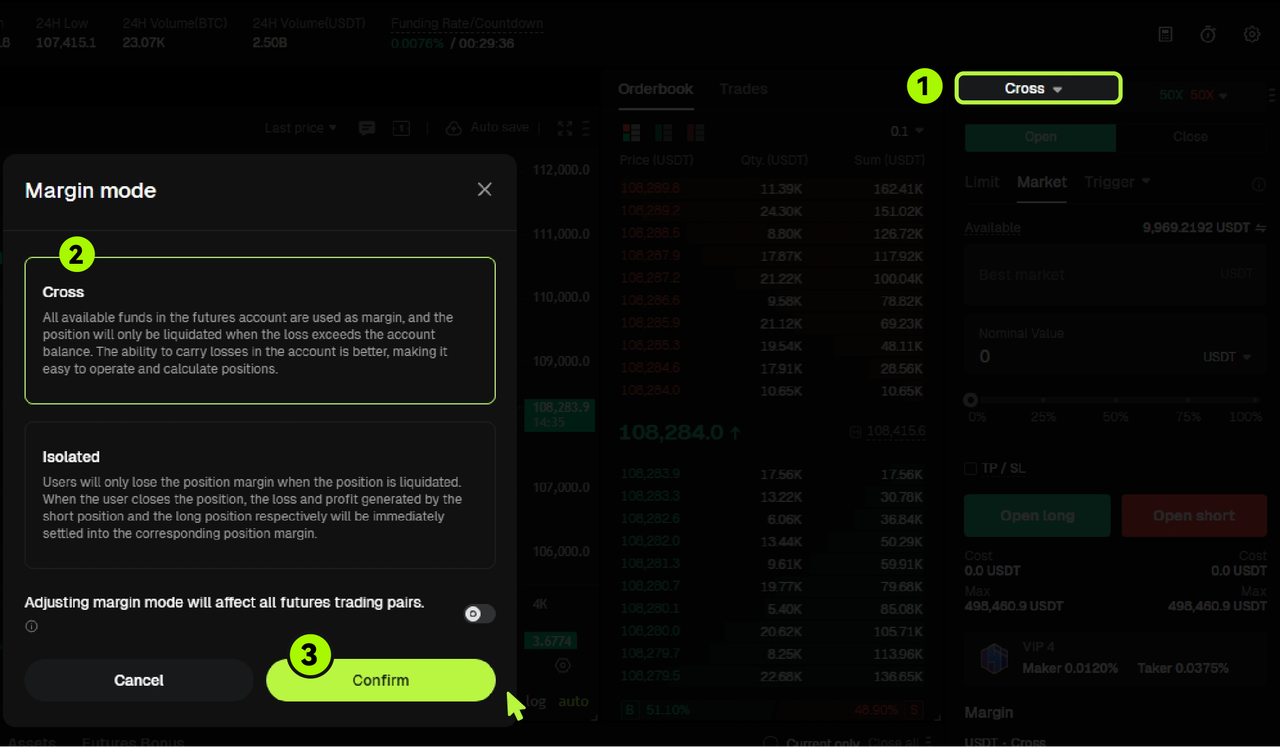
Note: When you have an open position or a pending order for a specific trading pair, you cannot switch between Isolated Margin Mode and Cross Margin Mode until all active orders for that pair are closed.