Cryptocurrency prices can move sharply within minutes, making it difficult to manage every position manually. Take profit (TP) and stop loss (SL) orders let traders define exit conditions in advance, so a position can be managed according to a predefined plan rather than a last-minute decision.
A TP order is designed to close a position when the market reaches a target in the expected direction, while an SL order is designed to close a position when the market moves against the trade. For leveraged products such as futures, TP and SL should also be considered alongside position size, leverage, margin, and crypto liquidation risk.
This guide explains how TP and SL work, how to plan these levels, and how to set and modify them on Bitunix. It also covers the latest TP/SL methods available for Bitunix Futures, including Position TP/SL, Partial TP/SL, Trailing TP/SL, and Account TP/SL.
What Is a Take Profit (TP) Order in Crypto Trading?
A take profit (TP) order is an instruction to close a trading position when the market reaches a predefined profit target.
The idea is straightforward: instead of waiting for the market to reach a target and then manually closing the position, a trader defines the exit condition in advance.
For example:
Buy Bitcoin at $60,000.
Set a take profit target at $65,000.
If the relevant trigger condition is reached, the TP instruction is activated and the position is closed according to the configured order settings.
A TP order can be useful when a trader has already identified a reasonable exit level but doesn't want to monitor the market continuously.
How Does a Take Profit Order Work?
A TP order generally follows three steps:
1. Set a Target Price
The trader determines the price level where they want to exit the position.
This level may be based on:
2. The Market Reaches the Trigger Condition
When the selected trigger condition is reached, the TP order becomes active.
Depending on the trading platform and product type, TP/SL settings may use different price references, such as the latest traded price or other supported trigger prices.
3. The Position Is Closed
After triggering, the system submits the closing order based on the configured settings.
Common execution approaches include:
Type | Description | Consideration |
|---|
Market execution | Attempts to close the position at available market prices | Prioritizes execution but the final price may vary |
Limit execution | Places an order at a specified price | Provides more price control but may not fill immediately |
A trigger price and the final execution price are not always identical, especially during periods of extreme volatility or limited liquidity.
What Is a Stop Loss (SL) Order in Crypto Trading?
A stop loss (SL) order is an instruction designed to close a position when the market moves against the trader's position.
For a long position, the SL is generally placed below the entry price. For a short position, it is generally placed above the entry price.
For example:
The purpose of an SL isn't to predict the lowest possible price. It's to establish a predefined point at which the trader no longer wants to remain exposed to the position.
For leveraged futures trading, this matters even more because a sufficiently large adverse move can bring a position closer to liquidation.
How Does a Stop Loss Order Work?
The basic process is similar to TP:
Choose the price or condition that should trigger the exit.
The market reaches that condition.
The system submits the closing order.
A stop loss can help prevent a trader from continuously moving the exit point farther away as a losing position develops. The effectiveness of an SL still depends on market conditions, liquidity, and the order configuration.
Take Profit vs Stop Loss: Key Differences
TP and SL are usually discussed together because they manage opposite sides of the same trade.
Feature | Take Profit (TP) | Stop Loss (SL) |
|---|
Main purpose | Close a position at a planned profit target | Close a position when the trade moves against the plan |
Typical placement for a long | Above entry | Below entry |
Typical placement for a short | Below entry | Above entry |
Primary role | Profit-taking | Loss control |
Main psychological benefit | Reduces the temptation to overhold | Reduces the temptation to keep holding a losing trade |
Using both creates a basic exit framework:
If the trade works, where will I take profit?
If the trade fails, where will I exit?
That decision can be made before market volatility starts influencing the trade.
How to Set Take Profit and Stop Loss in Crypto Trading
Setting TP and SL isn't simply a matter of choosing two convenient prices. The levels should make sense within the broader trade setup.
Define Your Entry and Exit Levels
Start with the point where you expect the trade idea to become invalid.
For example, if a long setup depends on a specific support level holding, an SL placed below that area may make more sense than choosing a fixed percentage without considering the chart.
Likewise, a TP can be based on:
A previous resistance area
A technical price target
A predefined risk-reward ratio
A trend or market-structure objective
The exact method depends on the trading strategy and timeframe.
Consider Risk and Reward
Risk-reward planning provides a simple way to compare the potential loss with the potential gain.
Suppose a trader enters BTC at $70,000, with:
The planned price movement is:
Potential reward: $6,000
Potential risk: $2,000
This gives a planned 1:3 risk-reward ratio before fees, funding costs, and execution differences.
A favorable risk-reward ratio doesn't guarantee a profitable trade. It simply provides a framework for evaluating the setup before entering.
Account for Market Volatility
An SL that's too close to the entry price can be triggered by normal market fluctuations rather than a meaningful change in the trade setup.
Volatility should therefore be considered when choosing exit levels.
Traders may look at:
These indicators shouldn't be treated as automatic signals. Their value comes from how they fit the overall trading plan.
Why Use Take Profit and Stop Loss Orders?
TP and SL allow traders to define potential exit conditions before opening a trade.
This is particularly relevant in cryptocurrency markets, where price movements can happen quickly.
For futures traders, TP and SL are only one part of risk management. Position size, leverage, margin mode, and liquidation price also affect the amount of risk carried by a position.
Trading decisions can change when money is at risk.
A position that was supposed to be closed at a predefined level may suddenly look different after a large price move. Traders may delay taking profit because they expect another rally or move an SL farther away because they don't want to realize a loss.
Predefined TP and SL conditions can reduce the number of decisions that need to be made during the trade.
Trading Consistency
A repeatable trading process is easier to evaluate than a series of decisions made in response to every market movement.
Using predefined exit levels gives traders a consistent framework for reviewing:
Why a position was opened
Where the position was supposed to exit
Whether the original trade thesis was correct
Whether the risk level was appropriate
How to Set Up Take Profit and Stop Loss on Bitunix
The exact TP/SL options depend on the trading product. Bitunix supports TP/SL functionality within its trading interfaces, while its Futures platform provides additional position-management methods.
The original Bitunix workflow for setting TP/SL when opening a Futures trade involves selecting the trading pair, configuring the order, enabling TP/SL, entering the relevant prices, and confirming the order.
For Futures trading, Bitunix offers four TP/SL methods for managing open positions: Position TP/SL, Partial TP/SL, Trailing TP/SL, and Account TP/SL. Each method is designed for a different type of position management, from setting a fixed exit for one position to managing multiple futures positions at the account level.
How to Set TP/SL on Bitunix Web
Step 1: Open the Bitunix Trading Interface
Log in to your Bitunix account and open the relevant trading interface.
For a Futures position, click Futures from the top navigation to enter the Futures trading page. Bitunix's current Web guide directs users to the Futures page before accessing position-level TP/SL controls.

Step 2: Select the Trading Pair
Choose the trading pair you want to trade, such as BTC/USDT.
You can select the pair from the market list or use the available search function to find the contract you want to trade.
Before placing the order, check that the selected contract matches your intended trading product.

Step 3: Transfer Funds to the Appropriate Account
You need sufficient available funds in the relevant trading account before placing a position.
If your assets are currently in your Spot account, use the transfer function to move the required amount to your Futures account.
The original article included external funding methods such as on-chain deposits and card purchases. Those aren't required for setting TP/SL itself, so they don't need to be part of the core TP/SL workflow.

Step 4: Configure Margin, Leverage, and Order Details
Before opening a Futures position, configure the relevant trading parameters.
Depending on the available interface and account mode, these can include:
Margin mode
Leverage
Order type
Order price
Order quantity
The original article specifically instructed users to check the margin mode and adjust the leverage multiplier before placing the trade. That operational detail remains useful because leverage and margin directly affect futures risk.
Don't treat leverage as a substitute for position sizing. A higher leverage setting can reduce the initial margin required for a position while increasing the sensitivity of account equity to price movements.

Step 5: Set Your TP and SL
When placing the trade, enter the desired TP and SL conditions in the order panel where available.
The basic workflow is:
Enable the TP/SL option.
Enter the desired take profit condition.
Enter the desired stop loss condition.
Review the order details.
Confirm the trade.
For an existing Futures position, Bitunix's current interface provides a separate TP/SL button in the Positions section. Clicking it opens the available TP/SL methods.
This distinction is important: setting TP/SL while opening a trade and managing TP/SL on an existing position are related workflows, but they aren't the same interface path.
Step 6: Confirm the Trade and Check the Position
Review the order details before confirming.
After the order is filled, check the Positions section to make sure the position and its TP/SL settings match your intended plan.
For pending orders, the order may appear in the relevant open-order area until it is filled. Once the position is open, position management becomes the more relevant place to review or adjust TP/SL.

How to Modify Take Profit and Stop Loss on Bitunix
Market conditions can change after a position is opened. Bitunix allows traders to modify or cancel TP/SL settings when needed. Its current Futures guide specifically states that existing TP/SL orders can be modified or canceled.
Modify TP/SL From the Position Management Area
For an existing Futures position:
Open the Futures trading page.
Scroll to the Positions section.
Find the position you want to manage.
Click TP/SL.
Review the current TP/SL configuration.
Modify the relevant trigger conditions or method.
Review the updated settings.
Click Confirm.
Bitunix's current workflow places the TP/SL entry point directly in the Positions section.
This updates the old workflow described in the original article, which relied heavily on finding TP/SL instructions through Open Orders.
When Should You Modify TP/SL?
A TP/SL adjustment can make sense when the underlying trade setup has materially changed.
For example:
Price breaks through a major resistance level.
Market volatility changes substantially.
The original support or resistance structure is no longer valid.
You use a predefined trailing or scaling strategy.
Moving an SL farther away simply because a position is losing is a different situation. It increases the amount of risk originally accepted and should not be treated as routine position management.
Managing TP/SL for Bitunix Futures Positions
Bitunix's current Futures interface provides four TP/SL methods for existing positions:
Method | Main Use |
|---|
Position TP/SL | Close an entire position at predefined conditions |
Partial TP/SL | Close a position progressively |
Trailing TP/SL | Follow favorable price movements with a dynamic exit |
Account TP/SL | Manage risk across multiple Futures positions |
Advanced TP/SL Methods on Bitunix Futures
For traders managing perpetual futures positions, Bitunix provides more advanced TP/SL options beyond a simple fixed exit level.
Instead of using only one take profit and one stop loss price, traders can choose different methods depending on their position management approach.
Bitunix Futures currently supports four TP/SL methods:
Method | Best Use Case |
|---|
Position TP/SL | Closing an entire position at predefined conditions |
Partial TP/SL | Taking profits or controlling losses in stages |
Trailing TP/SL | Following favorable price movements automatically |
Account TP/SL | Managing risk across multiple Futures positions |
To access these settings:
Open the Bitunix website and click Futures.
Enter the Futures trading page.
Scroll down to the Positions section.
Click TP/SL next to the position you want to manage.
Select the TP/SL method that matches your trading plan.
1. Position TP/SL
Position TP/SL is the simplest method for traders who want to close an entire Futures position at a predefined condition.
This method is suitable when a trader already has a clear exit target and wants the whole position to close once the condition is reached.
How to Set Position TP/SL on Bitunix
After entering the TP/SL settings:
Select Position TP/SL.
Enter the trigger price manually.
Alternatively, adjust the slider to select an expected return rate or price change percentage.
Review the estimated profit and loss.
Click Confirm to activate the TP/SL setting.
Example: Position TP/SL
Suppose a trader opens a BTC long position:
Entry price: 60,000 USDT
Take profit: 65,000 USDT
Stop loss: 58,000 USDT
With Position TP/SL:
If BTC reaches the TP condition, the entire position is closed.
If BTC falls to the SL condition, the entire position is closed.
This approach provides a simple full-position exit strategy.
2. Partial TP/SL
Partial TP/SL allows traders to close only part of a position instead of exiting everything at one price level.
This method is useful for traders who want to secure some profit while keeping part of their position open.
How to Set Partial TP/SL on Bitunix
To configure Partial TP/SL:
Open the TP/SL settings from the Positions section.
Select Partial TP/SL.
Enter the trigger price or adjust the expected return/price change slider.
Adjust the position ratio slider to determine how much of the position should be closed.
Review the estimated profit and loss.
Click Confirm.
The position ratio determines the percentage of the position affected when the trigger condition is reached.
Example: Partial TP/SL
A trader opens a BTC long position and creates a staged exit plan:
Price Level | Action |
|---|
65,000 USDT | Close 30% of the position |
68,000 USDT | Close another 40% |
Remaining position | Continue managing |
This approach allows traders to lock in part of the position while keeping exposure if the trend continues.
Partial TP/SL is especially useful for trend-based strategies where traders don't want one fixed target to determine the entire exit.
3. Trailing TP/SL
Trailing TP/SL is designed for traders who want their exit condition to adjust as the market moves in their favor.
Unlike a fixed TP level, a trailing setting follows price movement and triggers when the market retraces by the predefined amount.
How to Set Trailing TP/SL on Bitunix
To configure Trailing TP/SL:
Open the TP/SL menu from the Positions section.
Select Trailing TP/SL.
Enter the activation price.
Set the retracement range.
Enter the order quantity.
Choose the trailing mode:
Review the settings.
Click Confirm.
The trailing function becomes active only after the market reaches the activation price.
Once activated:
For a long position, the system follows upward price movement and triggers when price retraces by the configured amount.
For a short position, the system follows downward movement and triggers when price rebounds by the configured amount.
Example: Trailing TP/SL
Bitunix provides an example using an ETH long position:
Entry price: 1,938.30 USDT
Activation price: 2,000 USDT
Retracement range: 5%
The process works as follows:
ETH rises to 2,000 USDT.
The trailing TP/SL becomes active.
ETH continues moving higher.
If price later retraces 5% from the peak, the system triggers the closing order.
This method can reduce the need to manually adjust exit levels during strong trends.
4. Account TP/SL
Account TP/SL manages risk based on the overall Futures account rather than one individual position.
This method is designed for traders who hold multiple Futures positions and want a unified account-level exit condition.
How to Set Account TP/SL on Bitunix
To configure Account TP/SL:
Open the Futures trading page.
Go to the Positions section.
Click Account TP/SL.
Enter the desired account-level take profit and stop loss values.
Review the settings.
Click Confirm.
Example: Account TP/SL
A trader holds:
BTC Futures position
ETH Futures position
SOL Futures position
Instead of setting separate exits for each position, the trader creates an account-level rule:
Condition | Action |
|---|
Total Futures profit reaches 1,000 USDT | Trigger account TP |
Total Futures loss reaches 500 USDT | Trigger account SL |
When the account-level condition is reached, the system manages Futures positions based on the configured settings.
Which Bitunix TP/SL Method Should You Use?
Different TP/SL methods solve different position-management problems.
Trading Situation | Suitable Method |
|---|
You want to close the entire position at one target | Position TP/SL |
You want to secure profits gradually | Partial TP/SL |
You want to follow a trend without manually adjusting levels | Trailing TP/SL |
You manage several Futures positions at once | Account TP/SL |
There is no single TP/SL method that fits every strategy.
The appropriate choice depends on:
Position size
Trading timeframe
Market conditions
Risk management approach
How to Set TP/SL on Bitunix Mobile App
Bitunix users can also manage TP/SL settings through the mobile application.
The original mobile workflow remains relevant because many traders manage positions directly from their phones.
Step 1: Open Futures

Log in to your Bitunix account.
Open the Bitunix mobile app.
Select Futures from the bottom navigation bar.
Step 2: Select Trading Pair
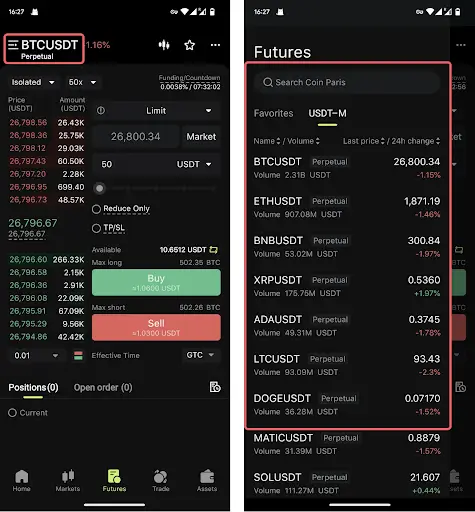
Tap the trading pair at the top of the screen.
Search for the Futures contract you want to trade.
Select the trading pair.
Step 3: Configure Margin and Leverage

Before placing the trade:
If your funds are in another account, use the transfer function to move assets into the Futures account.
Step 4: Place the Order and Set TP/SL
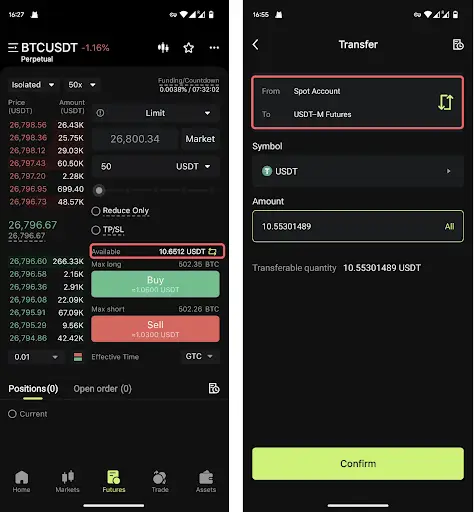
When opening a position:
Select the order type.
Enter price and quantity if required.
Enable the TP/SL option.
Enter your take profit and stop loss conditions.
Choose:
Confirm the order.
Step 5: Manage Existing TP/SL Orders

After opening a position:
Open your Futures position.
Access TP/SL settings.
Review or adjust the current configuration.

For advanced Futures positions, users can access the same four TP/SL methods available on Web:
Position TP/SL
Partial TP/SL
Trailing TP/SL
Account TP/SL
Practical Example: Setting TP/SL on Bitunix
Suppose a trader opens a BTC/USDT long position.
Trade setup:
Item | Value |
|---|
Entry Price | 70,000 USDT |
Take Profit | 76,000 USDT |
Stop Loss | 68,000 USDT |
The trader can choose different TP/SL approaches.
Option 1: Full Position Exit
Using Position TP/SL:
Close the entire position at 76,000 USDT.
Close the entire position if price falls to 68,000 USDT.
Option 2: Staged Profit Taking
Using Partial TP/SL:
Target | Position Closed |
|---|
75,000 USDT | 30% |
78,000 USDT | 40% |
Remaining position | 30% |
Option 3: Trend Following
Using Trailing TP/SL:
Activate after price reaches a selected level.
Allow the position to continue following upward movement.
Exit after the configured retracement occurs.
The choice depends on whether the trader prefers a fixed exit, staged management, or dynamic trend-following.
TP/SL vs Liquidation: What Traders Should Know
Take profit and stop loss orders are proactive risk management tools. Liquidation is a forced position closure mechanism that happens when a leveraged position no longer meets margin requirements.
Understanding the difference is especially important for Futures traders.
Feature | Take Profit / Stop Loss | Liquidation |
|---|
Trigger | Trader-defined condition | Exchange risk system |
Purpose | Planned position management | Prevent further losses beyond available margin |
Control | Set by trader | Triggered automatically |
Timing | Before liquidation risk becomes critical | Happens when margin requirements are breached |
Typical outcome | Position closes according to strategy | Position is forcibly closed |
A stop loss allows traders to decide where they want to exit.
Liquidation happens when the position reaches a point where the exchange must intervene because the remaining margin is insufficient.
Bitunix Futures users should consider TP/SL together with:
Position size
Leverage level
Margin mode
Liquidation price
A properly planned TP/SL strategy may help reduce the chance of liquidation, but it cannot remove market risk completely.
How TP/SL Helps Reduce Liquidation Risk
In leveraged trading, losses can increase faster because price movements affect a larger position size.
For example:
A trader opens a leveraged BTC Futures position.
Without an SL:
BTC moves against the position.
Unrealized losses increase.
Available margin decreases.
The position approaches liquidation.
With an SL:
This does not mean every SL will execute exactly at the intended price. During extreme volatility, price gaps, liquidity changes, and market conditions can affect execution.
For this reason, TP/SL should be combined with appropriate leverage and position sizing.
Common Take Profit and Stop Loss Mistakes
1. Setting Stop Loss Levels Too Close
A stop loss that is placed too close to the entry price may be triggered by normal market fluctuations.
A short-term price movement does not always mean the original trade idea is invalid.
When setting SL levels, consider:
2. Moving Stop Loss Further Away After a Loss
One common mistake is changing an SL level only because the market is moving against the position.
For example:
Initial plan:
Entry: $70,000
Stop loss: $68,000
After BTC falls near $68,000, the trader moves the SL lower to avoid closing the position.
This changes the original risk calculation.
A better approach is to define the invalidation level before entering the trade and only adjust it when the trading plan changes.
3. Ignoring Liquidation Price
Some traders focus only on TP and SL levels while ignoring the liquidation price.
For Futures trading, liquidation price provides additional information about how much room a position has before forced closure.
A position with:
Excessive leverage
Large position size
Limited margin buffer
can approach liquidation quickly during volatile conditions.
4. Confusing Trigger Price With Execution Price
A TP/SL trigger activates the exit instruction.
The final execution price may differ depending on:
Market liquidity
Price movement speed
Order type
Slippage
This is why traders should understand whether their TP/SL uses market execution or another execution method.
Final Thoughts: Using TP/SL as Part of a Trading Plan
Take profit and stop loss orders are simple tools, but effective use requires more than choosing two price levels.
A structured approach usually includes:
Defining the trade idea before entering.
Setting acceptable risk levels.
Choosing TP and SL based on market conditions.
Reviewing whether the position still matches the original strategy.
On Bitunix, traders can use basic TP/SL settings when opening positions and access more advanced Futures methods, including Position TP/SL, Partial TP/SL, Trailing TP/SL, and Account TP/SL.
TP/SL can help create a more disciplined trading process, but it should always be used together with broader risk management practices.
About Bitunix
Bitunix is a global cryptocurrency derivatives exchange trusted by over 5 million users across more than 150 countries/districts. The platform is committed to providing a transparent, compliant, and secure trading environment for every user. Bitunix offers a fast registration process and a user-friendly verification system supported by mandatory KYC to ensure safety and compliance.
With global standards of protection through Proof of Reserves (POR) and the Bitunix Care Fund, Bitunix prioritizes user trust and fund security. The K-Line Ultra chart system delivers a seamless trading experience for both beginners and advanced traders, while leverage of up to 200x and deep liquidity make Bitunix one of the most dynamic platforms in the market.
Bitunix Global Accounts
X | Telegram Announcements | Telegram Global | CoinMarketCap | Instagram | Facebook | LinkedIn | Reddit | Medium