Setting up a crypto trading stream usually goes one of two ways: you either bleed cash on software subscriptions, or you waste hours wrestling with screen layouts.
The default playbook gets expensive fast. Between a TradingView tier just to unlock multi-chart layouts ($155 to $700+/year) and the hassle of stitching together webcams, QR codes, and banners across multiple OBS layers, you’re burning both money and patience before you even hit "Go Live."
The workaround isn't some complex hack—it’s just using a unified terminal. With Bitunix PC Ultra, the multi-chart setups, custom screeners, and broadcast-ready branding panels (webcam and graphics included) all live natively inside the trading screen. You capture a single window in the free OBS Studio and you're good to go—no paid overlays, no window wrestling, and zero subscription tax.
If you want the step-by-step screen setup instead, that is covered in the first guide in this series: How to design a pro screen for a crypto trading livestream. This piece is about the money.
The Real Cost of Running a Professional Crypto Trading Livestream
Most live trading streamers never add up what the toolkit costs, because each subscription looks small on its own. The total only becomes visible when you list every monthly fee that exists purely so that viewers can see a clean chart and your face next to it.
Hidden Overhead: Monthly SaaS Fees for Charting and Stream Overlays
Most trading stream setups quietly tax you twice before you even place a trade. First is the charting fee: coughing up for a TradingView tier just to unlock multi-chart tabs, stack indicators, and set enough alerts. Second is the visual overhead: buying into stream suites or overlay marketplaces just to get a camera frame, follower popups, and a branded layout.
Neither fee is large. Together they are the equivalent of a few hundred dollars a year before you have earned anything from the channel, and they renew whether or not you streamed that month.
Why New Live Trading Streamers Get Priced Out
Before you make a dime from a crypto trading stream, the software bills start stacking up. Most streamers get funneled into two recurring expenses: TradingView (just to unlock multiple charts and stack indicators) and an overlay suite or template pack (to handle camera frames, popups, and screen branding).
This is the hidden cost most newcomers completely miss. The free version of TradingView is practically unusable for a live broadcast, which forces people onto Plus or Premium right out of the gate. The presentation side isn't any friendlier—free overlay templates usually slap obnoxious watermarks across the screen, meaning a clean, professional look instantly turns into another monthly subscription.
Paid Convenience vs. Free Native Integration
If you step back and look at it, you're paying to patch two mismatched tools together. TradingView was built strictly for chart analysis, not broadcasting. Streamlabs and overlay packs were built for Twitch gamers, not active traders.
Native integration just cuts out the friction. When an exchange terminal bakes multi-chart layouts, market screeners, webcam framing, and custom hotkeys directly into the interface, there’s simply nothing left to subscribe to.
Both routes will get your stream live. It just comes down to whether you want to pay recurring fees to juggle multiple apps on screen, or run everything inside one window so there’s far less to break when the market starts moving.
Breaking Down the Paid Livestream Tech Stack: TradingView & Streaming Costs
Costing out the paid route is easy because the pricing is right out in the open. The numbers below reflect standard, pre-tax pricing as of October 2026, accounting for TradingView's price bump earlier this year. Both platforms run discounts from time to time, so use these figures as a realistic cost baseline.
TradingView Essential, Plus and Premium Pricing
TradingView technically has a free plan, but trying to stream with it is painful. You're locked to a single chart per tab, indicator limits choke your analysis, and pop-up ads love to hijack your screen right during high-volume spikes. Upgrading to a paid tier isn't about luxury—it's just paying to remove basic roadblocks. Here is what the non-pro plans look like on paper:
Tier | Monthly billing | Annual billing (per year) | Charts per tab | Indicators per chart | Active alerts |
Basic (free) | $0 | $0 | 1 | 2 | Very limited |
Essential | $14.95 | $155.40 | 2 | 5 | 20 (expire after 2 months) |
Plus | $34.95 | $359.40 | 4 | 10 | 100 (expire after 2 months) |
Premium | $69.95 | $719.40 | 8 | 25 | 400 (non-expiring) |
There are two hidden catches here that catch a lot of people off guard. First, the annual discount isn't huge (roughly 13% to 14%), but paying month-to-month quietly adds an extra $24 to $120 to your bill over a year. Second—and this is a constant pain point for streamers—price alerts on both Essential and Plus expire after two months. If you rely on alerts during live sessions, you have to manually rebuild them every 60 days unless you pay up for Premium.
Paid Streaming Suites and Overlay Widgets
OBS Studio is completely free, but styling the broadcast usually isn't. Most creators look to Streamlabs for layouts. While the base app is free, unlocking their full theme library, custom widgets, and multistreaming requires Streamlabs Ultra at $27 a month or $189 a year. If you skip the subscription and buy standalone overlay packs from third-party marketplaces, that's still an extra $10 to $60 upfront.
You'll also notice a lot of trading streamers with a physical macro pad on their desk to swap scenes and fire off hotkeys across different windows. Because that's a one-time hardware purchase, it isn't counted in the annual software math below—but it exists for the exact same reason: none of these separate programs talk to each other out of the box.
Calculating the Total Annual Software Expense
Combining the two layers gives three realistic paid configurations. The following table shows what each costs per year on annual billing, with monthly billing in brackets:
Setup | Charting | Overlay / suite | Annual total (annual billing) | Annual total (monthly billing) |
Lean | TradingView Essential | OBS Studio (free) | $155.40 | $179.40 |
Typical | TradingView Plus | Streamlabs Ultra | $548.40 | $743.40 |
Full | TradingView Premium | Streamlabs Ultra | $908.40 | $1,163.40 |
Native | Bitunix PC Ultra | OBS Studio (free) | $0 | $0 |
The "typical" row is where most active crypto streamers land, because Plus is the first tier with four charts per tab and the overlay suite is the fastest way to a branded look. That is $548 a year on the cheapest billing option, or $743 if paid monthly.
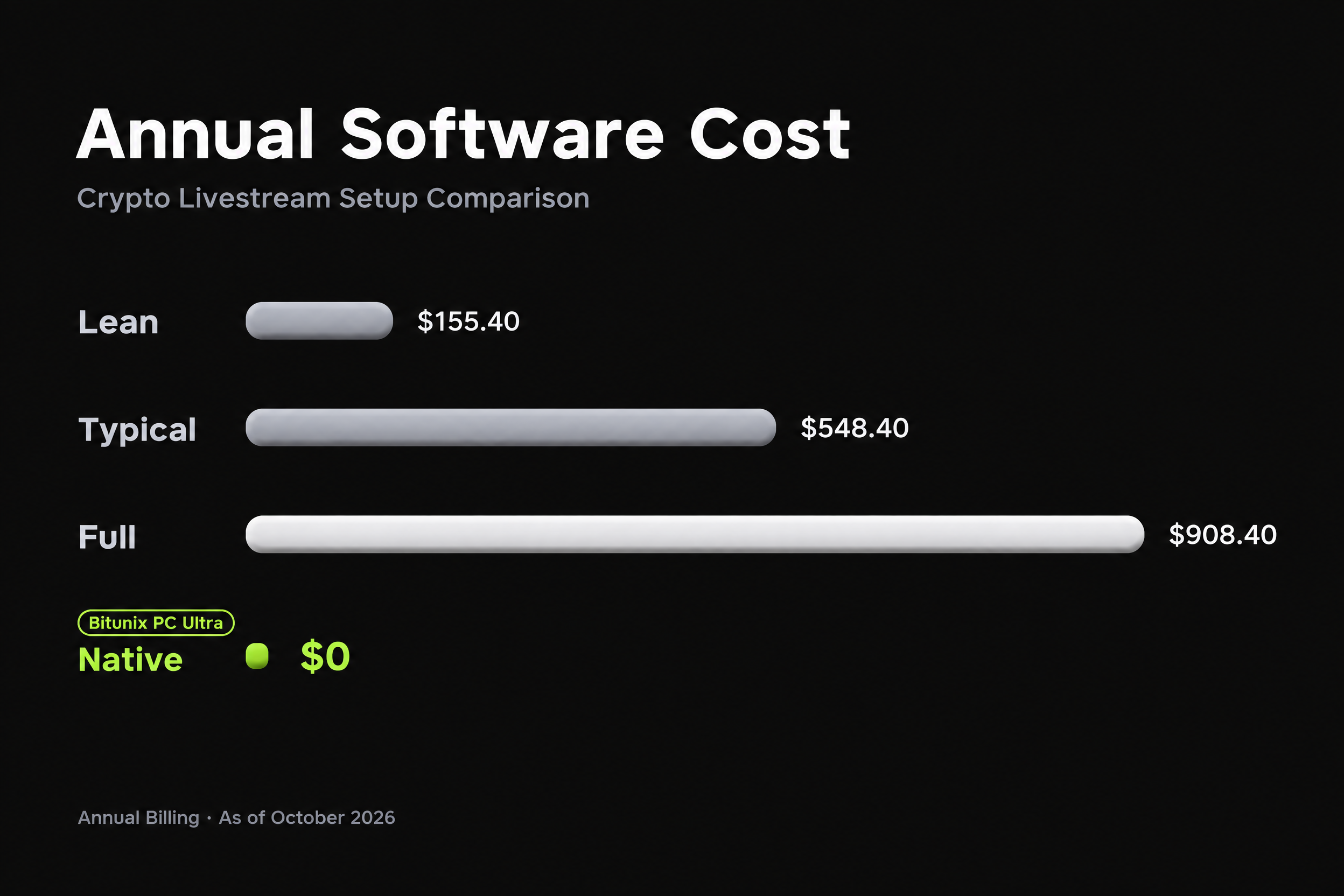
Annual software cost of four crypto trading livestream setups as of October 2026, from $0 (Bitunix PC Ultra + OBS) to $908 (TradingView Premium + Streamlabs Ultra).
Feature-by-Feature Livestream Trading Review: Paid Subscriptions vs. Bitunix PC Ultra
Price only matters alongside what you get. This section goes through the features a trading streamer actually uses on air and shows where each one sits on the paid stack versus Bitunix PC Ultra, the chart-first web layout documented in the Bitunix Ultra tutorial.
Multi-Chart Layouts and Chart Limits
On TradingView, the number of charts you can show in one tab is the primary thing you are paying for: 1, 2, 4 or 8 across Basic, Essential, Plus and Premium.
On Bitunix PC Ultra, the chart area supports split view, so two pairs can sit side by side in full-screen mode on a wide monitor. For wider comparisons, Super Filter's K-line mode displays a grid of multiple pairs' candlestick charts on one screen, with the count and size adjustable, and hovering shows open, high, low and close. Neither function is tied to an account tier.
The honest caveat: TradingView Premium's eight-chart tab is a true multi-timeframe workspace with independent indicators on each chart. Bitunix's grid is a screening and comparison view that feeds the main chart.
For an active day trading live stream, where you narrate one primary execution pair while glancing at market-wide volume spikes, the grid covers the core use case; for a static eight-chart dashboard, TradingView is still the deeper tool.
Live Camera Feeds and Branding Overlays
This is where the paid stack is most clearly solving a problem the exchange could have solved. Overlay suites exist to put a webcam frame, a QR code and a promo banner on top of a captured window without covering the chart.
PC Ultra builds this right onto the chart. Instead of stacking overlays in your broadcast software, you drop your webcam and a couple of graphic cards straight into a dedicated side panel that auto-saves to your account. Pin it when you want to show your face, or tap Esc when you need pure chart space. In OBS, you just grab that single screen—zero nudging frames around to make them fit.
Market Screeners and Candlestick Pattern Filtering
TradingView's crypto screener is available on the free plan and is a capable tool. The difference for a streamer is not whether a screener exists but how it connects to the rest of the session.
Bitunix Super Filter opens from the bottom of the Ultra chart page and screens the whole futures market by contract type, moving averages (EMA and MA from 5 to 200 periods), RSI, MACD, ADX, DMI, TRIX, nineteen candlestick patterns from hammer to three black crows, funding rate sign, listing age, 24-hour change bands and gainers, losers or turnover rank.
Clicking a result switches the main chart without leaving the page, and clicking never places an order. On stream that means the screener, the chart and the order panel are one continuous surface rather than three tabs.
Where a Paid TradingView Plan Still Earns Its Fee
To be fair, TradingView earns its keep for certain setups. It covers equities, forex, and commodities across hundreds of venues, supports custom Pine Script indicators, and includes bar replay for backtesting. If your stream covers traditional macro markets, relies on proprietary code, or requires an exchange-agnostic chart, a paid plan still makes complete sense.
The distinction here is straightforward: if you are simply streaming crypto on a single platform, paying TradingView just to unlock basic screen splits and alert slots makes far less sense—especially when the exchange terminal already gives you those tools out of the box.
How Bitunix Offers Professional Streaming Features for $0
The $0 figure is not a promotion. It follows from how the Ultra layout was designed and who it was designed for.
The Product Philosophy Behind Ultra
The idea for Ultra is pretty straightforward. If you watch anyone stream trading, they're usually struggling for screen space: trying to show a massive chart while squeezing in a webcam and a Discord QR code, usually split across two different apps and patched together in OBS.
Ultra pulls that entire setup into the trading window. Extraneous panels stay collapsed so the chart takes up the screen, and the tools that usually require paid tiers are included for free. It’s also just a layout toggle—turning it on won't affect your active trades, open orders, or margin settings, and you can switch back to the standard view in one click.
Integrated Custom Live Panels Without Third-Party Plugins
The custom panel is the direct replacement for the overlay subscription. Add a live stream region, start the camera, drop a QR code in one image card and a short "subscribe" clip in the other, rename the panel to your channel, and the whole arrangement is captured as part of the trading window. A short animated brand clip usually holds attention better than a static banner, and video cards are supported.
Because the layout is saved per account, the setup follows you between machines, which is one less thing to rebuild before a session.
Native Hotkey Immersive Mode Without Key-Mapper Apps
On a split stack, moving from "analysis" to "execution" means alt-tabbing from the chart app to the exchange tab, or scripting a macro to do it. Ultra collapses this into four keys: Esc for immersive chart mode, Space to open or close the trading panel, and the arrow keys to collapse or restore the order list. Order preview still works on the chart, so a viewer sees a continuous "analyse, decide, execute, back to chart" sequence. The first article in this series walks through these keys in detail, so they are not repeated here.
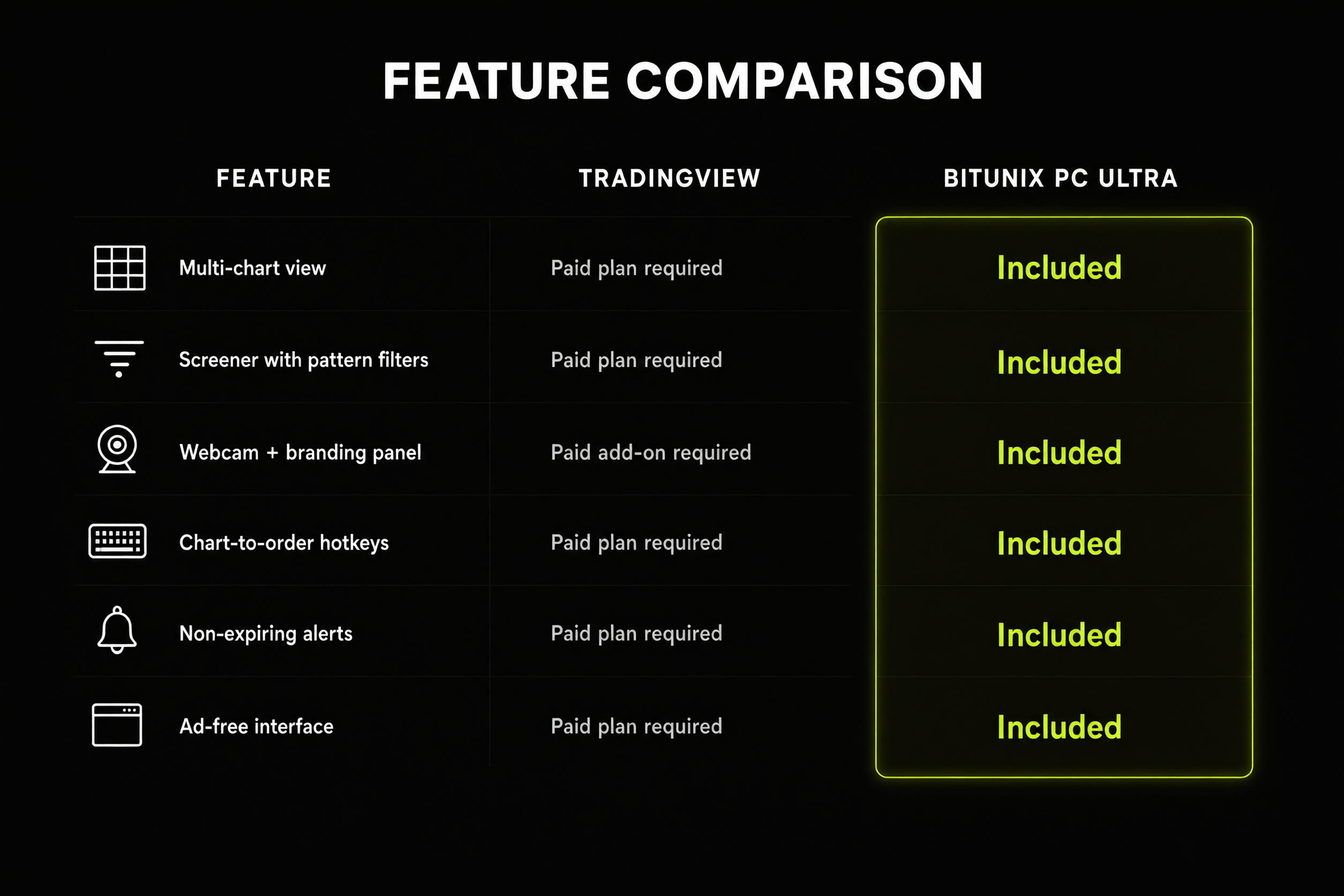
Which paid tier or add-on each streaming feature requires on a conventional stack, compared with Bitunix PC Ultra where all six are standard.
Multi-Chart View and Screener Costs: What a Streamer Actually Needs
The previous sections covered what each stack contains. This one looks at the two features most responsible for pushing a streamer into a paid tier, and what the free equivalent looks like in practice.
Chart Limits on Free vs. Paid Tiers
Most traders upgrade to TradingView Plus just to get four charts per tab, or spring for Premium for eight. But on a live broadcast, cramming that many charts onto a screen is counterproductive—especially when half your viewers are watching on a phone. Nobody can read eight micro-charts on a mobile screen.
What actually works is keeping one large, readable chart front and center while scanning other setups on the side. Ultra is built around that reality: use the grid to spot the setup, and the main chart to trade and explain it.
Super Filter: Custom Pattern Filters at Zero Cost
Candlestick pattern filtering is a strong stream format because it turns "what should we look at next" into content. Saying "show me every pair with a bullish engulfing candle in the top 30% of turnover" and then flipping through the K-line grid is more watchable than scrolling a list. Super Filter supports multi-condition groups, so an indicator condition, a pattern condition and a liquidity rank can be combined in one run. Results are a snapshot at the time the filter runs; re-run it as the market moves.
Saving and Reusing Screening Workflows Without Paywalls
Saved filter groups let you keep a "pattern scan" and an "indicator scan" one click apart, and screened pairs can be added to Favorites, which appear in the Ultra right-hand toolbar for the rest of the session. This is the "discover, confirm, monitor" loop in one place, and nothing in it is tied to a subscription tier. Trading fees are the only cost that applies, and they follow the normal fee schedule regardless of which layout you use.
How to Build a $0-Budget Professional Crypto Streaming Studio
For screenshots and layout examples, check part one of this series. If you already know your way around the Bitunix interface, here is the setup:
Step 1: Open PC Ultra from the Web Terminal
Open any futures pair in your browser and click Ultra in the top-left corner above the chart (or select it under Settings → Layout Mode). The workspace reloads with the main chart front and center. You don't need to download an app, and your active positions, open orders, and margin settings stay untouched.
Step 2: Add the Webcam and Branding Cards in the Custom Panel
Open the custom panel on the right toolbar. Toggle on your webcam, then upload your community QR code or promo banner into the two graphic slots. Pin the panel to the right edge, then tap Esc to make sure the hotkey drops you cleanly into the full chart view.
Step 3: Broadcast to YouTube or Twitch via Free OBS Studio
In OBS, add one Window Capture for your browser tab. That’s it. Since your webcam and graphics are already sitting inside the layout, you don't have to mess with extra video sources or crop boxes. Paste in your stream key and hit broadcast.
A quick heads-up before you go live: toggle off your wallet balance in the settings, keep deposit, withdrawal, and security tabs completely off that monitor, and run a quick test on a demo account first so you don't fumble the hotkeys while trading live.
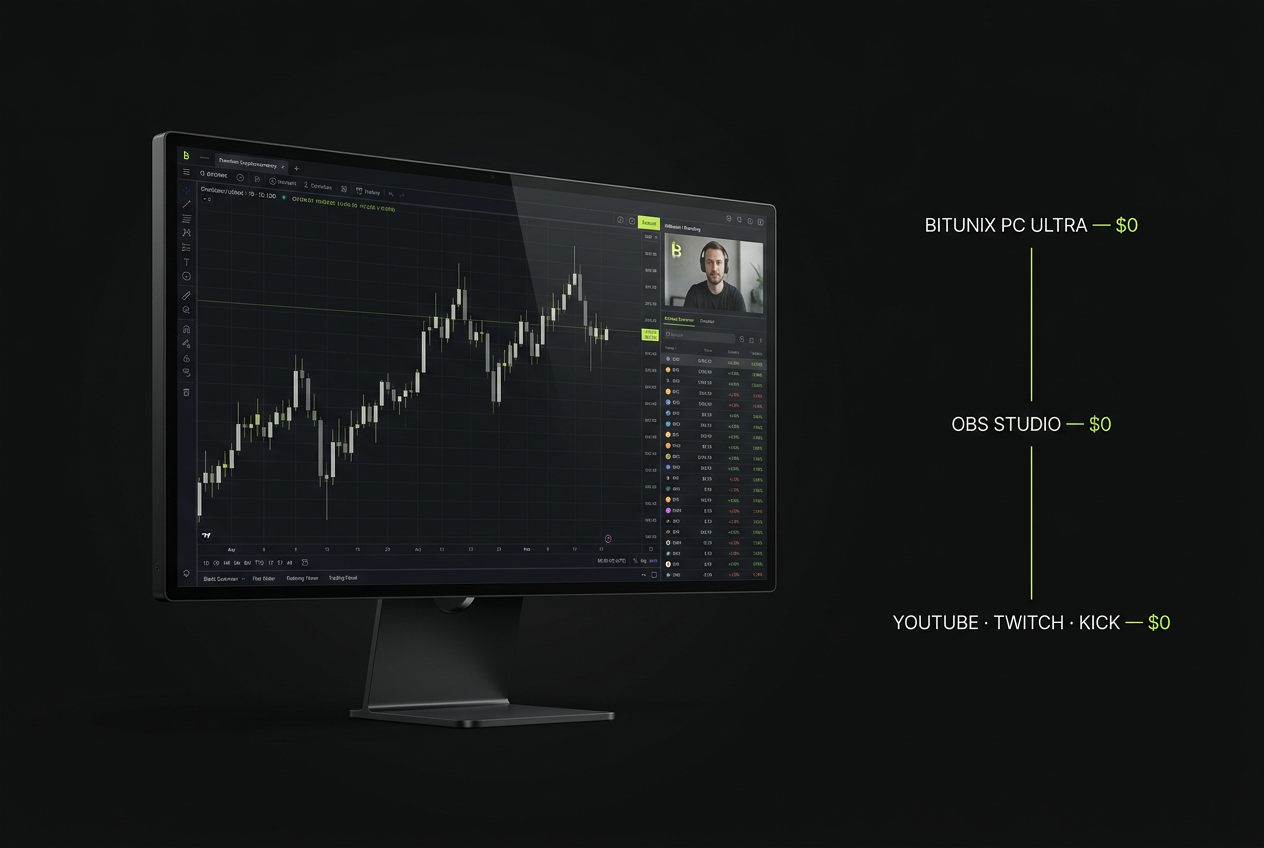
The $0 crypto trading livestream chain: Bitunix PC Ultra supplies the chart, screener and webcam panel, OBS Studio captures one window, and the stream goes out to any platform.
Maximizing Streamer ROI: Reinvesting Software Savings
For emerging live trading streamers, removing $150–$900 of annual tool spend does not automatically grow a channel. What it does is unlock a fixed budget previously tied up in software, making those funds far more useful elsewhere.
Allocating Saved Budgets Toward Audience Growth
A few hundred dollars buys things viewers instantly notice: a decent microphone so you don't sound hollow, a basic key light, or paying a freelance designer to fix your YouTube thumbnails for a few months. You could also run small community giveaways—just keep platform rules in mind, and focus on rewarding regular viewers rather than attracting giveaway hunters who leave the second the prize is drawn.
Better audio and decent thumbnails won't guarantee growth on their own. But at least you’re spending your starting budget on things that help you get discovered, instead of paying monthly rent for tools your exchange already gives away for free.
Viewer Trust and a Clean, Ad-Free Interface
A free TradingView Basic account shows ads, and a cluttered exchange page shows announcement banners, campaign pop-ups and a scrolling trade tape. Each of those pulls a viewer's eye away from the level you are explaining. An interface that shows only the chart, the order panel when it is needed and your branding beside the candles reads as more deliberate, and viewers tend to extend that impression to the analysis itself. Ultra's immersive mode gives you that without paying to remove ads.
Summary
A crypto trading livestream setup splits into two kinds of cost: the tools that make the chart readable and branded, and the risk you take in the trades themselves.
The first kind is optional. Multi-chart views, pattern screening, a webcam panel and one-key switching between chart and order entry are available at $0 through Bitunix PC Ultra and OBS Studio, where the conventional stack charges $155–$1,163 a year depending on tier and billing.
The second kind of cost does not change with the toolkit. Spend the savings on your audience, keep your risk management the same as it was off stream, and let the chart do the talking.