Quick Information Summary
Item | Details |
Platform | Bitunix — Futures (App) |
Article Focus | Futures page terminology and UI zones (5 areas, left → right) |
Contract Type | Perpetual futures (e.g. BTCUSDT) — no expiry if not liquidated |
Margin Modes | Cross (“Full Position”) · Isolated (“Position-by-Position”) |
Asset Modes | Single-Asset (USDT margin) · Multi-Assets (cross-asset margin; Cross only) |
Max Leverage (example) | Up to 200× on select pairs such as BTC/USDT and ETH/USDT perpetuals (pair-specific limits apply) |
Funding Rate | Often every 8 hours (UTC+8: 00:00, 08:00, 16:00); some low-liquidity pairs may settle hourly |
Funding Direction | Positive: longs pay shorts · Negative: shorts pay longs |
Pricing for Risk | Mark price used for unrealized PnL and liquidation; last price = latest trade |
Order Methods | Market, Limit, Tracking, Planned, Post Only (maker-style rules) |
Trading Fees | Maker / taker differ by order type; Bitunix VIP may offer fee discounts (e.g. up to 87% per platform promos) |
Fee Settlement | Charged on execution; funding settled on funding schedule |
Guaranteed SL | Optional coupon product for defined SL fee / slippage protection (see in-app help) |
Related Guides | Margin & size · Leverage · TP/SL · Order types · Academy |
Product Definition— Why Learn Futures Terms?
Futures trading on Bitunix shows more data than spot: funding, mark price, leverage, and liquidation price. Knowing each field helps you:
Judge market conditions — funding rate, index/mark vs last price, long/short ratio
Control liquidation risk — margin rate, maintenance margin, estimated liquidation price
Execute faster — order types, units (BTC vs USDT), Open/Close actions
Manage costs — maker/taker fees, funding intervals, VIP tiers
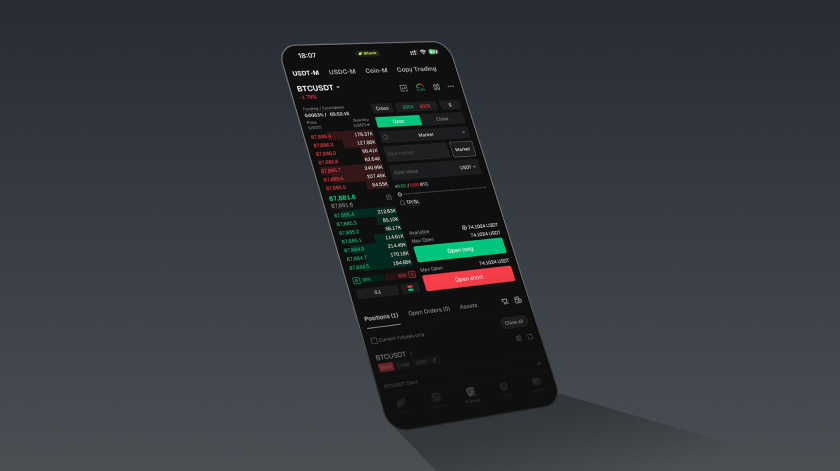
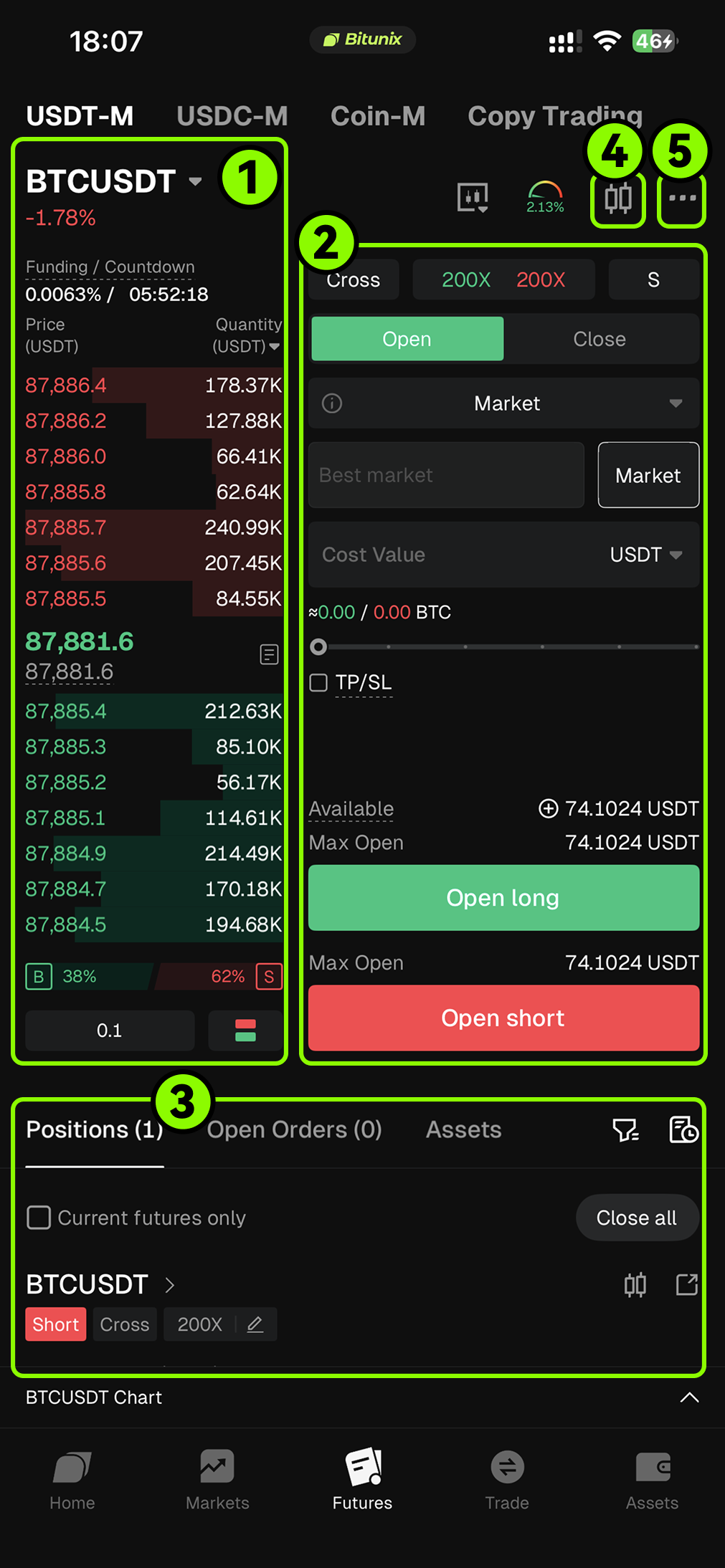
App Layout — Five Areas
Order book — live bids/asks, funding, sentiment
Order panel — margin mode, leverage, order type, size, TP/SL
Positions & orders — open PnL, margin, TP/SL, close
K-line chart — price action, indicators, alerts
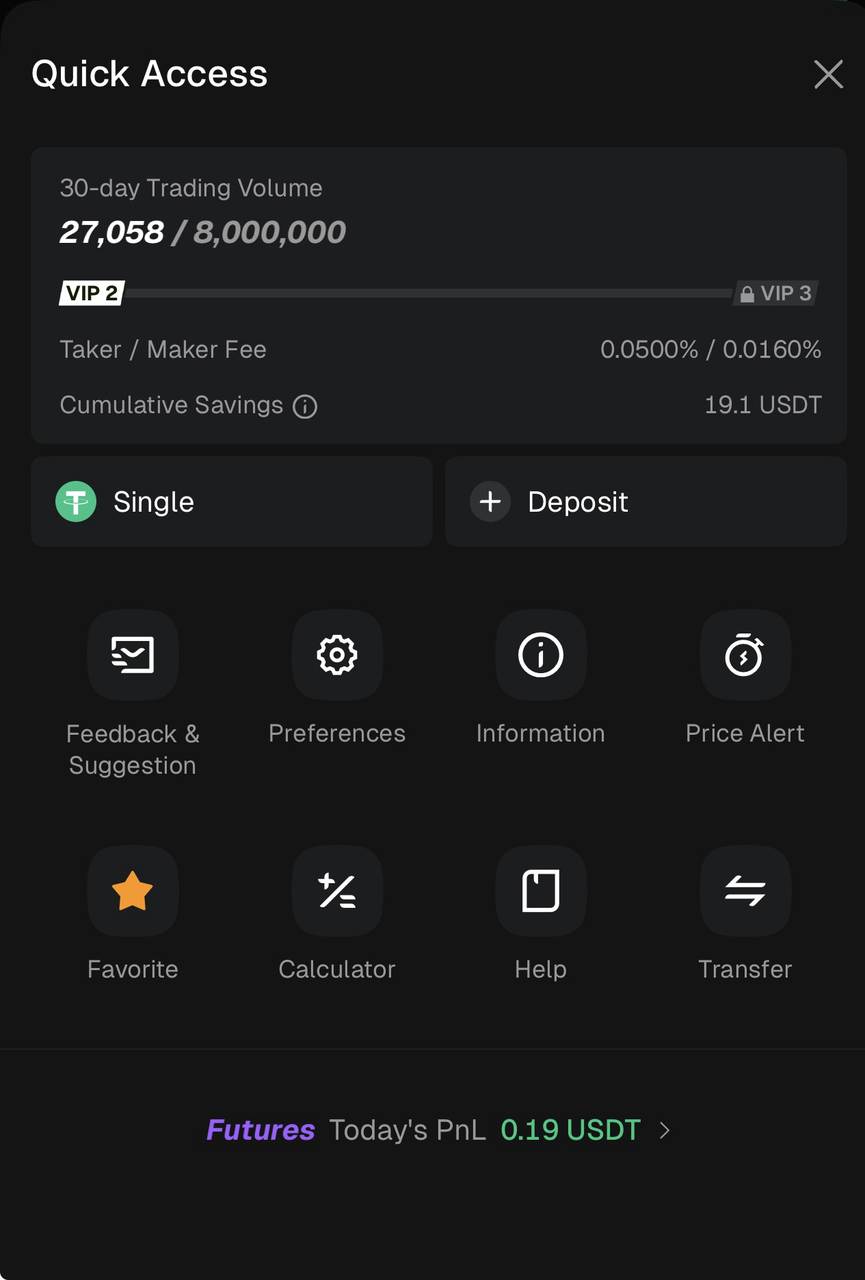
Common functions (⋯) — calculator, transfer, fee tier, settings
Why should we understand futures terms?
Understanding futures terminology is not only about learning the interface. It is also essential for safer and more effective trading:
Make better market judgments: Indicators such as the funding rate, index price, and mark price help you understand market sentiment and how pricing works.
Reduce liquidation risk: Knowing concepts like maintenance margin and liquidation rules helps you avoid avoidable liquidations caused by misunderstandings.
Trade more efficiently: Understanding order types, price protection, and trading limits helps you act faster in volatile markets.
Optimize costs and strategy: Knowing fee tiers and the maker vs taker fee model helps you plan lower cost execution strategies.
Bitunix Futures Page Overview (App)
We explain the key fields on the Bitunix Futures page from left to right across five main areas.
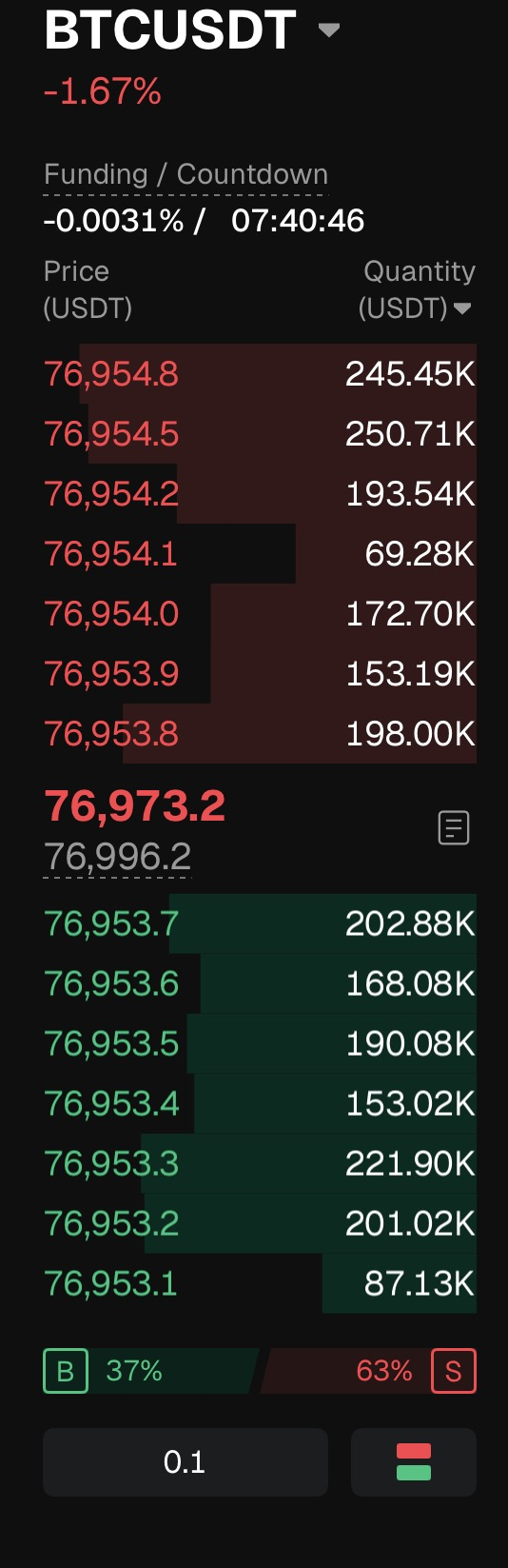
1、Order Book Panel
Panel display item (noun) | Meaning and analysis |
|---|---|
BTCUSDT | The current view shows the Bitcoin (BTC) to Tether (USDT) trading pair, corresponding to a perpetual futures contract with no expiration date. As long as the position is not liquidated, it can be held indefinitely. |
−1.67% | Indicates that the contract price has decreased by 1.67% compared with 24 hours ago, reflecting short term price movement. |
Funding rate / Countdown | Funding rate: A mechanism used to keep the perpetual contract price aligned with the spot index price and to reflect market sentiment. Positive rate: longs pay shorts. |
Sell order area (red, upper section) | Displays pending sell orders in the order book, with prices arranged from high to low (76,954.8–76,953.8). This area reflects short term selling pressure. |
Latest transaction price (76,973.2) | The most recent execution price of the current contract. |
Buy order area (green, lower section) | Displays pending buy orders in the order book, with prices arranged from low to high (76,953.1–76,953.7). This area reflects short term buying support. |
Long / Short ratio (B 37% / S 63%) |
|
0.1 | Indicates the minimum price tick size. Prices are displayed with one decimal place, for example 87,893.4, rather than rounded to whole numbers. |
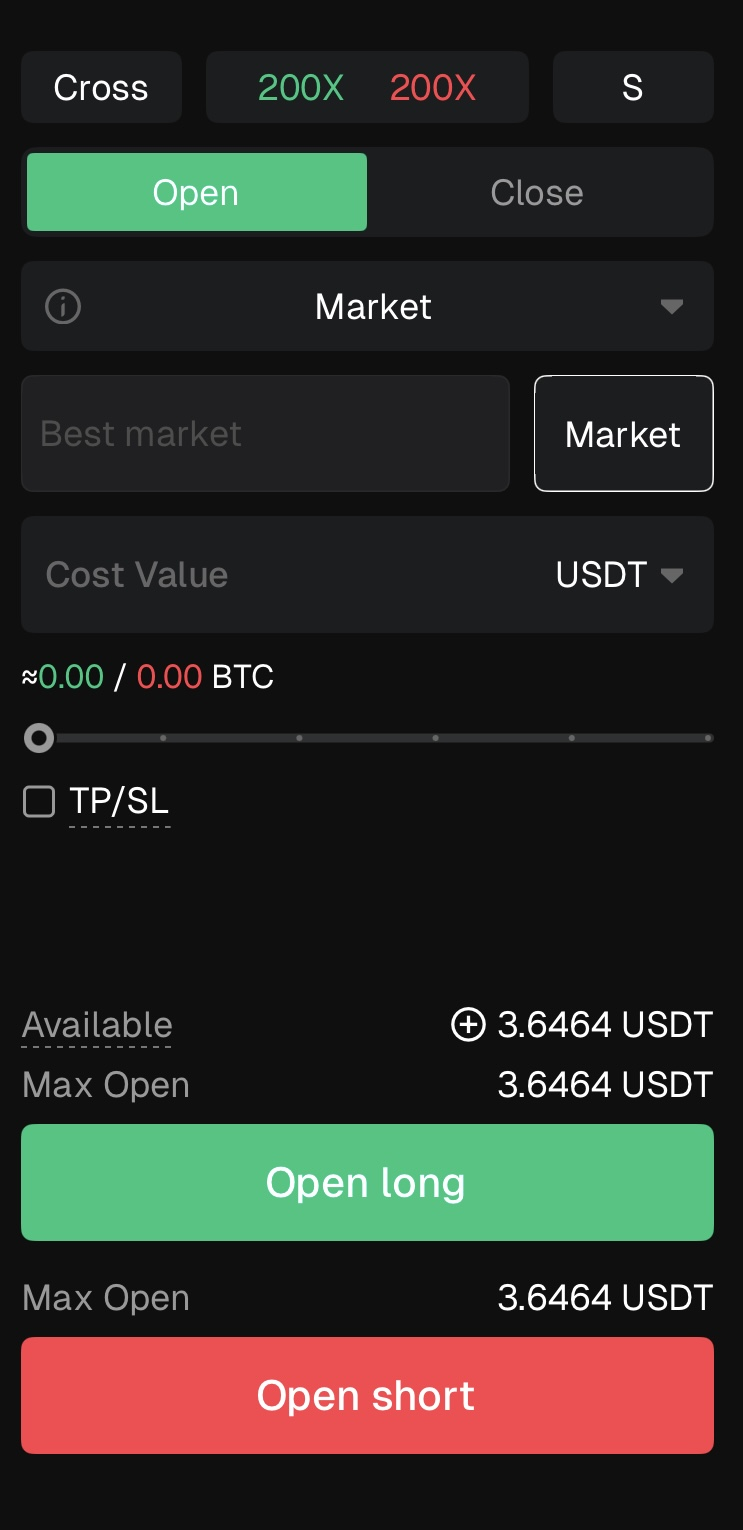
2、Order Panel and Position Settings
Panel display items (from top to bottom) | Meaning and function |
|---|---|
Full Position (Margin Mode) | Click Full Position to switch margin modes. |
200× (Leverage Ratio) |
|
Single (Asset Mode) |
|
Open / Close (Position Actions) |
|
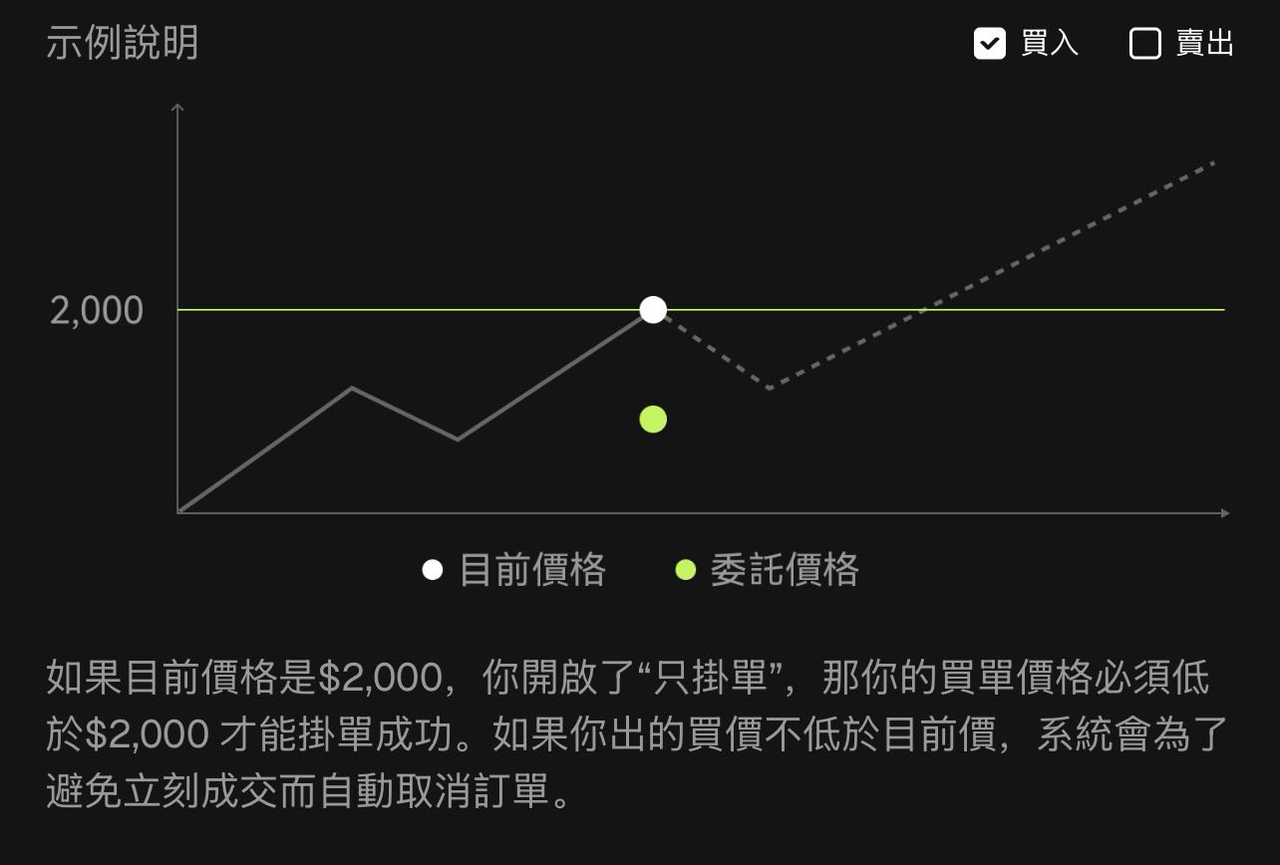
Market Order (Order Method) |
|
Market Price | In Market Order mode, the system executes at the best available buy or sell price. This field displays the market price and may be editable depending on the selected order type. |
USDT (Contract Unit Settings) |
|
Take Profit / Stop Loss |
|
Available / Open |
|
Buy Open Long | Open a long position when you expect the price to rise and profit from upward movement. |
Sell Open Short | Open a short position when you expect the price to fall and profit from downward movement. |
3、Order Area (Position and Orders Panel)
Panel display items (from left to right) | Meaning and function |
|---|---|
Positioning |
|
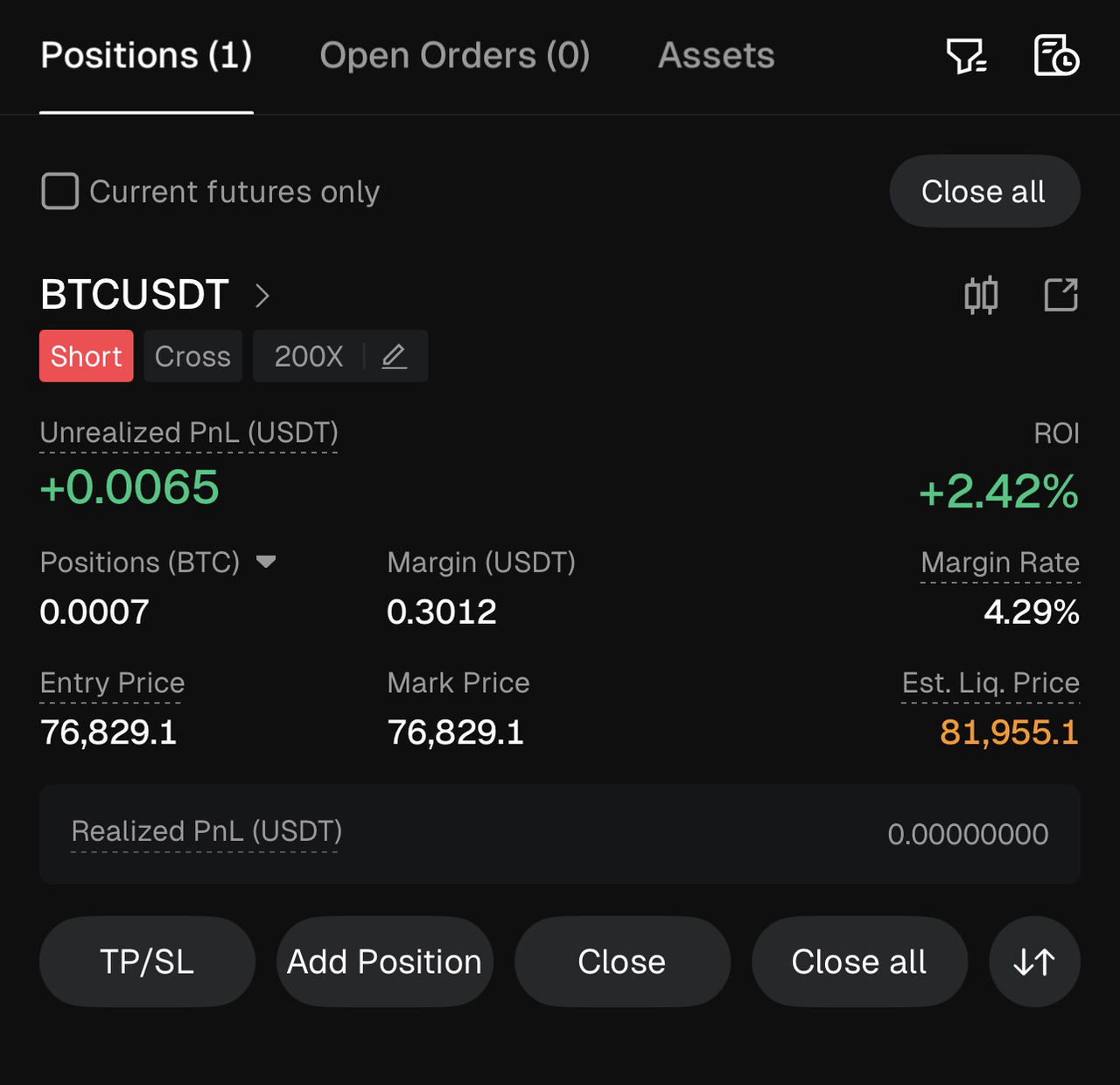
BTCUSDT | The current trading pair is BTC/USDT, representing a perpetual futures contract with no expiration date. |
Short | Indicates that a short position is currently held, meaning the trader expects the price to fall. |
Cross | Indicates that the position is using Cross Margin, where all positions under the same asset share the available margin. |
200× | The current leverage is 200×, meaning the position size can be up to 200 times the initial margin.Higher leverage increases both potential returns and liquidation risk. |
Unrealized PnL (USDT) | The floating profit or loss of the current open position that has not yet been closed. For example, +0.0065 USDT (green) indicates an unrealized profit. Unrealized PnL becomes realized only after the position is closed. |
ROI | The unrealized return on margin, for example +2.42%, showing the profitability of the position relative to the margin used. |
Position (BTC) | The size of the current position in BTC, for example 0.0007 BTC, representing the number of contracts held. |
Margin (USDT) | The amount of margin currently allocated to the position, for example 0.3012 USDT, which is required to maintain the position. |
Margin Rate | The ratio of margin to position value, for example 4.29%. A higher margin rate generally indicates lower liquidation risk. |
Entry Price | The average entry price of the position, for example 76,829.1 USDT, used as the reference for calculating profit and loss. |
Mark Price | A reference price used to calculate unrealized PnL and liquidation risk. It helps prevent unnecessary liquidations caused by abnormal or short-term price fluctuations. |
Estimated Liquidation Price | The estimated price at which the position will be forcibly liquidated by the system, for example 81,955.1 USDT. This is a key risk warning indicator. |
Realized PnL (USDT) | The actual profit or loss generated from closed portions of the position, for example 0.00000000 USDT, which is directly reflected in the account balance. |
TP / SL | Allows you to set Take Profit and Stop Loss levels for the current position. When the trigger price is reached, the system automatically closes the position to lock in profits or limit losses. |
Add Position | Increase the size of the existing position. This can amplify both potential returns and risks. |
Close | Close part or all of the current position to realize profit or loss. |
Close All | Immediately close all positions for the contract at the best available market price, ensuring a fast exit. |
4、Candlestick Chart (K-line) Panel Area
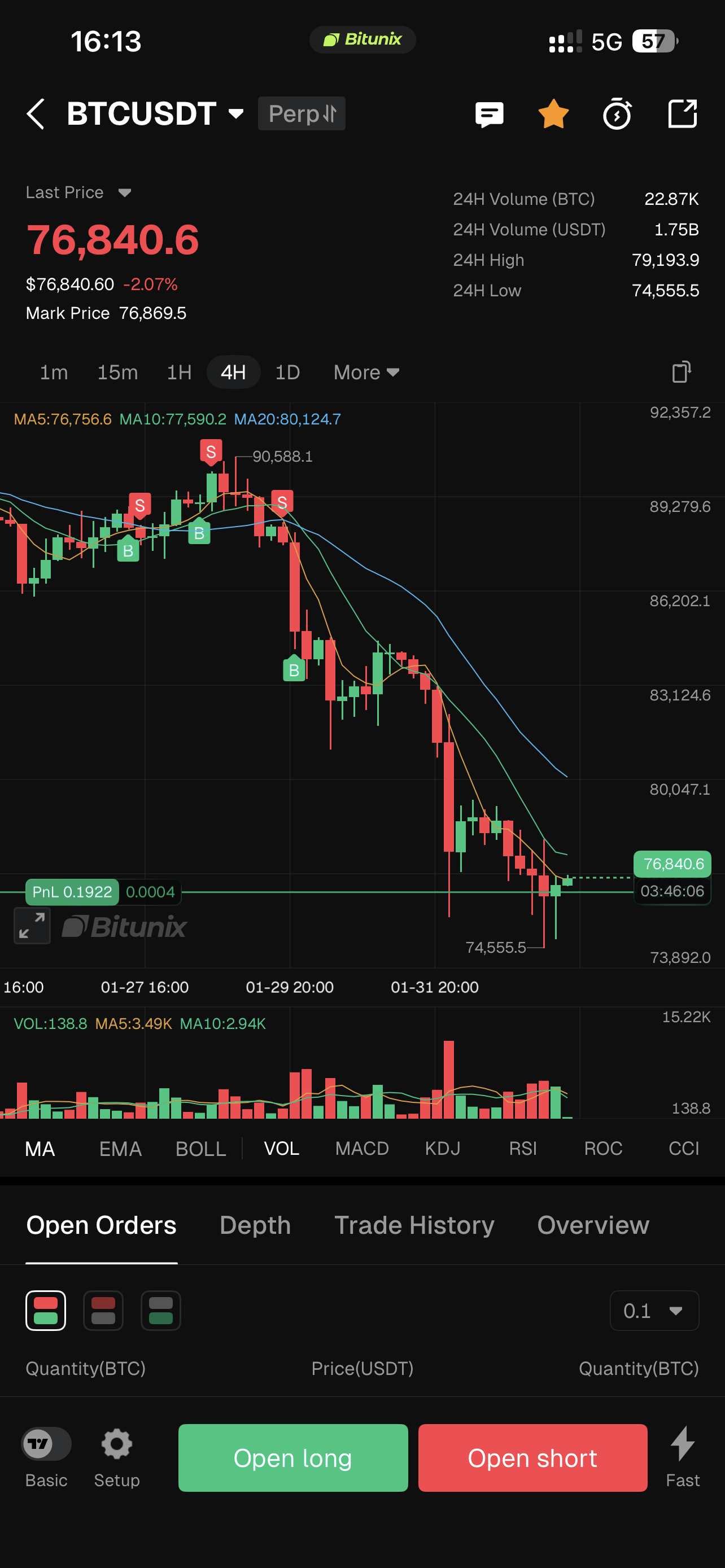
In the futures trading interface, click the "K-line chart" button at the top right 📊 to enter the K-line panel area.
Panel display items (from top to bottom) | Meaning and function |
|---|---|
Trading pair and contract type (top left) | Displays the current trading pair BTCUSDT and the contract type (perpetual contract), clearly identifying the trading instrument and product type. |
Optional (top right) | Click the yellow star icon (★) to add the trading pair to your watchlist for quick access. |
Alerts (top right) | Click the Alert button (🔔) to set trading alerts based on indicators or price conditions. When preset conditions are met, the system sends push notifications. |
Share (top right) | Click the Share button (↗) to generate a snapshot of the current K-line chart, a chart link, or a profit screenshot with one click, making it easy to share with other traders. |
Latest price and mark price (top left) | Last price: The most recent executed trade price from the order book, reflecting real-time market quotes. Mark price: A reference price used for risk control, unrealized PnL calculation, and liquidation determination. It helps prevent forced liquidations caused by short-term price spikes or manipulation. |
Custom K-line period (above the chart) |
|
Technical indicator area (below the chart) | Includes indicators such as MA, EMA, BOLL, VOL, MACD, KDJ, RSI, and more. Indicator parameters can be customized to assess trend strength, momentum, and overbought or oversold conditions. |
Open Long / Open Short button (bottom) |
|
Basic version | Click Basic Edition to switch to the simplified TradingView K-line interface for easier and faster trading. |
Settings (bottom left) | Customize the chart’s colors, style, background, as well as the display of the price axis and time axis, to create a personalized analysis interface. |
Quick order button (bottom right) | Enables fast order placement to improve trading efficiency. |
5、Common Functions
On the futures trading interface, click the […] button in the top right corner to open the Common Functions panel. This panel provides quick access to frequently used tools and essential account information, helping you manage trading, preferences, and risk controls more efficiently.
The Common Functions panel allows you to quickly view your trading volume and fee tier, manage account settings, set price alerts, access tools such as the calculator, submit feedback, transfer funds, and review key futures performance data.