Here is the fastest way to pick the wrong practice account: compare the virtual balances and choose the biggest number.
One platform hands you 100,000 virtual dollars. Another gives 50,000. A third gives 3,000. The instinct is that more is better, and for learning to trade it is almost exactly backwards. A balance fifty times larger than the account you actually plan to fund teaches position sizing you will never use.
The criteria that decide whether a demo account is worth your time are less visible and considerably more boring. Does it charge you the trading fees you will really pay? Does it deduct funding on a position held overnight? Does it liquidate you using the same tiered margin rules as the live venue, or a simplified version that gives you a liquidation price which does not exist?
Those three questions separate the best crypto demo trading apps from the ones that quietly inflate your results. This guide ranks the main options on that basis, says clearly who each is wrong for, and puts the specifications side by side.
If you are still working out what kind of simulator you need, the complete crypto demo trading guide covers the full practice program.
What Makes the Best Paper Trading App for Crypto Beginners?
Every simulator reproduces price. That is the easy part, and it is why they all look similar in a screenshot. What differs is how much of the cost and risk structure of live trading each one carries over, and that difference decides whether a profitable practice record means anything.
Two dimensions matter: fidelity, and where you can actually use it.
Key Criteria: Real-Time Data Accuracy, User Interface, and Feature Parity
This article scored every platform below against six criteria. They are ordered by how much damage getting them wrong will do.
Cost realism (fees and funding). The most under-weighted criterion in every "best paper trading app" list on the internet. A simulator that omits trading fees systematically overstates your results, and the distortion scales with how often you trade. Thirty round trips a month at taker rates on both legs is a real drag on a small account. Funding matters even more in crypto derivatives: with BTC perpetual funding averaging around +0.0089% per eight hours in late August 2026, roughly 9.7% annualized, a strategy that looks marginally profitable without funding is unprofitable with it.
Liquidation fidelity. More important than fill realism, because liquidation is the mechanic that actually ends live accounts. The question is whether the venue applies its real risk engine, including maintenance margin tiers that scale with position size, or a simplified model. A simplified model teaches you a liquidation price that will not match the one you get live.
Product coverage. A spot-only simulator cannot teach leverage, margin modes, funding or liquidation, which are the four things that make derivatives difficult. If you intend to trade perpetuals, practice on perpetuals.
Interface parity with live. The demo should be the same order panel with a different balance. If it runs on a separate stripped-down page, your muscle memory transfers to nothing. Check the return path too: a clearly labelled control for switching back to live matters more than it sounds, because mode confusion is where accidental real orders happen.
Balance sizing. Counterintuitively, smaller is often better. A balance close to what you actually intend to fund makes position sizing feel real. Where the balance is fixed and oversized, you have to impose the constraint yourself.
Mobile parity. A demo that works well on desktop but offers a stripped-down mobile experience creates a gap between practice and live execution. Mobile traders need the same core order types, charting tools, position management, and risk controls across devices. If key features or workflows change between desktop and mobile, the habits learned in the simulator may not transfer cleanly when you trade from your phone.
Notice what is absent from that list: virtual balance size as a headline feature, reset generosity, and the number of supported assets. All three are marketing metrics. None of them predict whether your practice transfers.

Ranking criteria for the best crypto demo trading apps: fee and funding realism and liquidation fidelity predict whether practice transfers to live trading, while virtual balance size, the most advertised metric, predicts almost nothing.
Mobile vs. Desktop: Why App Accessibility Matters for 24/7 Markets
Equity traders practice on desktop because equities trade on a schedule that lets them. Crypto does not close, which changes where positions actually get managed.
The uncomfortable reality is that most crypto positions are opened at a desk and closed on a phone. The 3am liquidation cascade, the weekend gap, the headline that lands mid-commute: none of those wait for you to open a laptop. If your entire practice happened on a desktop terminal, the first time you manage a position under pressure on a small screen will be with real money on the line.
August 2026 made the case efficiently. Bitcoin broke a six-week range on August 19 and rose 8.48% in 24 hours, with more than $1 billion of short positions liquidated inside a single hour. Three days later a roughly 3% fade from the highs near $79,500 wiped out more than $475 million in longs. Neither move waited for market open, because there isn't one.
That is also why order-ticket discipline has to be mobile-native. During news-driven volatility, traders taking a position in either direction with perpetual contracts need the stop-loss attached in the same ticket as the entry, on the device they are actually holding. A practice environment that only exists on desktop cannot build that habit.
The practical test: can you place an order, attach take-profit and stop-loss, check your margin ratio, and close a position on the app without hunting for anything? If not, keep practicing.
Top Crypto Demo Trading Apps in 2026 Ranked
Unbacked rankings are useless. Rather than handing out participation trophies, we break down two things for every option: the exact sweet spot, and the dealbreaker that means you shouldn't touch it. This data is current as of September 2026, but since demo builds shift overnight, test-drive the features yourself before dumping weeks of practice into the wrong ecosystem.
One note on scope. Two of the five below are not crypto-native, and they are included deliberately, because a large share of people searching for a demo trading app arrive from US equities and need to know exactly what does and does not carry across.
TradingView: Best for Advanced Technical Charting & Multi-Broker Simulation
Best for: strategy testing and chart-native execution across asset classes.
Not for: learning an exchange interface, or anything involving margin, funding or liquidation.
TradingView's Paper Trading is available on every plan including the free tier, loads a default $100,000 virtual balance that can be reset at any time, and supports market, limit, stop and bracket orders across equities, forex, crypto, futures and commodities.
Its structural advantage is that execution sits directly on the chart you already use for analysis, with no context switch between forming a view and placing the order. For testing whether a technical setup has an edge, nothing else in this list is as fast.
Its structural limitation follows from the same design. TradingView is a layer on top of data feeds rather than a trading venue, so it does not carry an exchange's margin engine, funding mechanism or liquidation logic. You are rehearsing a strategy, not an interface you will actually trade on. For crypto derivatives specifically, that leaves out the mechanics most likely to end an account.
Use it alongside an exchange-native demo rather than instead of one.
Webull: Best for Cross-Asset Stocks and Crypto Paper Trading
Best for: traders whose portfolio spans US equities, options and crypto and who want one simulator for all of it. Not for: crypto perpetual futures practice.
Webull's paperTrade received its largest overhaul since launch on July 21, 2026, expanding to six asset classes covering stocks, options, crypto, futures, bonds and event contracts, with a rebuilt pricing engine intended to mirror live fills more closely and API access so algorithmic strategies can be validated against simulated orders. Switching between live and paper mode with workspace layouts preserved shipped in the same release. Webull has disclosed that users have submitted more than 204 million simulated orders since the product launched, which is a striking amount of rehearsal.
For a US-based trader running a mixed book, it is the most complete cross-asset simulator available, and the options coverage in particular has no equivalent among crypto-native platforms.
The gap is structural rather than a quality issue. paperTrade is built around US market structure: defined session hours, equities-style margin, options chains. Crypto perpetuals with funding payments every eight hours, leverage far beyond US retail limits and automatic liquidation rather than a broker-discretion margin call are a different instrument on a different clock. Order entry discipline and journaling habits transfer. Leverage norms and session assumptions do not.
Binance: Best for Practising Spot and Futures in One Environment
Best for: beginners who want to learn spot and derivatives side by side without leaving one interface.
Not for: traders who need documented cost and liquidation fidelity, or anyone in a restricted region.
Binance rebuilt its demo product and relaunched it in November 2025 as a unified environment covering both spot and futures, and on breadth of coverage it is the strongest entry in this ranking. You can switch between the two markets at any time, and virtual balances in both can be reset whenever you like.
Access is relatively straightforward, though updated from its older standalone routes. On the web, you hover over "Trade" at the top of the Binance homepage and select "Demo Trading," entering a unified environment where you can toggle between spot and futures at the top of the page. In the app, you simply tap "More" on the homepage and select "Demo Trading."
Note that a registered Binance account and KYC identity verification are required to use the platform, though no real deposit is necessary. Access is also subject to IP validation and regional eligibility, so users in restricted markets may not be able to reach it at all. A Back to Live control in the top-right returns you to real trading on both web and app.
Binance describes the environment as using the same order types and interface as live trading, while noting that some advanced features may be limited. Its own disclaimer goes further, stating that the demo platform may include features that are not available in live trading, which is an unusual caveat. Because of this, the demo is better suited for practicing operational workflows and tools rather than verifying exact slippage, market depth, or real execution quality.
The gap relative to the top of this ranking is documentation rather than quality. Binance's public materials describe the interface and coverage, but do not specify how trading fees, funding payments or the liquidation engine are handled in the demo environment. Those three are the criteria this ranking weights most heavily, and a simulator that does not state its treatment of them leaves you unable to know how much to discount your own results. Separately, Mock Copy Trading exists as its own feature inside the copy trading product to let users test lead traders' strategies without real financial risk.
For a complete beginner who wants to understand what spot trading even is before touching leverage, the unified coverage is a real advantage that no other entry here matches.
Bitunix Mobile App: Best Overall for Realistic Futures Demo Trading
Best for: traders who intend to trade crypto perpetuals and want the costs and risk engine replicated honestly. Not for: spot-only practice, copy trading or grid bot testing, or anyone who wants a desktop simulator.
Bitunix Demo Trading credits 50,000 USDT in virtual funds for USDT-M perpetual futures, runs in the iOS and Android app, and is entered from the live Futures page via the "…" button in the upper-right corner.
What earns it the top position is not the balance. It is the three specifications that most simulators skip:
Fees are charged at your live VIP rate, 0.02% maker and 0.06% taker at VIP 0. Your practice P&L is already net of the cost most simulators pretend does not exist.
Funding payments are synchronized from live rates and booked into your simulated transaction history, so multi-day holds carry their real cost.
Liquidation rules are replicated without simplification, including tiered maintenance margin that scales with position size. The liquidation price you learn is the one you will get.
Both isolated and cross margin are supported, as are one-way and hedge modes, which means the hedging workflow covered in our guide to practising crypto futures with demo funds can be rehearsed properly rather than theorized about.
The limitations are real and worth stating plainly. It is scoped to USDT-M perpetuals, so there is no spot demo. Copy trading and grid bots sit outside the current demo scope. One master account maps to one demo account, so you cannot run parallel experiments. There is no web version. And demo volume does not count toward VIP fee tiers, so the practice period earns you skill and nothing else.
Narrow scope is a defensible design choice here rather than an oversight, because perpetuals are where leverage, funding and liquidation all bite at once, and they are the product a spot trader is least prepared for. Access requires no KYC, which means you can evaluate the environment before committing to anything.
eToro: Best for Copy Trading Demo Features
Best for: evaluating copy trading strategies and multi-asset portfolio practice.
Not for: crypto derivatives mechanics, or anyone who needs fees modeled.
Every eToro demo account includes a $100,000 virtual portfolio, selected from the Real/Virtual menu under your username and switchable at any time. It covers stocks, crypto, commodities and ETFs on live real-time data, has no time limit, and stays available after you begin trading with real funds.
Its distinguishing feature is that CopyTrader works inside the virtual portfolio. You can evaluate signal providers across weeks or months of live market conditions before committing capital to follow any of them, which is a genuinely useful function that no other platform in this list replicates. For anyone whose plan involves copy trading, that alone justifies the account.
Two things to account for. Trades in the virtual portfolio are placed without fees, which means the P&L is systematically better than live and short-horizon results should be discounted accordingly. And the $100,000 default is far above what most people fund a first account with, though the balance can be adjusted down to a minimum of $2,000 through customer support, which is worth doing.
eToro is a multi-asset broker rather than a derivatives exchange, so perpetual futures mechanics, funding rates and exchange-style liquidation are outside its scope entirely.
Also worth knowing
Several other exchanges run credible demo environments that did not make the main ranking but may fit specific needs. Bybit's demo account covers both spot and derivatives with a rechargeable multi-asset virtual balance. OKX offers a switchable demo mode spanning spot, futures and options. Bitget enables a futures demo by default for every user on both web and app.
The evaluation framework above applies to all of them. Ask what they charge, whether they book funding, and whether the liquidation engine is the real one.
Comparative Analysis: Side-by-Side Feature Breakdown
Specifications are easier to weigh next to each other than spread across five reviews, particularly where the differences are in the details rather than the headlines.
Virtual Capital Reloads, Order Types, and Mobile UX Comparison
The core value of demo trading is low-cost trial and error, but platforms diverge sharply between breadth (what you can trade) and fidelity (how closely the simulation mirrors real market friction).
Demo Trading Platform Comparison
Feature | TradingView | Webull | Binance | Bitunix | eToro |
Virtual balance | $100,000 default | Configurable | Not published in launch announcement | 50,000 USDT, fixed | $100,000, adjustable to $2,000 |
Products in demo | Equities, forex, crypto, futures, commodities | Stocks, options, crypto, futures, bonds, event contracts | Spot and futures, unified | USDT-M perpetuals only | Stocks, crypto, commodities, ETFs |
Platform | Web and mobile | Desktop, web and mobile | Web and app | iOS and Android app | Web and mobile |
Trading fees charged | No | Simulated | Not specified publicly | Yes, at live VIP rate | No |
Funding rates applied | Not applicable | Not applicable | Not specified publicly | Yes, synced from live | Not applicable |
Liquidation engine | Not applicable | Equities-style margin | Not specified publicly | Live rules, tiered maintenance margin, unsimplified | Broker margin rules |
Margin modes | Not applicable | Equities margin | Available on futures | Isolated and cross, one-way and hedge | Not applicable |
Copy trading in demo | No | No | Mock Copy Trading, separate feature | No | Yes, CopyTrader |
Reset | Yes, any time | Yes | Yes, both spot and futures balances | Yes, from Assets page, irreversible | Via support ticket |
Identity verification to access | Not required | Account required | Not required, subject to regional eligibility | Not required | Account required |
Tester Analysis: Three Key Insights Behind the Grid
1. Trading costs are where simulation and reality diverge most
Paper trading profits often evaporate on live accounts because traders ignore execution friction. Bitunix is the only entry here that explicitly charges live-synced VIP fees and funding payments against your demo account. TradingView and eToro explicitly ignore fees, while Webull relies on estimates. If your strategy relies on high frequency or high leverage, results from anything other than a fee-simulated environment need to be re-calculated against a real fee schedule before drawing conclusions.
2. "Undocumented" isn't "absent," but it creates a blind spot
Binance doesn't provide granular documentation on these specific operational mechanics — such as simulated fee deductions, exact funding settlements, or liquidation rules—focusing its official guides instead on interface navigation and order entry. While this doesn't mean those systems are completely absent in the background, the lack of explicit documentation makes it difficult to evaluate execution slippage or judge how much to discount your demo performance.
3. Product coverage and risk fidelity pull in opposite directions
Platform choices ultimately depend on what you are trying to test:
Exploring basic market mechanics: Binance and TradingView win on coverage. Binance offers a unified spot-and-futures setup that is unmatched for learning order entry and navigation without touching real capital.
Testing leveraged derivatives: Bitunix wins on fidelity. Its isolated/cross margin modes, live funding rates, and unsimplified liquidation rules make it the most realistic testing ground for managing capital under true market stress.
Recommendations
Complete Beginners & Interface Practice: Binance (unified spot/futures coverage) or TradingView (multi-asset charting and simple execution).
Traditional Assets & Options: Webull or eToro (ideal for equities, options, and ETF portfolio testing).
Leveraged Crypto Perpetual Trading: Bitunix (highest risk fidelity regarding fees, funding payments, and liquidation rules).
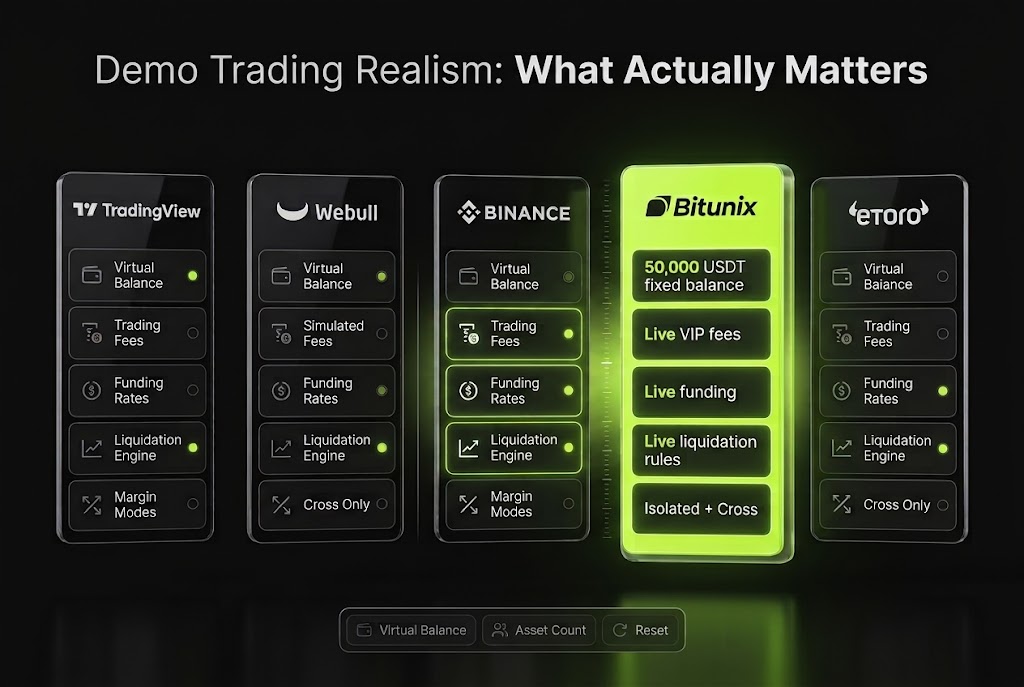
Comparing the best demo trading accounts on virtual balance versus documented derivatives realism: the largest virtual balances belong to simulators that charge no trading fees, while the environment that replicates live fees, funding and liquidation rules loads a smaller, more realistic starting balance.
Why the Bitunix App Delivers the Ultimate Free Demo Trading Experience
Being specific about what an environment does and does not reproduce is more useful than a general claim of realism, so this section covers both.
1:1 Live Rules: Real Fees, Real Funding, and an Unsimplified Liquidation Engine
Demo orders on Bitunix are matched internally against real-time prices rather than routed into the live order book. That is the correct architectural decision, since simulated orders should never distort real market depth for live traders. It also has a consequence worth stating openly: no slippage is applied to simulated fills. The price on screen is the price you get, every time, and the live market makes no such promise.
Everything else runs 1:1 with live rules, and that is where the value sits:
Trading fees at your live VIP rate. The fee line on your practice P&L is the fee line you will actually pay.
Funding synchronized from live rates, booked into your simulated transaction history rather than assumed away.
The real liquidation engine, including tiered maintenance margin that rises with position size. Larger positions face a nearer liquidation price at identical leverage, and a simplified simulator would hide that from you until it mattered.
Correcting for the one gap takes two habits. Default to limit orders where your strategy allows, and when journaling, record your entry a few ticks worse than the simulator gave you and your stop exits worse still, because stops in fast markets fill at the next available price rather than the trigger price.
This is also why the venue you eventually graduate onto is part of your risk management rather than a neutral container for it. Live slippage is a function of order book depth and spread on the specific pairs you trade during the hours you trade them, which is worth comparing directly rather than inferring from headline volume figures.
Seamless One-Tap Switch Between Demo and Live Capital
The Demo environment carries a visible "Demo" label, and a Back to Live button in the upper-right corner returns you to real trading. Switching in either direction takes one tap.
That convenience is genuinely useful and carries one risk worth naming. Placing a live order while believing you are in demo is a distinctly expensive beginner mistake, and it happens specifically to traders who toggle casually between modes during a session. Build the habit of checking the label before every session and before any order placed after a mode switch.
Used deliberately, the toggle supports a workflow that most practice accounts never enable: testing an unfamiliar setup in demo before committing size to it, even after you have been trading live for months. The demo environment does not expire when you fund the account, so an unfamiliar market or an untested variation on a strategy can always be routed through it first.
One structural note for planning purposes. Demo volume does not count toward VIP progress, so fee tiers are built with live volume only.
How to Get Started with the Best Crypto Demo Trading App
Choosing the platform is the smaller half of the decision. What you do in the first session determines whether the account becomes a practice program or a video game.
Downloading the App, Setting Up Virtual Capital, and Placing Your First Simulated Trade
Taking Bitunix as an example, the setup runs to about five minutes.
Download the app and register. An email address or phone number is enough, and identity verification is not required to reach the demo environment. KYC becomes mandatory later, before withdrawing real funds.
Enable two-factor authentication immediately, while the account is empty and the habit costs nothing.
Open the Futures page and tap the "…" button in the upper-right corner to open the Quick Access menu, then tap Demo Trading. A first-run card confirms the parameters: 50,000 USDT in virtual funds, 1:1 matching with live rules, and reset at any time.
Set your real constraint before your first order. This is the step almost everyone skips. The 50,000 USDT balance is fixed and cannot be adjusted down, so decide what you actually intend to fund a live account with, and treat only that portion as tradeable. If the answer is 1,000 USDT, every position size gets calculated against 1,000. A 30% return on a balance fifty times your real account rehearses sizing you will never use.
Spend the first session touching nothing but the interface. Before placing an order, be able to locate available balance versus margin balance versus total equity, unrealized P&L, realized P&L in trade history, the current funding rate and countdown to the next funding timestamp, and the position tab showing entry price, mark price, estimated liquidation price and margin ratio.
Place your first order deliberately. Pick one liquid pair, BTCUSDT or ETHUSDT. Set a modest leverage, read the order preview in full, margin required, trading fee, estimated liquidation price, then attach take-profit and stop-loss in the same ticket rather than afterwards.
Run the leverage drill. Change the leverage setting and watch the estimated liquidation price move. Do it ten times across the range before placing anything serious. That single exercise teaches more about leverage than any article, including this one.
Log every trade from the first one. Entry, size, leverage, margin mode, fees, funding paid, and the reason for both entry and exit. An untracked demo account produces feelings rather than evidence.
The full practice curriculum, including the derivatives mechanics to master in order, sits in our guide to practising crypto futures trading with demo funds.
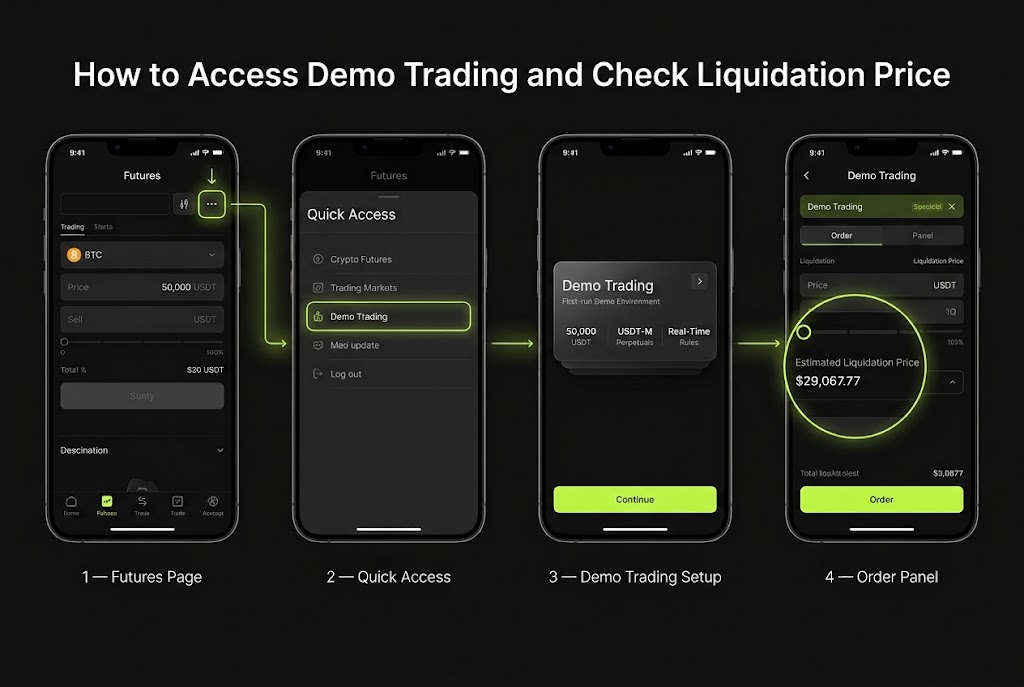
Setting up a free demo trading account in the Bitunix app: four taps from the live Futures page to a 50,000 USDT virtual balance running on 1:1 live rules.
Choosing the Right Practice Environment for What You Actually Trade
There is no single best demo trading app, only the right match between a simulator and the instrument you intend to trade. The question that resolves most of the decision is what you plan to hold six months from now.
If the answer is crypto perpetuals, practise on a derivatives venue that charges live fees, books real funding and applies the real liquidation engine, because those three mechanics decide live outcomes and a simulator that omits them is training you for a market that does not exist. If the answer is a mixed book of US equities, options and crypto, a cross-asset simulator built around US market structure will serve you better. If the answer is copy trading, evaluate the providers inside a virtual portfolio before following any of them with capital. And if the answer is that you mostly want to test whether a chart setup has an edge, a chart-native simulator will get you there faster than any exchange.
Whichever you pick, the criteria are the same. Ask what it charges you. Ask whether it liquidates you honestly. Ask whether the interface you are learning is the one you will actually trade. The virtual balance is the least informative number on the page.
There is a Federal Reserve decision on September 16, 2026, with markets pricing a 66.4% probability of a rate hike as of September 1, and after that another catalyst, and another. The mechanics do not change between them. Learn them where they cost nothing.
Note: Platform specifications were verified against official documentation as of September, 2026, and demo products change frequently, so confirm current availability and parameters before committing to a practice program. Demo trading results are for practice and reference only and do not represent actual trading returns. Trading digital assets involves substantial risk, including the potential loss of principal, and leveraged products can amplify losses beyond your initial margin. This article is educational and does not constitute financial advice.