

💡 At a Glance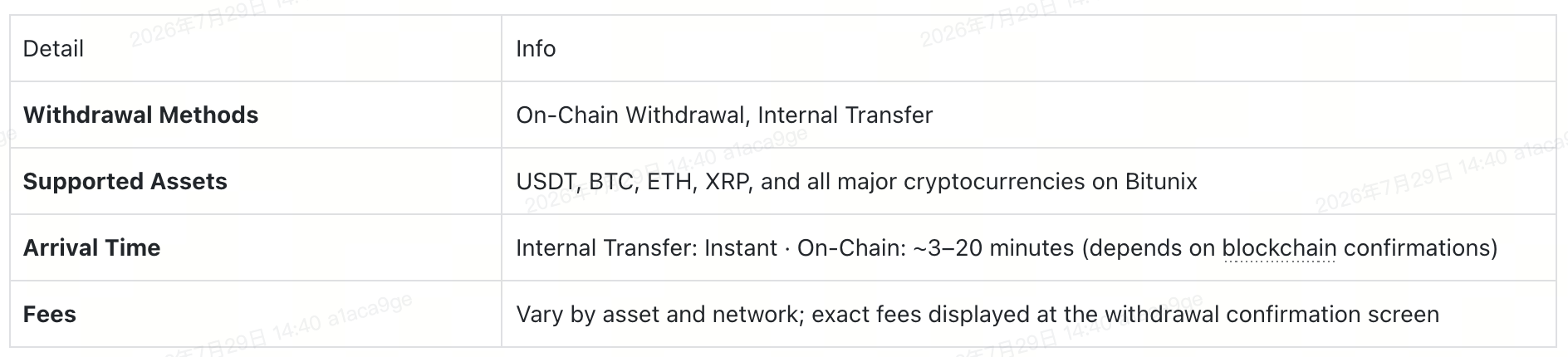
What Is Crypto Withdrawal?
A withdrawal moves digital assets from your Bitunix account to an external wallet or another exchange account. Bitunix supports two withdrawal methods:
- On-Chain Withdrawal — Sends funds through a blockchain network to any external wallet or exchange. Best for moving assets off-platform.
- Internal Transfer — Moves funds instantly between Bitunix accounts. Ideal for quick, fee-free transfers to other Bitunix users.
This guide walks you through both methods using USDT as an example.
Method 1: On-Chain Withdrawal
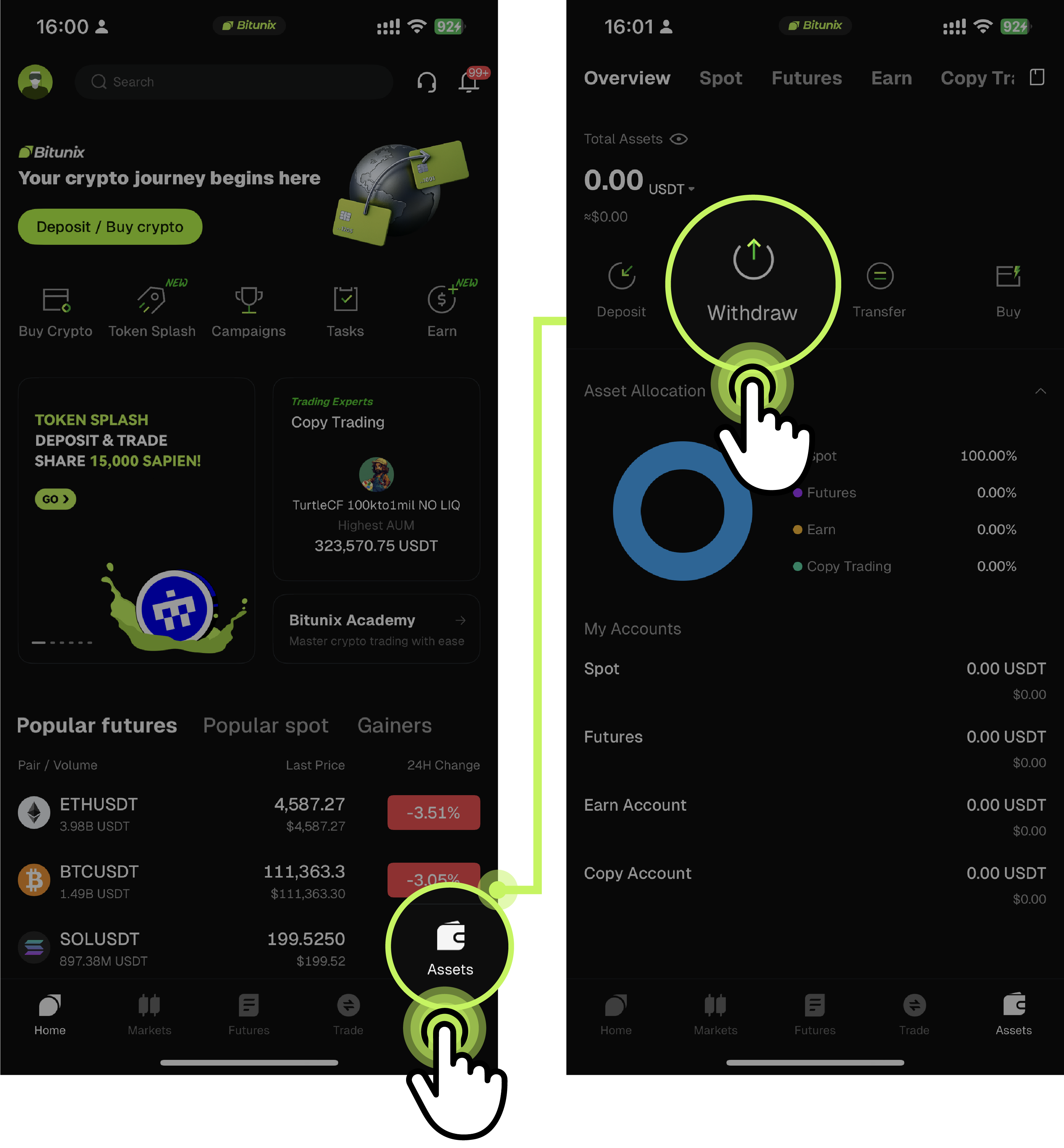
Step 1: Go to the Withdrawal Page
Open the Bitunix App home screen and tap:【Assets】 → 【Withdrawal】
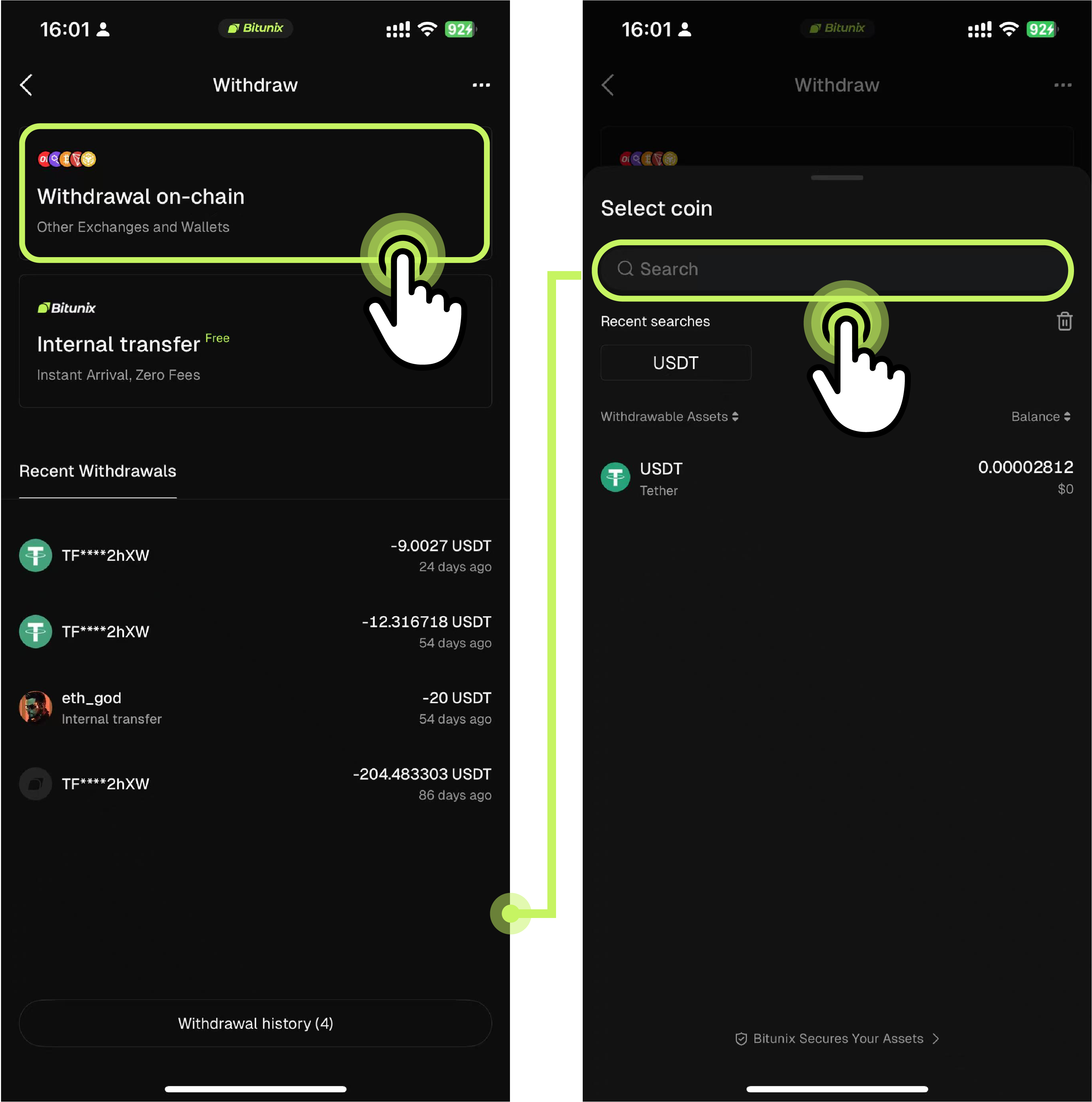
Step 2: Select On-Chain Withdrawal & Your Asset
On the withdrawal page, tap 【On-Chain Withdrawal】. Use the 【Search】 bar at the top to find the cryptocurrency you want to withdraw (e.g., USDT).
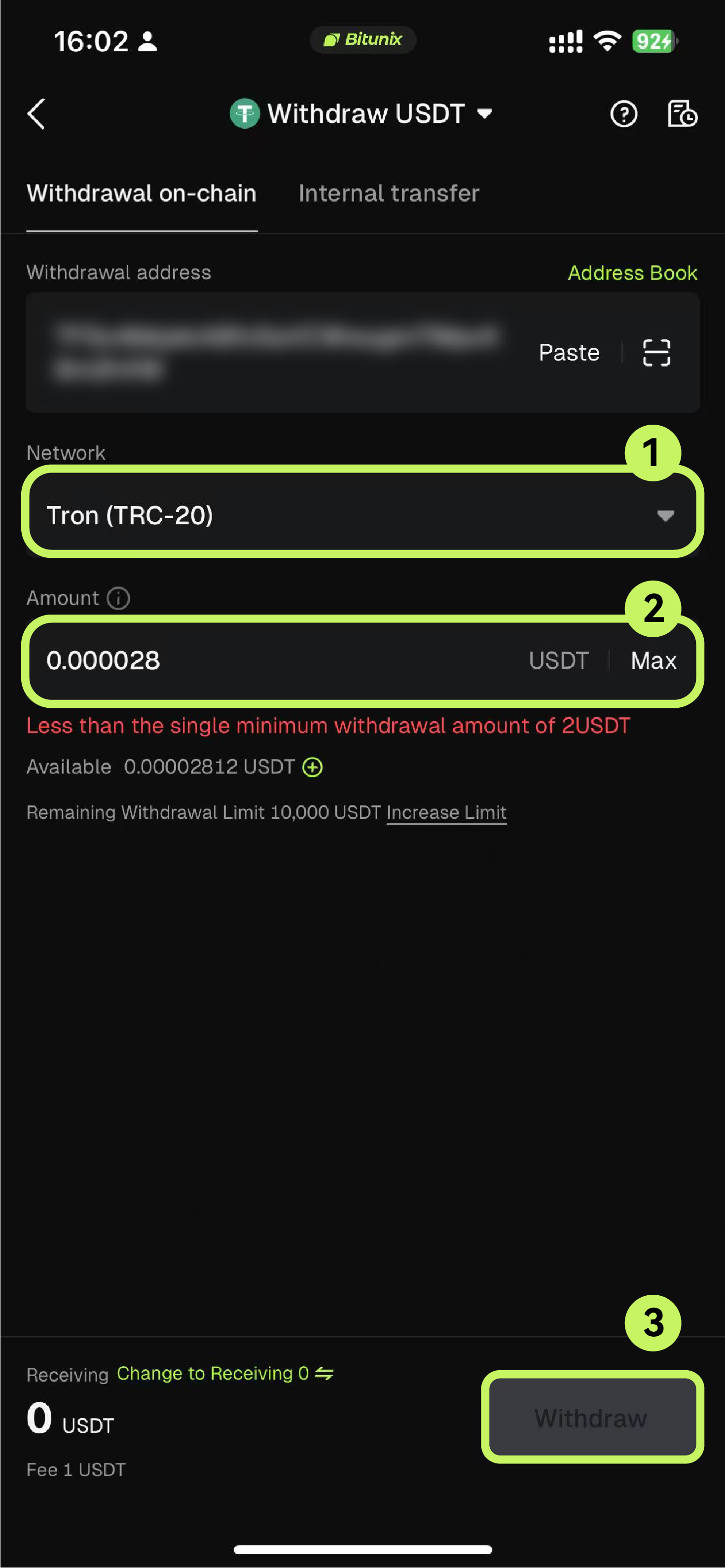
Step 3: Choose a Network & Enter Withdrawal Details
Using USDT as an example, select the 【TRON (TRC20)】 network, then fill in the following fields:
- 【Withdrawal Address】 — Enter or paste the destination deposit address. You can also select a saved address from your 【Address Book】 or choose from 【Exchange】 or 【Non-Custodial Wallet】 options.
- 【Withdrawal Amount】 — Enter the amount you wish to withdraw.
⚠️ Double-check the withdrawal address before proceeding. Once submitted, a blockchain transaction cannot be reversed.
Step 4: Confirm & Verify
Review all withdrawal details carefully — asset, network, address, and amount. When everything is correct, tap 【Withdrawal】, then complete the required verification steps (SMS code and Google Authenticator code). Your withdrawal request will be submitted immediately.
Method 2: Internal Transfer
Step 1: Go to the Withdrawal Page
Open the Bitunix App home screen and tap:【Assets】 → 【Withdrawal】
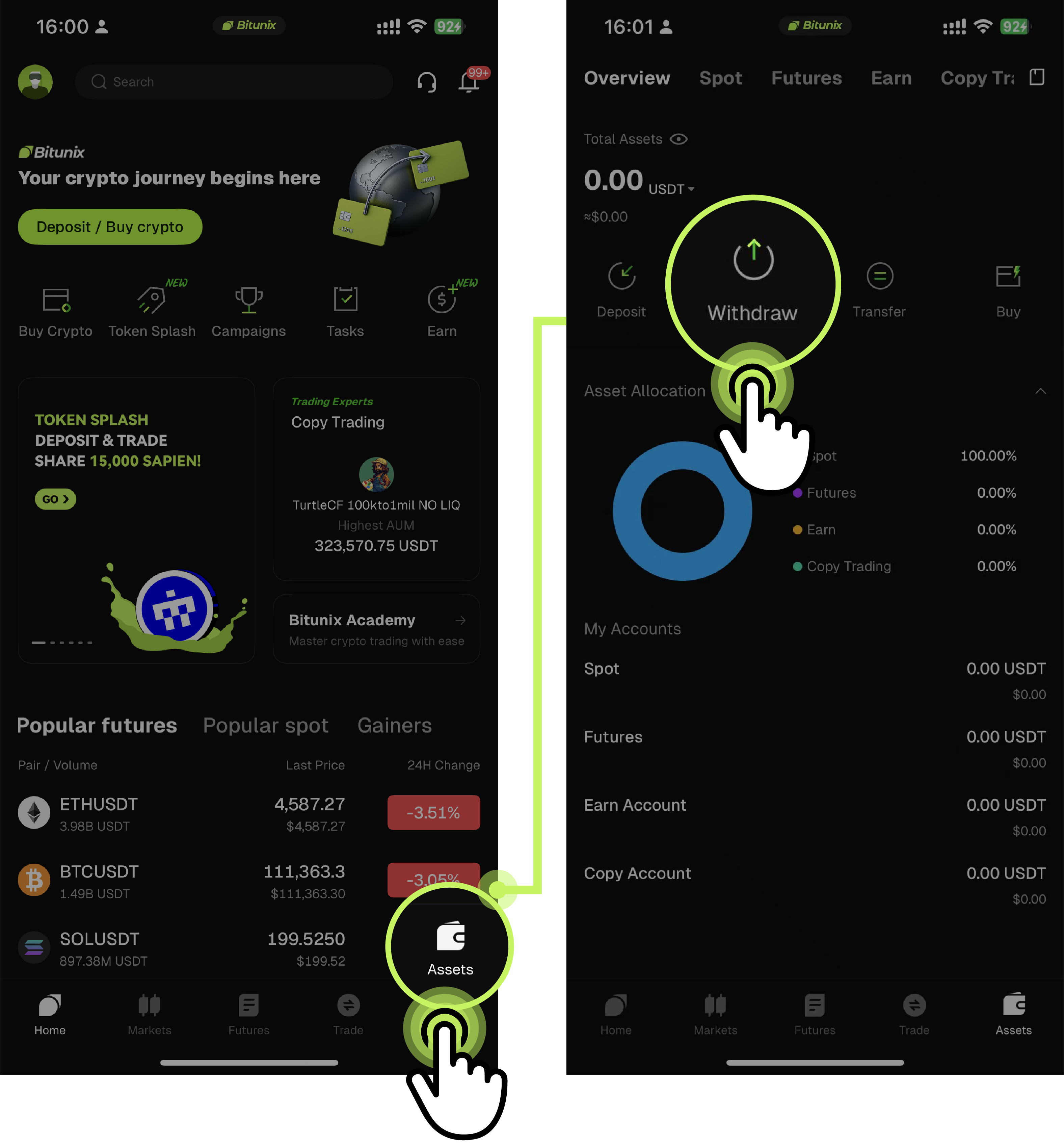
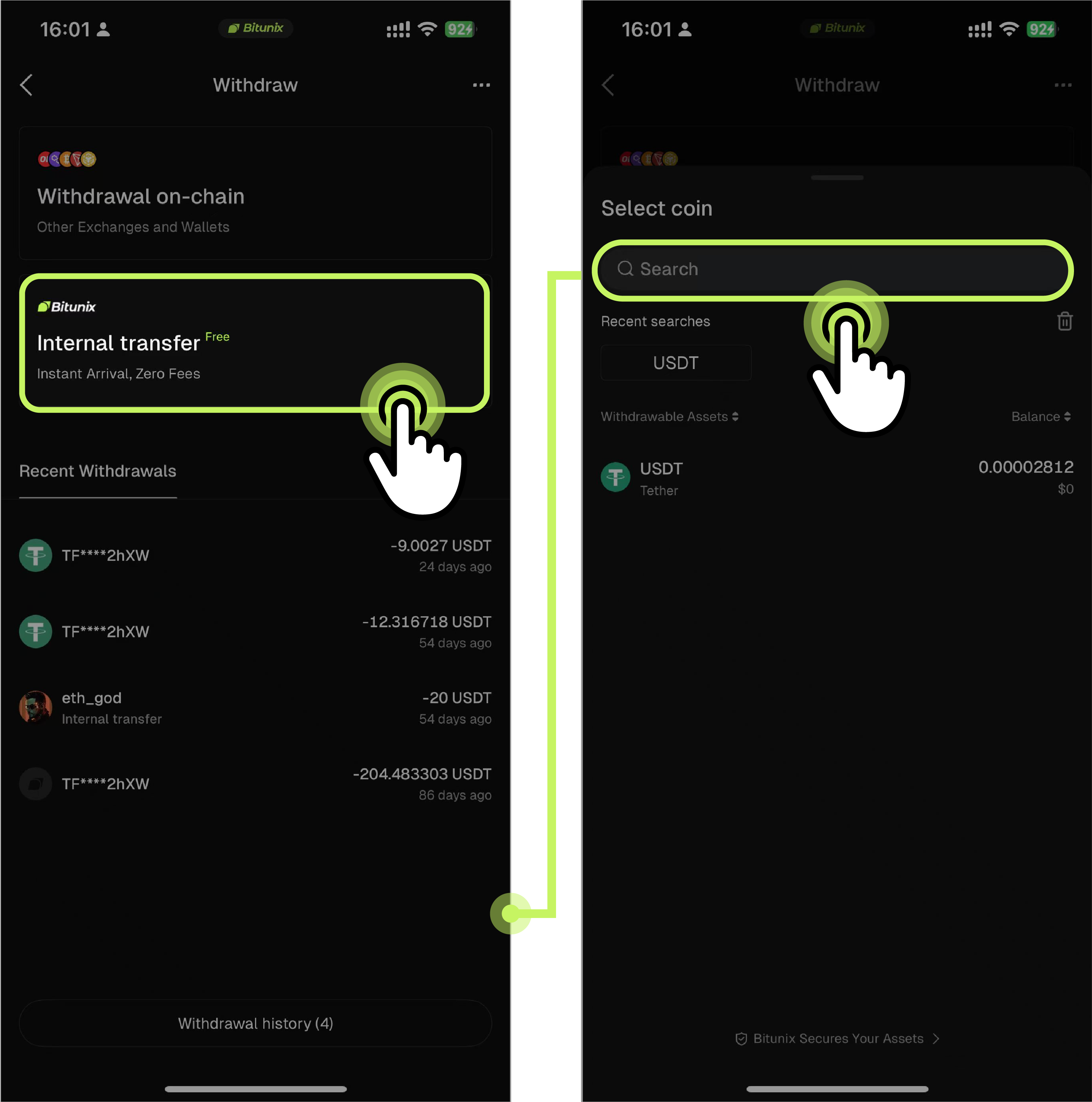
Step 2: Select Internal Transfer & Your Asset
On the withdrawal page, tap 【Internal Transfer】. Use the 【Search】 bar to find the cryptocurrency you want to transfer (e.g., USDT).
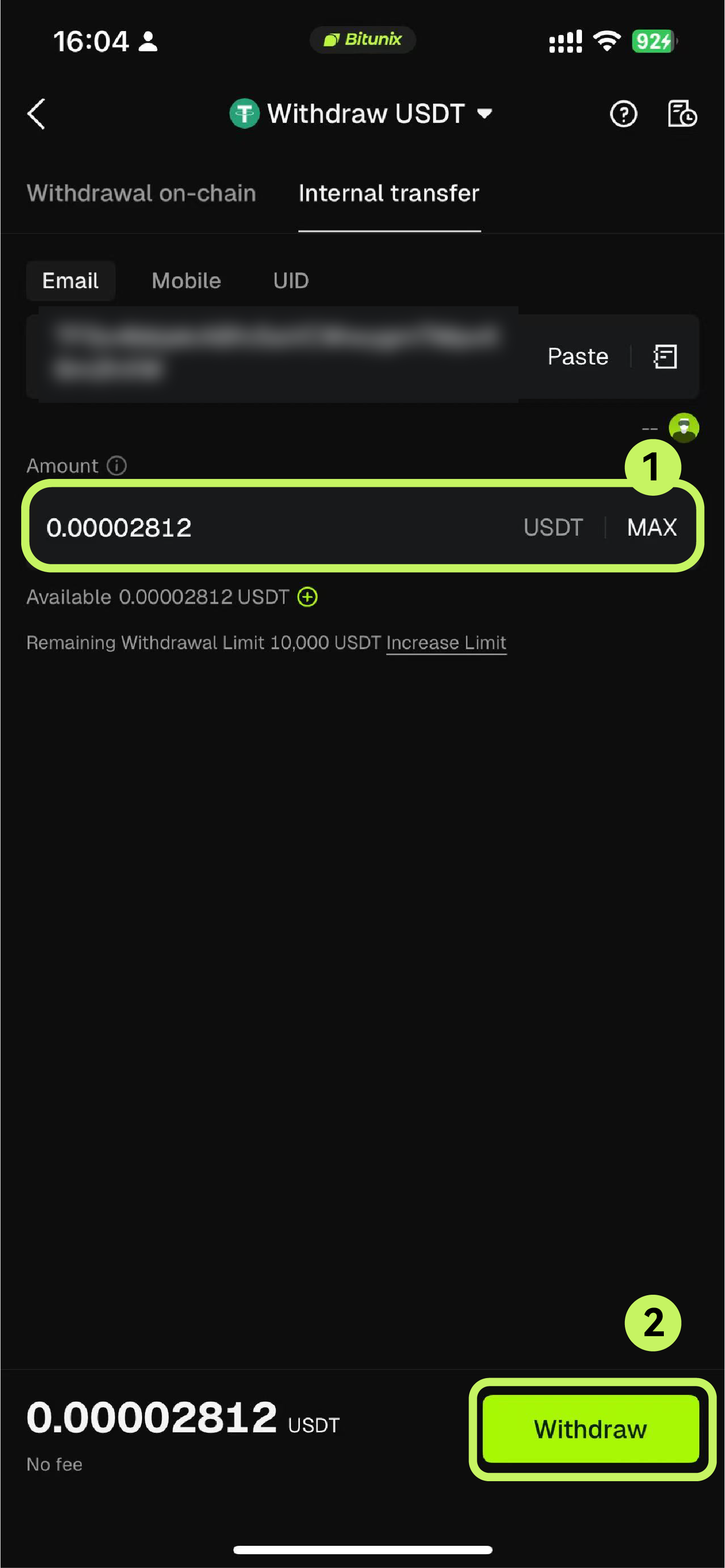
Step 3: Enter Recipient Details & Amount
Internal transfers support three recipient identifiers — choose any one:
- 【Email】 — The recipient's registered email address
- 【Phone Number】 — The recipient's registered phone number
- 【UID】 — The recipient's unique Bitunix User ID
- Enter the recipient's details, specify the 【Transfer Amount】, then tap 【Withdrawal】.
Step 4: Verify & Complete
Follow the on-screen prompts to enter your verification codes. Once verified, the transfer is processed instantly — the recipient's Bitunix account will reflect the funds immediately.
🔒 Security & Important Reminders
⚠️ Network Mismatch = Permanent Loss of Funds The deposit network on the receiving exchange or wallet must match the withdrawal network you select on Bitunix. For example, if the receiver requires TRON (TRC20), you must select TRON (TRC20) on Bitunix as well. A mismatch will result in irreversible loss of assets.
⚠️ XRP, EOS, and Similar Assets Require a MEMO / Tag Certain cryptocurrencies — including XRP, EOS, and ATOM — require an additional MEMO or Destination Tag when depositing to an exchange. Omitting this field will cause your funds to fail to arrive. Always check whether the receiving platform requires a MEMO or Tag before confirming your withdrawal.
⚠️ Never Share Your Verification Codes Your password, SMS verification code, and Google Authenticator code are strictly personal. Bitunix support staff will never ask for them. Never share them with anyone under any circumstances.
⚠️ On-Chain Arrival Time After an on-chain withdrawal is submitted, it must be confirmed by blockchain network nodes before arriving in the destination wallet. Typical arrival time is 3–20 minutes, though this may vary depending on current network congestion. You can track the status in the Withdrawal History section of the app.
❓ Frequently Asked Questions
Q1: I'm getting a "Network Mismatch" warning. What should I do?
Stop and go to the receiving platform to confirm which deposit network it supports (e.g., TRC20, ERC20, BEP20). Return to Bitunix and select the exact same network before proceeding.
Q2: I forgot to include the XRP MEMO — can I recover my funds?
If your withdrawal has not yet been processed, cancel it immediately and resubmit with the correct MEMO. If the transaction has already been sent without a MEMO, contact Bitunix Support via the in-app 【Help Center】 and provide your transaction hash (TxID). Recovery is possible but may take additional processing time.
Q3: Which method is cheaper — Internal Transfer or On-Chain Withdrawal?
Internal Transfer is the more cost-effective option. It processes instantly between Bitunix accounts and incurs no blockchain gas fees. On-chain withdrawals carry network fees that vary by asset and blockchain (displayed at confirmation).
Disclaimer
This article does not provide:
(i) investment advice or recommendations;
(ii) offers or solicitations to buy, sell, or hold digital assets;
(iii) financial, accounting, legal, or tax guidance.
Digital assets, including stablecoins and NFTs, involve high risk and may fluctuate significantly. You should carefully evaluate whether trading or holding digital assets is suitable for your financial situation. Please consult your own legal, tax, or investment professionals for personalized advice. It is your responsibility to understand and comply with all applicable local laws and regulations.