Most traders start with the simplest tool on the shelf: crypto price alerts. Pick a level, get a ping, react. It works right up until the moment the market stops being simple — when the move you were waiting for arrives as a trendline break at 3 a.m., or an RSI reset that never touches your round number, or a wallet you track quietly rotating nine figures before the chart shows anything at all.
That gap between what a price alert can express and what a real trading setup actually looks like is the reason Bitunix built Super Alert. It consolidates price, indicators, drawing objects, candlestick patterns, multi-condition logic, templates, TradingView webhooks and on-chain wallet activity into one monitoring system that lives on the chart itself.
Here's the practical framing to keep in mind: a price alert tells you where the market is. A condition-based alert tells you whether your setup is live. This guide walks through both, and shows exactly how to build the second kind.
What Are Crypto Price Alerts and Why Do Traders Need Them?
Crypto price alerts are automated notifications that fire when an asset reaches, crosses or breaks a price level you define in advance. Conceptually they're trivial. Operationally they are the single highest-leverage habit a discretionary trader can adopt, because they decouple two jobs that shouldn't be bundled together: watching the market and deciding what to do about it.
The value shows up in the arithmetic of attention. Crypto markets run 8,760 hours a year. A US equities trader working the regular session covers roughly 1,640. Nobody closes that gap with willpower.
The Limitations of Manual Chart Monitoring in 24/7 Crypto Markets
Manual chart monitoring fails in two directions at once, and both are expensive.
It fails on coverage. Crypto's violent repricing rarely respects your calendar. On June 2, 2026, roughly $1.8 billion in leveraged positions were liquidated inside 24 hours according to CoinGlass data — over 272,000 traders, with long liquidations ($1.57 billion) swamping shorts ($215.7 million). BTC alone accounted for around $833 million of that, ETH close to $480 million. Anyone who happened to be asleep, in a meeting, or on a flight simply received the outcome rather than the opportunity.
It also fails on discipline. Screen-watching invites over-trading: the longer you stare at a 1-minute chart, the more likely you are to take a position that your plan never called for. Alerts flip that dynamic. You define the level while you're calm and unpositioned, then you step away.
There's a third, subtler problem: quiet markets lull you into standing down right before they stop being quiet. As of August 17, 2026, BTC was trading around $63,500 (6:00 AM UTC), pinned inside a $62,000–$64,000 band since mid-month, with 30-day implied volatility reported near 36% — close to its 2026 low — while US spot Bitcoin ETFs had been in net outflow since roughly August 10.
Compression like that doesn't tell you which way the resolution goes. It only tells you that a resolution is being stored up, and that whoever has levels pre-armed will hear about it first.

Crypto markets trade 8,760 hours a year while manual chart monitoring covers a fraction of them — automated crypto price alerts close the coverage gap without keeping a trader at the screen.
How Crypto Price Alerts Help Traders Track Important Market Movements
A well-built alert does four things that manual watching cannot.
It fixes your levels in advance. The support you identified on a Sunday afternoon is a far more objective number than the one you'd draw mid-drawdown.
It runs server-side. Conditions are evaluated by the platform, not by a browser tab you left open, so closing your laptop doesn't disarm your monitoring.
It scales across symbols. Watching 15 pairs manually means watching none of them well. Fifteen alerts cost nothing in attention until one fires.
It creates a decision log. Every alert is a hypothesis with a timestamp. Reviewing which ones fired — and what you did next — is one of the cheapest sources of edge available to a self-directed trader.
The practical caveat: an alert is a notification, not an order. It compresses your reaction time; it doesn't remove the need for a plan, position sizing, or a stop.
Why Advanced Alerts Go Beyond Simple Price Notifications
Here's where basic alerting runs out of road. Very few real setups are expressible as a single horizontal line. "Break of the rising trendline from the June low" is a level that moves every candle. "Bullish MACD cross while RSI is back above 50" is a relationship between two derived series. "Bullish engulfing candle at the prior swing low" only exists once a candle closes.
A static price trigger can approximate none of these — it can only tell you that a number was touched, which is often the least informative part of the event.
The table below contrasts what each layer of alerting can and cannot capture:
Monitoring layer | What it can express | Where it breaks down |
Manual chart watching | Anything you can see | Coverage, fatigue, impulse trades |
Basic price alert | Static levels, round numbers, liquidity zones | Diagonal structure, indicator states, patterns |
Indicator alert | MA/MACD/RSI/Bollinger conditions | Chart geometry you drew yourself |
Drawing alert | Trendlines, channels, rectangles that shift over time | Multi-factor confluence |
Multi-condition (combo) alert | Confluence: price + indicator + structure | Over-filtering; fewer signals by design |
On-chain alert | Wallet flows and large transfers | Data latency; requires interpretation |
Read down that right-hand column and you get the product brief for Super Alert.
What Is Bitunix Super Alert? A Smarter Way to Monitor Crypto Markets
Bitunix Super Alert is a unified market-monitoring system on Bitunix Web that turns chart analysis into automated trigger conditions. Instead of one alert type sitting in a settings menu, it exposes eight modules inside a single panel opened directly from the K-line chart: Templates, Combo, Price, Indicators, Drawing, Candlestick, TradingView and On-chain Alert.
The design intent is worth stating plainly, because it explains most of the feature decisions: the chart shouldn't only be a place where you observe the market. It should be the place where you encode what you're waiting for.
From Price Tracking to Automated Market Signal Monitoring
Super Alert didn't arrive from nowhere. Bitunix shipped Indicator Warning 1.0 as a focused technical-alert tool, then added four alert types creatable straight from the K-line panel. Super Alert is the consolidation step: the earlier indicator alerting is now one tab inside a broader system rather than a standalone product.
That relationship matters if you've used the older tooling. Indicator alerts still behave the way you expect — they simply sit alongside drawing, candlestick, combo, template, webhook and on-chain monitoring, sharing the same notification channels, frequency settings and validity windows.
How Bitunix Super Alert Combines Technical Analysis and Real-Time Notifications
Three architectural choices do most of the work here.
Alerts are chart-native. You open the K-line chart for the pair you care about, click the alert icon at the top of the chart, and the Super Alert panel opens in context. Levels and drawings you've already placed become alert conditions instead of things you have to retype into a form.
Conditions are evaluated continuously, then filtered. Each alert carries a Trigger Method (which channels notify you), a Frequency (how many times it may fire), a Validity Period (when it expires) and an optional Note. Those last three are the difference between a monitoring system and a spam generator — an unbounded alert on a choppy pair will happily notify you 40 times before lunch.
Delivery is multi-channel. In-site messages, the Bitunix app, email, Discord and Telegram all route from the same trigger, so the signal reaches you wherever you actually are.
Bitunix ships roughly 15 product updates a month across the platform in 2026, and Super Alert sits in the same family as Chart Trading — the broader idea being that analysis, alerting and execution should all happen on one surface rather than three.
How Bitunix Super Alert Works: 8 Alert Types for Different Trading Scenarios
Each module answers a different question about the market. Before the detail, here's the map — what each alert type monitors and the scenario it's built for:
Alert type | Monitors | Best-fit scenario |
Price | A specific price level or cross | Round numbers, prior highs/lows, liquidity zones |
Indicator | MACD, RSI, Bollinger Bands, moving averages | Momentum shifts, overbought/oversold resets, crossovers |
Drawing | Trendlines, rectangles, parallel channels | Diagonal structure and dynamic support/resistance |
Candlestick | Naked price action analysis | Reversal and continuation patterns at key levels |
Combo | Multiple conditions in one alert | Confluence setups; filtering out weak signals |
Template | Saved, reusable configurations | Applying one framework across many symbols |
TradingView | External signals via webhook | Pine Script strategies and custom screeners |
On-chain | Wallet addresses and transfer size | Large-transfer tracking and fund-flow monitoring |
Price Alert: Track Crypto Price Movements Automatically
The foundation layer, and still the most-used one. You set a target level and a direction — price rising to, falling to, or crossing a value — and the alert fires when the market gets there.
Where it earns its keep is at structural prices rather than psychological ones: the prior swing high that trapped shorts, the untested breakout retest, the level where open interest built up. Bitunix supports price alert creation on Web, in the app, and directly from the K-line chart.
Indicator Alert: Monitor Technical Signals and Market Conditions
Indicator alerts watch derived series rather than raw price, which lets you monitor conditions instead of coordinates.
The mechanics are straightforward once you know what each indicator is measuring. MACD fires on the relationship between two exponential moving averages and its own signal line, so a cross is a change in momentum, not price. RSI thresholds (the classic 70/30, or the more useful 50 midline for trend traders) describe the pace of recent gains against losses. Bollinger Band conditions describe volatility state — a touch of the upper band during a squeeze means something quite different from a touch during an expansion. Full configuration options are covered in the Indicator Alert setup guide.
One discipline note: indicators are lagging by construction. An alert on a 4H MACD cross is a notification that momentum has already turned, not a prediction that it will continue.
Drawing Alert: Turn Chart Analysis Into Automated Notifications
This is the module that most obviously can't be replicated with a price alert. Draw a rising trendline off two swing lows and its value changes with every candle — a static trigger at today's level is wrong tomorrow.
Drawing alerts attach the trigger to the object itself: trendlines, rectangles and parallel channels. The alert follows your geometry as time advances, which means a "break of the channel bottom" stays meaningful a week after you drew it. The Drawing Alert setup guide covers object selection and trigger direction.
Candlestick Alert: Identify Key Candlestick Patterns Automatically
Naked-K traders spend an enormous amount of time waiting for a specific candlestick pattern to print at a specific place. Candlestick alerts automate the waiting.
Two things determine whether this module helps or annoys you. First, timeframe: a bullish engulfing on the 5-minute chart is noise on most pairs, while the same pattern on the daily is a genuine event worth reviewing. Second, location: patterns carry information at prior structure and almost none in the middle of a range. Pair the alert with a level, and you've built something useful.
Combo Alert: Combine Multiple Conditions for Customized Monitoring
Combo alerts let you require several conditions in a single alert — for example, price reclaiming a level and RSI holding above its midline and the candle closing inside your marked zone.
The trade-off is explicit and worth internalizing: every condition you add reduces false positives and reduces total signals. Tighten too far and you'll build an alert that fires beautifully twice a year. Most traders land on two or three conditions. Setup details are in the Combo Alert guide.
Template Alert: Simplify Alert Setup With Pre-Built Configurations
If you monitor 20 pairs with the same framework, rebuilding conditions by hand 20 times is pure friction. Template alerts store a configuration once and let you apply it repeatedly, which also enforces consistency — the same rules, applied identically, across your watchlist. See the Template Alert guide for how saved configurations are applied.
TradingView Alert: Connect External Trading Signals Through Webhook Integration
For traders who've already built logic in Pine Script, the webhook integration matters more than any built-in module. The flow: your TradingView alert fires, TradingView posts to a Bitunix webhook endpoint, and the signal lands in your Bitunix notification channels alongside everything else.
That consolidation is the point. Custom screeners, proprietary indicators and multi-timeframe scripts stop living in a separate inbox. Configuration is documented in the TradingView signal integration guide.
On-Chain Alert: Monitor Wallet Activity and Blockchain Movements
On-chain alerts monitor activity at specific wallet addresses, which puts a data layer beside the chart rather than on it.
Configuration covers Trigger Condition, Position Direction, Warning Coin, Transaction Amount (the threshold currently has to be set above 100,000), Monitoring Address (one or several), plus the usual Trigger Method, Frequency, Validity Period and Note. When you open the address picker, each candidate address is listed with a masked address string, its 24h PnL and a Trend sparkline, so you can judge whether an address is worth watching before you commit an alert to it.
Practical guardrails from the setup flow itself: verify the address before adding it, set the amount threshold to match the scale of flow you actually care about, keep the address count small enough that a trigger still means something, and use the Validity Period so old monitoring doesn't run forever. On-chain data may carry latency or differ by measurement methodology — treat it as one input for analysis, not a signal in itself. It doesn't constitute investment advice.
How to Set Bitunix Super Alert: Step-by-Step Guide
Knowing how to set crypto price alerts on Bitunix takes about 30 seconds once you've done it once. The sequence below is the same regardless of which of the eight modules you end up using — only the middle step changes.
Everything starts from the chart, not from a settings page.
Step 1: Open Super Alert and Select a Trading Pair
Open the K-line chart for the pair you want to monitor. Click the alert icon at the top of the chart to open the Super Alert panel. The pair you're viewing is the pair you're arming, so switch symbols first if you're working through a watchlist.
If you prefer using your phone, please access it via your mobile browser (H5), as Super Alert configuration is currently available on Web and H5 only.
Step 2: Choose an Alert Type and Configure Conditions
Switch to the tab that matches what you're monitoring: Price, Indicators, Drawing, Candlestick, Combo, Templates, TradingView or On-chain. Then fill in the trigger conditions — a level and direction for Price, an indicator and threshold for Indicators, a drawing object and break direction for Drawing, and so on.
For On-chain specifically, you'll also acknowledge the data disclaimer and select at least one monitoring address; until an address is added, the Create button stays inactive.
Step 3: Select Notification Channels and Set Alert Preferences
Choose your Trigger Method (in-site message, app, email, Discord, Telegram), set Frequency so a volatile pair can't spam you, set a Validity Period that matches your actual observation window, and add a Note explaining why the alert exists. That last field looks optional and isn't — in three weeks, "BTC 65k" tells you nothing, while "range high, watching for failed breakout" tells you everything.
Confirm the summary and click Create. Afterwards, the alert-records entry at the top-right of the Super Alert panel shows your created alerts, their current status and their trigger history — worth reviewing weekly to prune the ones that never fire and the ones that fire too much.
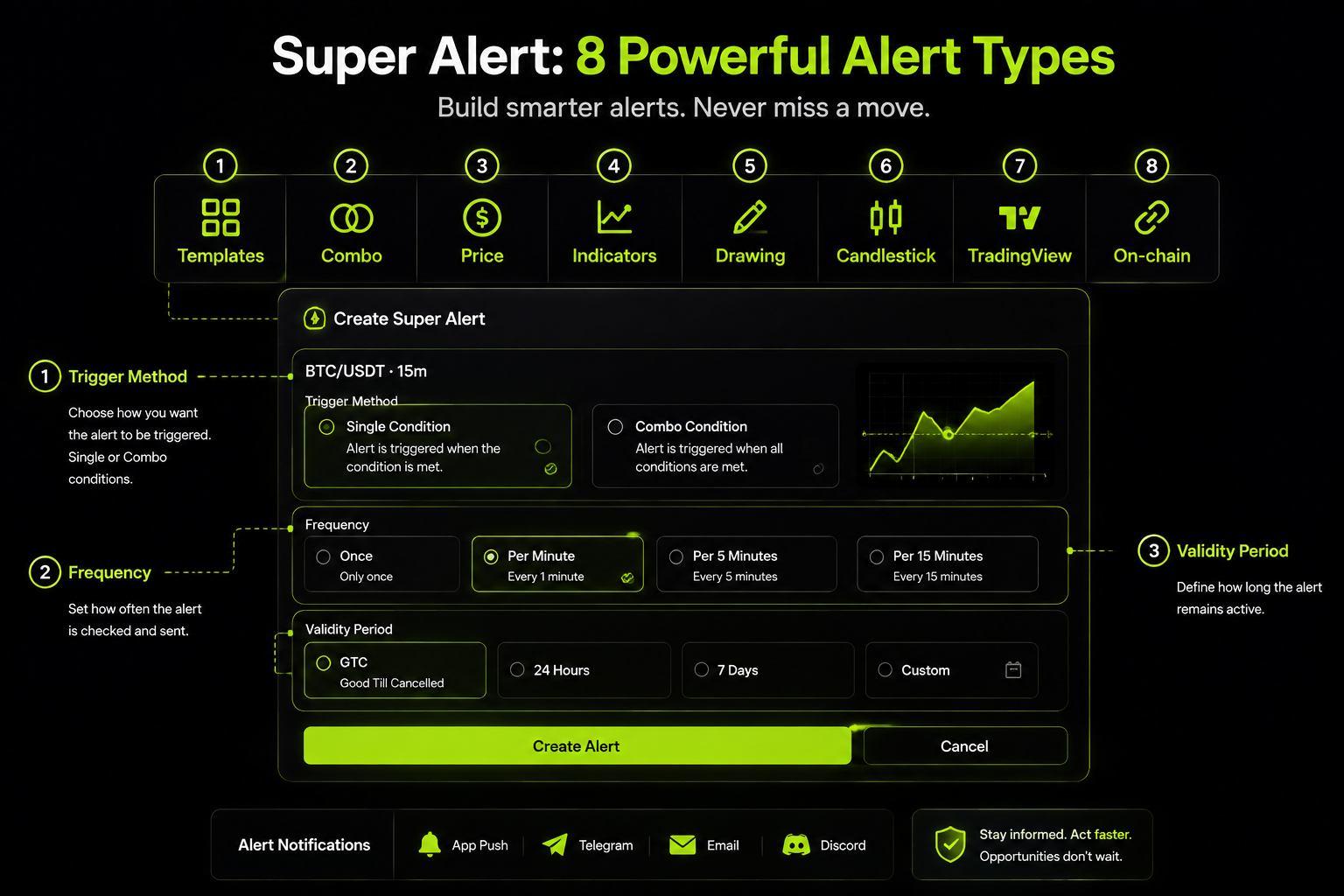
The Bitunix Super Alert panel opens directly from the K-line chart and groups all eight alert types — price, indicator, drawing, candlestick, combo, template, TradingView and on-chain — into one setup flow.
How Traders Can Use Super Alert for Different Market Scenarios
Feature lists don't make traders money; workflows sometimes do. The four scenarios below map common setups onto specific alert types, with the risk consideration attached to each.
This is where the alert-type table from earlier turns into something actionable:
Scenario | Alert combination | What you're actually monitoring |
Range breakout | Price + Drawing | Static range high plus the diagonal that's been capping rallies |
Trend confirmation | Indicator (MA crossover) | A momentum regime change on a higher timeframe |
Reversal at structure | Candlestick + Price | A pattern printing at a level, not anywhere |
Confluence entry | Combo | Two or three conditions satisfied simultaneously |
Monitoring Breakouts With Price and Drawing Alerts
Breakout monitoring is the natural home for a two-alert stack. Set a Price alert slightly above the horizontal range high, and a Drawing alert on the descending trendline that has rejected price three times. Whichever gives way first, you hear about it.
The failure mode is well documented: breakouts fail often, and the first push through a level frequently exists to collect stops before reversing. Two habits help. Give the level a buffer — a fraction of ATR rather than the exact tick — and treat the alert as a cue to check volume and follow-through, not as an entry signal by itself.
When a level breaks with conviction, traders typically look to capture the move in either direction using spot or perpetual contracts on platforms such as Bitunix, and pair that entry with a stop-loss order sized to the leverage they've taken on. The leverage is the risk, not the direction.
Example:
Imagine BTC has been trading between $60,000 and $64,000 for nearly two weeks. Each attempt to break above $64,000 has been rejected, while a descending trendline continues to cap every rebound. A trader who is watching the range can set a Price Alert at $64,200 to avoid false breaks around the exact level, while placing a Drawing Alert directly on the descending trendline.
If BTC pushes through the horizontal resistance but fails to break the trendline, the trader knows the breakout may still lack confirmation. If both alerts trigger within a short window — price clears the range high and the trendline resistance disappears — the setup becomes more meaningful. Instead of staring at charts all day, the trader receives the signal only when the market reaches the decision point.
Tracking Moving Average Crossover Signals With Indicator Alert
The moving average crossover is the most widely watched trend signal in crypto, and the most widely misused. A 50/200 daily cross (the "golden cross" and its inverse) describes a slow regime change; a 9/21 cross on the 15-minute chart describes noise on most pairs most of the time.
An Indicator Alert on the crossover you actually trade solves the real problem, which is that these events happen while you're not looking and the first 12 hours after the cross often carry most of the follow-through.
Two calibration notes: moving averages lag by design, so a crossover alert confirms what has happened rather than forecasting what's next, and crossover signals degrade badly in ranging markets — in a chop regime, expect whipsaws in both directions.

An Indicator Alert on a 50/200 moving average crossover notifies a trader at the moment the regime change confirms, removing the need to check the daily chart manually.
Example: A trader is monitoring ETH on the daily chart after several weeks of sideways movement. Rather than checking multiple charts every morning, they set an Indicator Alert for a 50-day and 200-day moving average crossover. When the faster moving average finally crosses above the slower one, Super Alert notifies them that the longer-term trend structure has changed.
The alert does not tell the trader to immediately enter a position. Instead, it acts as a workflow trigger: check whether trading volume is expanding, whether ETH is holding above key support, and whether the broader market environment supports continuation. The trader moves from constantly monitoring charts to reviewing opportunities only when the condition they care about actually occurs.
Identifying Candlestick Pattern Signals With Candlestick Alert
A candlestick pattern is a statement about who lost control of a candle. Engulfing candles, hammers, dojis and long-wick rejections all describe an intrabar fight and its outcome, which is why they read best at levels where a fight was likely in the first place.
Candlestick alerts handle the tedious part — waiting for the close. What they can't do is judge context, and that remains your job: the same bullish engulfing that means a great deal at a retested support means very little in the middle of a two-week range. Pick a higher timeframe than feels natural, and combine the pattern alert with a level.
Example: Suppose SOL has been declining for several days and approaches a previously tested support zone at $120. A trader expects a possible reversal but does not want to enter simply because price reaches the level. They set a Candlestick Alert for a bullish engulfing pattern on the 4-hour chart.
When SOL prints a bullish engulfing candle exactly at the support area, the alert highlights that buyers have stepped in after the sell-off. The same pattern appearing in the middle of a range would mean something completely different, but combined with a key price level, the alert helps the trader focus on higher-quality setups instead of reacting to every candle formation.
Combining Multiple Conditions With Combo Alert
Combo alerts are where experienced users end up, because most tradeable setups are conjunctions. "Price back above the broken support and RSI reclaiming 50" is a materially different signal from either condition alone.
They're also the natural tool for managing risk around news. When a bullish catalyst has already run and you're weighing the classic "sell the news" reversal, one combo alert can watch for the specific breakdown that would invalidate the move — a lost level plus a momentum roll-over.
Long-term holders who don't want to sell spot into that scenario sometimes hedge instead, opening a suitably sized perpetual short on Bitunix to lock in book profit while keeping the underlying position intact. Hedging shifts your risk profile; it doesn't remove risk, and a hedge that's oversized relative to your spot holding is just a new directional bet.
Example: After BTC breaks above a major resistance level, a trader expects a potential continuation but wants protection against a failed breakout. They create a Combo Alert that triggers only when BTC falls back below the breakout level while RSI drops below 50.
A single price drop might simply be normal market noise, and an RSI decline alone might not matter. But when both conditions happen together, it signals that momentum may be weakening and the breakout thesis could be invalidated. The trader can then reassess the position, reduce exposure, or activate a hedge strategy instead of waiting for losses to expand.
Stay Updated With Flexible Alert Notification Channels
An alert that fires into a channel you don't check is worse than no alert, because it creates the illusion of coverage. Bitunix routes Super Alert triggers to five destinations, and the right choice depends less on preference than on where you are during your trading day.
Choosing between them comes down to speed versus record-keeping, as summarized here:
Channel | Best for | Consideration |
Bitunix app push | Fastest personal notification, away from desk | Requires notifications enabled at OS level |
In-site message | Reviewing triggers while already trading | Only visible when logged in |
Email | Archiving and reviewing trigger history | Slowest of the five; can hit spam filters |
Telegram | Real-time, mobile-first, shareable | Requires one-time bot setup |
Discord | Team or community-facing signal routing | Channel discipline matters; alerts scale loudly |
Receive Alerts Through Bitunix App and Email
App push is the default for anyone who trades away from a desk. It's the shortest path from trigger to human, provided you've allowed notifications at the operating-system level — a step that quietly breaks more alert workflows than any platform setting.
Email plays a different role. It's slower, but it's searchable and it archives, which makes it the right channel for reviewing what fired last week and whether your conditions were well chosen.
Connect Discord and Telegram for Real-Time Notifications
Telegram and Discord both connect via a one-time setup and then behave like any other trigger method. The Telegram integration guide and Discord integration guide cover the connection steps.
The reason to bother: these are where crypto traders already live. Telegram suits individual traders who want alerts in the same app as their market chatter. Discord suits trading groups routing shared signals into a dedicated channel — with the obvious caveat that a group of ten people each pushing unfiltered alerts into one channel will train everyone to ignore it. Use Frequency limits generously in shared channels.
New tooling only becomes habit when people actually use it once. To push Super Alert past the trial stage, Bitunix launched the Super Alert Challenge with a 10,000 USDT total reward pool, structured to reward both usage and shared setups.
The campaign also functions as a feedback loop — publicly shared configurations reveal how traders combine the eight modules in practice, which is information no internal roadmap meeting produces on its own.
Overview of the $10,000 USDT Super Alert Challenge
The challenge runs from August 10, 2026 at 12:00 UTC to August 30, 2026 at 12:00 UTC and splits into two activities.
The main activity carries 7,500 USDT in Futures Bonuses, distributed to early participants and selected winners. Entry is deliberately low-friction: create at least one Super Alert and keep it active for 24 hours or until it triggers.
The second activity is a 2,500 USDT creator pool for users who publish their Super Alert setups as visuals, written tutorials or video using the campaign hashtag #BitunixSuperAlert, with 750 USDT of that pool reserved for Community Choice Awards.
Full participation rules, reward tiers and submission requirements sit on the campaign landing page. Futures bonuses are used for derivatives trading, which carries risk of loss — campaign terms apply.
Community Participation and Market Feedback
As noted by Cryptonews and BlockBeats, the value lies in consolidation — combining eight distinct monitoring modes into one panel and a single notification workflow.
Creator submissions and independent trader coverage on X and Instagram have leaned toward the modules that don't exist in basic alerting: drawing-object triggers and multi-condition combos. That tracks with the underlying problem.
Traders who were already satisfied with a single price ping didn't need a new system; the ones who had been maintaining spreadsheets, browser tabs and third-party bots to approximate condition-based monitoring did.
Bitunix serves over 5 million users across more than 150 countries, so the practical value of a campaign like this is breadth of setups — spot traders, perpetual traders and on-chain watchers all stress-test different modules.
Is Bitunix Super Alert the Right Tool for Your Crypto Trading Workflow?
Strip away the feature count and Super Alert answers one question: can you express your actual trading plan as a set of conditions the platform will watch for you? If your plan lives on horizontal levels, basic crypto price alerts on any platform will serve you fine.
If it involves trendlines that move, indicator states, candle closes at specific structure, external Pine Script logic, or wallet flows — then a consolidated system is the difference between monitoring your plan and approximating it.
Where it fits best:
Multi-timeframe discretionary traders who analyze on higher timeframes and need to be told when a setup goes live.
Naked-K and structure traders whose signals are geometry and candle closes rather than fixed numbers.
Traders already running TradingView strategies who want one notification layer instead of three.
Anyone trading around a job or a timezone that doesn't overlap with the sessions they care about.
Where it doesn't help: alerts don't execute, don't size positions, and don't manage risk. They also can't fix a plan that isn't well specified — an alert on an arbitrary level fires just as reliably as an alert on a meaningful one, which is exactly why the Note field and periodic review of your alert records matter. And in structurally quiet regimes like the mid-August 2026 tape, expect long stretches of silence followed by everything firing at once.
The honest version of the pitch is unglamorous: Super Alert doesn't tell you what the market will do. It makes sure the market can't do it without telling you. Build the conditions while you're calm, keep the frequency and validity settings tight, and let the chart do the watching.
Trading crypto involves substantial risk, including the possible loss of principal. Alerts and market data are provided for informational purposes only and do not constitute investment advice. Market figures cited are accurate as of August 17, 2026 and will change.
About Bitunix
Bitunix is a global cryptocurrency derivatives exchange trusted by over 5 million users across more than 150 countries. The platform is committed to providing a transparent, compliant, and secure trading environment for every user. Bitunix offers a fast registration process and a user-friendly verification system supported by mandatory KYC to ensure safety and compliance.
With global standards of protection through Proof of Reserves (POR) and the Bitunix Care Fund, Bitunix prioritizes user trust and fund security. The K-Line Ultra chart system delivers a seamless trading experience for both beginners and advanced traders, while leverage of up to 200x and deep liquidity make Bitunix one of the most dynamic platforms in the market.
Bitunix Global Accounts
X | Telegram Announcements | Telegram Global | CoinMarketCap | Instagram | Facebook | LinkedIn | Reddit | Medium