

1、 Supported Indicators and Applicable Scenarios
Currently, the Bitunix platform supports alerts for the following five types of technical indicators, covering mainstream trading signal needs.
| Indicator | Core Alert Rules | Applicable Scenarios |
|---|---|---|
| MACD | Golden cross, death cross, DEA crosses the zero line, top/bottom divergence | Trend reversal alerts and swing trading signal reminders |
| RSI | Crosses, crosses above, crosses below, greater than, less than | Overbought and oversold reversal opportunity alerts |
| BB (Bollinger Bands) | Overbought/oversold, middle band golden cross/death cross, bandwidth expansion/contraction | Range breakout, trend continuation, and market volatility analysis |
| Volume | Greater than | Volume breakout and abnormal volume monitoring |
| MA (Moving Average) | Crosses, crosses above, crosses below, greater than, less than | Trend tracking and key support/resistance breakout alerts |
2、How to Set Up a Indicator Alert
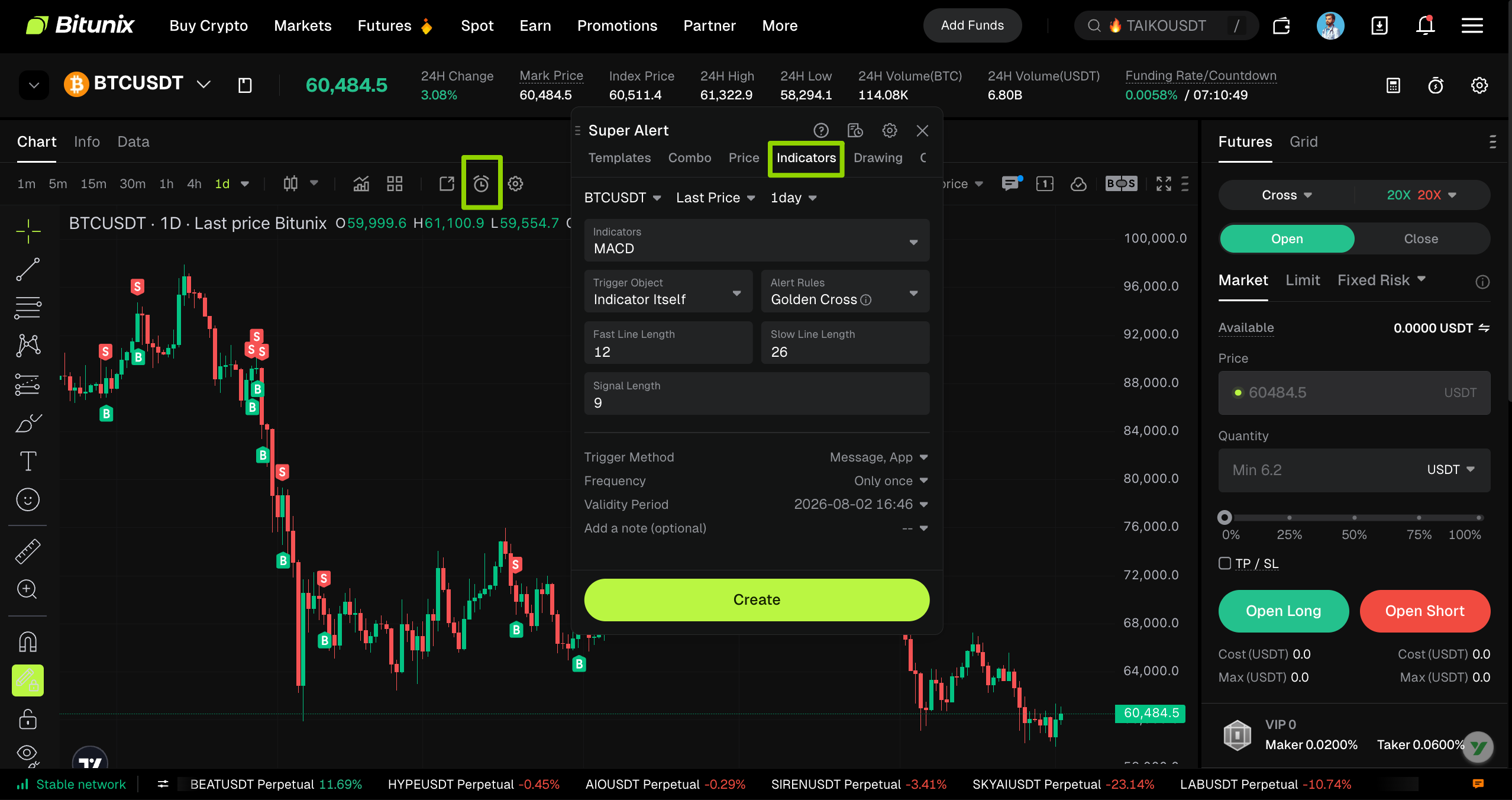
1、Select Indicator Alert
- Open the candlestick chart of your selected trading pair
- Click the 【Create Alert】 (⏰) icon in the chart toolbar
- Switch to the【 Indicator Alert】 tab to enter the configuration interface
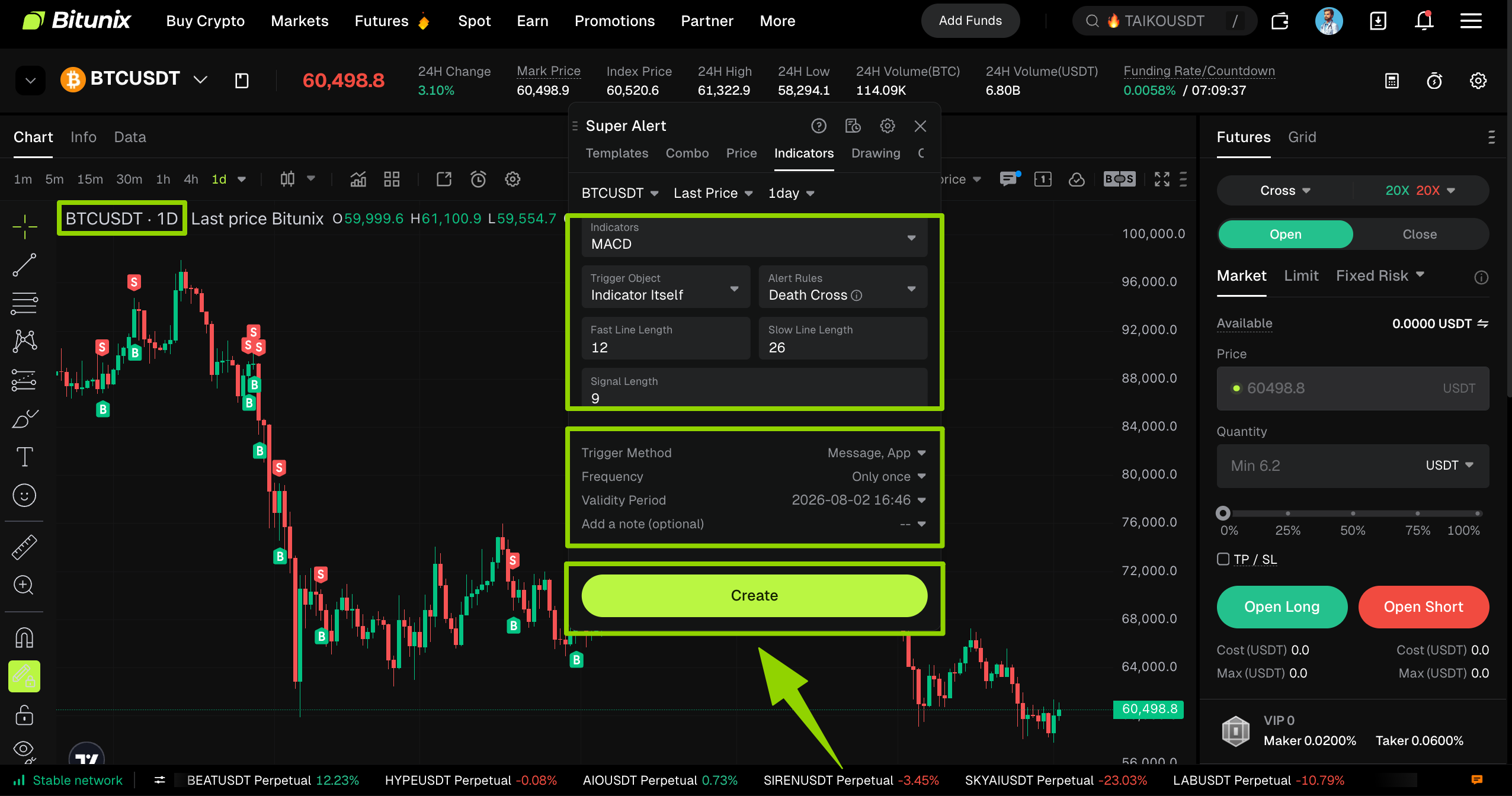
2、Configure all parameters and finalize your combo alert
Once all combination conditions have been configured and the trading logic has been verified, you can set up alert preferences, trigger frequency, expiration time, and notes at the bottom of the page. After double-checking that all parameters are correct, click 【Create】 to complete Indicator Alert setup.
⚠️ Important Note:
The current setup is based on the BTC/USDT daily chart. Indicator settings are only valid for the selected timeframe and will not apply after switching to a different timeframe.
3、 Configuration Guide for Technical Indicator Alerts
| Indicator Name | Alert Rules / Trigger Conditions | Signal Source (Optional) | Trigger Method | Alert Validity Period / Frequency | Remark Example |
|---|---|---|---|---|---|
| MACD | Golden cross, death cross, DEA line crosses the zero line, top divergence, bottom divergence | Open price, close price, highest price, lowest price | Inbox notification, app push notification, email, Discord, Telegram | Frequency: one-time alert or alert when the condition is met. The expiration date can be set. | MACD Golden Cross Buy Signal |
| RSI | Crosses, crosses above, crosses below, greater than, less than the set threshold | - | Inbox notification, app push notification, email, Discord, Telegram | Frequency: one-time alert or alert when the condition is met. The expiration date can be set. | RSI top trigger value 50 |
| Bollinger Bands (BB) | Overbought, oversold, middle band golden cross, middle band death cross, bandwidth expansion, bandwidth contraction | - | Inbox notification, app push notification, email, Discord, Telegram | Frequency: one-time alert or alert when the condition is met. The expiration date can be set. | BB upper band overbought signal |
| Volume | Greater than the set threshold | - | Inbox notification, app push notification, email, Discord, Telegram | Frequency: one-time alert or alert when the condition is met. The expiration date can be set. | Volume breakout signal |
| Moving Average (MA) | Crosses, crosses above, crosses below, greater than, less than the set threshold | - | Inbox notification, app push notification, email, Discord, Telegram | Frequency: one-time alert or alert when the condition is met. The expiration date can be set. | MA upper trigger value 50 |
4、Precautions
- Signal Filtering: The same indicator can be combined with other technical indicators and timeframes to improve signal accuracy. For example, users may combine a 30-minute MACD golden cross with a 4-hour RSI that is not overbought, or use a 4-hour support level as an additional confirmation signal.
- Frequency Settings: In a ranging or choppy market, it is recommended to choose one-time alert to avoid repeated triggers. In a trending market, users may choose alert every time the conditions are met to track trend continuation signals.
- Multi-Channel Notifications: It is recommended to enable app push notification and inbox notification at the same time to avoid missing important trading signals.
- Remark Management: Add clear notes to each alert so the signal type can be quickly identified later in the Alert Records section.
Tutorials for detailed configuration of all alert types can be found in the corresponding dedicated documents:
- Combo Alert :Mix and match multiple conditions to achieve multi-dimensional composite triggering
- K-Line Alert:dentify market signals based on candlestick patterns
- Drawing Alert: Custom trend graphics to spot support and resistance breakouts
- Template Alert: Apply preset strategies with one click to quickly generate combo alerts
- Price Alert: Trigger reminders when prices hit specified levels
Troubleshooting FAQs
Alert not triggered:
Check whether the indicator has been selected, whether the parameter settings are correct, such as the period and trigger value, and whether the notification channel is enabled.
Repeated triggers:
Adjust the alert frequency to one-time alert, or optimize the trigger conditions by adding multi-indicator filtering.
Disclaimer
This article is not intended to provide:
- investment advice or investment recommendations;
- an offer or solicitation to buy, sell, or hold digital assets;
- financial, accounting, legal, or tax advice.
- Digital assets, including stablecoins and NFTs, involve a high level of risk and may fluctuate significantly in value. You should carefully consider whether trading or holding digital assets is appropriate based on your financial situation. Please consult your legal, tax, investment, or other professional adviser for your specific situation. You are responsible for understanding and complying with relevant local laws and regulations.