

Learn More
To deepen your understanding of candlestick patterns, visit Bitunix Academy to master complete candlestick trading techniques.
Single Candlestick Alert
Step 1
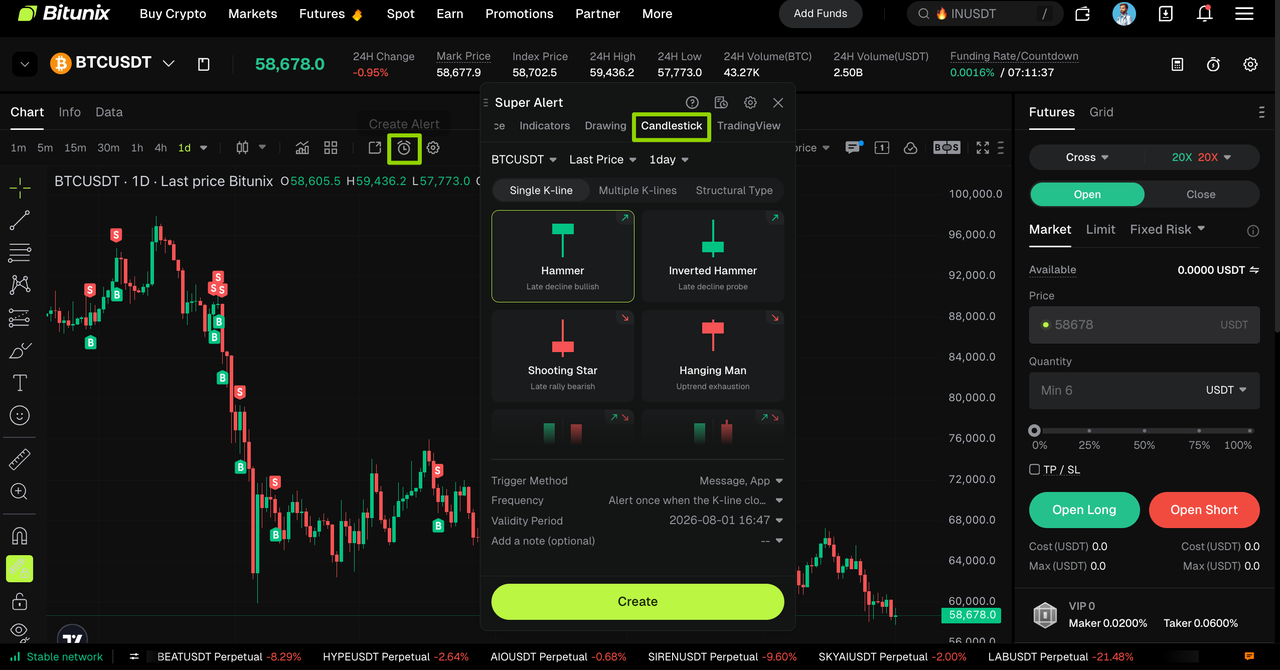
Click the 【CreateAlert】 (⏰) icon in the settings menu to enter the alert setup page. Switch to the candlestick chart tab and select 【Single K-line】.
Step 2
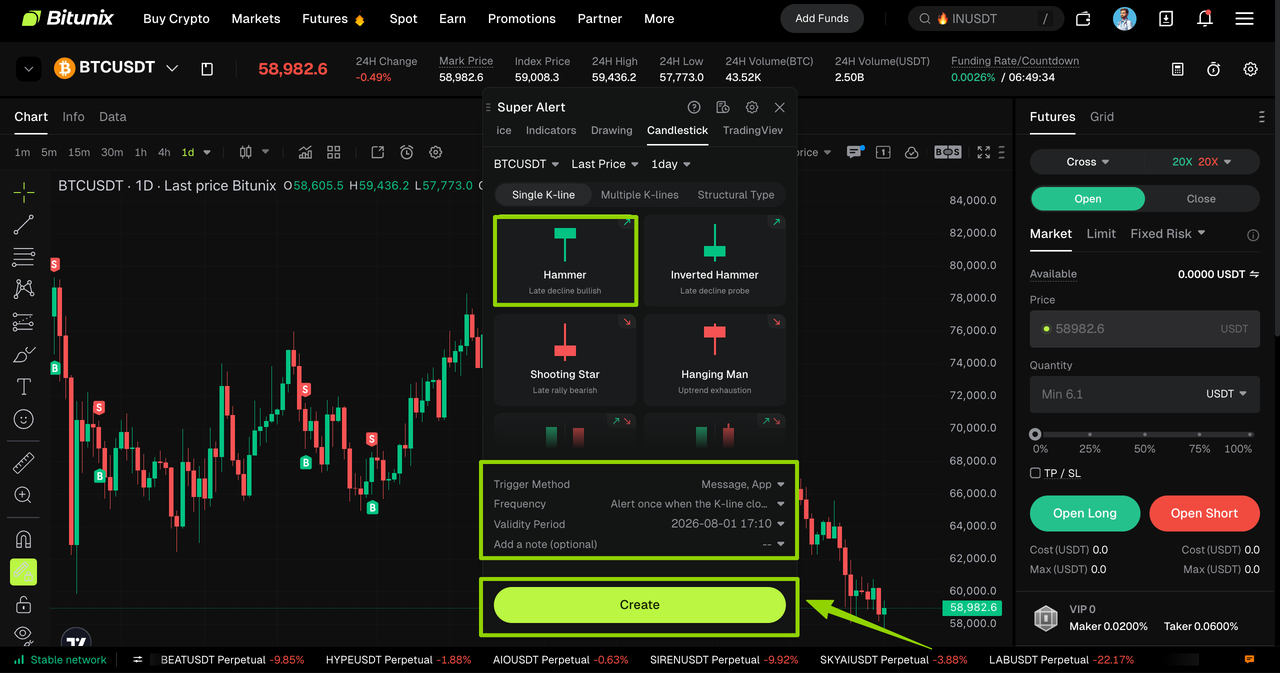
Choose the single K-line pattern you want to set up. In this example, we use the Hammer pattern.
After selecting the pattern, configure notification method and alert frequency, then click 【Create】 to complete setup.
Supported Single K-line Patterns
Hammer, Inverted Hammer, Shooting Star, Hanging Man, Marubozu, Closing Marubozu, Doji, Dragonfly Doji, Gravestone Doji, Spinning Top
Single K-line Alert Guide Summary
- Hammer: Appears at lows, signals potential price increase
- Inverted Hammer: Bottom signal, potential rebound
- Shooting Star: Appears at highs, signals potential pullback
- Hanging Man: High-level signal, suggests possible decline
- Marubozu: Strong directional movement, continuation of trend
- Closing Marubozu: Strong trending candle, trend continuation
- Doji: Market indecision, potential reversal
- Dragonfly Doji: Rejection of lower prices, bullish reversal bias
- Gravestone Doji: Rejection of higher prices, bearish reversal bias
- Spinning Top: Market indecision, waiting for direction
Dual Candlestick Alert
Step 1
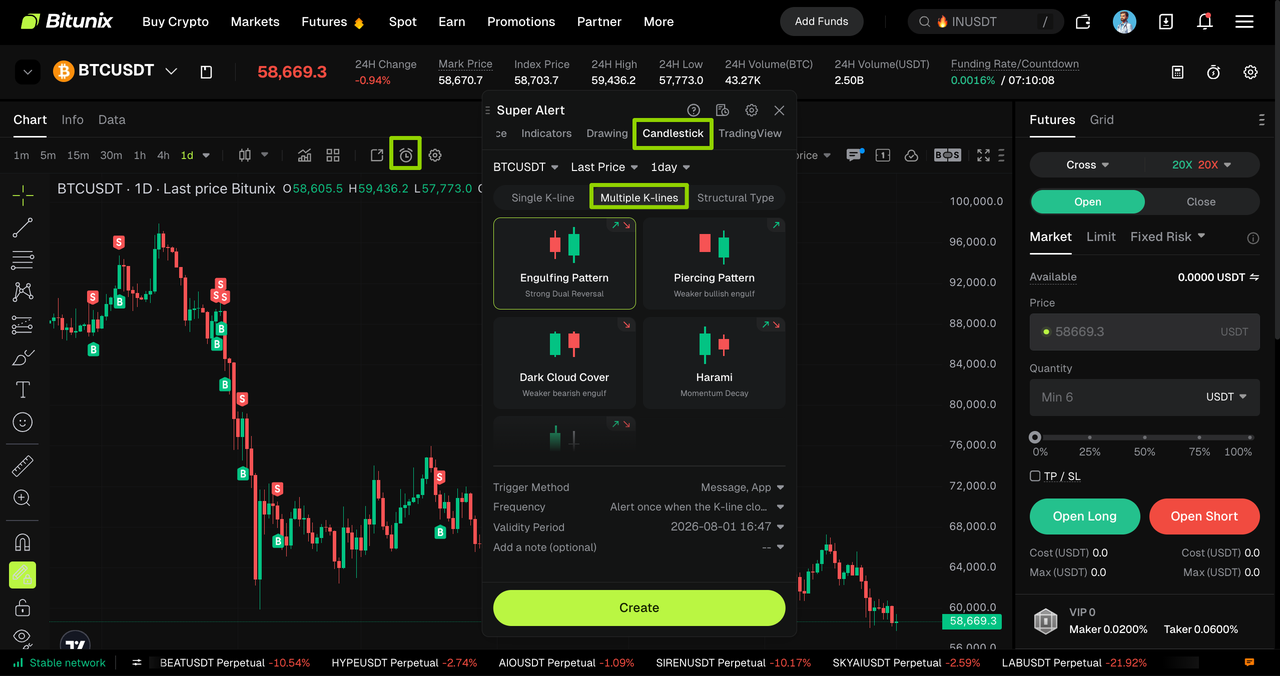
Click the 【CreateAlert】 (⏰) icon in the settings menu to enter the alert setup page. Switch to the candlestick chart tab and select Multiple K-lines.
Step 2
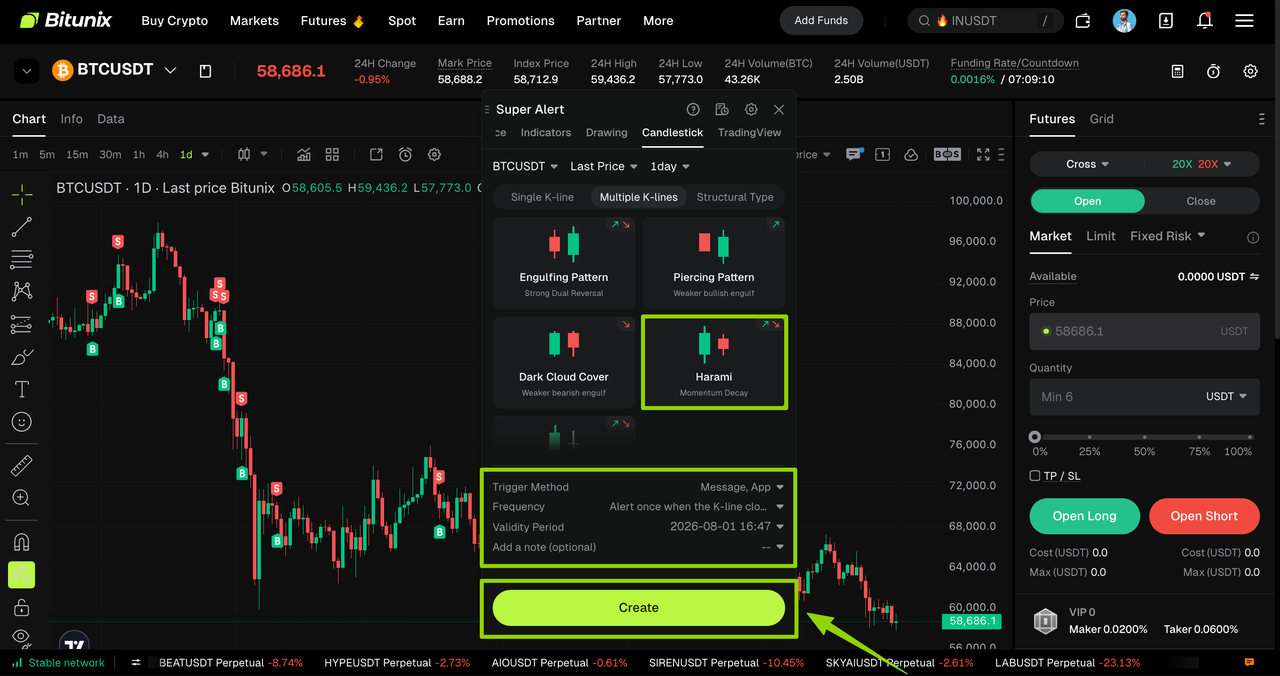
Choose the Multiple K-lines pattern you want to configure. In this example, we use the Harami pattern.
After selecting the pattern, configure notification method and alert frequency, then click 【Create】 to complete setup.
Supported Multiple K-lines Patterns
Engulfing Pattern, Piercing Pattern, Dark Cloud Cover, Harami, Harami Cross
Multiple K-lines Alert Guide Summary
- Engulfing Pattern: Bullish when a green candle engulfs a red one; bearish when reversed
- Piercing Pattern: Bullish reversal after a downtrend
- Dark Cloud Cover: Bearish reversal after an uptrend
- Harami: Weakening momentum, potential reversal
- Harami Cross: Market indecision, high probability of reversal
Structural Type Alert
Step 1
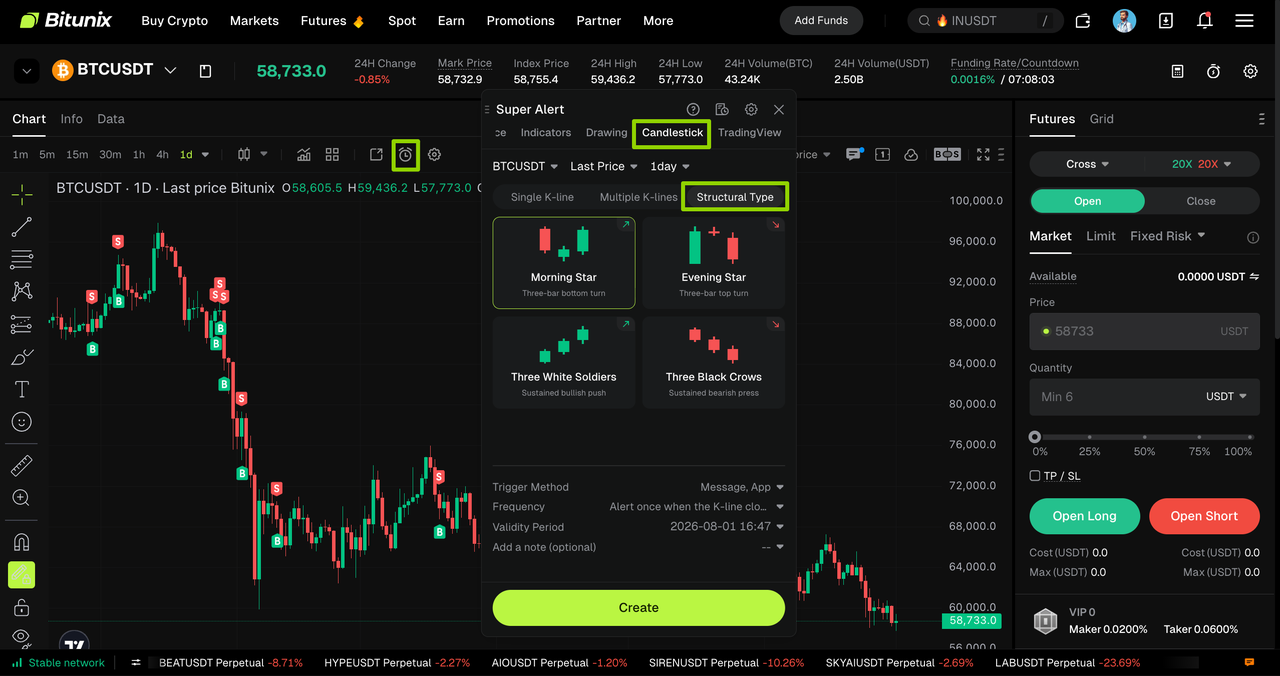
Click the 【CreateAlert】 (⏰) icon in the settings menu to enter the alert setup page. Switch to the candlestick chart tab and select Structural Type.
Step 2
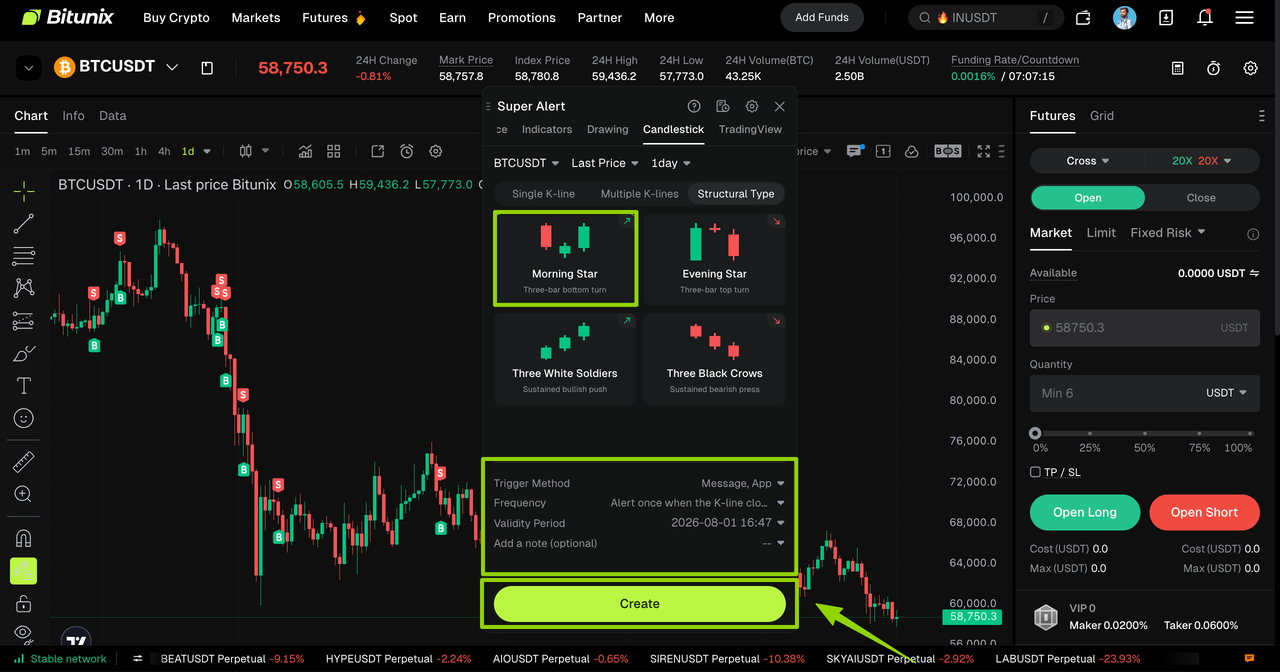
Choose the Structural Type you want to set. In this example, we use Morning Star.
After selecting the pattern, configure notification method and alert frequency, then click 【Create】 to complete setup.
Supported Structural Types
Morning Star, Evening Star, Three White Soldiers, Three Black Crows
Structural Type Alert Guide Summary
- Morning Star: End of downtrend, potential bullish reversal
- Evening Star: End of uptrend, potential bearish reversal
- Three White Soldiers: Strong bullish continuation
- Three Black Crows: Strong bearish continuation
Related Alert Types
For detailed guides, please refer to:
- Indicator Alert: Capture market fluctuations via technical indicators
- Combo Alert :Mix and match multiple conditions to achieve multi-dimensional composite triggering
- Drawing Alert: Custom trend graphics to spot support and resistance breakouts
- Template Alert: Apply preset strategies with one click to quickly generate combo alerts
- Price Alert: Trigger reminders when prices hit specified levels
Candlestick Alert Guide Summary

Disclaimer
This article does not provide:
(i) investment advice or investment recommendations;
(ii) an offer or solicitation to buy, sell, or hold digital assets;
(iii) financial, accounting, legal, or tax advice.
Digital assets, including stablecoins and NFTs, involve high risk and may fluctuate significantly. Consider whether trading or holding digital assets is appropriate for you given your financial situation. Consult a qualified legal, tax, or investment professional when needed. You are responsible for understanding and complying with applicable local laws and regulations.