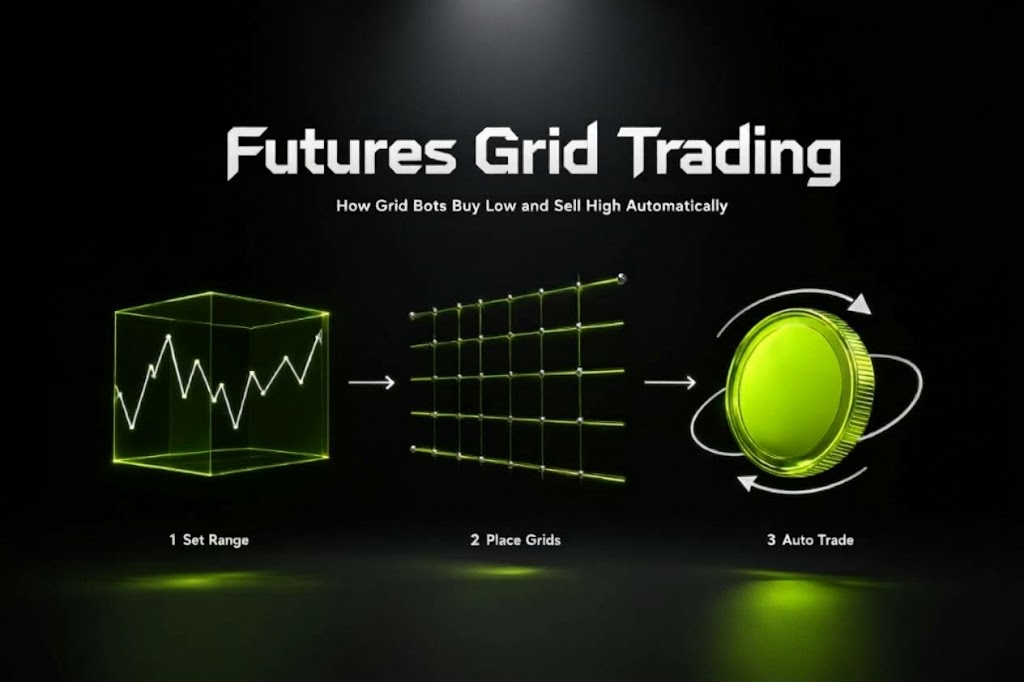
Futures grid trading is an automated strategy that places orders at predefined price levels within a selected range for a perpetual futures trading pair. It is designed to capture price fluctuations by following preset trading rules, making it useful for traders who expect repeated price movements rather than a sustained move in one direction.
On Bitunix, you can configure a futures grid bot by selecting a trading pair, choosing Long or Short, setting a price range and grid quantity, and allocating margin with a chosen leverage level. Before creating a bot, it is important to understand how grid execution works, what affects its profitability, and how to manage the risks of leveraged futures trading.
Futures grid trading does not guarantee profits. A bot can continue executing its rules while accumulating unrealized losses, and leverage increases liquidation risk.
What Is Futures Grid Trading?
Futures grid trading is an automated strategy that divides a selected price range into multiple intervals, or grids, and places orders according to predefined rules. On a perpetual futures contract, these orders create and reduce leveraged market exposure as the price moves through the grid.
Instead of manually placing every order, you configure the strategy in advance. The bot then executes orders according to its settings and the platform's trading rules.
The main objective is to capture repeated price movements within the selected range. However, completed profitable trades do not necessarily mean the entire strategy is profitable, because open positions, fees, funding payments, and adverse price movements also affect the overall result.
How Does a Futures Grid Bot Work?
A futures grid bot divides the selected price range into smaller price intervals. As the market moves between grid levels, the bot executes orders according to its direction and configuration.
For example, suppose BTC is trading at $60,000 and you configure a grid between $58,000 and $62,000. The bot divides that range into smaller intervals and places orders at the corresponding levels.
If the price moves between those levels, the bot can execute successive trades according to its rules. The resulting realized profit or loss depends on the executed trades, position exposure, and trading costs.
If the market moves sharply beyond the selected range, the bot may stop opening new grid trades or otherwise change its behavior according to the platform's rules. Existing exposure and unrealized PnL may still require attention.
Both strategies use predefined price levels to automate trading, but they differ in how positions are funded and what risks they introduce.
Feature | Futures Grid | Spot Grid |
Trading instrument | Futures contracts, including perpetual contracts | Spot assets |
Direction | May support Long and Short configurations | Generally involves buying and selling the underlying asset |
Leverage | May use leverage, depending on the platform and settings | Typically does not use leverage unless combined with a separate borrowing product |
Liquidation risk | Yes, when leveraged positions are subject to liquidation | No futures-style liquidation in ordinary unleveraged spot trading |
Main risks | Directional exposure, liquidation, fees, funding, and price breakouts | Price declines, inventory exposure, fees, and price breakouts |
A futures grid can provide exposure to both rising and falling markets through different configurations. That flexibility also introduces risks that do not arise in the same way with ordinary unleveraged spot trading.
How Does a Futures Grid Strategy Work?
A futures grid strategy combines a price range, grid spacing, directional bias, and position sizing. Understanding how these components interact helps you evaluate whether the strategy fits the market conditions you expect.
Long vs. Short Futures Grid
A futures grid bot may offer Long and Short configurations. The choice affects the direction of the strategy's exposure and how it responds to price movements.
Long grid: Generally suited to a bullish bias, where the strategy is configured to benefit from upward price movements within its operating range.
Short grid: Generally suited to a bearish bias, where the strategy is configured to benefit from downward price movements within its operating range.
These configurations are not interchangeable guarantees of profit. If the market moves against the selected direction, unrealized losses can accumulate. The actual outcome also depends on the bot's order logic, price range, leverage, and remaining open positions.
Before choosing a direction, consider the broader trend, recent volatility, and the possibility that price will move beyond your selected boundaries.
Price Range, Grid Spacing, and Trade Execution
The price range defines the upper and lower boundaries within which the strategy is configured to trade. Grid quantity determines how many intervals divide that range.
For example, a range of $58,000 to $62,000 with 20 equally spaced arithmetic intervals has a nominal spacing of $200 per interval. Actual trading results depend on the order execution rules, direction, contract specifications, fees, and position exposure.
Two common configuration choices are:
More grids: Create narrower intervals. This can increase the number of potential trading opportunities while reducing the nominal price difference between adjacent levels.
Fewer grids: Create wider intervals. This reduces the number of levels and increases the nominal distance between adjacent levels.
Neither approach is inherently more profitable. Narrow spacing may leave less room for costs, while wide spacing may produce fewer completed trades. The appropriate configuration depends on volatility, trading costs, and the strategy's intended behavior.
Arithmetic grids use equal absolute price intervals. Other grid methods, where supported, may distribute levels differently. Check the method displayed in the Bitunix interface before creating a bot.
When Is a Futures Grid Strategy Suitable?
A futures grid strategy may be worth evaluating when a market experiences repeated price fluctuations within a reasonably defined range.
Potentially suitable conditions include:
Range-bound markets: Price repeatedly moves between identifiable support and resistance areas.
Recurring short-term swings: The market moves through multiple price levels without a sustained directional trend.
Rule-based execution: You want to automate a predefined trading approach rather than place each order manually.
A grid is less suited to conditions where the price range is poorly defined or the market is likely to trend sharply beyond its boundaries. A long grid can face pressure during a sustained decline, while a short grid can face pressure during a sustained rally.
Market conditions can change after a bot starts. A range that initially appears appropriate may become unsuitable as volatility or directional momentum increases.
Futures Grid Parameters Explained
Before starting a futures grid bot, understand how each setting affects its behavior and risk.
Price Range
The price range defines the lower and upper prices used by the strategy.
A range that is too narrow may be crossed frequently during ordinary volatility. A range that is too wide may produce fewer completed trades at a given grid quantity.
Use a range that reflects the trading conditions you are assessing, and consider what could happen if the price moves beyond either boundary. Do not assume that the bot will automatically close all exposure simply because the market leaves the range.
Number of Grids and Grid Method
Grid quantity determines how many intervals the strategy creates inside the selected range.
The Bitunix web interface currently displays a grid quantity range of 2 to 200. Available options and limits should be checked in the interface when configuring a strategy.
When selecting the grid quantity, consider:
The distance between adjacent levels.
The potential frequency of order execution.
The gross profit available from each completed grid cycle.
Trading fees and other costs relative to the grid spacing.
Whether the resulting configuration matches the market's volatility.
More grids do not automatically produce higher net returns. If the price difference between adjacent levels is small, costs can consume a larger share of the gross profit.
Leverage and Margin
Margin is the collateral allocated to support the bot's positions. Leverage determines the relationship between the margin and the resulting market exposure.
Higher leverage can increase exposure relative to the margin allocated, but it also makes the strategy more sensitive to adverse price movements. Liquidation may occur if losses and margin requirements exceed the available buffer.
When configuring a bot:
Review the minimum margin required by the current settings.
Allocate only funds you can afford to expose to the strategy's risks.
Consider how the price range, leverage, and potential open positions interact.
Check the estimated liquidation price shown by the platform, where available.
Leave sufficient room for adverse price movements rather than relying on a narrow margin buffer.
A lower leverage setting does not eliminate risk, but it can reduce exposure relative to the same amount of margin. The appropriate level depends on the strategy and the trader's risk tolerance.
Take-Profit and Stop-Loss Settings
Take-profit (TP) and stop-loss (SL) settings define conditions under which the platform attempts to stop the strategy or close exposure.
Take profit: Establishes a target at which the configured exit or termination action is triggered.
Stop loss: Establishes a threshold intended to limit losses by triggering the configured exit or termination action.
These controls can help enforce a predefined plan, but they do not guarantee a particular exit price or eliminate losses. Fast price movements, liquidity conditions, and execution rules can affect the final result.
Before enabling TP/SL, check what the selected settings control: the overall bot, open positions, or another supported action. Do not assume that a trigger necessarily closes every position at the specified price.
Futures Grid Trading Risks and Risk Management
Automation can reduce the need to place orders manually, but it does not remove market risk. A futures grid bot follows its configuration; it cannot guarantee that the configuration remains suitable as market conditions change.
Directional Trends and Price Breakouts
A grid strategy is built around predefined price levels. A strong directional move can push the market beyond the selected range and leave the strategy with exposure that no longer matches current conditions.
For example, a long grid may accumulate exposure during a prolonged decline. Even if some individual grid trades have realized profits, unrealized losses on the remaining position can outweigh those gains.
To manage this risk:
Set boundaries based on a reasoned assessment of market conditions.
Review whether the range remains relevant as volatility changes.
Avoid assuming that price will return to the range.
Monitor the bot when the market approaches either boundary.
Liquidation and Unrealized Losses
Futures grid strategies can hold open positions between completed trades. Their unrealized PnL changes with the market price, even when the bot has already realized profits from previous grid cycles.
With leverage, an adverse price movement can reduce the available margin and bring the position closer to liquidation. If liquidation occurs, the resulting loss may substantially reduce or exhaust the margin allocated to the strategy, subject to the platform's liquidation rules.
Risk management should therefore account for the bot's overall position and unrealized PnL, not just the displayed profit from completed grid trades.
Trading Fees and Funding Costs
A strategy's gross grid profit is not the same as its net result.
Trading fees reduce the proceeds from executed orders. Perpetual futures may also involve funding payments between long and short positions at scheduled intervals. Depending on the funding rate and the position held, a trader may pay or receive funding.
For a grid with narrow intervals, fees can consume a significant share of the price difference between adjacent levels. Funding costs can also accumulate while exposure remains open.
Before creating a bot, consider:
The applicable maker and taker fees.
The expected frequency of order execution.
The funding rate and payment schedule for the selected contract.
Realized grid PnL alongside unrealized PnL.
The bot's overall net result after applicable costs.
Do not evaluate a strategy solely by the number of completed trades or its gross realized grid profit.
Monitoring and Managing an Active Bot
An active bot still requires oversight. Review its performance and exposure periodically, particularly when the market moves sharply or approaches the configured range boundaries.
Monitor:
Realized PnL: The profit or loss from completed trades.
Unrealized PnL: The current profit or loss associated with open exposure.
Margin and liquidation indicators: The remaining margin buffer and estimated liquidation price, where displayed.
Trading costs: Fees and funding payments that affect net performance.
Range relevance: Whether the original price boundaries remain appropriate for current market conditions.
If the strategy no longer matches your market assessment, review its settings and exit options. Stopping a bot can involve closing open positions, so consider execution risk and the treatment of remaining funds before confirming termination.
How to Use a Futures Grid Bot on Bitunix
The following steps describe the Bitunix web interface. Interface labels and available settings may change, so check the current trading panel before confirming a strategy.
Step 1: Prepare USDT for the Bot
Bitunix's Futures Grid documentation describes an independent pool of funds allocated to each bot, with the remaining funds returned to the Spot Account after the strategy is stopped and settled.
Log in to the Bitunix website.
Open the Assets section and check your available USDT balance.
If necessary, use Internal Transfer to move USDT from your Futures Account to your Spot Account.
Confirm that the funds are available before proceeding.
The trading interface displays the available Spot balance for Futures Grid. Check the current minimum margin requirement before allocating funds.
Each bot has its own allocated margin. Avoid committing more capital than you can afford to lose, and remember that separate bot funding does not eliminate the risks of the strategy itself.
Step 2: Open Futures Grid
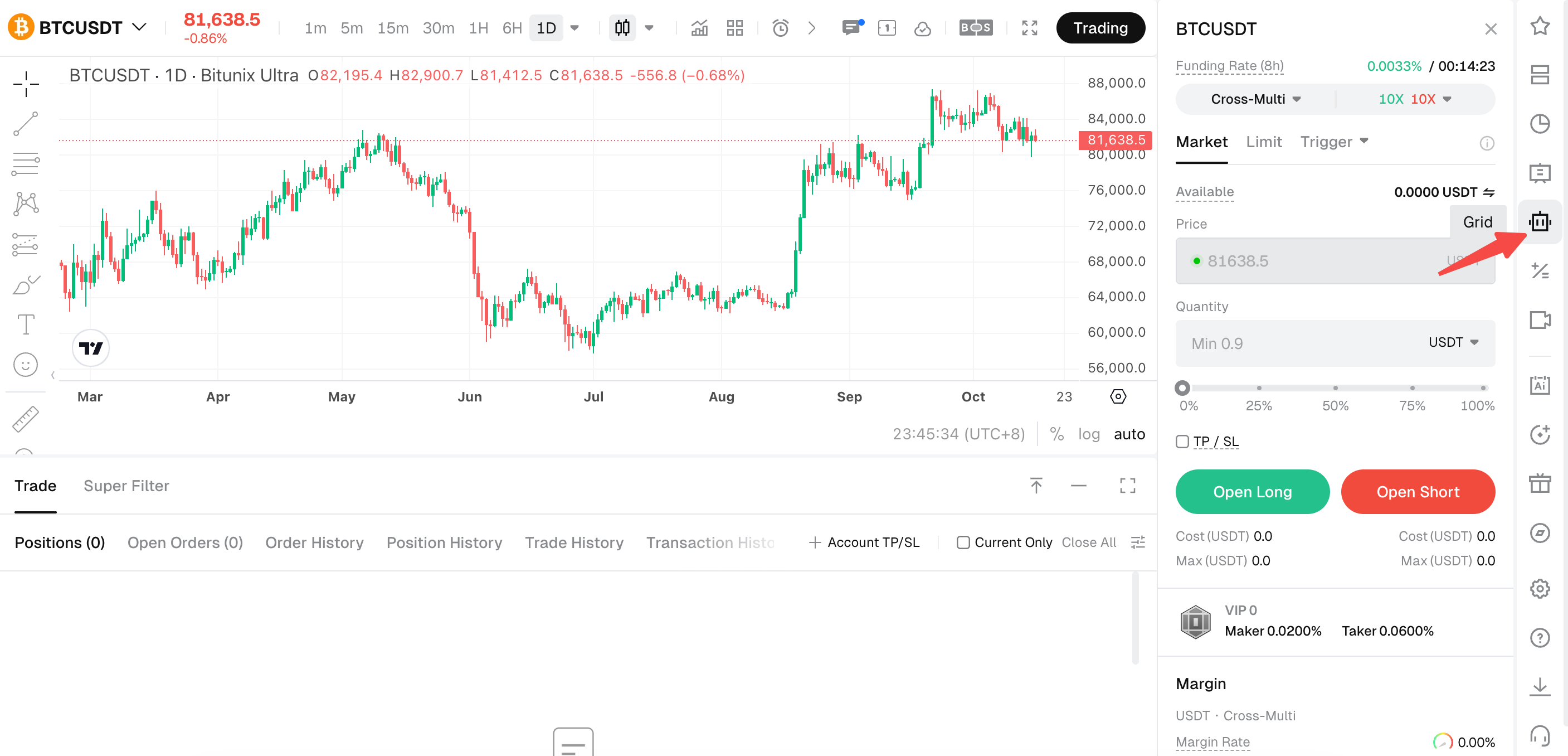
Open Bitunix Futures (PC Ultra trading layout).
Select the perpetual futures trading pair you want to trade (e.g., BTCUSDT).
On the far-right sidebar, click the Grid / Bot icon (indicated by the red arrow).
Confirm that the grid configuration panel is displayed.
Step 3: Select a Trading Pair and Direction
Choose the perpetual futures pair that matches your trading plan.
Next, select Long or Short based on the directional exposure you want the strategy to take.
Before continuing, check the contract's volatility, funding conditions, and applicable trading costs. A pair with frequent price fluctuations is not necessarily suitable if its movements or costs make the selected grid configuration unworkable.
Step 4: Set the Price Range and Grid Quantity
In the Price Range section:
Enter the lowest price.
Enter the highest price.
Set the number of grids within the range allowed by the interface.
Confirm the grid method, such as Arithmetic, if available.
Review the displayed grid spacing and estimated return per grid, where provided.
Bitunix's web interface supports a grid quantity of 2 to 200.
Use the displayed calculations to understand the proposed configuration, not as a forecast of total profitability. Actual performance depends on executed orders, costs, open positions, and subsequent market movements.
Step 5: Configure Margin and Leverage
Enter the amount of margin you want to allocate.
Select the available leverage setting.
Review the minimum investment requirement shown by the platform.
Check the estimated liquidation price and other displayed risk indicators, where available.
The margin must satisfy the minimum requirement for the selected configuration.
Before proceeding, consider whether the allocated margin can support adverse price movements within the strategy's intended range. Higher leverage increases liquidation risk, so avoid selecting it solely to increase potential exposure.
Step 6: Set TP/SL and Review the Parameters
If the interface offers TP/SL for your strategy, enable it if appropriate and enter your planned trigger levels.
Review the following before creating the bot:
Trading pair and Long/Short direction.
Lowest and highest prices.
Grid quantity and grid method.
Margin and leverage.
TP/SL settings.
Estimated liquidation price and other available risk indicators.
Confirm what the selected TP/SL controls will do when triggered. A stop-loss trigger is not a guarantee of execution at the exact specified price.
Step 7: Create the Bot
Once all parameters have been reviewed:
Click Create.
Review the confirmation details, if displayed.
Confirm the creation request.
After the bot is created, check the bot list or details page to verify its status and review the parameters. Do not assume the strategy is operating as intended until its status has been confirmed.
Step 8: Monitor or Stop the Strategy
You can view and manage active Futures Grid bots in the Bot or Robot section of the Bitunix contract trading interface.
Open the relevant bot's details to review its performance and available management options. Depending on the current interface, supported actions may include adjusting TP/SL, adding margin, or terminating the strategy.
If you decide to stop a bot:
Locate the active bot in the Bot list or open its details page.
Select the termination option.
Review the confirmation and the consequences for open positions.
Confirm only when you understand how the strategy will be closed and settled.
According to Bitunix's Futures Grid user guide, termination cancels open orders and closes remaining positions according to the platform's execution logic. Settlement takes approximately two minutes, after which remaining funds are transferred to the Spot Account. Actual execution and settlement can depend on platform conditions.
If a bot appears inactive or stops placing new grid orders, check its status, current market price, selected range, and any platform notifications before assuming there is a technical problem.