

1、What Is the Bitunix Futures Asset Mode?
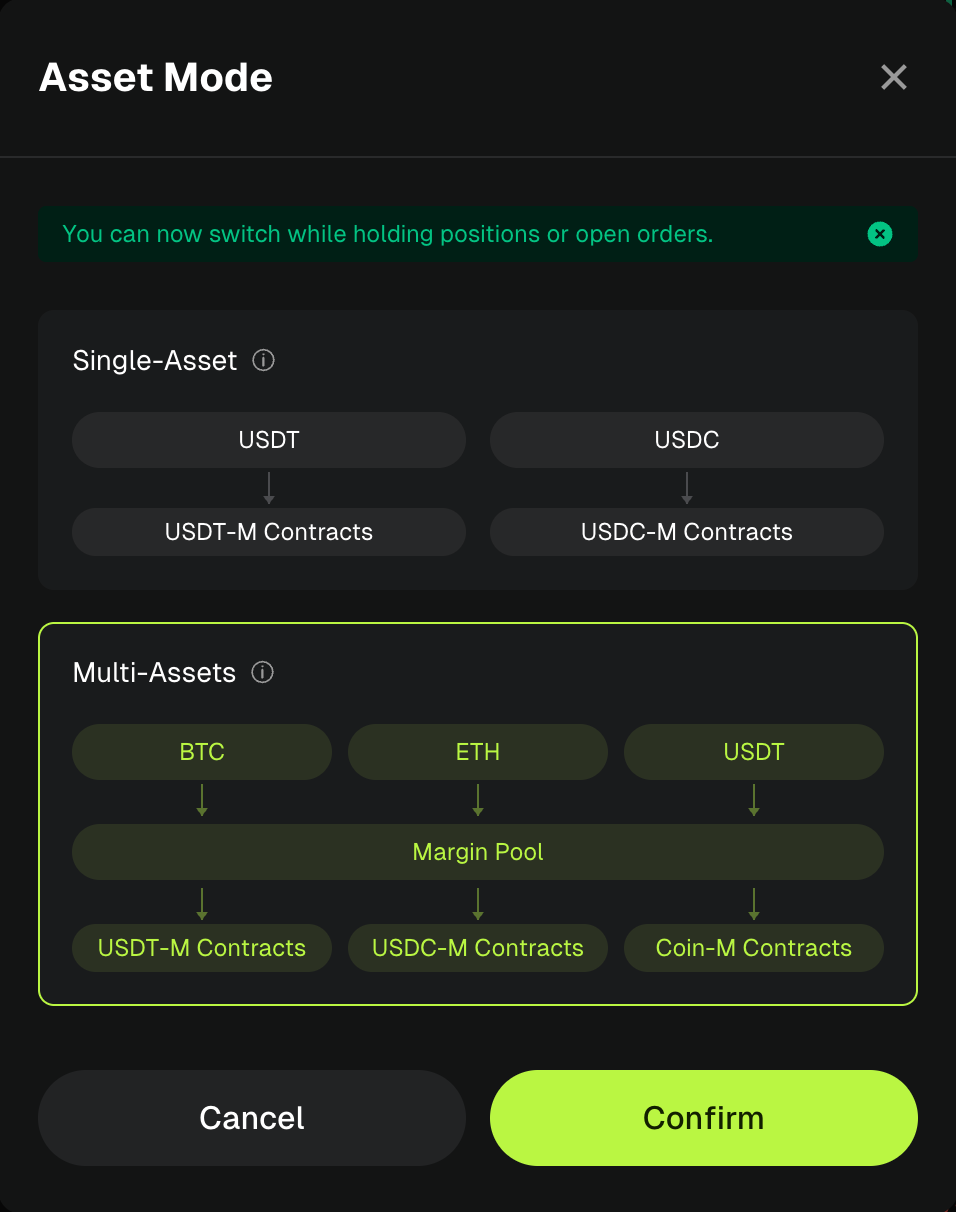
1. Single-Asset Margin Mode
Single-Asset Margin Mode is categorized by the settlement asset into USDT-margined, USDC-margined, and Coin-margined modes. Each trading pair can only use its corresponding settlement asset as margin, while other assets are excluded from the margin valuation.
Key Rules: Cross-asset futures trading is not supported. Different assets in the Futures Account are completely isolated in terms of risk and do not affect one another. P&L can only offset between Cross Margin positions that use the same margin asset.
Position Mode Compatibility: Both Cross Margin and Isolated Margin are supported, making this the most basic and traditional futures trading mode.
2. Multi-Asset Margin Mode
Multi-Asset Margin Mode supports cross-asset futures trading, allowing eligible assets in the account, including BTC, ETH, SOL, XRP, BNB, DOGE, USDC, and USDT, to be used as futures margin. These assets are collectively included in a shared margin pool.
Key Rules: All eligible assets in the Futures Account can collectively support the account's margin requirements. P&L from Cross Margin positions using different margin assets can offset each other, allowing more efficient use of otherwise idle assets.
Position Mode Compatibility: Both Cross Margin and Isolated Margin are supported, and the position mode can be configured independently for each trading pair.
2、Use Cases
1.Activate Idle Assets and Improve Capital Efficiency
If you previously used only USDT for futures trading, your idle BTC holdings could not be used to support your positions or manage risk. After switching to Multi-Assets Margin Mode, BTC can also be used as a margin asset. You can optimize capital utilization without selling your BTC holdings or closing existing positions.
2.Manage Asset Risks Separately with Greater Stability
If you previously used multiple cryptocurrencies as margin assets but now want to manage the profit and loss of BTC, USDT, and other assets separately, switching back to Single-Asset Margin Mode can help isolate risks. As long as your account has no outstanding liabilities and sufficient margin balance, you can switch modes and manage risks for each asset individually.
3.Switch Modes Without Disrupting Existing Trades
Regardless of how you switch between asset modes, your existing positions, leverage settings, liquidation prices, and open orders will remain unchanged. There is no need to close positions and reopen trades. After switching, you can continue trading seamlessly.
3、Bitunix Futures Asset Mode Switching: Setup Guide
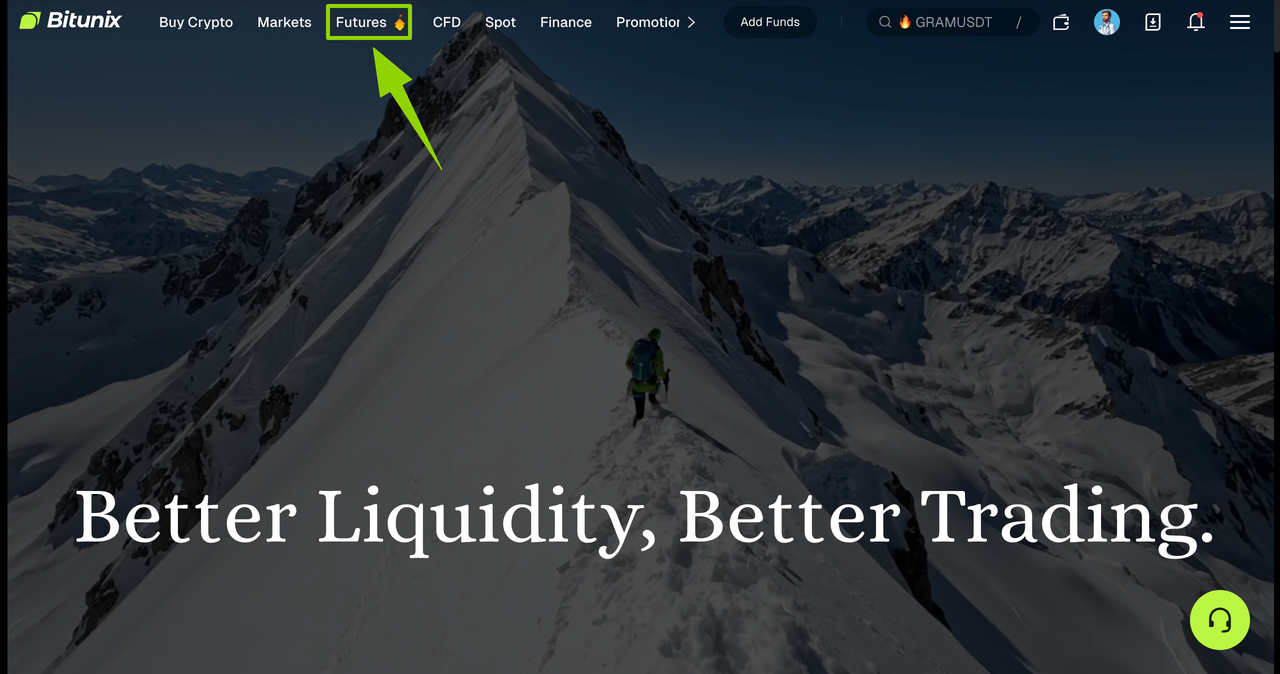
1.Open the Bitunix official website and click the [Futures] button. You will be automatically redirected to the futures trading page.
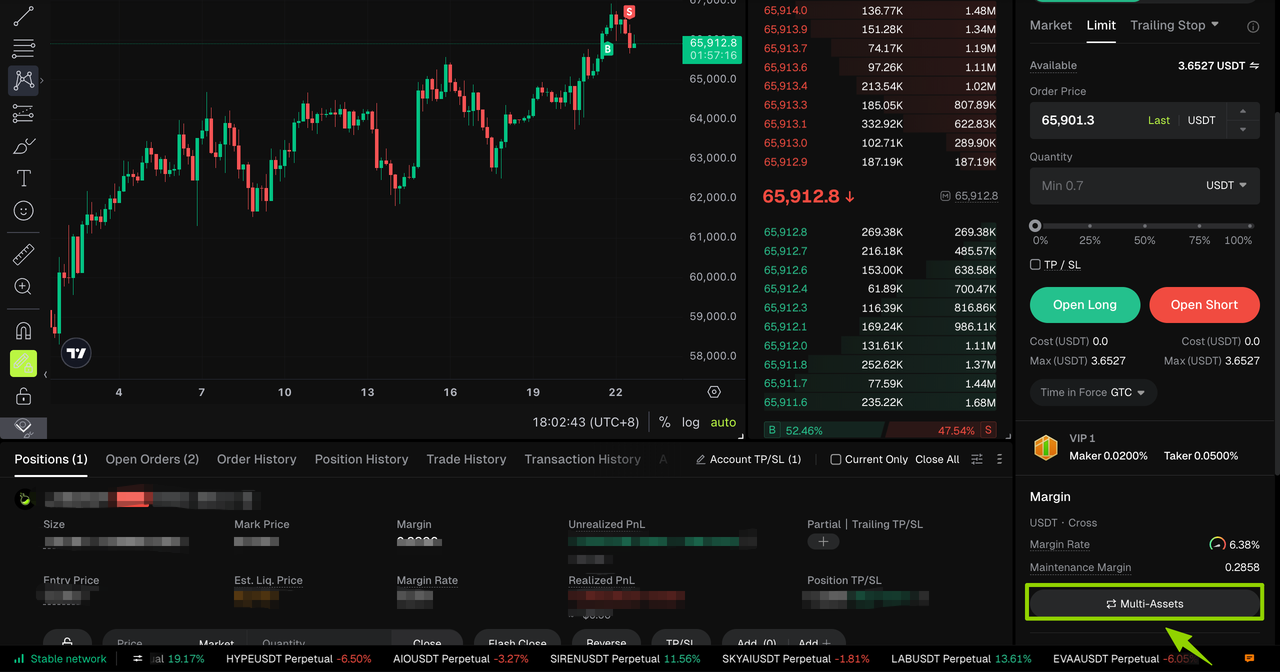
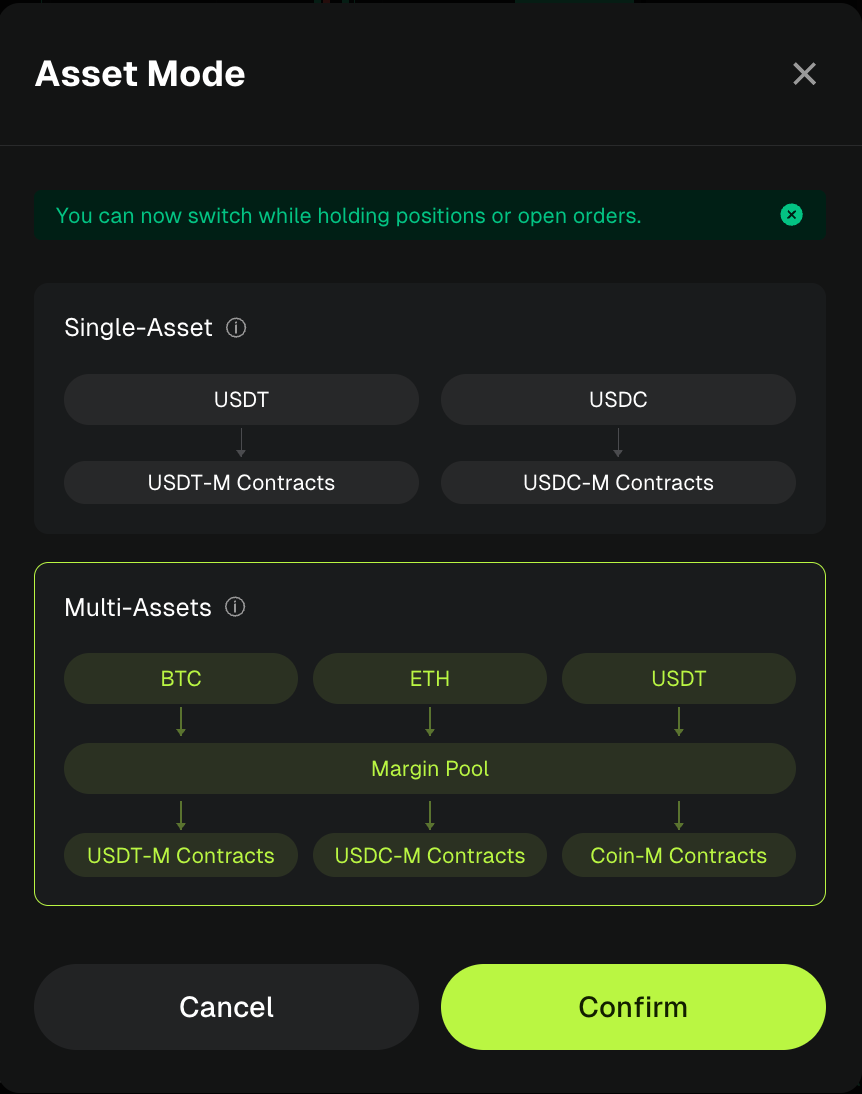
2.In the margin section of the futures trading page, you can view the current asset mode: [Single-Asset] or [Multi-Assets]. Click the current mode to open the Asset Mode switching window and complete the futures asset mode switch.
- Switching from Single-Asset Margin Mode to Multi-Assets Margin Mode: You can switch as long as there are no isolated margin positions or isolated margin orders.
- Switching from Multi-Assets Margin Mode to Single-Asset Margin Mode: You can switch as long as you have sufficient margin balance and no outstanding liabilities in any asset.
4、Bitunix Futures Asset Mode Switching Behavior
| Switching Action | What Happens After Switching |
|---|---|
| Single-Asset → Multi-Assets | The account immediately switches to Multi-Assets Margin Mode. Existing cross-margin positions and open orders remain unchanged, allowing trading strategies across different margin assets. |
| Multi-Assets → Single-Asset | The account immediately switches to Single-Asset Margin Mode. Existing positions and open orders remain unchanged, with each settlement asset calculated and settled independently. |
| Funding Fees / Interest / Trade Settlement | If settlement occurs during the switching process, the system will handle it in the background according to the settlement sequence. No additional user action is required. |
| No Liquidation or Order Cancellation | Switching asset modes will not trigger forced liquidation or cancel any existing open orders. |
FAQ
- I have open positions. Why couldn't I switch asset modes before, but can do so now?
- After this product upgrade, asset mode switching no longer requires the account to have no positions, no open orders, and no liabilities. As long as the account meets the validation requirements for the selected mode (such as having no isolated margin positions, sufficient margin balance, and no outstanding liabilities), you can switch asset modes even with existing positions and open orders.
- Why does the system show "isolated margin positions exist" when I try to switch from Single-Asset Margin Mode to Multi-Assets Margin Mode?
- Multi-Assets Margin Mode currently supports Cross Margin mode only and does not support isolated margin positions. If your account contains any isolated margin positions, you will not be able to switch to Multi-Assets Margin Mode. You can close the isolated margin positions first, or contact support to learn how to convert your positions to cross-margin management before switching.
- Why does the system show "XXX asset margin ratio is too high" when I try to switch back to Single-Asset Margin Mode?
- When switching from Multi-Assets Margin Mode back to Single-Asset Margin Mode, the system checks whether the margin ratio of each settlement asset is below 80%. This ensures that the account remains in a safe condition after switching. You can add more margin, close some positions, or cancel some open orders to reduce the margin ratio before trying again.
- Will my positions be liquidated during the switching process?
- The switching process itself will not trigger liquidation. After switching is completed, the account will operate under the new asset mode. If the liquidation price is reached afterward, the normal risk management mechanism will be applied. The switching process is usually completed within a short period of time, with risks under control.
- Why does the system show "Previous Asset Mode Switch Is Still Processing" when I try to switch again?
- If funding fees, interest, or trade settlements are involved during the switching process, the system will process them sequentially in the background. To prevent multiple switching requests from being processed simultaneously and causing account status issues, the system requires the previous switch to be completed before initiating a new one. Please wait a few seconds and try again.
- Why don't I see the Multi-Assets Margin Mode option as a copy trader?
- Multi-Assets Margin Mode currently does not support copy trading. Therefore, this option is not displayed for copy trader accounts. For related rules, please refer to the Copy Trading Product Documentation.
- Will switching asset modes affect my funding fees and interest?
- No. Switching asset modes will not result in any loss. If a settlement occurs during the switching process, the system will temporarily store the settlement record and automatically complete the settlement after the switch is finished. The related fund changes will be displayed normally in your account without missing or duplicate records.
- I have a small BTC liability in my account. Can I switch back to Single-Asset Margin Mode?
- No. If your account has any outstanding liability in a supported asset, you will not be able to switch from Multi-Assets Margin Mode back to Single-Asset Margin Mode, regardless of the amount. Please repay the outstanding liability before attempting to switch again.
- The pop-up shows multiple assets and multiple reasons. How should I handle them?
- The system will display all assets that fail the validation check along with the corresponding reasons, allowing you to address them at once. You can resolve each issue based on the prompts: repay outstanding liabilities, add margin or close positions if the margin ratio is too high, or reduce margin usage by canceling partial orders if the margin requirement exceeds the available amount. Once all issues are resolved, you can switch asset modes.
- Will switching asset modes affect my liquidation price, leverage, or take-profit and stop-loss settings?
- No. Switching only changes the asset mode under which your account operates. Existing position settings, including leverage, liquidation price, take-profit and stop-loss settings, and open orders, will remain unchanged.
- Does the asset mode switch take effect immediately?
- Yes. From the user's perspective, the switch takes effect immediately. After you click [Confirm], the account will immediately operate under the new mode. If backend settlement is required during the process, it will be completed in the background without affecting your continued operations.
- Why has the "NEW" label disappeared from the entry button?
- The "NEW" label is used to indicate the launch of a new feature. Once you open the switching pop-up window, the label will automatically disappear. This is expected behavior.
Disclaimer
This article is not intended to provide:
(i) investment advice or investment recommendations;
(ii) an offer or solicitation to buy, sell, or hold digital assets; or
(iii) financial, accounting, legal, or tax advice.
Digital assets you hold, including stablecoins and NFTs, involve significant risks and may experience substantial price volatility. You should carefully consider whether trading or holding digital assets is suitable for you based on your financial circumstances.
For advice specific to your situation, please consult your legal, tax, or investment professionals. You are solely responsible for understanding and complying with all applicable local laws and regulations.