The best TradingView alternatives for a crypto streamer are not the ones that rank highest on indicator counts or exchange connections. They are the ones that let a live trading stream run from a single window, with the chart large, the order panel on a key, and the webcam and branding somewhere other than on top of the candles.
Judged that way, Bitunix PC Ultra separates itself from Coinigy, Altrady and GoCharting, because those tools were built for analysis and aggregation, not broadcasting.
This article is for live trading streamers, KOLs and professional traders who have already decided TradingView's paid tiers are not worth it for crypto and are weighing the usual alternatives to TradingView. It compares the four platforms on price, screening, execution and streaming support, explains where generic tools break down on air, and ends with a migration guide.
The Charting Dilemma: Why Modern TradingView Alternatives Ignore Streamers
What defines the best TradingView alternatives 2026 depends entirely on who's looking at the glass. For a solo analyst, it's about cheaper data; for a streamer, it's about a readable, clutter-free broadcast. Right now, almost nobody is building for the latter.
The Shift from Cluttered Multi-Tool Stacks to Integrated Streaming Terminals
The standard crypto streaming stack didn't start with a blueprint; it grew by accretion. You had a charting platform for analysis, an exchange tab for execution, a multi-venue aggregator, OBS to bind them together, and an overlay suite for camera frames, QR codes, and banners.
Each piece solved one problem and added another window. Since 2025, that fragmentation has given way to consolidation: unified terminals that fold screening, execution, and broadcast-ready presentation into a single page. Streamers no longer juggle five browser tabs under pressure—they broadcast one clean window and manage one unified interface while live.
Why Third-Party Alternatives Miss the Demands of the Crypto Creator Economy
Aggregators such as Coinigy and Altrady sell one benefit: trade many exchanges from one dashboard. That is valuable for a portfolio manager and nearly irrelevant for a streamer, who typically narrates one primary pair on one exchange and needs the audience to read it.
Pure charting tools such as GoCharting go deep on order flow and footprint analysis, which is useful on a 27-inch monitor and unreadable on a phone-sized stream. None of these products addresses the creator's actual problems: where the face goes, where the community link goes, and how to get from analysis to an order without alt-tabbing on air.
What Professional Broadcasters and Live Trading Streamers Require in 2026
The following table lists what a streaming workflow needs from a charting platform, and which of the common requirements the generic alternatives were never built to meet:
Requirement
| Why it matters on stream | Typical aggregator / charting tool |
Chart-first layout with collapsible panels | Candles must be readable after compression on a phone | Dense multi-panel dashboards |
Order entry on a hotkey | Execution without window switching while narrating | Separate order tab or external exchange |
Native webcam and brand cards | Removes OBS overlay stack and alignment drift | Not offered |
On-page screener with chart sync | Turns "what next" into content | Screener in a separate module or absent |
Positions and PnL visible beside the chart | Transparency for viewers | Multi-exchange position lists, cluttered |
Single-window capture | OBS stability, lower CPU | Multiple windows required |
No ads, no subscription | Clean frame, no recurring bill before revenue | Paid plans; free tiers limited to paper trading or ads |
With the baseline set, let's see how the leading platforms actually stack up.
Comparing Bitunix PC Ultra with Popular TradingView Alternatives (Coinigy, Altrady, GoCharting)
Each of the three alternatives below is a good product for its intended user. The point of this section is to show what that intended user is, and why it is not a streamer.
Multi-Exchange Aggregators (e.g., Coinigy, Altrady): High SaaS Fees with Zero Streaming Support
Coinigy is a hosted web and mobile dashboard that connects more than 45 exchanges through API keys, with unified portfolio tracking and order placement. The Pro Trader plan is about 18.66 a month on annual billing (around 24.95 monthly), with a starter tier limited to one exchange and an API Dev Pro plan at $99.99. It is non-custodial; funds stay on each exchange.
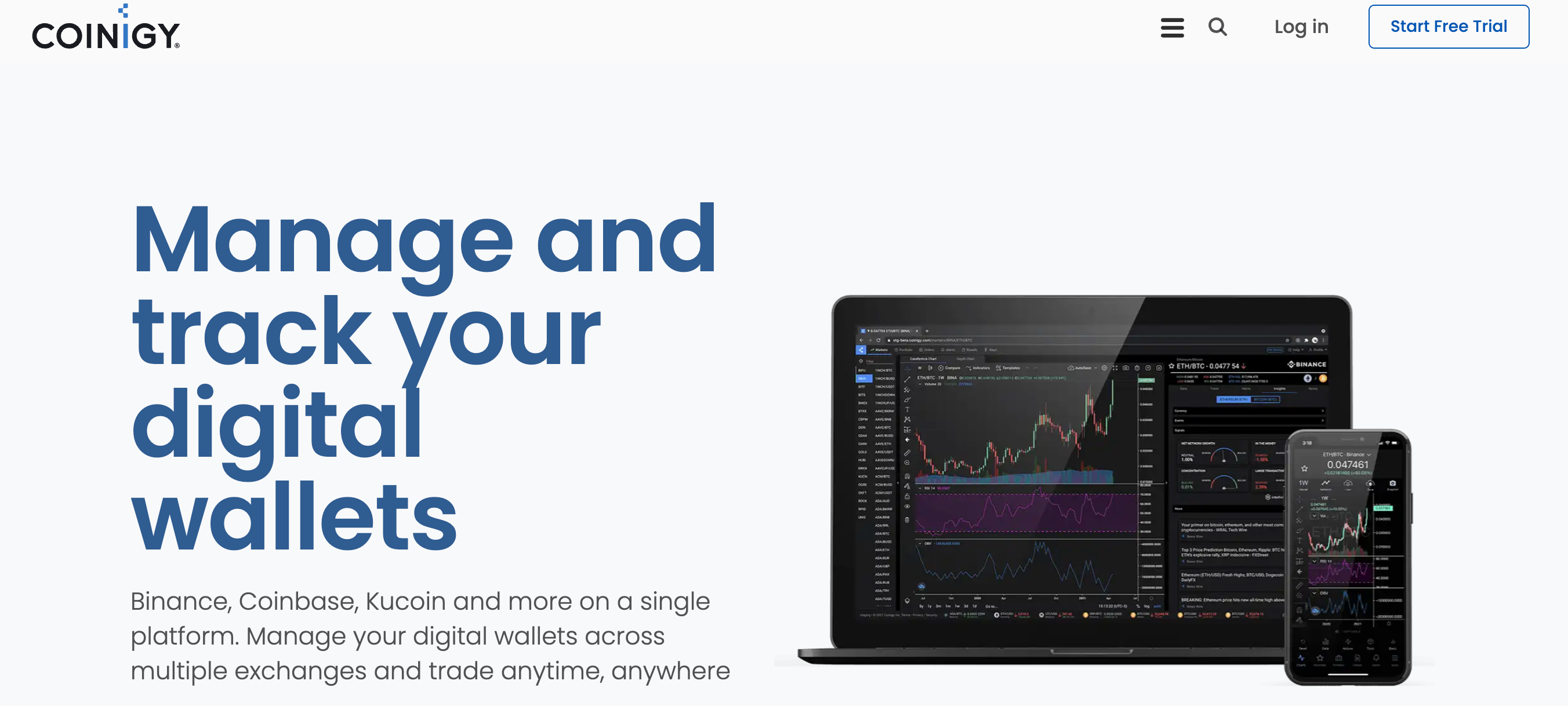
Coinigy multi-exchange platform for tracking digital wallets and executing trades across major CEXes.
Altrady is a multi-exchange trading terminal available in the browser, as a Windows, Mac and Linux desktop app, and on iOS and Android, connecting 19 exchanges through API keys. It bundles smart orders, grid and signal bots, a TA scanner and portfolio tracking.
Plans are billed in euros: Basic at €28 a month (€20 on annual billing) with 5 trading accounts, 2 bots and 50 price alerts; Essential at €50 (€35 annual) with 15 accounts, 5 bots, 350 price alerts and 50 trend-line alerts; Premium at €90 (€63 annual) with 30 accounts, 50 bots and 1,000 price alerts. There is a 5-day trial, but the free tier after it only allows paper trading, so any live stream on Altrady runs on a paid plan.
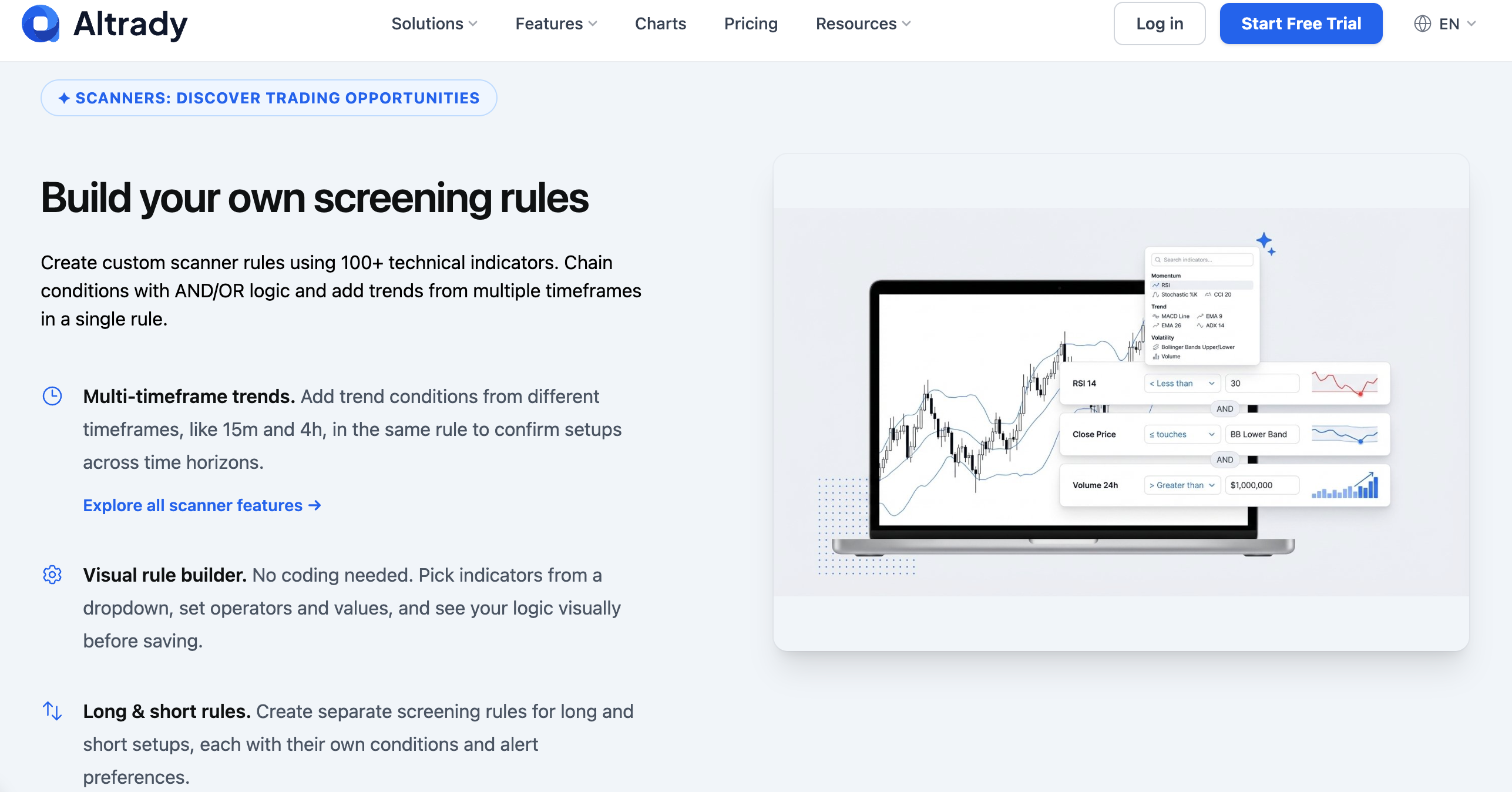
Altrady market scanner interface featuring a visual rule builder and multi-timeframe indicator screening for crypto setups.
Both do the aggregation job well. Neither has a webcam panel, brand cards, an immersive chart mode or an execution hotkey layer, and both depend on API-key connections to venues, which is one more credential set to keep off a captured screen.
Feature tables don't measure mortality.
Yet platform survival is the ultimate single point of failure. On 21 August 2026, TabTrader proved it. After running for more than a decade, the multi-exchange terminal abruptly went dark, giving paying subscribers barely two hours' notice via email. Before the day ended, everything vanished: saved watchlists, custom layouts, price alerts, and every active API bridge. Ten years of infrastructure, erased in an afternoon.
When a streamer anchors their entire broadcast inside a third-party tool, they quietly inherit that company's runway.
A native exchange terminal removes that middleman entirely.
Pure Web Charting Tools (e.g., GoCharting): Static Technical Analysis Lacking Native Live Integration
GoCharting is a browser-based charting platform with a generous free plan: unlimited built-in indicators, footprint and volume-profile tools, bar replay and, per its current pricing page, up to eight charts per tab. Paid packages are mostly about data: real-time US stock and CME futures feeds in the 29 to 35 a month range, with crypto data free. Its broker integrations centre on stock, futures and prop-firm feeds.
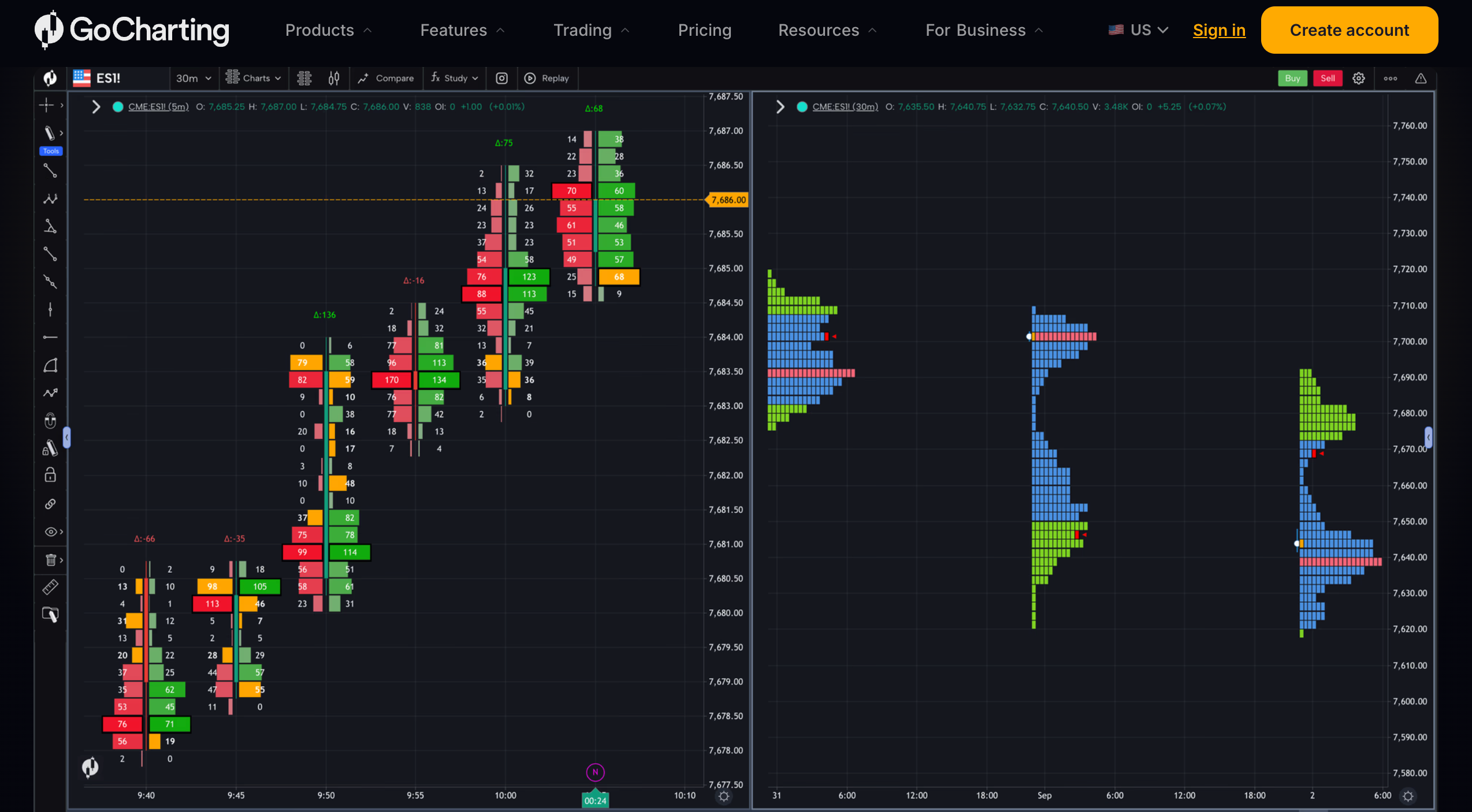
GoCharting web interface displaying order flow footprint charts and volume profile tools on CME futures.
For a crypto streamer, GoCharting is a strong analysis window and nothing more. There is no execution on a crypto exchange from the chart, no presentation layer, and order-flow charts are the least phone-readable format in trading.
Head-to-Head Comparison Matrix: Pricing, Screener Power, Execution, and Built-in Live Tools
The following table compares the four platforms on the dimensions a streamer and a pro trader care about:
Dimension | Bitunix PC Ultra | Coinigy | Altrady | GoCharting |
Type | Exchange terminal, chart-first layout | Multi-exchange aggregator | Multi-exchange terminal (web, desktop, mobile) | Web charting platform |
Price | $0; trading fees only | ~18.66/mo annual, ~24.95 monthly
| €20–€63/mo annual, €28–€90 monthly; free tier is paper trading only | Free; data packages ~$29–35/mo |
Charts per layout | 2–16 windows, 35 presets; split view in Ultra | Multi-chart layouts
| Multi-chart dashboards | Up to 8 per tab |
Indicators | 106, no cap | Large library | Large library; TA scanner with 100+ indicators | Unlimited |
Screener | Super Filter: indicators, 19 patterns, funding, listing age, turnover rank, 3 views | Market data filters | Base, Quick and TA scanners (plan-gated) | Scanner tools |
Execution | Native, on-chart preview, hotkeys | Via API to connected exchanges | Via API; smart orders, grid and signal bots | Broker integrations (stocks/futures) |
Bitunix supported | Native | No | No | No |
Webcam / brand panel | 1 live feed + 2 cards, pinned beside chart | None | None | None |
Immersive chart mode | Esc; full-screen with split view | No | No | Full-screen chart |
Alerts | Super Alert: price, indicator, drawing, pattern, combo, on-chain; Telegram / Discord | Price alerts | 50 / 350 / 1,000 price alerts by plan; trend-line alerts on Essential and above | Webhook alerts |
Best for | Crypto streamers and single-exchange pro traders | Traders on 5+ exchanges | Multi-exchange swing traders and bot users | Order-flow analysts |
The Broadcaster's Bottleneck: Why Generic Alternatives Fail Live Trading Streamers
The failure is not that generic tools chart badly. It is that they leave the broadcasting problem entirely to OBS, and OBS was built for games, where the game window and the overlay never need to share a price axis.
The "OBS Window Clutter" Problem: Manually Stitching Webcams and Charts
With a generic charting tool, the stream is a composite: a window capture of the chart, a second capture or tab for the exchange, a webcam source, an image source for the QR code and another for the banner. Each source has its own position and scale, and they drift. A browser resize, a monitor sleep or an accidental drag moves the camera over the candles or the banner over the price scale, and the streamer notices when chat does. Streamers who are traders first end up spending the opening minutes of every session aligning sources instead of reading the market.
Latency Spikes and RAM Drain Across Multi-App Livestream Workflows
Every extra window is a process fighting for machine resources when you can least afford it.
Volatility doesn't just stress the trader—it chokes the hardware. When price moves fast, your charting platform, aggregator, exchange book, and OBS encoder all demand peak CPU and RAM simultaneously. Something always gives. You get stuttering candles, dropped stream frames, or an execution button that registers a second too late.
Consolidating into a single page doesn't make the tape faster, but it strips away the internal friction competing against your video encoder.
Specs differ, of course. Treat this as structural hygiene rather than a universal score, and always dry-run your limits on a demo account first.
Covering Decision Zones: How External Overlays Ruin Viewer Chart Visibility
The most critical broadcast mistake is completely invisible to the host.
Streamers arrange layouts on spacious 1440p monitors; audiences watch them crushed and compressed onto a six-inch phone. What looks like a tiny webcam frame on your desktop swallows the last ten candles on a mobile feed. That sleek sponsor banner hovering below the chart? It slices straight through the price axis the moment mobile compression kicks in.
The tragedy is location. Overlays naturally gravitate toward the right edge and bottom margins—the exact visual territory where live prints, liquidation wicks, and breakout zones are unfolding. You spend twenty minutes explaining a setup your audience literally cannot see.
Stop nudging OBS bounding boxes by hand. The real fix is architectural: a terminal that walls off the charting canvas by default and locks cameras and branding strictly outside the data.
Bitunix PC Ultra: Unlocking Enterprise-Grade Livestream Tools for $0
A professional broadcast canvas, unlocked in a single click.
Toggle "Ultra" at the top-left of any perpetual contract, and the interface immediately re-indexes for the camera. The chart takes the floor. Distractions like the order book and depth profiles tuck away into collapsible drawers, leaving your candles pristine for mobile viewers. Execution remains pinned to the right margin, while secondary tools—alerts, timeframes, and custom modules—condense into a zero-footprint icon strip.
Nothing sits behind a paywall.
Bitunix gives you an enterprise-grade streaming workspace without asking for your credit card.
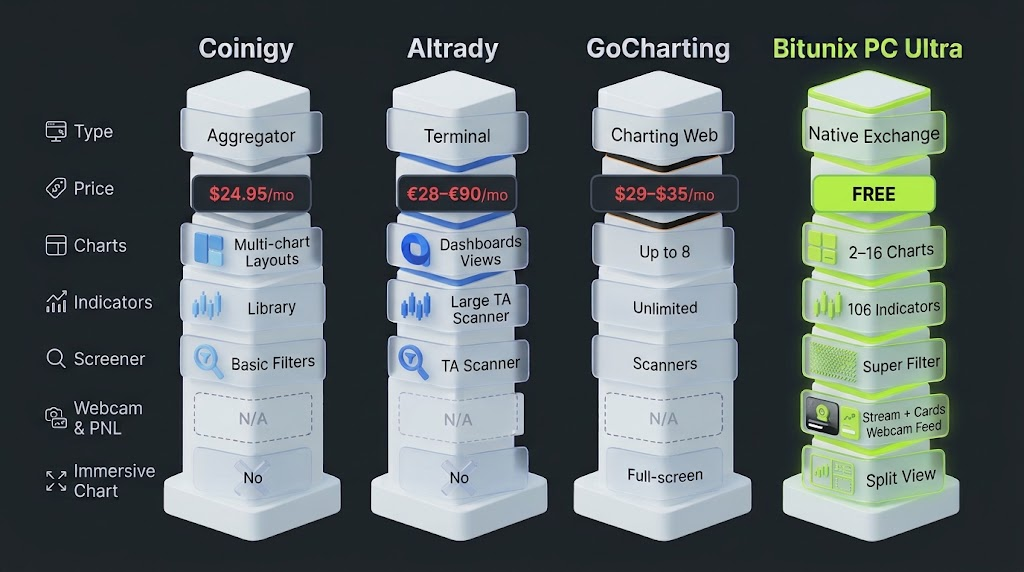
Which streaming functions each TradingView alternative covers natively; only PC Ultra includes the webcam and brand panel.
Native Custom Live Panel: Picture-in-Picture Webcam Integration Without Paid Plugins
Your camera feed now lives directly inside the terminal.
No third-party plugins. No fragile OBS multi-source cropping. Open the custom panel from the right rail, add a live stream zone, and trigger the camera. Your video feed renders natively inside the web app as a flexible, draggable card you can rename on the fly.
The real win is visual safety. Because the camera docks strictly beside the K-line area by design, your face can never drift over live candles or swallow the price axis—no matter how much mobile compression squashes the stream.
Pin it to the far right, and it locks solid for the show. Tap Esc, and the entire presentation layer collapses instantly for pure, edge-to-edge analysis.
Built-In Brand & Campaign Cards: Showing QR Codes and Banners Beside the Candles
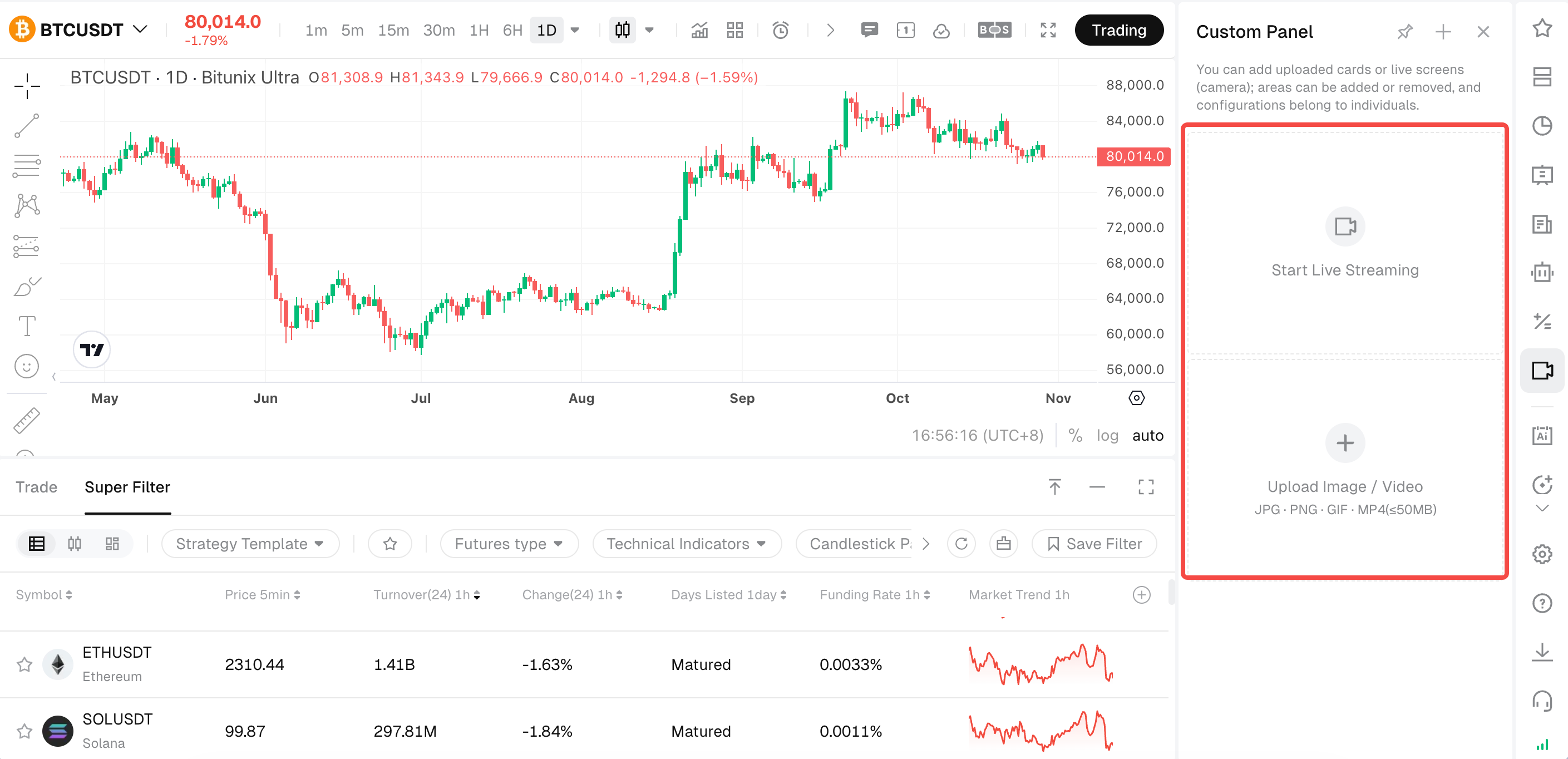
Setting up a livestream overlay in the Bitunix PC Ultra Custom Panel with camera feed and media upload cards.
The same panel holds two image or video cards. The usual use is a community QR code in one and a current campaign poster or a short subscribe clip in the other; video cards are supported, and a short animated brand clip tends to hold attention better than a static image. The following table summarises the panel's limits:
Setting | Detail |
Supported content | Live camera feed, image cards, video cards |
Region limit | 1 live feed + 2 image or video cards |
Save scope | Per account; follows you between machines |
Position | Beside the main chart, never over the K-line area |
Cost | Included for every account |
The One-Window Capture Advantage: Maximizing OBS Performance and Video Stability
With camera and branding inside the page, the entire stream is one browser window. In OBS that is a single Window Capture, no crop boxes and no source alignment. The practical gains are fewer processes competing with the encoder, nothing that can move between sessions, and a layout that is identical the next time you log in from a different PC. The step-by-step version of this setup, including the hotkeys and security habits for streaming an account, is covered in the screen setup guide.
From Viewers to Community: How Bitunix Empowers Crypto KOLs and Content Creators
A trading stream converts viewers into a community through three things: visible, honest trading; a frictionless path to the creator's channel; and a frame that looks deliberate. PC Ultra supports each without adding a window.
Transparent Real-Time Trading: Top-Pinned PnL and Live Position Demonstrations
Native terminal integration closes the verification gap between chart and execution.
Because the workspace is tied directly to the exchange engine, entry lines, resting limit orders, and TP/SL brackets render natively across the live price feed. Broadcasters can dock the active position table directly above the candles using the up-arrow toggle, aligning unrealized PnL alongside current price action in a single visual plane—then press down to clear the frame.
This replaces static screenshots with verifiable on-chain or on-book mechanics.
Operational hygiene still matters on camera: broadcasters should keep total equity masked in account preferences, and explicitly call out invalidation levels so viewers focus on risk parameters rather than blind trade copying.
Conversion elements shouldn't force a compromise on chart visibility.
The custom panel reserves two dedicated branding slots directly adjacent to the K-line area. One slot anchors a persistent referral or Telegram QR code—scaled for quick mobile camera scans, yet physically cordoned off from the active price feed. The second slot acts as a dynamic card, letting affiliates rotate campaign banners or subscriber calls-to-action directly in the web client without touching OBS scene files mid-stream.
The funnel stays active. The candles stay visible.
That structural separation solves the persistent flaw of traditional overlay setups, where promotional graphics inevitably end up obscuring the very setups the host is breaking down.
Clean, Ad-Free UI: Building Audience Credibility with a Distraction-Free Workspace
Viewers extend their impression of the interface to the analysis. A free TradingView tier shows ads; a standard exchange page shows banners, campaign pop-ups and a trade tape; an aggregator shows positions from five venues and a bot dashboard.
PC Ultra's default state is built for the broadcast, not the upsell.
The core canvas belongs entirely to the chart, the execution panel stays tucked away until triggered, and brand cards dock cleanly beside the candles. Because there are no subscription tiers to push, the layout is completely free of banner ads and paywall nags.
Off-air, the workflow extends through the Super Alert engine. Any indicator condition, drawing interaction, or candlestick trigger pushes directly into Discord or Telegram webhooks.
Streamers map the setups live on screen. PC Ultra keeps the community engaged between shows.
Workflow Comparison: The All-in-One Livestream Trading Ecosystem
The difference between the stacks is easiest to see as a sequence of actions during one on-air trade.
Traditional Fragmented Stack vs. The Unified Bitunix Ultra Streaming Loop
The following table traces a single trade from idea to execution on each stack:
Step | Fragmented stack (charting tool + aggregator or exchange + OBS overlays) | Bitunix PC Ultra
|
Find a candidate | Scroll a watchlist or run a screener in another module | Run a saved Super Filter scan; results in K-line grid |
Open the chart | Type the ticker into the charting tool | Click the result; main chart switches in place |
Confirm the setup | Analyse; webcam overlay may cover recent candles | Esc for immersive chart; branding sits beside it |
Place the order | Alt-tab to exchange or aggregator; find pair; fill form | Space; order preview on chart; place |
Set risk | Enter TP/SL in the order form | Drag TP/SL lines on chart; Fixed Risk sizing available |
Return to narration | Alt-tab back; re-align overlays if moved | Space; chart and branding unchanged |
Keep monitoring | Separate alert app or tab | Super Alert to app, Telegram or Discord |
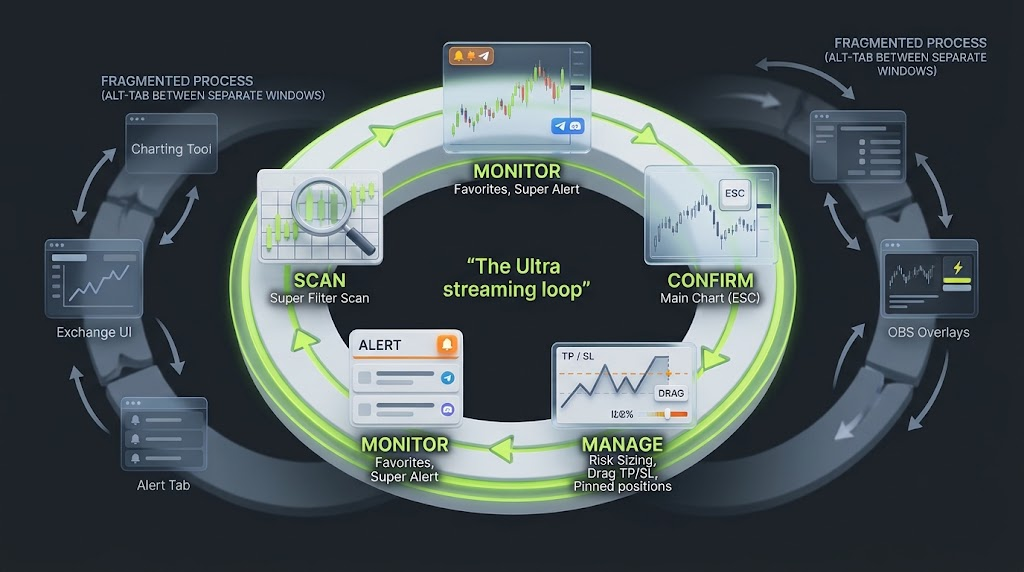
The scan-confirm-execute-manage-monitor loop runs on one page in PC Ultra; the fragmented stack crosses windows at every step.
Discovering Opportunities on Air: Super Filter Pattern Scans Without Leaving the Broadcast
Dead air while hunting for setups is the structural weakness of most crypto broadcasts.
Super Filter eliminates that friction by sliding out directly from the bottom of the Ultra page, screening Bitunix perpetuals in place across moving averages (EMA/SMA 5–200), core oscillators (RSI, MACD, ADX, DMI, TRIX), 19 candlestick patterns, funding polarity, listing maturity, and turnover ranks.
On camera, screening becomes the show: a creator queries "bullish engulfing candles in the top 30% turnover bracket", cycles through the synchronized K-line results, and narrates setup selection live.
Chart navigation remains strictly decoupled from execution; clicking a pair switches the candles immediately without activating an order ticket. Because queries generate static snapshots, running a fresh scan after volatility sweeps keeps the stream anchored to live market conditions.
Zero-Latency Execution: Flipping from Technical Narration to Hotkey Order Fill
When the setup triggers, the host presses Space, the trading panel slides in, a grey preview appears on the chart as the quantity is typed, the order is placed, and Space hides the panel again.
Market, limit and trigger orders all support preview, and the chart's right-click and plus menus remain available for direct on-chart entry. Viewers see analysis, decision, execution and return to chart as one continuous motion. The latency that disappears is the workflow's, not the matching engine's, and the risk of the trade is exactly what it would be off stream.
Strategic Migration Guide: How Streamers Can Transition to Bitunix Ultra in Minutes
Moving a stream to PC Ultra is a layout change, not a platform migration. Existing positions, orders and margin settings are untouched when the layout switches, and the standard page remains one click away. The three steps below cover what actually needs rebuilding.
Rebuilding Your Indicator Setups and Watchlists for Stream Readability
Open any USDT, USDC or USD perpetual on the Bitunix web terminal and click Ultra at the top-left of the chart, or choose the Ultra template under Settings → Layout Mode.
Recreate your core indicator template from the 106 built-in indicators and save it; templates sync between web and app. For stream readability keep two or three indicators and one sub-pane, and raise the axis font size.
Build the session watchlist in Favorites from the right toolbar. Favorites are linked to Super Filter and separate from the regular watchlist, so a scan can populate them directly.
Save the Super Filter condition groups you will run on air (a "pattern scan" and an "indicator scan" are a sensible pair) so they are one click apart next session.
If you keep a TradingView account for Pine Script or other markets, its alerts can be forwarded to Bitunix through the Super Alert webhook integration, which requires a paid TradingView plan with 2FA enabled.
Configuring and Cloud-Saving Your Custom Panel Layouts Across Streaming PCs
Click the custom panel icon in the right toolbar, add a live stream region and start the camera.
Upload your community QR code and a campaign poster or short clip into the two card slots, rename the panel to your channel, and pin it to the right edge.
Drag the chart-to-order divider to the height you want; the layout remembers it for the ↑ key. Decide whether the position list sits above or below the chart.
Press Esc to confirm the hotkey drops you into a clean chart, then Space to confirm the order panel returns.
The configuration is saved to your account, so the same layout loads on a second streaming PC or a laptop after login.
Setting Up Your Single-Source Broadcast in OBS Studio
In OBS Studio (free), add one Window Capture for the browser tab running PC Ultra. No webcam source, no image sources, no crop.
Switch the terminal to dark mode and check the frame on a phone: candles should be legible after compression.
Before going live, mask account balances in settings, keep deposit, withdrawal, API and security pages off the captured monitor, and run a rehearsal on a demo account so the hotkeys are automatic before they are used with size.
The cost of this whole migration is the time it takes to rebuild templates. The software line goes to $0; trading fees, regional restrictions and the risks of leveraged perpetual futures are unchanged.
>>> See Also: Crypto Streamer Tech Stack: Free Tools vs. Paid Subscriptions