

1、What is the Bitunix Template Alert feature?
The Template Alert is a shortcut feature built on top of the Combo Alert system.
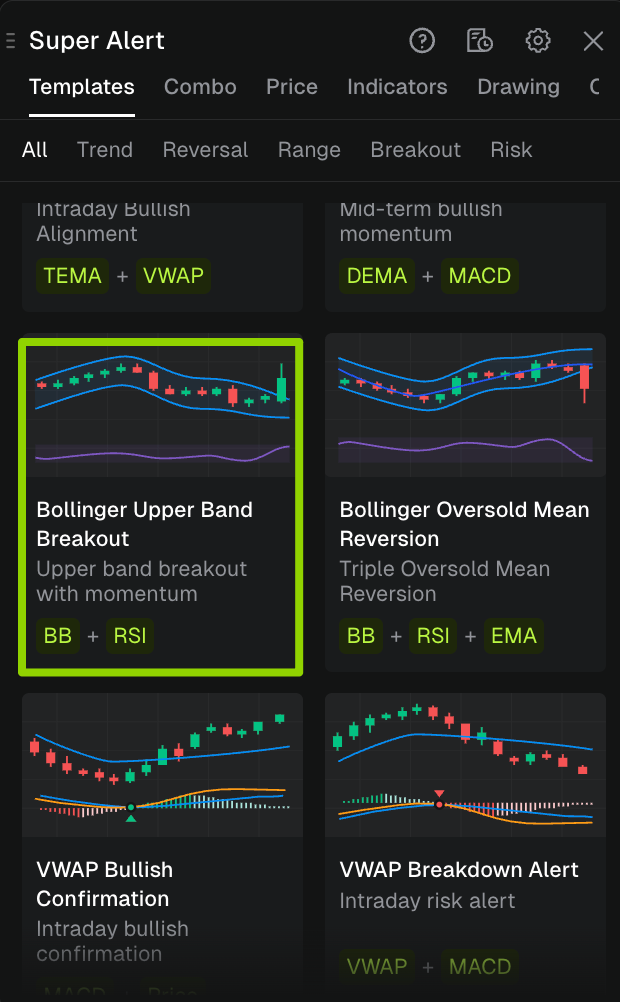
Bitunix provides a library of pre-verified, standardized trading strategy templates. Users do not need to manually combine complex conditions such as price levels, technical indicators, candlestick patterns, or volume signals from scratch.
With one click, users can select a template card and the system will automatically pre-fill a complete set of Combo Alert conditions, enabling fast deployment of standardized trading strategies and significantly reducing setup time and complexity.
2、Use Cases
Template Alert is designed for three main trading scenarios:
- Quickly build common strategies Generate widely used market setups such as MACD golden cross + volume spike, or RSI oversold + bullish engulfing patterns.
- Beginner-friendly setup Users without technical indicator knowledge can directly apply pre-built, proven trading logic without manual configuration.
- Fast customization and iteration Start from official templates and fine-tune parameters, add or remove conditions, and quickly build personalized trading alert strategies.
3、Template Categories
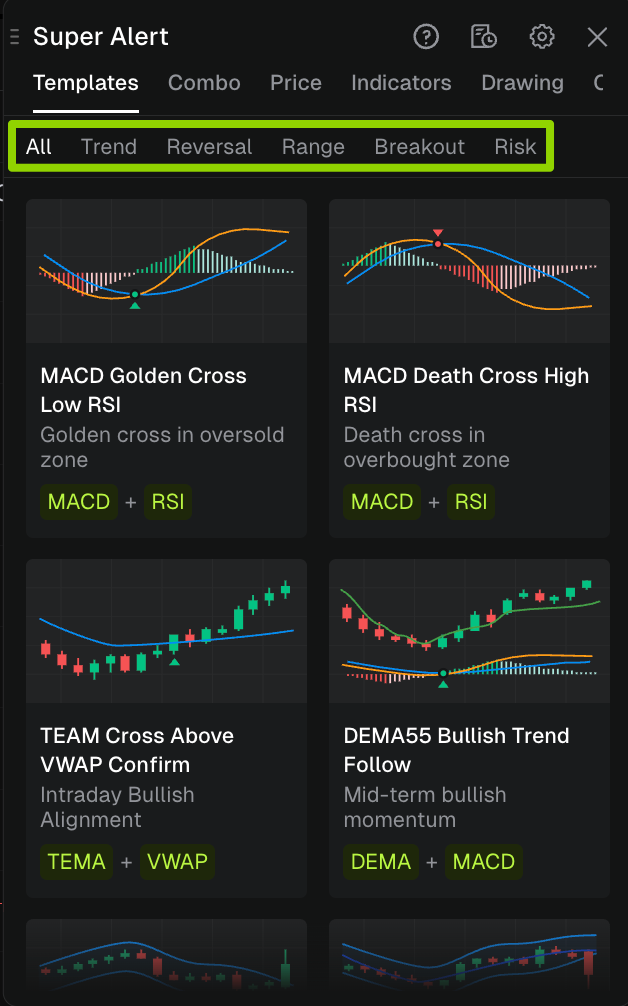
Templates are organized by strategy type and can be filtered via the top navigation bar:
| Category | Description |
|---|---|
| All | All templates |
| Trend | Trend type (e.g. moving average crossover, trend continuation) |
| Reversal | Reversal type (e.g. RSI oversold + K-line pattern) |
| Range | Range type (e.g. high and low points within the range, support and resistance) |
| Breakout | Breakout type (e.g. price or indicator breaking through key levels) |
| Risk | Risk control type (e.g. abnormal volatility, risk signals) |
Template Card Structure
Each official template card includes four standardized elements for quick evaluation:
- Strategy Name: Indicates the core trading pattern (e.g., MACD Golden Cross – Low Zone, MACD Death Cross – High Zone)
- Strategy Description: A one-line explanation of the logic and signal meaning
- Condition Tags: Visual breakdown of components such as [MACD] + [Volume], [RSI] + [Candlestick]
- Chart Preview: Visual illustration of candlestick or indicator signals for quick understanding
4、How to Create a Template Alert
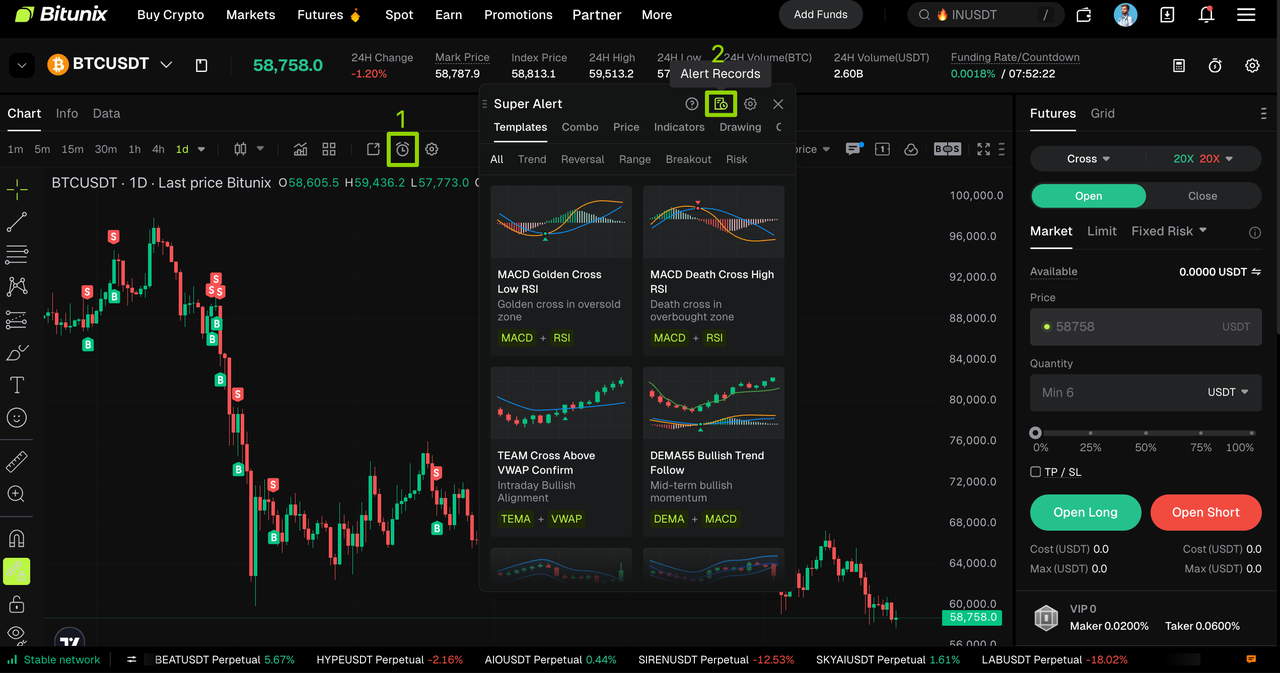
Step 1: Open Super Alert and go to the Template Alert page
- Open the candlestick chart of your selected trading pair
- Click the 【Create Alert】 (⏰) icon in the chart toolbar
- Switch to the 【Templates】 tab to enter the Template Alert interface
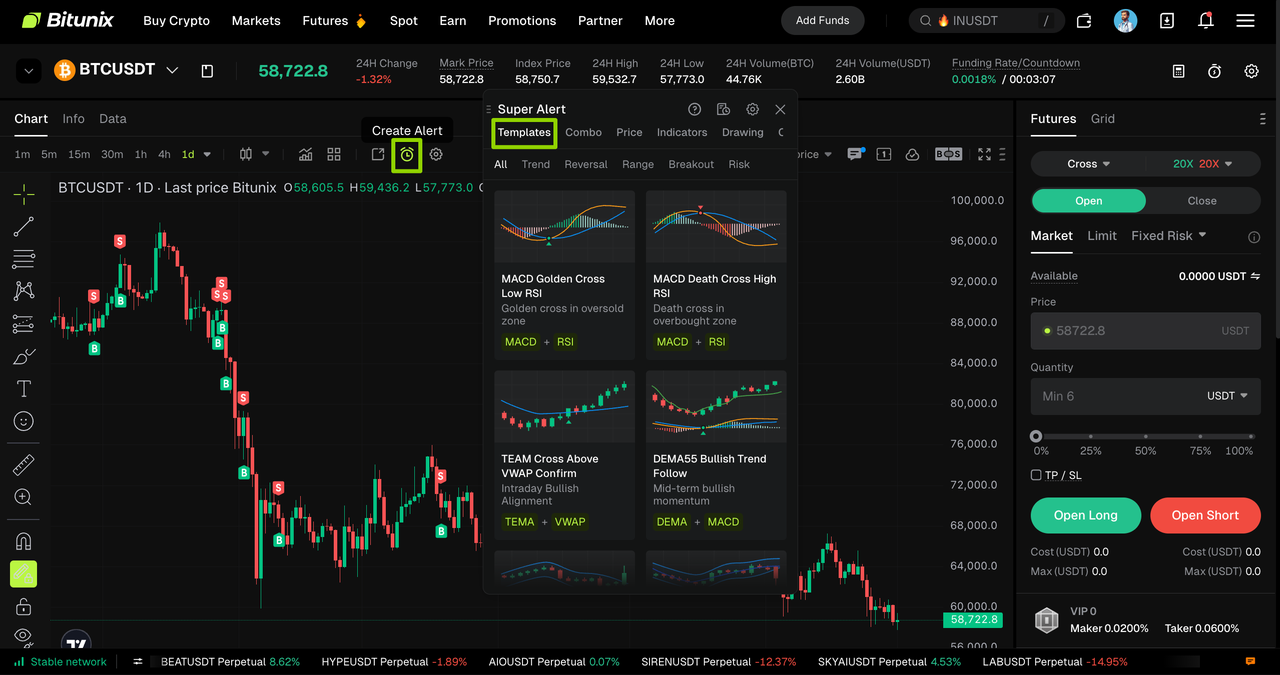
Step 2: Select a Template Strategy
1. Use category filters (Trend / Reversal / Range / Breakout / Risk) to narrow down templates
2. Click a template card to automatically enter the Combo Alert page with all conditions pre-filled
Step 3: Review and Customize Conditions
Once inside the Combo Alert interface, all strategy parameters will be automatically populated.
You can then configure:
- Notification method
- Trigger frequency
- Expiration time
- Notes (optional)
After confirming all settings, click 【Create】 to finalize the setup
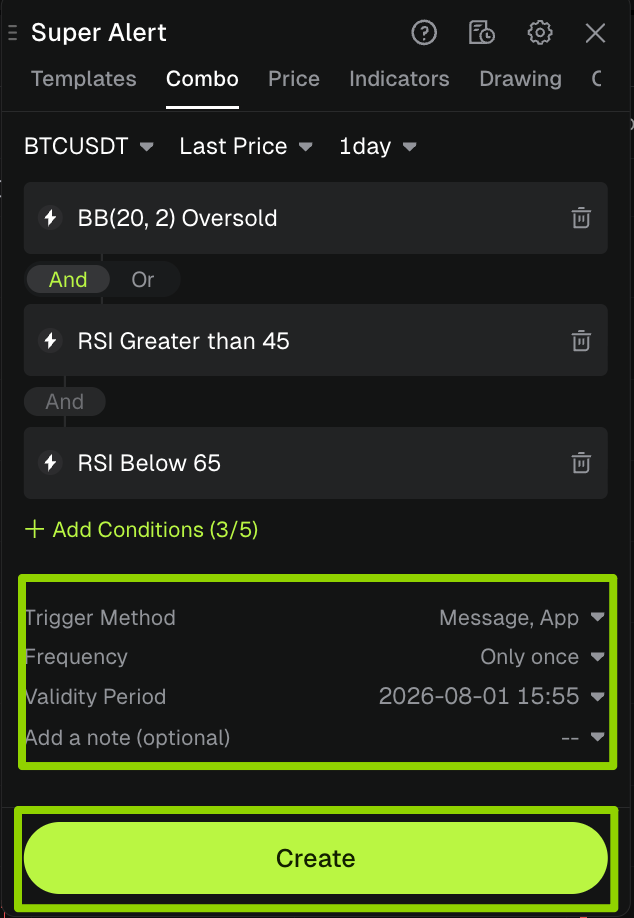
| Field | Description | Example |
| Trigger Method | Notification channel | Message, App |
| Frequency | Alert frequency | Only once |
| Validity Period | Expiration time | 2026/6/22 18:08 |
| Notes (optional) | Custom label | Personal strategy note |
Step 4: View Alert Records & Status
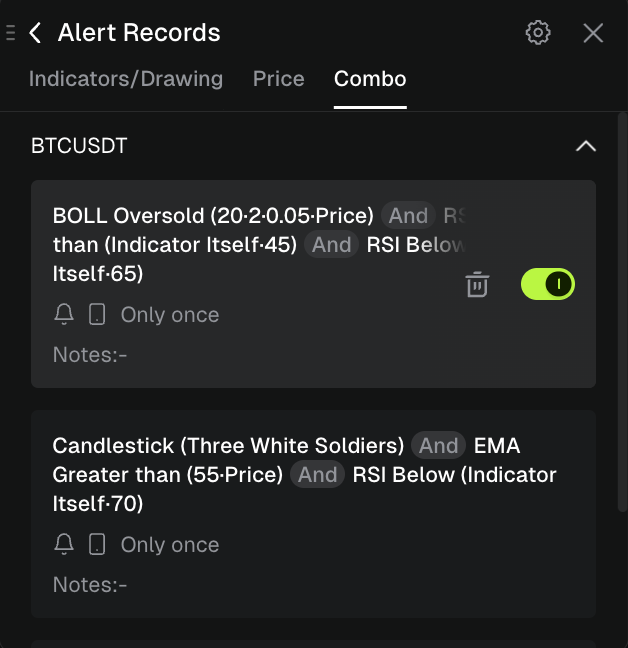
After creation, go to the trading page and click 【Create Alert】 → 【Alert Records】 to manage all alerts and view execution status and data.
Related Alert Types
For detailed guides, please refer to:
- Indicator Alert: Capture market fluctuations via technical indicators
- Combo Alert :Mix and match multiple conditions to achieve multi-dimensional composite triggering
- K-Line Alert:dentify market signals based on candlestick patterns
- Drawing Alert: Custom trend graphics to spot support and resistance breakouts
- Price Alert: Trigger reminders when prices hit specified levels
Best Practices & Key Advantages of Template Alert
Best Practices
- Start with category filtering Select templates based on current market conditions (Trend / Reversal / Breakout).
- Review condition tags first Use tags like [Indicator + Volume] or [Indicator + Candlestick] to quickly understand strategy structure.
- Fully customizable templates All templates can be modified by adding/removing conditions or adjusting parameters.
- Adjust expiration time wisely Align alert duration with your trading or observation horizon to avoid unnecessary signals.
Key Advantages
- Zero learning curve No need to understand indicator parameters or manually build strategies.
- Proven strategies All templates are based on widely used and market-tested trading logic.
- High efficiency What normally takes minutes of manual setup can be done in one click.
- Fully flexible Combines one-click usability with full customization for advanced traders.
Disclaimer
This article is not intended to provide
(I) investment advice or investment recommendations;
(Ii) an offer or solicitation to buy, sell or hold digital assets;
(Iii) Financial, accounting, legal or tax advice. Digital assets held (including stablecoins and NFTs) involve a high level of risk and may fluctuate significantly. You should carefully consider whether trading or holding digital assets is appropriate for you based on your financial situation. Please consult your legal/tax/investment professional for your specific situation. Please be responsible for understanding and complying with relevant local applicable laws and regulations.
About Bitunix
Bitunix is a global cryptocurrency derivatives exchange trusted by more than 3 million users from over 100 countries. Bitunix is committed to providing a transparent, compliance and secure trading environment for every user. The platform has a fast registration process and friendly verification system, and enforces KYC to ensure security and compliance.
Through global protection standards such as Proof of Reserve (PoR) and Bitunix Care Fund, Bitunix puts user trust and money security first.The K-Line Ultra Charting System provides a seamless trading experience for both novice and advanced traders, with up to 200 times leverage and deep liquidity, making Bitunix one of the most dynamic platforms in the market.
Bitunix Global Account
X | Telegram Announcements | Telegram Global | CoinMarketCap | Instagram | Facebook | LinkedIn | Reddit | Medium