

Quick Overview
| Item | Description |
|---|---|
| Supported Method | On-chain Deposit |
| Supported Cryptocurrencies | USDT, BTC, ETH, XRP and all other digital assets |
| Arrival Time | Funds are credited after blockchain network confirmations, generally 3–30 minutes (subject to network congestion) |
| Fees | Charged by the blockchain network. Bitunix does not impose additional deposit fees. |
What is a Deposit?
A deposit refers to transferring digital assets from an external wallet or another exchange into your personal Bitunix account. Similar to interbank transfers, it is the primary way to fund your platform account.
Bitunix offers deposit methods:
- On-chain Deposit: Cross-platform transfers via the blockchain network. Suitable for transferring assets from external wallets or other exchanges.
- The complete step-by-step procedures for both methods are illustrated below using USDT as an example.
Important Reminder:When depositing coins, always ensure that:
- The currency name for deposit and withdrawal matches
- The network used remains consistent
- Failing to do so may result in lost funds.
Recharge Steps
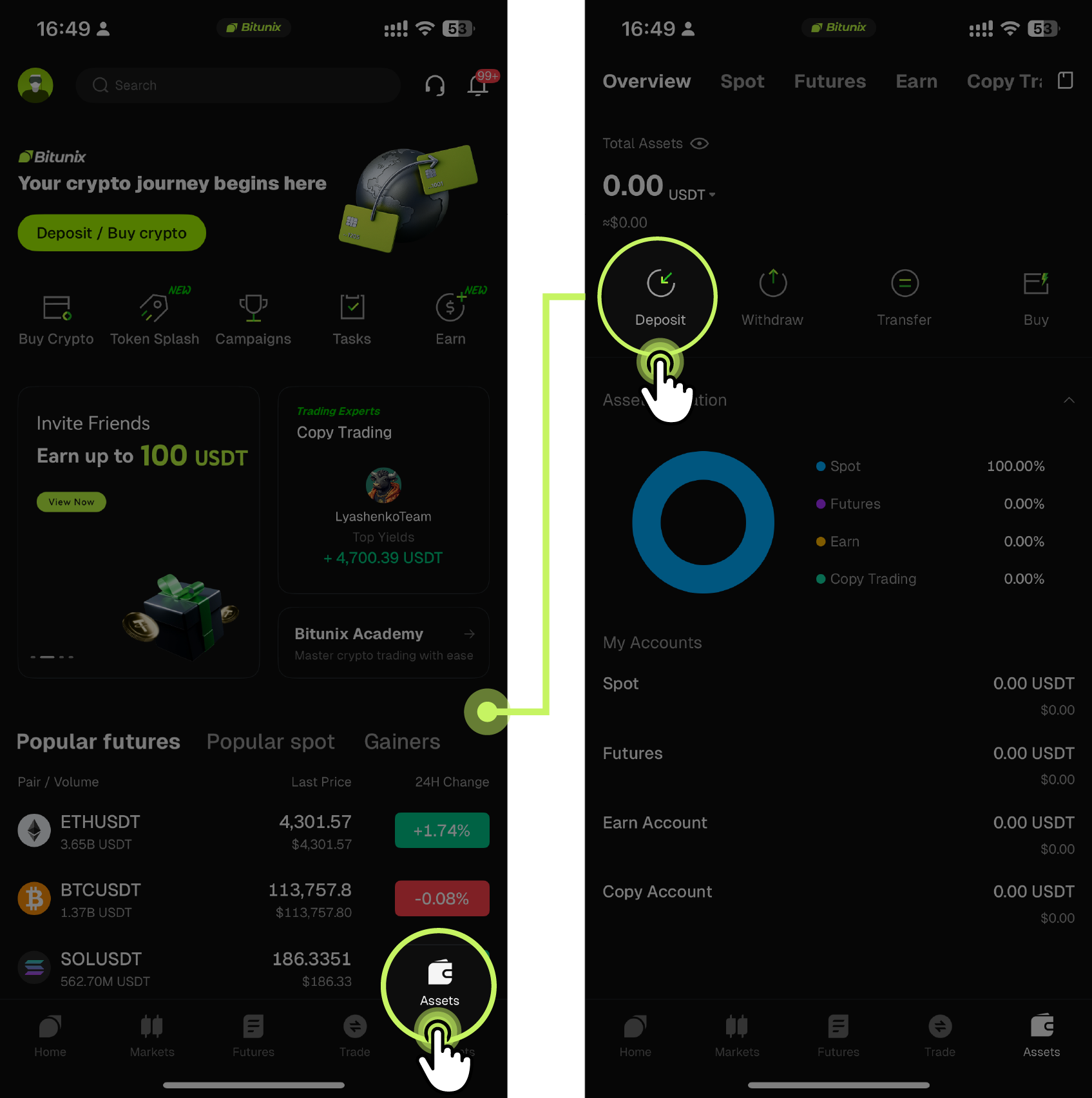
1.Open the App homepage and tap [Assets] — [Deposit].
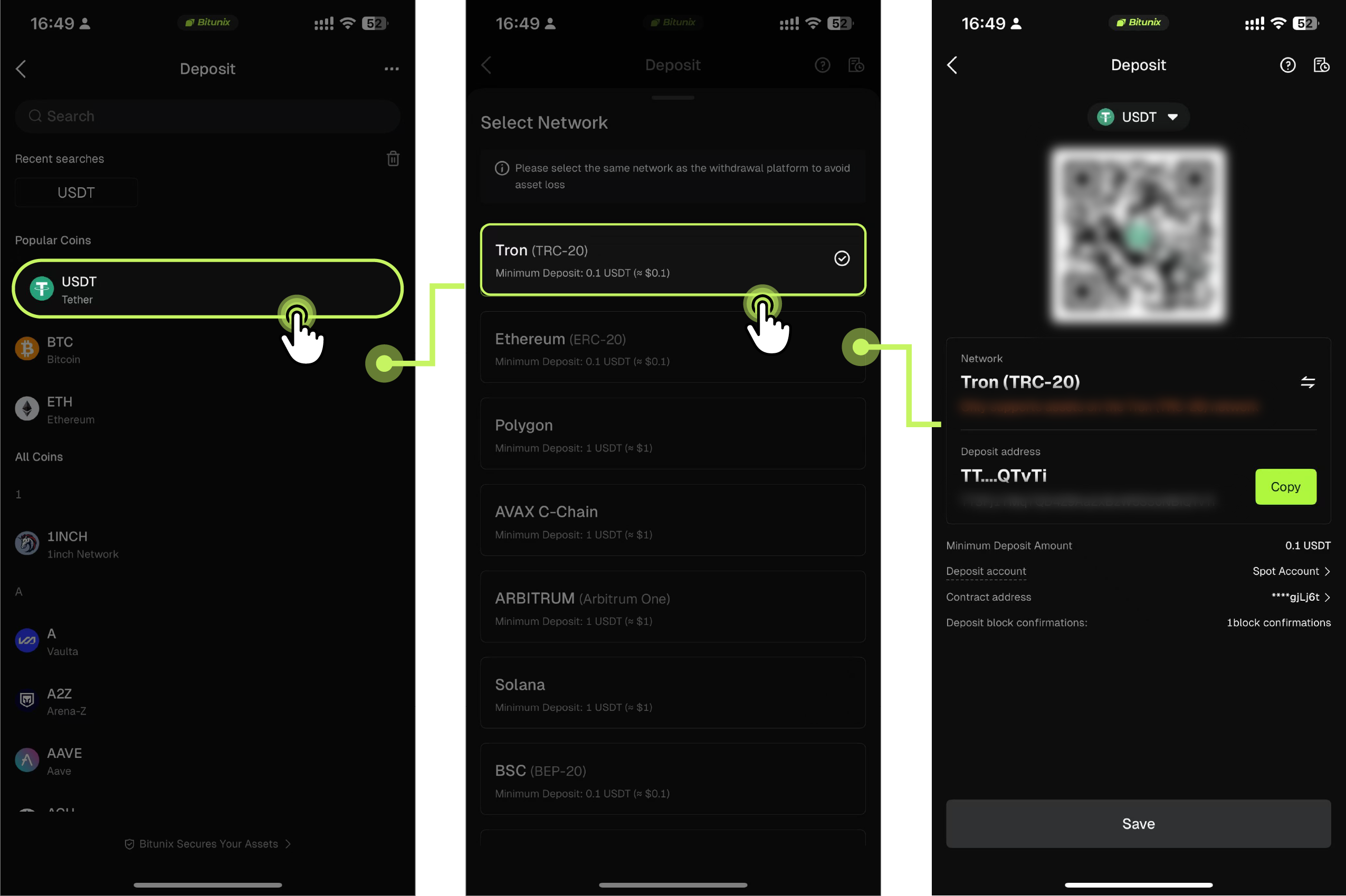
2.Select the currency you wish to deposit. For example, if you choose USDT, select the available deposit network for USDT, such as TRC-20, then click [Copy] to copy the deposit address generated on the page, or save the provided QR code.
Note:
When selecting a deposit network, the withdrawal network of other exchanges or wallets must be consistent with the network used for depositing on Bitunix, for example, both should be USDT-TRON (TRC20), otherwise the coins will be lost.
Certain cryptocurrencies, such as XRP, require additional information. Please make sure to enter the MEMO or TAG details displayed on the deposit page.
3.Open another platform or wallet, select Withdraw, choose USDT, and select the same on-chain network as chosen in Bitunix. Paste the deposit address you copied from Bitunix, or scan the QR code through the corresponding app. Follow the prompts to complete the required information and confirm the transaction.
For specific currencies, such as XRP, you must also enter the MEMO or TAG information shown on the Bitunix deposit page.
4.Once the network confirms the transaction, your deposit will be completed. The funds will appear in the Asset Overview section of your Bitunix account.
🔒 Security & Operational Notes
⚠️ Mismatched network will result in permanent loss of funds The deposit network must exactly match the withdrawal network on the sending platform, e.g. both sides using TRON (TRC20), ERC20, BEP20, etc. Mismatched networks will lead to unrecoverable, permanent asset loss.
⚠️ MEMO / Tag is mandatory for certain tokens For tokens including XRP, EOS, ATOM, a corresponding MEMO or Destination Tag is required when depositing to the exchange. Providing only the wallet address will cause failed transactions and lost assets. Double-check all details before submission.
⚠️ Do not use expired deposit addresses Platform deposit addresses are updated periodically. Always verify the latest address on the page before each deposit. Do not use outdated historical addresses, or funds may fail to arrive and become difficult to recover.
⚠️ Notes on arrival time On-chain deposits require confirmation by blockchain nodes. Normal arrival takes 3–20 minutes, and delays may occur during network congestion. Intra-platform deposits are credited instantly with no waiting period.
⚠️ Fees and minimum deposit limits Bitunix charges no deposit fees. Only external network Gas fees apply for on-chain transfers. Each token has a minimum deposit threshold. Deposits below the minimum limit will not be credited and cannot be refunded.
⚠️ Keep your account information confidential Your UID, registered mobile number and email address are only used for intra-platform transfers. Do not disclose them arbitrarily to prevent scammers from forging transfers and stealing your assets.
Frequently Asked Questions
Q1: My on-chain deposit has not arrived. What should I do? First verify that the token type, network, address and MEMO information are all correct, and confirm whether the sending platform has initiated the transaction successfully. If the transaction is confirmed on-chain but remains pending for a long time, copy the transaction Hash and submit an inquiry via 【Customer Support】 inside the App.
Q2: I entered an incorrect MEMO during deposit. Can the funds be recovered? If the transaction has not been confirmed on-chain, cancel the transfer immediately and retry. If the transaction has received on-chain confirmations, contact platform customer support promptly and submit transaction details for assistance. The recovery process will take a relatively long time.
Disclaimer:
This article is not intended to provide:
(i) investment advice or recommendations;
(ii) Solicitations or invitations to buy, sell, or hold digital assets;
(iii) financial, accounting, legal, or tax advice.
Holding digital assets (including stablecoins and NFTs) involves significant risks and may be subject to substantial fluctuations in value. You should carefully evaluate whether trading or holding digital assets is appropriate for you based on your financial circumstances. Please consult your legal, tax, or investment professionals regarding your specific situation. You are solely responsible for understanding and complying with all applicable laws and regulations in your jurisdiction.