

1. What Is a Contract for Difference (CFD)
A Contract for Difference (CFD) is a derivative financial instrument. Its underlying logic is: you do not need to hold the underlying asset itself — you simply predict the direction of price movement and profit from the difference between the buy price and the sell price. Choose Buy when you expect the price to rise, and Sell when you expect it to fall. Once the price moves in the direction you anticipated, you can close the position to realize your profit. Bitunix CFD covers major global asset classes including Forex, Commodities, Precious Metals, Indices, US Stocks, and ETFs — all settled uniformly in USDx, allowing you to access multiple markets through a single account. This guide walks you through the complete process from account activation to completing your first trade on the App.
2. Core Advantages of CFD Trading
✅ Multi-Market Unified Settlement: Forex, Commodities, Indices, and US Stocks all under one roof, uniformly denominated in USDx.
✅ No Manual Leverage Adjustment: The maximum leverage for each instrument is preset by the system, and overall account risk is measured uniformly by Margin Level — simplifying risk management.
✅ Flexible Take-Profit & Stop-Loss: Supports setting TP/SL by price or by percentage change, with the system displaying estimated P&L in real time.
✅ One-Click Quick Orders: The App supports OneClick mode — tap to execute instantly with no secondary confirmation, ideal for fast, short-term trading.
3. CFD Trading Guide (App)
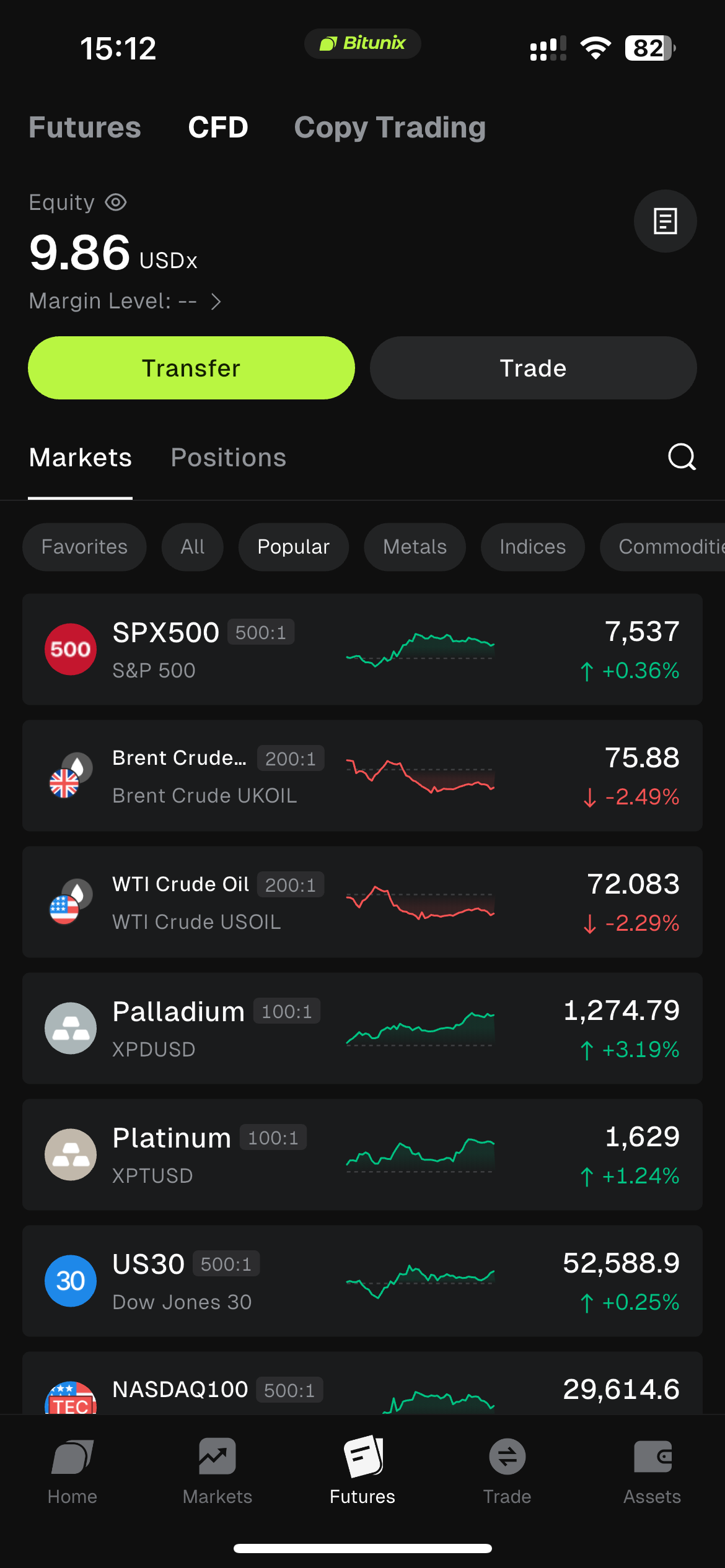
1、Log in to your Bitunix App and tap the third button 【Futures】 in the bottom navigation bar. You will be automatically redirected to the Futures trading page. In the top navigation bar of the Futures trading page, tap the second button 【CFD】 to start CFD trading.
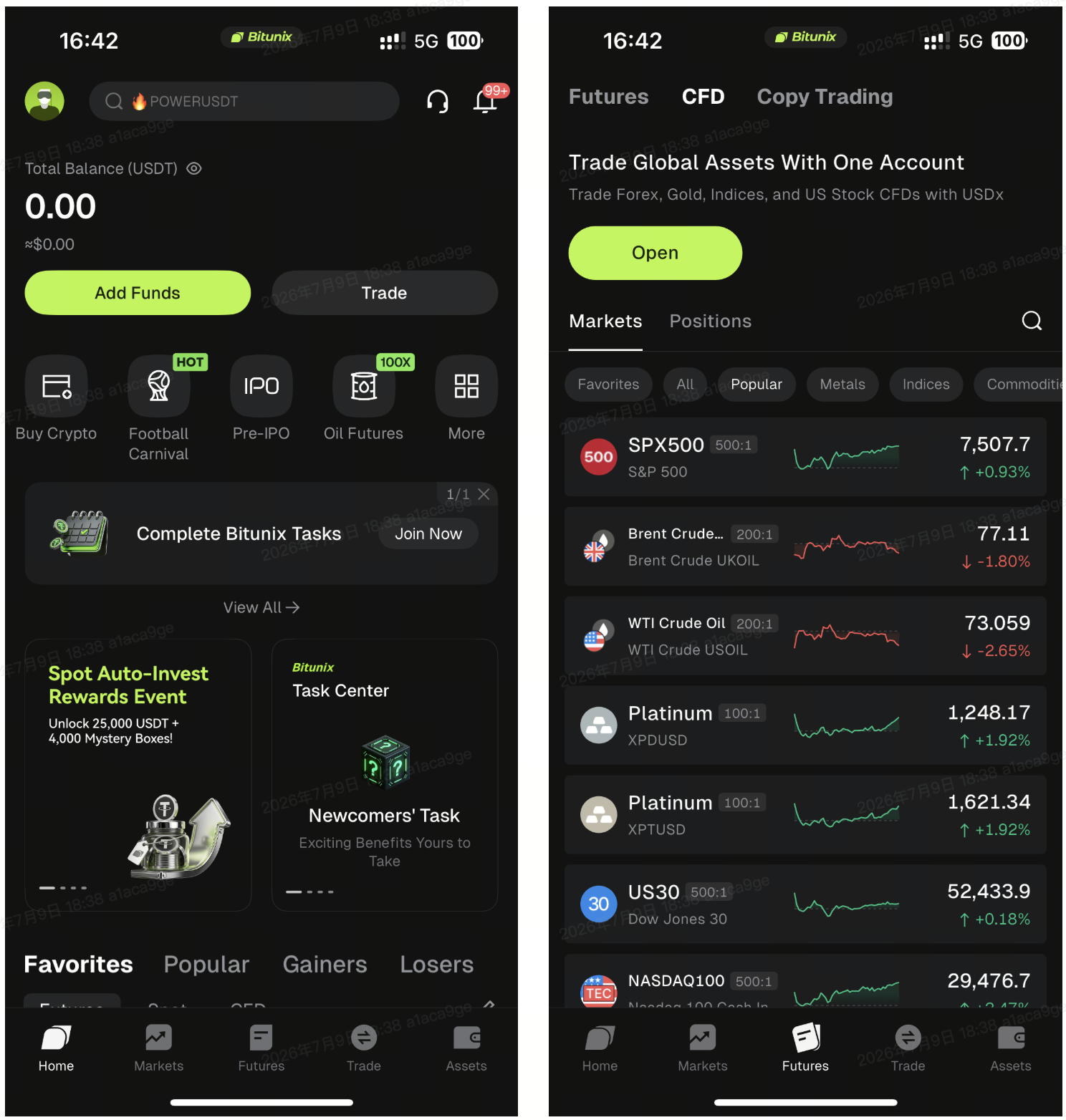
2、If you have not completed identity verification, you must complete the verification process before trading CFDs. Tap the 【Open】 button, and a reminder window to open the account will appear at the bottom of the App. Tap 【Verify Now】 and follow the instructions on the page to upload a valid identity document and complete the identity verification process.
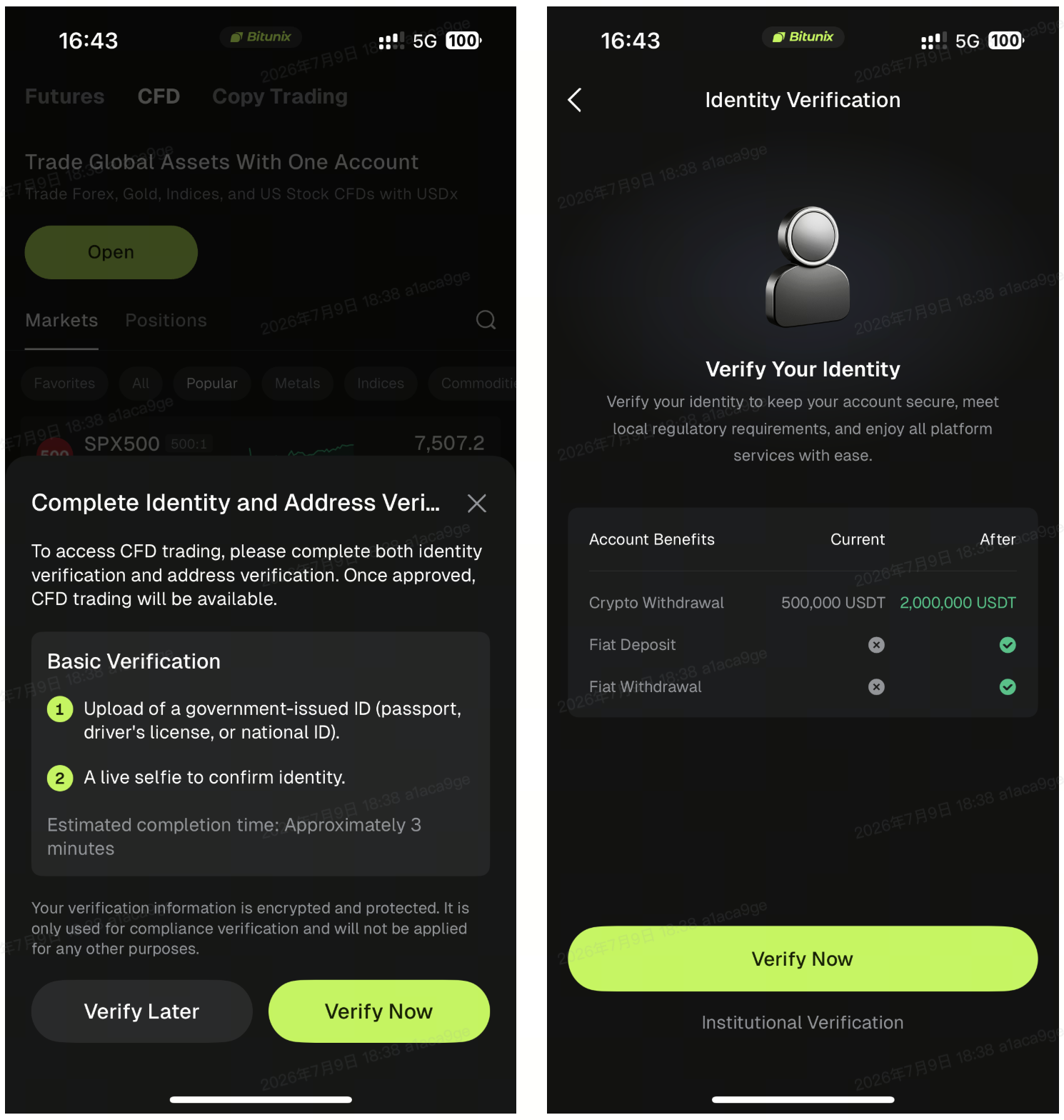
3、After completing identity verification, click the 【CFD】 button again. The system will pop up a trading risk disclosure notice outlining the potential risks associated with CFD trading. If you wish to proceed with trading, check the 【Agree】 box and click the 【Confirm】 button.
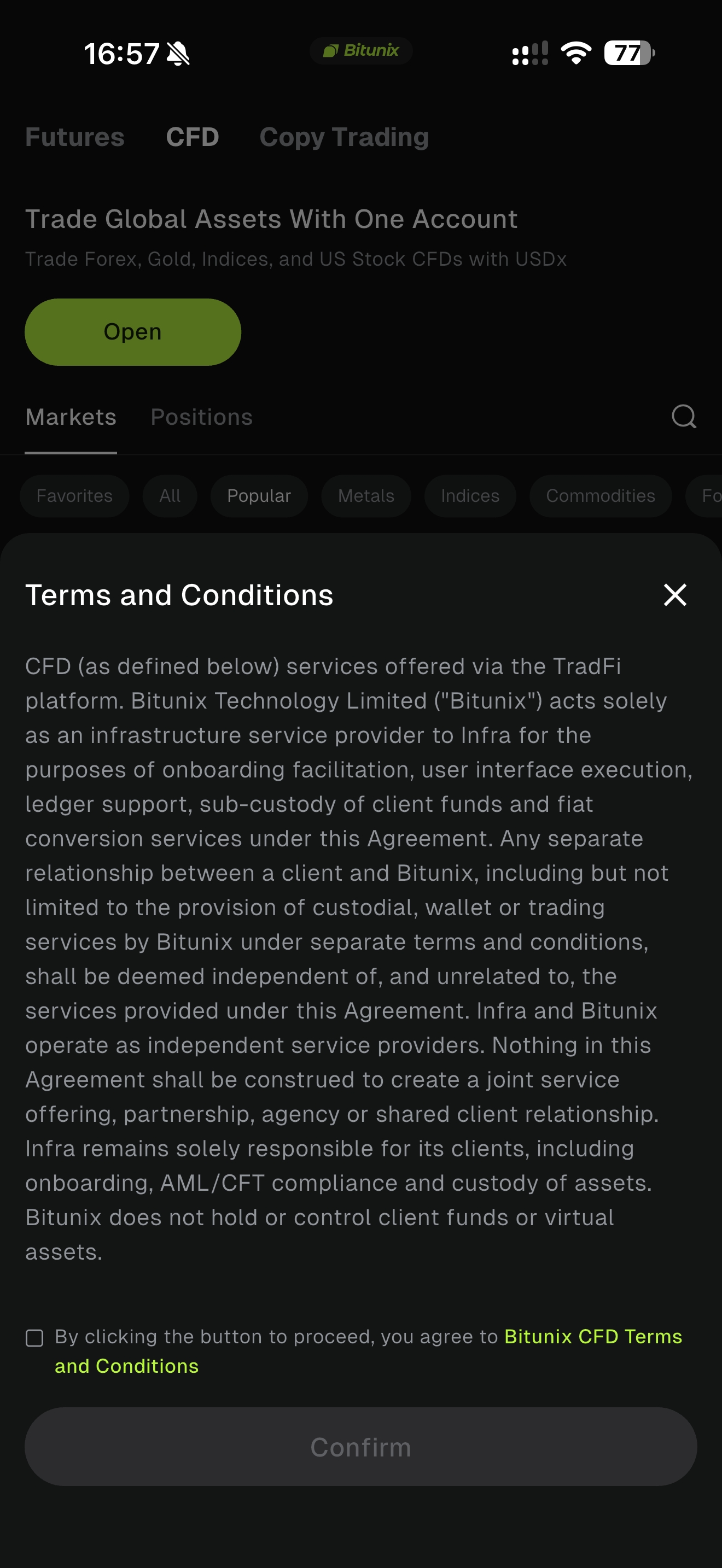
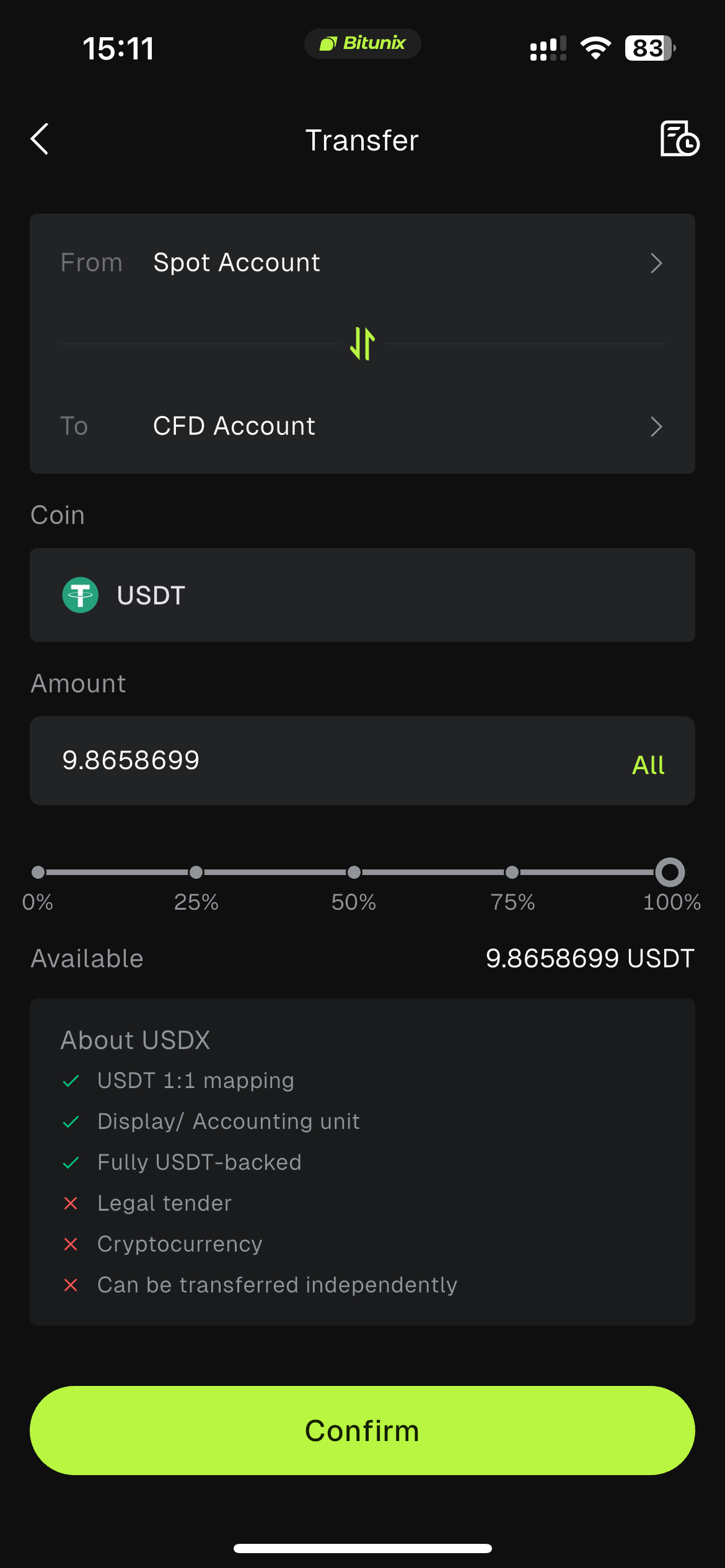
4、Click 【Transfer】, set the transfer direction to move funds from your Spot Account or Contract Account to the 【CFD Account】. Select the currency, fill in the transfer amount, verify the information, then click 【Confirm】.
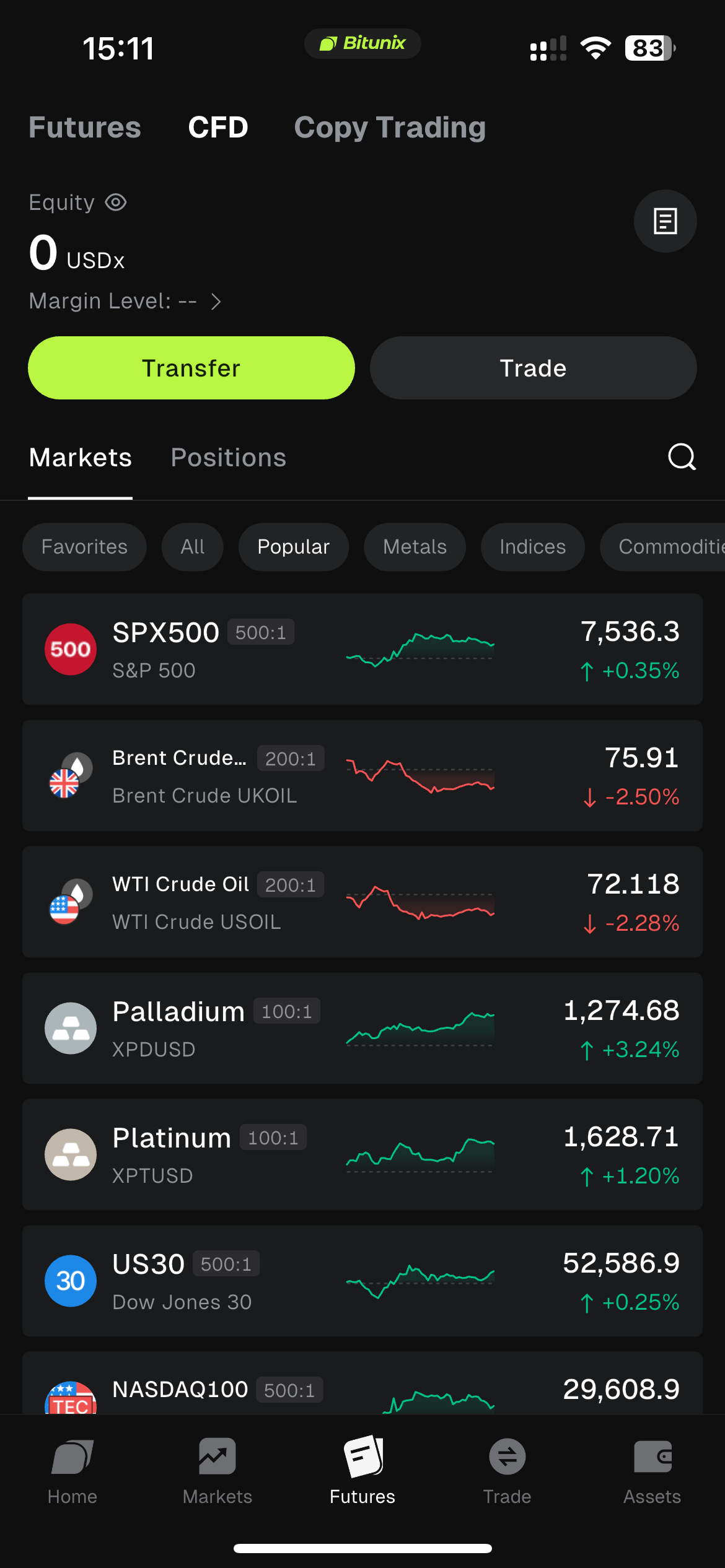
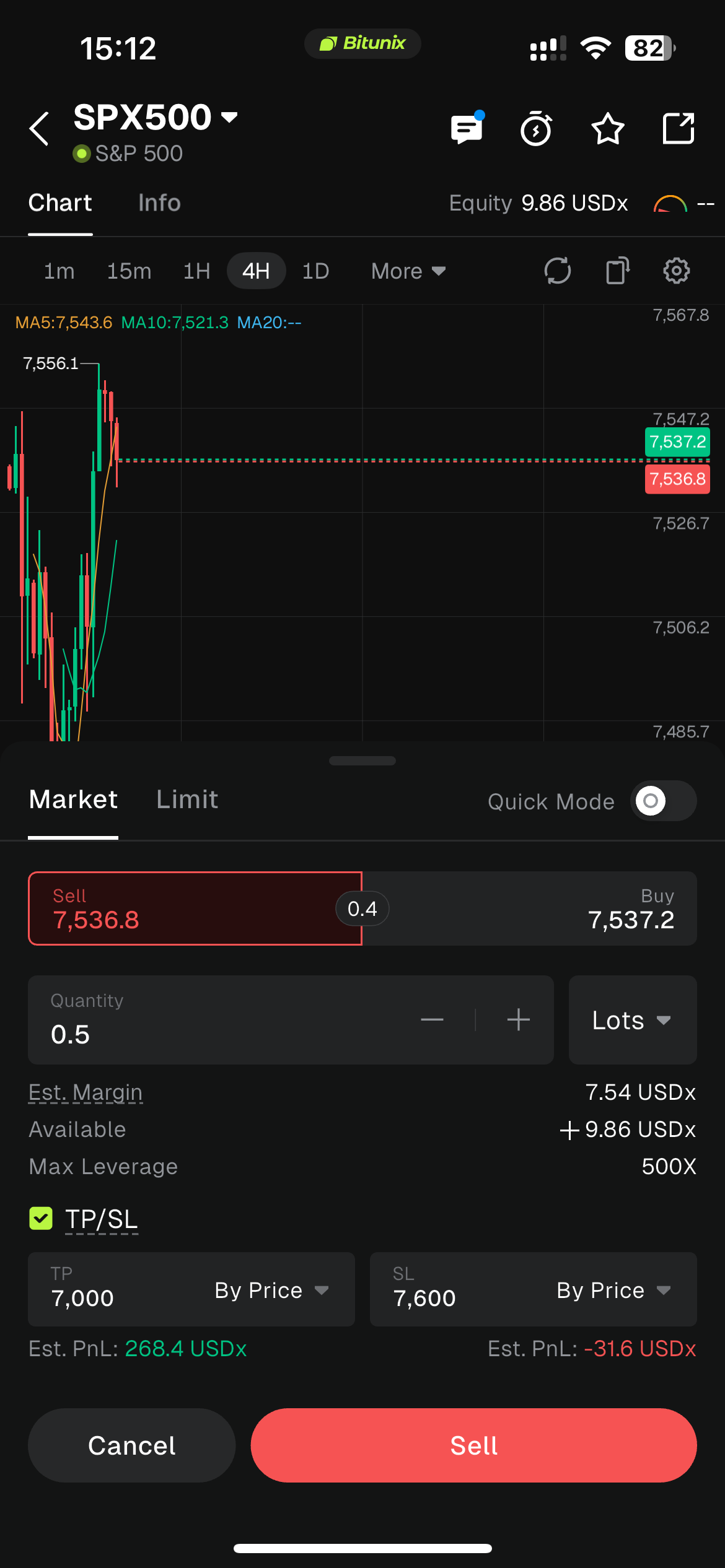
5、To conduct CFD trading, first select trading instruments below (e.g., S&P 500, Gold, Silver, Brent Crude Oil, etc.). Next, choose 【Buy】 or 【Sell】 in the trading section below, then set corresponding trading parameters (such as market or limit order mode, order quantity, take-profit and stop-loss) to complete the trade.
Note:
CFD trading operates through a separate account system. Your CFD account does not contain any funds by default. You must first transfer funds from your Spot account to your CFD account before you can start trading.
⚠️ Regional Access: CFD trading is subject to regional compliance requirements. The system will determine your access eligibility based on your IP address and KYC country information. If CFD services are restricted in your region, you may receive a notification indicating that you can only close existing positions or that opening new positions is unavailable.
4.Countries and regions where CFD is available:
.Andorra
.Antigua and Barbuda
.Anguilla
.Armenia
.Angola
.Antarctica
.Argentina
.Aruba
.Åland Islands
.Barbados
.Burkina Faso
.Benin
.Bermuda
.Brunei
.Bolivia
.Caribbean Netherlands
.Bahamas
.Bouvet Island
.Botswana
.Belize
.Cocos (Keeling) Islands
.Congo (Brazzaville)
.Switzerland
.Côte d'Ivoire
.Chile
.Cameroon
.Colombia
.Costa Rica
.Cabo Verde
.Curaçao
.Christmas Island
.Djibouti
.Dominica
.Dominican Republic
.Algeria
.Ecuador
.Western Sahara
.Ethiopia
.Fiji
.Faroe Islands
.Gabon
.Grenada
.Georgia
.Guernsey
.Ghana
.Gibraltar
.Greenland
.Gambia
.Equatorial Guinea
.South Georgia and the South Sandwich Islands
.Guatemala
.Honduras
.Isle of Man
.British Indian Ocean Territory
.Jersey
.Jamaica
.Japan
.Kenya
.Kyrgyzstan
.Cambodia
.Kiribati
.Comoros
.Saint Kitts and Nevis
.Republic of Korea
.Cayman Islands
.Kazakhstan
.Lao PDR
.Saint Lucia
.Lesotho
.Morocco
.Monaco
.Moldova
.Montenegro
.Madagascar
.Marshall Islands
.North Macedonia
.Mongolia
.Macao Special Administrative Region of China
.Mauritania
.Montserrat
.Mauritius
.Malawi
.Mexico
.Namibia
.New Caledonia
.Niger
.Norfolk Island
.Nigeria
.Nauru
.New Zealand
.Panama
.Peru
.French Polynesia
.Papua New Guinea
.Philippines
.Pitcairn Islands
.Palau
.Paraguay
.Réunion
.Serbia
.Rwanda
.Solomon Islands
.Saint Helena
.Svalbard and Jan Mayen
.San Marino
.Senegal
.Suriname
.Turks and Caicos Islands
.Chad
.French Southern Territories
.Togo
.Thailand
.Tajikistan
.Tokelau
.Timor-Leste
.Turkmenistan
.Tunisia
.Tonga
.Trinidad and Tobago
.Tuvalu
.Taiwan Region of China
.Tanzania
.Uganda
.Uruguay
.British Virgin Islands
.Viet Nam
.Indonesia
.Mayotte
.Zambia
Risk Disclaimer & Trading Advice
CFDs are high-risk derivative financial instruments, and prices may experience significant fluctuations. Beginner traders are advised to follow the core principle of "Light Positions, Strict Stop-Losses, and Ample Margin Buffer":
⚠️ Start with small lot sizes to avoid tying up too much available margin at once.
⚠️ Always set a stop-loss for every trade and plan your maximum acceptable loss in advance.
⚠️ Pay attention to each instrument's trading hours and market closures. Avoid holding heavy positions near market close or ahead of major data releases.
⚠️ Holding positions overnight will incur overnight/swap fees. If you plan to hold long-term positions, factor these costs into your P&L calculations.
⚠️ Closely monitor your Margin Level at all times and maintain a safe distance from the 30% liquidation threshold.
Disclaimer
This article is not intended to provide:
(i) investment advice or investment recommendations;
(ii) an offer or solicitation to buy, sell, or hold digital assets; or
(iii) financial, accounting, legal, or tax advice.
Holdings of digital assets, including stablecoins and NFTs, involve a high degree of risk and may fluctuate significantly. You should carefully consider whether trading or holding digital assets is appropriate for you based on your financial situation. Please consult your legal, tax, or investment professional regarding your specific circumstances. You are solely responsible for understanding and complying with all applicable local laws and regulations.