

💡 Quick Overview
- Verification Types: Basic Verification (required) → Advanced Verification (unlocks higher limits)
- Required Documents: Valid government-issued ID, selfie holding your ID, proof of address (Advanced Verification only)
- Review Time: Usually completed within minutes to 24 hours
- Supported Formats: JPG, JPEG, PNG (each file ≤ 5MB)
- Scope: This guide covers the Bitunix App. For the Web version, please refer to our separate guide.
Why Is Identity Verification Required?
To protect your assets and comply with global digital asset regulations, Bitunix requires all users to complete KYC (Know Your Customer) identity verification.
Step-by-Step Guide: Complete Basic KYC Verification
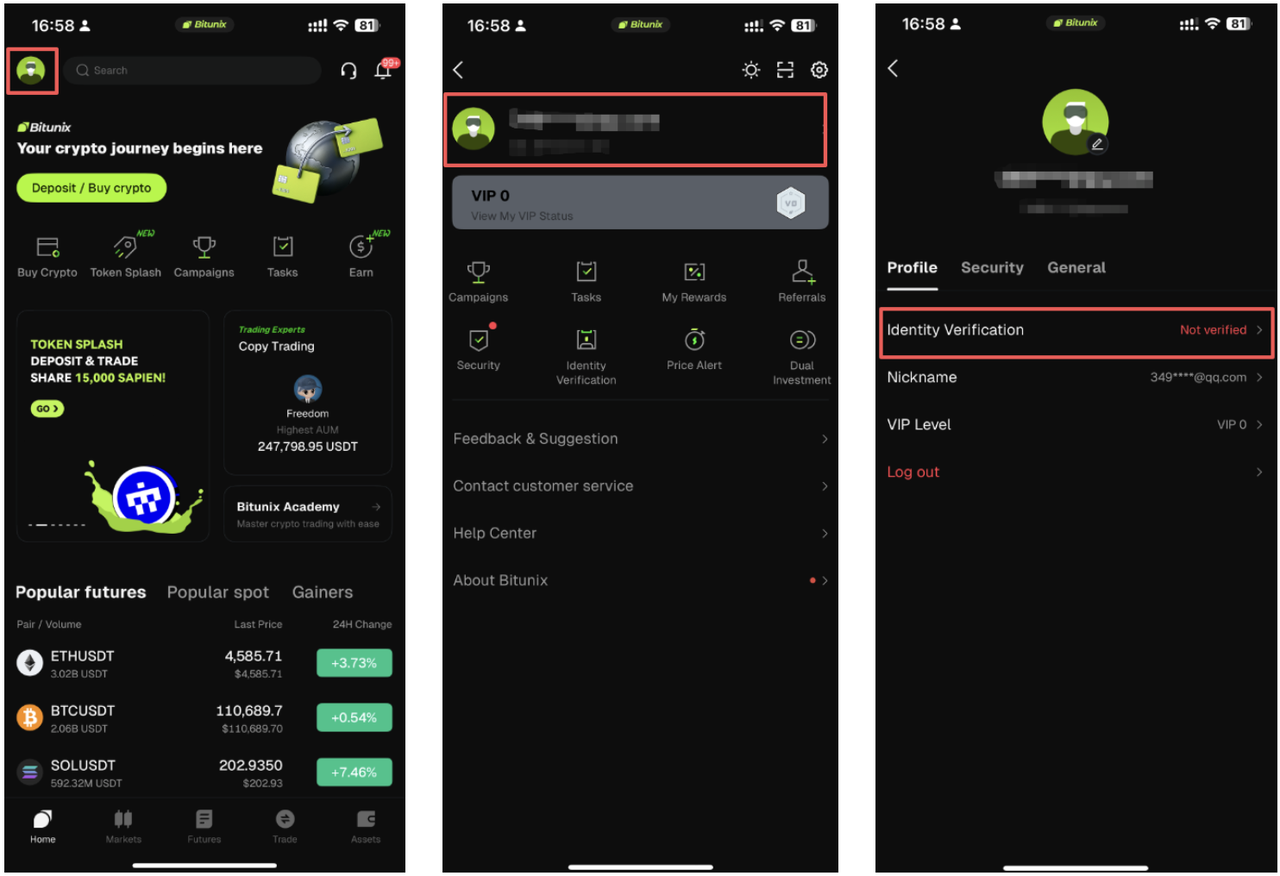
Step 1: Go to the Identity Verification Page
Open the Bitunix App and log in to your account. Tap the [Profile Icon] in the top-left corner, then tap the [Profile / Username Area] at the top to open your account settings. Select [Identity Verification].
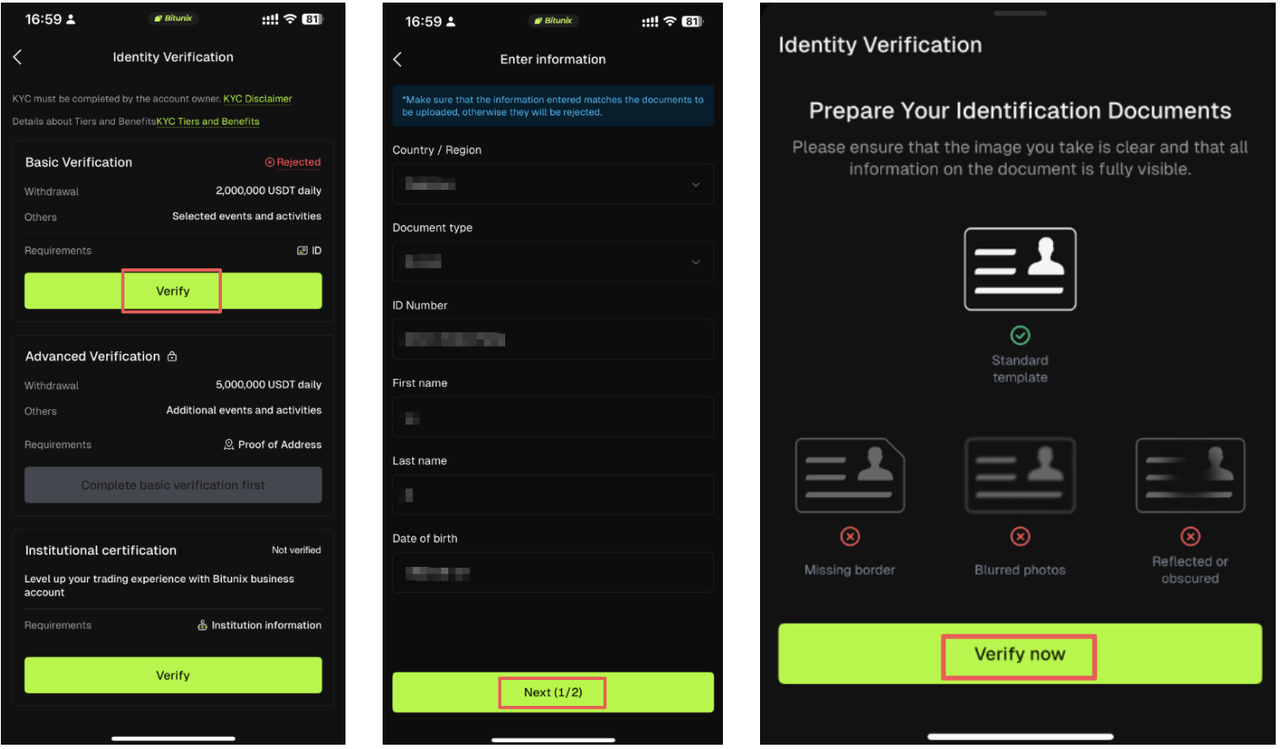
Step 2: Choose a Verification Level and Enter Your Information
Select [Basic Verification] and tap [Verify Now]. Fill in your personal details, then tap [Next] → [Start Verification].
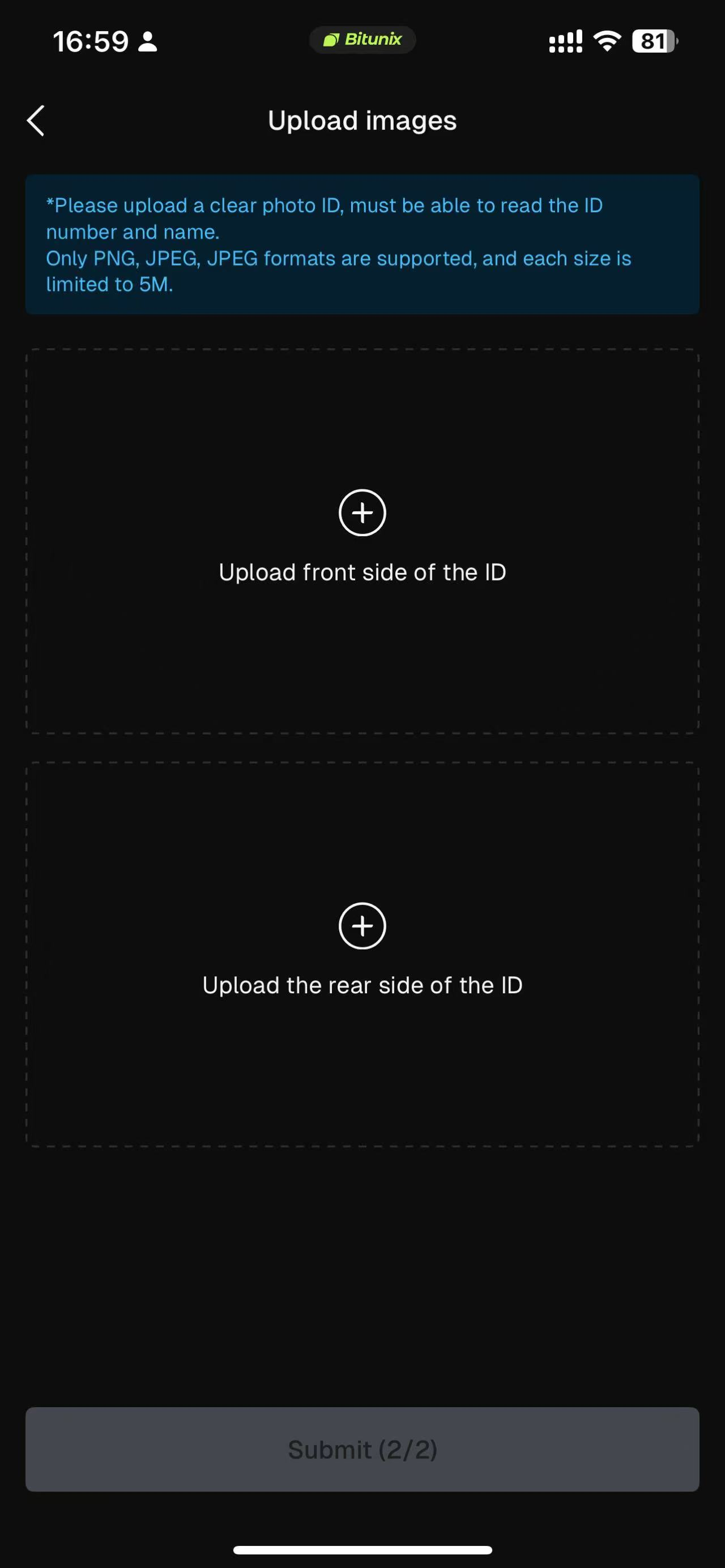
Step 3: Upload Your ID and Submit
Follow the on-screen instructions to upload both the front and back of your ID document. Once you've confirmed the photos are clear and legible, tap [Submit]. Bitunix will review your application — once approved, your Basic KYC Verification is complete.
🔒 Important Security & Submission Reminders
⚠️ Please review the following to ensure a smooth approval:Information accuracy: The name and ID number you enter must match your submitted document exactly. Any mismatch will result in rejection.Photo authenticity: Do not use photos edited with Photoshop or any other software. Edited documents will lead to permanent rejection.Privacy protection: Bitunix encrypts all personal information submitted by users and never shares it with third parties. Never send your ID photos to anyone outside of official Bitunix channels.Handwritten note validity: The handwritten note in your selfie photo must show today's date or yesterday's date. Outdated notes may cause your application to be rejected.
❓ Frequently Asked Questions
Q1: What should I do if my verification keeps getting rejected?
If your application has been rejected, follow these troubleshooting steps:
- Check that your ID photos are clear, complete, and unedited.
- Confirm that the name and ID number you entered match your document exactly.
- Make sure your selfie meets all requirements (facial features clearly visible, both arms shown, handwritten note content correct).
- Retake your photos or try video verification, then resubmit.
If you've tried multiple times without success, please contact the Bitunix Support team for assistance.
Q2: Why can't I access the page or upload my documents?
Possible causes include:
- Unstable internet connection: Switch to a stable Wi-Fi or mobile network and try again.
- Outdated app version: Update the Bitunix App to the latest version.
- Device compatibility: The camera on some older devices may not function properly. Try a different device or contact support.
If the issue persists, please submit a support ticket with a screenshot of the error, and our technical team will resolve it as quickly as possible.
Q3: Can I correct my information if I made a mistake?
If your application is still under review, you typically cannot make changes yourself. Please wait for the review result:
- If your application is rejected, you can correct the information when you resubmit.
- If your application is approved but you notice an error, please contact support immediately and our team will assist you.
Disclaimer
This article is not intended to provide:
(i) investment advice or investment recommendations;
(ii) an offer or solicitation to buy, sell, or hold digital assets; or
(iii) financial, accounting, legal, or tax advice.
Digital assets (including stablecoins and NFTs) involve high risk and may be highly volatile. You should carefully consider whether trading or holding digital assets is suitable for you based on your financial situation. For your specific circumstances, consult your legal, tax, or investment professionals. You are responsible for understanding and complying with all applicable local laws and regulations.