

What is Multi-Trade?
Multi-Trade is a futures position management mode. Once enabled, you can create multiple independent positions under the same trading pair and in the same direction. The margin, stop-loss settings, and liquidation calculations of each position are handled separately and do not affect one another.
Core Differences
• Non-Multi-Trade (Default): Multiple positions opened in the same direction under the same trading pair are automatically merged into one position.
• Multi-Trade: Each position opened in the same direction under the same trading pair is created and managed independently, without being merged with others.
Trading Setup
1、Select the Trading Pair
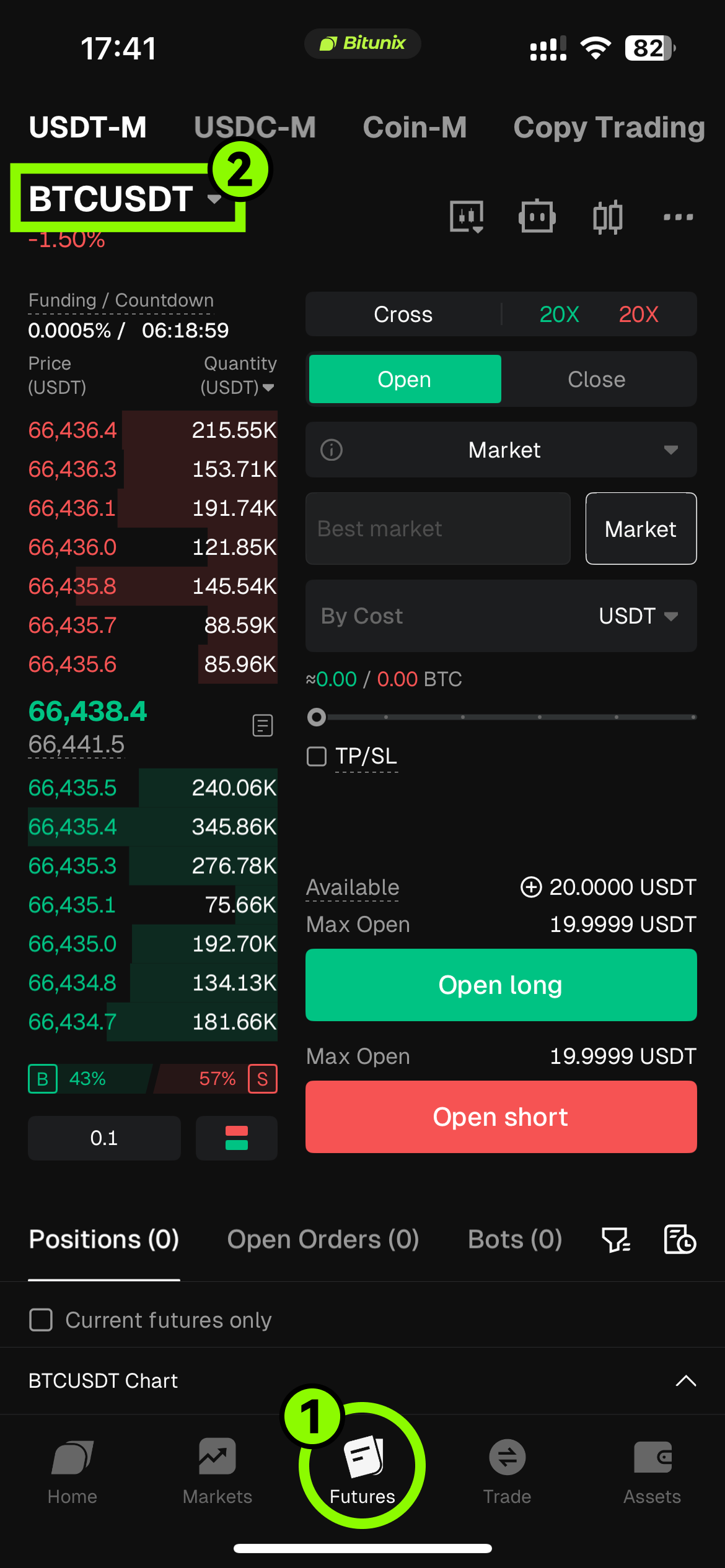
Log in to the Bitunix app, tap "Futures" in the bottom navigation bar, and select "BTC/USDT" in the upper-left corner of the futures trading page to enter the trading pair list. You can quickly find the pair you want through the search box, or directly select a USDT-margined perpetual contract from the list.
2、Enable Multi-Trade
Using the BTCUSDT USDT-margined perpetual contract as an example, tap the "Cross/Isolated" button to open the margin mode menu, then tap the "Multi-Trade" option at the bottom of the menu, and finally tap "Confirm" to enable Multi-Trade mode.
This tutorial uses Cross Multi-Trade mode as an example: set the leverage to 20x, select Market Order as the order type, enter the order quantity, and tap "Open Long" to place the order.
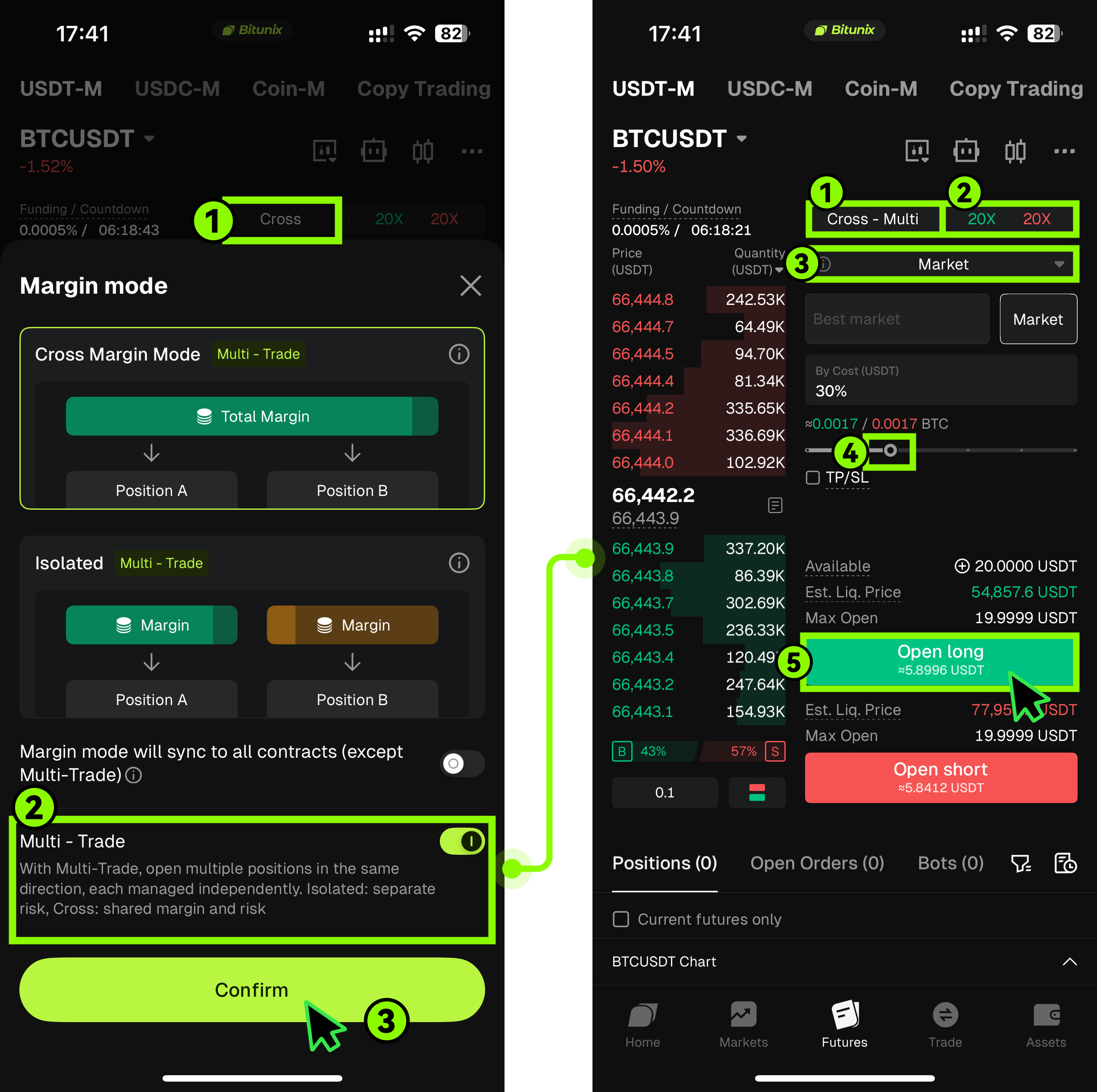
This mode supports opening multiple independent positions under the same trading pair, and each position can have its own take-profit and stop-loss settings for better risk isolation.
Please note the difference between Isolated Multi-Trade and Cross Multi-Trade:
• Isolated Multi-Trade: The risk of each position is completely independent and does not affect other positions.
• Cross Multi-Trade: Each position can still be managed independently, but multiple positions share the same margin account.
3、Close a Futures Position
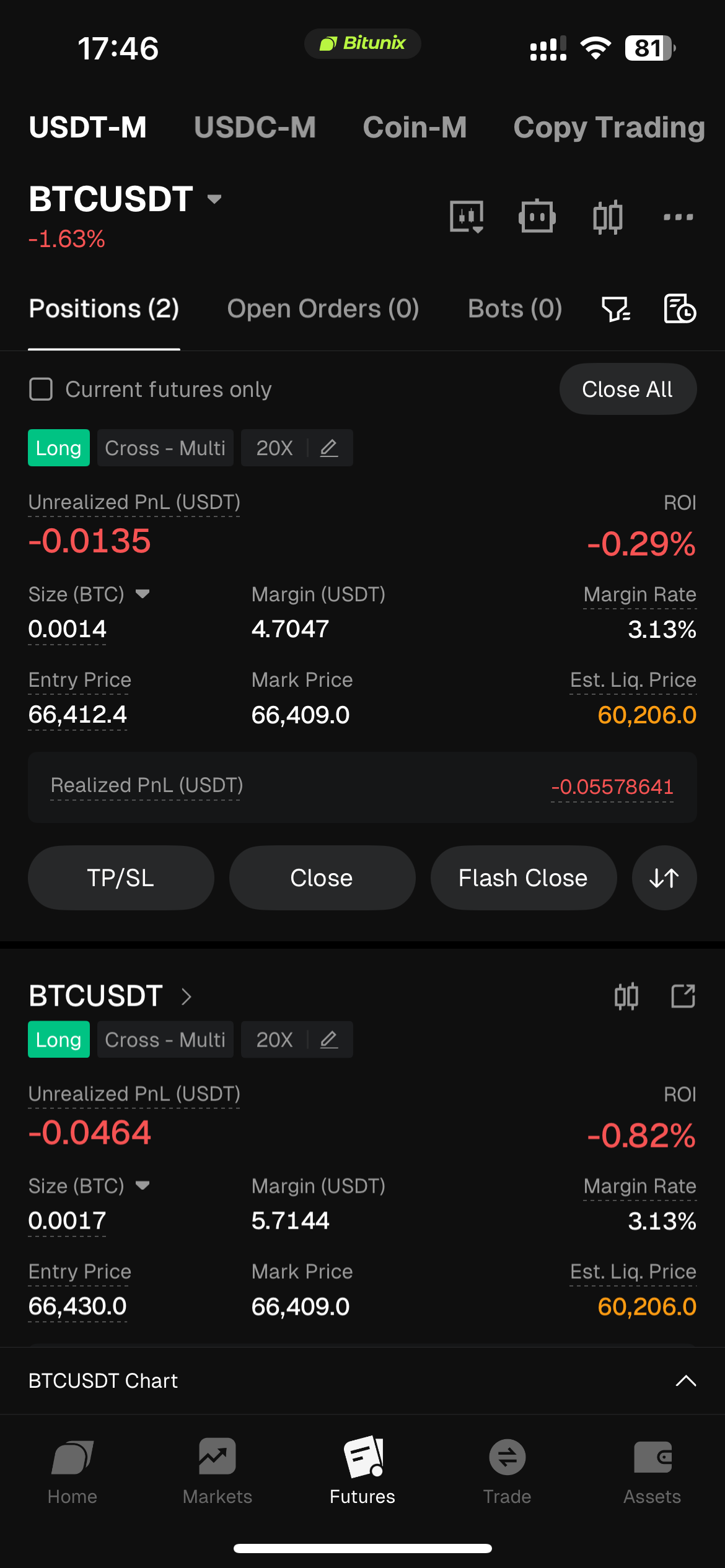
In Multi-Trade mode, each position is independent. You can close one position separately while continuing to hold another. Tap the "Close" or "Market Close All" button for the corresponding position to complete the close.
Important Restrictions and Rules for Enabling Multi-Trade
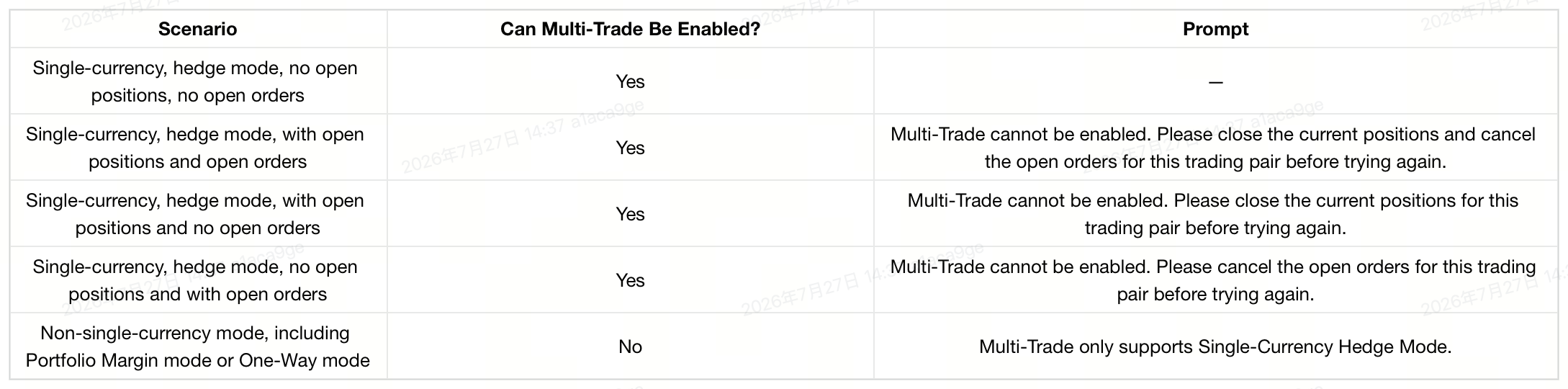
✅ Multi-Trade can be enabled when: Single-Currency Hedge Mode is active, with no open positions and no open orders.
❌ Multi-Trade cannot be enabled when: there are open positions, open orders, or the account is in Portfolio Margin mode or One-Way mode.
Frequently Asked Questions (FAQ)
Does Multi-Trade mode support adding to a position?
No. Adding to an existing position is not supported in Multi-Trade mode. The system will display a prompt stating that Multi-Trade mode does not support adding to positions.
How are take-profit and stop-loss calculated in Multi-Trade mode?
The number of take-profit and stop-loss orders is limited by the current position size, and each position is calculated independently. Take-profit and stop-loss settings are not merged across positions.
How is realized PnL calculated in Multi-Trade mode?
Realized PnL is calculated separately for each position. It is not aggregated across positions, and the profit and loss attribution of each position remains independent.
How is the liquidation price calculated in Multi-Trade mode?
There are two calculation methods in Multi-Trade mode:
• Isolated Multi-Trade: The liquidation price of each position is calculated independently and does not affect other positions.
• Cross Multi-Trade: The margin usage of all positions in the account is calculated together, so the liquidation price may differ from the merged-position mode.
Does the order panel support closing positions in Multi-Trade mode?
No. In Multi-Trade mode, the order panel only supports opening positions. The tab switch for closing positions is hidden, and the panel defaults to open-position mode.
What order types are supported in Multi-Trade mode?
The following order types are supported:
• Limit Order
• Market Order
• Trigger Order
• Trailing Order
• Stop-Loss-Based Position Sizing
What should I do if I cannot enable Multi-Trade mode?
If you are unable to enable Multi-Trade, please first check the current trading status of the pair. If there are still open positions or open orders for that trading pair, you must close the positions or cancel the orders before attempting to enable Multi-Trade. In addition, if the account is currently in Portfolio Margin mode or One-Way mode, Multi-Trade cannot be enabled. Please switch to Single-Currency Hedge Mode first. Please also note that copy trading accounts do not currently support Multi-Trade.
What should I do if position data appears abnormal or positions are not visible in an older version of the app after enabling Multi-Trade?
This is usually caused by a version compatibility issue and is considered normal behavior. Older versions of the app do not fully support the Multi-Trade feature, which may result in abnormal position displays or the inability to view positions. It is recommended that you update the app to the latest version. After upgrading, you will be able to view and manage Multi-Trade positions normally.
What should I do if I cannot close a position in an older version of the app?
When you try to close a Multi-Trade position in an older version of the app, the system may block the action and prompt you to upgrade. Some versions will display an upgrade notice, while older versions may only show a generic error message. It is recommended that you update to the latest version before proceeding, or use the web version to close the position.
Disclaimer
This article is not intended to provide
(I) investment advice or investment recommendations;
(Ii) an offer or solicitation to buy, sell or hold digital assets;
(Iii) financial, accounting, legal or tax advice.
Holding digital assets (including stablecoins and NFTs) involves high risk and can fluctuate widely. You should carefully consider whether trading or holding digital assets is right for you based on your financial situation. Please consult your legal/tax/investment professional for your specific situation. Please be responsible for understanding and complying with all applicable local laws and regulations.