

What is Take Profit and Stop Loss?
Take Profit and Stop Loss are strategic trading tools based on pre-set trigger conditions. Once the market, mark, or index price reaches the specified trigger, the order is automatically submitted at the defined price. These tools are essential in futures trading — a Stop Loss helps limit losses when your position moves against the market, while a Take Profit secures gains when your trade aligns with market trends. Together, they allow for timely exits and effective risk control.
Bitunix futures trading can be managed in two areas: the futures trading page and the position management page. Users can choose either option based on their trading preferences and needs.
What Is the Trigger Price?
The trigger price is the specific price at which a user's buy or sell order is activated and submitted to the exchange for execution. In other words, when the market price reaches the user-defined trigger price, the order is automatically placed on the exchange.
How to Set Take Profit and Stop Loss on Web
1.Futures trading page to set take profit and stop loss
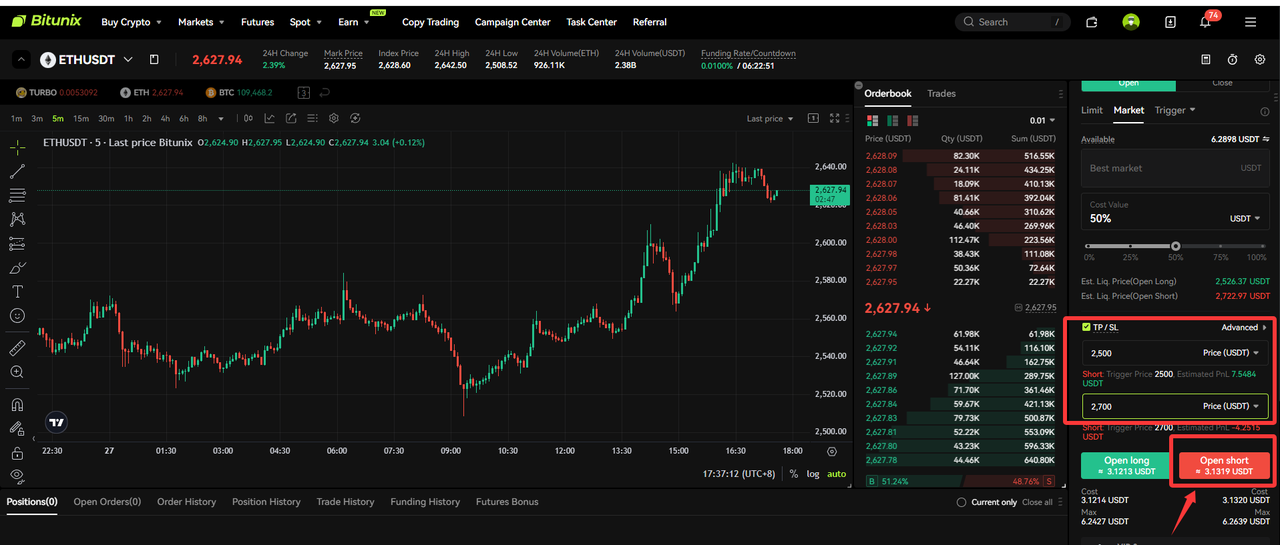
Open Bitunix.com and log in, go to the [Futures] page on Bitunix. After selecting your parameters, click [Take Profit/Stop Loss] to set your trigger prices directly on the order screen.
For example, let’s open a 50x leveraged short position on ETHUSDT using a Market Order. Set the order size to 50%, the Stop Loss trigger price to 2500, and the Take Profit trigger price to 2700. Then, click ‘Sell’ to execute the short position — completing the market order.
2.Specific positioning page setting take profit stop loss
Click the [Position] option—select the target [Position TP/SL]—enter the [TP Trigger Price], [SL Trigger Price], and [Quantity]—click [Confirm].

There are two commonly used methods for setting Take Profit and Stop Loss:
- Position-Based Take Profit and Stop Loss
- Batch Take Profit and Stop Loss
Note:
- If the market price does not reach the trigger price, the order will not be executed. Once the trigger price is reached, the system will place the order at the specified order price.
- Margin and position will not be frozen until the order is successfully triggered. Take Profit and Stop Loss orders may fail to trigger due to price limits, position restrictions, insufficient margin, inactive trading status, or system issues. Triggered limit orders function like standard limit orders and may remain unfilled. Any unfilled orders will appear in the current orders list.
- In the event of extreme market volatility, orders may fail to execute as expected.
- To quickly close all open positions, you can select the specific position and click [Market Price Full Flat].
Risk Warning:
Take Profit and Stop Loss are the "safety net" of futures trading: Take Profit allows traders to exit the market rationally when in profit and avoid emotional decision-making or market volatility, while Stop Loss acts as a brake when losses occur, preventing small losses from turning into larger ones. The combination of both effectively manages position risk and ensures that trading strategies are executed without emotional interference. Together, they are essential tools for long-term survival in the futures trading market.
Disclaimer
This material is provided for general information only. It is not intended to provide:
- Investment advice or investment recommendations.
- an offer or solicitation to buy, sell, or hold digital assets;
- Financial, accounting, legal, or tax advice.
- Digital assets, including stablecoins and NFTs, carry a high level of risk and can fluctuate significantly in value. Consider carefully whether trading or holding digital assets is suitable for your financial situation. Consult your legal, tax, or investment professional for guidance tailored to your circumstances. You are responsible for understanding and complying with all applicable laws and regulations in your location.