

1. What is the On-Chain Alert Feature
The On-Chain Alert feature is a tool used to monitor on-chain activities of wallet addresses. You can set trigger conditions, position direction, alert coins, transaction amount, and other parameters according to your needs, and select one or more wallet addresses to track. When the on-chain behavior of a monitored address meets the preset conditions, the system will send a notification via your chosen alert method, helping you stay informed of on-chain fund movements and transaction activities in a timely manner.
2. Core Advantages of the On-Chain Alert Feature
✅ Flexible Wallet Activity Monitoring:
Supports adding one or more wallet addresses, making it convenient to continuously track fund flows and on-chain activities of key addresses.
✅ Precise Transaction Data Filtering:
Filter on-chain transactions based on parameters such as trigger conditions, position direction, alert coins, and transaction amounts.
✅ Real-Time Large Transaction Tracking:
Quickly identify large on-chain transaction movements for specified coins by setting transaction amount thresholds.
✅ Address Data for Assisted Analysis:
The monitoring address list provides 24h PnL and Trend data, helping you gain a more comprehensive understanding of an address's recent performance.
3. Configuration Items for the On-Chain Alert Feature
When creating an on-chain alert, you need to configure the following parameters:
- Trigger Condition: Set the conditions that trigger the on-chain alert.
- Position Direction: Specify the position direction to monitor.
- Warning Coin: Select the coin(s) to monitor.
- Transaction Amount: Set the transaction amount threshold to monitor; currently must be greater than 100,000.
- Monitoring Address: Select one or more wallet addresses to monitor.
- Trigger Method: Set the notification channel after the alert is triggered.
- Frequency: Set the number of alert notifications.
- Validity Period: Set the expiration time of the alert.
- Add a Note: Optional; used to add supplementary notes describing the purpose of the alert.
4. How to Create an On-Chain Alert
Step 1: Access the On-Chain Alert Settings Page
- Open the K-line chart of the target trading instrument.
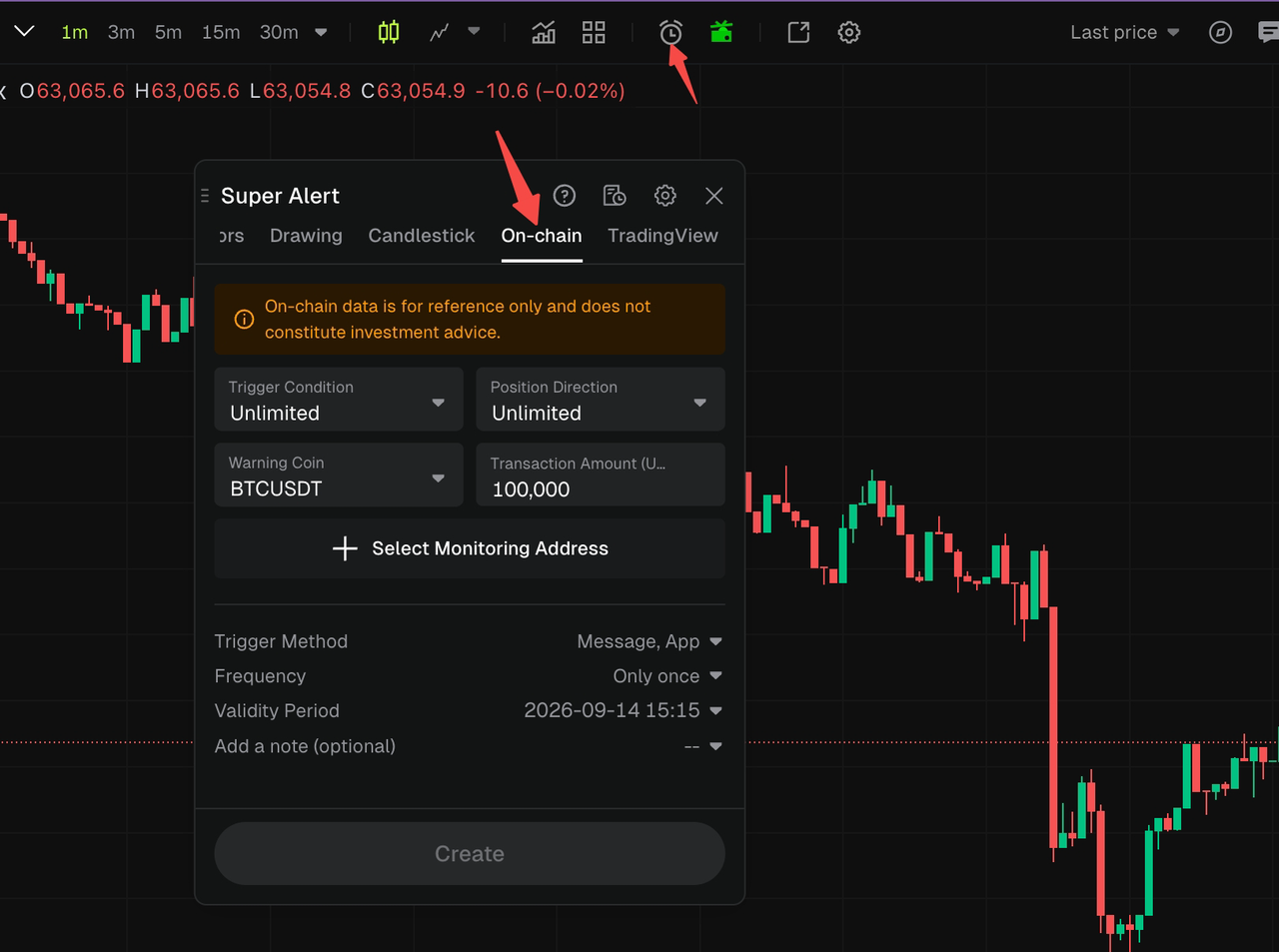
- Click the alert icon at the top of the chart to enter the [Super Alert] settings page.
- Select [On Chain] in the top tab bar.
- After reading the on-chain data disclaimer, enter the on-chain alert settings page.
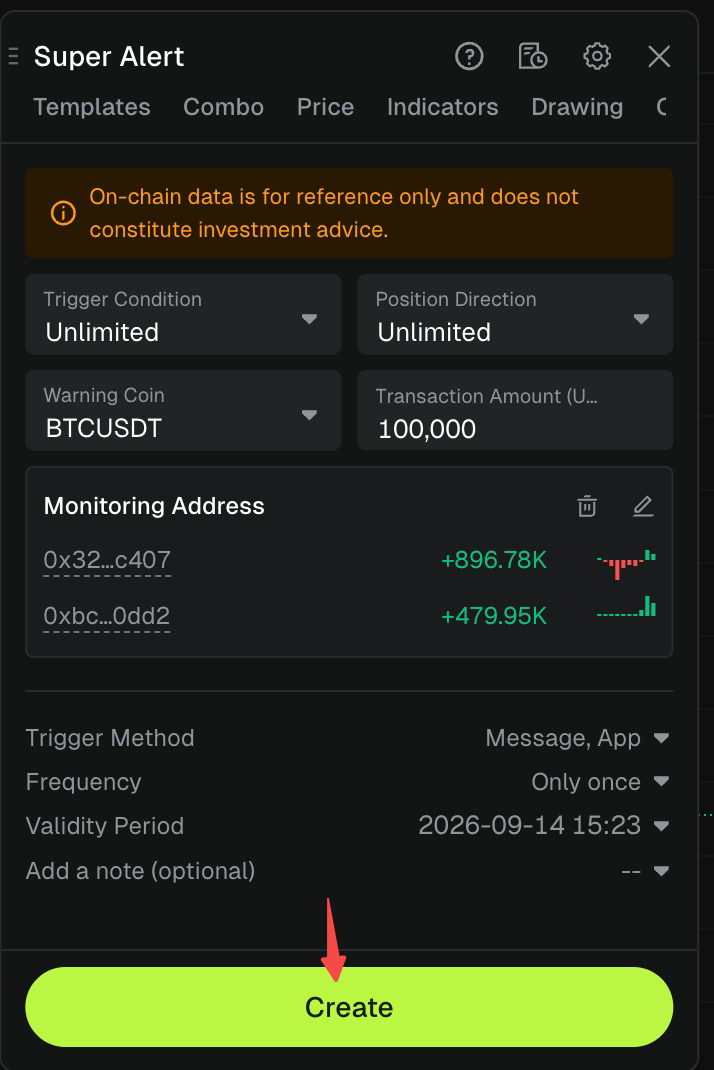
Step 2: Configure On-Chain Alert Conditions
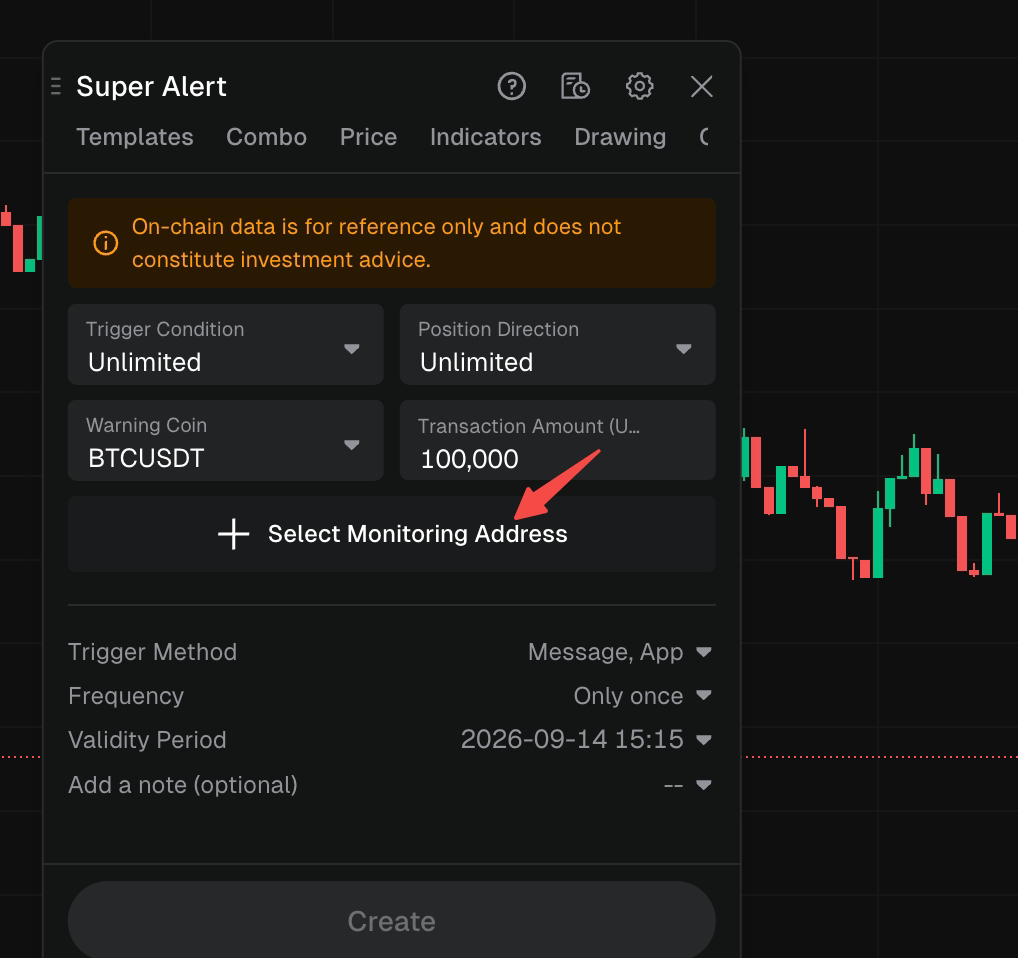
On the [On Chain] page, configure the following settings in order:
- Trigger Condition: Select the alert trigger condition.
- Position Direction: Select the position direction to monitor.
- Warning Coin: Select the alert coin(s) to monitor.
- Transaction Amount: Enter the transaction amount threshold you wish to monitor.
After completing the above settings, you need to add a monitoring wallet address. If no monitoring address has been added yet, the page will display [Select Monitoring Address] and the [Create] button will be temporarily unavailable.
Step 3: Select Monitoring Wallet Addresses
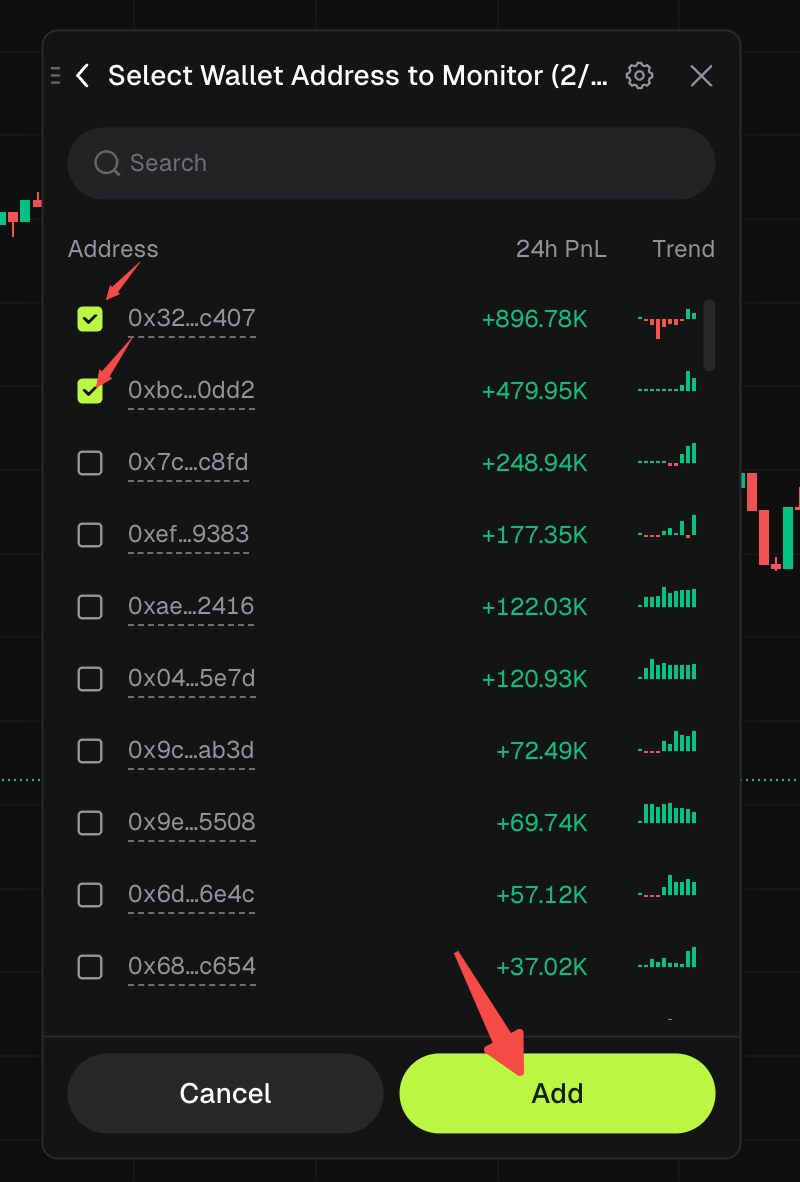
1. Click [Select Monitoring Address].
2. Enter the [Select Wallet Address to Monitor] page.
3. To quickly find an address, use the search bar at the top of the page.
4. The address list will display the following information:
- Address: Desensitized wallet address.
- 24h PnL: Profit and loss of the address over the past 24 hours.
- Trend: Recent trend changes of the address.
5. Check one or more wallet addresses you wish to monitor.
6. The page title will display the number of currently selected addresses.
7. Click [Add] to confirm adding; click [Cancel] to cancel this selection.
Step 4: Confirm Monitoring Addresses and Alert Settings
After adding monitoring addresses, the [On Chain] page will display the Monitoring Address area, including:
- The selected wallet addresses.
- The corresponding 24h PnL for each address.
- Trend charts corresponding to each address.
You can perform the following operations:
- Delete: Remove currently selected monitoring addresses.
- Edit: Re-enter the address selection page to adjust monitoring addresses.
After confirming the monitoring addresses, continue to configure:
- Trigger Method (Notification method)
- Frequency (Alert frequency)
- Validity Period (Expiration time)
- Add a note (Remarks)
Once all required information is completed, the [Create] button at the bottom will become actionable.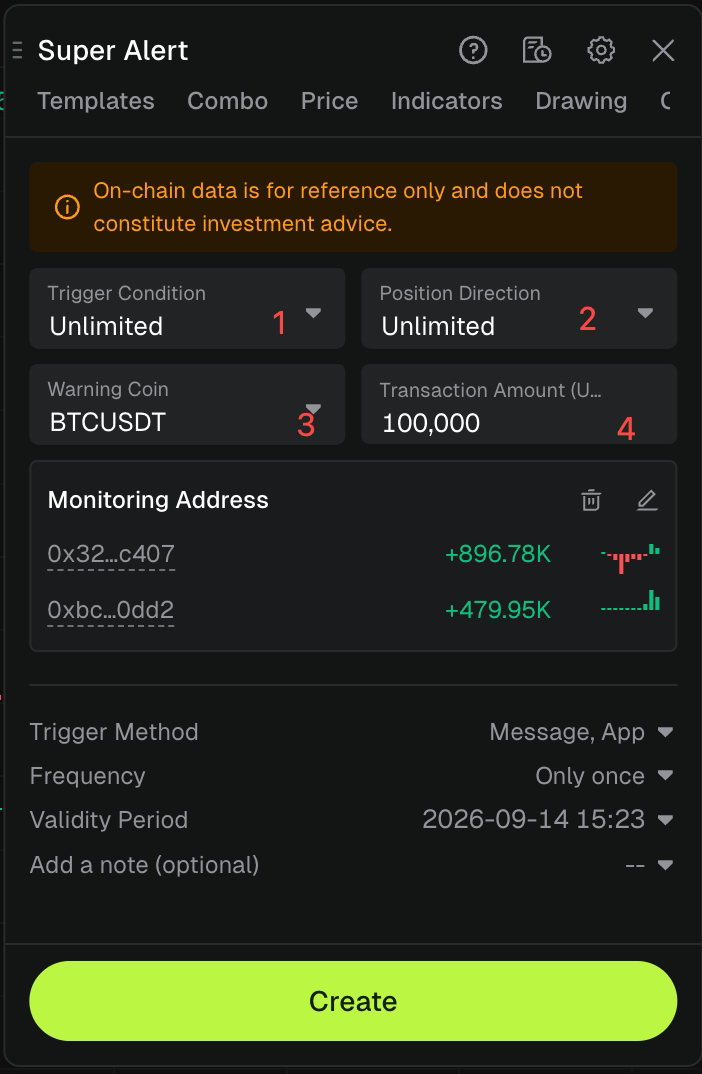
Step 5: Complete the On-Chain Alert Creation
Before creating, please confirm the following information:
- Trigger Condition
- Position Direction
- Warning Coin
- Transaction Amount
- Monitoring Address
- Trigger Method
- Frequency
- Validity Period
After confirming that everything is correct, click [Create] at the bottom to complete the on-chain alert creation.
5. Viewing On-Chain Alert Records
After creation, you can view the following via the alert record entry in the upper right corner of [Super Alert]:
- Created on-chain alerts.
- Current alert status.
- Historical alert trigger records.
6. Usage Recommendations
To enhance the effectiveness of the On-Chain Alert feature, it is recommended that you:
- Verify Monitoring Addresses: Carefully check wallet addresses before adding to avoid monitoring the wrong targets.
- Set Transaction Amounts Reasonably: Adjust the transaction amount threshold based on the fund scale you are monitoring to reduce unnecessary alerts.
- Limit the Number of Monitoring Addresses: Prioritize important addresses to improve information filtering efficiency.
- Set a Validity Period: Adjust the [Validity Period] according to your actual observation needs to prevent invalid alerts from running for extended periods.
- Add Notes: Record the source of the address or the purpose of monitoring for easier future management.
- Refer to On-Chain Data with Caution: On-chain data may have delays or discrepancies in statistical methods; such information should be used as analytical reference only.
Disclaimer
This article is not intended to provide:
(i) investment advice or investment recommendations;
(ii) an offer or solicitation to buy, sell, or hold digital assets; or
(iii) financial, accounting, legal, or tax advice.
Holdings of digital assets, including stablecoins and NFTs, involve a high degree of risk and may fluctuate significantly. You should carefully consider whether trading or holding digital assets is appropriate for you based on your financial situation. Please consult your legal, tax, or investment professional regarding your specific circumstances. You are solely responsible for understanding and complying with all applicable local laws and regulations.