

Want to build a crypto position without trying to time the market? Spot Auto-Invest buys the crypto you choose on a fixed schedule, using dollar-cost averaging (DCA). This guide explains how it works and how to set up a plan in the Bitunix app in three steps, then answers the most common questions.
What Is Spot Auto-Invest?
Spot Auto-Invest is a tool that lets you automatically buy cryptocurrency on a recurring schedule. It is also known as Dollar Cost Averaging (DCA). By setting a fixed frequency and investment amount, the system places your buy orders automatically, helping you build a position over time and reduce the impact of short-term price swings.
Note: Available features may vary depending on the trading pair and your region.
Benefits of Bitunix Spot Auto-Invest
Bitunix Spot Auto-Invest helps you stay consistent across different market conditions by buying at fixed intervals.
- When prices fall, your fixed investment amount can buy more units.
- When prices rise, it can buy fewer units.
- It helps reduce emotional decision-making and supports long-term, disciplined investing.
- If you want steady exposure to crypto over time, Spot Auto-Invest is a simple, structured approach.
DCA does not guarantee a profit or protect you from losses in a falling market.

How to Set Up Spot Auto-Invest
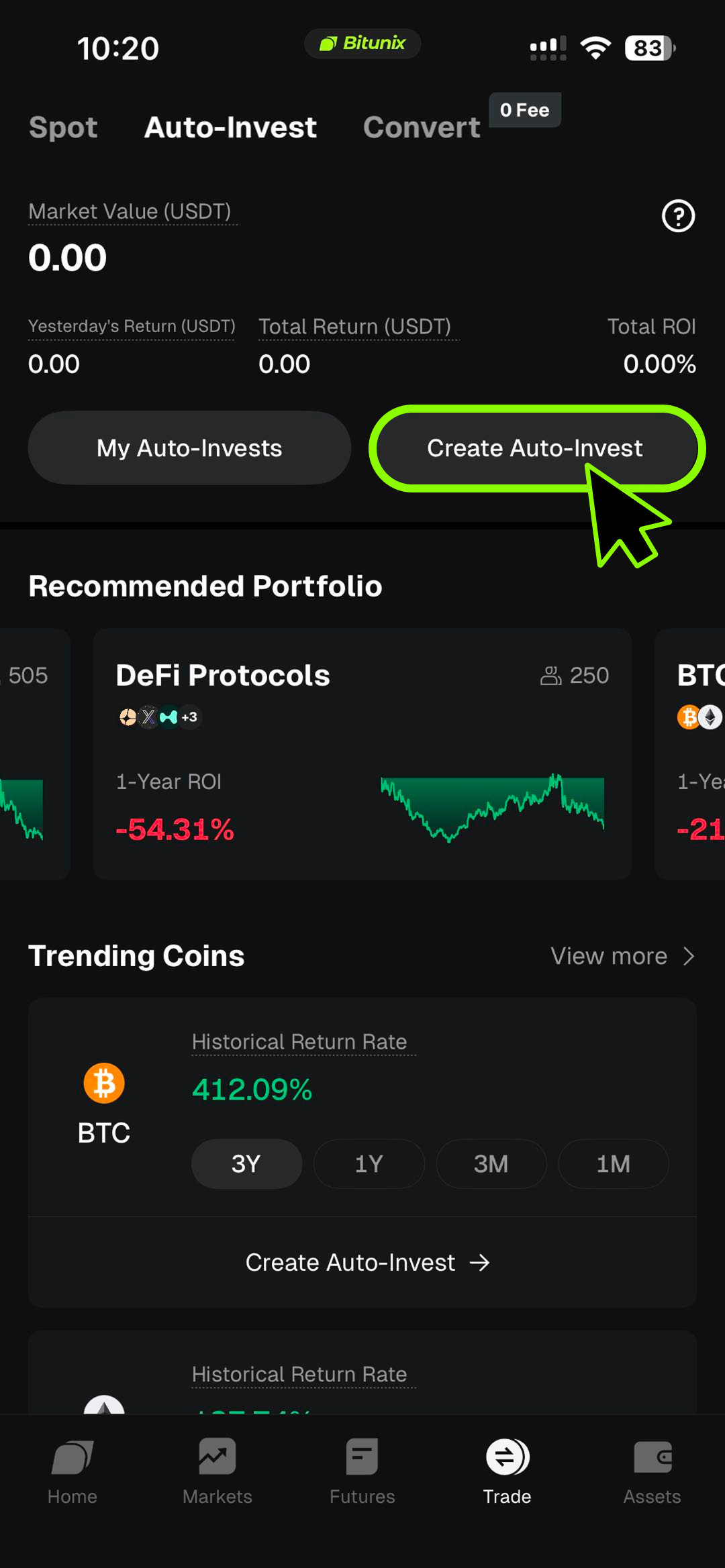
Step 1: Start a new plan
Open the Bitunix app and go to Spot Auto-Invest. Tap Create. You can choose a recommended portfolio or select popular crypto.
Step 2: Configure your plan
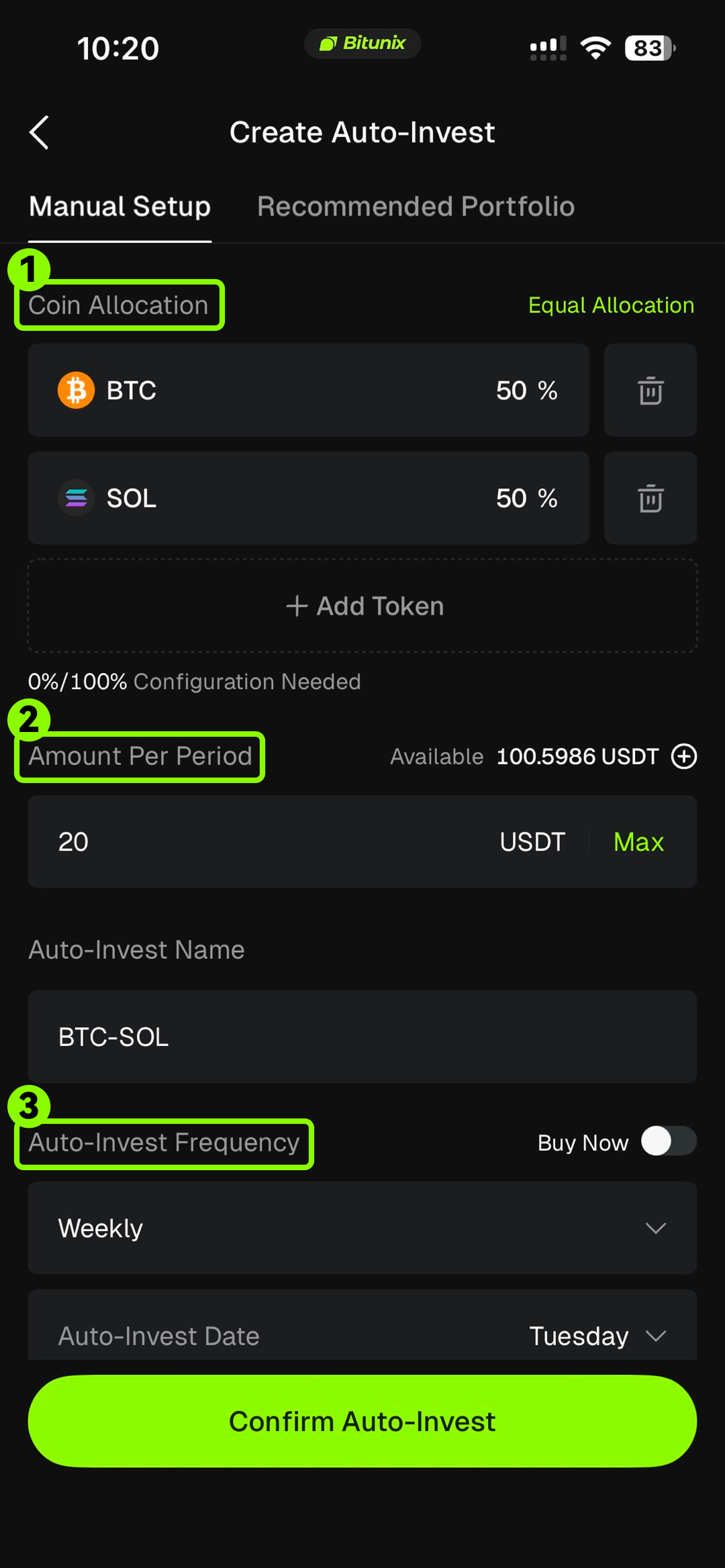
Set your investment frequency and start time, choose the crypto or portfolio, and enter the amount you want to invest in each cycle. You can also review the estimated performance information shown on the page.
Estimated performance is for reference only and is not a guarantee of future results.
Step 3: Confirm and activate
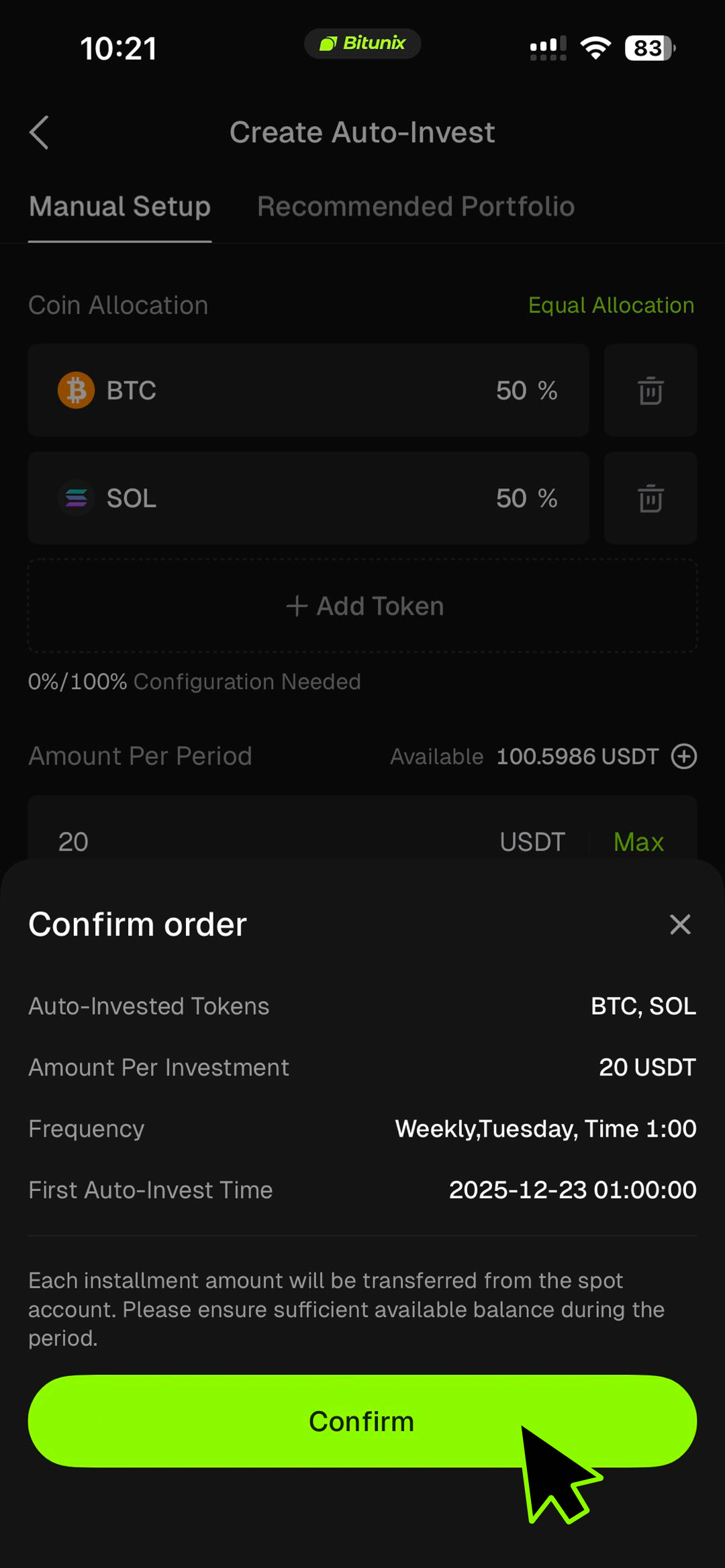
Tap Confirm to place your plan and begin your Auto-Invest schedule.
Prefer to place orders yourself? See How to Complete Spot Trading on Bitunix (App).
FAQ
Where are the assets purchased through Auto-Invest stored?
All assets purchased through Auto-Invest are deposited directly into your Spot account. The Auto-Invest plan page is used only to record and execute your plan. It does not hold assets.
What is the difference between Auto-Invest and regular Spot buying?
Auto-Invest buys on a fixed schedule automatically, which is better suited for long-term and disciplined investing. Regular Spot buying requires manual orders and is better suited for users who prefer active, hands-on trading.
What plan types can I create?
You can create:
- Single-coin Auto-Invest (for example, BTC, ETH)
- Recommended portfolios (for example, AI, DeFi, Top portfolios)
- Custom portfolios (up to 10 coins, with adjustable allocation ratios)
What is the minimum investment amount?
The minimum per order is 5 USDT for single-coin plans and 10 USDT for portfolio plans. You must also meet the minimum order requirements for the selected trading pairs.
When will my plan execute?
Your plan executes based on the local time you set when creating the plan. Profit and performance statistics are calculated using UTC+0 as the reference point.
What happens if my Spot account balance is insufficient?
If your Spot balance is insufficient, the scheduled purchase will not be executed and you will receive an insufficient balance notification. After you add funds, future scheduled purchases will resume automatically.
Can I pause or stop my plan?
Yes. You can pause, resume, or stop your Auto-Invest plan at any time. If you stop the plan, future purchases will not be executed, but the crypto you already purchased will remain in your Spot account.
Disclaimer
This article is for informational purposes only and does not constitute:
(i) investment advice or investment recommendations;
(ii) an offer or solicitation to buy, sell, or hold digital assets; or
(iii) financial, accounting, legal, or tax advice.
Digital assets (including stablecoins and NFTs) involve significant risk and may be highly volatile. Carefully consider whether trading or holding digital assets is suitable for you based on your financial situation. Consult qualified professionals for advice specific to your circumstances. You are responsible for understanding and complying with applicable local laws and regulations.