

What is a Limit Order?
A limit order allows you to set a specific price at which you want to buy or sell. The order will only be executed if the market reaches your specified price or better.
Key characteristics
- You define the execution price.
- The order may not be filled immediately or at all.
- Suitable for traders who prioritize price control.
Advantages of Limit Orders
- Better price control: You avoid buying higher or selling lower than expected.
- Reduced slippage: Orders are executed only at your chosen price.
- Ideal for planned entries and exits: Useful when trading at key support or resistance levels.
What is a Market Order?
A market order is executed immediately at the best available price in the market.
Key characteristics
- Executes instantly.
- Price is determined by market liquidity.
- May experience slippage in volatile markets.
Advantages of Market Orders
- Fast execution: Ideal when speed is more important than price.
- High certainty of execution: Especially useful in fast-moving markets.
- Simple and straightforward: Suitable for beginners.
What is a Trigger Order?
A Trigger order is an order that is triggered only when the market price reaches a preset trigger price. Once triggered, the order will be placed automatically as a limit or market order.
Key characteristics
- Requires a trigger price.
- Order is inactive until the trigger condition is met.
- Can be used for entry, take profit, or stop loss.
Advantages of Trigger Orders
- Automated execution: No need to monitor the market constantly.
- Better risk management: Commonly used for stop-loss and take-profit strategies.
- Suitable for volatile markets: Helps capture opportunities or control losses.
What is a Trailing Order?
A trailing order dynamically adjusts the trigger price as the market moves in your favor. When the price reverses by a predefined amount, the order is triggered.
Key characteristics
- Trigger price moves automatically with market price.
- Locks in profits while allowing further upside.
- Requires a trailing distance or percentage.
Advantages of Trailing Orders
- Protect profits dynamically: Profits are locked in as the market moves favorably.
- No need to predict the top or bottom: Let the market decide.
- Ideal for trend-following strategies: Especially in strong directional markets.
Trading settings for limit order and market order
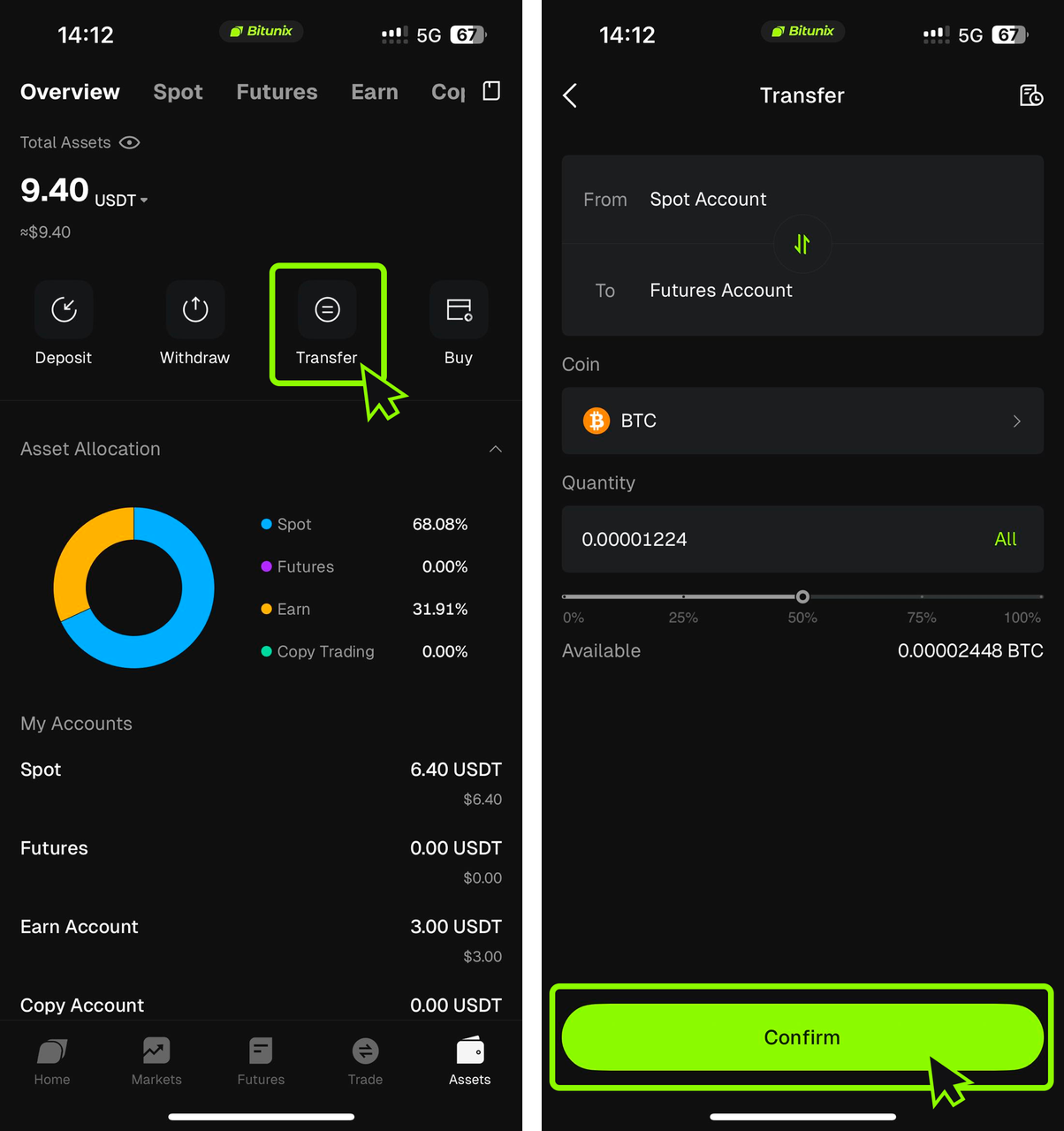
Step 1: Transfer assets
- Open the Bitunix app. Tap Assets in the bottom bar.
- Tap Transfer.
- Set From to Spot Account and To to Futures Account.
- Under Coin, select USDT.
- Enter the Quantity and tap Confirm.
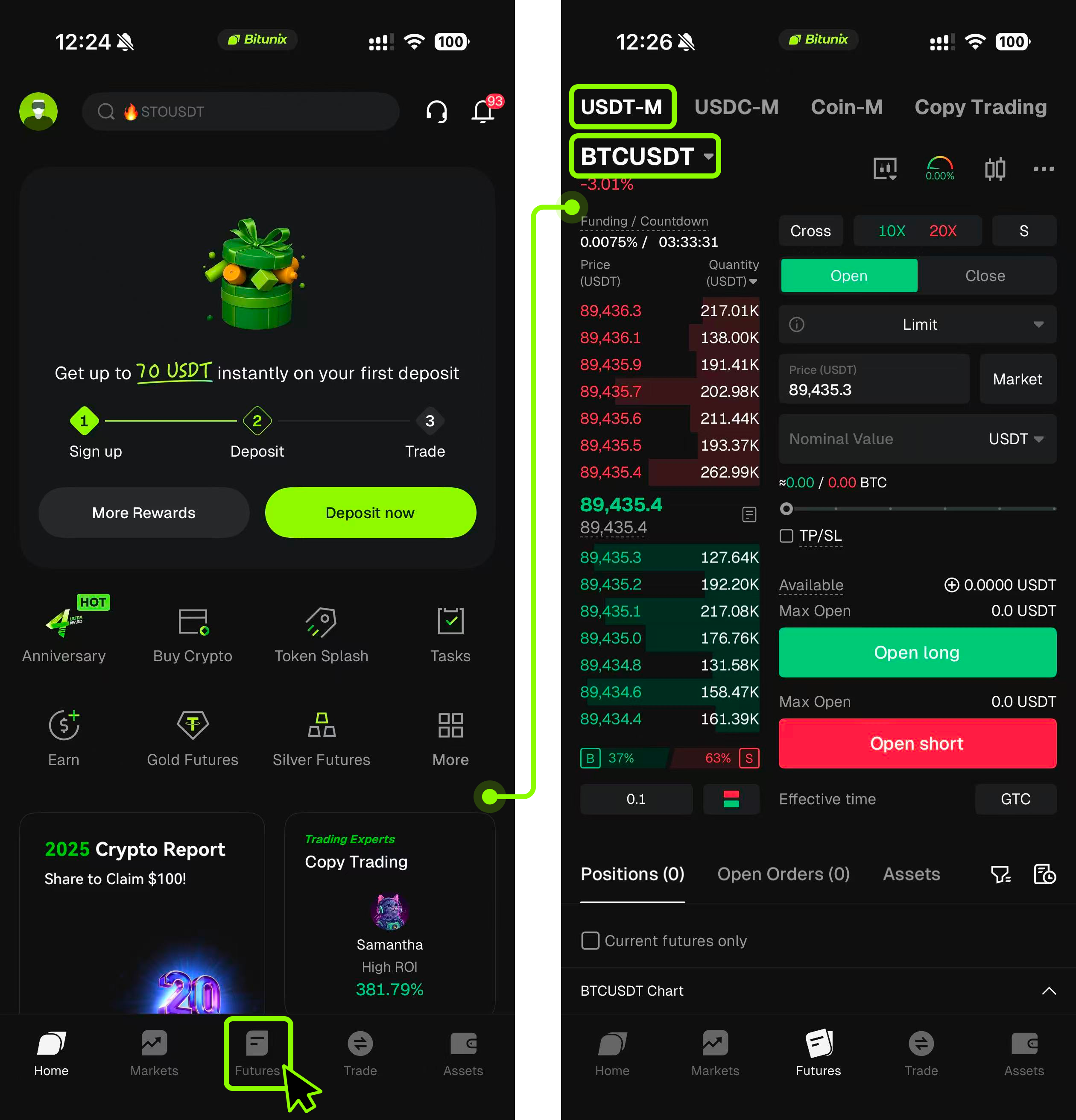
Step 2: Select a trading pair
- Tap Futures on the top navigation bar.
- On the menu, tap the symbol at the top left (USDT Perp Future) and then tap one of the trading pairs (BTCUSDT) for example.
- Use Search or pick a contract from the list and select BTCUSDT.
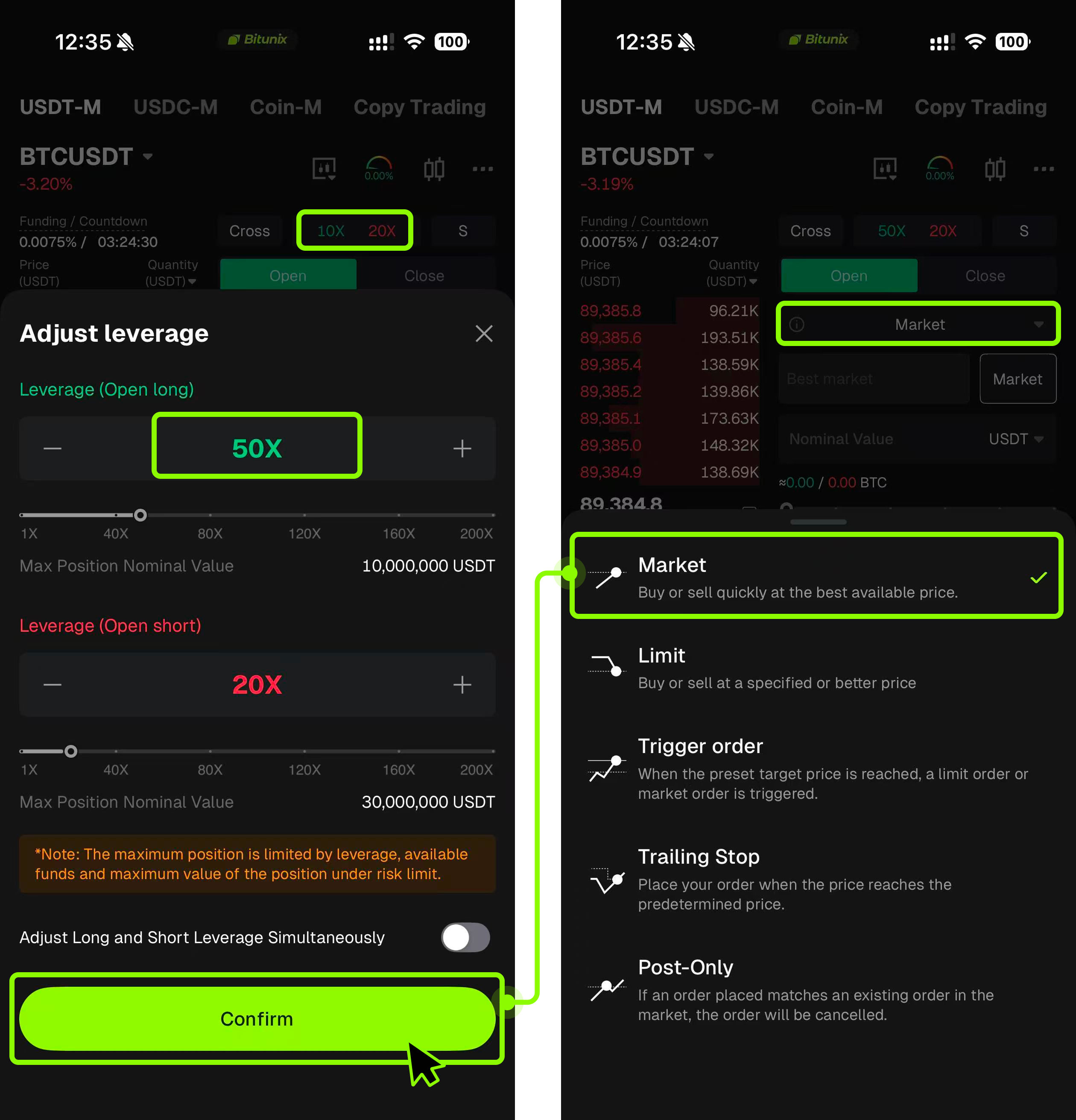
Step 3: Set leverage and order type
- In the order panel, tap the leverage display (for example 50X) to open Adjust leverage.Set the desired leverage for Open long and Open short.You may enable Adjust Long and Short Leverage Simultaneously if needed.Tap Confirm.
- Choose the Order type. Tap the order-type selector and pick Limit, Market.A Market order will execute at the current market price.A Limit order will execute at your specified price.
Position Mode and Margin Models
Cross vs. Isolated margin
- Cross margin The account’s margin is shared across all open positions. Profits and losses from different positions can offset one another.
- Isolated margin Margin is assigned to each position independently. The PnL and liquidation risk of one position do not affect another.
- Both Cross and Isolated margin modes are supported.
Asset model
- Single-currency margin Uses one coin as margin. Cross-asset offset is not supported. Risks of assets in the futures account are separated by currency.
- Joint margin model Supports cross-asset futures margin where eligible assets in the futures account can provide mutual margin. Profits and losses across margin assets can offset one another under this model.
Only full account settlement is supported for the joint margin model.
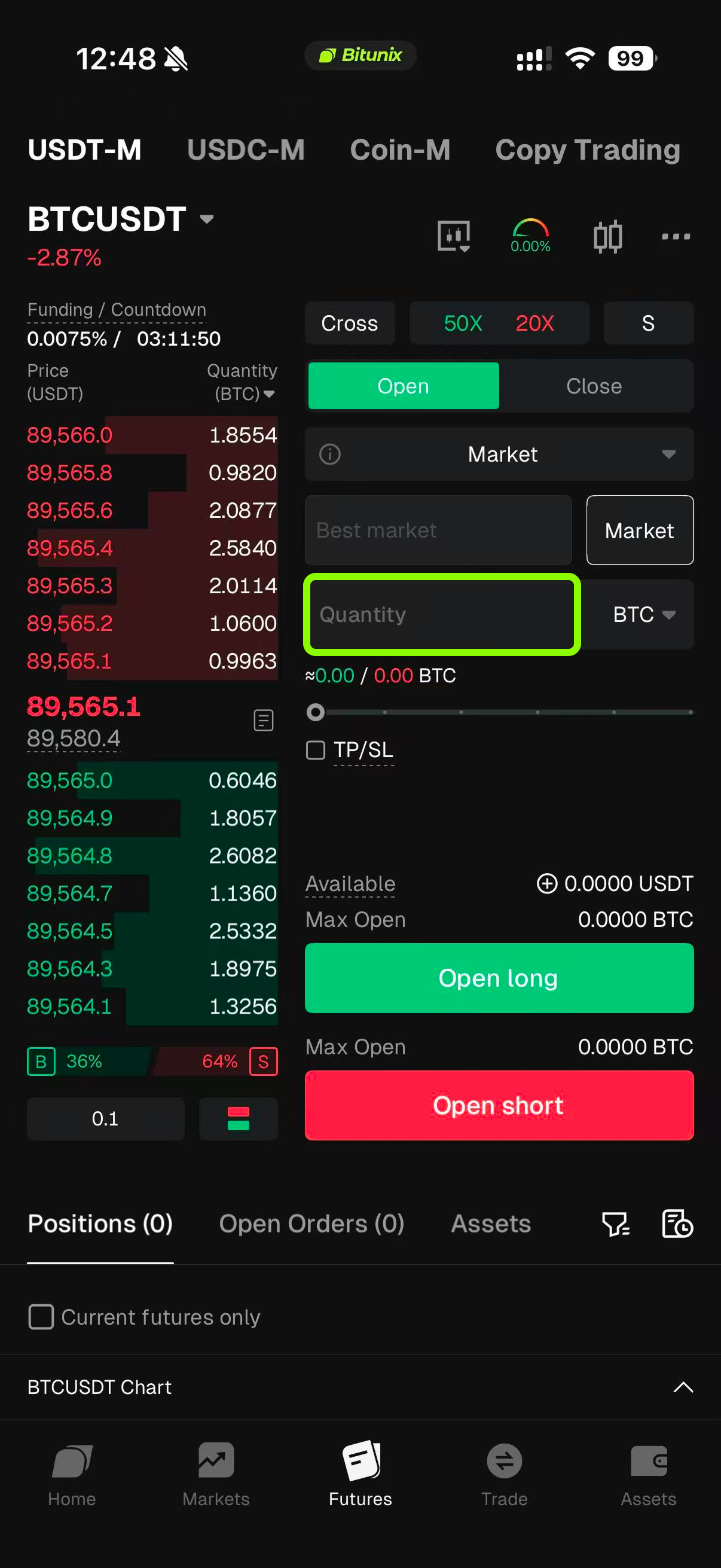
Step 4: Enter the order size
- Enter quantity in contracts or amount.Quantity unit: How many tokens you would like to open with and you can see how much USDT would cost beneath.USDT(Cost Value): When placing orders based on the cost value, adjusting the leverage will not affect the cost.USDT(Nominal Value): The position opening cost varies with leverage when using the underlying asset's market value.
- Choose your order type. In your screenshots the panel shows Market.
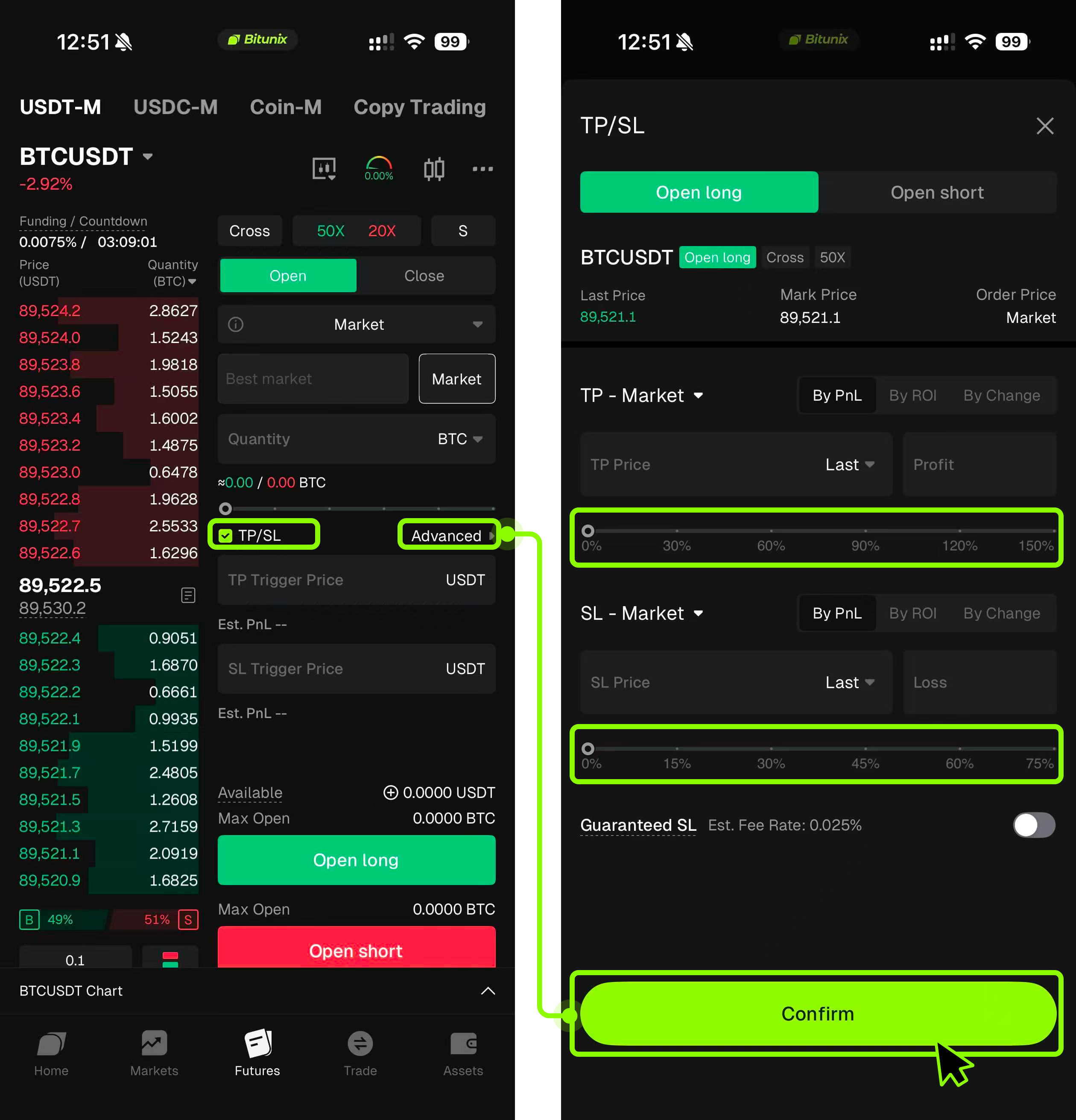
Step 5: Set Take Profit / Stop Loss and place an order
- Before the order is filled, click TP/SL on order panel.
- In the TP/SL window, set your take-profit and stop-loss parameters.
- Tap Open long to buy or Open short to sell.
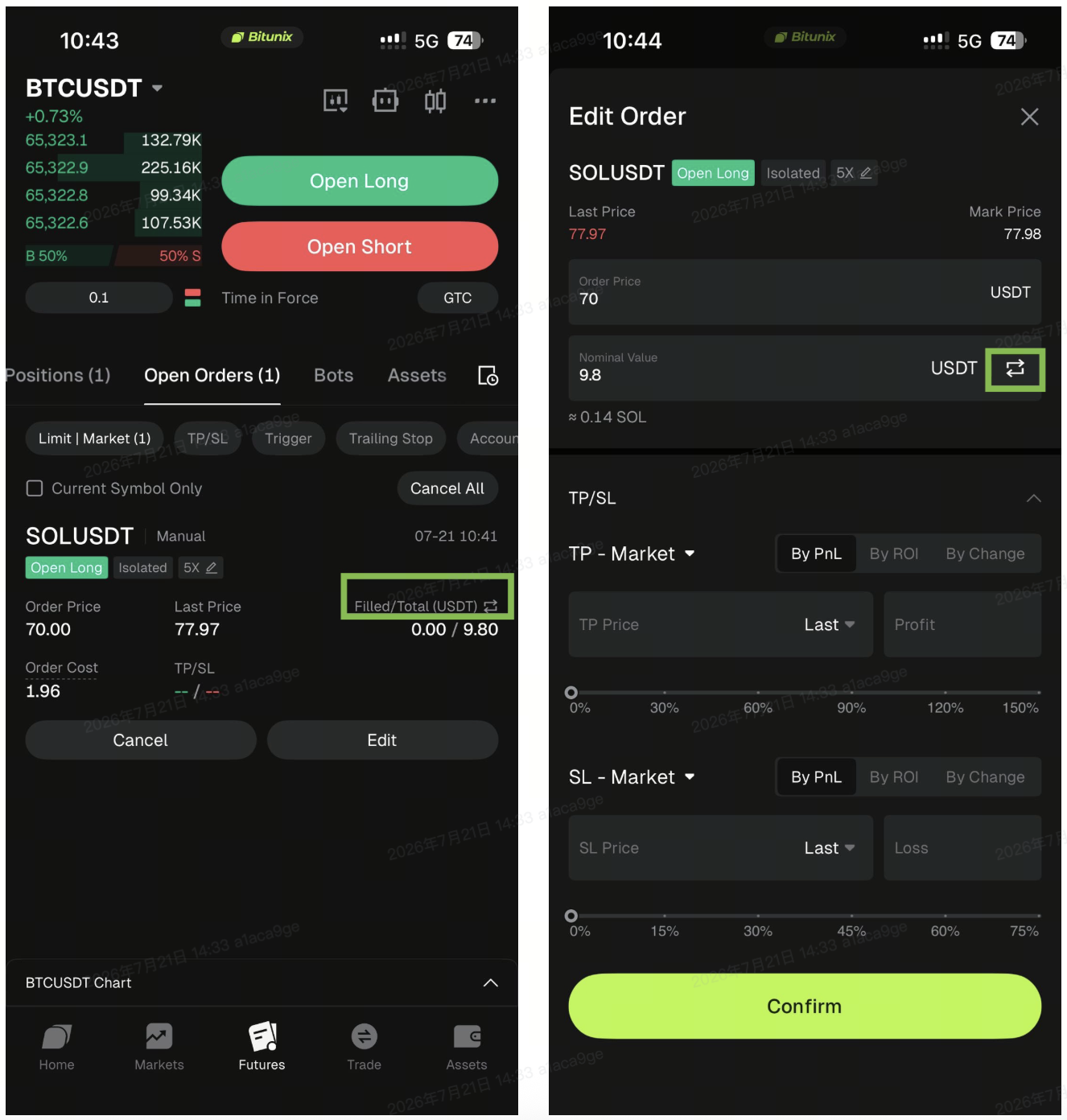
New Feature
In Limit Order mode, the Open Orders section now supports switching between【Quantity】and【Position Size】. You can select the preferred order unit based on your trading habits and maintain a consistent valuation method during market fluctuations, making order management clearer and more efficient.
Trading settings for trigger order and trilling order
Step 1: Set leverage and order type
- In the order panel, tap the leverage display (for example 50X) to open Adjust leverage.Set the desired leverage for Open long and Open short.You may enable Adjust Long and Short Leverage Simultaneously if needed.Tap Confirm.
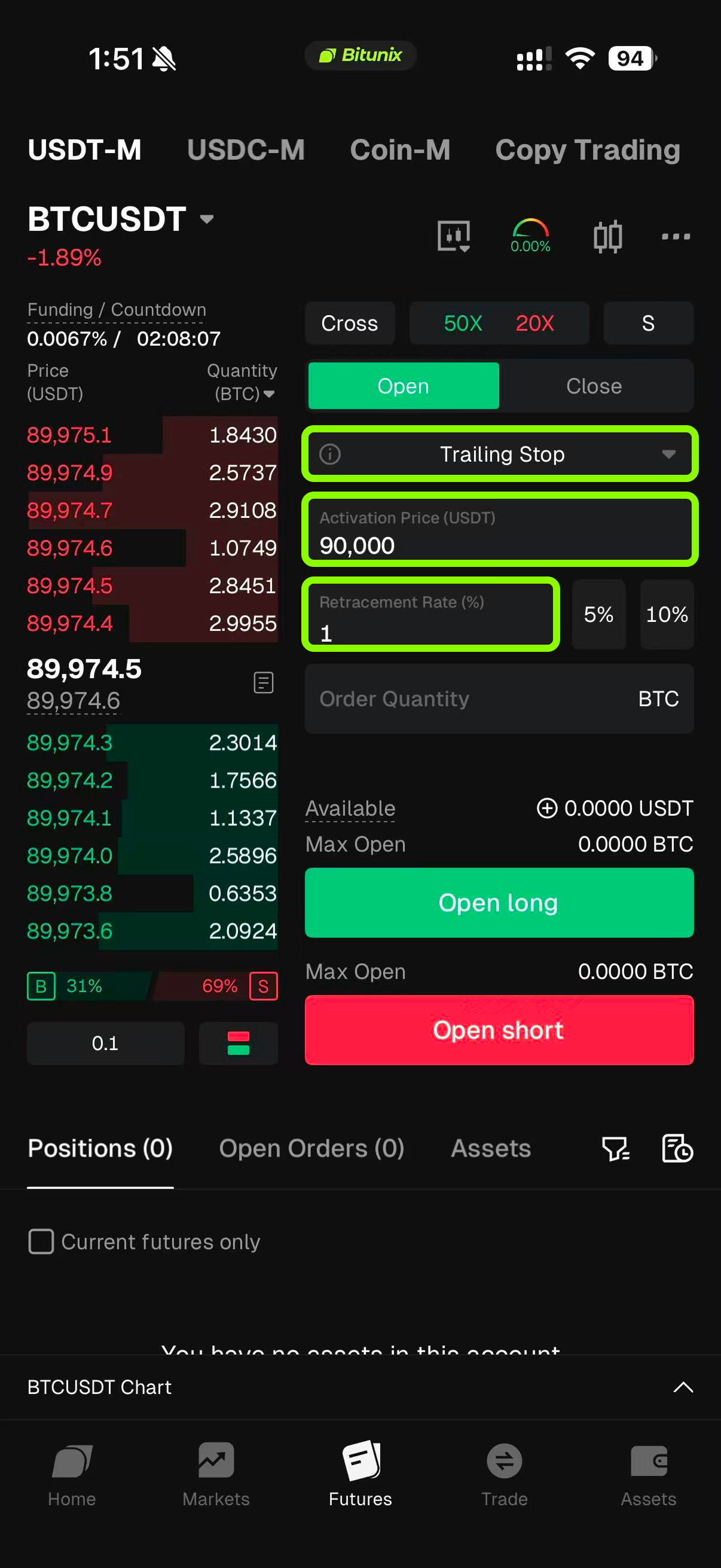
- Choose the Order type. Tap the order-type selector and pick Trigger order, or Trailing Stop.A Trigger order is an order that is triggered only when the market price reaches a preset trigger price. Once triggered, the order will be placed automatically as a limit or market order.A trailing order dynamically adjusts the trigger price as the market moves in your favor. When the price reverses by a predefined amount, the order is triggered.
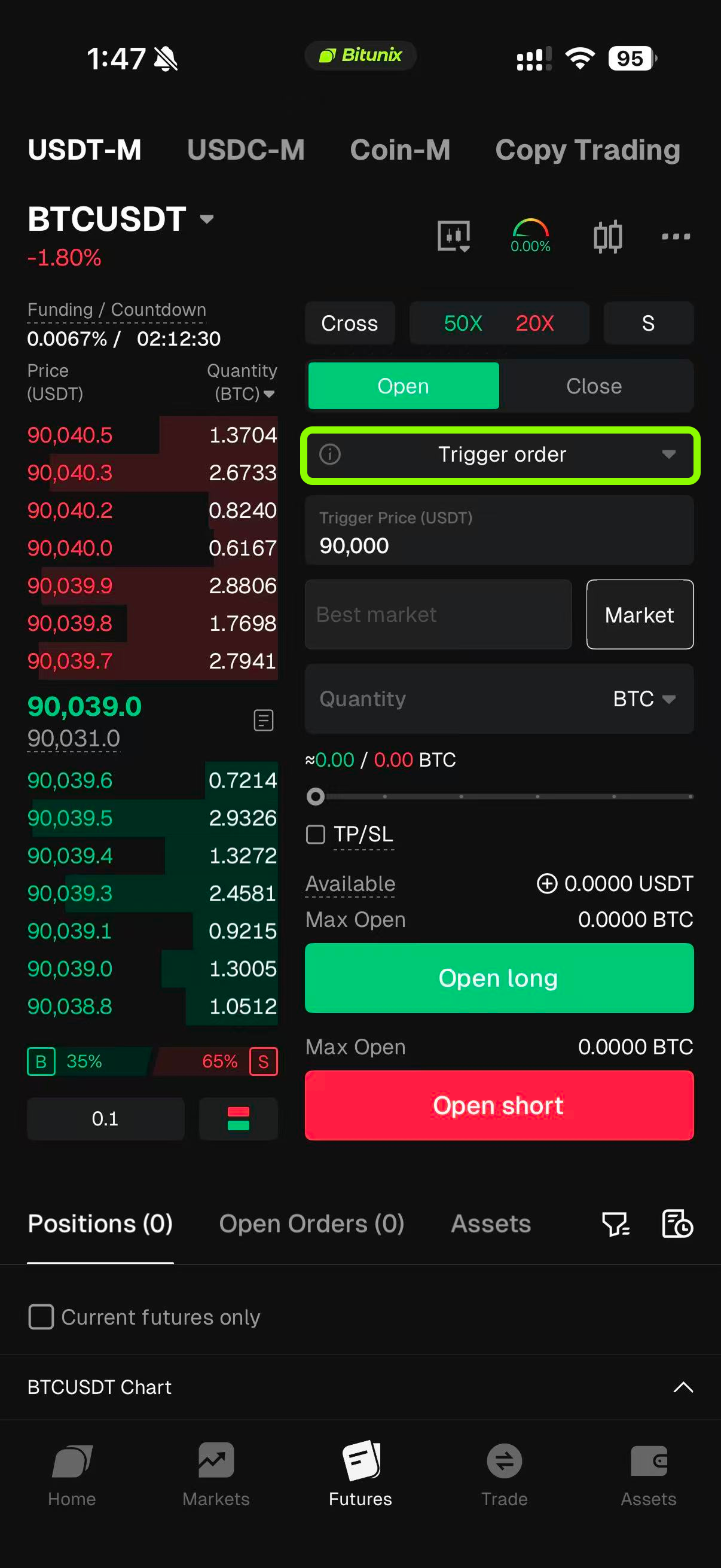
Step 2: Enter the order size
- For trigger order, enter the trigger price. The trigger price is the price condition that activates your order.
- Enter the best market price, or enter the limit price.When entering the best market price, order will be placed immediately after trigger price has been reached.When entering limit price, order will first be active when trigger price has been reached. Order will then be placed after hitting the limit price.
- Enter quantity in contracts or amount.Quantity unit: How many tokens you would like to open with and you can see how much USDT would cost beneath.USDT(Cost Value): When placing orders based on the cost value, adjusting the leverage will not affect the cost.USDT(Nominal Value): The position opening cost varies with leverage when using the underlying asset's market value.
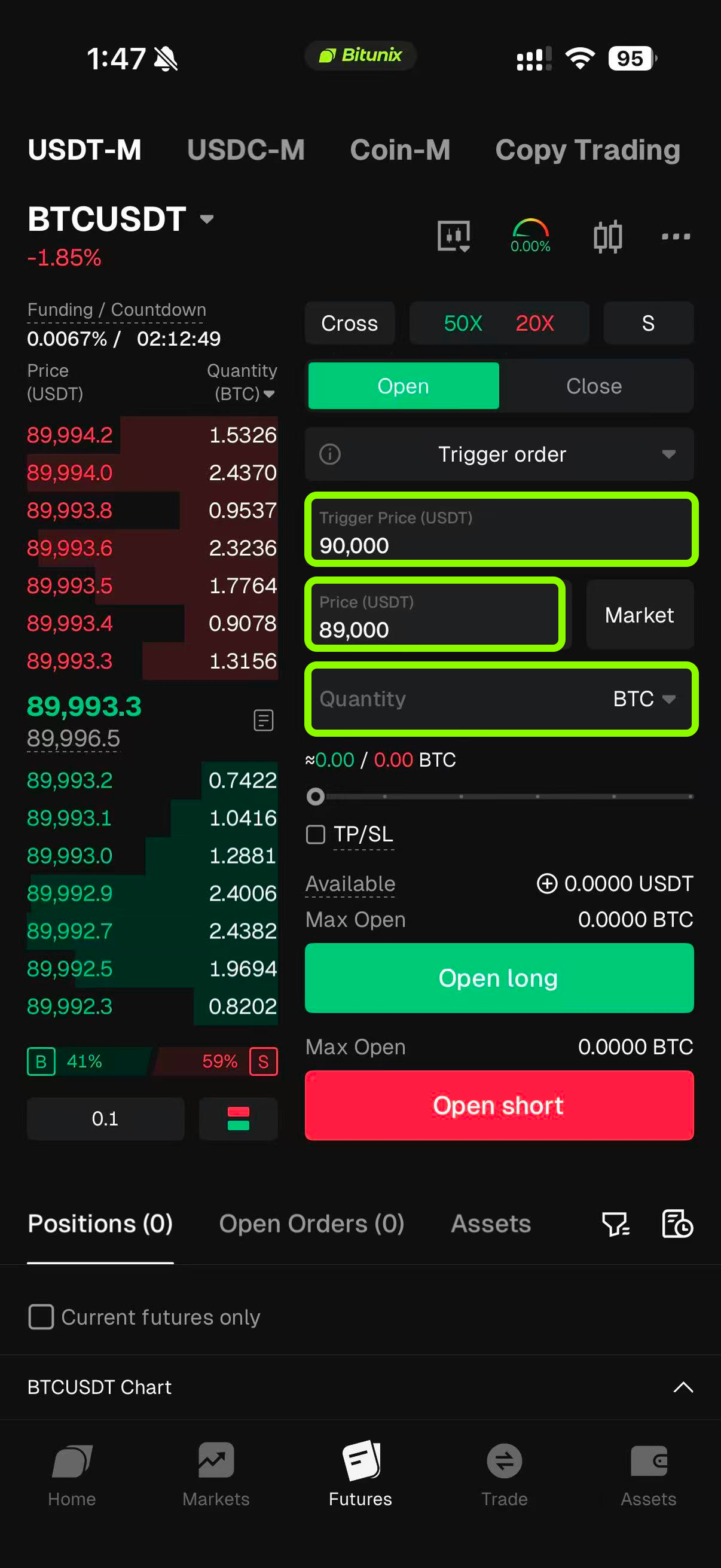
4. For trilling order, first enter the activation price. The price at which the trailing mechanism starts.
5. Enter the percentage range, 1% for example. The percentage is price must retrace from its best level before the order is executed.
6. How It Works (Long Example)Market price is below the activation price → order is inactiveMarket price reaches the activation price → tracking beginsPrice makes new highs → trailing reference moves up automaticallyPrice retraces by the set percentage → order is triggered and executed
Step 3: Set Take Profit / Stop Loss and place an order
- Before the order is filled, click TP/SL on order panel.
- In the TP/SL window, set your take-profit and stop-loss parameters.
- Tap Open long to buy or Open short to sell.
Conclusion
Understanding the differences between limit, market, trigger, and trailing orders is essential for effective futures trading on Bitunix, as each order type serves a specific role—from precise price control and immediate execution to automated entries, exits, and dynamic risk management. Limit and market orders are suitable for straightforward execution needs, while trigger and trailing orders help traders plan ahead, reduce emotional decision-making, and adapt to changing market conditions. Regardless of the order type used, disciplined leverage selection, proper margin mode configuration, and consistent use of take-profit and stop-loss settings are critical, since futures trading amplifies both potential gains and losses. By applying the right order type to the right market scenario, traders can improve execution quality, manage risk more effectively, and build a more structured and professional trading approach on Bitunix.
Disclaimer
This article is not intended to provide:
(i) investment advice or investment recommendations;
(ii) an offer, invitation, or solicitation to buy, sell, or hold digital assets;
(iii) financial, accounting, legal, or tax advice.
Digital assets, including stablecoins and NFTs, carry significant risk and price volatility. Evaluate whether trading or holding digital assets is appropriate for your financial situation. Seek guidance from your legal, tax, or investment adviser regarding your specific circumstances.
Bitunix assumes no responsibility for any investment outcomes. You are solely responsible for understanding and complying with all applicable local laws and regulations.