

What Is the Bitunix Drawing Alert Function?
Bitunix’s drawing alert function is an intelligent market monitoring tool built with chart drawing features. It helps traders set trading signal alerts, such as channels and trend lines, to automatically monitor market movements, send timely reminders, optimize trading decisions, and improve operational efficiency.
1、Core Advantages of the Bitunix Drawing Alert Function
- Multi-Format Adaptation Covering Different Trading Signal Scenarios The function supports trend lines, parallel channels, and other mainstream drawing tools. Parallel channels are especially useful for setting upper and lower channel alerts, entry and exit zones, rail target prices, and other multi-dimensional alert conditions. These tools can be applied to trends, ranges, interval breakouts, and other trading strategies.
- Intelligent Multi-Channel Alerts That Reduce Manual Monitoring The system automatically monitors the market. Once the trigger conditions are met, users receive real-time notifications through multiple channels, such as the app, email, and Telegram. This removes the need for 24-hour manual chart monitoring and helps traders shift from passive observation to active decision-making, improving trading efficiency.
- Stronger Risk Control and Fewer Emotional Trading Decisions Users can set early warning boundaries for scenarios such as channel breakouts, take-profit levels, and stop-loss levels. When the market deviates from the preset range, the system sends timely alerts to help users follow their trading plans, reduce hesitation, avoid emotional decisions, and maintain risk control discipline.
2、Supported Drawing Tools and Applicable Scenarios
Currently, Bitunix supports six types of drawing alert tools, covering mainstream trading signal needs.
| Drawing Tool Type | Core Alert Rules / Trigger Conditions | Applicable Scenarios |
| Trend Line / Ray / Information Line / Extended Line / Trend Angle | Breaks above, breaks below, moves through, greater than, lower than | Trend breakouts, key support and resistance level alerts, trend tracking, and reversal signal capture |
| Parallel Trend Lines / Parallel Channels | Supports parallel channel alerts, including upper band touch, lower band touch, breakout above, breakout below, enter channel, exit channel, and inside or outside the channel. Target prices can be set for the upper rail, middle rail, and lower rail. | Range trading, trend channel breakout and retracement alerts, band trading, and volatility-based market strategies |
3、Bitunix Chart Alert Setup Steps
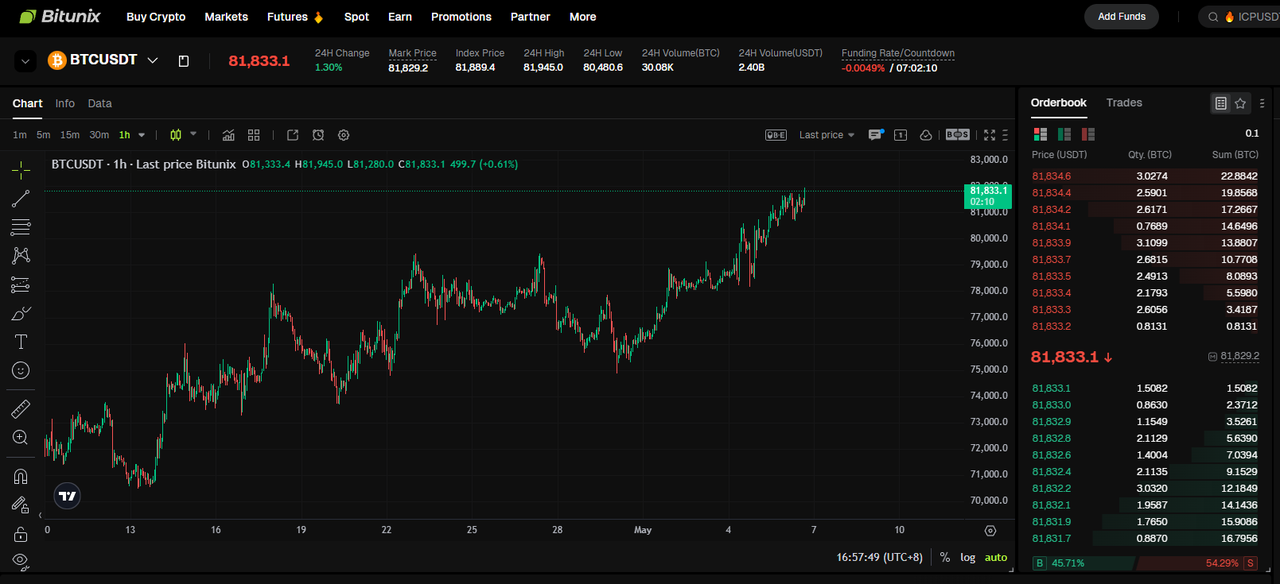
Step 1: Enter the Futures Trading Interface
Open the Bitunix Futures Trading page and enter the market chart for the target trading pair you want to follow, such as BTCUSDT.
Step 2: Select the Target Market and Timeframe to Draw the Parallel Channel
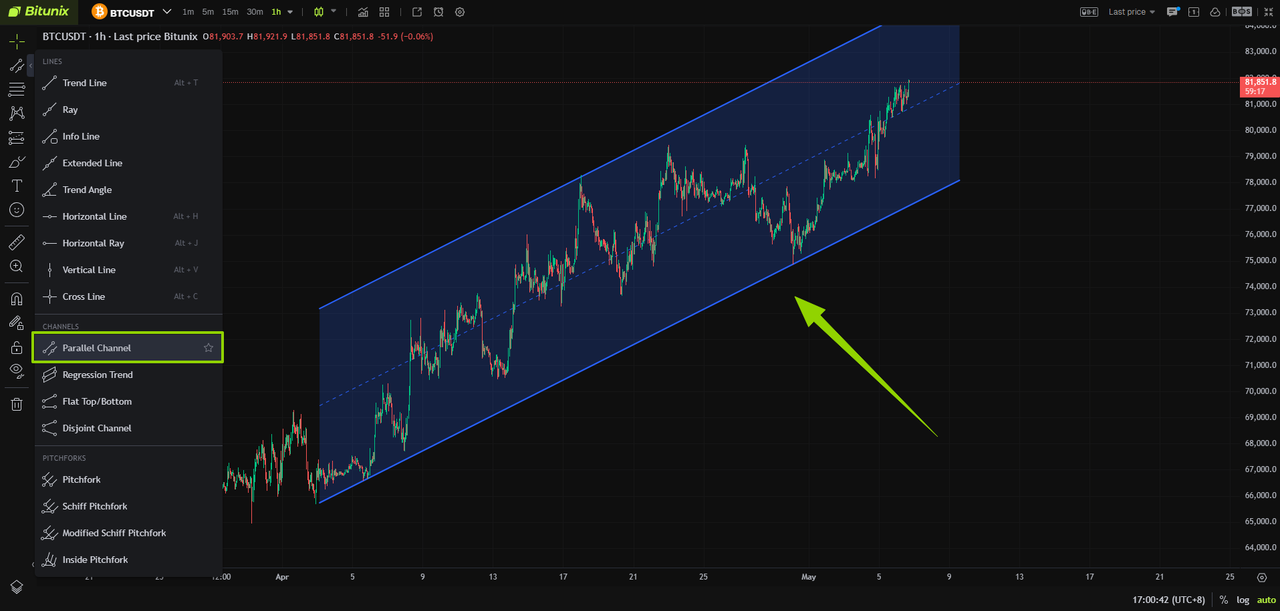
Using the BTCUSDT futures contract on the 1-hour timeframe as an example, select the Parallel Channel tool from the left toolbar, then draw the channel directly on the chart.
Step 3: Open the Alert Settings
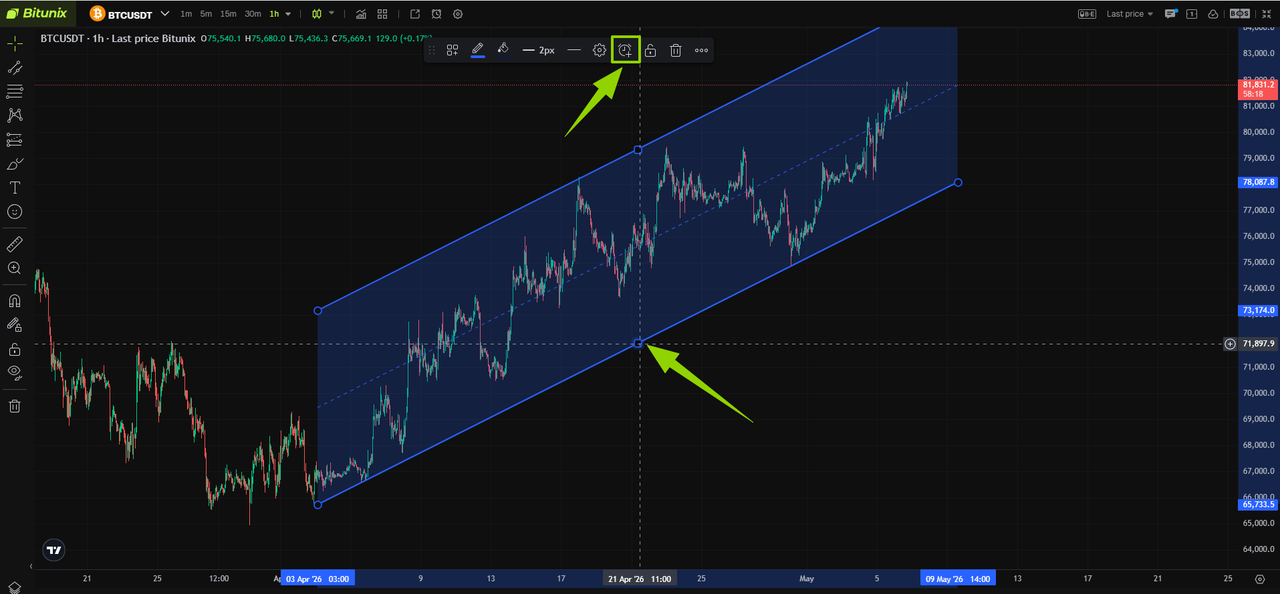
Select the parallel channel you have drawn. When the alarm icon appears, click the icon to open the alert creation dialog box.
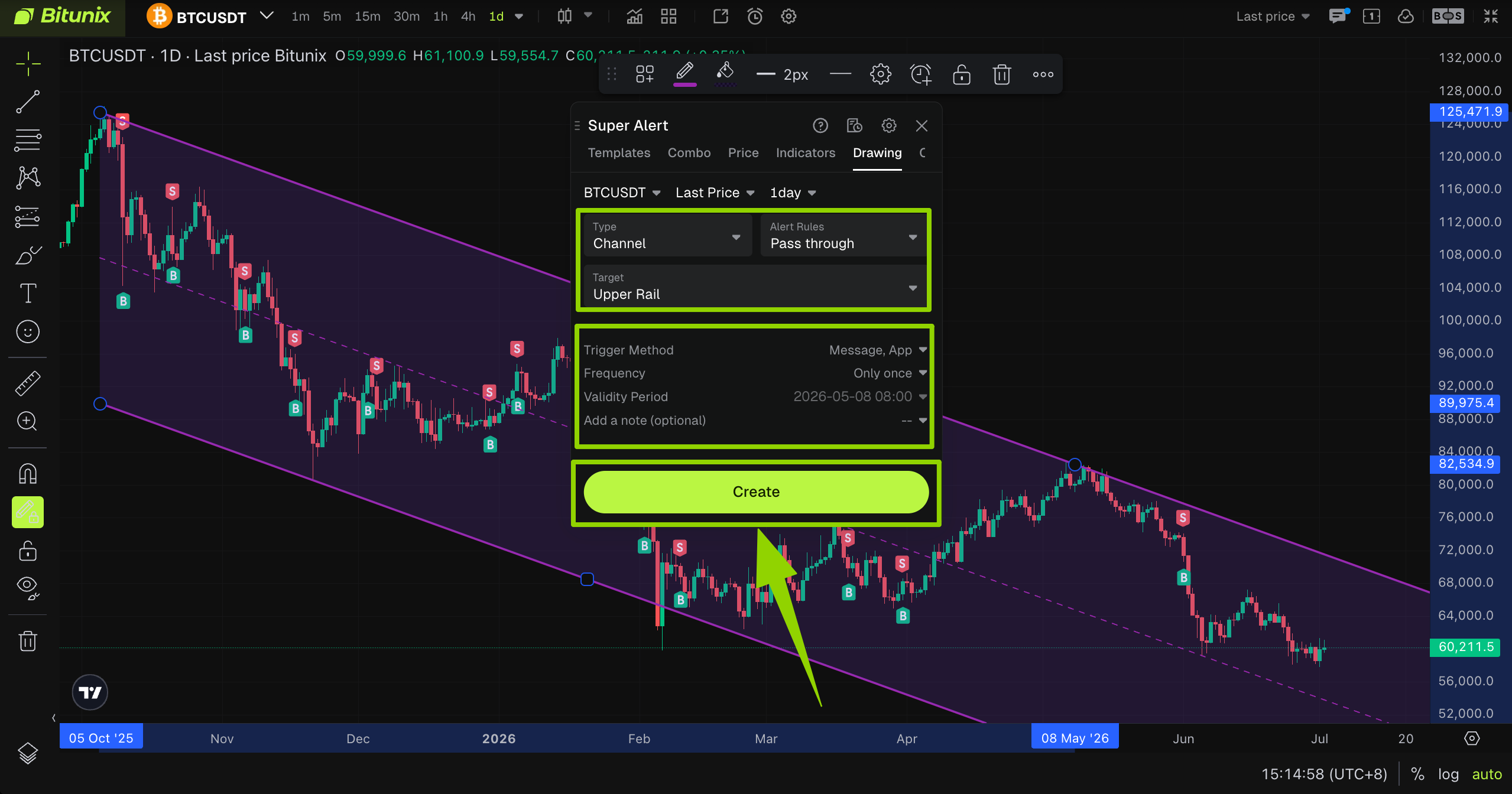
Step 4: Configure the Alert Parameters
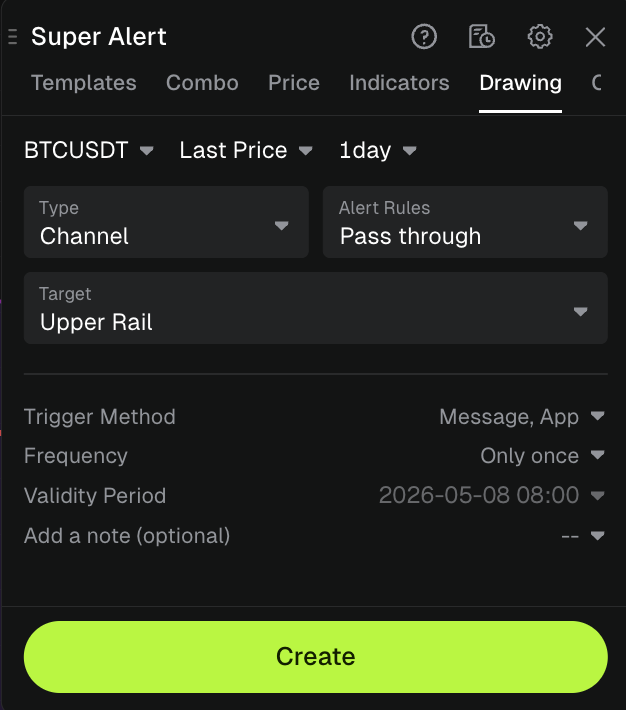
Set reasonable trigger conditions based on technical indicators, such as Fibonacci retracement levels, support and resistance levels, or the channel structure.
For example, users can set an alert when the price crosses the lower rail of the parallel channel to monitor whether support remains valid. If the price breaks below the lower rail, the system can send a short-term warning signal.
Drawing Alert Configuration Guide
| Drawing Tool Type | Alert Rules / Trigger Conditions | Trigger Method | Alert Frequency / Time | Remarks |
| Trend Line | Line alerts can be triggered when the price crosses through, breaks above, breaks below, is greater than, or is lower than the selected line. | In-app notification, app alert, email, Discord, Telegram | Single reminder, every time the condition is met, or until the expiration date | Example: BTC uptrend line breakout alert |
| Ray | Line alerts can be triggered when the price crosses through, breaks above, breaks below, is greater than, or is lower than the selected ray. | In-app notification, app alert, email, Discord, Telegram | Single reminder, every time the condition is met, or until the expiration date | Example: price breakout alert |
| Information Line | Line alerts can be triggered when the price crosses through, breaks above, breaks below, is greater than, or is lower than the selected information line. | In-app notification, app alert, email, Discord, Telegram | Single reminder, every time the condition is met, or until the expiration date | Example: key level alert |
| Extension Line | Line alerts can be triggered when the price crosses through, breaks above, breaks below, is greater than, or is lower than the selected extension line. | In-app notification, app alert, email, Discord, Telegram | Single reminder, every time the condition is met, or until the expiration date | Example: extended trend breakout alert |
| Trend Angle | Line alerts can be triggered when the price crosses through, breaks above, breaks below, is greater than, or is lower than the selected trend angle. | In-app notification, app alert, email, Discord, Telegram | Single reminder, every time the condition is met, or until the expiration date | Example: trend angle breakout alert |
| Parallel Trend Lines / Parallel Channel | Channel alerts can be set for conditions such as crossing through the channel, touching the lower rail, breaking through the upper rail, entering the channel, leaving the channel, or staying inside or outside the channel. Target prices can be set for the upper rail, middle rail, or lower rail. | In-app notification, app alert, email, Discord, Telegram | Single reminder, every time the condition is met, or until the expiration date | Example: BTC channel breakout or retracement alert |
Step 5: Confirm and Create the Alert
After verifying that all parameter settings are correct, click the Create button to complete the alert setup. The system will then automatically monitor the market based on the preset conditions.
Tutorials for detailed configuration of all alert types can be found in the corresponding dedicated documents:
- Indicator Alert: Capture market fluctuations via technical indicators
- K-Line Alert:dentify market signals based on candlestick patterns
- Price Alert: Trigger reminders when prices hit specified levels
- Template Alert: Apply preset strategies with one click to quickly generate combo alerts
- Combo Alert :Mix and match multiple conditions to achieve multi-dimensional composite triggering
FAQ
- Why does the alert not trigger?
Check whether the selected indicator is in the correct state, whether the parameter settings are accurate, such as the cycle and trigger value, and whether the notification channel is enabled.
- Why does the alert trigger repeatedly?
Adjust the alert frequency to Single Reminder Only, or optimize the trigger conditions by adding multi-indicator filters.
Disclaimer
This article is for informational purposes only and does not provide:
- Investment advice or investment recommendations;
- An offer or solicitation to buy, sell, or hold digital assets;
- Financial, accounting, legal, or tax advice.
- Digital assets, including stablecoins and NFTs, involve a high level of risk and may fluctuate significantly in value. Users should carefully consider whether trading or holding digital assets is suitable for their financial situation and personal circumstances. Please consult a qualified legal, tax, or investment professional for advice specific to your situation. Users are responsible for understanding and complying with all applicable local laws and regulations.