

1. Quick Overview
| Item | Details |
|---|---|
| Feature | Isolated Margin under Multi-Asset Margin Mode (Multi-Asset Isolated Margin) |
| Supported Platforms | Web and App |
| Prerequisites | The target trading pair must have no open positions or pending orders; the account must be in Multi-Asset Margin Mode and must not be a Copy Trading account |
| Key Capability | Isolates margin for each trading pair while allowing the use of the Multi-Asset Margin Mode's multi-asset collateral benefits |
| Unsupported Scenarios | Trading pairs with existing positions or pending orders; Copy Trading accounts |
| Key Risk Control | If the isolated margin balance is insufficient, the system may automatically borrow additional assets. New orders may be blocked once the borrowing limit or LTV threshold is reached |
| Fee Structure | The same trading fee rates as regular USDT-margined perpetual futures apply, with no additional feature fee |
2. Product Definition
The risk management framework for futures trading consists of two layers: Asset Mode and Position Mode.
Asset Mode determines which assets in your account can be used as futures margin and how risk is shared or correlated across different assets. Position Mode determines how margin and risk are shared or isolated between positions for different trading pairs.
Bitunix's Multi-Asset Isolated Margin feature is an advanced trading capability built on these two fundamental modes.
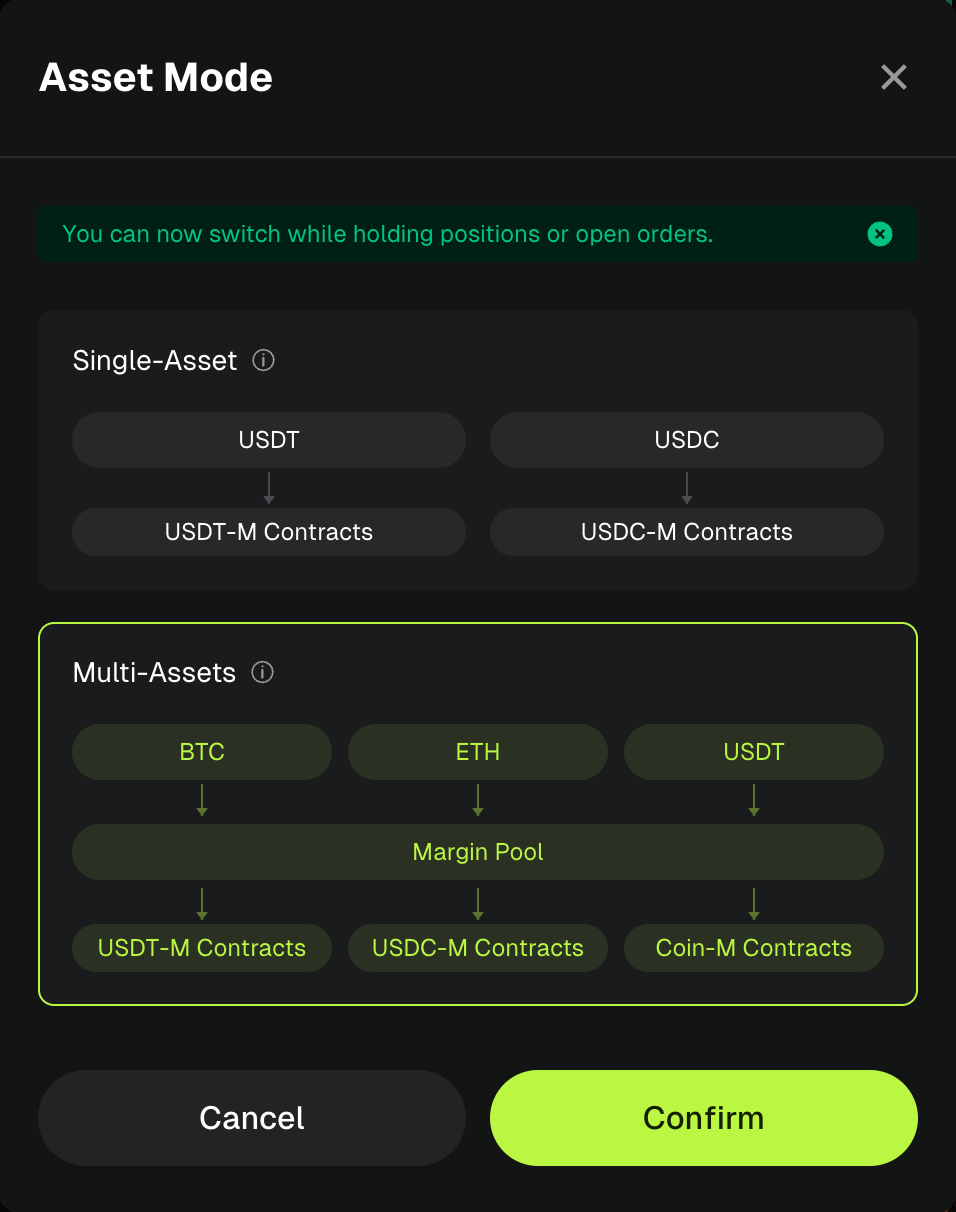
Asset Mode
1. Single-Asset Margin Mode
Single-Asset Margin Mode is categorized by the settlement asset into USDT-margined, USDC-margined, and Coin-margined modes. Each trading pair can only use its corresponding settlement asset as margin, while other assets are excluded from the margin valuation.
Key Rules: Cross-asset futures trading is not supported. Different assets in the Futures Account are completely isolated in terms of risk and do not affect one another. P&L can only offset between Cross Margin positions that use the same margin asset.
Position Mode Compatibility: Both Cross Margin and Isolated Margin are supported, making this the most basic and traditional futures trading mode.
2. Multi-Asset Margin Mode
Multi-Asset Margin Mode supports cross-asset futures trading, allowing eligible assets in the account, including BTC,ETH, SOL, XRP, BNB, DOGE, USDC, and USDT, to be used as futures margin. These assets are collectively included in a shared margin pool.
Key Rules: All eligible assets in the Futures Account can collectively support the account's margin requirements. P&L from Cross Margin positions using different margin assets can offset each other, allowing more efficient use of otherwise idle assets.
Position Mode Compatibility: Both Cross Margin and Isolated Margin are supported, and the position mode can be configured independently for each trading pair.
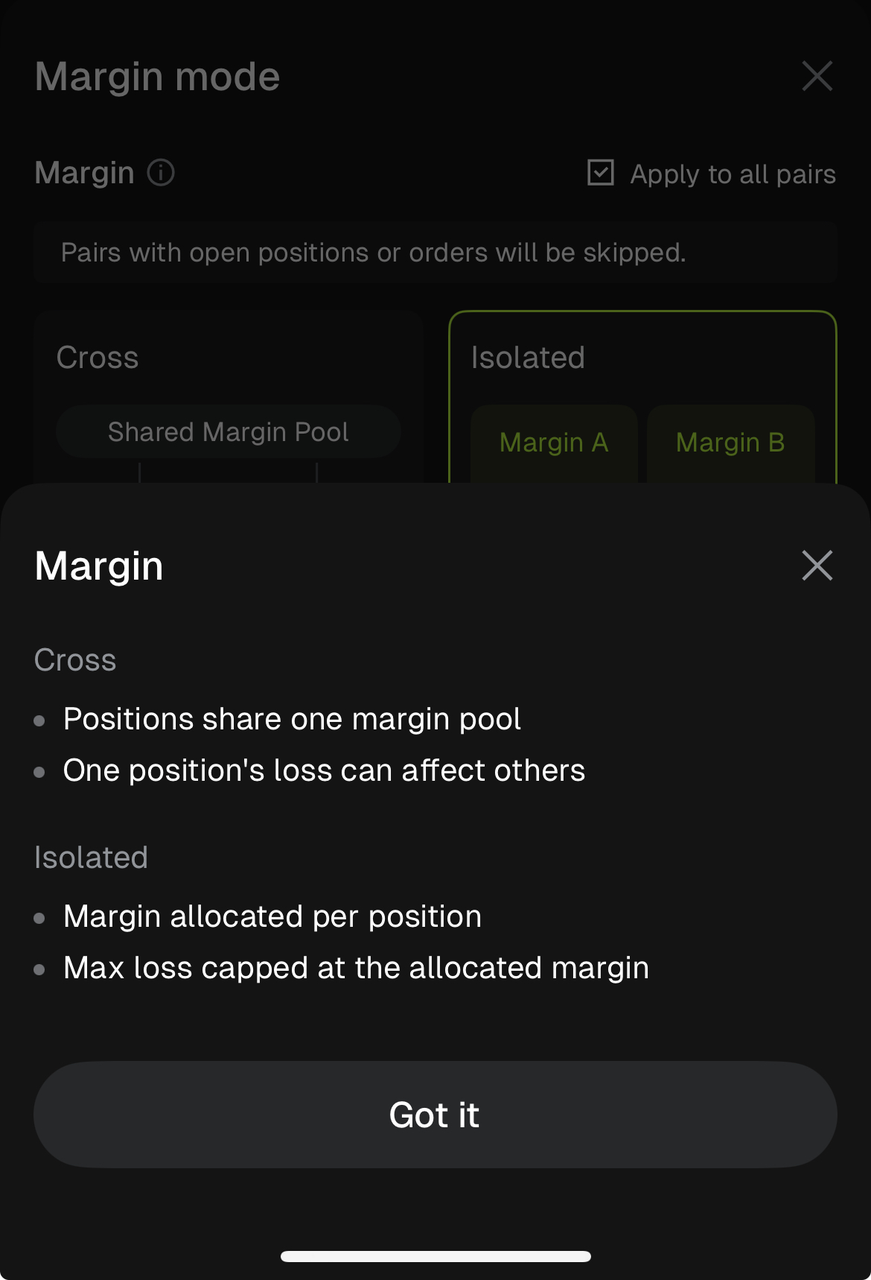
Two Core Position Modes
1. Cross Margin
Available margin is shared across the account, with positions drawing from the same margin pool. A loss on one position can consume the account's overall available margin, resulting in higher capital efficiency but greater risk interaction between positions.
2. Isolated Margin
A separate margin amount is allocated to each trading pair, isolating the risk of that position. The trading pair's P&L and margin usage are calculated independently. If the position is liquidated, the loss is generally limited to the margin allocated to that trading pair and does not directly affect funds allocated to other positions in the account.
Bitunix Multi-Asset Isolated Margin
Multi-Asset Isolated Margin is an advanced feature developed by Bitunix that extends the traditional Multi-Asset Margin Mode beyond its Cross Margin-only setup. When an account is in Multi-Asset Margin Mode, users can enable Isolated Margin independently for a specific trading pair, combining the benefits of shared multi-asset margin and isolated risk for individual trading pairs.
Key Benefits of Multi-Asset Isolated Margin
1.Combine Capital Efficiency with Targeted Risk Isolation
Compared with Single-Asset Isolated Margin, users do not need to convert all assets into the settlement asset before opening a position. Eligible assets such as BTC and ETH can be valued at a discount and used as margin, while Isolated Margin still keeps the risk of each trading pair separate. Losses from one trading pair do not directly affect other isolated positions.
Compared with traditional Multi-Asset Cross Margin, this feature provides an additional layer of risk isolation. Instead of having all positions share the same cross-margin risk, users can isolate higher-risk trading pairs while keeping other positions separate.
2.Flexible Configuration for Multiple Trading Strategies
Users do not need to switch the account's Asset Mode or create additional sub-accounts. Different margin configurations can be used within the same main account: Multi-Asset Cross Margin can be used for trading pairs where capital efficiency is a priority, while Multi-Asset Isolated Margin can be used to isolate risk on higher-volatility trading pairs. This allows different trading strategies and risk profiles to be managed within a single account.
3.Reduce Asset Conversion and Transfer Requirements
Users do not need to frequently convert existing assets into the required settlement asset or split funds across multiple sub-accounts for risk isolation, simplifying the overall trading workflow.
3. How to Use Multi-Asset Isolated Margin on the Bitunix App
Important: When using Multi-Asset Isolated Margin, Multi-Trade is not supported in either Cross Margin or Isolated Margin Mode.
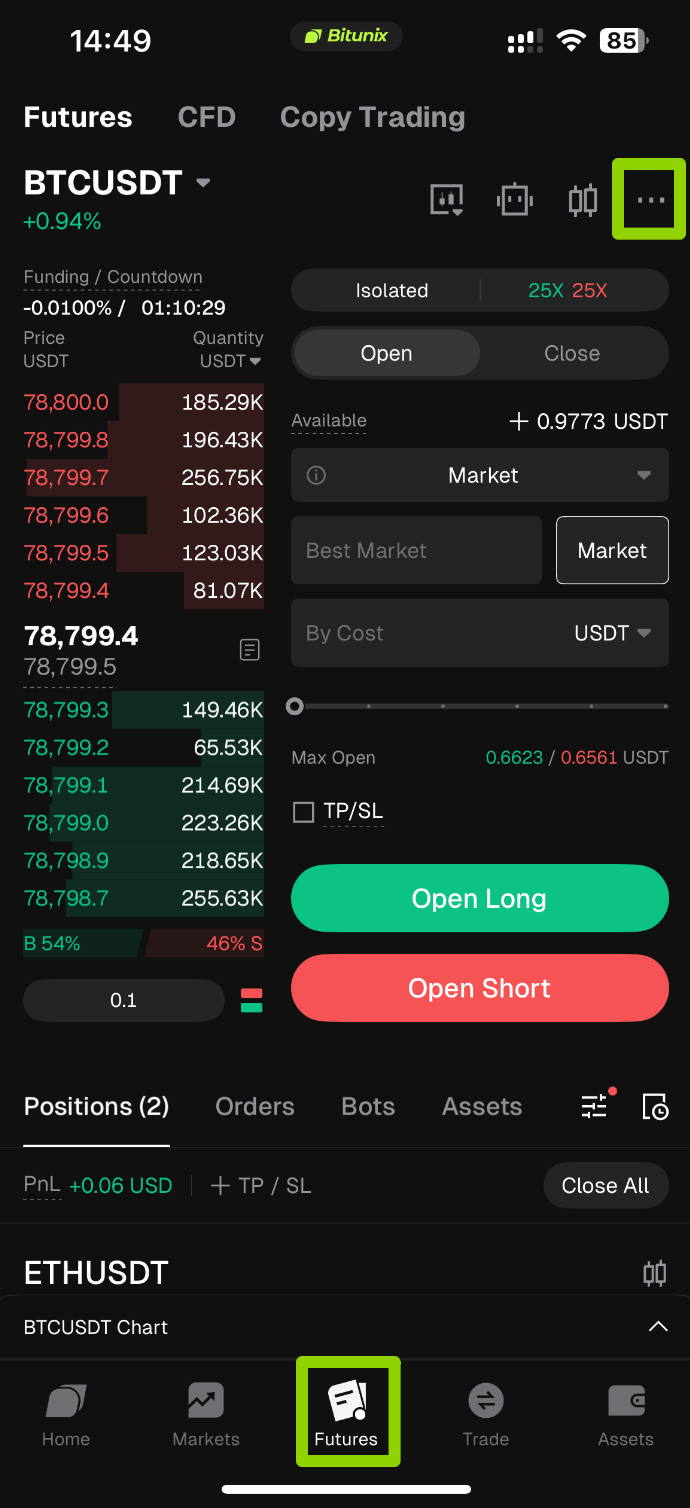
1. Open the Bitunix App and go to the Futures trading page from the bottom navigation bar. Tap the [···] button in the upper-right corner of the Futures page.
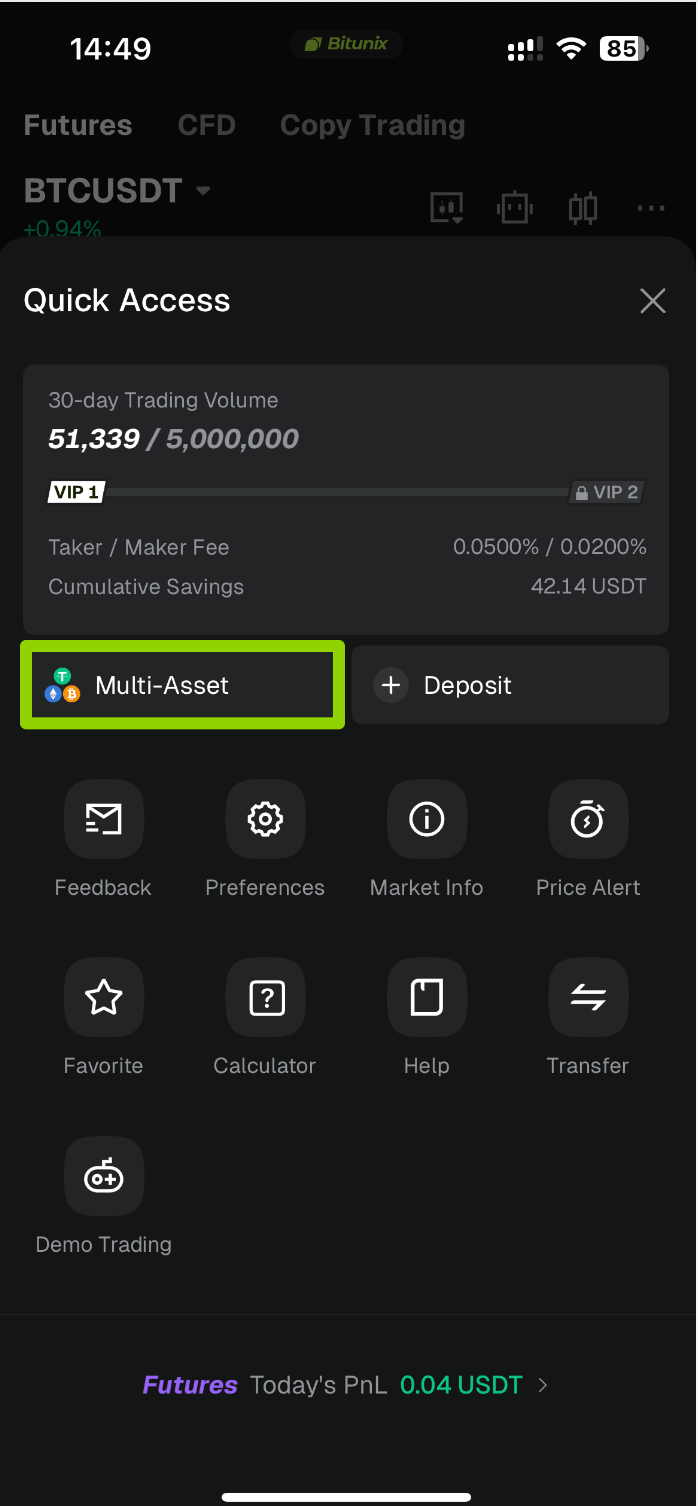
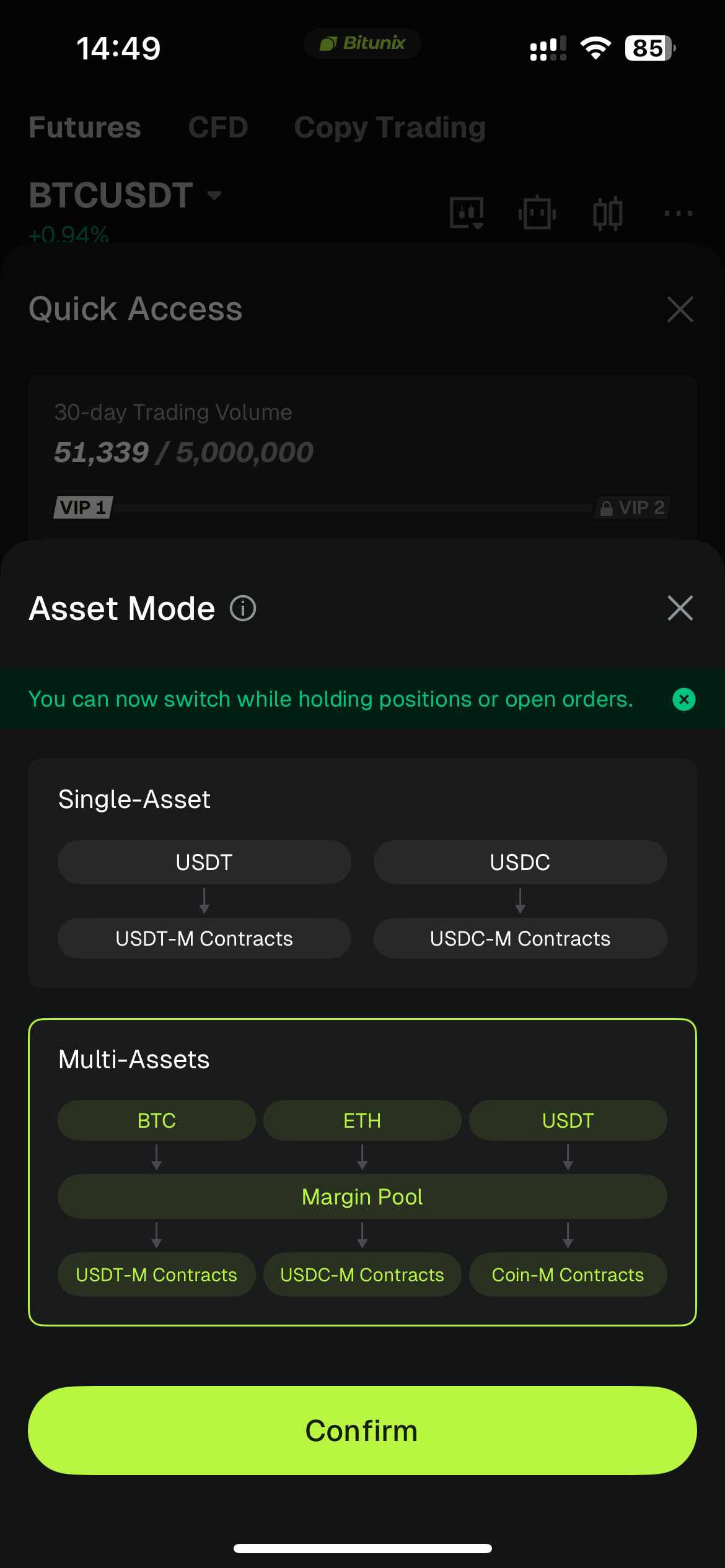
2. In the [Quick Access] pop-up, tap [Multi-Asset/Single-Asset]. In the [Asset Mode] pop-up, select [Multi-Assets], then tap [Confirm] to switch the account's Asset Mode. Once the switch is complete, return to the Futures trading page.
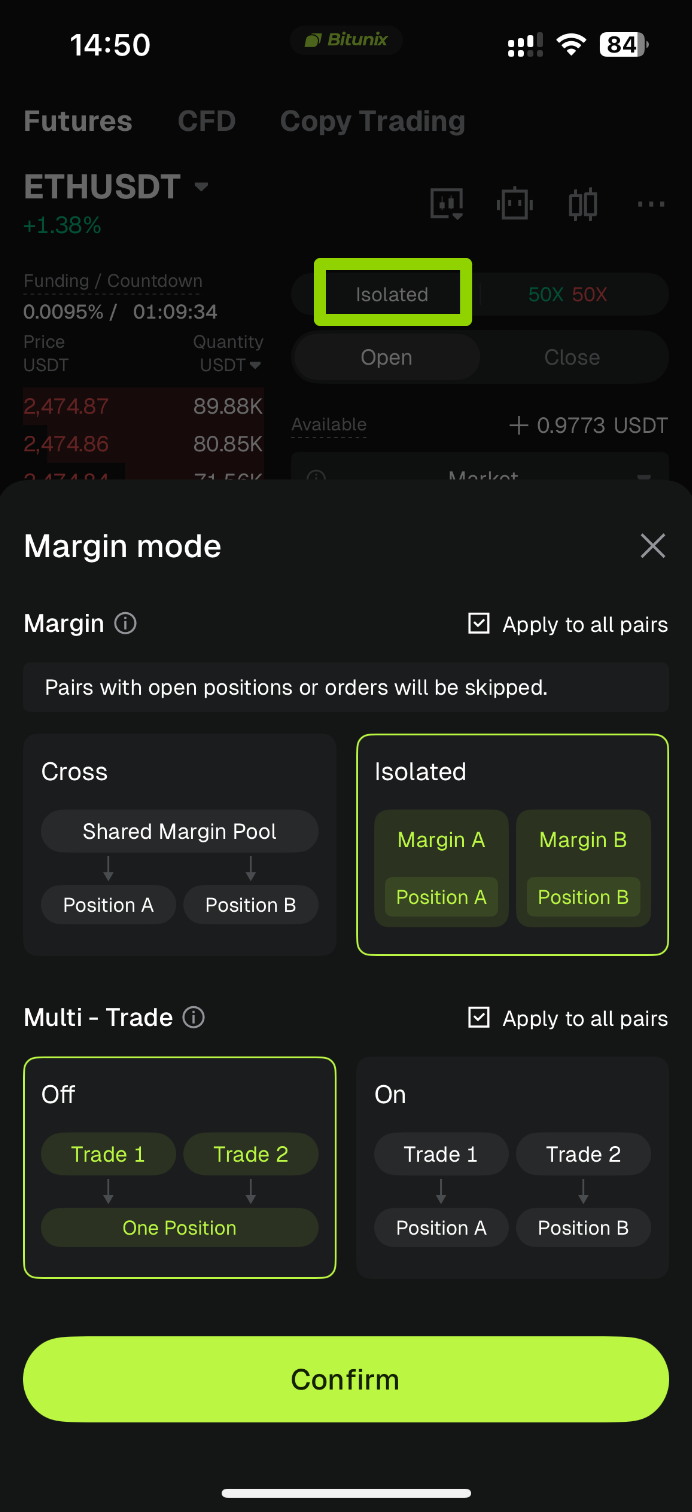
3. In the margin mode selection section of the order panel, select the target trading pair, ETH/USDT (for demonstration purposes), and switch the position mode to [Isolated].
⚠️ Prerequisite Check: The trading pair must have no open positions or unfilled orders for the Isolated option to be available. If there are any open positions or unfilled orders, the option will be grayed out and unavailable. Close the relevant positions and cancel all unfilled orders before proceeding.
Also make sure that Multi-Trade is set to [Off], as Multi-Asset Isolated Margin does not support Multi-Trade.
In the confirmation window, verify that Isolated is selected as the position mode, then tap [Confirm] at the bottom to complete the Multi-Asset Isolated Margin configuration for the trading pair.
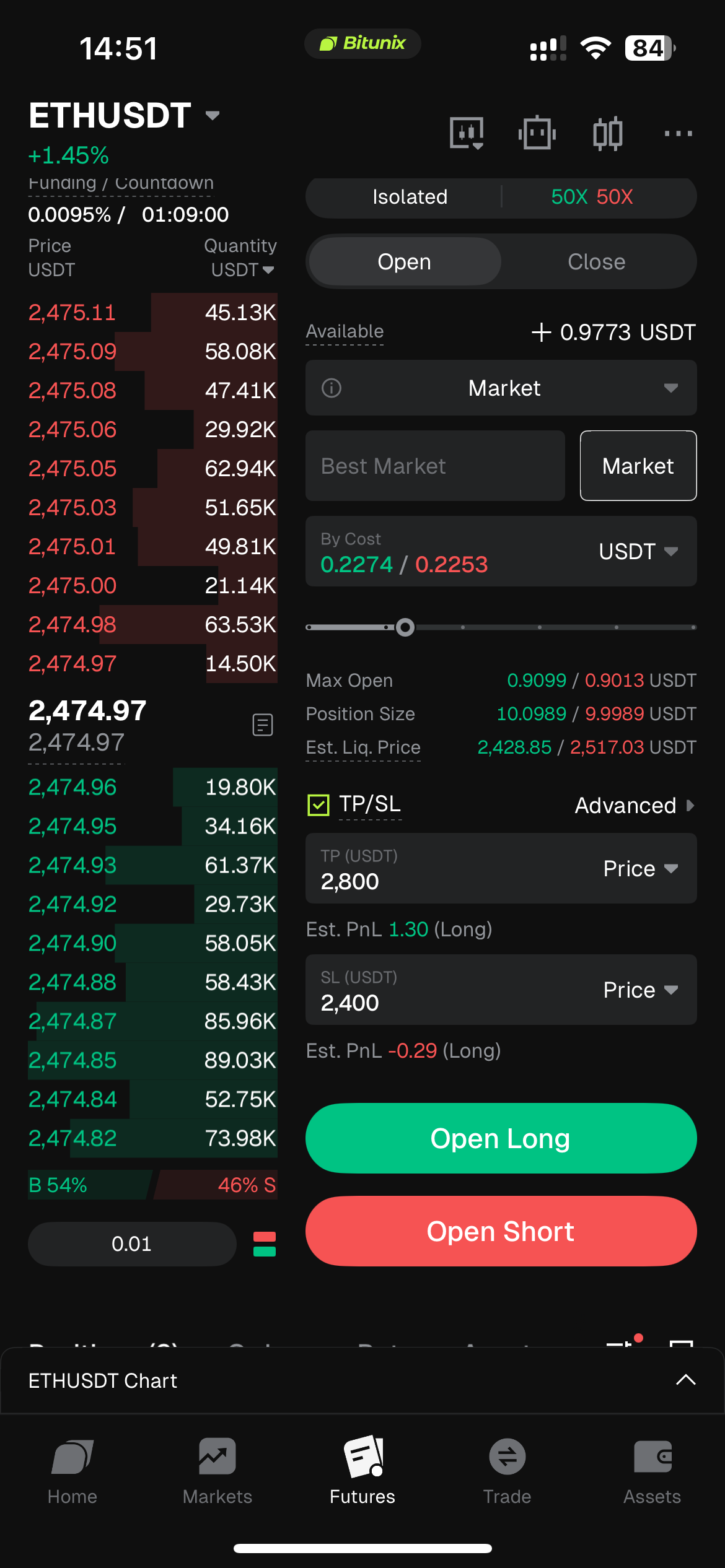
4. Parameter Settings: Set the leverage to 50x, select Market Order as the order type, enter the order price, and set the Take Profit and Stop Loss (TP/SL) prices as needed.
Tap [Open Long] to submit the order and open the position.
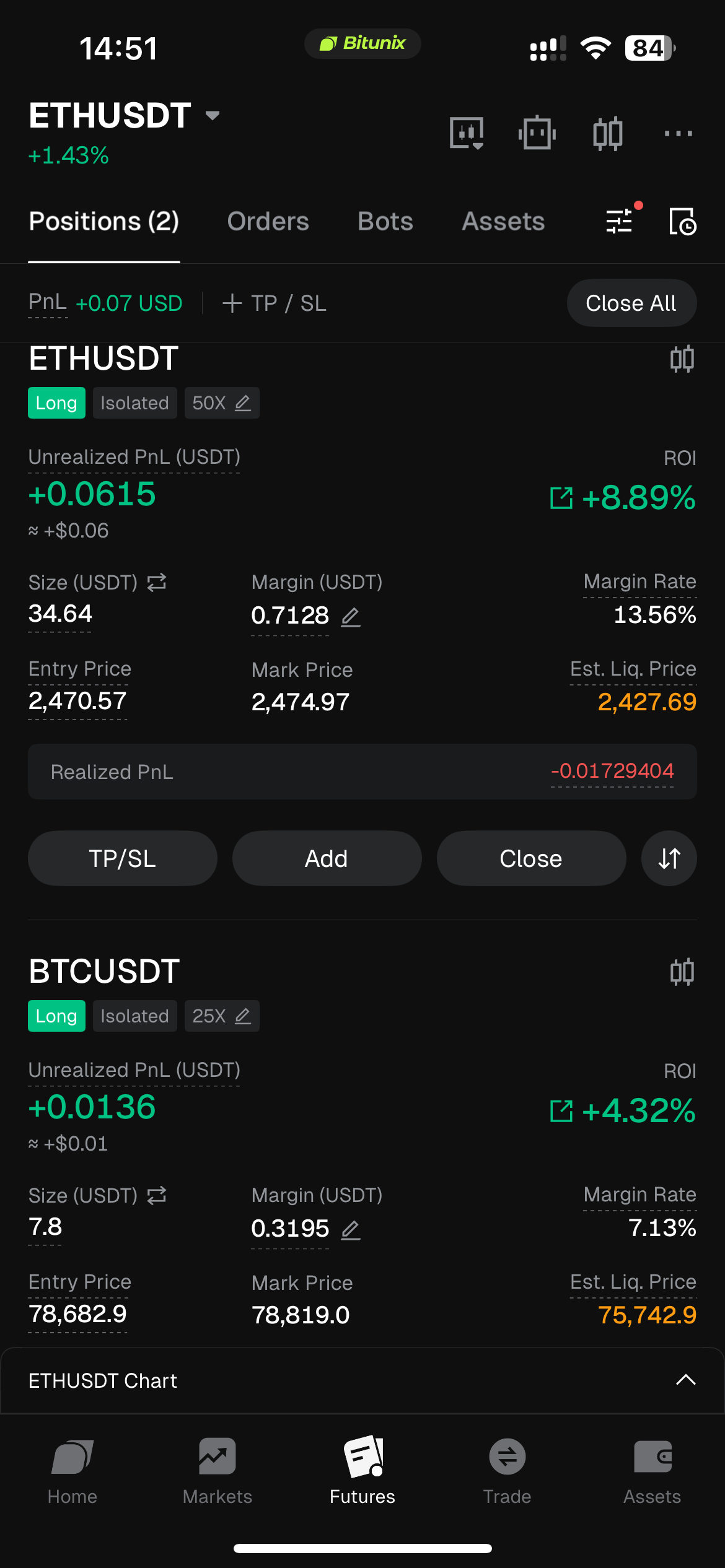
5. After the position is successfully opened, find the Multi-Asset Isolated Margin position in the Positions list below. You can view the entry price and perform standard position management actions, such as modifying Take Profit and Stop Loss (TP/SL) settings, transferring the position, and partially closing the position.
The position for this trading pair uses margin independently under the Isolated Margin rules, keeping its risk isolated from positions on other trading pairs.
4. Risk Management and Important Notes
- Switching Restrictions: A trading pair with open positions or unfilled orders cannot be switched directly to Multi-Asset Isolated Margin. Close all open positions and cancel all unfilled orders before switching.
- Account Restrictions: Multi-Asset Isolated Margin is not supported for Copy Trading accounts. Positions copied through Copy Trading cannot use this mode.
- Cross-Trading-Pair Risk Rules: Only trading pairs configured with Isolated Margin follow isolated risk rules. Other trading pairs in the account remain in Multi-Asset Cross Margin, meaning their P&L can affect each other.
- Collateral Asset Price Risk: Under Multi-Asset Margin Mode, a decline in the price of collateral assets such as BTC or ETH reduces the account's effective margin, which can indirectly increase the liquidation risk of isolated positions.
- Liability Risk: If the account incurs USDT liabilities, the system will automatically sell eligible collateral assets in the account to repay the liabilities. This rule also applies to accounts using Multi-Asset Isolated Margin.
- Feature Restriction: Trading pairs configured with Multi-Asset Isolated Margin do not support the Multi-Trade feature.
5. FAQ
Q1: What is the difference between Multi-Asset Isolated Margin and Multi-Asset Cross Margin?
A: Under Multi-Asset Cross Margin, all Cross Margin positions share the same margin and risk exposure, and their P&L can affect each other. Under Multi-Asset Isolated Margin, each trading pair uses and settles its margin independently. If the allocated margin is insufficient, isolated margin debt may be incurred, providing risk isolation at the trading-pair level.
Both modes can coexist within the same Multi-Asset Margin account, allowing users to configure individual trading pairs as Cross Margin or Isolated Margin.
Q2: Why is my Multi-Asset Isolated Margin order automatically canceled? How can I troubleshoot it?
A: This is a normal risk-control measure. An order may be automatically canceled for one of the following reasons:
- Insufficient Multi-Asset Margin balance;
- The account's liabilities have reached the LTV risk threshold;
- A Multi-Asset Cross Margin position in the account has triggered liquidation, resulting in the cancellation of related orders.
Check the in-app message or App push notification associated with the order cancellation to identify the specific reason.
Q3: What does it mean when a Multi-Asset Isolated Margin order fails with the message "Borrowing Limit Exceeded" or "LTV Auto-Conversion Triggered"?
A: These messages indicate that the order has failed a pre-order risk-control check introduced for Multi-Asset Isolated Margin. The check is designed to prevent excessive borrowing and potential liabilities after an order is placed.
Try reducing the position size, adding more margin to the account, or repaying part of the borrowed assets before submitting the order again.
Q4: Which accounts or services do not support Multi-Asset Isolated Margin?
A: Copy Trading does not support Multi-Asset Margin, including Multi-Asset Isolated Margin. Multi-Asset Isolated Margin is available for Challenge Fund and Wealth Fund accounts.
Q5: I received a feature upgrade prompt and cannot place a Multi-Asset Isolated Margin order on the App. What should I do?
A: When Multi-Asset Isolated Margin is enabled for the first time on the Web platform, a version upgrade prompt may appear. If the App version is outdated, the system will block Multi-Asset Isolated Margin orders and prompt you to upgrade. Update the Bitunix App to the latest version to resume using the feature normally.
Disclaimer
This article is not intended to provide:
(i) investment advice or investment recommendations;
(ii) an offer or solicitation to buy, sell, or hold digital assets; or
(iii) financial, accounting, legal, or tax advice.
Digital assets you hold, including stablecoins and NFTs, involve significant risks and may experience substantial price volatility. You should carefully consider whether trading or holding digital assets is suitable for you based on your financial circumstances.
For advice specific to your situation, please consult your legal, tax, or investment professionals. You are solely responsible for understanding and complying with all applicable local laws and regulations.