

1. Quick Overview
| Item | Details |
|---|---|
| Bonus Name | CFD Cushion Bonus |
| Settlement Currency | USDx |
| Applicable To | CFD trading only |
| Deduction Order | Your principal is used first. Once the principal is fully depleted, the Cushion Bonus is used to cover eligible losses. There is no fixed deduction ratio. |
| Eligible Items | Settled costs, including trading losses/liquidation losses, overnight fees, dividend adjustments, and other eligible settled charges |
| Ineligible Items | Floating costs such as spreads and unsettled items |
| Withdrawable | No. However, profits generated through trading with the bonus can be withdrawn. |
| Transferable | No. Transferring principal out of the CFD account will trigger the full recovery of the Cushion Bonus. |
| Redemption Requirements | A CFD account must be activated and the required activation threshold must be met. |
| Validity Period | Includes the redemption deadline and the number of days the bonus remains available after redemption, as specified on the bonus voucher. |
2. What Is the CFD Cushion Bonus?
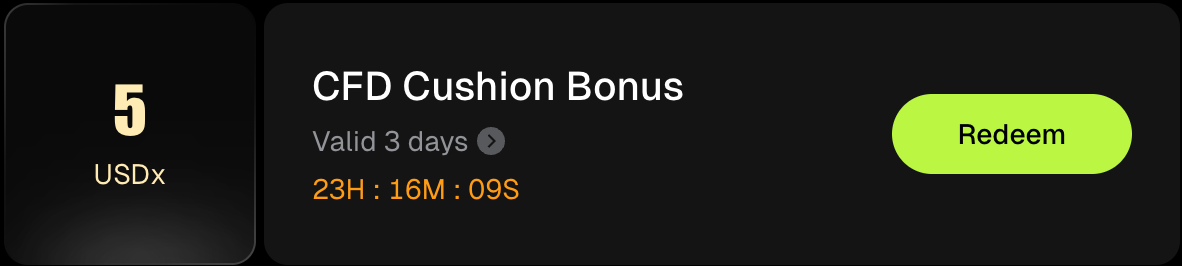
The CFD Cushion Bonus is a reward provided by Bitunix through promotional campaigns, reward tasks, or manual distribution. It is added to your available margin in your CFD account alongside your own funds to support your positions.
When a loss occurs, your own funds are used first. Once your own funds are fully depleted, the Cushion Bonus covers eligible remaining losses. This allows you to trade CFDs with additional loss coverage beyond your own funds.
The Cushion Bonus itself is not withdrawable or transferable. Profits generated from trading with the Cushion Bonus can still be withdrawn normally. To learn more about and start CFD trading, visit the Bitunix official website.
Key Functions of the CFD Cushion Bonus
The Cushion Bonus provides additional coverage when losses from CFD trading exceed your own funds. Once your own funds have been fully depleted, the bonus can be used to cover eligible remaining losses.
- Used alongside your own funds: The Cushion Bonus and your own funds are both included in your available margin and support your CFD positions.
- Own funds first, bonus covers the remainder: When a loss occurs, your own funds are deducted first. Once they are fully depleted, the Cushion Bonus covers eligible remaining losses.
- Profits are yours: Profits generated from trading with the Cushion Bonus can be withdrawn normally.
- The bonus itself cannot be used independently: The Cushion Bonus cannot be withdrawn or transferred.
How Does the CFD Cushion Bonus Differ From the Futures Bonus?
Both are trading rewards that can be used to cover losses, but they differ in how the reward amount is applied and how losses are covered:
| Comparison | Futures Bonus | CFD Cushion Bonus |
|---|---|---|
| Loss Coverage Method | The bonus covers a fixed percentage of eligible losses or fees based on the voucher terms. For Futures Bonuses with a deduction ratio above 0%, the bonus is deducted first, followed by your own funds. | There is no fixed deduction ratio. Losses are covered according to the "own funds first, Cushion Bonus second" order. |
| Applicable To | Perpetual futures | CFD trading |
| Profit Withdrawal | Supported | Supported |
| Withdrawal / Transfer of Bonus | Not supported | Not supported |
3. How to Use the Bitunix CFD Cushion Bonus on the Web
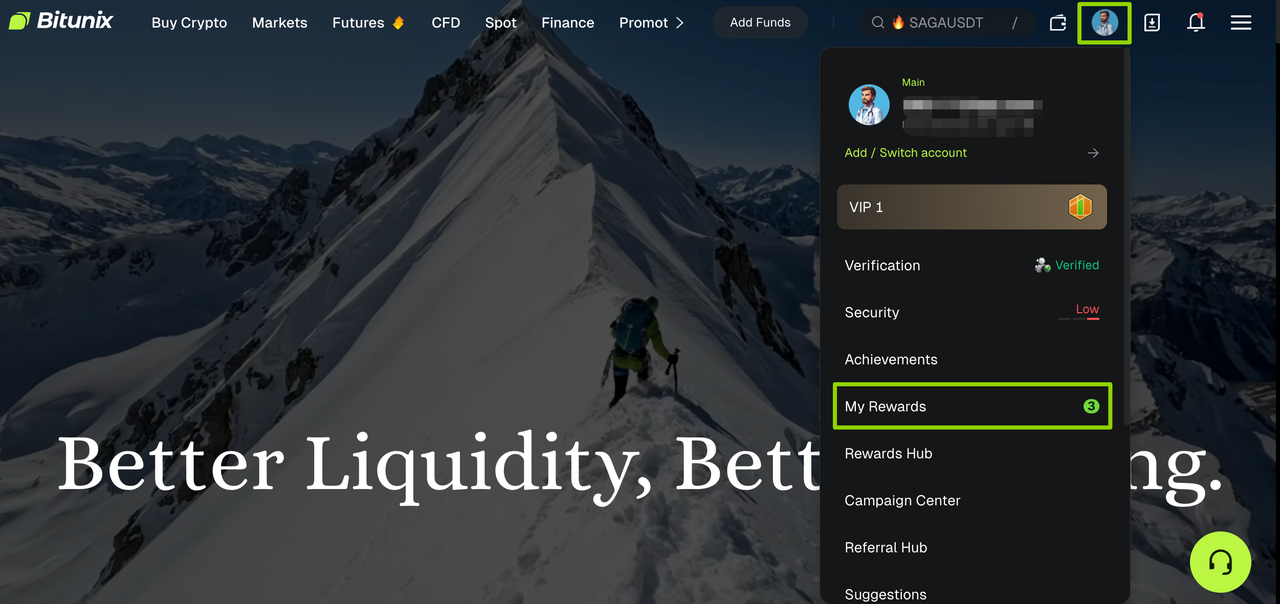
1. Log in to the Bitunix official website, then click the [Profile] icon in the top-right corner and select [My Rewards].
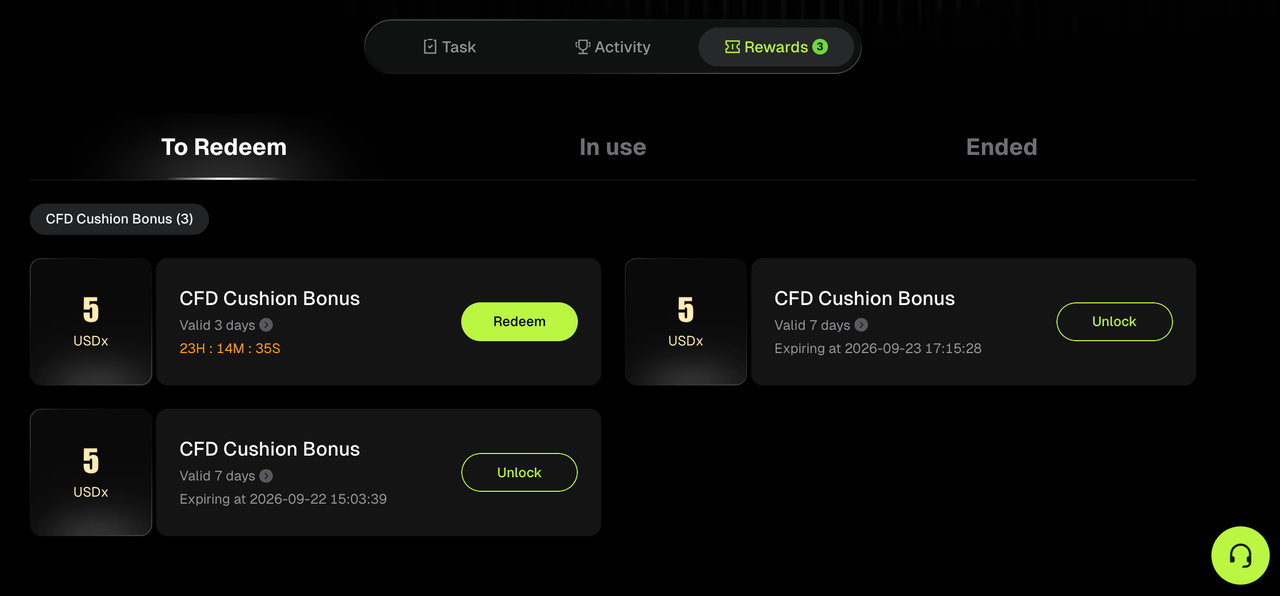
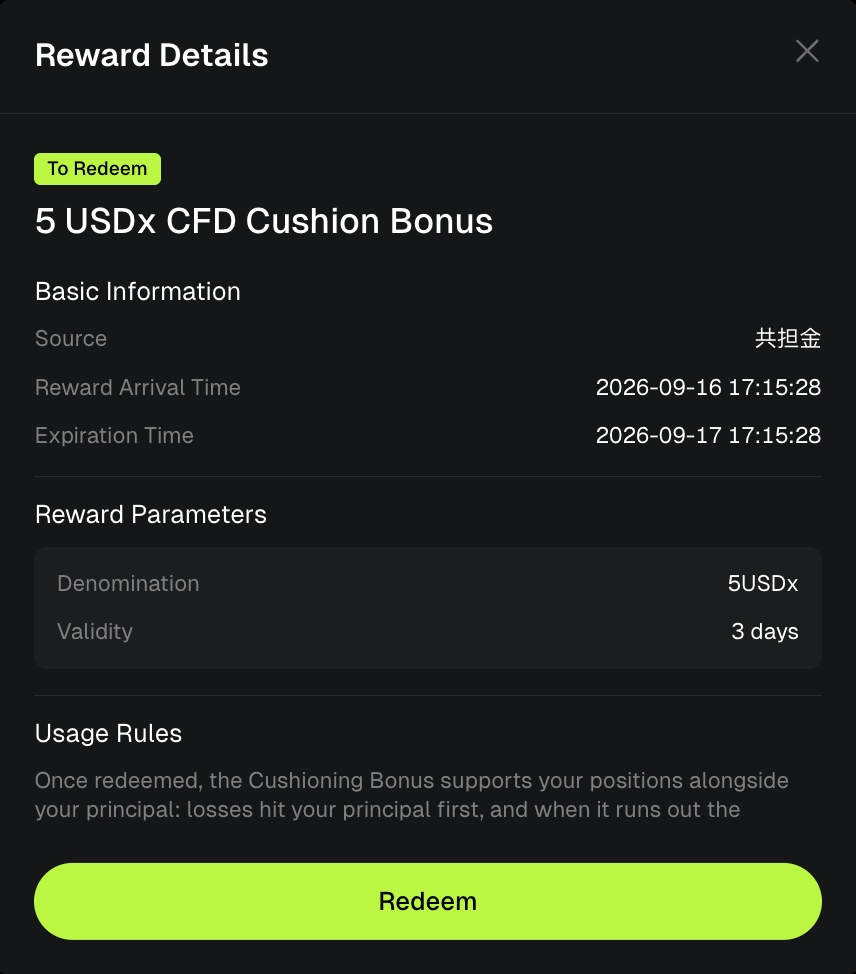
2. On the [Rewards] page, find the [CFD Cushion Bonus]. Once you meet the eligibility requirements, click [Redeem]. Before redeeming, you can view the reward details, including the bonus amount, validity period, and applicable terms.
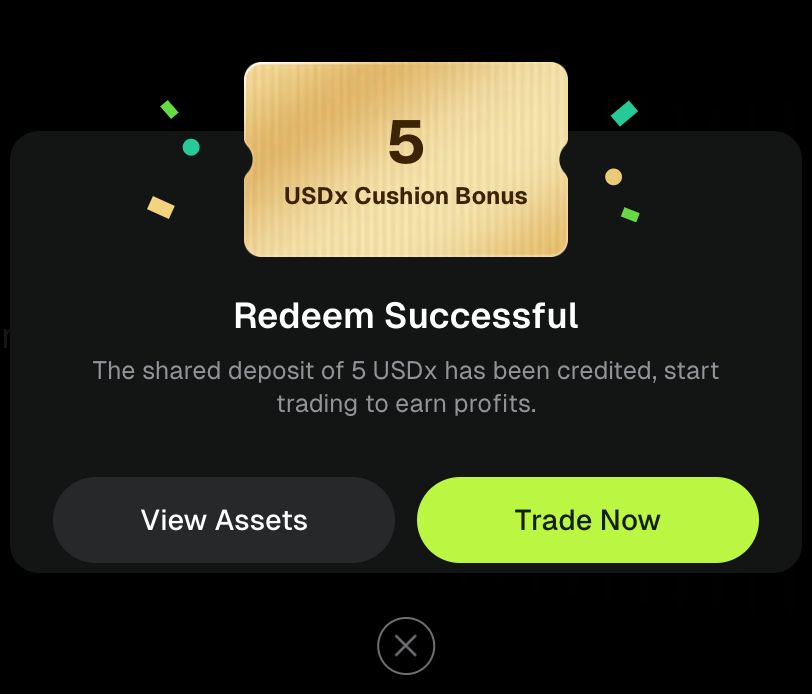
3. Once the redemption is successful, a pop-up will confirm that the Cushion Bonus has been credited to your account. Click [Trade Now] to enter the CFD trading page.
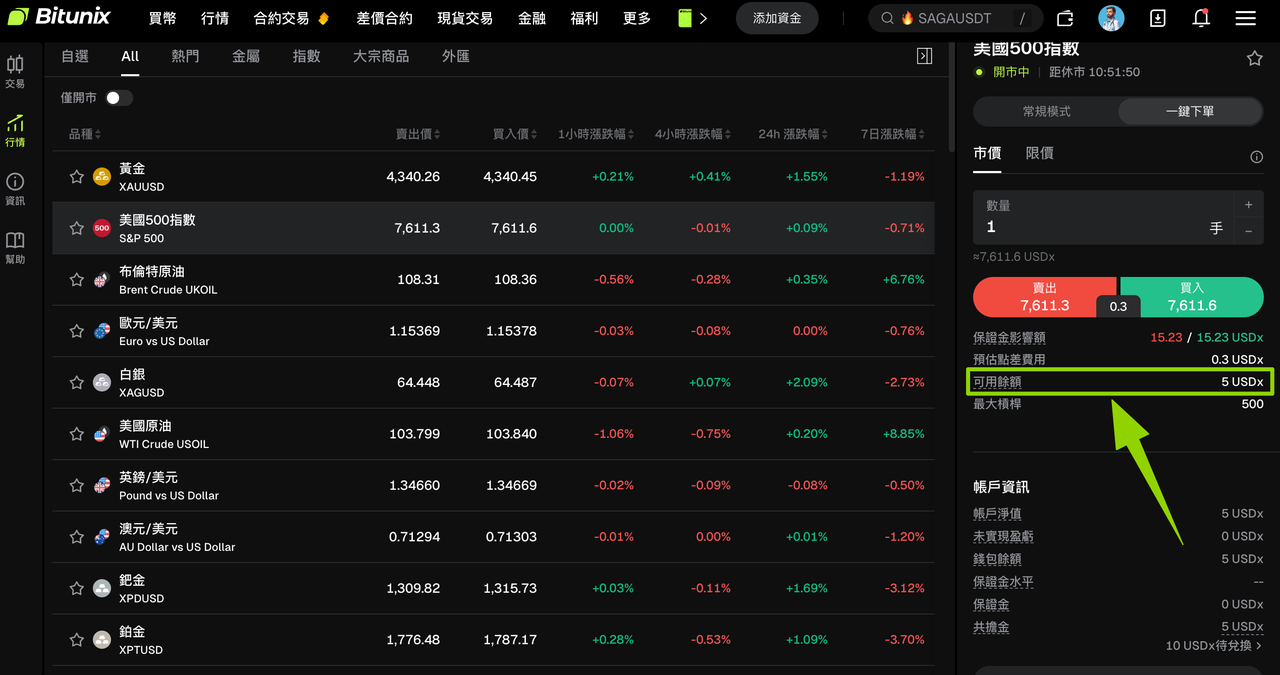
4. This example uses the US 500 Index. On the order page, the available balance shows [5 USDx], indicating that the CFD Cushion Bonus is active and available for CFD trading.
4. CFD Cushion Bonus Terms and Conditions
- Usage Restrictions: The CFD Cushion Bonus can only be used for CFD trading, including opening positions and covering eligible losses or settled fees. It cannot be transferred or withdrawn directly. Profits generated from trading with the bonus can be withdrawn normally.
- Validity Period: The Cushion Bonus will be automatically reclaimed when it expires. If you have open positions at the time of expiration, the bonus will be reclaimed after the positions are closed.
- Transfer Restrictions: Transferring your own funds out of your CFD account will result in the full recovery of any Cushion Bonus currently in use. Check the confirmation prompt carefully before initiating a transfer.
- Compliance Requirements: Violations such as bulk account registration, wash trading or hedging, or attempts to improperly monetize the bonus may result in Bitunix reviewing the relevant accounts, revoking eligibility, and recovering any Cushion Bonus already distributed.
- Final Interpretation: Bitunix reserves the right to make the final interpretation of the CFD Cushion Bonus terms and conditions.
Frequently Asked Questions (FAQ)
- Can I withdraw profits earned with the CFD Cushion Bonus?
Yes. Profits generated from trading with the Cushion Bonus are credited to your CFD account and can be used for further trading or withdrawn normally. The Cushion Bonus itself cannot be withdrawn.
- Why can't I redeem the CFD Cushion Bonus?
This is usually because: ① you have not yet activated a CFD account; ② your own funds balance has not reached the required threshold; or ③ you have not met the required trading volume. The bonus card will show your current unlocking progress and provide relevant guidance.
- Will the CFD Cushion Bonus deduct money from my own funds?
When a loss occurs, your own funds are deducted first. Once your own funds are fully depleted, the Cushion Bonus covers eligible remaining losses. The Cushion Bonus provides additional loss coverage beyond your own funds; it does not result in any additional deduction from your account.
- Why did my CFD Cushion Bonus disappear after I made a transfer?
Transferring your own funds out of your CFD account triggers the full recovery of the Cushion Bonus. If you want to keep the bonus, do not transfer your own funds out of the CFD account during its validity period.
- Does the CFD Cushion Bonus have an expiration date?
Yes. It has two validity periods: the redemption period, during which you must redeem the bonus after it is issued, and the post-redemption validity period, during which the redeemed bonus remains available before it is reclaimed. The specific periods are shown on the bonus voucher.
- Where can I find my CFD Cushion Bonus after redemption?
Go to [My Rewards] → [In Use] to view the bonus. You can also view the Cushion Bonus balance and related entry points on the CFD trading page or Assets page.
- Why hasn't my CFD Cushion Bonus been credited after I clicked [Redeem]?
You may not have activated your CFD account or met the required activation threshold. Follow the instructions on the bonus card to activate your CFD account and complete the required deposit or trading volume before redeeming the bonus.
Disclaimer
This article is not intended to provide:
(i) investment advice or investment recommendations;
(ii) an offer or solicitation to buy, sell, or hold digital assets; or
(iii) financial, accounting, legal, or tax advice.
Digital assets you hold, including stablecoins and NFTs, involve significant risks and may experience substantial price volatility. You should carefully consider whether trading or holding digital assets is suitable for you based on your financial circumstances.
For advice specific to your situation, please consult your legal, tax, or investment professionals. You are solely responsible for understanding and complying with all applicable local laws and regulations.