

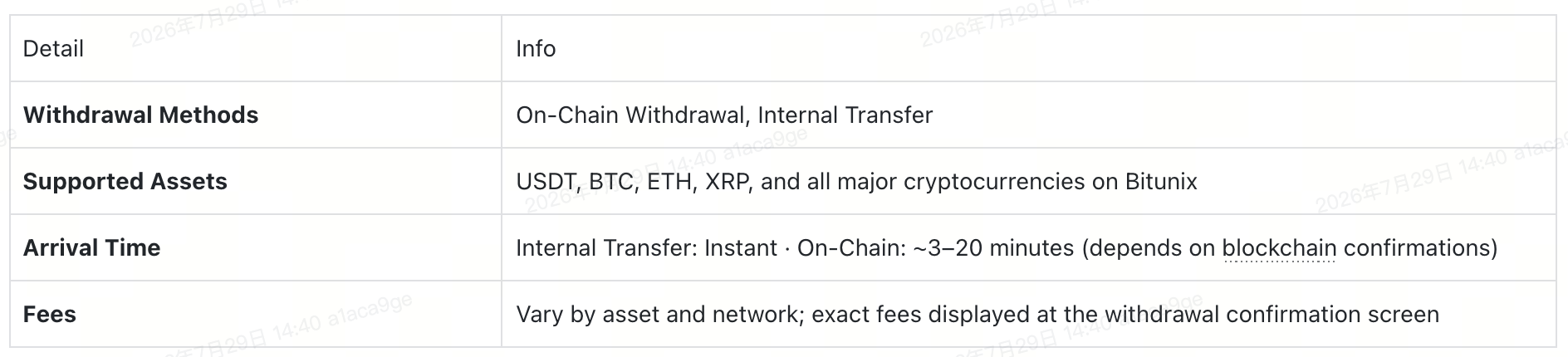
💡 At a Glance
What Is Crypto Withdrawal?
A withdrawal moves digital assets from your Bitunix account to an external wallet or another exchange account. Bitunix supports two withdrawal methods:
- On-Chain Withdrawal — Sends funds through a blockchain network to any external wallet or exchange. Best for moving assets off-platform.
- Internal Transfer — Moves funds instantly between Bitunix accounts. Ideal for quick, fee-free transfers to other Bitunix users.
This guide walks you through both methods using USDT as an example.
Method 1: On-Chain Withdrawal
Step 1: Go to the Withdrawal Page
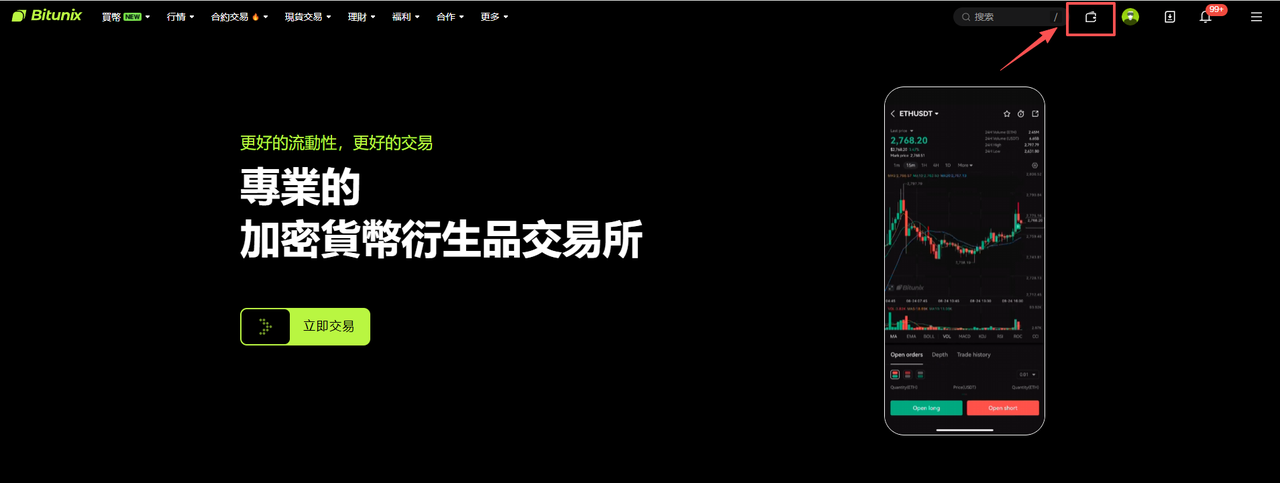
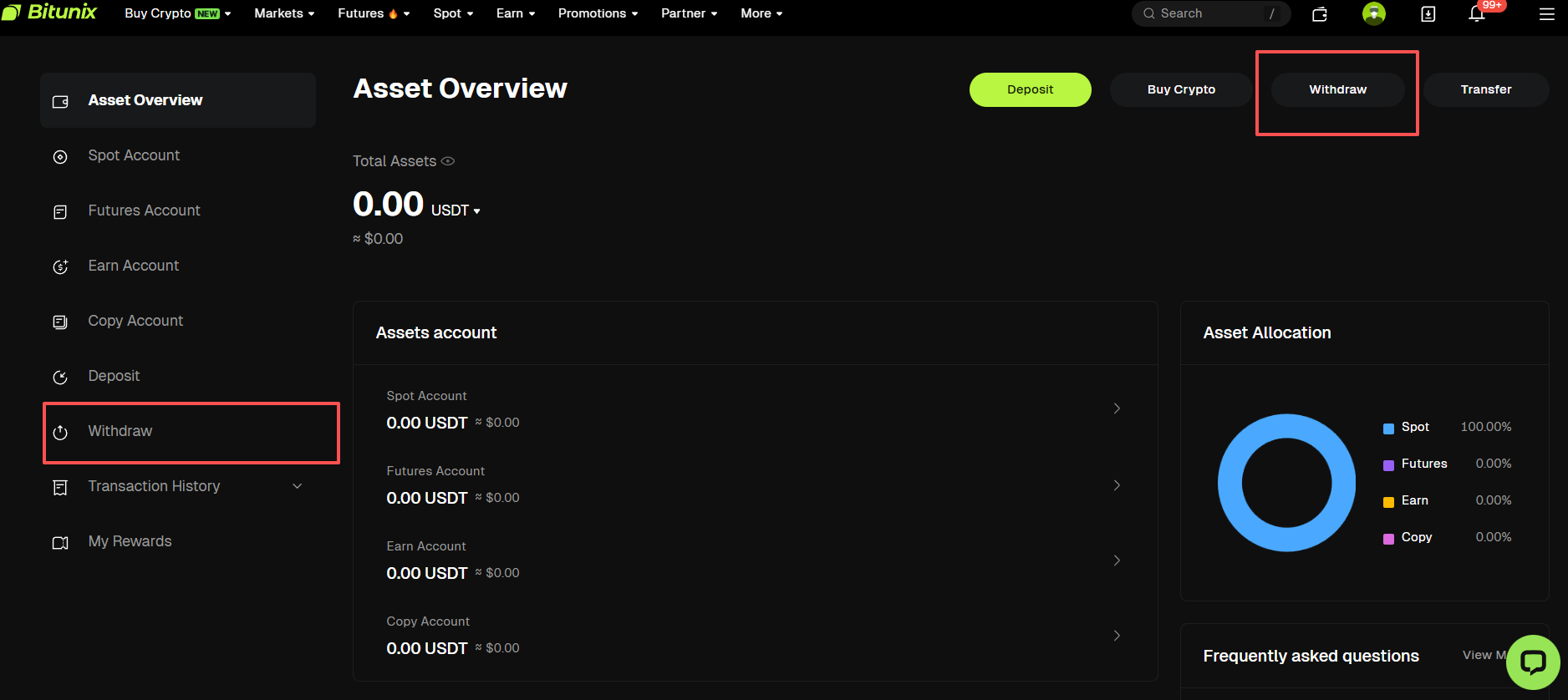
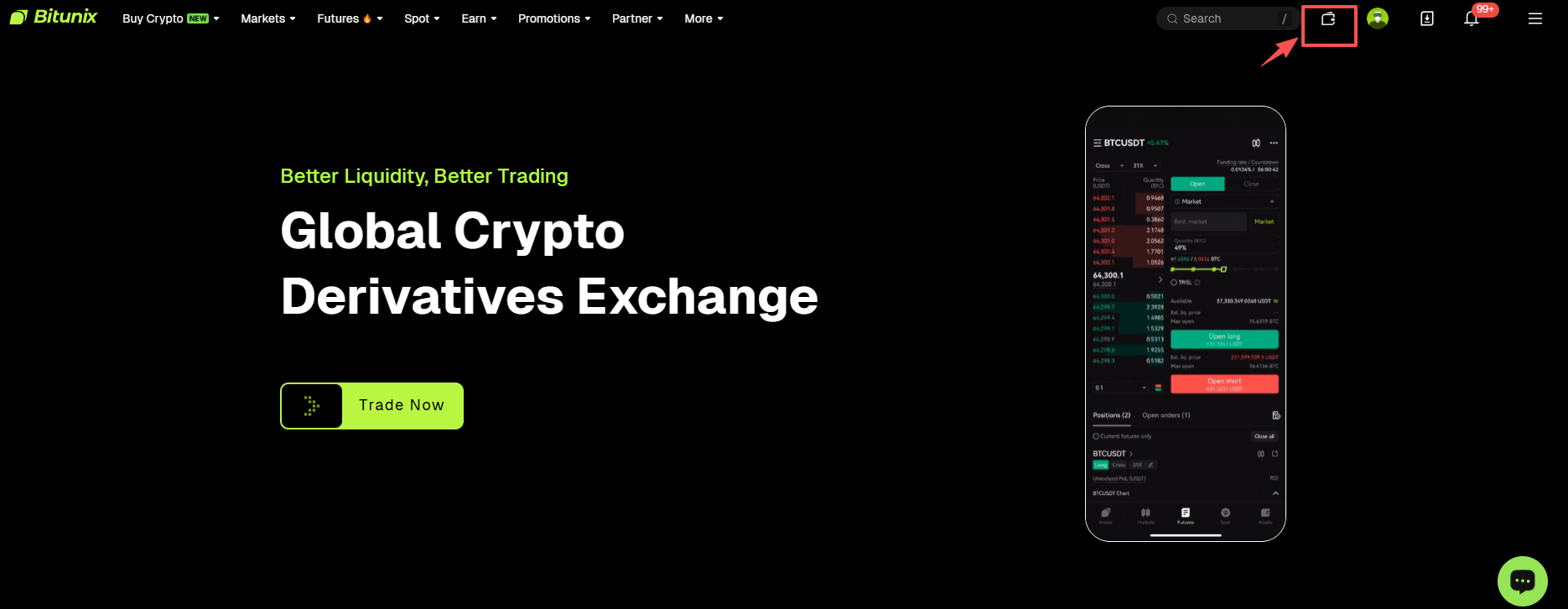
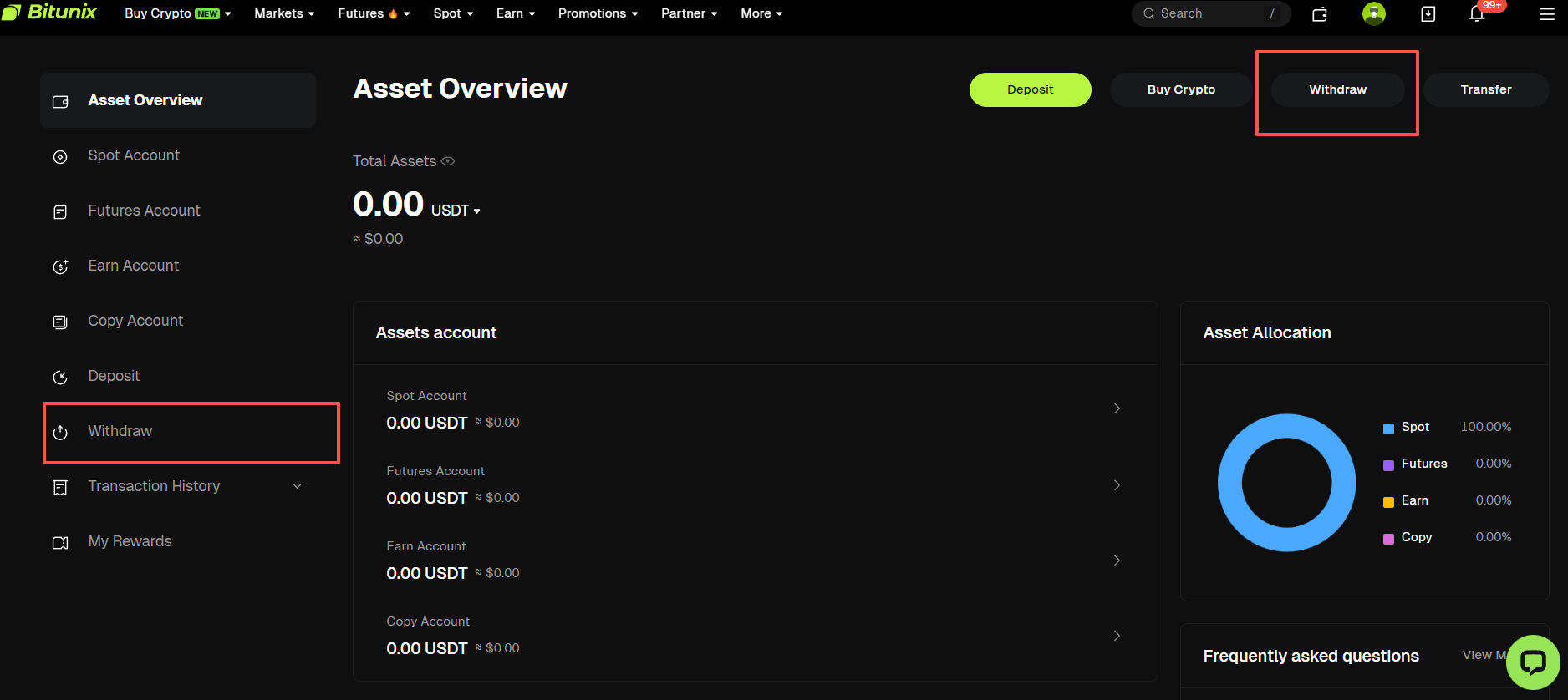
Visit the Bitunix website and log in to your account, Click the [Wallet icon] in the top-right corner. On the Assets page, click [Withdraw]
Step 2: Select On-Chain Withdrawal and Enter Details
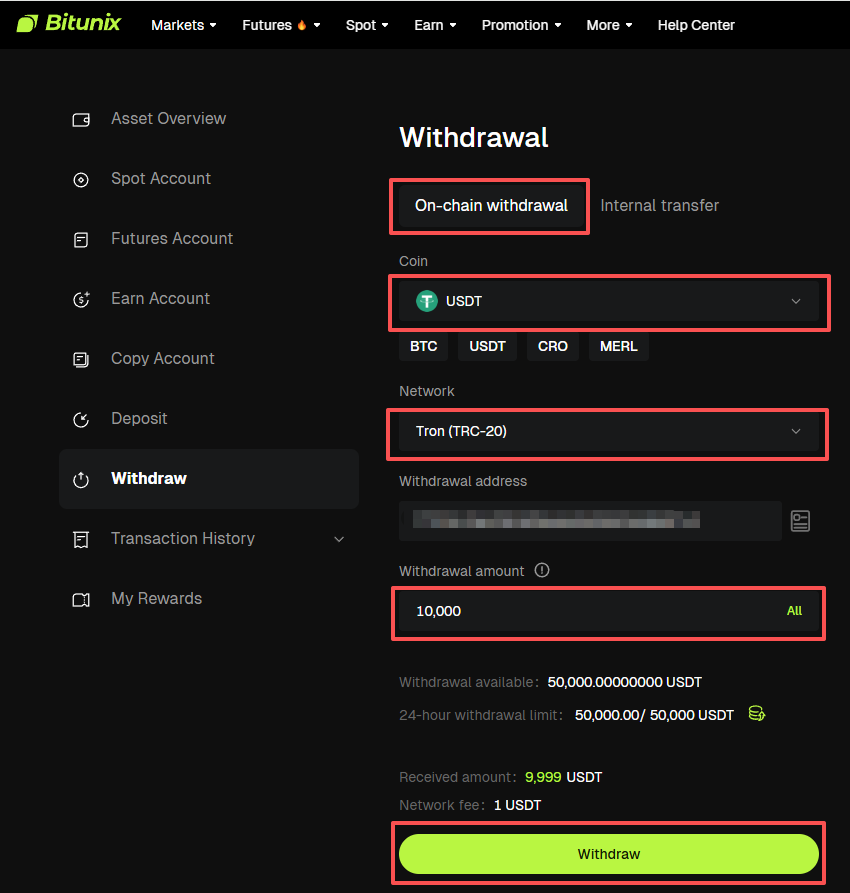
Choose [On-Chain Withdrawal]. Select the coin you want to withdraw (e.g., USDT). Choose a withdrawal network (e.g., TRON (TRC20)). Enter or paste the recipient's [Withdrawal Address]. Enter the [Withdrawal Amount]
Step 3: Confirm and Complete the Withdrawal
Double-check all details (coin, network, address, and amount), Click [Withdraw]. Follow the prompts to complete security verification (email code, Google Authenticator, etc.). Once verified, your withdrawal request is submitted — pending blockchain network confirmation.
⚠️ Important Reminders
- Network Match: The deposit network on the receiving exchange or wallet must match the Bitunix withdrawal network you selected (e.g., both must be TRC20). A mismatch will result in permanent and irrecoverable asset loss.
- MEMO / Tag: Certain coins (e.g., XRP, EOS, ATOM) require an additional MEMO or Tag. Failing to include one may cause your deposit to not be credited.
- Minimum Withdrawal Amount: Each coin has a minimum withdrawal limit — check the withdrawal page for the current amount.
Method 2: Internal Transfer (Between Bitunix Users)
Step 1: Go to the Withdrawal Page
Visit the Bitunix website and log in to your account, Click the [Wallet icon] in the top-right corner. On the Assets page, click [Withdraw]
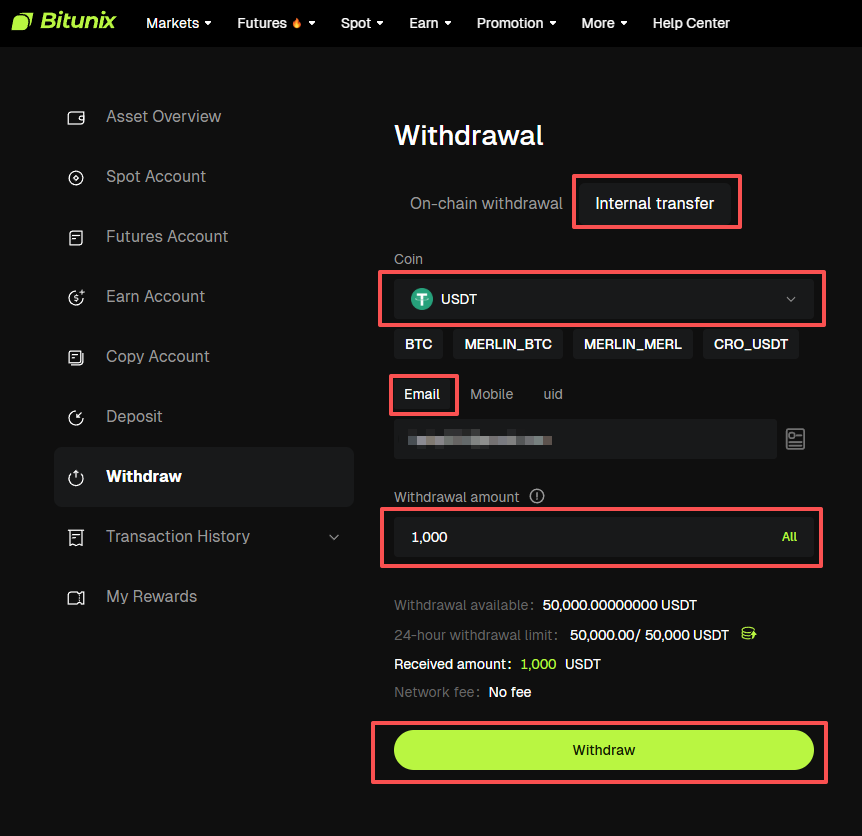
Step 2: Select Internal Transfer and Enter Details
Switch to [Internal Transfer], Select the coin you want to send (e.g., USDT). Enter the recipient's information using one of the following:
- [Email]: The recipient's Bitunix registered email
- [Phone Number]: The recipient's registered phone number
- [UID]: The recipient's Bitunix User ID
Enter the [Transfer Amount]
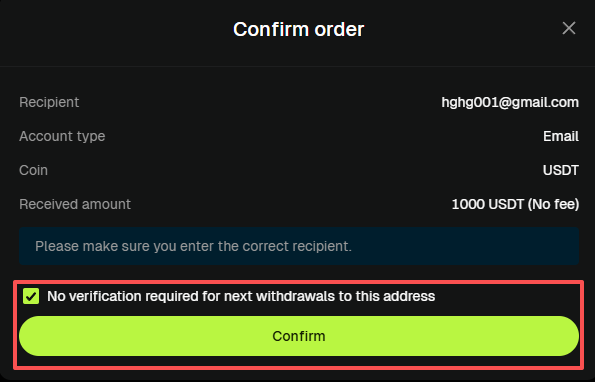
Step 3: Confirm and Complete the Transfer
Verify the recipient's information and the transfer amount, Click [Confirm]. Complete security verification (email code, Google Authenticator, etc.). Once verified, the assets are transferred to the recipient's Bitunix account instantly
⚠️ Important Reminders
- Always verify the recipient's email, phone number, or UID before transferring. Transfers cannot be reversed once completed.
- Internal transfers are typically processed instantly — no blockchain confirmation needed.
🔒 Security & Operational Guidelines
⚠️ Please keep the following in mind to protect your assets:Verify Network & Address: Before submitting an on-chain withdrawal, triple-check that the network and address are correct. An incorrect network or address will result in permanent asset loss.Protect Your Credentials: Never share your login password, SMS verification codes, or Google Authenticator codes with anyone. Bitunix staff will never ask you for this information.Processing Time: After submission, on-chain withdrawals require blockchain confirmations and typically arrive within 3–20 minutes. Delays may occur during periods of network congestion.Large Withdrawals: For first-time or large withdrawals, we recommend sending a small test amount first. Confirm that it arrives successfully before proceeding with the full amount.
❓ Frequently Asked Questions
Q1: How long does a withdrawal take?
On-chain withdrawals typically take 3–20 minutes, depending on blockchain confirmation speed. During network congestion, processing may take longer. You can track your transaction status using a blockchain explorer (e.g., TronScan, Etherscan). Internal transfers are usually processed instantly.
Q2: What happens if I select the wrong network?
If the withdrawal network doesn't match the receiving platform's deposit network, your assets may not arrive and could be difficult — or impossible — to recover. Always confirm the correct network before submitting. If you've already submitted a withdrawal on the wrong network, contact Bitunix Support immediately for assistance.
Q3: Do I need to include a MEMO or Tag when withdrawing?
It depends on the coin. Coins like XRP, EOS, and ATOM typically require a MEMO or Tag. Without one, your deposit may not be credited to the intended account. Always check whether the receiving wallet or exchange requires a MEMO — and make sure it's entered correctly.
Disclaimer:
This article is not intended to provide
(i) investment advice or recommendations;
(ii) an offer or solicitation to buy, sell, or hold digital assets; or
(iii) financial, accounting, legal, or tax advice. Holding digital assets (including stablecoins and NFTs) involves significant risk and may fluctuate in value. You should carefully evaluate whether trading or holding digital assets is suitable for you based on your financial situation. Please consult legal, tax, or investment professionals for advice specific to your circumstances. It is your responsibility to understand and comply with applicable local laws and regulations.