

Want to trade crypto futures from your phone? This guide shows how to complete futures trading in the Bitunix app in five steps: transfer USDT to your Futures Account, pick a trading pair, set leverage and order type, place the order, and add take-profit and stop-loss. Bitunix is a crypto exchange built around perpetual futures, and the example uses a USDT-margined (U-based) contract.
What is futures trading?
It refers to an agreement between two parties to trade an agreement on a certain asset at a specified price and quantity at a future time, so as to obtain profits. Futures trading is specifically divided into delivery contract trading and perpetual contract trading.
Investors can obtain profits from the rise in the price of digital assets by opening long positions (buying contracts), or obtain profits from the decline in the price of digital assets by opening short positions (selling contracts).
Why engage in futures trading?
Futures trading, through the margin system, enables the control of larger positions with a small amount of capital, thus improving the utilization rate of funds. Profits can be magnified through margin leverage, and it supports two-way trading, providing profit-making opportunities whether the price rises or falls.
It can hedge against the risks of physical assets and enhance the efficiency of funds. Investors can participate in multiple underlying assets without having to hold the full positions.
Standardized contracts also have strong liquidity, making it convenient for quick buying and selling. It offers investors a flexible and efficient way to participate in the market, allowing them to precisely seize the opportunities presented by price fluctuations.
How to place a futures order in the Bitunix application? (using U-based contracts as an example)
Step 1: Asset Transfer
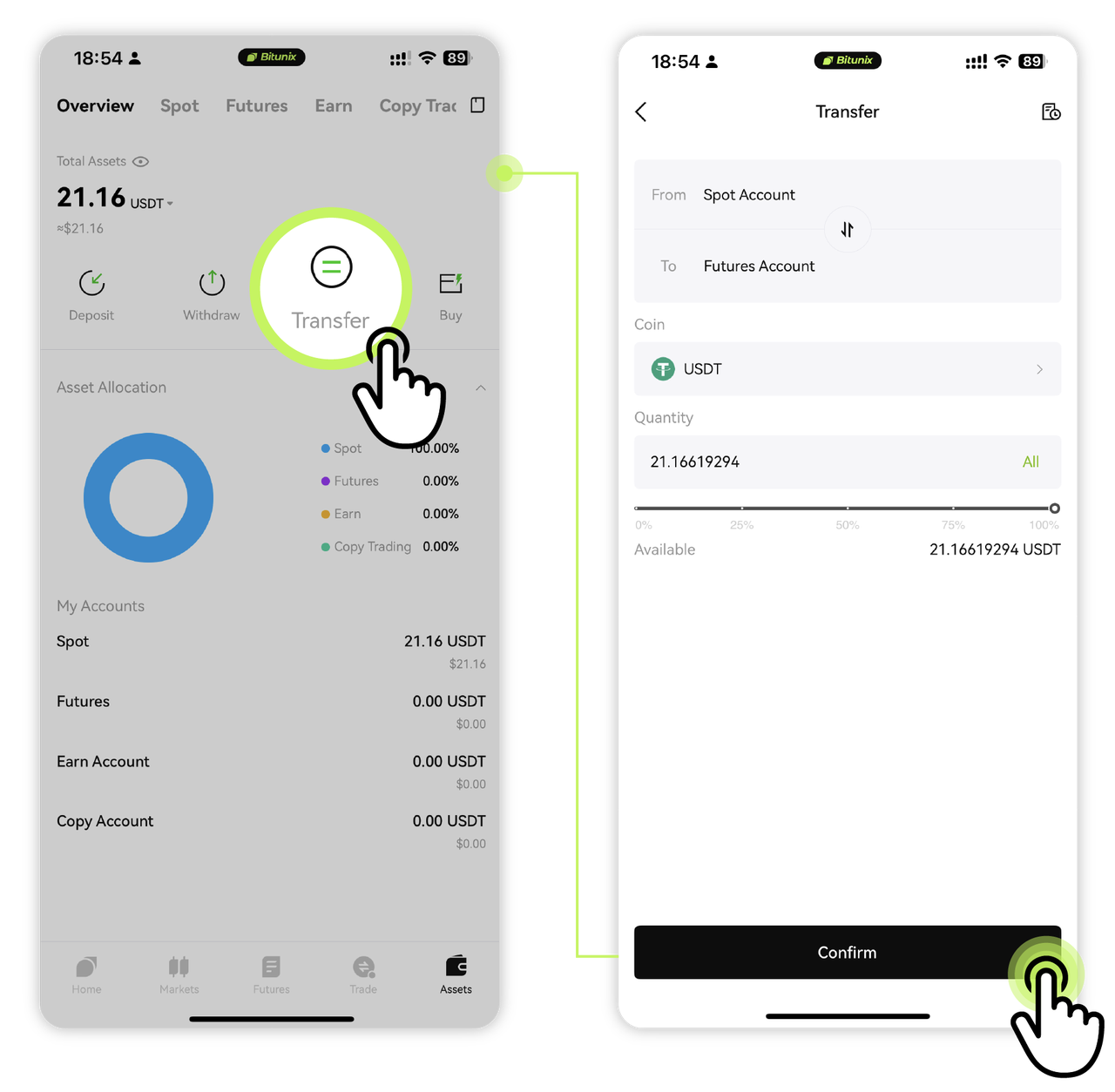
Log in to the Bitunix App, click on the bottom right corner 【Assets】 to enter the asset page; then click the transfer button to transfer assets from the 【Spot Account】 to the 【futurus Account】, fill in 【Quantity】 and select the currency 【USDT】 , and click 【Confirm】.
Step 2: Select the trading pair
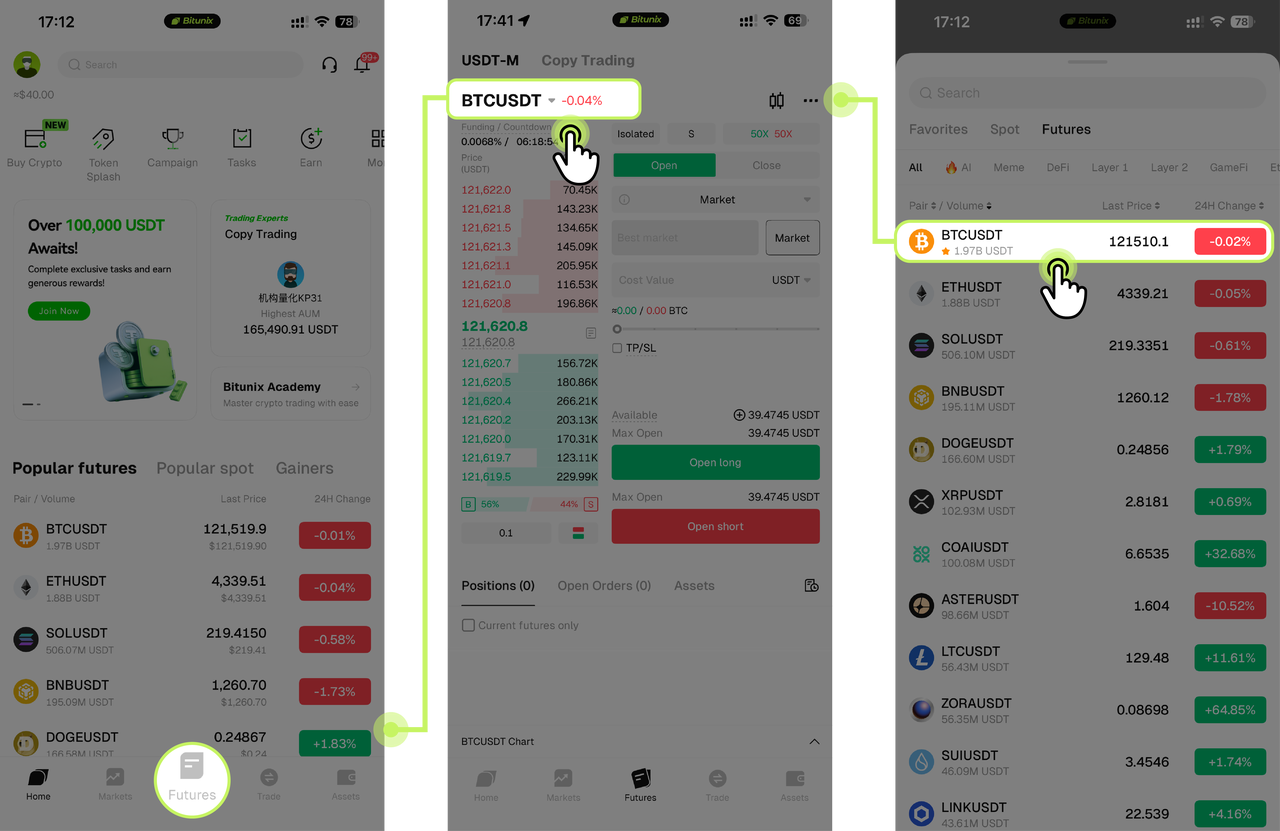
Click "【Futures】" in the bottom navigation bar, and then click 【BTC/USDT】 in the upper left corner of the futures interface to enter the list. Users can use the search bar or directly click on the list below to select the USDT-margined futures for trading.
Step 3: Set leverage and order type
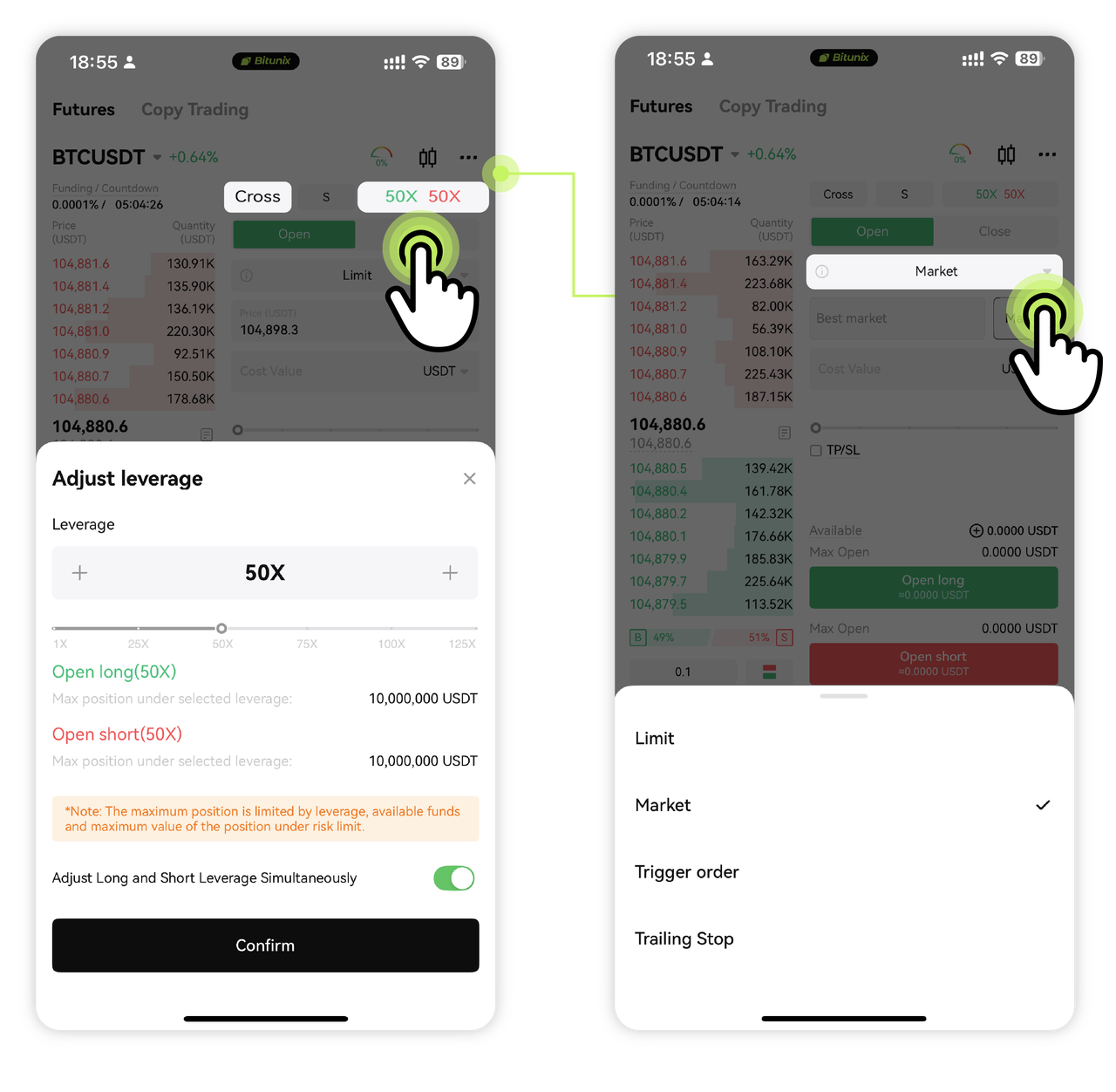
Here we take the【 cross-margin mode】【BTCUSDT U-margin Futures】as an example, set the leverage to 【50】times, and the order method to【Market Order】.
Entrustment method: supports limit orders, market orders, etc. Limit orders an set specific prices, and market orders are executed at the current market price. Bitunix also supports trigger and trailing stop orders (see the futures order types guide).
Margin mode
Cross
All available funds in the futures account are used as margin, and the position will only be liquidated when the loss exceeds the account balance. The ability to carry losses in the account is better, making it easy to operate and calculate positions.
Isolated
Users will only lose the position margin when the position is liquidated. When the user closes the position, the loss and profit generated by the short position and the long position respectively will be immediately settled into the corresponding position margin. See Cross Margin vs Isolated Margin and the forced liquidation rules.
Step 4: Enter quantity and place order
Enter the opening quantity (in units or amount). Finally, select 【Open Long】 or 【Open Short】.
Here we【open long 】 order to complete the order.
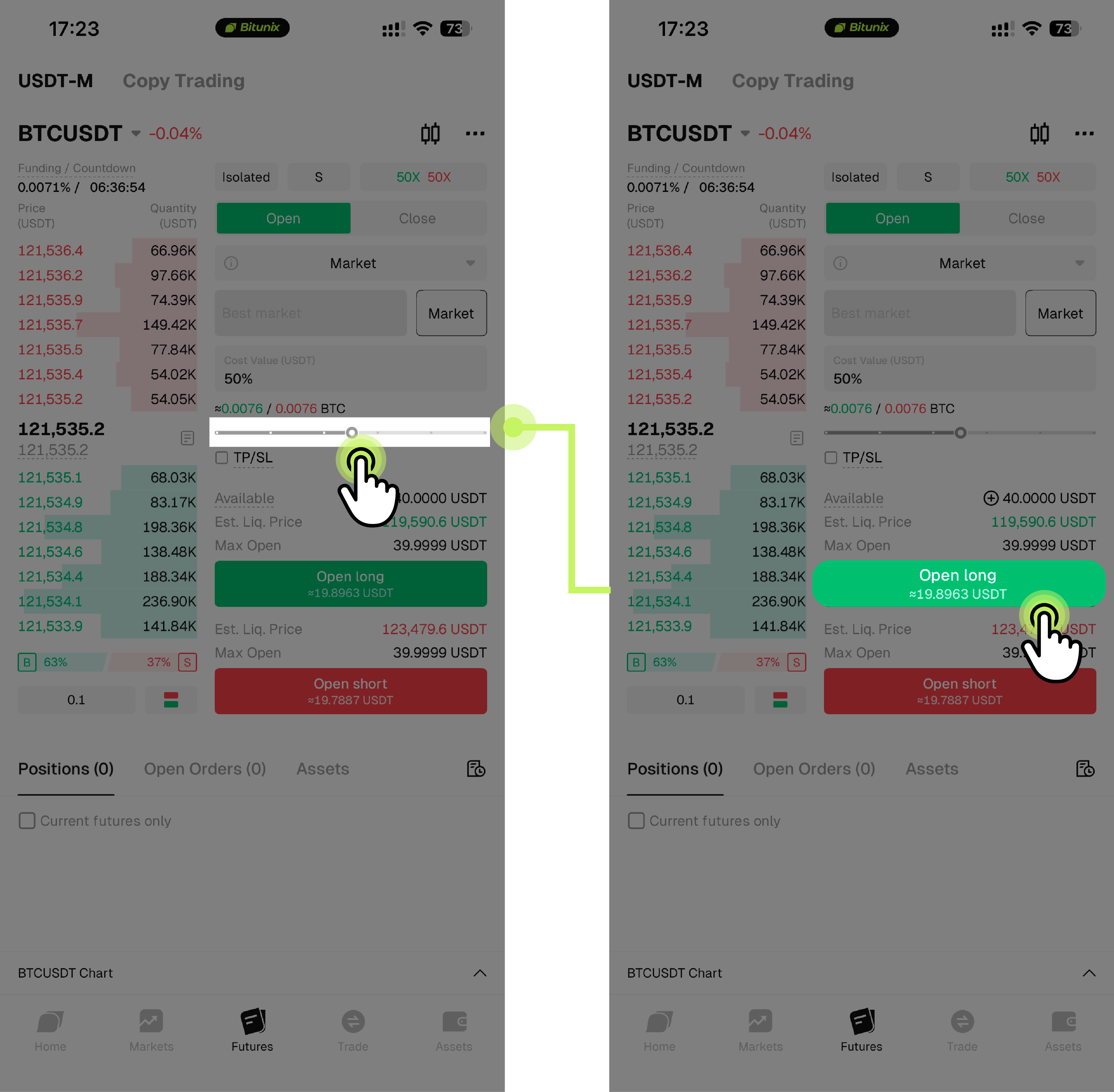
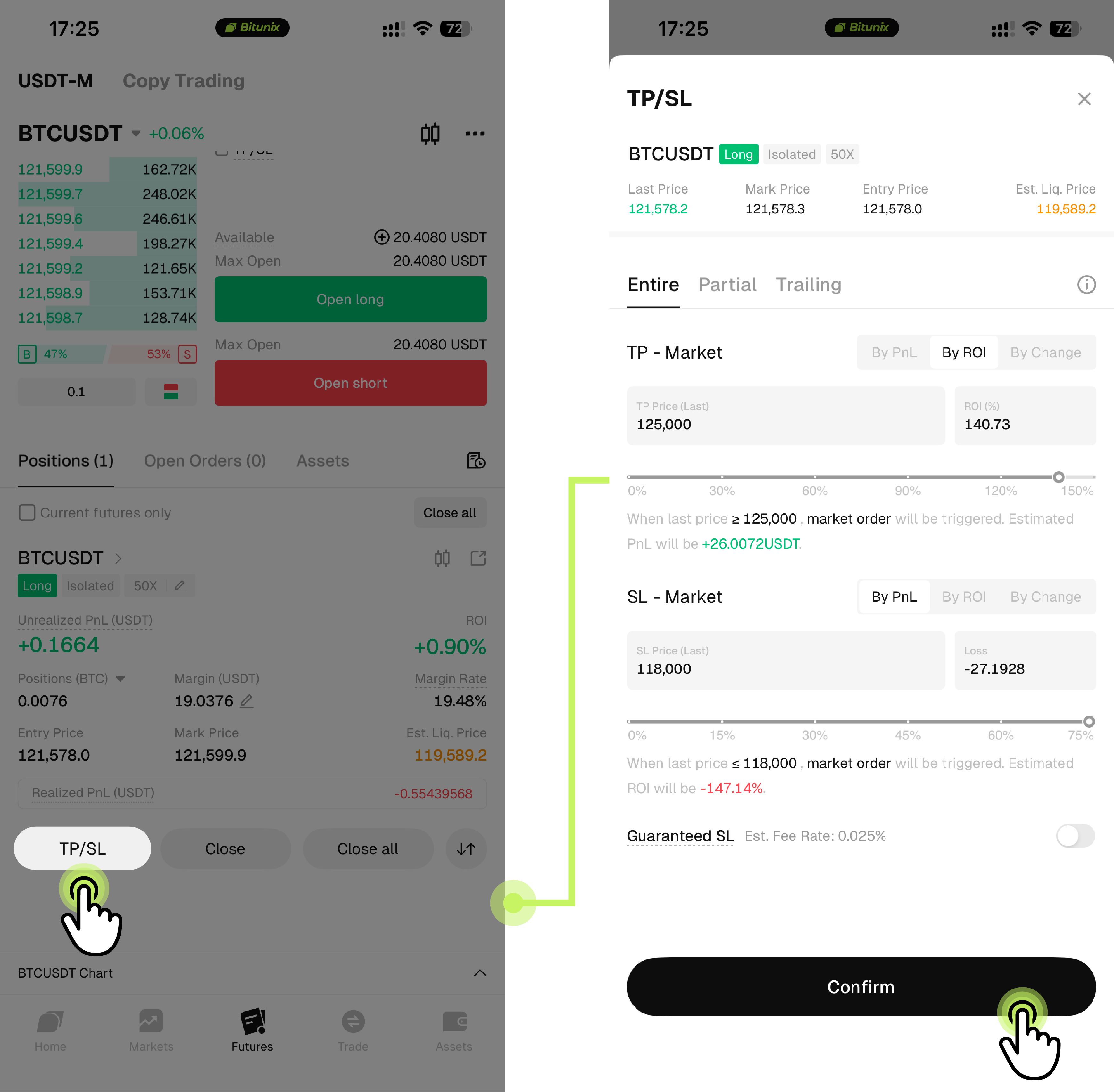
Step 5: After completing the order, we can see the relevant information of the contract, and we can also set the take profit and stop loss here, and finally click 【Confirm】。
Tip: not ready to use real funds? Practise first with the Demo Trading guide (App). The futures demo account gives a virtual balance of 50,000 USDT and needs no KYC (see the demo trading guide).
Risk Warning:
Novices should follow the principles of "low leverage, light positioning, and strict stop-loss", use Bitunix's TradingView integrated tool to analyze the market, and reduce initial costs by combining activity rewards. At the same time, be vigilant against high volatility risks and avoid blindly chasing highs and selling lows.
Disclaimer
This material is provided for general information only. It is not intended to provide:
- Investment advice or investment recommendations.
- an offer or solicitation to buy, sell, or hold digital assets;
- Financial, accounting, legal, or tax advice.
- Digital assets, including stablecoins and NFTs, carry a high level of risk and can fluctuate significantly in value. Consider carefully whether trading or holding digital assets is suitable for your financial situation. Consult your legal, tax, or investment professional for guidance tailored to your circumstances. You are responsible for understanding and complying with all applicable laws and regulations in your location.