

1. Quick Overview
| Item | Specifications |
|---|---|
| Initial Virtual Funds | 50,000 USDT fixed virtual balance (cannot be customized or adjusted) |
| Supported Products | USDT-M Perpetual Futures only |
| Margin Mode | Supports both Isolated Margin and Cross Margin, consistent with live trading |
| Trading Fees | VIP 0 fee rates: Maker fee 0.02%, Taker fee 0.06% |
| Slippage Mechanism | No slippage. Orders are simulated based on real-time market prices without affecting the actual order book |
| Funding Rate | Real-time funding rates are synchronized with live trading, with all payments and receipts recorded in the simulated transaction history |
| Liquidation Rules | Fully replicates live trading liquidation rules without simplification |
| Account Limit | Each master account can be linked to only one demo trading account |
| Deposit / Withdrawal / Transfer | Not supported. Virtual funds are for practice purposes only |
| VIP Progress Calculation | Demo trading volume does not count toward live account VIP upgrade progress |
| Supported Devices | Bitunix mobile App on iOS and Android |
| Fund Reset | Users can manually reset the account to clear all positions and open orders and restore the initial 50,000 USDT virtual funds |
Access Bitunix to try the Futures Demo Trading feature. No KYC verification is required — simply log in to your account to start practicing.
2. Basic Definition of Bitunix Demo Trading
Bitunix Demo Trading follows the principle of "Practice First, Trade Later." It is a virtual funds-based Futures practice mode launched by Bitunix, designed to help users gain hands-on experience in contract trading. The order matching logic, liquidation mechanism, and fee calculations are fully aligned with the rules of live USDT-M perpetual futures trading. Users can practice trading with virtual funds without any risk of real asset losses, making it suitable for beginners to learn the complete futures trading process and test trading strategies.
Demo Trading uses real-time market data from Bitunix's live trading system, ensuring that prices, funding rates, and market conditions remain synchronized with the real market. All orders are simulated internally and do not affect the Bitunix live order book. Demo account funds are virtual credits only and cannot be deposited, withdrawn, or transferred to other accounts.
3. Bitunix Demo Trading Tutorial (Practice First, Trade Later)
1.Go to the Bitunix Futures live trading page.
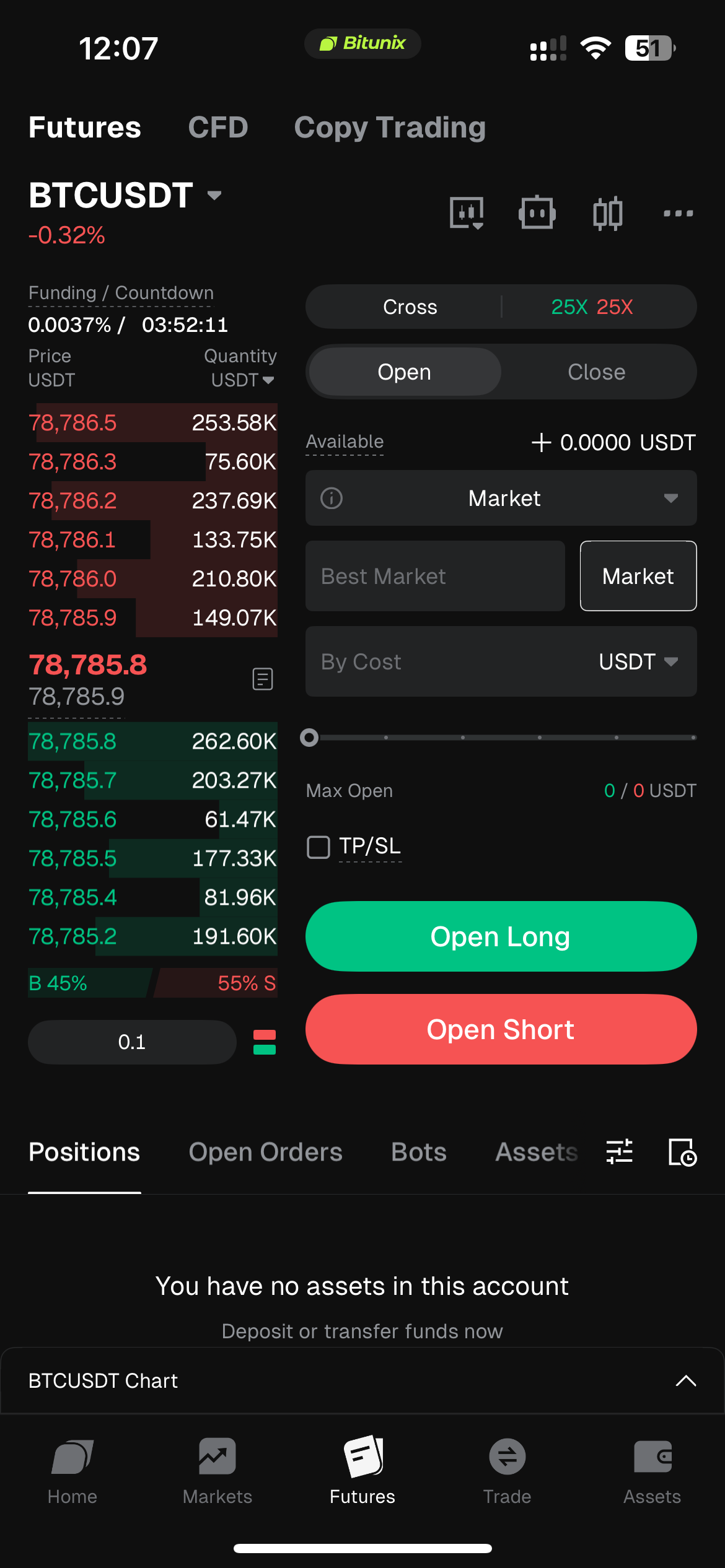
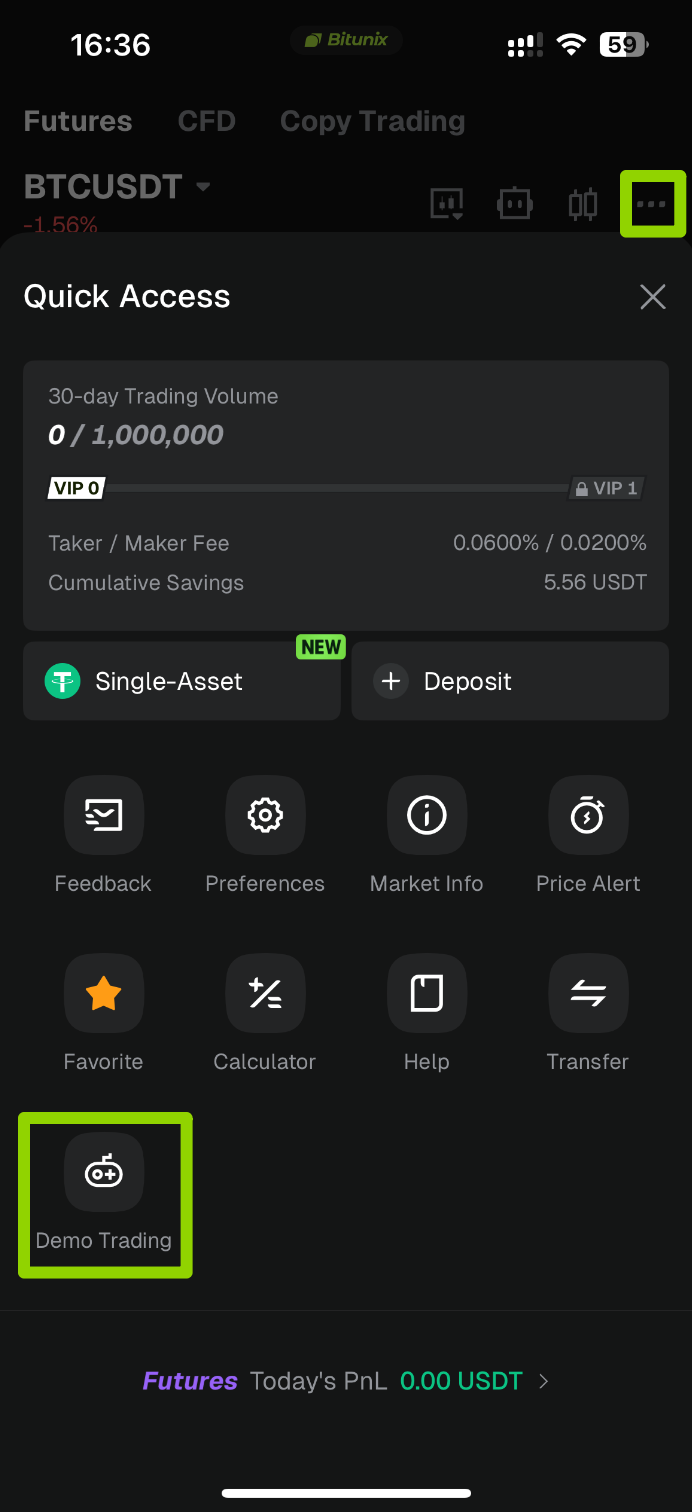
2Tap the "…" button in the upper-right corner of the Futures trading page to open the【Quick Access】menu. Then tap the【Demo Trading】icon in the lower-left corner of the pop-up window.
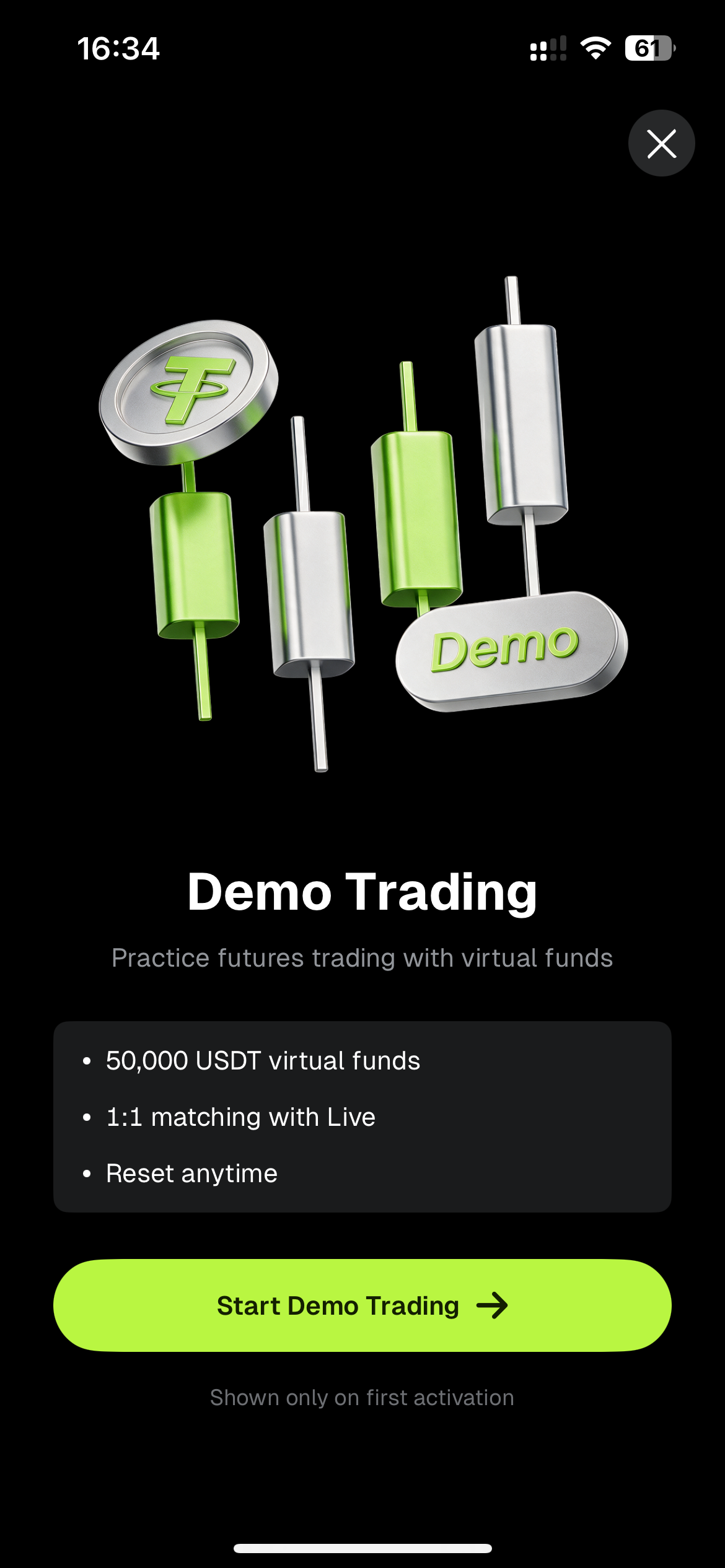
3.When opening Demo Trading for the first time, a tutorial pop-up will appear, highlighting three key features: 50,000 USDT virtual funds, 1:1 matching with Live, and Reset anytime. Tap【Start Demo Trading】to enter the Demo Futures trading interface.
4.Take BTCUSDT Perpetual Futures as an example:
- Configure Trading Parameters: Select the BTCUSDT perpetual contract, set 20X Cross Margin and a Market Order, then review the order book and funding rate.
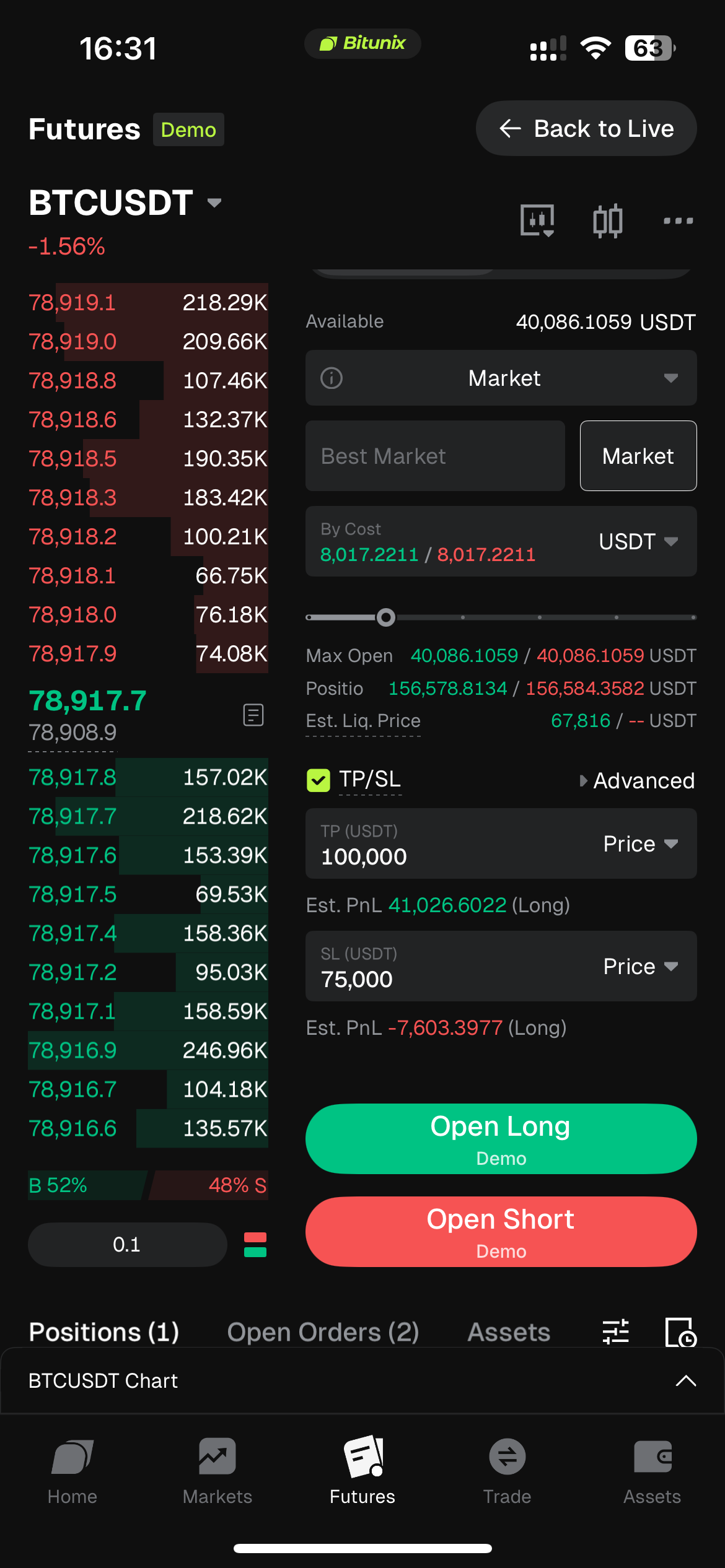
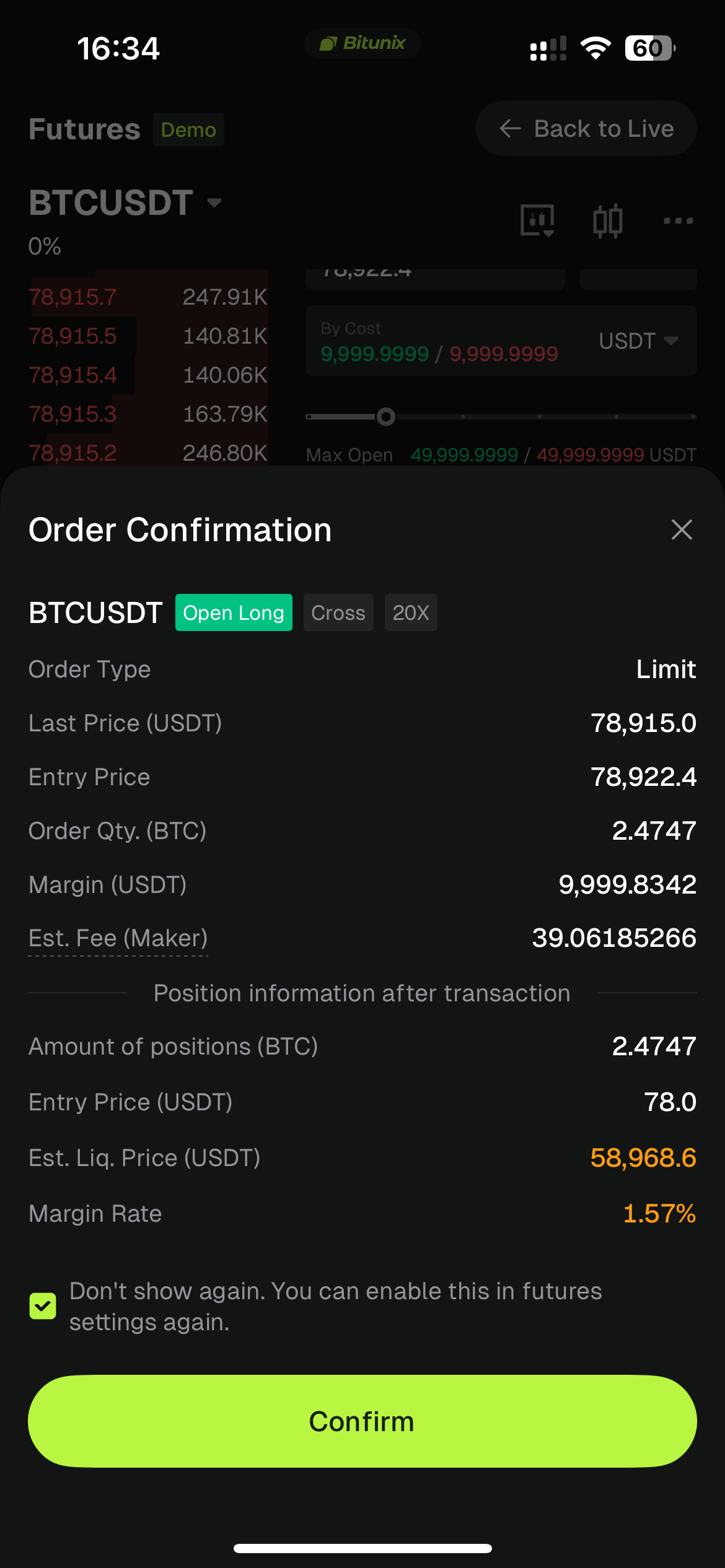
- Confirm Position Opening: Tap【Open Long】, review the margin, trading fee, estimated liquidation price, and margin rate, then confirm the order.
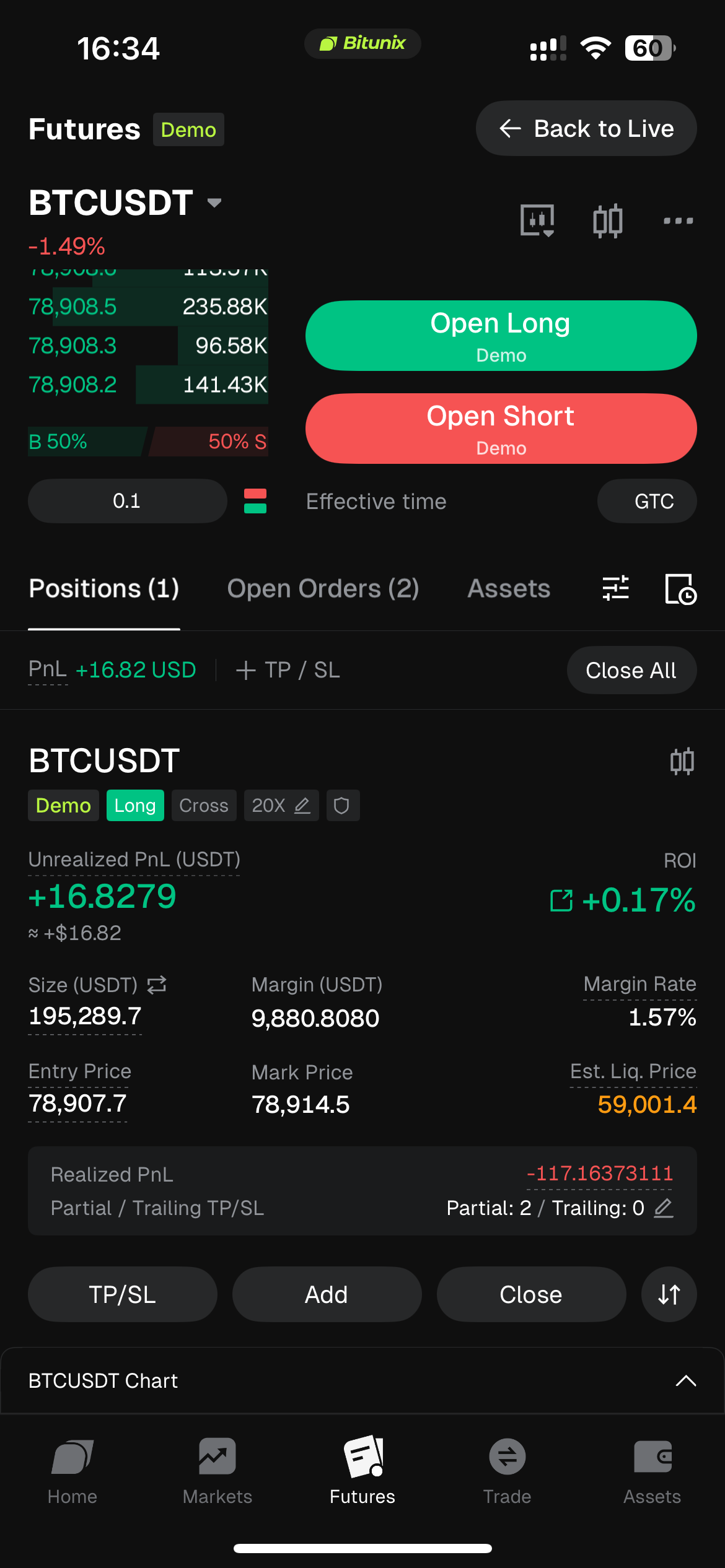
- Manage Positions: After the order is filled, check PnL, entry price, and estimated liquidation price on the Positions page. Users can set take-profit and stop-loss (TP/SL) orders, add to positions, or close positions with one click.
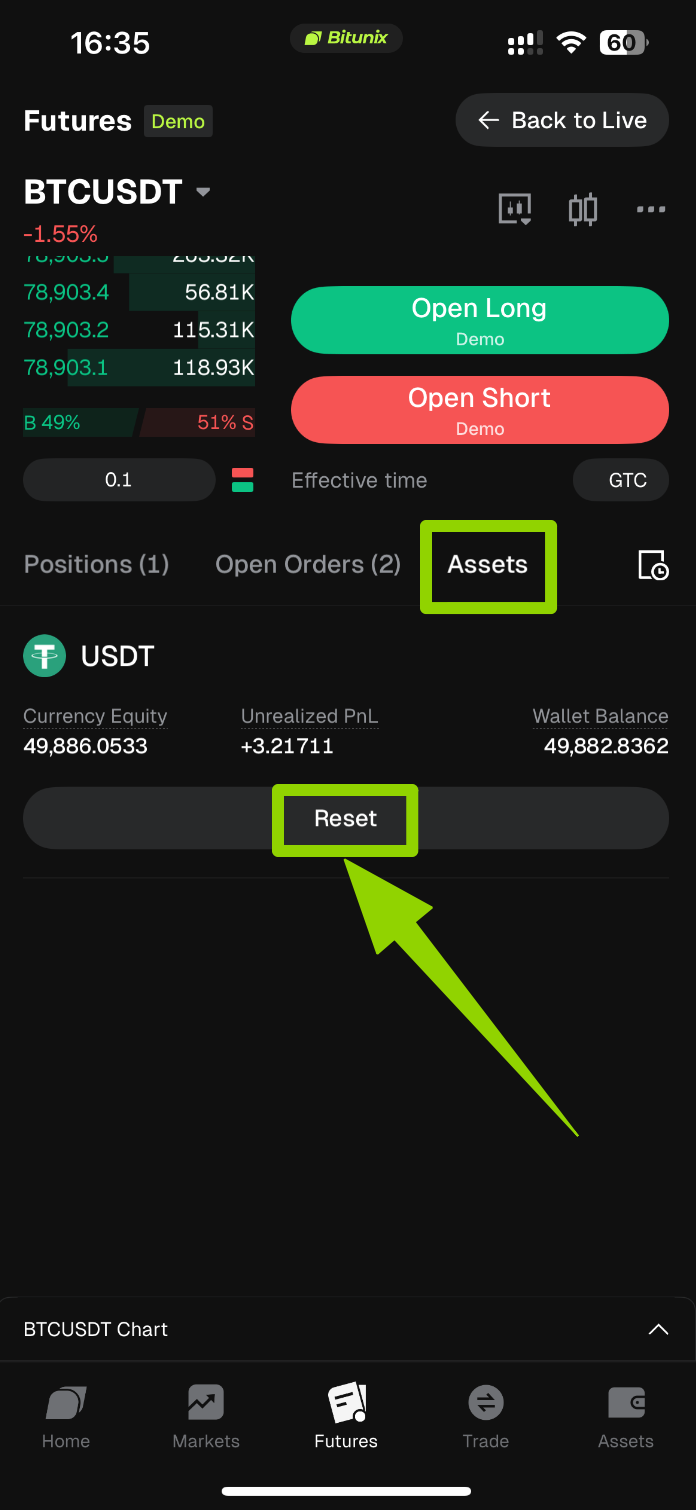
- Reset Account: Go to the Assets page. After losses occur, tap Reset to clear all positions and open orders and restore the 50,000 USDT virtual funds.
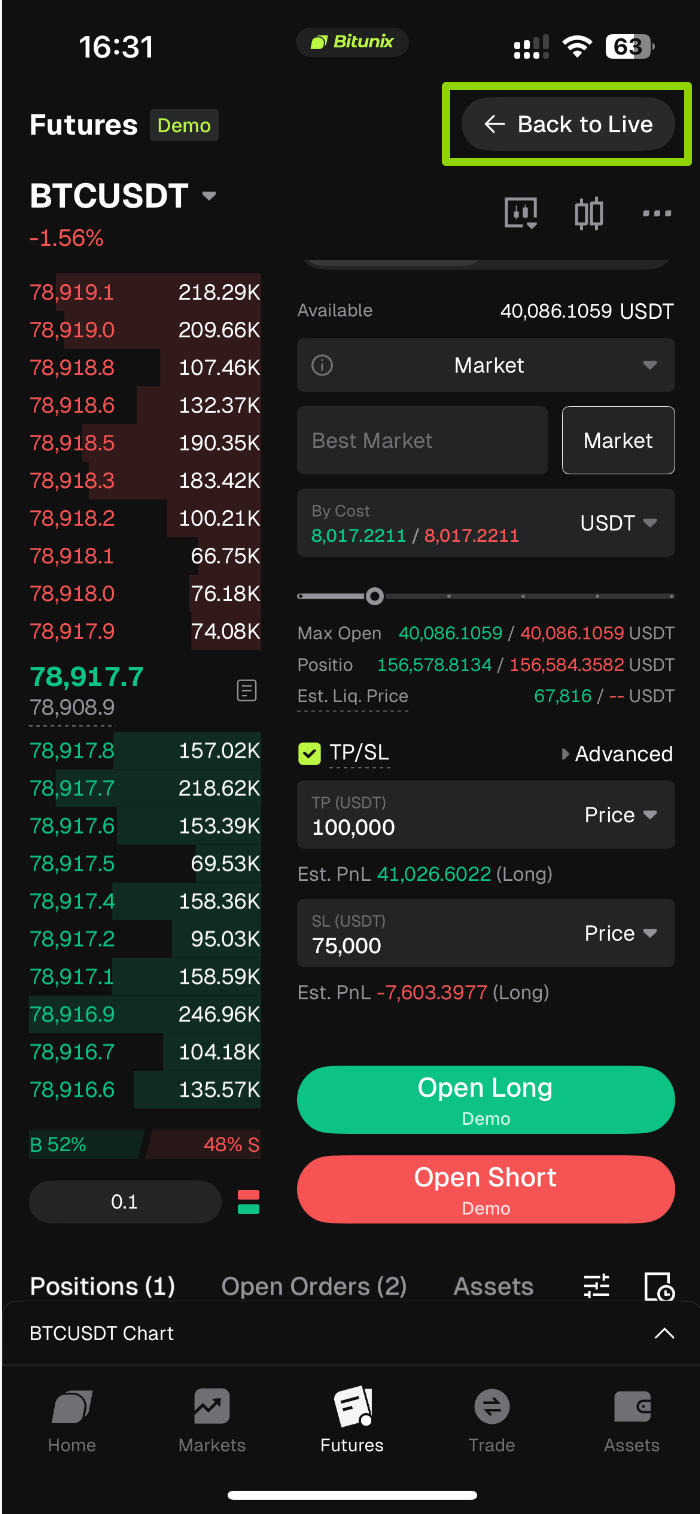
5.Return to Live Trading
After completing your practice, follow the principle of "Practice First, Trade Later." Simply tap the【Back to Live】button in the upper-right corner to exit the demo environment and return to real Bitunix Futures trading.
4. Risk Management and Important Notes
- Demo Trading market data is synchronized with live trading, but trading results are for strategy practice and reference only. The demo environment does not reflect real market liquidity, and simulated profits should not be considered equivalent to actual trading returns.
- Each Bitunix master account can be linked to only one Demo Trading account. Creating multiple demo accounts is not supported.
- Demo Trading volume does not count toward live account VIP upgrade statistics. Trading fee rates follow the user's live VIP level and are updated accordingly.
- Virtual funds cannot be deposited, withdrawn, or transferred. Regardless of the amount of simulated profits earned, virtual balances cannot be converted into real assets.
- The current version of Demo Trading does not support Copy Trading or Grid Trading Bots. Related features will be evaluated for future releases.
- When logging into a Bitunix account on different devices, Demo Trading positions, assets, and trading history are synchronized through the cloud, ensuring consistent data across devices.
- Always check the "Demo" label displayed on the page to distinguish between the demo and live trading environments and avoid placing unintended real orders.
- Account reset actions are irreversible. Resetting will clear all demo positions and open orders. Confirm that you no longer need the current simulated positions before proceeding.
5. FAQ
Q: What should I do if my demo funds are depleted?
A: Go to the Positions page, tap【Assets】, and then tap the【Reset】button. Resetting will clear all positions and open orders, and restore the demo balance to 5,000 USDT.
Q: Are Demo Trading prices the same as Bitunix live trading prices?
A: Yes. Demo Trading uses Bitunix live market data, including real-time prices, order book depth, and funding rates. However, positions and funds in the demo environment are virtual.
Q: Does Demo Trading affect my live VIP level?
A: No. Demo Trading volume does not count toward live VIP upgrade requirements. Trading fee rates are updated in line with your live VIP level.
Q: Are liquidation rules simplified in Demo Trading?
A: No. Bitunix Demo Trading uses the same liquidation rules as live trading without any simplification.
Q: Can I withdraw profits earned from Demo Trading?
A: No. All funds in Demo Trading are virtual practice funds and cannot be deposited, withdrawn, or transferred between accounts.
Q: Will my demo account data remain available if I log in on another device?
A: Yes. Demo account data is stored in the cloud and remains synchronized when you log in to your Bitunix account across different devices.
Q: Can I use Copy Trading or Grid Trading Bots in Demo Trading?
A: Not at this time. These features are currently unavailable in Demo Trading, and Bitunix will evaluate whether to introduce them in future updates.
Q: Do I need to complete KYC verification to use Bitunix Demo Trading?
A: No. Simply log in to your Bitunix account to access Demo Trading. KYC verification status does not affect access.
Q: Will simulated order execution experience slippage?
A: No. Demo Trading uses internal order matching based on real-time market prices. Orders do not interact with the live order book, so no slippage occurs.
Disclaimer
This article is not intended to provide:
(i) investment advice or investment recommendations;
(ii) an offer or solicitation to buy, sell, or hold digital assets; or
(iii) financial, accounting, legal, or tax advice.
Digital assets you hold, including stablecoins and NFTs, involve significant risks and may experience substantial price volatility. You should carefully consider whether trading or holding digital assets is suitable for you based on your financial circumstances.
For advice specific to your situation, please consult your legal, tax, or investment professionals. You are solely responsible for understanding and complying with all applicable local laws and regulations.